
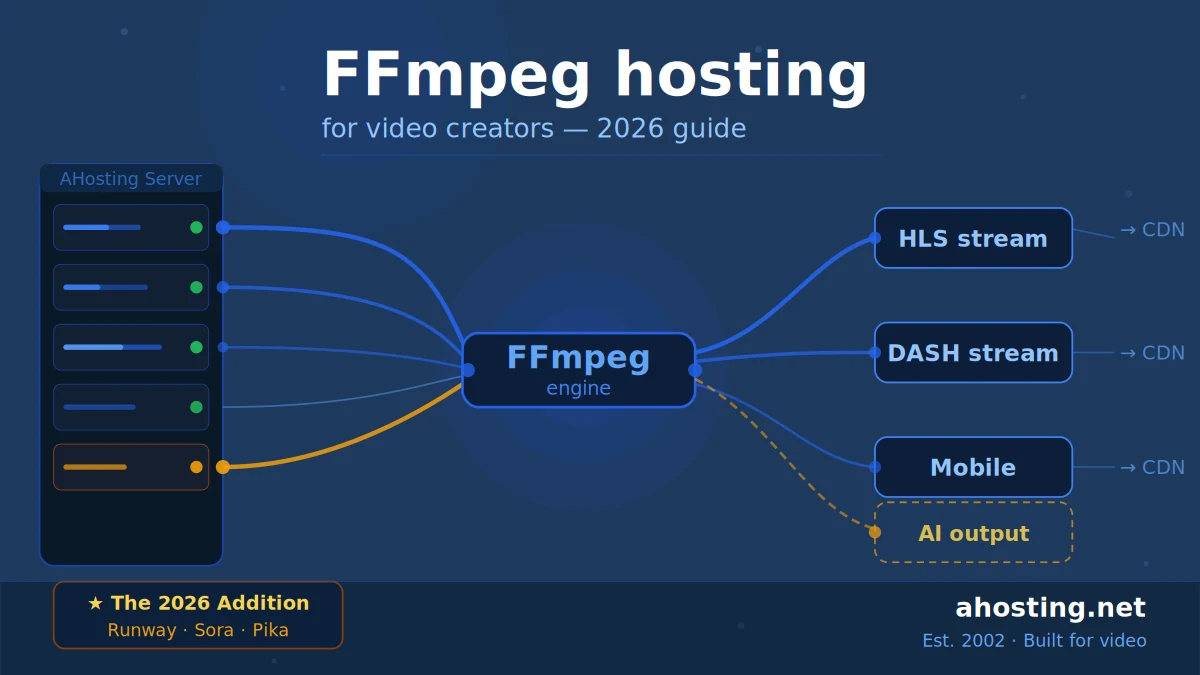
FFmpeg hosting 2026 isn’t just for video sharing sites — it’s the processing backbone of AI-generated video tools like Runway and Sora. Your host needs pre-installed FFmpeg, dedicated CPU allocation, and HLS/DASH support to keep pace. AHosting has had all three since day one.
- What Is FFmpeg Hosting? (And Why It Still Matters in 2026)
- The 2026 Video Landscape: What FFmpeg Hosts Now Need to Handle
- Self-Hosted Video vs Cloud Transcoding: The Real Cost Comparison
- What to Look for in an FFmpeg Hosting 2026 Provider
- AHosting FFmpeg Hosting: Built for Video Since 2002
- Practical Checklist: Is Your FFmpeg Host Ready for 2026?
- The AHosting Advantage: 20+ Years of Video Hosting Experience
- Conclusion: Video Hosting Has Changed — Your Server Should Too
- FAQ
What Is FFmpeg Hosting? (And Why It Still Matters in 2026)
If you’ve ever uploaded a video to YouTube and watched it magically appear in six different resolutions — from 4K down to a stuttery 240p for someone on a slow connection — you’ve already experienced FFmpeg doing its job. You just didn’t see it.
FFmpeg is the open-source multimedia framework that powers transcoding, streaming, recording, and conversion across almost every major video platform on the planet. It’s not glamorous software. There’s no shiny UI. But it’s the engine under the hood of video infrastructure that most people never think about — until they need it.
FFmpeg hosting in 2026, at its core, means web hosting where FFmpeg is pre-installed, properly configured, and optimized to handle real video workloads. That might sound like a small thing. It isn’t.
Most shared hosts technically “support” FFmpeg. But there’s a significant difference between a host that lets you compile FFmpeg from source after filing a support ticket, and a host that has FFmpeg pre-installed, tuned, and ready to run the moment your account goes live. That difference shows up immediately in your transcoding performance, your stream latency, and — critically in 2026 — your compatibility with the AI video tools that are now part of every serious video creator’s workflow.
Why it still matters: The video internet didn’t slow down. It accelerated. YouTube Shorts now drives over 70 billion views per day. Twitch has become infrastructure for entire creator economies. Substack launched native video. And then there are the AI video generation tools — Runway, Sora, Pika — all of which depend on FFmpeg-compatible output pipelines to deliver their generated video content in formats your audience can actually watch.
FFmpeg isn’t a legacy technology. It’s more important in 2026 than it’s ever been.
The 2026 Video Landscape: What FFmpeg Hosts Now Need to Handle
The video landscape has shifted dramatically since most “FFmpeg hosting” guides were written. Here’s what a capable FFmpeg host needs to handle today:
YouTube Shorts, Twitch, and Substack Video
Short-form video has completely changed delivery requirements. YouTube Shorts demands vertical 9:16 encoding. Twitch ingests at variable bitrates and requires real-time transcoding for stream quality ladders. Substack’s native video feature — launched to compete directly with Beehiiv and Ghost — means newsletter creators now need proper video hosting pipelines, not just YouTube embeds.
If you’re running a self-hosted video platform that feeds into any of these channels, your FFmpeg host needs to handle format conversion, resolution scaling, and bitrate optimization across all of them simultaneously. That requires CPU headroom that shared servers simply can’t provide.
AI Video Tools: Runway, Sora, and Pika + FFmpeg Processing
Here’s the angle that nobody in the “FFmpeg hosting” space is talking about yet.
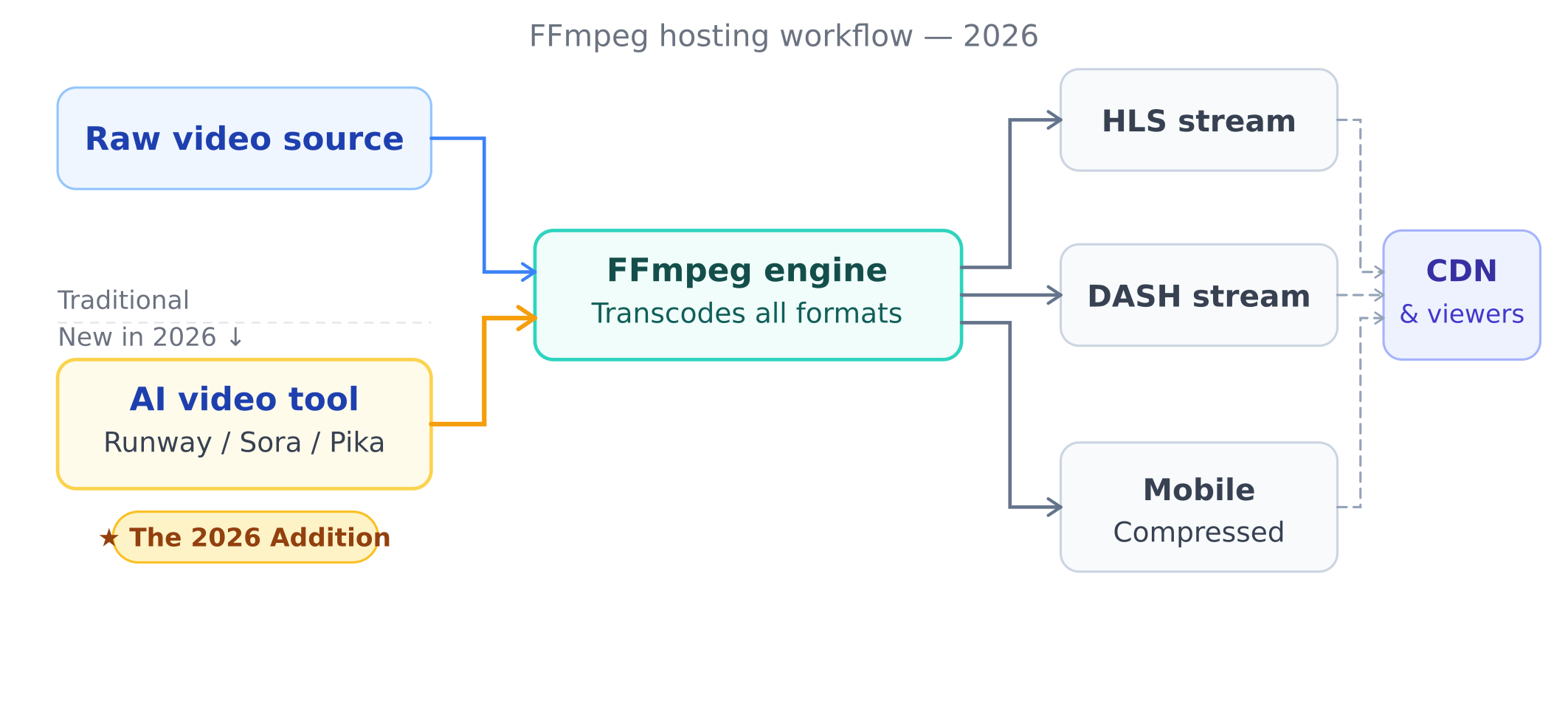
AI video generation tools like Runway Gen-3, OpenAI’s Sora, and Pika all output video in formats that require post-processing before they’re ready for web delivery. The raw output from these tools — typically high-bitrate MP4 files — needs to be transcoded into HLS streams, compressed for mobile delivery, and often watermarked or packaged before hitting your CDN.
That post-processing pipeline is FFmpeg. Every single time.
Creators who’ve integrated AI video generation into their workflow are now running FFmpeg jobs far more frequently than they did two years ago. Each Sora-generated clip, each Runway output, each Pika animation needs to run through a transcoding pipeline before it’s web-ready. If your host can’t handle sustained FFmpeg processing without throttling your CPU allocation, that pipeline becomes a bottleneck.
This is the 2026 reality: FFmpeg isn’t just for building a YouTube clone anymore. It’s the processing layer between AI-generated content and your audience.
4K/8K Delivery and HLS/DASH Adaptive Streaming
4K content is now the expectation, not the premium. 8K is emerging in gaming and cinema communities. And adaptive bitrate streaming — using HLS or MPEG-DASH protocols — is the only sane way to serve that content across the range of devices and connections your audience uses.
FFmpeg is the tool that generates HLS playlists and DASH manifests. Without a host configured to run these jobs efficiently, you’re either stuck serving a single bitrate (bad for viewers on slow connections) or paying through the nose for cloud transcoding services.
Self-Hosted Video vs Cloud Transcoding: The Real Cost Comparison
The cloud transcoding pitch is compelling on paper: pay per minute, no infrastructure to manage, elastic scale. In practice, the math often doesn’t work out for serious video creators.
| Factor | Self-Hosted FFmpeg (AHosting) | AWS MediaConvert | Cloudflare Stream |
|---|---|---|---|
| Monthly cost | Fixed plan cost | $0.0075–$0.054/min | $5/1,000 mins stored |
| Control | Full — your configuration | Limited API control | Very limited |
| Latency | Local processing — fast | Cloud round-trip delay | CDN-dependent |
| AI tool compatibility | Direct pipeline — no API | Requires API integration | API only |
| Dedicated IP | ✅ Included (AHosting) | N/A (cloud service) | N/A (cloud service) |
| Storage | Your server + expandable | S3 costs extra | Limited by plan |
| FFmpeg version | Latest stable — your choice | Fixed by AWS | Not applicable |
The break-even point for most video creators is around 2,000–3,000 minutes of transcoded content per month. Below that, cloud transcoding is probably fine. Above it, self-hosted FFmpeg hosting wins on cost. And it wins on control every time.
There’s also a trust signal consideration that cloud services simply can’t offer: when you run FFmpeg on your own VPS hosting or dedicated FFmpeg plan, you control where your content goes and how it’s processed. That matters for creators working with exclusive content, licensed footage, or sensitive client work.
What to Look for in an FFmpeg Hosting 2026 Provider
Not all FFmpeg hosts are created equal. Here’s what separates a real FFmpeg hosting environment from a standard host that happens to let you run FFmpeg occasionally:
Pre-Installed and Optimized FFmpeg
This is the non-negotiable starting point. FFmpeg should be installed, current (ideally the latest stable release), and tested on the server before you ever log in. If a host’s FFmpeg documentation starts with “you can compile FFmpeg from source,” that’s a red flag. Compilation takes time, can fail on shared environments, and often results in a stripped-down binary missing key codecs.
AHosting has FFmpeg pre-installed on every FFmpeg hosting plan — not as an add-on, not on request. It’s there, it works, and it includes the codecs you actually need: libx264, libx265, libvpx, AAC, and the full suite of format support that professional video workflows require.
Dedicated CPU Allocation
FFmpeg is computationally expensive. Transcoding a single 4K video file to multiple bitrates can peg a CPU core at 100% for minutes at a time. On a shared host with oversold CPU resources, that job competes with every other user on the server. The result is throttled transcoding speeds, stalled jobs, and the kind of inconsistent performance that makes automated video pipelines unreliable.
Dedicated CPU allocation — either through a VPS-style architecture or resource-isolated hosting — is essential for any serious FFmpeg workload. This is why AHosting’s FFmpeg plans are built on isolated environments, not shared CPU pools.
HLS and DASH Adaptive Streaming Support
Your host environment needs to support generating and serving HLS segments and MPEG-DASH manifests. That means the right FFmpeg flags, correct MIME type configuration for .m3u8 and .mpd files, and server configuration that doesn’t block the HTTP range requests adaptive players depend on.
GPU-Readiness for AI Video Workloads
This is the emerging requirement for 2026. AI video generation outputs — especially from tools like Runway and Pika — often benefit from GPU-accelerated transcoding using FFmpeg’s NVENC encoder. Hardware acceleration can reduce transcoding time by 5–10× compared to software encoding. Not every plan needs GPU access, but if you’re processing significant AI video output volume, it’s worth factoring into your hosting decision.
Storage and Bandwidth That Match Video Reality
A single 4K video at reasonable quality runs 1–4 GB per hour of content. A creator publishing daily content can accumulate 100+ GB of video assets in months. Your FFmpeg host needs storage that scales without punishing costs, and bandwidth that can handle real viewer traffic — not just the burst limits that look good on a spec sheet.
AHosting FFmpeg Hosting: Built for Video Since 2002
AHosting has been running hosting infrastructure since 2002. That’s not a marketing statement — it’s relevant context for why AHosting’s FFmpeg hosting works the way it does.
Over two decades of managing video-heavy workloads means the infrastructure decisions have been tested against real traffic, real transcoding jobs, and real edge cases. The FFmpeg configuration isn’t a checkbox feature. It’s been tuned against actual production use.
“Most hosts treat FFmpeg as an afterthought — something they support if you ask nicely. We built our FFmpeg plans around the assumption that video processing is the primary workload, not a secondary one.” — Matt Chrust, Director of Business Development, AHosting
AHosting offers two FFmpeg-specific plans:
FFmpeg Start is the right choice for creators building their first video platform, running occasional AI video processing jobs, or testing a video workflow before scaling. It includes pre-installed FFmpeg, dedicated CPU allocation, and HLS/DASH support out of the box.
FFmpeg Power is built for high-volume transcoding, sustained AI video pipelines, and platforms serving significant audience traffic. It adds more CPU cores, expanded storage, and the headroom for concurrent FFmpeg jobs that production video workflows demand.
Both plans include a dedicated IP address — which matters more than most hosting guides acknowledge. Shared IP environments can suffer from bad-neighbor effects: other sites on the same IP generating spam reports or engaging in abuse can affect your server’s outbound traffic reputation. For video delivery, where CDN handshakes and content distribution depend on consistent IP trust signals, a dedicated IP removes that variable entirely. AHosting includes it as standard on every plan.
Internal WordPress hosting plans also include dedicated IPs — consistent infrastructure philosophy across the board.
Practical Checklist: Is Your FFmpeg Host Ready for 2026?
FFmpeg Host Readiness Checker — 2026
Check 16 criteria across 4 categories. Find out if your host is ready for modern video workloads.
Pre-installed FFmpeg · Dedicated CPU · HLS/DASH · Dedicated IP included
Score 14–16: Your FFmpeg environment is ready for 2026 workloads. Score 10–13: Functional but you’ll hit limitations as volume grows. Score below 10: Time to upgrade your hosting before your video workflow scales.
The AHosting Advantage: 20+ Years of Video Hosting Experience
There’s a meaningful difference between a hosting company that added FFmpeg support in 2022 because it became trendy, and one that has been running video infrastructure since before YouTube existed.
AHosting launched in 2002. The web hosting industry has changed almost beyond recognition in that time — but the core engineering principles haven’t. Reliable uptime, honest resource allocation, and infrastructure that actually does what the spec sheet says.
That experience shows up in practical ways for FFmpeg customers:
First, configuration that’s already been debugged. Common FFmpeg issues — codec compatibility, MIME type mismatches, HLS delivery problems — have already been encountered and resolved at the infrastructure level before you hit them.
Second, support from people who understand video workloads. When you submit a ticket about an FFmpeg job failing at the 4K HLS segmentation step, you’re not explaining what FFmpeg is to a first-level support agent.
Third, infrastructure decisions made for the long term. The dedicated IP on every plan, the isolated CPU allocation, the bandwidth headroom — these aren’t upsells. They’re the baseline, because 20 years of running hosting infrastructure teaches you what actually matters.
Meta’s engineering team published their FFmpeg infrastructure architecture in early 2026 — processing billions of minutes of video daily. The technical requirements they describe — isolation, codec flexibility, adaptive streaming — are the same requirements that apply at every scale, including yours.
Explore the full range of FFmpeg hosting plans to find the right configuration for your video workflow.
Conclusion: Video Hosting Has Changed — Your Server Should Too
The version of ffmpeg hosting 2026 that made sense five years ago was built around video sharing sites: upload a file, transcode it, serve it. That’s still valid. But it’s no longer the whole picture.
In 2026, FFmpeg hosting needs to handle the full scope of modern video infrastructure: AI-generated content pipelines, adaptive streaming for 4K delivery, concurrent transcoding jobs from multiple sources, and the kind of sustained CPU workloads that shared hosting environments were never designed for.
The good news is that the solution hasn’t gotten more complicated. Pre-installed FFmpeg, dedicated CPU allocation, HLS/DASH support, and a dedicated IP. Those four things cover the vast majority of what video creators need from a host in 2026.
AHosting has offered all four since before most current FFmpeg hosting guides were written. That’s not an accident — it’s two decades of infrastructure built around real video workloads.
If your current FFmpeg hosting environment isn’t keeping pace with where your video workflow is heading, explore our FFmpeg hosting plans and see what a purpose-built video hosting environment actually looks like.