
- Listen to the Podcast!
- Why Your Plugins Have Hit a WordPress Hosting Speed Wall
- What “WordPress Hosting Speed” Actually Measures
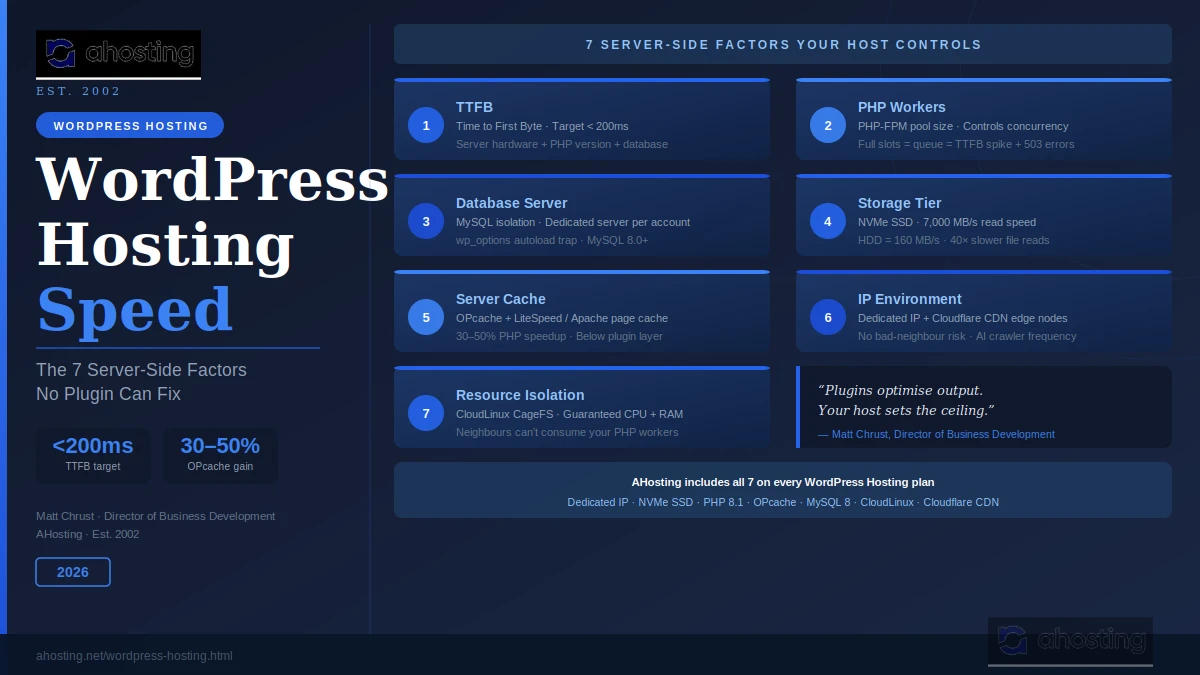
- Time to First Byte: Hosting Speed Factor 1
- PHP Workers: Hosting Speed Factor 2
- Database Server Performance: Hosting Speed Factor 3
- Storage Tier: Hosting Speed Factor 4
- Server-Level Caching vs Plugin Caching: Hosting Speed Factor 5
- IP Environment and Network Congestion: Hosting Speed Factor 6
- Resource Isolation: Hosting Speed Factor 7
- AHosting’s WordPress Hosting Speed Stack: 22 Years of Performance
- A Practical Checklist: Is Your Hosting Speed Bottlenecked?
- Conclusion: WordPress Hosting Speed Starts at the Foundation
Why Your Plugins Have Hit a WordPress Hosting Speed Wall
You’ve done everything right. You installed a caching plugin, compressed your images, minified your CSS, and deferred your JavaScript. A CDN is running too. However, your wordpress hosting speed — specifically your Time to First Byte — stays stubbornly high despite all of it.
Listen to the Podcast – WordPress Hosting Speed Tips!
WordPress hosting speed is set by your server infrastructure — not your plugins. Seven server-side factors control the performance ceiling, and no plugin configuration raises it. Here’s exactly what those factors are and what good hosting provides for each one.
However, here’s the part most WordPress speed guides skip entirely.
Specifically, plugins optimise your server’s output — shrinking file sizes, deferring scripts, and serving pre-built HTML. However, none of that changes how fast your server generates that output in the first place.
In practice, every WordPress page load starts with a server-side handshake. PHP processes the request, queries a database, and assembles the response. Specifically, that entire chain happens inside your hosting infrastructure. Consequently, no plugin touches it.
In short, your host sets the performance ceiling. Plugins work within it.
This post explains the seven server-side factors that control wordpress hosting speed. Moreover, it covers what good hosting looks like for each one — and why AHosting has built its infrastructure around all seven since 2002.
What “WordPress Hosting Speed” Actually Measures
Before diving into the factors, it helps to understand what speed testing tools actually measure.
When you run a speed test, you see several distinct metrics. The most important is Time to First Byte (TTFB). Specifically, TTFB measures the gap between your browser sending a request and receiving the first response byte. Notably, Google recommends keeping TTFB under 800ms, but fast hosting routinely delivers it under 200ms.
Indeed, TTFB is almost entirely determined by your server. It includes PHP processing time, database query execution, and the network latency of the server itself. Furthermore, a caching plugin can eliminate most TTFB by serving pre-built HTML — but even so, the server-side generation of that cached file still depends on the factors below.
In 2026, Google’s Core Web Vitals framework measures three signals: Largest Contentful Paint (LCP), Cumulative Layout Shift (CLS), and Interaction to Next Paint (INP). Specifically, INP measures how quickly your page responds to interactions. A slow PHP environment directly inflates it.
In short, wordpress hosting speed is a server-side measurement first, and a browser-side concern second.
Time to First Byte: WordPress Hosting Speed Factor 1
Indeed, TTFB is the single most revealing metric in any WordPress speed audit. A high TTFB confirms the problem lives on the server. Accordingly, no client-side optimization — JavaScript deferral, image compression, font swapping — can reduce it.
Specifically, what good looks like in 2026: Under 200ms for cached pages. Under 400ms for dynamic, uncached pages. Above 800ms signals a clear hosting bottleneck.
What drives TTFB on shared hosting:
Specifically, your server’s PHP version matters enormously. PHP 8.2 and 8.3 are measurably faster than PHP 7.4 on identical hardware. Server location also matters. Indeed, a server in Dallas delivers faster responses to a Dallas visitor than one in Frankfurt does. That physical gap is irreducible.
However, the biggest TTFB driver on crowded shared hosting is often PHP worker availability — the hidden queue nobody warns new WordPress users about.
“After 22 years of hosting WordPress sites, we’ve learned that TTFB is the clearest x-ray of a hosting stack. It hides nothing.” — Matt Chrust, Director of Business Development, AHosting
To test your own TTFB accurately, use WebPageTest’s TTFB report with a server location close to your visitors.
PHP Workers: Hosting Speed Factor 2
Notably, every WordPress page load consumes one PHP worker — a process slot that handles one request at a time. When all slots are full, new requests queue. That queue time adds directly to your TTFB.
On shared hosting, the PHP worker pool is shared across accounts on the server. On CloudLinux-based hosting like AHosting’s plans, however, each account gets its own isolated worker allocation. Even so, that allocation has a ceiling set by the hosting plan tier.
Why this matters more in 2026: AI plugins, membership areas, WooCommerce checkouts, and dynamic sidebars all hold PHP workers longer than a basic blog post. Furthermore, sites that ran fine at ten concurrent visitors two years ago now struggle because newer plugins make each request more expensive.
What the fix looks like:
On a VPS hosting plan, you control the PHP-FPM worker pool directly. Specifically, you set pm.max_children based on available RAM. On shared hosting, however, you work within the plan’s allocation.
AHosting’s WordPress hosting plans provide higher per-account PHP worker allocations than budget shared plans. Moreover, upgrading to VPS gives you complete, configurable control.
Signs you’re hitting your worker limit: Intermittent 503 errors during traffic spikes. The admin dashboard feels sluggish even when front-end traffic is low. TTFB spikes randomly without any changes to your site.

Database Server Performance: Hosting Speed Factor 3
On shared hosting, multiple accounts share a single MySQL server. Consequently, when a neighbor runs a heavy import or a poorly written plugin loops queries, it slows down the database for everyone on that server.
Two specific bottlenecks hosting providers see daily:
The wp_options Autoload Trap
First, the wp_options autoload trap. WordPress loads every row marked autoload = yes in the wp_options table on every single page load. Notably, some poorly written plugins store large data sets with autoload enabled. After a few years of plugin activity, this table can balloon to 10–50MB of autoloaded data. Accordingly, that adds 200–500ms to every page load — even cached ones. The PHP bootstrapping process runs regardless of whether a page is cached.
Consequently, this is a silent killer. Your GTmetrix score might look acceptable. However, your real-world TTFB tells a different story.
MySQL Version and Storage Engine
Second, storage engine lag. Modern MySQL 8.0+ running InnoDB is significantly faster than older MySQL 5.x with MyISAM tables. Indeed, a quality hosting provider keeps its MySQL version current.
AHosting’s WordPress hosting plans run MySQL 8 on dedicated database servers. Therefore, your queries compete only with your own site’s traffic — not with 200 neighboring accounts. Additionally, our team can assist with wp_options audits on request.
Storage Tier: Hosting Speed Factor 4
Specifically, when PHP reads files — WordPress core files, plugin code, theme templates — it reads from disk. It reads from whatever storage technology your host installed.
The performance gap is dramatic:
| Storage Type | Typical Read Speed | Real-World Impact |
|---|---|---|
| Spinning HDD | 80–160 MB/s | Slow PHP execution, high TTFB |
| SATA SSD | 500–550 MB/s | Significantly faster startup |
| NVMe SSD | 3,000–7,000 MB/s | Near-instant file reads |
Notably, WordPress makes hundreds of file-system reads per request. It loads dozens of PHP files just to bootstrap the framework, before your theme or plugins even run. On HDD-based hosting, those reads introduce measurable latency on every single page load.
Accordingly, NVMe SSD storage is now the baseline expectation for fast wordpress hosting speed in 2026. AHosting’s servers run NVMe throughout. Furthermore, that hardware advantage is permanent — it exists below any plugin configuration layer.
The test: Install a clean, plugin-free WordPress site. Measure TTFB. That number is your server’s raw performance floor. No plugin can push below it.
Server-Level Caching vs Plugin Caching: Hosting Speed Factor 5
Overall, WordPress caching plugins are powerful tools. However, they operate within a caching stack that your host controls independently.
Specifically, two server-level caching layers exist that plugin-level tools cannot replicate:
OPcache: PHP compiles your code every time it runs — unless OPcache is active. OPcache stores pre-compiled PHP bytecode in server RAM. Accordingly, PHP execution time drops by 30–50% even before any WordPress code runs. Notably, OPcache is a server configuration. Plugin developers cannot enable it for you. Your host either runs it correctly or they don’t.
Server-layer page caching: Some hosts implement full-page caching at the Apache or LiteSpeed layer, before PHP even loads. Furthermore, this server-layer caching handles concurrent traffic bursts that PHP-based plugins struggle with, because the web server responds directly from memory without spawning a PHP process at all.
AHosting configures OPcache on all WordPress hosting accounts. Additionally, every plan includes W3 Total Cache — so server-level and plugin-level caching work together rather than in isolation.
Together, this completes the server-side wordpress hosting speed stack for PHP execution. Moreover, combined with NVMe storage and database isolation, it creates a foundation that plugin-only optimisation can never replicate.
IP Environment and Network Congestion: Hosting Speed Factor 6
Specifically, your IP address is the connection between your WordPress site and the rest of the internet. On shared hosting, that IP connects many sites to the internet simultaneously.
Two specific speed and SEO impacts:
First, the bad neighbor effect. If another site on your shared IP sends spam or triggers a security block, Google may rate-limit crawling for all sites on that IP. Consequently, AI crawlers like PerplexityBot and GPTBot may visit your site less frequently — reducing citation frequency in AI search results. Moreover, Google’s John Mueller confirmed that shared IP neighbors can affect how Google evaluates your site’s environment.
Accordingly, AHosting provides a dedicated IP address with every WordPress hosting plan. Therefore, your site’s network reputation is entirely your own. No other site can erode it.
Second, Cloudflare CDN edge caching. AHosting sites integrate with Cloudflare’s global edge network. Accordingly, static assets — images, CSS, JavaScript — serve from edge nodes physically close to each visitor. Moreover, Cloudflare’s edge layer intercepts the majority of static requests before they ever reach your origin server. Notably, this CDN infrastructure operates at the network level — not the plugin level.
Resource Isolation: Hosting Speed Factor 7
Overall, every shared hosting environment imposes resource limits. CPU, memory, and I/O bandwidth are shared across accounts. However, how those limits are enforced matters enormously to WordPress hosting speed consistency.
Without isolation: One account running a heavy WooCommerce import can peg the CPU, slowing every other account on that server. Accordingly, your TTFB spikes with no warning and no changes to your site.
With CloudLinux CageFS (used on AHosting’s infrastructure): Each account runs in its own container with guaranteed minimum resources. Specifically, if account A consumes its full CPU allocation, account B remains entirely unaffected. Furthermore, I/O bandwidth is isolated too — a heavy backup job on one account doesn’t degrade disk access for others.
Notably, this isolation makes wordpress hosting speed predictable. Indeed, a well-isolated hosting environment delivers consistent TTFB rather than the “sometimes fast, sometimes slow” pattern that plagues overcrowded shared servers.
When to Upgrade from Shared to VPS
Shared hosting with CloudLinux isolation handles the vast majority of WordPress sites comfortably. However, if your site regularly hits CPU limits — visible as persistent 503 errors, TTFB spikes during traffic surges, or admin dashboard lag under load — upgrading to AHosting’s VPS hosting plans gives you fully dedicated resources with no shared limits whatsoever.
For WooCommerce stores specifically, the database and PHP worker demands of checkout flows often benefit from the step up to AHosting’s WooCommerce hosting.
AHosting’s WordPress Hosting Speed Stack: 22 Years of Performance
Indeed, AHosting has been hosting WordPress sites since 2002. Over that time, we’ve refined our infrastructure around every aspect of wordpress hosting speed discussed above.
Every WordPress hosting plan at AHosting includes:
- Dedicated IP address — isolated network reputation, no bad-neighbor risk
- PHP 8.1 via lsapi on CloudLinux CageFS — isolated PHP worker allocation per account
- NVMe SSD storage — near-instant PHP file reads, well below SATA SSD speeds
- MySQL 8 on dedicated database servers — your queries run in isolation
- OPcache configured and active — 30–50% faster PHP execution on every request
- W3 Total Cache included — full plugin-level caching stack, no extra cost
- Cloudflare CDN integration — static assets served from edge nodes globally
Furthermore, for sites with higher traffic or custom PHP-FPM requirements, AHosting VPS hosting gives you full control over every server-side variable in this list.
Additionally, for agencies managing multiple client sites, AHosting reseller hosting provides the same performance infrastructure across an entire portfolio.
A Practical Checklist: Is Your Hosting Speed Bottlenecked?
Therefore, use these four checks to diagnose where your speed ceiling actually sits.
Check Your TTFB
- Run WebPageTest with a test server location close to your visitors
- Is TTFB above 400ms on a cached page? Your server hardware or PHP workers are the issue
- Is TTFB above 800ms? Your host’s infrastructure is fundamentally undersized
Check Your PHP Environment
- Go to WordPress → Tools → Site Health — check PHP version
- Are you running PHP 7.4 or older? Upgrading to 8.1+ is a free, immediate speed gain
- Are you seeing 503 errors during traffic spikes? You may be hitting PHP worker limits
Check Your Database Health
- Run this query in phpMyAdmin:
SELECT SUM(LENGTH(option_value)) / 1024 / 1024 AS size_mb FROM wp_options WHERE autoload = 'yes' - Is autoloaded data above 1MB? Investigate which plugins are adding large autoloaded rows
- Ask your host which MySQL version you’re running — MySQL 8.0+ is the 2026 standard
Check Your Server Infrastructure
- Does your plan include NVMe SSD? Ask support if you’re unsure
- Is OPcache enabled? Check WordPress → Tools → Site Health → Info → Server
- Do you have a dedicated IP? Check your hosting control panel
Conclusion: WordPress Hosting Speed Starts at the Foundation
Overall, plugins are genuinely useful tools. However, they operate within the ceiling your host sets. If that ceiling is low, no amount of plugin tuning raises it.
The seven factors above — TTFB, PHP workers, database performance, storage tier, server-level caching, IP environment, and resource isolation — are all controlled by your host. Specifically, they represent the infrastructure that every WordPress site runs on.
Indeed, after 22 years of hosting WordPress sites, we’ve built AHosting around all seven. Therefore, when wordpress hosting speed matters — for user experience, Core Web Vitals, and AI search citation frequency — the infrastructure decision comes first.
Explore AHosting’s WordPress hosting plans and discover the difference a properly built foundation makes.
Related posts:
 More WordPress Plugin Vulnerabilities Have Surfaced – Here’s What You Need To Know
 WordPress LiteSpeed Hosting 2026: Why Server-Level Caching Changes Everything
 WordPress Multisite Hosting: What Your Server Actually Needs in 2026
 WordPress Hosting Security in 2026: The Server-Level Protection Plugins Can’t Add