- Introduction: The WooCommerce Hosting 2026 Trap
- What WooCommerce Actually Demands from WooCommerce Hosting
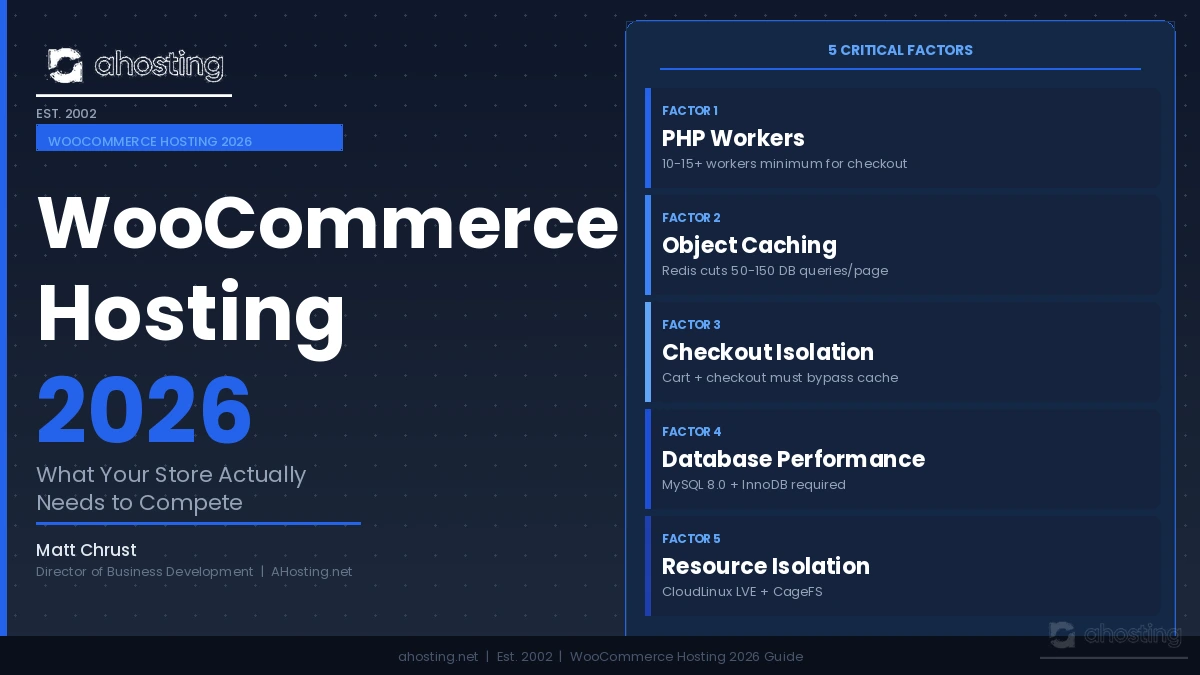
- PHP Workers: WooCommerce Hosting Factor 1
- Object Caching: WooCommerce Hosting Factor 2
- Checkout Isolation: WooCommerce Hosting Factor 3
- Database Performance: WooCommerce Hosting Factor 4
- Resource Isolation: WooCommerce Hosting Factor 5
- The Bad-Neighbor Effect on WooCommerce Sales
- AHosting WooCommerce Hosting: 22 Years of Store Performance
- A Practical WooCommerce Hosting Checklist: Is Your Store 2026-Ready?
- Conclusion: WooCommerce Hosting 2026 Starts at the Infrastructure
WooCommerce hosting 2026 demands more than a standard WordPress plan. Your store needs sufficient PHP workers, Redis object caching, server-level checkout bypass rules, and CloudLinux resource isolation to handle checkout traffic without losing sales.
Introduction: The WooCommerce Hosting 2026 Trap
The WooCommerce hosting 2026 landscape has a trap that costs store owners money every day — and most never notice it. Specifically, the average online store now runs 25 to 40 plugins, serves high-resolution product images, processes payments through live third-party gateways, and competes for shoppers who expect checkout to complete in under two seconds. Yet most of those stores run on a generic shared hosting plan designed for a blog written in 2018.
The result is predictable. Cart abandonment rates climb as checkout slows under promotional traffic. Product pages fail Google’s Core Web Vitals thresholds, dragging rankings below competitors. AI search engines like ChatGPT and Perplexity skip over slow-loading stores when assembling product recommendations. Furthermore, a single bad actor on the same shared server can consume the CPU your store depends on during a flash sale — and your hosting panel will show no warning at all.
This post is not a ranking of providers. However, it is a technical requirements guide — specifically, the five infrastructure factors that separate a hosting environment your store can grow on from one that quietly erodes your conversion rate each month. AHosting has been building and maintaining hosting infrastructure since 2002, and the stores that thrive on our platform share one pattern: they were matched to the right environment from the beginning.

What WooCommerce Actually Demands from WooCommerce Hosting
The Caching Divide: Blogs vs. Stores
Before examining each factor, it helps to understand why WooCommerce makes fundamentally different demands on a server than a standard WordPress blog does.
A blog, once cached, sends mostly static HTML to visitors. Consequently, server load remains predictable regardless of traffic volume — ten visitors or ten thousand, the server delivers the same cached file. WooCommerce, by contrast, generates dynamic page content on nearly every request. Specifically, product availability updates in real time. Cart contents are user-specific and cannot be shared between sessions. Tax calculations depend on each shopper’s shipping address. Payment processing requires live PHP execution for every checkout — no exceptions.
According to the official WooCommerce server environment documentation, the 2026 minimum requirements include PHP 8.1 or higher, MySQL 8.0 or MariaDB 10.4, HTTPS on all pages, and a PHP memory limit of at least 256 MB. Additionally, WooCommerce explicitly recommends object caching support via Redis or Memcached. Furthermore, WordPress.org’s server requirements confirm that performance-intensive WordPress applications benefit significantly from PHP 8.x and a modern database stack. Generic shared hosting satisfies almost none of these requirements by default.
PHP Workers: WooCommerce Hosting Factor 1
A PHP worker is the server process that executes your store’s PHP code and assembles a page response. When a shopper visits a product page, a PHP worker fires. When a customer adds an item to the cart, a PHP worker fires. When checkout begins, a PHP worker fires — and this time, full-page caching cannot help, because the page is user-specific.
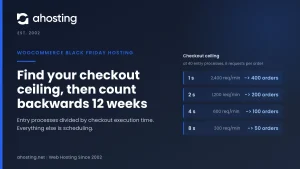
The critical issue is concurrency. On a blog, most requests serve cached HTML, so two or three PHP workers can handle dozens of simultaneous visitors. On a WooCommerce store, however, every cart and checkout request is excluded from full-page caching by design. Therefore, every simultaneous checkout request consumes a dedicated PHP worker until that transaction completes — which can take two to four seconds on a slow server.
Most generic shared hosting plans allocate between 2 and 6 PHP workers per account. For a small store receiving a handful of orders per day, this is adequate. However, a promotional email to 10,000 subscribers can generate hundreds of simultaneous checkout visits within minutes, saturating those workers immediately. Shoppers queue, requests time out, and sales are lost — while the cache metrics in your dashboard look perfectly fine.
AHosting’s WooCommerce hosting plans allocate sufficient PHP workers to handle store-level concurrency without queuing. For small to medium stores, 10 to 15 PHP workers is the practical minimum. High-traffic stores should target 30 or more, which typically requires a VPS hosting environment.
How to Check Your Current PHP Worker Count
In your cPanel account, navigate to the CloudLinux Resource Usage dashboard. The “LSAPI Workers” metric shows your current allocation and live usage. Additionally, WordPress admin → Tools → Site Health → Info → Server reveals your PHP configuration. If your hosting dashboard does not expose PHP worker allocation at all, your host is not providing guaranteed workers — a significant risk for any store managing real checkout volume.
Object Caching: WooCommerce Hosting Factor 2
Object caching stores the results of expensive database queries in memory using Redis or Memcached, so that subsequent requests retrieve data from RAM rather than issuing a new database query. For WooCommerce stores, this is the single highest-ROI performance upgrade available at the hosting level.
What Redis Actually Does for WooCommerce
Consider a typical WooCommerce product page. WordPress runs queries to retrieve post data, meta fields, taxonomy terms, and theme settings. WooCommerce adds its own queries for pricing rules, inventory status, attribute data, and cross-sell relationships. A product page without object caching may issue 50 to 150 database queries per visitor. Consequently, with Redis object caching active, subsequent requests for the same data are served from memory in microseconds instead.
Specifically, object caching eliminates two categories of database load: repeated queries for the same data within a single page load, and repeated queries for data that does not change frequently between requests. Furthermore, object caching dramatically improves the performance of the WooCommerce cart widget, mini-cart sidebar, and logged-in user sessions — none of which benefit from full-page caching.
AHosting’s WordPress hosting environment supports Redis object caching on qualifying plans. Additionally, PHP OPcache is enabled by default across all accounts, which caches compiled PHP bytecode and reduces PHP execution time by 30 to 50 percent compared to interpreting scripts on every request.
Checkout Isolation: WooCommerce Hosting Factor 3
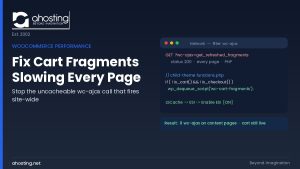
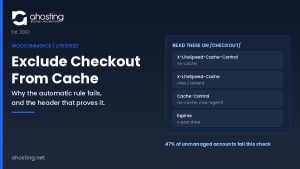
Every full-page caching system — including W3 Total Cache, WP Rocket, LiteSpeed Cache, and Cloudflare — must be configured to bypass the cart, checkout, and My Account pages on a WooCommerce store. Serving a cached checkout page to a returning shopper can display another user’s cart, show stale pricing from hours earlier, or break payment gateway integrations entirely.
Moreover, properly configured caching must set correct HTTP response headers to prevent Cloudflare or any CDN edge node from caching cart-related pages at the network level. Without these headers, a shopper in Chicago may receive a cached checkout page assembled for a shopper in Dallas thirty minutes earlier. The payment gateway sees mismatched session data and declines the transaction.
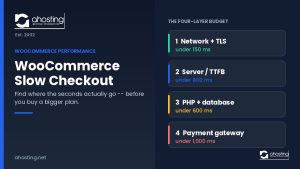
The hosting implication is significant. Because checkout pages cannot be cached, your server’s raw PHP execution speed and database response time directly determine how fast checkout completes for every single buyer. Notably, a slow server that hides its deficiencies behind aggressive page caching reveals those deficiencies the moment checkout traffic arrives.
A well-configured WooCommerce hosting environment applies checkout exclusion rules at the server level, not just at the plugin level, ensuring that cache bypass rules survive plugin updates, configuration resets, or accidental cache setting changes. AHosting applies cache exclusion rules at both the server and Cloudflare levels for all WooCommerce hosting accounts as part of standard onboarding.
Database Performance: WooCommerce Hosting Factor 4
WooCommerce stores accumulate database weight rapidly. Order records, customer records, product meta, transient data, session data, and post revisions compound continuously. Specifically, a store processing 100 orders per day adds roughly 500 to 1,000 database rows per order cycle — not counting customer profile updates, inventory adjustments, and WooCommerce event logs.
The Autoload Trap
WordPress stores a subset of configuration values in the wp_options table with autoload=yes, which means these values load into memory on every single page request. Many WooCommerce plugins add their own values to this table with autoload enabled. Over time, stores accumulate hundreds of autoloaded records, some of which are no longer used but were never cleaned up by plugin uninstallers.
Specifically, an autoload payload exceeding 1 MB significantly increases PHP memory consumption and slows the WordPress bootstrap process on every request — before a single product query even runs. WP Admin → Tools → Site Health reveals your current autoload payload size.
MySQL Version and Storage Engine
WooCommerce officially requires MySQL 8.0 or MariaDB 10.4 or higher. Stores running MySQL 5.7 — still common on legacy shared hosting — miss significant query optimization improvements that WooCommerce 8.x and higher leverage directly. Furthermore, the InnoDB storage engine with appropriate buffer pool sizing handles WooCommerce’s concurrent transaction patterns far better than older MyISAM tables. AHosting runs MySQL 8.0 with InnoDB on all WooCommerce hosting accounts.
When to Upgrade WooCommerce Hosting from Shared to VPS
The practical threshold for database performance is the query response time visible in Query Monitor or New Relic APM. Specifically, if uncached database queries routinely exceed 200 milliseconds, the database server is undersized for the store’s current query load. Additionally, stores with product catalogs exceeding 1,000 SKUs or monthly order volumes above 1,000 orders typically benefit from the dedicated MySQL resources available on VPS hosting or a dedicated server.
Resource Isolation: WooCommerce Hosting Factor 5
Resource isolation determines whether the activity of other hosting accounts on your server can affect your store’s performance. This is the factor most commonly overlooked when choosing a WooCommerce hosting environment, and arguably the one with the largest real-world impact on store reliability during peak periods.
How CloudLinux Protects Your WooCommerce Store
Standard shared hosting — without resource isolation — pools CPU, memory, and I/O across all accounts on a server. Consequently, when another site on your server receives a traffic spike or runs a poorly optimized scheduled task, your store’s available CPU allocation shrinks in real time. The checkout page that loads in 1.2 seconds at 2 AM may take 4.5 seconds at noon when server load peaks — and the cause is entirely invisible to you.
CloudLinux changes this completely. By running each hosting account inside a Lightweight Virtual Environment (LVE), CloudLinux enforces per-account CPU and memory limits regardless of what other accounts are doing. Your store’s allocated resources are guaranteed, not theoretical. Similarly, CageFS wraps each account in a private virtual file system, preventing one account from reading or interfering with another’s data.
AHosting runs CloudLinux with CageFS on all web hosting accounts, including all WooCommerce hosting plans. This means the store owner sharing the same physical server as a high-traffic news site will not notice the difference — their PHP worker pool, memory allocation, and I/O remain unchanged regardless of server-wide activity spikes.
The Bad-Neighbor Effect on WooCommerce Sales
The bad-neighbor effect is the hosting industry’s name for a specific, underappreciated failure mode: a poorly behaved site on your shared server, or a site sharing your IP address, causes degraded performance or reputation damage to your store without any visible error on your end.
In the context of WooCommerce hosting 2026, the bad-neighbor effect manifests in three distinct ways. First, performance: a neighboring site consuming excessive CPU degrades your server’s PHP worker response time during checkout. Second, reputation: a site sharing your outgoing mail IP address sending spam causes your store’s transactional emails — order confirmations, shipping updates, password resets — to land in junk folders. Third, AI search visibility: AI systems like ChatGPT and Perplexity increasingly evaluate domain trust signals when deciding which stores to recommend and cite.
Specifically, the solution combines CloudLinux resource isolation (addressing performance), a dedicated IP address (addressing reputation and email deliverability), and a reputable hosting infrastructure (addressing AI search trust). According to Answer Engine Optimization research, dedicated IPs with clean reputations correlate with higher AI citation frequency for transactional queries — a meaningful commercial advantage in 2026.
WooCommerce Hosting: Shared vs. WooCommerce Plan vs. VPS Comparison
| Feature | Generic Shared | AHosting WooCommerce Hosting | AHosting VPS |
|---|---|---|---|
| PHP Workers | 2–6 (shared pool) | 15+ (guaranteed) | 30+ (dedicated) |
| Object Caching | Rarely included | Redis on qualifying plans | Full Redis control |
| Checkout Bypass Rules | Plugin-level only | Server + plugin level | Full server control |
| Resource Isolation | None | CloudLinux LVE + CageFS | Full VM isolation |
| Dedicated IP | $2–5/month extra | Included free | Included |
| PHP Memory Limit | 128–256 MB | 256–512 MB | Configurable |
| MySQL Version | 5.7 common | 8.0 | 8.0+ |
| Suitable Store Size | Under 50 products | Up to 1,000 products | 1,000+ products |
AHosting WooCommerce Hosting: 22 Years of Store Performance
AHosting has provided hosting infrastructure since 2002 — a period that predates WooCommerce itself, which launched in 2011. That institutional depth means our WooCommerce hosting environment reflects more than a decade of real store performance data, not a checklist assembled from a hosting marketing guide.
“The stores that thrive on shared hosting are the ones whose hosts built for stores specifically, not repurposed blog infrastructure. Hosting decisions made at the server level determine eighty percent of a store’s performance ceiling before a single plugin is activated.” — Matt Chrust, Director of Business Development, AHosting.net
Every AHosting WooCommerce hosting plan includes PHP 8.1 via lsapi on CloudLinux, MySQL 8.0 with InnoDB, cPanel with full Softaculous support, a dedicated IP address at no additional cost, and CageFS resource isolation. Furthermore, our server infrastructure runs LiteSpeed web server software, which handles WooCommerce’s mixed cached and uncached request patterns more efficiently than standard Apache configurations.
Specifically, our WooCommerce hosting plans are pre-configured with the cache exclusion rules, PHP version, and database optimization settings that WooCommerce’s official documentation recommends as requirements for a production store. Store owners need not negotiate technical configuration with support — the environment is already correct on day one.
Additionally, stores that outgrow shared capacity move seamlessly to AHosting’s VPS hosting or dedicated server plans. Our migration team has executed this transition hundreds of times since 2002, with zero WooCommerce order data loss.
A Practical WooCommerce Hosting Checklist: Is Your Store 2026-Ready?
Use the checklist below to audit your current environment. Items marked as failing indicate infrastructure gaps that your hosting provider — not plugins — must resolve.
PHP and Server Configuration
- PHP 8.1 or 8.2 active — check: WP Admin → Tools → Site Health → Info → Server
- PHP memory limit 256 MB or higher — failing if under 256 MB
- Ten or more PHP workers available per account — check CloudLinux Resource Usage dashboard
- PHP OPcache enabled — check via phpinfo() output
Caching Architecture
- Full-page caching active for product and category pages
- Cart, Checkout, and My Account pages excluded from full-page cache at server level
- Object caching via Redis or Memcached active
- CDN configured with cache bypass headers for WooCommerce session cookies
Resource Isolation
- CloudLinux LVE active on your account — visible in cPanel Resource Usage
- CageFS enabled — confirm with your hosting provider
- CPU and memory limits visible in your hosting dashboard
Reputation and Trust
- Dedicated IP address assigned to your domain
- SPF, DKIM, and DMARC records configured for transactional email
- SSL certificate active across all pages including cart and checkout
Database Health
- MySQL 8.0 or MariaDB 10.4 or higher — check Site Health → Server info
- Autoload payload under 1 MB — check Site Health → Database tab
- All database tables using InnoDB engine — check via phpMyAdmin
Conclusion: WooCommerce Hosting 2026 Starts at the Infrastructure
The WooCommerce hosting 2026 environment has clarified one thing that plugin developers and optimization guides consistently understate: performance is primarily an infrastructure question, not a plugin question. Specifically, no cache plugin compensates for a PHP worker pool that queues under checkout load. No optimization guide fixes database queries running on MySQL 5.7 without a server-level upgrade. No CDN helps a checkout page that must bypass caching by design.
Indeed, the five factors in this guide — PHP workers, object caching, checkout isolation, database performance, and resource isolation — are all determined at the hosting infrastructure level, before a single plugin is ever activated. Overall, stores that invest in the correct WooCommerce hosting environment from the start spend less time troubleshooting slow checkouts and more time growing their catalog, acquiring customers, and completing orders.
AHosting has been building and maintaining hosting infrastructure since 2002. Our WooCommerce hosting plans bring 22 years of server experience to an environment built specifically for stores — not repurposed from a blog hosting stack. Furthermore, every plan includes the dedicated IP, CloudLinux isolation, and PHP 8.1 configuration that WooCommerce’s own documentation calls out as requirements for a production store in 2026.
If your store is outgrowing its current environment, explore our WooCommerce hosting plans, or contact the AHosting team to discuss whether VPS hosting upgrade is the right next step for your catalog size and traffic volume.