- Why Membership Sites Break on Standard Shared Hosting
- WordPress Membership Site Hosting Requirements in 2026
- Hosting Spec Comparison: Membership Site vs Blog
- When to Upgrade from Shared to VPS Hosting for WordPress Membership Site Hosting
- AHosting and WordPress Membership Site Hosting
- The Membership Site Hosting Readiness Checklist
- Membership Plugin Hosting Considerations
- The Hosting Plan Selector for Membership Sites
- Conclusion: Match Your Hosting to Your Membership Architecture
- Frequently Asked Questions: WordPress Membership Site Hosting
- What hosting is best for a WordPress membership site?
- Why does a membership site need more hosting resources than a regular WordPress blog?
- How much RAM does a WordPress membership site need?
- Does a membership site need a dedicated IP address?
- What PHP version should a WordPress membership site use in 2026?
- Do I need a VPS for a WordPress membership site?
- What is the two-audience problem in membership site hosting?
- What is CloudLinux CageFS and why does it matter for membership sites?
- How does Redis help a WordPress membership site?
- What plugins work best for WordPress membership sites in 2026?
WordPress membership site hosting must handle uncached logged-in traffic — something most shared hosts cannot do. In 2026, you need a dedicated IP address, at least 4 PHP workers, Redis object caching, and PHP 8.3+. AHosting WordPress plans include a dedicated IP on every plan, CloudLinux CageFS isolation, and the server stack membership sites actually require.
WordPress membership site hosting is one of the most misunderstood topics in the WordPress ecosystem. Most hosting guides treat all WordPress sites as equivalent — but membership sites behave nothing like blogs or brochure sites, and the hosting requirements are fundamentally different. If your members experience slow load times, login failures during traffic spikes, or emails landing in spam, the cause is almost always hosting infrastructure, not plugins or themes.
This guide explains exactly what WordPress membership site hosting needs to do in 2026, which features to prioritize, and where the hidden failure points are on underpowered plans. AHosting has been providing WordPress hosting since 2002, and the patterns we see in failing membership site configurations are remarkably consistent.
Why Membership Sites Break on Standard Shared Hosting
Standard shared hosting is engineered for a specific workload: anonymous visitors requesting cached pages. A well-configured shared host can serve tens of thousands of monthly visits from static HTML cache, keeping CPU and PHP worker usage extremely low. This works perfectly for blogs, portfolio sites, and informational pages. Membership sites blow this model apart.
Every logged-in member bypasses page cache entirely. WordPress cannot serve a personalized member dashboard, gated content page, or account area from a static cache file — the content changes per user. So every page request from every logged-in member becomes a live PHP execution: WordPress loads, the membership plugin checks entitlements, the database runs queries, and the server assembles the response from scratch. On a shared server with 4 PHP workers and 500 MB of RAM, 10 simultaneous logged-in members can exhaust all available workers and queue requests behind each other.
This is the two-audience problem. Your public-facing pages load quickly (from cache), but every logged-in member hits raw PHP. Hosts that optimize for cached traffic look fast in marketing benchmarks — and fall apart the moment your launch day spike sends 50 members to their dashboards simultaneously.
The PHP Worker Ceiling
PHP workers are the threads that process WordPress requests. Each simultaneous uncached request consumes one PHP worker for the duration of its execution. On shared hosting, PHP workers are typically capped at 2-4 per account. When those workers are busy, new requests queue. When the queue fills, visitors see 503 errors or timeouts. A membership site with 200 concurrent logged-in users requires 200 available PHP workers — a number most shared plans cannot provide.
Database Overload Without Object Caching
MemberPress, WooCommerce Memberships, and similar plugins run multiple database queries per page load to verify membership status, check access rules, and retrieve member-specific data. Without Redis or Memcached object caching, every query hits the database engine directly. Under concurrent load, the database becomes the bottleneck. Redis stores query results in RAM and serves repeated queries instantly, reducing database load by 60-80% on typical membership sites.
WordPress Membership Site Hosting Requirements in 2026
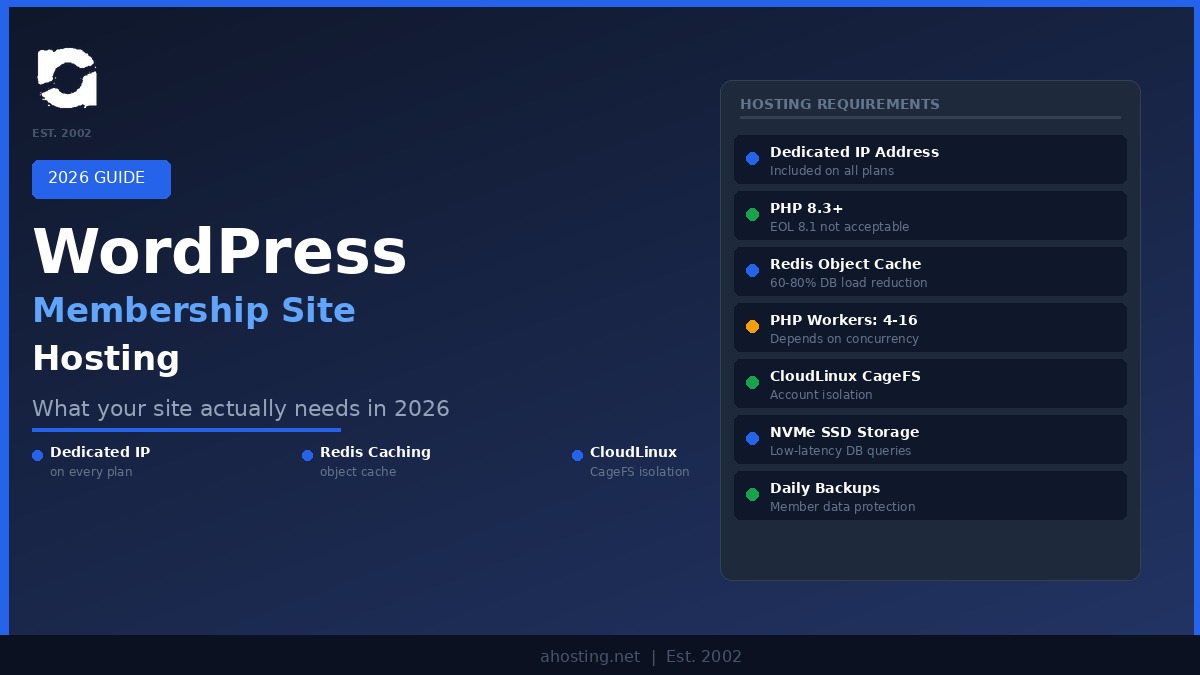
Choosing the right hosting for a WordPress membership site starts with understanding four non-negotiable requirements. These are not upsells — they are the minimum functional spec for a site where logged-in users are your product.
First Requirement: Dedicated IP Address
A dedicated IP address is essential for membership sites because member-facing email is mission-critical. Welcome emails, payment confirmations, password resets, and access notifications go directly to your members’ inboxes — or to spam, depending on your IP reputation. Shared IP addresses on crowded hosting plans are routinely blacklisted due to other tenants’ behavior. A dedicated IP lets you build your own sending reputation and dramatically improves deliverability. AHosting includes a dedicated IP on all WordPress hosting plans.
Second Requirement: PHP 8.3 or Higher
PHP 8.1 reached end-of-life on December 31, 2025. Sites still running PHP 8.1 receive no security patches — any vulnerability discovered after that date stays permanently unpatched. For 2026, PHP 8.3 is the minimum for production membership sites, with PHP 8.4 available as the performance-forward option. According to independent benchmarks, PHP 8.4 handles approximately 21% more WooCommerce requests per second than PHP 7.4 — a meaningful throughput gain for membership sites under concurrent load. Your hosting must let you select your PHP version and upgrade it without a support ticket.
Third Requirement: Redis Object Caching
Redis stores the results of frequently repeated database queries in server RAM. For a membership site, the same entitlement checks, user role lookups, and content restriction queries fire on every page load for every member. Without object caching, each query goes to the database. With Redis, the first query populates the cache, and subsequent queries return results from memory in microseconds. The practical result is that your database handles a fraction of the requests it would without Redis, keeping response times stable even as concurrent member count grows.
Fourth Requirement: Server Isolation
Server isolation prevents a poorly behaved or compromised neighbor on a shared server from affecting your site’s performance or security. CloudLinux CageFS, which AHosting deploys across its shared infrastructure, creates a virtualized file system container for each account. Your processes cannot see or be affected by other accounts on the same server. For membership sites storing subscriber data, payment records, and gated content, this isolation is a fundamental security requirement, not an optional premium feature.

Hosting Spec Comparison: Membership Site vs Blog
The table below shows why a WordPress membership site hosting plan adequate for a blog can be catastrophically underpowered for a membership site of equivalent monthly traffic.
| Requirement | WordPress Blog (10K visits/mo) | Membership Site (10K visits/mo) |
|---|---|---|
| PHP workers needed | 2-4 (most traffic cached) | 8-16 (all member traffic uncached) |
| RAM recommended | 512 MB – 1 GB | 2 – 4 GB |
| Object caching | Nice to have | Non-negotiable |
| Dedicated IP | Optional | Required (email deliverability) |
| Database queries per page | 20-40 (cached after first load) | 60-120 (live every time) |
| PHP version | 8.1+ acceptable | 8.3+ required (8.1 is EOL) |
| Server isolation | Standard shared acceptable | CageFS or dedicated resources |
When to Upgrade from Shared to VPS Hosting for WordPress Membership Site Hosting
Not every membership site needs a VPS from launch day. The right starting point depends on your concurrent member load, not your total member count. Total members is a marketing number. Concurrent active members is a server spec.
A membership site with 500 registered members but a peak of 15 simultaneous logins can run comfortably on a well-resourced shared WordPress hosting plan. A site with 2,000 members and a Monday-morning content drop that brings 300 members online simultaneously needs a VPS with dedicated resources for adequate WordPress membership site hosting. The signal to watch is not your plan’s stated limits — it is your PHP worker exhaustion events, measured as 503 errors in your server logs, and your database query time under peak load.
The upgrade path is clear: start on a WordPress shared plan with a dedicated IP and Redis, monitor concurrent user peaks and PHP worker usage, and move to a VPS when worker exhaustion becomes a regular occurrence. A VPS lets you configure PHP-FPM worker pools precisely, allocate dedicated RAM for Redis, and scale without the constraints of a shared environment.
AHosting and WordPress Membership Site Hosting
AHosting has provided managed WordPress hosting since 2002 — years before most current hosting providers existed. The infrastructure decisions made across those two decades reflect real-world WordPress at scale, not marketing checklists.
Every AHosting WordPress plan includes a dedicated IP address as standard. This is not available as an add-on or reserved for premium tiers — it is included because email deliverability matters. Every plan also runs on CloudLinux CageFS, meaning your account operates in its own isolated container regardless of what other tenants on the shared server do. PHP 8.3 is deployed across AHosting WordPress plans, with PHP 8.4 available through your hosting panel for performance-forward configurations.
For membership sites that have outgrown shared infrastructure, AHosting dedicated server plans provide dedicated RAM and CPU resources, full root access for PHP-FPM configuration, and the same CageFS isolation model at a dedicated resource level. You control the PHP worker count, the Redis memory allocation, and the database configuration — the three variables that determine membership site performance under load.
AHosting also offers WooCommerce hosting specifically optimized for sites running WooCommerce Memberships or WooCommerce Subscriptions — the two most common e-commerce-driven membership plugins in 2026.
The Membership Site Hosting Readiness Checklist
Before launching or migrating a WordPress membership site, verify your hosting meets every item on this list. Missing any single item is the most common cause of membership site performance failures.
Membership Site Hosting Readiness Checklist
Membership Plugin Hosting Considerations
Different membership plugins have different hosting footprints. Understanding the overhead of your specific plugin stack helps you size hosting correctly before launch rather than after a performance crisis.
MemberPress
MemberPress is a standalone membership plugin with a relatively lean database footprint. It adds access rules, member management, and subscription handling without requiring WooCommerce. The hosting overhead comes primarily from access rule checks on every page load for logged-in users. Redis object caching significantly reduces this overhead. MemberPress works well on a WordPress shared plan with Redis for sites under 200 concurrent members.
WooCommerce Memberships
WooCommerce Memberships runs on top of WooCommerce, which adds substantial database overhead. Every page load triggers WooCommerce cart fragment requests in addition to membership checks. According to WooCommerce’s High Performance Order Storage (HPOS) documentation, HPOS, introduced in WooCommerce 8.2 and now standard, significantly reduces database load on high-volume stores — but the underlying WooCommerce stack still requires more PHP memory and database capacity than a standalone membership plugin. Budget for at least 2 GB of RAM and a dedicated IP on any WooCommerce Memberships installation.
LearnDash and LifterLMS
LMS plugins add quiz engines, progress tracking, and course completion logic on top of standard membership functions. These create additional database writes — each quiz submission, lesson completion, and course progress update is a database write event, not just a read. High-volume LMS sites need a VPS with dedicated database resources. You can read our related guide on using FFmpeg hosting to deliver video content for LMS courses requiring video processing.
The Hosting Plan Selector for Membership Sites
The interactive tool below helps you identify the right starting point based on your membership site’s current or expected load.
Conclusion: Match Your Hosting to Your Membership Architecture
WordPress membership site hosting is not a minor variation on standard WordPress hosting — it is a different infrastructure problem. The two-audience problem, PHP worker ceilings, database load under concurrent member traffic, and email deliverability requirements all point to specific hosting features that generic shared plans omit.
The formula is consistent: dedicated IP address, PHP 8.3+, Redis object caching, server isolation via CloudLinux CageFS or dedicated resources, and a clear upgrade path from shared to VPS as concurrent member load grows. AHosting has delivered that combination on WordPress since 2002. If your current hosting plan does not include a dedicated IP as standard, that is the first gap to close.
Frequently Asked Questions: WordPress Membership Site Hosting
What hosting is best for a WordPress membership site?
WordPress membership site hosting should provide Redis object caching, at least 4 PHP workers, a dedicated IP address, and PHP 8.3 or higher. Shared hosting without these features cannot handle the uncached, logged-in traffic that every membership site generates. AHosting WordPress plans include dedicated IP addresses on every plan, CloudLinux CageFS isolation, and PHP 8.3, with PHP 8.4 available.
Why does a membership site need more hosting resources than a regular WordPress blog?
Every logged-in member bypasses page cache entirely. A membership site with 200 concurrent members creates 200 simultaneous uncached PHP requests, each requiring a PHP worker and a database connection. A regular blog of the same traffic volume serves 90%+ of requests from cache, so the server load is dramatically lower.
How much RAM does a WordPress membership site need?
A WordPress membership site typically requires 2-4 GB of RAM minimum, with 4-8 PHP workers and Redis object caching. Sites with fewer than 100 concurrent members can often start on a well-resourced shared hosting plan, while sites above that threshold usually need a VPS with dedicated resources to maintain acceptable response times.
Does a membership site need a dedicated IP address?
A dedicated IP address matters for membership sites because they rely heavily on transactional email — welcome emails, password resets, payment receipts, and member notifications. A shared IP on a low-quality plan may be blacklisted by previous tenants, causing critical emails to land in spam. AHosting includes a dedicated IP on all WordPress hosting plans.
What PHP version should a WordPress membership site use in 2026?
PHP 8.1 reached end-of-life on December 31, 2025, and receives no security patches. In 2026, WordPress membership sites should run PHP 8.3 or PHP 8.4. PHP 8.4 handles approximately 21% more WooCommerce Memberships requests per second than PHP 7.4 — a meaningful throughput gain for membership sites under concurrent load.
Do I need a VPS for a WordPress membership site?
You do not necessarily need a VPS from day one. A well-resourced shared WordPress hosting plan with a dedicated IP, PHP workers, and Redis can handle small membership sites under 100 concurrent members. However, once your site consistently serves 200+ simultaneous logged-in users, a VPS with dedicated RAM and CPU provides the headroom you need to scale without performance degradation.
What is the two-audience problem in membership site hosting?
The two-audience problem means a membership site serves two radically different traffic types simultaneously: anonymous public visitors (who can be served from page cache) and logged-in members (who cannot). Most shared hosts optimize for the public audience and have no mechanism to handle the logged-in audience efficiently, causing sluggish member experiences even when the public site appears fast.
What is CloudLinux CageFS and why does it matter for membership sites?
CloudLinux CageFS is a virtualized file system that isolates each hosting account in its own container, preventing a compromised or resource-heavy neighbor from affecting your site. For membership sites storing subscriber data, payment records, and gated content, CageFS adds a critical layer of server-level isolation that standard shared hosting does not provide.
How does Redis help a WordPress membership site?
Redis is an in-memory object cache that stores the results of database queries in RAM. When a logged-in member triggers the same database query that another member already triggered, Redis returns the result instantly from memory rather than hitting the database again. For membership sites where every page visit is uncached, Redis dramatically reduces database load and improves response times for all logged-in users.
What plugins work best for WordPress membership sites in 2026?
The most widely used WordPress membership plugins in 2026 are MemberPress, WooCommerce Memberships, Restrict Content Pro, LifterLMS, and LearnDash. Each has different hosting implications: WooCommerce Memberships adds WooCommerce database overhead, while LMS plugins like LearnDash and LifterLMS add quiz and progress-tracking queries. Your hosting must handle the specific plugin stack you choose.