WordPress and spam go together like highways and traffic jams. Everyone agrees that the former is indispensable, but desperately wishes it could exist without the latter.
The good news is that unlike with gridlock, there IS something you can do about WordPress spam. Quite a bit, actually. And that’s where we come in.(more…)
We’ve said it before, and we’ll say it again. Even though WordPress is one of the most frequently-targeted platforms for cybercriminals; even though it seems like there’s a new vulnerability connected to the platform every week, WordPress itself is not particularly insecure. Its popular, and its plugin architecture is incredibly open. (more…)
As you well know, WordPress is the most popular content management system in the world. It powers 23% of the web, with over 60 million users worldwide. That popularity has served it well in some regards – it hosts a thriving development community with scores of passionate users coding plugins and helping one another out with technical problems. (more…)
TL;DR
Choosing the best CMS for dynamic content 2026 comes down to one question: how complex is your data? WordPress still wins for most sites. Headless wins when you need speed at scale. AHosting has the infrastructure for both.
If you’re searching for the best CMS for dynamic content 2026, you already know that not all websites are created equal. A brochure site and a product catalog serving 50,000 SKUs have nothing in common — except that both need a CMS capable of handling what’s actually being asked of it.
A dynamic content CMS is a content management system that generates page output at request time — pulling from a database, an API, or a combination of both — rather than serving pre-rendered static files. Think personalised product pages, real-time inventory counts, member-only dashboards, or a blog that pulls related posts based on user behaviour. The CMS doesn’t just store your words; it assembles the page on the fly.
Why does this matter for hosting? Because dynamic generation means server resources — CPU cycles, RAM, database queries — are consumed every time a page loads. The CMS you choose directly determines the infrastructure you need. Get the pairing wrong and you’ll be debugging timeouts at 2 a.m.
Definition (citation-ready): A dynamic CMS serves content generated in real time from a database or API, as opposed to static site generators that pre-build HTML at deploy time. Source: W3Techs, 2025 CMS Usage Statistics
The 2026 CMS Landscape: What Changed
The CMS market looked very different five years ago. Monolithic platforms dominated. “Headless” was a buzzword reserved for enterprise budgets. Today the field is genuinely competitive — and the hosting requirements that come with each platform have never mattered more.
W3Techs data consistently shows WordPress powering over 43% of all websites. But the conversation has shifted: developers are increasingly asking not whether to use WordPress, but when to reach for something different.
WordPress 6.x — Still the Default
WordPress 6.x introduced significant block-editor maturity, improved performance defaults, and a streamlined Full Site Editing experience. For most content-driven websites — blogs, business sites, membership portals, and WooCommerce stores — WordPress remains the most pragmatic choice in 2026.
What’s new in 6.x that affects dynamic content:
Interactivity API — client-side dynamic interactions without a JavaScript framework
Block Bindings API — bind block attributes directly to custom fields or external data sources
Improved query loops — more granular filtering for dynamic post listings without a plugin
For teams already on WordPress hosting, upgrading to 6.x gives meaningful dynamic-content capabilities without rebuilding anything.
Headless CMS — Astro, Next.js, Payload CMS
The “headless” model decouples content management from content delivery. Your CMS stores and serves data via API; a separate frontend framework consumes that API and renders the UI.
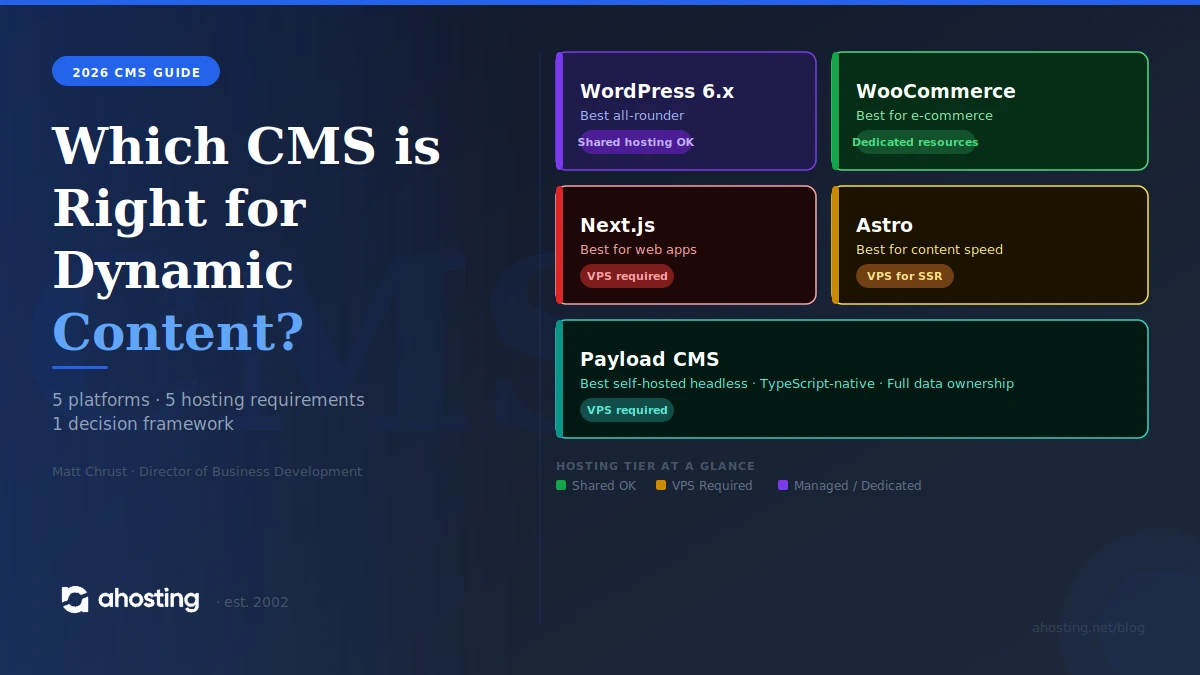
Astro has become the go-to for content-heavy sites that want near-zero JavaScript by default. Its Islands Architecture ships only the interactive components that need JavaScript — everything else is static HTML.
Next.js remains the dominant React-based framework for complex web applications. Its hybrid rendering model makes it ideal for large-scale dynamic content sites. Next.js deployments typically require a Node.js-capable server or a VPS hosting environment with persistent processes.
Payload CMS is the headless option gaining the most ground among developers in 2026. It’s TypeScript-native, self-hosted, and ships with its own admin UI — a direct rival to Contentful and Sanity for teams who want full data ownership without a SaaS bill.
When Headless Makes Sense (and When It Doesn’t)
Headless is not always the answer. It introduces build pipeline complexity, requires developer capacity to maintain, and increases hosting requirements significantly.
Go headless when:
You’re serving content across multiple channels (web, app, kiosks)
Your frontend team works in React, Vue, or Svelte and resists WordPress
You need sub-100ms API response times at global scale
You’re building something Next.js or Astro was literally designed for
Stick with WordPress when:
Your team includes non-technical editors who need a GUI
You need a plugin ecosystem (SEO, forms, e-commerce, membership)
Time-to-launch matters more than architectural purity
You’re running WooCommerce and need dynamic product/inventory pages without custom API work
CMS Comparison: WordPress vs Astro vs Next.js vs Payload
CMS
Best For
Hosting Needs
Learning Curve
AHosting Fit
Verdict
WordPress 6.x
Blogs, business sites, WooCommerce
Optimised shared or managed
Low–Medium
⭐⭐⭐⭐⭐ Ideal
Best all-rounder
Astro
Content-heavy, low-JS sites
Static host or Node VPS
Medium
⭐⭐⭐⭐ VPS required
Best for content speed
Next.js
Web apps, large dynamic sites
Node.js VPS or dedicated
High
⭐⭐⭐⭐ VPS/dedicated
Best for app-scale
Payload CMS
Developer-controlled headless
Node.js + MongoDB/Postgres VPS
High
⭐⭐⭐⭐ VPS required
Best self-hosted headless
Bottom line for 2026: WordPress wins on accessibility and ecosystem. Headless wins on performance and flexibility — but demands more from your hosting stack.
What Hosting Does Your CMS Actually Need?
This is the question most CMS comparison posts skip. The honest answer: your CMS choice and your hosting plan are the same decision.
WordPress — Optimised Shared or Managed Hosting
WordPress on quality web hosting handles the vast majority of dynamic content use cases without issue — provided your host has configured the stack correctly.
Look for:
LiteSpeed + LSCache (not Apache) for PHP-based dynamic page caching
PHP 8.2+ — WordPress 6.x is fully PHP 8.x native
MariaDB 10.6+ — better query performance for complex WP_Query calls
Free dedicated IP — improves email deliverability and AI-citation trust signals on content-heavy sites
OPcache enabled — reduces PHP compilation overhead on dynamic pages
AHosting’s WordPress hosting includes LiteSpeed, free dedicated IP on every plan, and PHP 8.x as default — the exact stack WordPress 6.x dynamic content needs.
Headless CMS — VPS or Dedicated for Build Pipelines
Headless architectures have two distinct hosting requirements that often catch teams off-guard:
The CMS/API layer (Payload, Strapi, Contentful) — needs a persistent Node.js process, typically a VPS hosting environment with at least 2GB RAM
The build pipeline (Next.js SSR, Astro SSG) — needs either a Node.js-capable VPS or a static host with build hooks
Shared hosting is not viable for headless. The persistent processes, package managers, and build scripts that headless frontends require are simply outside what shared environments support. Plan for a VPS from day one.
WooCommerce — Dedicated Resources for Dynamic Product Pages
WooCommerce is among the most resource-intensive WordPress configurations because every product page is genuinely dynamic: inventory checks, pricing rules, user-specific discounts, tax calculations, and cart state all run on each request.
For WooCommerce stores beyond 500 products or 1,000 daily sessions, dedicated resources — either a high-tier managed plan or a WooCommerce hosting plan with isolated CPU/RAM — become non-negotiable. Shared resources create checkout timeouts, which directly cost conversions.
AHosting CMS Hosting: Built for Dynamic Sites Since 2002
AHosting has been hosting content-driven websites since 2002 — before WordPress hit version 1.0, before “headless CMS” was a product category, and before most of today’s framework authors were writing code professionally.
That history isn’t just a number. It means:
Infrastructure tuned for dynamic workloads — LiteSpeed, LSCache, OPcache, and MariaDB are defaults, not upsells
Free dedicated IP on every WordPress plan — better AI citation trust signals, improved email deliverability, cleaner SEO signals for content sites
VPS infrastructure for headless — when Astro or Next.js is the right call, AHosting’s VPS hosting provides the Node.js environment headless architectures demand
WooCommerce-grade resources — isolated CPU and RAM for dynamic product catalogues that can’t afford shared-host latency
24-year uptime track record — your CMS needs a host that’s still here next decade
Whether you’re launching a WordPress 6.x content site, a Next.js web app, or a WooCommerce store with 10,000 dynamic product pages, AHosting’s web hosting stack has been purpose-built for exactly this.
Which CMS Is Right for You?
Answer five quick questions to get a personalised recommendation:
The AHosting Advantage: 20+ Years of CMS Hosting Experience
Most hosting companies that recommend CMS platforms have been around for five years. AHosting has been doing this since the era of hand-coded HTML tables.
We’ve watched CMS platforms rise (WordPress), pivot (Joomla), fragment (the headless explosion), and mature (Next.js, Astro, Payload). We’ve hosted each generation of dynamic content architecture — and we’ve tuned our infrastructure accordingly.
The result: when you host with AHosting, you’re not getting a generic LAMP stack with a WordPress installer bolted on. You’re getting a stack that has been iteratively optimised for the way dynamic CMS platforms actually behave under load — PHP-FPM pools, LiteSpeed worker tuning, database connection pooling, and caching layers that understand WordPress’s query patterns.
That specificity matters. Generic hosting wastes resources. Optimised hosting makes your dynamic content fast.
Conclusion: The Best CMS for Dynamic Content 2026 Needs a Host That Keeps Up
The best CMS for dynamic content 2026 isn’t a single answer — it’s a decision matrix. WordPress 6.x is the right call for most teams: it’s mature, extensible, and performs excellently on optimised hosting. Headless — Astro, Next.js, Payload — is the right call when you need architectural flexibility, multi-channel delivery, or app-scale performance, and you’re prepared to invest in a proper VPS hosting environment to support it.
What never changes: the host you choose either enables your CMS or limits it.
AHosting has been the infrastructure behind dynamic content sites for over two decades. Whether you’re on WordPress hosting, scaling a WooCommerce hosting store, or deploying a headless architecture, we have the stack, the history, and the team to keep your dynamic content fast, reliable, and ready for 2026 and beyond.
WordPress parent company Automattic is finally spending the $160 million in funding it raised last year – on plugins, apparently. Late last month, it purchased WooCommerce, a powerful shopping plugin designed to help publishers turn their websites into digital storefronts. Although CEO Matt Mullenweg wouldn’t comment on the price, recode claims that inside sources have clocked it at around $30 million. (more…)
So, you want to create a few videos for your brand? That’s awesome. With the runaway success of YouTube, video content is now bigger than ever – and few things are more memorable than an awesome video ad.
There’s just one tiny problem. Video isn’t easy. You (usually) can’t just start rolling a camera and hope for the best. (more…)
According to a report from CodeGuard, WordPress now powers 79% of content-driven websites. By comparison, Joomla powers 7.2%, and Drupal 5.3%. The report further notes that designers and developers are flocking to the platform in droves; it’s gained more popularity in that market than it has among bloggers. (more…)
Recently, Finnish security researcher Joukou Pynnonen revealed a security flaw in Yoast’s WordPress SEO plugin which allowed hackers to take over the administrator account of any CMS on which the plugin was installed. One of the most popular SEO tools on the web; Yoast’s plugin has been downloaded nearly seven million times – meaning there’s a staggering number of WordPress sites impacted by the vulnerability. Unfortunately, this story is nothing new. (more…)
I’m sure you’ve heard on at least one occasion that content delivery networks are awesome. They significantly improve the speed at which your website can deliver content. Not only does that make for a better user experience, there’s also mounting evidence that faster-loading pages tend to rank higher than those that load slowly (though not, perhaps, for the reasons that you might think).
Sounds like a pretty good deal across the board, no? (more…)
What do WordPress, Drupal, Joomla!, and pretty much every other market-leading content management system have in common?
Simply put, they’re having just a little bit of trouble adapting to the small screen. As smartphones and tablets become more and more ubiquitous, the need to design websites that can adapt to different screen sizes grows ever more pressing. A poorly-optimized site alienates mobile visitors – and given that as of last year, 60% of Internet access was done on mobile devices, that represents a huge chunk of your audience. (more…)