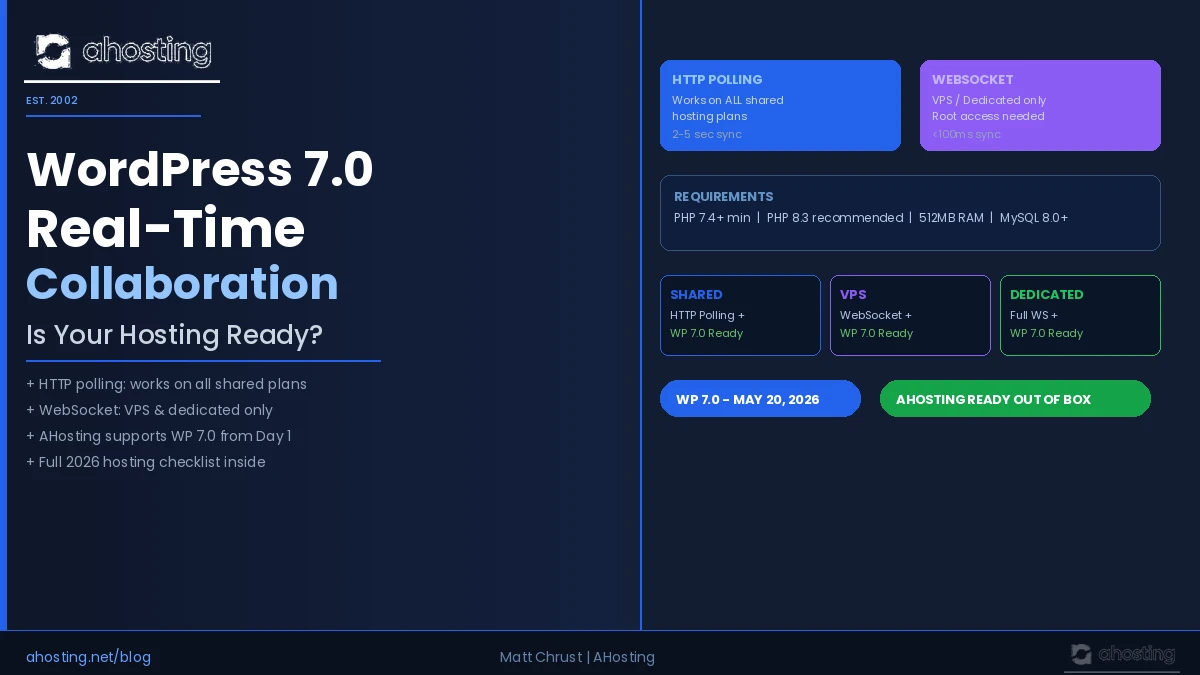
- Introduction: The Collaboration Feature Site Owners Are Scrambling to Understand
- What WordPress 7.0 Real-Time Collaboration Actually Does
- The Critical Hosting Gap: HTTP Polling vs WebSocket
- WordPress Real-Time Collaboration Hosting: The Comparison Table
- The Shared Hosting Reality in 2026
- WordPress Real-Time Collaboration Hosting at AHosting: What's Already Supported
- What Else Your Site Needs for Smooth Collaboration
- The AHosting Advantage: 23 Years of WordPress Real-Time Collaboration Hosting Ready Infrastructure
- A Practical Checklist: Is Your WordPress Real-Time Collaboration Hosting Ready?
- Conclusion: WordPress Real-Time Collaboration Hosting Starts at the Foundation
WordPress real-time collaboration hosting determines whether your team can co-edit in WP 7.0 — HTTP polling works on all shared plans out of the box, while WebSocket sync requires VPS or dedicated hosting with persistent connection support.
Introduction: The Collaboration Feature Site Owners Are Scrambling to Understand
WordPress 7.0 landed on May 20, 2026 — and it brought the platform’s most significant new capability in years. Specifically, multiple team members can now edit the same post simultaneously, with changes appearing in near-real time for every connected editor. However, most upgrade guides explain what the feature does. This one explains whether your server can actually run it. In short, your WordPress real-time collaboration hosting environment — not the feature itself — is what determines the quality of the experience. For a full list of what shipped, see the official WordPress 7.0 release announcement.
Furthermore, the answer is not simple. Specifically, WordPress 7.0 ships with two transport modes for syncing collaborative edits, and each mode has very different hosting requirements. Notably, one works everywhere, and one works only on servers with the right infrastructure. Consequently, site owners on shared hosting are not locked out — but they do need to understand which mode they are running and what limitations come with it.
What WordPress 7.0 Real-Time Collaboration Actually Does
WordPress 7.0’s collaboration engine works at the block level. Additionally, it uses Conflict-free Replicated Data Types — CRDTs — to resolve simultaneous edits without data loss. Notably, this is the same underlying technology Google Docs and Figma use. Moreover, it means two editors can change the same paragraph at the same time and both changes merge cleanly. The full technical architecture is documented on the Make WordPress Core blog.
In practice, the collaboration session activates automatically when a second editor opens a post that someone else is already editing. Furthermore, live cursors show each editor’s position in the document. Specifically, inline comments, @mentions, and a revision timeline round out the collaborative experience.
However, all of that happens through one of two underlying transport layers.
HTTP Polling (default) fires a POST request to admin-ajax.php every few seconds. Consequently, it works on every hosting environment without any server configuration changes. Additionally, it requires no special port access, no persistent process, and no root-level server configuration.
WebSocket transport (optional) maintains a persistent, bidirectional connection between the browser and server. Moreover, it delivers near-instantaneous sync — under 100 milliseconds, versus 2–5 seconds for polling. However, it requires hosting infrastructure that explicitly supports WebSocket upgrades and long-lived PHP processes.
The WordPress core team made a deliberate architectural decision. Specifically, they shipped HTTP polling as the universal default because it works on any host. WebSocket support, in contrast, is an optional upgrade requiring the right server environment.
The Critical Hosting Gap: HTTP Polling vs WebSocket
Here is where WordPress real-time collaboration hosting gets technically interesting. Most shared hosting environments impose hard constraints on persistent connections and PHP process lifetimes. Specifically, CloudLinux LVE — Lightweight Virtual Environment — constraints common on cPanel shared hosting cap concurrent PHP workers and terminate idle processes after 30–60 seconds.
As a result, WebSocket connections typically fail on shared hosting before they can be useful. Additionally, shared hosting typically runs Apache with PHP-LSAPI or mod_php, neither of which supports WebSocket protocol upgrades natively without additional server-side configuration.
Fortunately, this does not mean collaboration breaks on shared hosting. Instead, the WordPress core automatically detects that WebSocket is unavailable and falls back to HTTP polling. Consequently, the feature still works — it simply runs with 2–5 second latency between edits rather than sub-100ms.
Furthermore, WordPress 7.0’s HTTP polling transport was a deliberate design choice, not a limitation. The core team explicitly built it to ensure the collaboration feature functions on the broadest possible range of hosting environments from day one.

WordPress Real-Time Collaboration Hosting: The Comparison Table
| Transport | Works on Shared? | Sync Speed | Simultaneous Editors | Best For |
|---|---|---|---|---|
| HTTP Polling | Yes — all shared plans | 2–5 seconds | 2–3 editors | Small teams, content sites |
| Server-Sent Events | Depends on host config | ~1 second | 3–5 editors | Mid-size teams |
| WebSocket | Rarely on shared hosting | Under 100ms | 10+ editors | Agencies, large newsrooms |
Notably, for the majority of WordPress site owners — individual bloggers, small businesses, and content teams of two or three — HTTP polling delivers a perfectly usable editing experience. Furthermore, it requires zero hosting changes and activates automatically the moment WordPress 7.0 is installed.
The Shared Hosting Reality in 2026
Most shared hosting plans run under CloudLinux with CageFS isolation. Specifically, each account operates inside a Lightweight Virtual Environment with defined CPU, RAM, and PHP worker limits. Consequently, persistent WebSocket connections — which require the server to hold an open process for each connected editor indefinitely — exceed these per-account process limits.
The practical result is straightforward. On shared WordPress real-time collaboration hosting, polling mode activates automatically, and the feature works. However, the latency between a collaborator’s edit and its appearance on your screen is 2–5 seconds rather than under 100ms. For a two-person content team editing a blog post together, this is barely noticeable.
Additionally, the WordPress Heartbeat API — which powers post locking, autosave, and now collaboration polling — fires more frequently with multiple editors active. Each pulse is an uncacheable POST request to admin-ajax.php. Moreover, ten simultaneous editors on a shared server generate 40+ uncacheable requests per minute. For most shared accounts with 2–3 editors, this load is manageable. However, larger editorial teams will begin to feel the PHP worker ceiling.
Specifically, site owners expecting to run five or more simultaneous editors in real time should upgrade to VPS hosting. Furthermore, agencies managing multiple client sites with editorial teams should treat WebSocket hosting as a competitive differentiator for their managed WordPress services.
WordPress Real-Time Collaboration Hosting at AHosting: What’s Already Supported
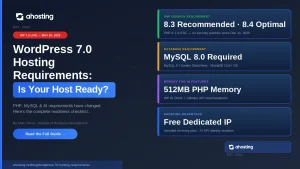
AHosting’s WordPress hosting plans support the full HTTP polling collaboration mode out of the box. Specifically, every shared plan ships with PHP 8.1, 8.3, and 8.4 via cPanel’s MultiPHP Manager — the minimum PHP 7.4 requirement is easily met. Moreover, our infrastructure runs PHP-LSAPI on CloudLinux CageFS, delivering stable resource isolation without the aggressive process-killing timeouts found on older shared stacks.
Additionally, all AHosting WordPress plans include:
- PHP 8.3 and 8.4 available with no plan upgrade required
- 512MB PHP memory limit — meets the WP 7.0 WP AI Client requirement
- W3 Total Cache pre-configured for static asset delivery
- Cloudflare CDN integration at no extra cost
- MySQL 8.0 on all plans — recommended by WordPress 7.0
For teams that require WebSocket-level collaboration speed, AHosting’s VPS hosting provides full root access, configurable persistent processes, and unblocked WebSocket upgrade support. Consequently, agencies and larger editorial teams can unlock sub-100ms collaboration without switching hosting providers.
Furthermore, AHosting’s WooCommerce hosting customers benefit from the same PHP 8.3 baseline that supports the WP AI Client — the new Abilities API layer introduced alongside collaboration in WordPress 7.0.
What Else Your Site Needs for Smooth Collaboration
First Check: PHP Version and Memory Allocation
Specifically, WordPress 7.0’s real-time collaboration engine requires PHP 7.4 as a minimum. However, the CRDT conflict-resolution library performs significantly better on PHP 8.2 or higher, and the WP AI Client component requires 512MB of PHP memory to run reliably. In cPanel, verify both settings under Software → MultiPHP Manager and Software → MultiPHP INI Editor. Moreover, switching PHP versions in cPanel takes under 60 seconds — no support ticket required.
Second Check: Heartbeat API Configuration
The WordPress Heartbeat API is the engine driving collaboration polling. Consequently, its tick rate directly determines how quickly collaborative changes appear for co-editors. By default, Heartbeat fires every 15 seconds. Notably, some performance optimization plugins — including certain configurations of WP Rocket and Perfmatters — reduce this interval to 60 seconds or disable it entirely to save server resources. Therefore, before enabling multi-editor collaboration, verify that Heartbeat is active at its default 15-second interval.
Third Check: Object Caching for Lower Latency
HTTP polling responses hit the database on every tick for each active editor. Specifically, without an object cache, each admin-ajax.php request generates multiple database queries for post state, user data, and CRDT merge tables. Moreover, enabling a persistent object cache — Redis or Memcached — reduces this database pressure significantly. However, on shared hosting, object caching typically requires a host that provisions a dedicated Redis instance per account. Indeed, checking with your host before enabling WP_CACHE in wp-config.php is essential.
Fourth Check: User Roles and Permissions
Real-time collaboration requires Editor or Administrator role on the post being edited. Additionally, Contributor and Author roles cannot trigger collaborative sessions by default. Consequently, reviewing your editorial team’s user role assignments in Users → All Users before expecting collaboration to work across all accounts prevents frustrating access failures.
Fifth Check: Caching Layer Compatibility
Page-level caching — W3 Total Cache, WP Rocket, or LiteSpeed Cache — must exclude the /wp-admin/ directory from all cache rules. Furthermore, the admin-ajax.php endpoint must never be cached at the server, plugin, or CDN level. Otherwise, collaboration polling requests return stale cached responses, effectively breaking the sync loop entirely. Therefore, verify exclusion rules in your caching plugin settings and in your Cloudflare Page Rules before inviting collaborators to a live editing session.
WordPress Collaboration Hosting Checker
Answer 4 quick questions to find out which collaboration mode your hosting supports.
The AHosting Advantage: 23 Years of WordPress Real-Time Collaboration Hosting Ready Infrastructure
AHosting has been operating WordPress hosting since 2002. Consequently, we have navigated every major WordPress infrastructure transition — from MySQL 4 to MySQL 8, from PHP 4 to PHP 8.4, from mod_php to PHP-LSAPI. Furthermore, our shared web hosting plans are built on CloudLinux with per-account CageFS isolation, delivering the stable PHP process environment that WordPress 7.0’s HTTP polling collaboration requires.
“WordPress 7.0’s real-time collaboration uses HTTP polling as its default transport — which works on any properly configured shared host. Our infrastructure has supported this configuration since Day 1 of the WordPress 7.0 launch.” — Matt Chrust, Director of Business Development, AHosting
Additionally, AHosting’s reseller hosting customers can offer their clients collaboration-ready WordPress plans without managing server configuration overhead. Moreover, PHP version selection in cPanel’s MultiPHP Manager takes seconds — giving every client account immediate access to PHP 8.3 or 8.4 collaboration performance without a plan change or support ticket.
Furthermore, for teams ready to unlock WebSocket-level collaboration, AHosting’s VPS plans provide the persistent process control and root access required. Specifically, upgrading from shared to VPS within AHosting means no data migration, no DNS changes, and no downtime — just a faster collaborative editing experience.
A Practical Checklist: Is Your WordPress Real-Time Collaboration Hosting Ready?
Server Requirements
- PHP 7.4 minimum installed — PHP 8.3+ recommended
- PHP memory limit at 512MB or higher
- MySQL 8.0 or MariaDB 10.6 installed
- WordPress 7.0 update applied
Collaboration Feature Checks
- Heartbeat API active at 15-second default interval
- Multiple editor accounts set to Editor or Administrator role
/wp-admin/directory excluded from page cachingadmin-ajax.phpnot cached at server, plugin, or CDN level
For WebSocket Mode (VPS or Dedicated Servers Only)
- WebSocket support explicitly confirmed with hosting provider
- PHP 8.2 or higher installed for CRDT fiber support
- Connection timeout configured at 60 seconds minimum
- Persistent process manager — PHP-FPM or Node.js bridge — configured
AHosting-Specific Verification
- PHP version confirmed in cPanel MultiPHP Manager
- W3 Total Cache admin exclusion rules verified
- Cloudflare Page Rules set to bypass
/wp-admin/* - VPS plan selected if WebSocket transport is required
Conclusion: WordPress Real-Time Collaboration Hosting Starts at the Foundation
WordPress 7.0 delivered something the platform has never had in its 23-year history: genuine, built-in collaborative editing. Consequently, every editorial team working on WordPress content can now co-edit in real time without relying on external tools. However, the quality of that experience depends entirely on what sits beneath the site.
For most editorial teams, shared WordPress real-time collaboration hosting with HTTP polling performs adequately. Moreover, it activates automatically on any properly configured shared plan running PHP 7.4 or higher, with no hosting changes required. Furthermore, AHosting’s shared plans already meet every requirement WordPress 7.0 sets for polling-mode collaboration from Day 1.
For agencies and newsrooms with five or more simultaneous editors, VPS is the right path. Specifically, WebSocket transport eliminates the latency ceiling that polling mode introduces, delivering the sub-100ms sync experience teams expect from modern collaborative tools. Additionally, AHosting’s VPS plans provide the full root access and persistent process control this requires.
In either case, the hosting foundation matters. Specifically, a properly configured server — PHP 8.3, correct memory limits, Heartbeat active, cache exclusions verified — is the difference between a smooth collaborative editing experience and a frustrating one full of sync delays. Ultimately, WordPress real-time collaboration hosting is not just an infrastructure checkbox. It is the foundation every WP 7.0 editorial team is building on right now.