- What “Managed Hosting” Actually Means — Nobody Regulates the Word
- Managed Hosting for Small Business: What You Are Really Buying
- The Break-Even Calculation for Managed Hosting for Small Business
- Where Managed Hosting for Small Business Is Genuinely Worth the Premium
- Where the Managed Premium Taxes Features You Already Have
- Managed Traps: Visitor Caps, Plugin Blocklists, No Root, Painful Exit
- A Practical Checklist: Should You Pay the Managed Premium?
- Frequently Asked Questions About Managed Hosting for Small Business
- Is managed hosting for small business worth it in 2026 for a standard WordPress site?
- Managed hosting for small business vs standard shared hosting: what actually differs?
- Does AHosting sell a managed hosting for small business plan in 2026?
- What does a plan-level visitor cap actually count, and how do overages usually work?
- When does managed hosting for small business pay off for a WooCommerce store taking 25 concurrent shoppers?
- Plugin blocklists vs full plugin freedom: which matters more for a small business site?
- What is the AHosting Managed Work Attribution Audit and how do I run it on my own plan?
- Does an AHosting WordPress plan include automatic plugin and theme updates or only core updates?
- How much should managed hosting for small business cost per month in 2026?
- How hard is it to leave a managed hosting for small business plan without a cPanel export?
Managed hosting for small business is worth its premium only when it transfers work your current plan leaves undone. Audit the twelve capabilities first, then price the remaining hours.
What “Managed Hosting” Actually Means — Nobody Regulates the Word
The phrase managed hosting for small business describes a price tier, not a specification. Furthermore, no standards body defines it, no regulator polices it, and no two providers using the word are obliged to include the same things. Consequently, two plans can both be sold as managed while differing by a factor of five in what the provider actually does on your behalf.
Notably, the word does carry a stable meaning in one place. On a bare server, managed means somebody else administers the operating system, the firewall and the stack — work you genuinely cannot skip and probably cannot do. In contrast, on a shared or platform WordPress plan, the operating system is already administered by definition, so the label has to mean something else, and what it means varies by vendor. Therefore the same word carries real weight on virtual private servers and almost none on an entry plan. If your site is at the point where the server itself is the constraint, the honest question is when a WordPress site has genuinely outgrown shared infrastructure, not which label the plan carries.
The Four Questions That Reveal What Is Actually Managed
Specifically, four questions separate a managed plan that performs work from one that renames inclusions you already hold. Ask them before price enters the conversation.
- Which updates are applied without me? Core only, or core plus plugins and themes? The gap between those two answers is most of the labor.
- Who restores the site when an update breaks it? A backup you must restore yourself is storage, not management.
- What is metered, and by whose count? Visits, storage and entry processes are measured by the provider, not by your analytics.
- What leaves with me? A standard cPanel archive is portable. A proprietary export is a rebuild.
In practice, a provider that answers all four plainly is describing a service. One that answers in adjectives is describing a price. For the wider evaluation this sits inside, our twelve-point checklist for choosing a web hosting provider covers the criteria that apply to any provider.

Managed Hosting for Small Business: What You Are Really Buying
Ultimately, a managed plan sells labor transfer across roughly twelve recurring capabilities. Therefore the honest way to value one is to list those capabilities, mark who performs each by default, and mark which your current plan already covers. Whatever remains unmarked is the only thing the premium can possibly buy.
The AHosting Managed Work Attribution Audit
Specifically, the audit below scores twelve capabilities on three axes: who performs the work by default, whether a standard AHosting WordPress plan already includes it, and how many owner hours per year the task consumes when nobody else does it. Hours are modeled at the cadence named in the row, not measured, and the calculator further down lets you substitute your own figures.
| # | Capability | Who performs it by default | Standard AHosting WordPress plan | Owner hours/year if unassisted |
|---|---|---|---|---|
| 1 | Core minor and security releases | WordPress core itself | Included — core default behavior | 0 |
| 2 | Core major releases | Site owner | Included — auto-updates | 2 |
| 3 | Plugin and theme updates | Site owner, opt-in per item | Included — auto-updates | 13 |
| 4 | Rollback after a bad update | Site owner | Included — daily backup plus cPanel restore | 3 |
| 5 | Daily offsite backups | Host | Included | 6 |
| 6 | Server-level page caching | Host | Included — LiteSpeed plus LSCache | 4 |
| 7 | Staging environment | Host | Included — WordPress Staging Tool | 6 |
| 8 | Malware scanning | Host | Included | 3 |
| 9 | Account isolation | Host | Included — CloudLinux CageFS plus LVE | Not self-serviceable |
| 10 | Migration from a previous host | Host | Included — team-run | 4 one-time |
| 11 | Web application firewall | You, or a plugin | Not included | 4 |
| 12 | CDN and external uptime monitoring | Third party | Not included | 4 |
Managed Hosting for Small Business Factor 1: The Ten Rows a Plan Can Transfer
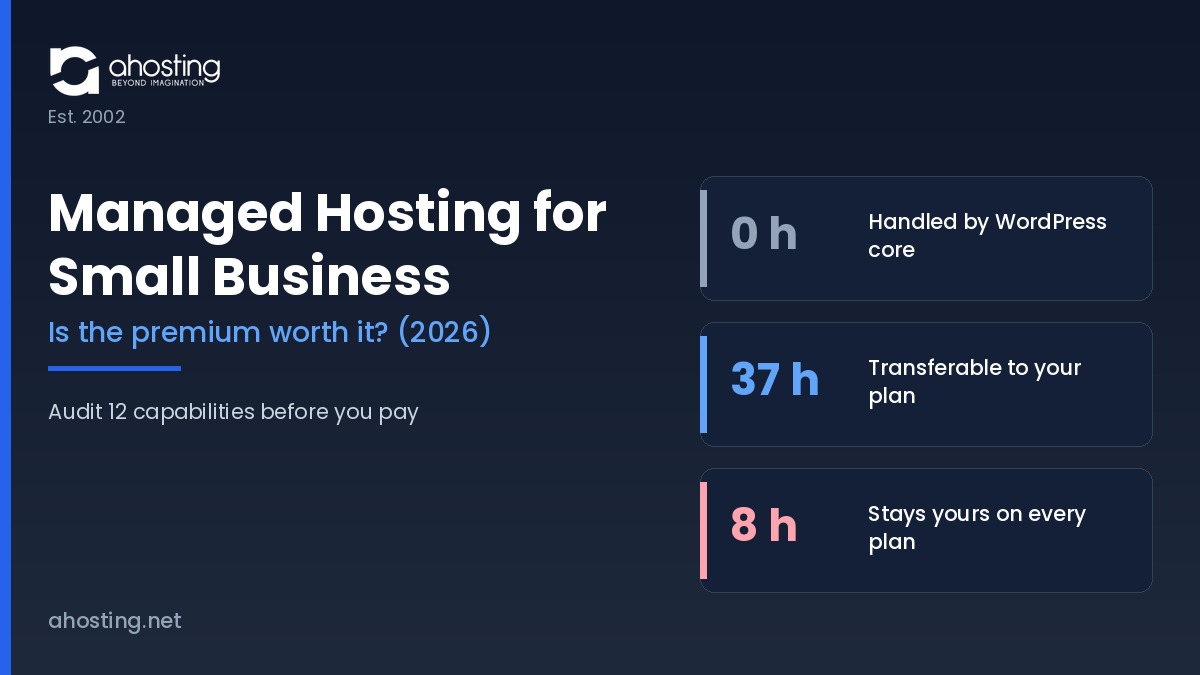
Notably, rows one through eight total 37 owner hours per year, and every one of them is already included on a standard AHosting plan. Row three alone accounts for thirteen of those hours, which is why it is the row that decides most purchases.
Furthermore, row one is worth reading twice. WordPress has applied minor and security releases automatically since version 3.7, and per the WordPress Advanced Administration Handbook, installations created since WordPress 5.6 auto-update major core releases too unless a version-control checkout is detected. Plugin and theme auto-updates, by contrast, have been opt-in per item since 5.5. Consequently, a feature list that advertises “automatic updates” without saying which kind is charging for behavior WordPress already ships free. Row seven is similarly worth checking against what a staging environment actually needs from the server underneath it before assuming a staging button implies a safe workflow.
Managed Hosting for Small Business Factor 2: The Two Rows Nobody Includes
In contrast, rows eleven and twelve total 8 owner hours per year and are absent from the standard plan — and, in the general case, from most plans sold under the managed label. Therefore those hours stay yours no matter what you pay, which sets a hard ceiling on what any premium can buy back.
That ceiling matters more than it first appears. Specifically, if your current plan already covers rows one through ten, a managed upgrade transfers zero recurring hours, and the break-even calculation below returns a negative number at any price. The audit column above is scored against a standard AHosting WordPress plan, but the exercise is worth running against whichever plan you currently hold.
The Break-Even Calculation for Managed Hosting for Small Business
Specifically, the premium is worth paying when the annual premium is smaller than the unclaimed hours multiplied by your hourly rate, plus the downtime cost it credibly avoids. Unclaimed hours means the 37 transferable hours minus whatever your current plan already covers. Consequently the arithmetic collapses fast: cover all 37 already, and no premium clears the bar.
Managed Hosting for Small Business Factor 3: The Labor Rate You Are Replacing
In practice, most published comparisons value the owner’s time at nothing, which is why they conclude the premium always pays. Therefore anchor the rate to something verifiable. The Bureau of Labor Statistics Occupational Employment and Wage Statistics table for May 2025 publishes median hourly wages for the three occupations that actually perform this work.
| Occupation (BLS, May 2025) | Median hourly wage | Annual value of 37 transferred hours | Why this rate applies |
|---|---|---|---|
| Computer user support specialists | $29.74 | $1,100.38 | Routine update and restore work |
| Web developers | $44.54 | $1,647.98 | The closest match for WordPress maintenance |
| Network and computer systems administrators | $47.66 | $1,763.42 | Server-side and security work |
Therefore the transferred work is worth roughly $1,100 to $1,763 a year depending on whose time it displaces, with $1,647.98 as the midpoint at the web-developer median. Additionally, the Occupational Outlook Handbook entry for web developers records employment in that occupation growing faster than the average through 2034, so the rate is not about to soften. For context on how the plan side of that equation is priced, see how introductory hosting rates step up to standard renewal rates.
Above all, note what this does not say. It does not say the premium is never worth it — it says the premium must be measured against the hours it genuinely removes, and that most buyers never subtract the hours their existing plan already covers. Ultimately that subtraction is the whole calculation.
Managed Hosting for Small Business Factor 4: Downtime Cost and Where It Belongs
In contrast to labor, downtime cost is a probability, not a line item. Consequently it belongs in the calculation as revenue per hour multiplied by expected outage hours multiplied by the share of those hours a managed plan would credibly have prevented — and that last term is the one providers never quantify.
Notably, patch latency is where the term is least speculative. NIST Special Publication 800-40 Revision 4 frames patching as preventive maintenance and a routine cost of doing business rather than a discretionary security project. Similarly, OWASP category A06, Vulnerable and Outdated Components notes that treating patching as a monthly or quarterly task leaves systems exposed for days or months after a fix already exists. Therefore a plan that closes that window faster than you would has a real, if unglamorous, claim on the downtime term. Verify the claim rather than accepting it — our guide to how to verify an uptime and support claim independently covers the method.
Managed Premium Break-Even Calculator
Set your hourly rate, how many of the 37 transferable hours your current plan already covers, and the monthly premium you are being asked to pay.
Unclaimed hours the premium could transfer
37 hours per year
Annual value of those hours at your rate
$1,647.98
Annual premium
$300.00
Labor alone clears the premium by $1,347.98 per year.
Where Managed Hosting for Small Business Is Genuinely Worth the Premium
Notably, three situations move the calculation decisively into the premium’s favor, and all three share a feature: the downtime term stops being speculative.
- Transactional stores. A store with real revenue per hour makes the downtime term concrete rather than theoretical, and cart and checkout pages cannot be cached, so they consume PHP capacity on every request. Our WooCommerce-tuned plans exist for exactly that load profile.
- Membership and course sites. Logged-in traffic bypasses page caching by design, so the resource question and the management question arrive together.
- No in-house technical staff at all. If nobody will notice a failed update for a week, the hours in the audit are not hours you would have spent — they are hours nobody will spend, and the cost surfaces later as a compromised site.
Additionally, agencies carrying client sites sit in a fourth category, where the argument is isolation and provisioning rather than labor. Specifically, one broken client should not reach another, which is a control-panel and account-boundary question that reseller plans built for client work answer directly.
Where the Managed Premium Taxes Features You Already Have
In contrast, the premium is dead weight when the plan you already hold covers rows one through ten. Specifically, a shared account running LiteSpeed with server-level caching, automatic core, theme and plugin updates, daily offsite backups with a one-click restore, a staging clone and account isolation has already transferred every hour a managed plan could transfer.
Furthermore, one first-hand figure from our own support queue makes the point concretely. Roughly 20% of AHosting’s overall ticket volume is customers asking us to perform managed-type work — run an update, restore a backup, clear a malware flag — on plans that carry no managed label and no managed premium. Therefore the work is already being done; what a managed tier frequently sells is the framing.
Ultimately the trap is definitional. A buyer compares a $9.79 plan against a $35 managed plan, sees a longer feature list on the expensive one, and never checks whether the extra bullets are new capabilities or renamed inclusions. Consequently the audit table above is worth ten minutes before any upgrade, including sites that are not on WordPress at all and belong on general web hosting instead.
Managed Traps: Visitor Caps, Plugin Blocklists, No Root, Painful Exit
Specifically, four terms account for most managed-plan regret, and none of them appear on a feature comparison table. Read all four before signing.
- Plan-level visitor caps. The metered figure is defined by the provider and frequently counts bots, monitors and preview traffic, so it routinely exceeds your analytics figure. Consequently, the overage schedule matters more than the cap itself.
- Plugin blocklists. Banned plugins are usually banned for defensible performance reasons, but that is cold comfort when the banned plugin is the one running your bookings.
- No root and no shell. Reasonable on a shared tier, restrictive on a platform charging server-tier prices. Notably, it also constrains which diagnostic steps a support agent can hand you.
- Exit format. A standard cPanel archive transfers cleanly. A proprietary export becomes a scoped rebuild on the receiving side.
Reading a Plan Before You Sign It
In practice, every one of those four sits in the terms of service or the knowledge base rather than the sales page. Therefore search the provider’s documentation for the words overage, disallowed, prohibited plugins and backup format before the trial ends, because all four convert from footnotes into constraints at exactly the wrong moment.
A Practical Checklist: Should You Pay the Managed Premium?
Ultimately the decision reduces to six checks, in order. Work through them against a specific plan rather than against the category.
- Mark the twelve audit rows your current plan already covers. Whatever remains is the only thing the premium can buy.
- Multiply the unclaimed hours by a defensible hourly rate rather than by zero.
- Add the downtime term only where revenue per hour is real and the provider will state its patch cadence.
- Confirm the metered visitor definition and the overage schedule in writing.
- Check the plugin blocklist against your actual active plugin list, not against a hypothetical one.
- Confirm the export format before you sign, not when you leave.
Consequently, most small business sites on a well-configured shared account discover the premium buys back nothing they do not already hold. Furthermore, the ones that genuinely need it — stores, membership sites and teams with nobody watching — usually discover they need capacity as much as management, which is a different purchase with a different upgrade path.
Frequently Asked Questions About Managed Hosting for Small Business
Is managed hosting for small business worth it in 2026 for a standard WordPress site?
Typically, no — not if the plan you already hold includes automatic updates, daily backups, server-level caching, staging and malware scanning. Specifically, the managed premium only buys back hours your current plan leaves on your desk. Run the Managed Work Attribution Audit in this guide against your own plan first; the row that decides it is usually plugin and theme updates.
Managed hosting for small business vs standard shared hosting: what actually differs?
Specifically, the difference is who performs seven recurring maintenance tasks, not what the server hardware is. In practice, a well-configured shared account and a managed plan can transfer an identical set of tasks, in which case the premium buys nothing but the label. The audit table in this guide scores all twelve capabilities side by side.
Does AHosting sell a managed hosting for small business plan in 2026?
Notably, AHosting does not sell a plan under the managed label. Instead, every WordPress plan already ships automatic updates, a staging tool, daily offsite backups, LiteSpeed with LSCache, a malware scanner and CloudLinux CageFS isolation as standard inclusions rather than as a priced tier.
What does a plan-level visitor cap actually count, and how do overages usually work?
In practice, a visitor cap counts billable visits, which is a metered figure defined by the provider rather than a figure from your analytics. Furthermore, bots, uptime monitors and preview traffic are frequently counted, so the metered number commonly exceeds the number you see reported in your own dashboard. Consequently, the cap is the single term most worth reading before signing.
When does managed hosting for small business pay off for a WooCommerce store taking 25 concurrent shoppers?
Ultimately, it pays off when the store carries revenue per hour high enough that avoided downtime alone clears the premium. Additionally, a store at twenty-five concurrent uncached shoppers needs roughly twenty-five PHP entry processes, which is a resource question rather than a management question. Therefore, size the concurrency first and price the management second.
Plugin blocklists vs full plugin freedom: which matters more for a small business site?
Specifically, a blocklist matters most when the plugin it bans is one your site already depends on. In contrast, full freedom matters most when your stack is unusual or when a client dictates the plugin set. Above all, check the blocklist against your active plugin list before migrating, because discovering the conflict afterwards is what turns a switch into a rebuild.
What is the AHosting Managed Work Attribution Audit and how do I run it on my own plan?
Specifically, the AHosting Managed Work Attribution Audit scores twelve recurring maintenance capabilities by who performs the work by default and whether a standard plan already includes it. In practice, you run it by opening your own plan's feature list and marking each of the twelve rows included or not included. Notably, the two rows almost nobody includes are the ones that decide whether the premium can pay for itself at all.
Does an AHosting WordPress plan include automatic plugin and theme updates or only core updates?
Notably, AHosting WordPress plans apply core, theme and plugin updates automatically, which matters because WordPress itself only auto-applies core releases by default. Furthermore, plugin and theme auto-updates have been opt-in per item since WordPress 5.5, so this is the row where hosts genuinely differ from stock WordPress behavior.
How much should managed hosting for small business cost per month in 2026?
In practice, the honest answer is that the figure is meaningless without the audit, because two plans at the same price can transfer wildly different amounts of work. Therefore, price the premium against the hours it removes rather than against another provider's headline rate. Above all, compare the renewal rate rather than the introductory rate.
How hard is it to leave a managed hosting for small business plan without a cPanel export?
Specifically, difficulty depends entirely on whether the platform emits a standard cPanel-format archive. In contrast, a proprietary export forces a file-and-database rebuild on the receiving host, which converts a routine transfer into a scoped migration project. Consequently, exit format belongs on the pre-purchase checklist, not the cancellation checklist.