Skip to content
Skip to main content
Ahosting Logo
  • Hosting
    • WordPress Hosting
      Fast, secure hosting for WordPress sites
    • Web Hosting
      Reliable, affordable hosting for sites
    • FFMpeg Hosting
      Fast hosting for FFmpeg projects
    • Reseller Hosting
      Start hosting biz with white-label plans
    • VPS Hosting
      Scalable VPS with full control & power
    • Dedicated Server
      High-power servers for max security
    • WooCommerce Hosting
      Fast hosting for WooCommerce shops
  • Domain
    • Register a Domain
      Secure your domain name in minutes
    • Domain Transfer
      Move domains to Ahosting with ease
    • Premium SSL Certificate
      Enterprise SSL to build customer trust
  • Support
    • Submit A Ticket
      Expert 24/7 help from our support team
    • Abuse Report
      Report abuse to keep network safe
    • Knowledge Base
      Quick answers via step-by-step guides
  • Company
    • Blog
      Expert articles to power your online growth
    • Compare Hosts
      Side-by-side comparison
    • Datacenter
      Secure, high tech datacenter for hosting
    • About Us
      Learn about our mission, values & team
    • Contact Us
      Contact sales for plans, pricing & advice
    • Sitemap
      Find info fast with our clear site map
My Account
Ahosting Logo
  • Hosting
    • Web Hosting
    • WordPress Hosting
    • FFMpeg Hosting
    • Reseller Hosting
    • VPS Hosting
    • Dedicated Server
    • WooCommerce Hosting
  • Domain
    • Register a Domain
    • Domain Transfer
    • Premium SSL Certificate
  • Support
    • Knowledge Base
    • Abuse Report
    • Submit A Ticket
  • Company
    • About Us
    • Contact Us
    • Blog
    • Sitemap
    • Datacenter
  • Legal
    • Privacy Policy
    • Terms of Service
    • Acceptable Use Policy
    • Service Level Agreement
    • Resource Abuse Policy
My Account

Blog Home

Category: Hosting Guides

  • AI Crawler Traffic Is Now a Hosting Cost: 65,044 Fetches, Measured

    AI Crawler Traffic Is Now a Hosting Cost: 65,044 Fetches, Measured

    • What AI Crawler Traffic Actually Is (And Why It Is Not One Thing)
      • Indexing Crawlers and User-Triggered Fetchers Are Different Jobs
      • Why That Distinction Decides What You Can Control
    • 28 Days of AI Crawler Traffic, Measured on One Hosting Network
      • The AHosting AI Crawler Load Table
      • 65,044 AI Crawler Fetches Against 298 Google Clicks
      • What Came Back: 79 Assistant Referrals
    • What an AI Crawler Fetch Actually Costs Your Plan
      • Entry Processes, and Why a Cached Page Costs None
      • Where the AI Crawler Cost Is Genuinely Concentrated
      • AI Crawler Entry-Process Headroom by Plan Tier
    • Why robots.txt Does Not Fix the Biggest AI Crawler Number
      • What Perplexity's Own Documentation Says
      • What robots.txt Still Does Control
    • AI Crawler Traffic vs. a Bot Flood: Which Problem Do You Have?
    • What AHosting Actually Ships for AI Crawler Load
    • A Practical Checklist for AI Crawler Traffic
    • Frequently Asked Questions About AI Crawler Traffic
      • Do AI crawler visits actually cost me anything on shared hosting in 2026?
      • AI crawler vs search engine crawler: what is the difference for my server?
      • Can I block AI crawler traffic with robots.txt, and does it work?
      • What is the AHosting robots.txt policy on AI crawler access in 2026?
      • User-triggered fetches vs indexing crawls: which one should I worry about?
      • How many entry processes does an AI crawler fetch consume on a cached page?
      • Which AHosting plan tier gives enough entry processes for heavy AI crawler traffic in 2026?
      • How many visitors does AI crawler traffic actually send back to a hosting site?
      • How do I measure AI crawler load in my own server access logs?
      • How does AHosting tell an AI crawler apart from an ordinary bot flood?
    TL;DR

    AHosting logged 65,044 AI crawler fetches in 28 days against 298 Google clicks. Most of that load costs nothing, because a cached page consumes no entry process — and most of it cannot be blocked with robots.txt either, because 72% of it is user-triggered.

    Every hosting blog now carries advice about AI crawler traffic, and almost all of it ends at the same instruction: edit your robots.txt. Over 28 days we counted what the AI crawlers actually did to one hosting network — 65,044 fetches — and then worked out what those fetches cost and which of them that instruction can reach. The answer to the second question is most of the advice does not apply to most of the traffic.

    Listen: 65,044 assistant fetches, 79 visits back, and where the real cost sits. By Matt Chrust, Director of Business Development, AHosting.

    Furthermore, the cost is not where the volume is. Most of those 65,044 requests were free, for a reason that has nothing to do with AI and everything to do with how a cached page is served. What follows is the measurement, the mechanism, and the part of the problem that is genuinely worth acting on.

    What AI Crawler Traffic Actually Is (And Why It Is Not One Thing)

    Notably, the phrase covers two populations that behave alike in a log file and differently in every way that matters. Separating them is the first step, and it is the step most write-ups skip.

    Indexing Crawlers and User-Triggered Fetchers Are Different Jobs

    Specifically, an indexing crawler is building a corpus. It arrives on a schedule of its own choosing, works through your site methodically, and stores what it finds for later. OpenAI’s crawler documentation describes exactly this split in its own products: GPTBot gathers content for model training, while OAI-SearchBot exists to surface pages in ChatGPT search results, and a site can allow one and refuse the other.

    A user-triggered fetcher does something else entirely. Somebody asked an assistant a question a few seconds ago, the assistant decided your page might answer it, and the fetch happens live while that person waits. Perplexity’s crawler documentation draws the same line: PerplexityBot surfaces and links pages in search results, while Perplexity-User supports a specific action a person just took.

    In practice, the log line looks identical. Both are a GET for an article, both come from a declared user agent, and both count once. The difference only appears when you ask what would happen if you tried to stop them.

    Why That Distinction Decides What You Can Control

    Indeed, robots.txt was written for the first population and not the second. RFC 9309 standardized the Robots Exclusion Protocol for automatic clients working through a site of their own accord, and the whole model assumes a crawler that fetches the file, reads the rules and then decides where to go next.

    A fetch made because a person asked for it does not fit that model, and the vendors say so. Perplexity documents that its user-triggered agent generally ignores robots.txt rules, on the stated grounds that a user requested the page. Consequently, the largest category of AI crawler traffic in our own logs is also the category that a robots.txt edit does not reliably touch.

    That gap is being worked on rather than merely complained about. The IETF has a working group, AI Preferences, building a vocabulary for expressing how content may be used by automated systems, precisely because the existing file cannot carry the distinction. Until that work lands, the honest position is that you have policy control over indexing and very little over live retrieval.

    28 Days of AI Crawler Traffic, Measured on One Hosting Network

    Ultimately, the argument above is only worth making if the numbers behind it are real. These come from AHosting server access logs for the 28 days from 4 August to 31 August 2026, grouped by declared user agent. They are ours, and nothing here is modeled or extrapolated.

    The AHosting AI Crawler Load Table

    AgentFetches, 28 daysClassReachable by robots.txt
    Perplexity-User38,743User-triggeredNo — vendor states it generally ignores it
    ChatGPT-User7,197User-triggeredNo — live browsing on a user request
    Amazonbot3,743IndexingYes
    ClaudeBot3,503IndexingYes
    PerplexityBot3,292IndexingYes
    OAI-SearchBot2,519IndexingYes
    GPTBot2,379IndexingYes
    Google-Extended1,020IndexingYes
    Applebot988IndexingYes
    Claude-User936User-triggeredNo — live browsing on a user request
    Bytespider478IndexingYes
    meta-externalagent246IndexingYes
    Total65,04446,876 user-triggered18,168 reachable
    The AHosting AI Crawler Load Table — AHosting.net server access logs, 4–31 August 2026 (28 days). Class assignment follows each vendor’s own published documentation.

    Above all, read the last row first. Of 65,044 fetches, 46,876 came from the three agents their own vendors describe as acting on a live user request — 72% of it is user-triggered. The remaining 18,168 are indexing crawls, and those are the ones a robots.txt rule genuinely governs.

    65,044 AI Crawler Fetches Against 298 Google Clicks

    For example, put that total next to the search traffic from the same 28 days. Google Search Console recorded 52,662 impressions and 298 clicks for AHosting.net over the identical window. AI systems therefore read the site roughly 218 times for every visit Google search sent to it.

    Interestingly, the raw scale is easy to misread as alarming. Spread across 28 days, 65,044 fetches average about 2,323 a day, or roughly 1.6 a minute — which no server notices as a rate. Volume alone is not the problem, and a post that stopped here would be selling a worry rather than describing one.

    Similarly, one agent dominates to a degree worth naming. Perplexity-User alone accounts for 38,743 of the total, close to three-fifths of all AI crawler activity on the network, and it sits in the category that robots.txt does not reliably reach. Any policy that treats this as a single undifferentiated stream will therefore mostly regulate the smaller half.

    What Came Back: 79 Assistant Referrals

    By contrast, the return traffic over the same window was 74 referred visits from ChatGPT and 5 from Gemini. Seventy-nine visits, against 46,876 user-triggered reads. That works out at one referred reader for roughly every 593 pages an assistant fetched on somebody’s behalf.

    Fortunately, that number is a starting point rather than a verdict. An assistant that answers a question without sending a click still puts the brand in front of the person asking, which is the whole argument of our guide to optimizing a WordPress site for AI search. What the ratio does establish is that nobody should assume this traffic pays for itself in visits.

    Overall, the useful framing is a trade rather than a leak. You are giving up some server work and getting citations, brand presence and a small number of high-intent readers. Whether that trade is good depends entirely on what the server work costs, which is the next question and the one almost nobody answers.

    What an AI Crawler Fetch Actually Costs Your Plan

    Therefore the meaningful unit is not the fetch. It is the entry process, and the gap between those two things is where this entire topic gets misjudged.

    Entry Processes, and Why a Cached Page Costs None

    Accordingly, start with the definition rather than the intuition. CloudLinux documents an entry process as a limit that usually represents the maximum number of concurrent connections to Apache dynamic scripts, alongside SSH sessions and cron jobs running at the same time. The operative word is dynamic. An entry process is a slot held while PHP is running, not a counter of requests.

    On AHosting a cached page costs zero entry processes, because LiteSpeed answers it at the server level and no PHP script is ever started. That is the same mechanism described in our write-up of server-level caching, and it is why the 65,044 figure is not a bill.

    Consequently, an AI crawler reading your article pages behaves almost exactly like a visitor reading them from cache: it consumes bandwidth, it does not consume a concurrency slot, and it disappears from the constraint you actually pay for. Where a fetch does reach PHP, it holds one of those slots for as long as the request takes, and at that moment it is indistinguishable from a human.

    Where the AI Crawler Cost Is Genuinely Concentrated

    In particular, the cost lives on whatever you expose that caching does not cover. Internal search URLs run a database query per request and are almost never cached. Faceted or parameterized listing pages generate an effectively unlimited set of unique addresses, each one a cache miss by construction. Feeds, calendar archives and admin-ajax endpoints behave the same way.

    Moreover, a crawler is far more likely than a human to find those paths, because it follows every link it can see rather than the two or three a reader would. A site with a crawlable faceted archive can hand an AI crawler thousands of distinct uncached URLs from a single category page.

    Specifically, this is why the fix is usually a caching and crawl-surface audit rather than a robots.txt edit — and the two get confused because both are edits to the same kind of file. Where an entry-process ceiling is genuinely being hit, the diagnosis in our explanation of the 508 resource limit error applies unchanged, since a crawler-driven ceiling and a traffic-driven one produce the identical symptom.

    Notably, an appropriate Cache-Control policy also determines how often a well-behaved fetcher comes back for something it already has, which quietly reduces the indexing half of the load without refusing anybody anything.

    AI Crawler Entry-Process Headroom by Plan Tier

    Shared tierEntry processesPhysical memoryWhat that means for crawler load
    Bronze201 GBFine for a cached content site; tight if search URLs are crawlable
    Silver302 GBComfortable headroom once articles are served from cache
    WooStart403 GBSized for cart and checkout paths, which are uncached by design
    Gold504 GBRoom for a large uncached surface alongside human peak
    AHosting shared plan entry-process allocations, verified against the live server configuration on 31 August 2026. The ceiling is shared between crawler and human requests.

    In other words, bot traffic consumes entry processes only where your cache does not cover it, and that ceiling is what the plan tiers set. If your uncached surface is small, crawler load is not the reason to move tier. If it is large and genuinely necessary, the WordPress hosting tiers are where that headroom comes from, and the estimator further down turns your own numbers into the comparison.

    Why robots.txt Does Not Fix the Biggest AI Crawler Number

    That said, none of the above means robots.txt is useless. It means it is a policy instrument that is widely mistaken for a load control, and the difference shows up precisely where the volume is.

    What Perplexity’s Own Documentation Says

    Fortunately, this does not require inference, because the vendor states it plainly. Perplexity’s crawler page says that since a user requested the fetch, that fetcher generally ignores robots.txt rules. Perplexity-User is 38,743 of our 65,044 fetches.

    Similarly, the pattern is not unique to one company. Live-browsing agents across the sector are framed as acting for a person rather than as autonomous crawlers, and the exclusion protocol has never claimed authority over a request a human initiated. Google’s own crawler reference makes the same three-way split between common crawlers, special-case crawlers and user-triggered fetchers.

    Consequently, a robots.txt file that disallows every AI agent you can name will still leave the majority of this traffic arriving. Believing otherwise is the specific failure mode this article exists to correct, and it is expensive only in the sense that it stops people looking at the thing that would actually help.

    What robots.txt Still Does Control

    However, the 18,168 indexing fetches are a different matter, and there the file works exactly as documented. Blocking a training crawler stops that crawler. Allowing a search crawler is what keeps you eligible to be cited, and OpenAI notes that a site opted out of OAI-SearchBot will not appear in ChatGPT search answers.

    For example, AHosting.net runs the split deliberately rather than by default. The live file allows GPTBot, OAI-SearchBot, ClaudeBot, PerplexityBot, Google-Extended and Applebot-Extended, and disallows CCBot, Bytespider, TikTokBot, anthropic-ai, cohere-ai, meta-externalagent and Amazonbot. Agents that cite and link are welcome; agents that only harvest are not.

    Additionally, the file carries a Content-Signal declaration reading search=yes, ai-train=no, ai-input=yes — a machine-readable statement that the site may be indexed for search and used to answer a live question, but not used as training data. Notably, that is a statement of terms rather than an enforcement mechanism, which is the right way to think about the whole file.

    AI Crawler Traffic vs. a Bot Flood: Which Problem Do You Have?

    In contrast to everything above, some sites really are being hurt by automated traffic — and when they are, an AI crawler is usually not what is doing it. The two present differently enough that a few minutes in the access log settles which one you have.

    SignalLegitimate AI crawler trafficAbusive bot flood
    TargetArticle and category pages, spread across the siteOne endpoint hit repeatedly — login, XML-RPC, search
    RateSteady; 65,044 fetches over 28 days averaged 1.6 a minuteBursty; thousands of requests an hour against one URL
    IdentityDeclared agent with vendor-published IP ranges you can verifySpoofed or absent agent, unverifiable addresses
    Cache behaviorMostly served from cache, so mostly freeDeliberately targets uncached and authenticated paths
    Correct responseAudit the uncached surface; set policy in robots.txtRate-limit or block at the edge
    How to tell an AI crawler apart from an abusive bot flood, from AHosting support cases and the access-log patterns behind them.

    Therefore the diagnosis changes the action completely. An XML-RPC flood is handled the way our guide to stopping one describes, at the edge and quickly. AI crawler load is handled by looking at what you leave uncached, which is slower, duller and permanent.

    Above all, verify before you act. Every major vendor publishes the IP ranges its agents use, so an agent string claiming to be a well-known crawler can be confirmed or rejected rather than assumed — and traffic impersonating a crawler is by definition the second column, not the first.

    What AHosting Actually Ships for AI Crawler Load

    Specifically, three things carry this on our stack, and none of them was built for AI. Server-level LiteSpeed caching removes the entry-process cost from every page it covers. The per-tier entry-process allocation sets the ceiling that the uncached remainder competes for. And the access logs are the only place any of this can be measured rather than guessed at.

    Moreover, the estimator below is the arithmetic, not a product pitch. Put in your own daily fetch count, your honest cache-miss share and your tier, and it returns how much of that ceiling the crawler load is actually holding. Most sites that run it discover the answer is almost none, which is the useful finding.

    AI Crawler Load Estimator

    Give it your daily AI fetch count, the share of those that miss your cache, and your plan tier. It returns the entry processes that load actually occupies at peak, and whether the tier has room for it.

    Arithmetic over your own numbers, not a prediction. It assumes a 400 ms average dynamic response and a peak hour carrying four times the average rate, and it counts crawler load only – your human traffic occupies the same ceiling alongside it.

    Compare the shared hosting tiers

    Ultimately, where the estimator says the load is binding, the constraint is real and the options are the ones it names: reduce what is reachable and uncached, or raise the ceiling. For a site whose uncached surface is genuinely necessary — a large store, a busy membership area, an application rather than a publication — that ceiling stops being shared at all on a VPS plan. Where the pressure is coming from human concurrency instead, the PHP worker calculation sizes the same ceiling from the other direction.

    A Practical Checklist for AI Crawler Traffic

    Finally, work through this in order. Every item is answerable from your own logs and your own configuration, and the sequence matters — a policy decision made before the measurement is a preference rather than a diagnosis.

    • Access logs grouped by user agent over a fixed window, so the fetch count is measured rather than sensed.
    • User-triggered agents separated from indexing agents before any total is quoted.
    • Referred visits from assistants counted over the same window, so the return side is known too.
    • Cache hit rate established for article pages, since that is what decides whether the load costs anything.
    • Uncached surface listed explicitly: search URLs, faceted parameters, feeds, calendar archives, ajax endpoints.
    • Anything on that list that does not need to be crawlable removed from the crawl surface.
    • Entry-process ceiling for the current tier known, and the peak-hour crawler share estimated against it.
    • robots.txt treated as a policy statement about indexing and training, never as a load control.
    • Agent identity verified against published vendor IP ranges before anything is blocked.
    • The decision revisited quarterly, because agent behavior and volumes are changing faster than the standards are.
    Where 65,044 AI crawler fetches go, and which of them cost an entry process The 28-day AHosting total of 65,044 AI crawler fetches divides into 46,876 user-triggered fetches from Perplexity-User, ChatGPT-User and Claude-User, which vendors state may ignore robots.txt, and 18,168 indexing crawls which obey it. Both halves then meet the cache: a request served from the server-level cache starts no dynamic script and consumes no entry process, while a request to an uncached path consumes the same entry process a human visitor would. 65,044 AI crawler fetches, 28 days, one hosting network The split on the left decides what you can control. The gate on the right decides what it costs. 46,876 user-triggered Perplexity-User, ChatGPT-User, Claude-User – may ignore robots.txt 18,168 indexing PerplexityBot, GPTBot, ClaudeBot, Amazonbot – robots.txt applies Cached? server-level cache Yes – 0 entry processes No dynamic script runs. The fetch costs the plan nothing measurable. No – 1 entry process Search URLs, faceted parameters, admin- ajax, feeds. Same slot a visitor uses. The bill is not the fetch count. The bill is the uncached share of the fetch count. Which is why the fix is a caching audit, not a robots.txt edit – and why the two are often confused. AHosting server access logs, 4 August to 31 August 2026. Referred visits back over the same window: 74 from ChatGPT, 5 from Gemini.

    In fact, the discipline this asks for is modest. Count what arrives, split it by whether a person asked for it, find out how much of it reaches PHP, and only then decide anything. On the network measured here that sequence turned a number that looks like a crisis into a caching question with a short answer, and it will do the same for most sites that run it honestly.

    Frequently Asked Questions About AI Crawler Traffic

    Do AI crawler visits actually cost me anything on shared hosting in 2026?

    Typically, only where the request reaches PHP. A page served from the server-level cache never starts a dynamic script, so it consumes no entry process and costs the plan nothing measurable. The cost appears on the paths caching does not cover, which is a much smaller and much more specific list than the raw fetch count suggests.

    AI crawler vs search engine crawler: what is the difference for my server?

    In practice, the load behaves the same and the control does not. A search crawler is building an index and comes back on its own schedule, so it obeys robots.txt and it can be slowed. A user-triggered AI crawler arrives because a person asked a question a moment ago, and several vendors state that this class of fetcher does not treat robots.txt as binding.

    Can I block AI crawler traffic with robots.txt, and does it work?

    Specifically, it works for the indexing half and not reliably for the other. Perplexity’s own documentation says its user-triggered fetcher generally ignores robots.txt rules because a person requested the page. Blocking is therefore a policy statement about training and indexing rather than a load control, and treating it as a load control is where most advice on this topic goes wrong.

    What is the AHosting robots.txt policy on AI crawler access in 2026?

    Notably, AHosting allows the assistants that cite and link, and blocks the ones that only harvest. The live file explicitly allows GPTBot, OAI-SearchBot, ClaudeBot, PerplexityBot, Google-Extended and Applebot-Extended, and disallows CCBot, Bytespider, TikTokBot, anthropic-ai, cohere-ai, meta-externalagent and Amazonbot. It also carries a Content-Signal line reading search=yes, ai-train=no, ai-input=yes.

    User-triggered fetches vs indexing crawls: which one should I worry about?

    Ultimately, the user-triggered half, because it is both larger and less controllable. Across 28 days on AHosting the three user-triggered agents accounted for 46,876 of 65,044 total fetches. That is the portion that arrives in response to a real question, cannot be scheduled away, and is the only portion with any chance of sending a reader back.

    How many entry processes does an AI crawler fetch consume on a cached page?

    Fortunately, none. CloudLinux defines an entry process as a concurrent connection to a dynamic script, and a page returned by the server-level cache never invokes one. Where the fetch lands on an uncached path, though, it consumes exactly the same entry process a human visitor would, and it competes for the same ceiling.

    Which AHosting plan tier gives enough entry processes for heavy AI crawler traffic in 2026?

    Accordingly, the answer depends on your uncached surface, not on the fetch count. The shared tiers allocate 20, 30, 40 and 50 entry processes for Bronze, Silver, WooStart and Gold respectively, verified against the live server configuration. A site whose cache covers its article pages rarely needs a larger tier for crawler load alone; a site with heavy search or faceted URLs often does.

    How many visitors does AI crawler traffic actually send back to a hosting site?

    Indeed, far fewer than the read volume implies. The same 28-day window that recorded 65,044 AI fetches on AHosting recorded 74 referred visits from ChatGPT and 5 from Gemini. That ratio is the honest starting point for any conversation about whether to allow, throttle or block, and it is a number most sites have never worked out.

    How do I measure AI crawler load in my own server access logs?

    For example, group raw access-log requests by user agent over a fixed window, then separate the user-triggered agents from the indexing ones before you total anything. The vendors publish the exact agent strings and their IP ranges, so verification is possible rather than guesswork. Measuring first is what stops a policy decision being made on an impression.

    How does AHosting tell an AI crawler apart from an ordinary bot flood?

    By contrast, a flood concentrates on one endpoint and a crawler spreads across content. Automated abuse hammers a login form, an XML-RPC endpoint or a search parameter thousands of times an hour from unverifiable addresses. Legitimate AI crawler traffic identifies itself, publishes its address ranges, and reads article pages, which is why the two need different responses.

    September 4, 2026
  • LiteSpeed Cache and Cloudflare: Fixing Double Caching Without Breaking Either (2026)

    LiteSpeed Cache and Cloudflare: Fixing Double Caching Without Breaking Either (2026)

    • What Double Caching Actually Means on a LiteSpeed Server
    • Why Cloudflare Alone Does Not Double-Cache Your WordPress Site
      • The Three Opt-Ins That Create the Conflict
    • LiteSpeed Cache and Cloudflare Ownership Factor 1: Who Holds the HTML
    • LiteSpeed Cache and Cloudflare Ownership Factor 2: Splitting the Optimization Features
      • Where LiteSpeed Cache and Cloudflare Overlap Function by Function
    • LiteSpeed Cache and Cloudflare Ownership Factor 3: Making Purges Propagate
    • Reading the Two Headers That Expose Double Caching
      • The LiteSpeed Cache and Cloudflare Verdict Table
    • Why the Cache Warming Crawler Starts Blacklisting Pages
    • What the LiteSpeed Conflict Warning Is Actually Telling You
    • First-Hand: What LiteSpeed Cache and Cloudflare Look Like in Production
    • Diagnose Your Own LiteSpeed Cache and Cloudflare Configuration
    • A Practical Checklist for LiteSpeed Cache and Cloudflare
    • Frequently Asked Questions About LiteSpeed Cache and Cloudflare
      • Do LiteSpeed Cache and Cloudflare conflict with each other in 2026?
      • Does Cloudflare do caching by default, or must you enable it yourself?
      • Cloudflare APO vs LiteSpeed Cache: which page cache should own HTML in 2026?
      • Cloudflare edge cache vs LiteSpeed server cache: which header shows what served the page?
      • How does AHosting run LiteSpeed Cache and Cloudflare together without double caching?
      • What is the downside of Cloudflare caching on an AHosting LiteSpeed Cache setup?
      • Should I disable the Cloudflare plugin when LiteSpeed Cache and Cloudflare are both active?
      • Why does the LSCache crawler blacklist pages once Cloudflare edge caching is enabled?
      • Does AHosting WordPress hosting support LiteSpeed Cache and Cloudflare on shared plans?
      • WooCommerce checkout with LiteSpeed Cache and Cloudflare: what must bypass both caches in 2026?
    TL;DR

    LiteSpeed Cache and Cloudflare only double-cache when you enable edge HTML caching. Keep one page cache, leave Cloudflare on static assets, and verify with two headers.

    Running LiteSpeed Cache and Cloudflare together is the default shape of a fast WordPress stack, and it is also the configuration that generates more contradictory advice than any other. Site owners see a plugin warning about a conflict, read a forum thread telling them to pick one, and end up disabling something that was working. The truth is narrower and more useful: these two layers coexist safely until a specific set of options is switched on, and the damage they cause afterwards is silent. Nothing errors. Pages simply go stale, edits fail to appear, and the cache warming tool starts marking healthy URLs as uncacheable.

    Listen: why Cloudflare does not double-cache by default, and the three settings that change that. By Matt Chrust, Director of Business Development, AHosting.

    What Double Caching Actually Means on a LiteSpeed Server

    Double caching means two independent systems have each stored a complete copy of the same HTML page and neither one knows when the other should discard it. That is the entire problem in one sentence. A CDN storing your images alongside a server storing your pages is not double caching, because the two layers hold different objects and never disagree.

    Notably, the disagreement only becomes possible once both layers hold HTML. WordPress can instruct the origin cache to drop a page the instant you press Update, because the plugin runs inside WordPress. It has no comparable authority over a copy sitting in a data center several hundred miles away. Consequently the edge copy survives on its own timer, and your visitors read whichever version their nearest location happens to hold.

    Furthermore, the staleness window is not a bug in either product. In the HTTP caching specification, a stored response stays usable until its freshness lifetime expires, and every cache in a chain calculates that independently. Both layers are behaving correctly. They are simply answering different questions, which is why the symptom presents as intermittent rather than broken.

    Why Cloudflare Alone Does Not Double-Cache Your WordPress Site

    Here is the fact that resolves most of the confusion: Cloudflare does not cache HTML by default. According to Cloudflare’s documented default cache behavior, static content such as images, CSS and JavaScript is cacheable the moment your domain is proxied, while dynamic content including HTML pages is excluded unless you add a Cache Rule. Cloudflare additionally refuses to store any response that carries a Set-Cookie header, a private or no-store directive, or a non-GET method.

    In practice this means a freshly proxied WordPress site behind LiteSpeed is already in the recommended configuration. The origin owns HTML, the edge accelerates assets, and no page exists in two places. Nobody has to choose between the two products, because out of the box they are not competing for the same object.

    The Three Opt-Ins That Create the Conflict

    Specifically, three deliberate changes move HTML to the edge and introduce the second copy. Automatic Platform Optimization comes first, and it exists precisely to cache WordPress HTML at the edge, as set out in Cloudflare’s own launch write-up for the feature. A Cache Rule carrying an Edge TTL applied to page URLs is the second. Third comes the legacy Cache Everything page rule, which still lingers in older configurations. Each is a reasonable choice on a stack with no server-level page cache. On LiteSpeed, each creates the duplicate.

    LiteSpeed Cache and Cloudflare Ownership Factor 1: Who Holds the HTML

    Therefore the first decision is the only one that genuinely matters, and it is binary. One layer owns HTML. On a LiteSpeed server the origin is the stronger candidate for a reason that has nothing to do with brand preference: LSCache is built into the web server rather than bolted on above it, so a cached page is returned before PHP is ever invoked. That is the same mechanism behind how LiteSpeed hosting serves WordPress pages before PHP runs, and it is why a cached request consumes no PHP worker at all.

    Moreover, the origin cache is the only one WordPress can address directly. Publishing a post, editing a page or updating a plugin fires an invalidation the plugin understands. An edge cache receives no such signal unless you build one. Ownership at the origin therefore buys correctness, and correctness is worth more than the handful of milliseconds an edge copy would save on a stack already returning cached pages in roughly sixteen milliseconds.

    That said, the reverse choice is legitimate on hosting without a server-level page cache. If your platform runs Apache with no native cache layer, moving HTML to the edge is a genuine upgrade. The error is running both, not preferring either. For sites that have outgrown shared infrastructure entirely, a dedicated server changes the arithmetic again by removing contention from the equation.

    LiteSpeed Cache and Cloudflare Ownership Factor 2: Splitting the Optimization Features

    Beyond page caching, both products ship overlapping optimization features, and this is where configurations quietly rot. Minification, image conversion, and HTML rewriting all exist on both sides. Enabling the same function twice does not double the benefit; it produces assets processed by one layer and re-processed by another, which is how a site ends up serving a stylesheet that no longer matches its markup.

    Additionally, one setting is frequently misread. Cloudflare is a distributed proxy rather than a reverse-proxy CDN, so the plugin’s Enable CDN mapping option is not meant for it, per LiteSpeed’s explanation of that distinction. Turning it on rewrites asset URLs that Cloudflare already serves transparently. The table below assigns every overlapping function to exactly one owner and names the signal that confirms it.

    Where LiteSpeed Cache and Cloudflare Overlap Function by Function

    FunctionOwning layerTurn off on the other layerVerification signal
    Full-page HTML cacheLiteSpeed CacheAPO, Cache Rules and Cache Everything all OFFx-litespeed-cache: hit
    Static asset deliveryCloudflareNo action needed — default behaviorcf-cache-status: HIT on assets
    CSS and JS minifyLiteSpeed CacheCloudflare Auto Minify OFFMinified filename at origin
    WebP image conversionLiteSpeed CacheCloudflare Polish OFFcontent-type: image/webp
    Guest Mode / first-visit optimizationLiteSpeed CacheRequires edge HTML caching OFFGuest Mode test passes in plugin
    Brotli and HTTP/3 transportCloudflareNothing to disable at origincontent-encoding: br
    Object cache (database layer)Origin onlyNever an edge functionSite Health reports persistent cache
    Cache warming crawlerLiteSpeed CacheNeeds an origin-reaching request pathCrawler blacklist stays empty
    Purge on content updateLiteSpeed Cache, propagating outwardManual edge purges become unnecessarycf-cache-status: MISS after update
    The AHosting Cache Layer Ownership Matrix — one owner per function, with the signal that confirms it.

    Accordingly, the matrix is worth applying line by line rather than skimming. Most broken configurations fail on only one or two rows, and the failure is invisible in a browser because both layers return a valid page. Sites running checkout flows should treat the object-cache row as mandatory, which is why WooCommerce-tuned hosting plans ship with the database layer already provisioned.

    LiteSpeed Cache and Cloudflare Ownership Factor 3: Making Purges Propagate

    Once ownership is settled, the remaining risk is propagation. An origin purge does not reach the edge unless something tells it to, and this is the gap that produces the classic complaint of an edit that refuses to appear. Two mechanisms close it, and they are mutually exclusive in practice.

    First and foremost, the plugin can drive Cloudflare directly. Per the plugin’s CDN screen documentation, entering a scoped API token generated from the WordPress template lets a LiteSpeed Purge All also purge Cloudflare automatically, keeping the edge current without a second dashboard. Alternatively, if you have kept HTML at the origin as recommended, there is very little at the edge to purge, and the question largely dissolves.

    Ultimately the sequence is what people get wrong. Purging the edge before the origin simply refills the edge from a stale origin copy. Origin first, edge second, then verify — in that order, every time. On accounts where sustained dynamic traffic makes purge frequency itself a load concern, VPS hosting with dedicated resources removes the shared ceiling that turns a purge storm into a queue.

    Reading the Two Headers That Expose Double Caching

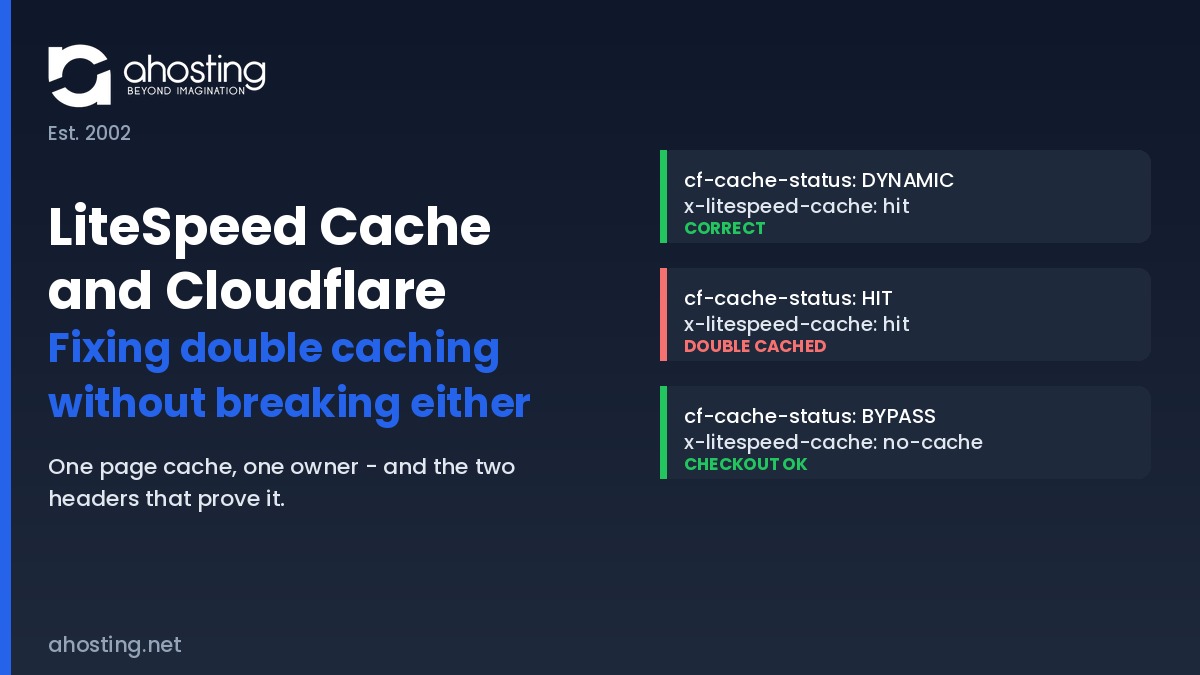
    Diagnosing LiteSpeed Cache and Cloudflare takes one command and two headers. The cf-cache-status header reports what Cloudflare did, and x-litespeed-cache reports what the origin did. Reading either alone is exactly why double caching survives so long undetected — each header, on its own, looks perfectly healthy.

    Interestingly, the standards world has already formalized this problem. RFC 9211 Cache-Status field defines a single header in which every cache in a chain appends its own entry, ordered from the cache closest to the origin outward to the one closest to the user, specifically so an entire chain can be debugged at once. Neither product emits it yet, so the two-header read below remains the practical method.

    The LiteSpeed Cache and Cloudflare Verdict Table

    cf-cache-statusx-litespeed-cacheVerdictWhat to do
    DYNAMIChitCorrect — recommended shapeNone. This is the target state.
    DYNAMICmissCorrect, cache coldWarm it with the crawler, then re-test.
    HIThitDouble cachedTwo stored copies. Disable edge HTML caching.
    HIT(header absent)Double cached, origin maskedEdge is answering; origin health is unknown.
    BYPASSno-cacheCorrect for cart and checkoutNone. Confirm it stays this way.
    MISShitEdge caching HTML, coldDuplicate forming. Review your Cache Rules.
    DYNAMIC(header absent)Nothing is cachingLSCache inactive or excluded. Check the plugin.
    The AHosting Double-Cache Verdict Table — seven header combinations and what each one means.

    Similarly, one detail trips people up during testing. A logged-in administrator is excluded from caching on both layers by design, so a browser check while signed in reports the uncached path and tells you nothing. Test in a private window, or against the command line, and always bypass your own edge with a cache-busting query string when you want to confirm what the origin is really doing — the same technique described in whether a CDN fixes high TTFB or merely hides it.

    Why the Cache Warming Crawler Starts Blacklisting Pages

    One symptom deserves its own section because it is so widely misdiagnosed. After edge HTML caching is enabled, the LiteSpeed crawler begins marking large numbers of URLs as uncacheable, and site owners reasonably conclude the crawler is broken. It is not.

    By contrast, the crawler is doing exactly what it was built to do — against the wrong layer. Under the documented crawler blacklist conditions, a URI is blacklisted when the response carries a no-cache directive in the x-litespeed-cache-control header, or when the status is not a 200 or 201. When the edge answers first, the crawler never reaches the origin, so it records a verdict about a response the origin never sent. Operators who bypass the edge in development mode watch the identical crawler run cleanly, which is the tell.

    In fact this matters more than a cosmetic list. A crawler that cannot warm the origin cache leaves real visitors generating uncached page builds, and those consume PHP workers — the mechanism behind how cached pages raise your concurrency ceiling. A configuration error at the edge becomes a capacity problem at the origin.

    What the LiteSpeed Conflict Warning Is Actually Telling You

    The warning that starts most of these investigations reads as a recommendation to disable the Cloudflare plugin, and taken literally it is too broad. Running LiteSpeed Cache and Cloudflare side by side is not the problem, and the plugin itself is harmless. What the message is guarding against is the page-cache duplication that the plugin makes available, since the official plugin is the supported route to Automatic Platform Optimization outside enterprise plans.

    For example, LiteSpeed states the underlying rule plainly in its LiteSpeed Cache general settings documentation: when using the plugin alongside other optimization solutions you must not duplicate functions, and because Automatic Platform Optimization is itself a page cache, it has to be off for the LiteSpeed page cache to work correctly. Read that way, the notice is not a verdict on Cloudflare at all. It is a warning about owning HTML twice.

    As such, the correct response depends on which layer you chose. Keeping HTML at the origin means the plugin is simply unnecessary and the notice can be dismissed. Choosing the edge instead means keeping the plugin and disabling the overlapping origin features, including Guest Mode. Either path is coherent. Running both page caches is the only genuine error, and it is also the configuration people arrive at by accident. Where hostile traffic is the real driver for edge features, filtering hostile traffic at the edge is a better reason to sit behind Cloudflare than caching ever was.

    First-Hand: What LiteSpeed Cache and Cloudflare Look Like in Production

    Across AHosting accounts pairing LiteSpeed Cache and Cloudflare, one pattern recurs. An internal review of a production WordPress server found LSCache installed on fourteen of roughly one hundred and twenty WordPress accounts — and not one of those fourteen carried a custom plugin configuration file. That detail is more interesting than it first appears.

    Consequently it confirms something the documentation implies but rarely states: on a LiteSpeed server the plugin begins full-page caching on activation, with no wizard and no configuration step. Site owners are therefore running a page cache they never consciously configured. When one of them later enables edge HTML caching, believing they are adding caching to a site that has none, they are in fact adding a second one. That is the mechanism behind almost every double-caching report, and it explains why the affected site owner is genuinely surprised.

    Overall, the operational lesson is to establish which layer holds HTML before changing anything, rather than after. This applies equally to standard web hosting accounts and to larger deployments, because the failure is architectural rather than a function of plan size. If you are weighing a plugin-level cache instead, how LSCache compares with plugin-level page caches covers that trade-off.

    LiteSpeed Cache and Cloudflare: correct versus double-cached request paths Two request paths. In the correct path Cloudflare serves static assets and passes HTML to LiteSpeed Cache at the origin. In the double-cached path both Cloudflare and LiteSpeed store HTML, so an origin purge leaves a stale edge copy. One Page Cache vs Two: The Same Stack, Two Outcomes ahosting.net | Est. 2002 CORRECT – HTML owned at the origin Visitor requests a page Cloudflare assets only – HTML passes through LiteSpeed Cache serves stored HTML before PHP runs Publish = instant invalidation -> -> -> Headers: cf-cache-status: DYNAMIC + x-litespeed-cache: hit DOUBLE CACHED – APO or a Cache Rule stores HTML too Visitor requests a page Cloudflare stores HTML copy 1 own expiry timer LiteSpeed Cache stores HTML copy 2 purged on publish Publish = stale page at the edge -> -> -> Headers: cf-cache-status: HIT + x-litespeed-cache: hit

    Diagnose Your Own LiteSpeed Cache and Cloudflare Configuration

    Below, describe what your own LiteSpeed Cache and Cloudflare headers report and the tool returns the verdict from the table above, together with the next action. Run the check in a private window against a public page rather than while signed in.

    Double-Cache Diagnostic

    Read both headers on a public URL, then match them here.

    Correct – recommended shape

    Nothing to change. The origin owns HTML and the edge is accelerating assets only.

    See the LiteSpeed stack behind this setup

    A Practical Checklist for LiteSpeed Cache and Cloudflare

    Work through these in order to bring LiteSpeed Cache and Cloudflare into a single-owner configuration. Each step is verifiable, and the sequence matters because a later check is meaningless if an earlier one has not been settled.

    • Decide which single layer owns HTML, and write the decision down before changing any setting.
    • Confirm Automatic Platform Optimization is off if the origin owns HTML, and that no Cache Rule targets page URLs.
    • Search your Cloudflare configuration for any surviving Cache Everything rule from an older setup.
    • Disable Auto Minify and Polish at the edge if the plugin is already handling minification and WebP conversion.
    • Leave the plugin CDN mapping option off, since Cloudflare is a distributed proxy rather than a reverse-proxy CDN.
    • Enter a scoped Cloudflare API token in the plugin CDN screen so an origin purge propagates outward automatically.
    • Verify cart, checkout, account and login URLs return a bypass verdict on both layers.
    • Run the crawler and confirm the blacklist stays empty rather than filling with ordinary pages.
    • Re-test both headers in a private window, and repeat the check after the next content update.

    Finally, treat the header check as a recurring task rather than a one-time fix. Edge configurations drift as features are trialled and forgotten, and a stale page is the kind of defect nobody reports because it never looks like an error.

    Frequently Asked Questions About LiteSpeed Cache and Cloudflare

    Do LiteSpeed Cache and Cloudflare conflict with each other in 2026?

    Typically they do not. In a default configuration Cloudflare caches only static assets and leaves HTML to your origin, so LiteSpeed Cache keeps sole ownership of the page cache and nothing is stored twice. The conflict appears only after you opt into HTML caching at the edge, through Automatic Platform Optimization, a Cache Rule, or the retired Cache Everything page rule. The plugin warning many site owners see is a precaution about that opt-in, not evidence that the two products are incompatible. Which specific settings collide is set out in the AHosting Cache Layer Ownership Matrix earlier in this guide.

    Does Cloudflare do caching by default, or must you enable it yourself?

    Specifically, Cloudflare caches static content automatically and dynamic content only on request. Images, CSS and JavaScript are cacheable the moment your domain is proxied, while HTML pages are excluded until you add a Cache Rule or enable Automatic Platform Optimization. Cloudflare also declines to cache any response carrying a Set-Cookie header, a private or no-store directive, or a request method other than GET. That default is the reason a freshly proxied WordPress site behind LiteSpeed rarely shows double caching until somebody changes it deliberately.

    Cloudflare APO vs LiteSpeed Cache: which page cache should own HTML in 2026?

    Ultimately only one of them can, and LiteSpeed’s own documentation is unambiguous that Automatic Platform Optimization must be switched off when the LiteSpeed Cache page cache is in use, because both are page caches and their functions must not be duplicated. On a LiteSpeed server the practical answer is to keep HTML at the origin: LiteSpeed Cache already serves cached pages before PHP executes, and it understands WordPress publish events, so it invalidates precisely. Automatic Platform Optimization makes more sense on stacks with no server-level page cache to begin with.

    Cloudflare edge cache vs LiteSpeed server cache: which header shows what served the page?

    In practice you read two headers together. The cf-cache-status header reports what Cloudflare did, where HIT means the edge answered and DYNAMIC means the URL was never eligible for edge caching at all. The x-litespeed-cache header reports what the origin did, where hit means LiteSpeed served a stored page. Reading either one alone is what makes double caching so easy to miss. The full combination table, including the two states that indicate genuine trouble, appears in the verdict table above.

    How does AHosting run LiteSpeed Cache and Cloudflare together without double caching?

    Notably the rule is one page cache, one owner. AHosting runs LiteSpeed Web Server with LSCache holding the HTML layer and leaves Cloudflare on its default behavior, where the edge accelerates static assets and passes HTML through. Because LSCache integrates at the server level, cached pages are returned before PHP starts and consume no entry processes at all. Purge order matters just as much as configuration: the origin cache is flushed first, then the edge, and the result is verified before the change is considered done.

    What is the downside of Cloudflare caching on an AHosting LiteSpeed Cache setup?

    Fortunately the downside is narrow and entirely avoidable. Edge HTML caching adds a second layer that WordPress cannot invalidate on its own, so a published edit can clear the origin cache and still be served stale from the edge until its own timer expires. It also hides origin behavior from you, because a page answered at the edge never reveals whether the server cache underneath is healthy. On a stack that already returns cached pages in roughly sixteen milliseconds, the latency won is small next to the staleness risk introduced.

    Should I disable the Cloudflare plugin when LiteSpeed Cache and Cloudflare are both active?

    That said, the warning that prompts this question is broader than the actual conflict. The official Cloudflare plugin is required if you intend to run Automatic Platform Optimization, so removing it is wrong for that setup and right for almost every other one. If you are keeping HTML at the origin, you do not need the plugin at all, and you can instead enter a scoped Cloudflare API token in the LiteSpeed Cache CDN screen so that an origin purge propagates outward automatically.

    Why does the LSCache crawler blacklist pages once Cloudflare edge caching is enabled?

    Consequently the crawler is measuring the wrong layer. LiteSpeed blacklists a URI when the response is not cacheable by design, meaning it carries a no-cache directive in the x-litespeed-cache-control header, or when the response status is not a 200 or 201. When Cloudflare answers from its own edge cache, the crawler never reaches the origin, so it records a response that says nothing about the server cache it was sent to warm. Site owners who bypass the edge in development mode see the same crawler run cleanly.

    Does AHosting WordPress hosting support LiteSpeed Cache and Cloudflare on shared plans?

    Indeed both work on every AHosting WordPress plan, and neither requires a support ticket to set up. LSCache installs from the WordPress plugin repository and begins caching immediately because the LiteSpeed server layer is already present, which is why an internal review of one production server found no custom configuration file on any account running it. Cloudflare sits in front independently. The one decision that matters is which of the two owns your HTML, and the matrix above resolves it line by line.

    WooCommerce checkout with LiteSpeed Cache and Cloudflare: what must bypass both caches in 2026?

    Above all, cart, checkout, account and any logged-in session must bypass every caching layer, not merely the one you configured most recently. LiteSpeed Cache excludes these paths natively once WooCommerce is detected, and Cloudflare declines them by default because the responses carry a Set-Cookie header. Introducing an edge HTML rule can override that protection if the rule is written too broadly, which is the single most expensive mistake in this entire configuration. Confirm the exclusion with a header check rather than assuming it.

    August 19, 2026
  • Managed Hosting for Small Business: Is the Premium Worth It? (2026)

    Managed Hosting for Small Business: Is the Premium Worth It? (2026)

    • What “Managed Hosting” Actually Means — Nobody Regulates the Word
      • The Four Questions That Reveal What Is Actually Managed
    • Managed Hosting for Small Business: What You Are Really Buying
      • The AHosting Managed Work Attribution Audit
      • Managed Hosting for Small Business Factor 1: The Ten Rows a Plan Can Transfer
      • Managed Hosting for Small Business Factor 2: The Two Rows Nobody Includes
    • The Break-Even Calculation for Managed Hosting for Small Business
      • Managed Hosting for Small Business Factor 3: The Labor Rate You Are Replacing
      • Managed Hosting for Small Business Factor 4: Downtime Cost and Where It Belongs
    • Where Managed Hosting for Small Business Is Genuinely Worth the Premium
    • Where the Managed Premium Taxes Features You Already Have
    • Managed Traps: Visitor Caps, Plugin Blocklists, No Root, Painful Exit
      • Reading a Plan Before You Sign It
    • A Practical Checklist: Should You Pay the Managed Premium?
    • Frequently Asked Questions About Managed Hosting for Small Business
      • Is managed hosting for small business worth it in 2026 for a standard WordPress site?
      • Managed hosting for small business vs standard shared hosting: what actually differs?
      • Does AHosting sell a managed hosting for small business plan in 2026?
      • What does a plan-level visitor cap actually count, and how do overages usually work?
      • When does managed hosting for small business pay off for a WooCommerce store taking 25 concurrent shoppers?
      • Plugin blocklists vs full plugin freedom: which matters more for a small business site?
      • What is the AHosting Managed Work Attribution Audit and how do I run it on my own plan?
      • Does an AHosting WordPress plan include automatic plugin and theme updates or only core updates?
      • How much should managed hosting for small business cost per month in 2026?
      • How hard is it to leave a managed hosting for small business plan without a cPanel export?
    TL;DR

    Managed hosting for small business is worth its premium only when it transfers work your current plan leaves undone. Audit the twelve capabilities first, then price the remaining hours.

    What “Managed Hosting” Actually Means — Nobody Regulates the Word

    The phrase managed hosting for small business describes a price tier, not a specification. Furthermore, no standards body defines it, no regulator polices it, and no two providers using the word are obliged to include the same things. Consequently, two plans can both be sold as managed while differing by a factor of five in what the provider actually does on your behalf.

    Listen: why “managed” is a price tier rather than a specification, and how to price the premium against the hours it actually removes. By Matt Chrust, Director of Business Development, AHosting.

    Notably, the word does carry a stable meaning in one place. On a bare server, managed means somebody else administers the operating system, the firewall and the stack — work you genuinely cannot skip and probably cannot do. In contrast, on a shared or platform WordPress plan, the operating system is already administered by definition, so the label has to mean something else, and what it means varies by vendor. Therefore the same word carries real weight on virtual private servers and almost none on an entry plan. If your site is at the point where the server itself is the constraint, the honest question is when a WordPress site has genuinely outgrown shared infrastructure, not which label the plan carries.

    The Four Questions That Reveal What Is Actually Managed

    Specifically, four questions separate a managed plan that performs work from one that renames inclusions you already hold. Ask them before price enters the conversation.

    • Which updates are applied without me? Core only, or core plus plugins and themes? The gap between those two answers is most of the labor.
    • Who restores the site when an update breaks it? A backup you must restore yourself is storage, not management.
    • What is metered, and by whose count? Visits, storage and entry processes are measured by the provider, not by your analytics.
    • What leaves with me? A standard cPanel archive is portable. A proprietary export is a rebuild.

    In practice, a provider that answers all four plainly is describing a service. One that answers in adjectives is describing a price. For the wider evaluation this sits inside, our twelve-point checklist for choosing a web hosting provider covers the criteria that apply to any provider.

    Managed Hosting for Small Business: What You Are Really Buying

    Ultimately, a managed plan sells labor transfer across roughly twelve recurring capabilities. Therefore the honest way to value one is to list those capabilities, mark who performs each by default, and mark which your current plan already covers. Whatever remains unmarked is the only thing the premium can possibly buy.

    The AHosting Managed Work Attribution Audit

    Specifically, the audit below scores twelve capabilities on three axes: who performs the work by default, whether a standard AHosting WordPress plan already includes it, and how many owner hours per year the task consumes when nobody else does it. Hours are modeled at the cadence named in the row, not measured, and the calculator further down lets you substitute your own figures.

    #CapabilityWho performs it by defaultStandard AHosting WordPress planOwner hours/year if unassisted
    1Core minor and security releasesWordPress core itselfIncluded — core default behavior0
    2Core major releasesSite ownerIncluded — auto-updates2
    3Plugin and theme updatesSite owner, opt-in per itemIncluded — auto-updates13
    4Rollback after a bad updateSite ownerIncluded — daily backup plus cPanel restore3
    5Daily offsite backupsHostIncluded6
    6Server-level page cachingHostIncluded — LiteSpeed plus LSCache4
    7Staging environmentHostIncluded — WordPress Staging Tool6
    8Malware scanningHostIncluded3
    9Account isolationHostIncluded — CloudLinux CageFS plus LVENot self-serviceable
    10Migration from a previous hostHostIncluded — team-run4 one-time
    11Web application firewallYou, or a pluginNot included4
    12CDN and external uptime monitoringThird partyNot included4
    The AHosting Managed Work Attribution Audit — twelve recurring capabilities scored by who performs the work. Hours are modeled at the cadence stated in each row.

    Managed Hosting for Small Business Factor 1: The Ten Rows a Plan Can Transfer

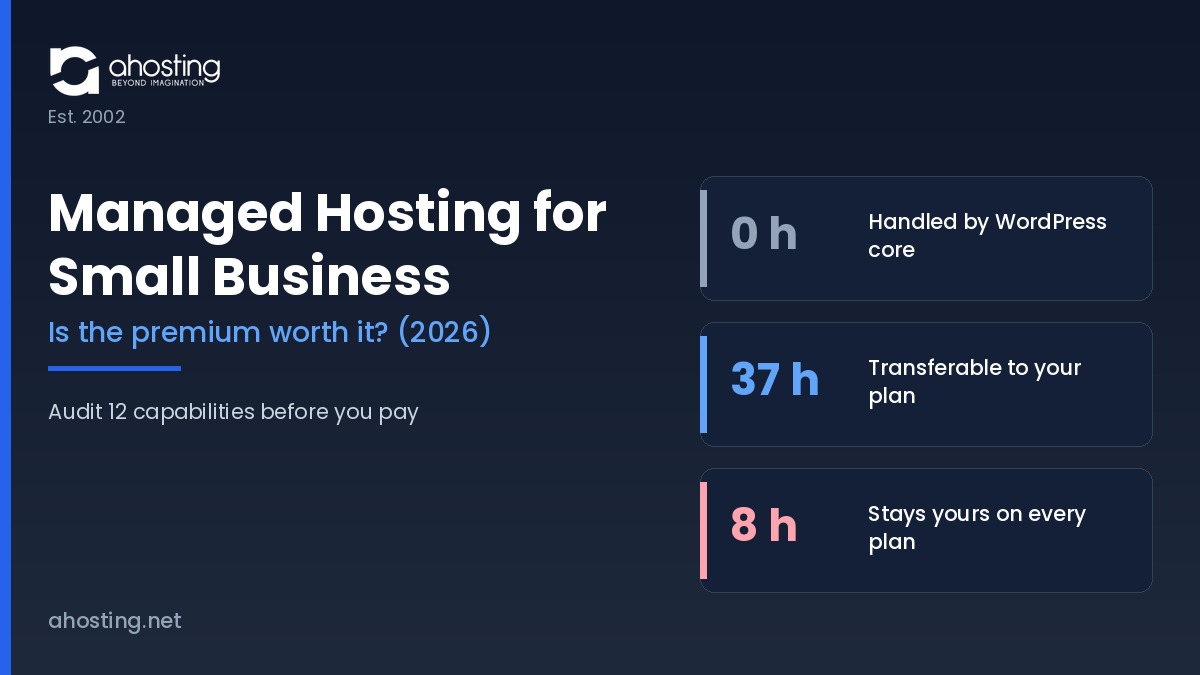
    Notably, rows one through eight total 37 owner hours per year, and every one of them is already included on a standard AHosting plan. Row three alone accounts for thirteen of those hours, which is why it is the row that decides most purchases.

    Furthermore, row one is worth reading twice. WordPress has applied minor and security releases automatically since version 3.7, and per the WordPress Advanced Administration Handbook, installations created since WordPress 5.6 auto-update major core releases too unless a version-control checkout is detected. Plugin and theme auto-updates, by contrast, have been opt-in per item since 5.5. Consequently, a feature list that advertises “automatic updates” without saying which kind is charging for behavior WordPress already ships free. Row seven is similarly worth checking against what a staging environment actually needs from the server underneath it before assuming a staging button implies a safe workflow.

    Managed Hosting for Small Business Factor 2: The Two Rows Nobody Includes

    In contrast, rows eleven and twelve total 8 owner hours per year and are absent from the standard plan — and, in the general case, from most plans sold under the managed label. Therefore those hours stay yours no matter what you pay, which sets a hard ceiling on what any premium can buy back.

    That ceiling matters more than it first appears. Specifically, if your current plan already covers rows one through ten, a managed upgrade transfers zero recurring hours, and the break-even calculation below returns a negative number at any price. The audit column above is scored against a standard AHosting WordPress plan, but the exercise is worth running against whichever plan you currently hold.

    Managed Hosting for Small Business: Where the Maintenance Hours Go Three bands showing annual owner hours by who performs the work. WordPress core handles minor and security releases at zero owner hours. A standard plan can transfer 37 hours across seven capabilities. Eight hours for firewall, CDN and external uptime monitoring stay with the owner on every plan. Where the Maintenance Hours Actually Go Annual owner hours by who performs the work — 12 capabilities audited Handled by WordPress core Minor and security releases, automatic since 3.7 No plan tier changes this. Row 1 of the audit. 0 h Transferable to the hosting plan Major core, plugin and theme updates, rollback, backups, caching, staging, malware scanning — rows 2 to 8 Already included on a standard AHosting WordPress plan 37 h Stays yours on every plan Web application firewall, CDN, external uptime monitoring 8 h AHosting Managed Work Attribution Audit — ahosting.net

    The Break-Even Calculation for Managed Hosting for Small Business

    Specifically, the premium is worth paying when the annual premium is smaller than the unclaimed hours multiplied by your hourly rate, plus the downtime cost it credibly avoids. Unclaimed hours means the 37 transferable hours minus whatever your current plan already covers. Consequently the arithmetic collapses fast: cover all 37 already, and no premium clears the bar.

    Managed Hosting for Small Business Factor 3: The Labor Rate You Are Replacing

    In practice, most published comparisons value the owner’s time at nothing, which is why they conclude the premium always pays. Therefore anchor the rate to something verifiable. The Bureau of Labor Statistics Occupational Employment and Wage Statistics table for May 2025 publishes median hourly wages for the three occupations that actually perform this work.

    Occupation (BLS, May 2025)Median hourly wageAnnual value of 37 transferred hoursWhy this rate applies
    Computer user support specialists$29.74$1,100.38Routine update and restore work
    Web developers$44.54$1,647.98The closest match for WordPress maintenance
    Network and computer systems administrators$47.66$1,763.42Server-side and security work
    Annual value of the 37 transferable hours at each published median wage. Source: Bureau of Labor Statistics Occupational Employment and Wage Statistics, May 2025.

    Therefore the transferred work is worth roughly $1,100 to $1,763 a year depending on whose time it displaces, with $1,647.98 as the midpoint at the web-developer median. Additionally, the Occupational Outlook Handbook entry for web developers records employment in that occupation growing faster than the average through 2034, so the rate is not about to soften. For context on how the plan side of that equation is priced, see how introductory hosting rates step up to standard renewal rates.

    Above all, note what this does not say. It does not say the premium is never worth it — it says the premium must be measured against the hours it genuinely removes, and that most buyers never subtract the hours their existing plan already covers. Ultimately that subtraction is the whole calculation.

    Managed Hosting for Small Business Factor 4: Downtime Cost and Where It Belongs

    In contrast to labor, downtime cost is a probability, not a line item. Consequently it belongs in the calculation as revenue per hour multiplied by expected outage hours multiplied by the share of those hours a managed plan would credibly have prevented — and that last term is the one providers never quantify.

    Notably, patch latency is where the term is least speculative. NIST Special Publication 800-40 Revision 4 frames patching as preventive maintenance and a routine cost of doing business rather than a discretionary security project. Similarly, OWASP category A06, Vulnerable and Outdated Components notes that treating patching as a monthly or quarterly task leaves systems exposed for days or months after a fix already exists. Therefore a plan that closes that window faster than you would has a real, if unglamorous, claim on the downtime term. Verify the claim rather than accepting it — our guide to how to verify an uptime and support claim independently covers the method.

    Managed Premium Break-Even Calculator

    Set your hourly rate, how many of the 37 transferable hours your current plan already covers, and the monthly premium you are being asked to pay.

    Unclaimed hours the premium could transfer

    37 hours per year

    Annual value of those hours at your rate

    $1,647.98

    Annual premium

    $300.00

    Labor alone clears the premium by $1,347.98 per year.

    See what a standard plan already includes

    Where Managed Hosting for Small Business Is Genuinely Worth the Premium

    Notably, three situations move the calculation decisively into the premium’s favor, and all three share a feature: the downtime term stops being speculative.

    • Transactional stores. A store with real revenue per hour makes the downtime term concrete rather than theoretical, and cart and checkout pages cannot be cached, so they consume PHP capacity on every request. Our WooCommerce-tuned plans exist for exactly that load profile.
    • Membership and course sites. Logged-in traffic bypasses page caching by design, so the resource question and the management question arrive together.
    • No in-house technical staff at all. If nobody will notice a failed update for a week, the hours in the audit are not hours you would have spent — they are hours nobody will spend, and the cost surfaces later as a compromised site.

    Additionally, agencies carrying client sites sit in a fourth category, where the argument is isolation and provisioning rather than labor. Specifically, one broken client should not reach another, which is a control-panel and account-boundary question that reseller plans built for client work answer directly.

    Where the Managed Premium Taxes Features You Already Have

    In contrast, the premium is dead weight when the plan you already hold covers rows one through ten. Specifically, a shared account running LiteSpeed with server-level caching, automatic core, theme and plugin updates, daily offsite backups with a one-click restore, a staging clone and account isolation has already transferred every hour a managed plan could transfer.

    Furthermore, one first-hand figure from our own support queue makes the point concretely. Roughly 20% of AHosting’s overall ticket volume is customers asking us to perform managed-type work — run an update, restore a backup, clear a malware flag — on plans that carry no managed label and no managed premium. Therefore the work is already being done; what a managed tier frequently sells is the framing.

    Ultimately the trap is definitional. A buyer compares a $9.79 plan against a $35 managed plan, sees a longer feature list on the expensive one, and never checks whether the extra bullets are new capabilities or renamed inclusions. Consequently the audit table above is worth ten minutes before any upgrade, including sites that are not on WordPress at all and belong on general web hosting instead.

    Managed Traps: Visitor Caps, Plugin Blocklists, No Root, Painful Exit

    Specifically, four terms account for most managed-plan regret, and none of them appear on a feature comparison table. Read all four before signing.

    • Plan-level visitor caps. The metered figure is defined by the provider and frequently counts bots, monitors and preview traffic, so it routinely exceeds your analytics figure. Consequently, the overage schedule matters more than the cap itself.
    • Plugin blocklists. Banned plugins are usually banned for defensible performance reasons, but that is cold comfort when the banned plugin is the one running your bookings.
    • No root and no shell. Reasonable on a shared tier, restrictive on a platform charging server-tier prices. Notably, it also constrains which diagnostic steps a support agent can hand you.
    • Exit format. A standard cPanel archive transfers cleanly. A proprietary export becomes a scoped rebuild on the receiving side.

    Reading a Plan Before You Sign It

    In practice, every one of those four sits in the terms of service or the knowledge base rather than the sales page. Therefore search the provider’s documentation for the words overage, disallowed, prohibited plugins and backup format before the trial ends, because all four convert from footnotes into constraints at exactly the wrong moment.

    A Practical Checklist: Should You Pay the Managed Premium?

    Ultimately the decision reduces to six checks, in order. Work through them against a specific plan rather than against the category.

    • Mark the twelve audit rows your current plan already covers. Whatever remains is the only thing the premium can buy.
    • Multiply the unclaimed hours by a defensible hourly rate rather than by zero.
    • Add the downtime term only where revenue per hour is real and the provider will state its patch cadence.
    • Confirm the metered visitor definition and the overage schedule in writing.
    • Check the plugin blocklist against your actual active plugin list, not against a hypothetical one.
    • Confirm the export format before you sign, not when you leave.

    Consequently, most small business sites on a well-configured shared account discover the premium buys back nothing they do not already hold. Furthermore, the ones that genuinely need it — stores, membership sites and teams with nobody watching — usually discover they need capacity as much as management, which is a different purchase with a different upgrade path.

    Frequently Asked Questions About Managed Hosting for Small Business

    Is managed hosting for small business worth it in 2026 for a standard WordPress site?

    Typically, no — not if the plan you already hold includes automatic updates, daily backups, server-level caching, staging and malware scanning. Specifically, the managed premium only buys back hours your current plan leaves on your desk. Run the Managed Work Attribution Audit in this guide against your own plan first; the row that decides it is usually plugin and theme updates.

    Managed hosting for small business vs standard shared hosting: what actually differs?

    Specifically, the difference is who performs seven recurring maintenance tasks, not what the server hardware is. In practice, a well-configured shared account and a managed plan can transfer an identical set of tasks, in which case the premium buys nothing but the label. The audit table in this guide scores all twelve capabilities side by side.

    Does AHosting sell a managed hosting for small business plan in 2026?

    Notably, AHosting does not sell a plan under the managed label. Instead, every WordPress plan already ships automatic updates, a staging tool, daily offsite backups, LiteSpeed with LSCache, a malware scanner and CloudLinux CageFS isolation as standard inclusions rather than as a priced tier.

    What does a plan-level visitor cap actually count, and how do overages usually work?

    In practice, a visitor cap counts billable visits, which is a metered figure defined by the provider rather than a figure from your analytics. Furthermore, bots, uptime monitors and preview traffic are frequently counted, so the metered number commonly exceeds the number you see reported in your own dashboard. Consequently, the cap is the single term most worth reading before signing.

    When does managed hosting for small business pay off for a WooCommerce store taking 25 concurrent shoppers?

    Ultimately, it pays off when the store carries revenue per hour high enough that avoided downtime alone clears the premium. Additionally, a store at twenty-five concurrent uncached shoppers needs roughly twenty-five PHP entry processes, which is a resource question rather than a management question. Therefore, size the concurrency first and price the management second.

    Plugin blocklists vs full plugin freedom: which matters more for a small business site?

    Specifically, a blocklist matters most when the plugin it bans is one your site already depends on. In contrast, full freedom matters most when your stack is unusual or when a client dictates the plugin set. Above all, check the blocklist against your active plugin list before migrating, because discovering the conflict afterwards is what turns a switch into a rebuild.

    What is the AHosting Managed Work Attribution Audit and how do I run it on my own plan?

    Specifically, the AHosting Managed Work Attribution Audit scores twelve recurring maintenance capabilities by who performs the work by default and whether a standard plan already includes it. In practice, you run it by opening your own plan's feature list and marking each of the twelve rows included or not included. Notably, the two rows almost nobody includes are the ones that decide whether the premium can pay for itself at all.

    Does an AHosting WordPress plan include automatic plugin and theme updates or only core updates?

    Notably, AHosting WordPress plans apply core, theme and plugin updates automatically, which matters because WordPress itself only auto-applies core releases by default. Furthermore, plugin and theme auto-updates have been opt-in per item since WordPress 5.5, so this is the row where hosts genuinely differ from stock WordPress behavior.

    How much should managed hosting for small business cost per month in 2026?

    In practice, the honest answer is that the figure is meaningless without the audit, because two plans at the same price can transfer wildly different amounts of work. Therefore, price the premium against the hours it removes rather than against another provider's headline rate. Above all, compare the renewal rate rather than the introductory rate.

    How hard is it to leave a managed hosting for small business plan without a cPanel export?

    Specifically, difficulty depends entirely on whether the platform emits a standard cPanel-format archive. In contrast, a proprietary export forces a file-and-database rebuild on the receiving host, which converts a routine transfer into a scoped migration project. Consequently, exit format belongs on the pre-purchase checklist, not the cancellation checklist.

    August 17, 2026
  • Server Location and Website Speed: What Distance Actually Costs (2026)

    Server Location and Website Speed: What Distance Actually Costs (2026)

    • What Server Location and Website Speed Actually Measures
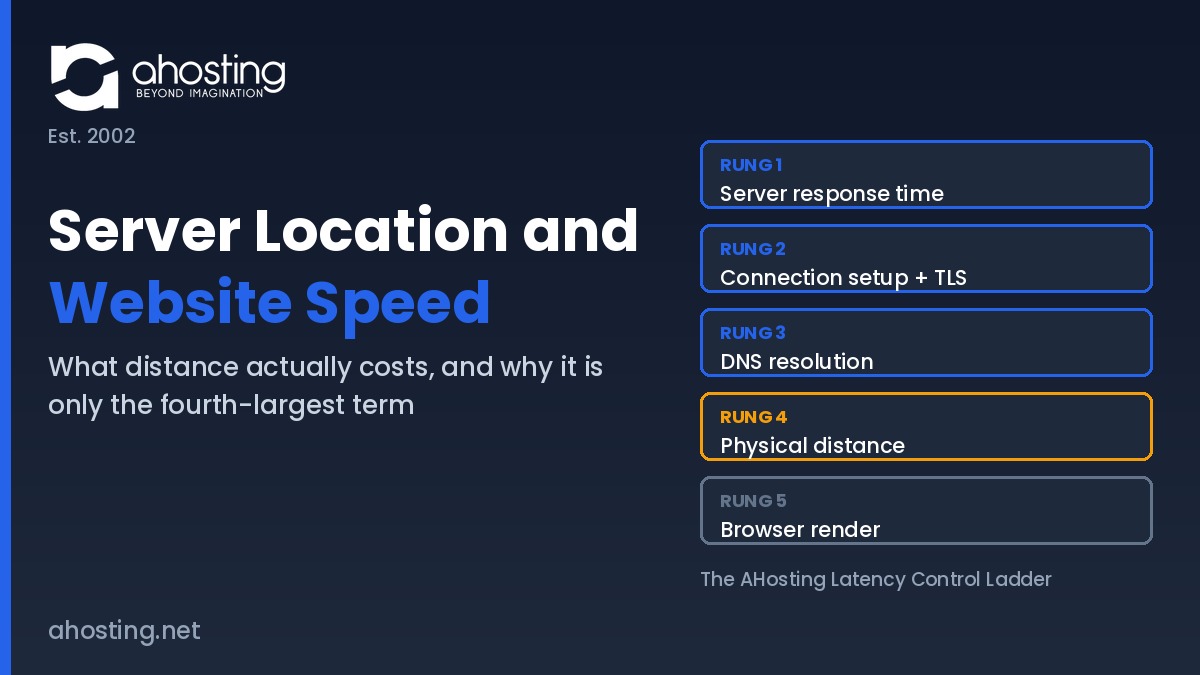
    • The Five Terms Between a Click and a Painted Page
      • Term One: Server Response Time
      • Term Two: Connection Setup and TLS
      • Term Three: DNS Resolution
      • Term Four: Physical Distance
      • Term Five: Browser Render
    • The AHosting Latency Control Ladder
    • Why Distance Sits Fourth in Server Location and Website Speed
    • Peering Quality vs Raw Proximity: The Server Location Trade-off
    • When Server Location and Website Speed Genuinely Matter
      • Data Residency and Jurisdiction
      • Real-Time and Interactive Workloads
      • Audiences Outside Practical Delivery Reach
    • What a Delivery Network Fixes and What It Leaves Untouched
    • Where the AHosting Network Actually Sits
    • A Practical Checklist: Is Server Location Your Website Speed Problem?
    • Conclusion: Buy the Terms You Can Move
    • Frequently Asked Questions About Server Location and Website Speed
      • How much does server location and website speed actually matter in 2026?
      • Server location and website speed vs server hardware: which matters more?
      • What is the physics ceiling on server location and website speed gains?
      • Should a WooCommerce store with logged-in checkout traffic pick a closer AHosting server?
      • Does a CDN fix server location and website speed for dynamic pages?
      • How does AHosting's Southfield data center reduce network hops for Midwest visitors?
      • When does server location and website speed matter for real-time apps in 2026?
      • Can I choose an AHosting server location to improve website speed?
      • Server location vs page weight: which slows a site down more in 2026?
      • What should I ask a host about server location and website speed?
    TL;DR

    Server location and website speed are linked, but distance is only the fourth-largest term in page latency. Fiber physics caps the gain near ten milliseconds per thousand kilometers.

    Every hosting comparison page tells you the same thing about server location and website speed: closer is faster, so buy closer. Notably, that advice is true and almost useless, because it never says how much closer buys how much faster. Distance is a real cost with a hard physical ceiling, and that ceiling turns out to be small next to the other things a hosting purchase can change.

    Listen: why physical distance is the fourth-largest term in page latency and what that means when choosing a host. By Matt Chrust, Director of Business Development, AHosting.

    This guide prices the distance term honestly. Specifically, it breaks server location and website speed into the five things that happen between a click and a painted page, ranks them by how much your choice of host actually moves each one, and shows where geography genuinely decides the outcome. For the server-side terms that sit above distance, the companion guide to the seven server-side speed factors no plugin can fix goes deeper.

    What Server Location and Website Speed Actually Measures

    Server location describes one coordinate: the building your origin server sits in. Website speed describes a sequence of events that begins when a visitor clicks and ends when the page is usable. Consequently the two are related through exactly one mechanism, which is the time a signal spends traveling between the visitor and that building.

    That travel time is measured as round-trip time, the interval for a packet to reach the destination and for the acknowledgment to come back. Mozilla documents network latency the same way, as a round-trip delay rather than a one-way figure. In practice the distinction matters because a page load is not one trip. Furthermore, a browser opens a connection, negotiates encryption, requests a document, then requests everything the document references.

    Therefore the honest version of the question is not whether distance costs time. Distance always costs time. The useful question is how that cost compares with the other four terms, and whether changing hosting company moves it at all. Ultimately, server location and website speed is a question about one term out of five rather than about the whole page.

    The Five Terms Between a Click and a Painted Page

    Ultimately every millisecond a visitor waits belongs to one of five buckets. Similarly to a budget, the buckets are not equal in size and are not equally under your control.

    Term One: Server Response Time

    Server response time covers everything that happens after the request arrives and before the first byte leaves. Specifically that means the web server, the PHP process, the database, and whatever cache layer sits in front of them. On a cached page this term collapses toward the low tens of milliseconds; on an uncached WordPress page it routinely runs into the high hundreds.

    Notably this is the term with the widest spread, which makes it the term a hosting decision moves most. A server-level cache such as LiteSpeed with LSCache answers below the PHP layer entirely, and adequate worker allocation stops requests queueing behind each other. Managed WordPress hosting plans differ from one another here by an order of magnitude more than they differ by geography.

    Term Two: Connection Setup and TLS

    Before any content moves, the browser and server perform a transport handshake and then a security handshake. Additionally each of those handshakes costs at least one full round trip, which means the distance term is multiplied here rather than merely added.

    Fortunately protocol choices cut the multiplier. TLS 1.3 completes a full handshake in one round trip instead of two and supports a zero round-trip resumption mode for returning visitors. Modern HTTP versions reduce the number of connections needed in the first place. Interestingly, all of that is server configuration rather than server placement, so it is bought from a host without moving anything.

    Term Three: DNS Resolution

    Before the browser can open a connection it must turn the hostname into an address. Typically that lookup walks a hierarchy that starts at the DNS root zone, continues to the top-level domain servers, and ends at your authoritative nameservers. Each step is its own round trip when nothing is cached.

    However this term is usually invisible, because resolvers cache aggressively and most visitors never perform the full walk. In contrast the first visit of the day from a cold resolver pays the whole sequence. Moreover, DNS is normally supplied by a separate vendor, so changing hosting company often does not change this term at all.

    Term Four: Physical Distance

    Physical distance is the propagation delay of the signal itself, and it is the only term in the list that no software can negotiate away. Light in vacuum moves at a defined 299,792,458 meters per second, and it moves roughly thirty percent slower through the silica core of single-mode fiber. Consequently a signal covers something close to two hundred kilometers per millisecond in one direction.

    In other words a thousand kilometers of fiber path costs about ten milliseconds of round-trip time. That figure is a floor rather than a forecast, because real fiber routes bend around geography and because every router along the way adds its own small delay. Even so, the arithmetic sets a ceiling on what relocating a server can ever return.

    Term Five: Browser Render

    Finally the browser has to parse, style, script and paint what it received. Above all this term is governed by page weight, third-party scripts, font loading and the visitor device, none of which a hosting company supplies. Indeed a single oversized hero image can cost more than an entire transatlantic round trip.

    As such the render term belongs on the list for honesty rather than for shopping. Overall it is often the largest number on a slow page and the one least affected by which company invoices you.

    The AHosting Latency Control Ladder

    Together the five terms form a ladder, and the rungs are ordered by a single question: does changing hosting company move this? Notably that ordering is different from the usual diagnostic ordering, which ranks terms by size. In practice the ladder below is the shortest honest answer to how server location and website speed relate. For a buyer comparing providers, size matters less than leverage.

    RungLatency termWhat sets itDoes changing host move it?Practical ceiling on the gain
    1Server response timeCache layer, PHP handler, database, worker allocationDecisivelyHundreds of milliseconds on an uncached page
    2Connection setup and TLSTLS version, HTTP version, session resumption, certificate chainYes, by configurationOne round trip per new connection
    3DNS resolutionDNS vendor, record TTL, number of lookups, anycast footprintRarely, DNS is usually a separate vendorOne to several round trips on a cold lookup
    4Physical distanceFiber path length and route quality between visitor and originOnly if the host offers a placement choiceAbout ten milliseconds per thousand kilometers
    5Browser renderPage weight, scripts, fonts, visitor deviceEssentially neverUnbounded, but no hosting plan changes it
    The AHosting Latency Control Ladder: the five terms in page latency ranked by how much a hosting purchase moves each one. Physical distance sits fourth.

    Reading the ladder downward is the whole argument. Specifically, the two rungs a host controls outright sit above the rung geography controls, and the rung nobody controls sits at the bottom. Therefore a buyer who optimizes for the map before the stack has spent the decision on the fourth-largest lever.

    Why Distance Sits Fourth in Server Location and Website Speed

    Distance sits fourth because its ceiling is fixed and modest while the ceiling above it is neither. Consider a concrete comparison. Moving an origin from the West Coast to the Midwest shortens the path by roughly three thousand kilometers, which returns something in the region of thirty milliseconds of round-trip time.

    Now consider the same site with no server-level cache. In that state the origin can spend several hundred milliseconds assembling each page before a single byte moves, and our own measurements put uncached WordPress responses in a seven hundred to fourteen hundred millisecond range against roughly sixteen milliseconds when the cache answers. Consequently the cache decision is worth an order of magnitude more than the geography decision on the same site.

    Furthermore the distance gain is bounded on both ends. In contrast to a cache, which can eliminate most of its term, relocation can never take propagation below the physical minimum for the remaining distance. Anyone still carrying a diagnostic question about which term dominates their own site should work through how to tell whether high TTFB is the server or the plugins before shopping for a new city.

    That said, none of this makes distance irrelevant. Ultimately it makes distance a tiebreaker that becomes decisive once the terms above it are already handled, which is precisely the situation of a well-tuned site chasing its last hundred milliseconds.

    Peering Quality vs Raw Proximity: The Server Location Trade-off

    Raw distance on a map is not the distance a packet travels. Interestingly, two servers the same number of kilometers from a visitor can differ substantially in round-trip time, because the packet follows the network topology rather than the terrain.

    Specifically, a network that hands traffic to its upstream carriers inside its own building puts a visitor closer, in time, than a network that must haul every packet to another metro before it reaches a carrier at all. AHosting’s Southfield facility also houses the Detroit Internet Exchange, and several of its upstream carriers take handoff on site rather than in Chicago or Ashburn. Consequently a regional visitor crosses fewer networks to arrive.

    One customer story makes the point better than a diagram. A metro Detroit auto parts supplier moved off a Seattle provider onto a Detroit dedicated server with the same application, the same database and the same code. Their measured end-user latency fell by more than forty percent, and the only variable that changed was the network path. The full infrastructure story sits in our guide to the Detroit dedicated server and the DET-iX advantage.

    Therefore the server location and website speed question is not only which city. Moreover it is which carriers the network uses and where each of them takes the handoff, because that pair of answers describes the route your traffic genuinely takes.

    When Server Location and Website Speed Genuinely Matter

    Three situations flip the ranking, and in each of them geography stops being a tiebreaker and starts being the decision. Notably none of the three is about a general audience reading an article.

    Data Residency and Jurisdiction

    Sometimes the requirement is legal rather than technical. Specifically, contracts, sector regulation and regional privacy law can require that personal data rests inside a defined territory, and in that case the location of the server is a compliance fact rather than a performance tuning knob.

    Accordingly the speed argument becomes secondary. Ultimately no amount of caching satisfies a residency clause, so the placement decision gets made first and the performance work happens inside whatever territory the contract allows.

    Real-Time and Interactive Workloads

    Interactive applications pay the distance cost repeatedly rather than once. In particular, collaborative editors, live dashboards, chat features and payment flows perform many sequential round trips inside a single user action, so a modest per-trip floor compounds into a visible delay.

    Consequently a twenty millisecond round trip becomes two hundred milliseconds across ten exchanges, and the user perceives the total rather than the unit. Applications of that shape usually belong on VPS hosting or better, placed deliberately near the people using them.

    Audiences Outside Practical Delivery Reach

    Edge networks are dense in some regions and thin in others. For example, a visitor in a market with few nearby edge locations effectively talks to the origin for everything, which returns the full distance term on every request rather than only on dynamic ones.

    In that situation origin placement is the only lever left. Similarly, an audience concentrated in one distant region makes a second origin a more honest answer than a delivery network that does not reach them well.

    What a Delivery Network Fixes and What It Leaves Untouched

    A content delivery network is usually offered as the answer to the distance problem, and it solves exactly half of it. Specifically, it caches copies of your static files at locations near visitors so those files stop traveling from the origin. Notably it does nothing of the kind for content that has to be generated per visitor.

    Request typeServed fromDistance term applies?What actually reduces it
    Images, CSS, JavaScript, fontsNearby edge cache after first fetchNo, after the cache fillsAny delivery network
    Anonymous cached HTML pageEdge or server-level cacheNo, on a cache hitServer-level caching, edge HTML caching
    Logged-in page or dashboardOrigin server, every timeYes, in fullFaster origin, closer origin
    Cart, checkout, account pagesOrigin server, every timeYes, and multiplied by request countFaster origin, closer origin
    Search results and filtered listingsOrigin server, usually uncachedYes, in fullQuery tuning, object cache, closer origin
    Where a delivery network removes the distance term and where it does not. Every uncached row travels the full path in both directions.

    Therefore the practical reading is that a delivery network protects anonymous readers and leaves signed-in users exposed. Stores feel this most sharply, because the pages that convert are precisely the pages that cannot be cached. Notably this is where server location and website speed stops being theoretical and starts costing revenue. Anyone running one should read where the seconds actually go in a slow WooCommerce checkout alongside this guide, and treat WooCommerce hosting as an origin-speed decision rather than an edge decision.

    Where the AHosting Network Actually Sits

    Transparency about the path is more useful than a marketing claim about the city, so here is ours. AHosting runs its flagship Tier III facility in Southfield, Michigan, an eighty thousand square foot building that also hosts the Detroit Internet Exchange, alongside additional strategic locations across the EU. Details of the Michigan data center including the full carrier list are published rather than described.

    Notably the carrier list is the part worth reading. The network buys transit from ten upstream providers, and the handoff point differs by carrier: several take traffic on site in Southfield, others in Chicago, and one in Ashburn. Additionally the facility reaches three peering fabrics, one of them inside the same building. Consequently the effective distance from a visitor depends on which carrier carries them, not only on where the rack is.

    Compliance context follows the same building. Specifically the facility carries SOC 2 Type II, SOC 3, HIPAA, PCI-DSS and SSAE-18 attestations, and service availability is covered at 99.9% under our terms of service. For audiences outside North America, ask before purchase rather than assuming placement, since that conversation runs through the sales team.

    The AHosting Latency Control Ladder Five rungs ranked by buyer control: server response time, connection setup and TLS, DNS resolution, physical distance, and browser render. Physical distance sits fourth of five. The AHosting Latency Control Ladder Five terms in page latency, ranked by how much changing hosting company moves each one RUNG 1 Server response time Cache layer, PHP handler, database, workers – moved decisively by the host RUNG 2 Connection setup and TLS TLS 1.3, HTTP version, session resumption – one round trip per new connection RUNG 3 DNS resolution Usually a separate vendor – changing host rarely changes this term RUNG 4 Physical distance Ceiling: about 10 ms of round-trip time per 1,000 km of fiber path SERVER LOCATION RUNG 5 Browser render Page weight, scripts, fonts, visitor device – no hosting plan changes it ahosting.net | Est. 2002 | Distance is real, bounded, and fourth of five

    Where Your Latency Actually Goes

    Pick the three that describe your site. The tool names the rung that dominates and says whether moving the server would change anything.

    Where are most of your visitors?
    What do they mostly load?
    Do you run server-level caching?
    Choose one answer in each rowYour dominant latency term will appear here.
    Compare hosting plans

    A Practical Checklist: Is Server Location Your Website Speed Problem?

    Work down this list in order before concluding that server location and website speed is your bottleneck. Notably each step is cheaper than the one below it, and most sites stop before reaching the geography question.

    • Measure an uncached page first. If time to first byte exceeds several hundred milliseconds, rung one owns the problem and the map is irrelevant.
    • Confirm a server-level cache is active and actually serving. Plugin caching that never reaches the server layer leaves rung one wide open.
    • Check which TLS and HTTP versions your host negotiates. Older versions cost an extra round trip on every new connection.
    • Count third-party domains on the page. Each one adds its own DNS lookup and its own connection setup.
    • Look at where your traffic really comes from before assuming. Analytics by country settles the placement question faster than intuition.
    • Separate cached traffic from logged-in traffic. Only the second group pays the distance term on every request.
    • Ask the provider which carriers it uses and where each hands traffic off. That answer describes the path, unlike a city name.
    • Weigh the page against the path. Trimming a heavy hero image usually beats relocating a server, and costs nothing.

    Conclusion: Buy the Terms You Can Move

    Server location and website speed are genuinely connected, and the connection is smaller and more bounded than the hosting industry likes to admit. Roughly ten milliseconds per thousand kilometers is the whole prize, and it arrives fourth in a list of five.

    Above all, spend the hosting decision on the rungs a hosting decision actually moves. Get the response time and the connection setup right, understand which of your pages can never be cached, and then treat geography as the tiebreaker it is. Finally, when placement does decide the outcome, ask about carriers and handoff points rather than about the city on the invoice.

    Frequently Asked Questions About Server Location and Website Speed

    How much does server location and website speed actually matter in 2026?

    Typically it matters less than buyers expect and less than most hosting pages imply. Fiber propagation costs roughly ten milliseconds of round-trip time per thousand kilometers of path, so a coast-to-coast move buys tens of milliseconds while an uncached page can spend hundreds of milliseconds inside the server itself. The Latency Control Ladder in this guide ranks all five terms by how much a hosting decision moves each one.

    Server location and website speed vs server hardware: which matters more?

    In practice hardware and the software stack running on it dominate, because they govern the term that is measured in hundreds of milliseconds rather than tens. Distance sets a fixed floor that no configuration removes, yet that floor is small next to an uncached database query or a missing cache layer. Consequently the correct sequence is to fix the response time first and treat placement as the tiebreaker.

    What is the physics ceiling on server location and website speed gains?

    Specifically the ceiling is set by the speed of light in glass. Light moves at a defined 299,792,458 meters per second in vacuum and roughly thirty percent slower through the silica core of single-mode fiber, which works out near two hundred kilometers per millisecond one way. Therefore relocating a server two thousand kilometers closer returns about twenty milliseconds of round-trip time at best, before any real routing detour is counted.

    Should a WooCommerce store with logged-in checkout traffic pick a closer AHosting server?

    Indeed proximity earns more on a checkout flow than on a brochure site, because logged-in and cart pages bypass full-page caching and every one of them makes a fresh round trip to the origin. Multiply the round-trip cost by the number of sequential requests a checkout performs and a small per-request number becomes a visible delay. That said, the same multiplication makes server response time the larger prize.

    Does a CDN fix server location and website speed for dynamic pages?

    By contrast with static assets, a content delivery network does very little for dynamic pages. Images, stylesheets and scripts are cached at edge locations near the visitor, whereas a logged-in dashboard, a cart, or a search result is generated by the origin and must travel the full distance in both directions. Accordingly a CDN narrows the gap for anonymous readers and leaves it almost untouched for signed-in users.

    How does AHosting's Southfield data center reduce network hops for Midwest visitors?

    Notably the Southfield building also houses the Detroit Internet Exchange, so regional traffic can hand off inside the same facility instead of being carried to another metro first. Several of the network's upstream carriers take that handoff on site rather than in Chicago or Ashburn. As a result a Michigan or Ontario visitor often crosses fewer networks than they would reaching a server that looks closer on a map.

    When does server location and website speed matter for real-time apps in 2026?

    Above all it matters when the application makes many sequential round trips rather than one. Collaborative editors, live dashboards, chat, multiplayer features and payment flows all pay the distance cost repeatedly within a single user action, so a twenty millisecond floor becomes a two hundred millisecond delay across ten exchanges. Interactive workloads are therefore the clearest case for placing the origin near the audience.

    Can I choose an AHosting server location to improve website speed?

    Ultimately AHosting operates its flagship Tier III facility in Southfield, Michigan and additional strategic locations across the EU, and placement questions are handled by the sales team rather than as a self-service toggle at checkout. Ask before you buy if your audience sits outside North America. The checklist later in this guide lists the exact questions worth asking any provider.

    Server location vs page weight: which slows a site down more in 2026?

    Overall page weight wins by a wide margin on most sites. A single oversized hero image or a blocking third-party script routinely costs more than the entire transatlantic round trip, and unlike distance it can be fixed without moving anything. First and foremost, audit the front end before you audit the map.

    What should I ask a host about server location and website speed?

    Furthermore, go past the city name and ask which carriers the network buys from, where each one hands traffic off, and which internet exchanges the building reaches. Those answers describe the path your packets actually take, whereas a city name describes only the starting point. The practical checklist in this guide turns those questions into a short pre-purchase script.

    August 14, 2026
  • High Traffic Website Hosting: The Specs No Plan Page Prints (2026)

    High Traffic Website Hosting: The Specs No Plan Page Prints (2026)

    • What High Traffic Website Hosting Actually Has to Survive
      • Sustained Load Versus Peak Concurrency
      • Why Monthly Visits Is the Wrong Unit
    • The Four Specs High Traffic Website Hosting Depends On
      • Spec 1: Concurrent PHP Slots
      • Spec 2: Container Memory
      • Spec 3: Disk I/O Throughput and Inode Count
      • Spec 4: Database Server Tier and Location
    • High Traffic Website Hosting Claims, Decoded
    • The Spec Sheet Silence Score
    • How to Verify a High Traffic Website Hosting Claim Before You Pay
      • First Check: Read Your Own Resource Usage Faults
      • Second Check: Confirm the Cache Is Actually Server-Level
      • Third Check: Ask Support Four Questions
    • When the Spec Sheet Says Shared Hosting Is Not Enough
    • What AHosting Publishes and What We Tell You On Request
    • A Practical Checklist for Buying High Traffic Website Hosting
    • Frequently Asked Questions About High Traffic Website Hosting
      • Which specs should a high traffic website hosting plan publish in 2026?
      • Unlimited bandwidth vs entry processes: which spec actually caps high traffic website hosting?
      • How does AHosting size high traffic website hosting plans in 2026?
      • Published specs vs marketing features: which should decide a high traffic hosting purchase?
      • If my store runs flash sales, which high traffic website hosting specs matter most?
      • What is the Spec Sheet Silence Score and how do I calculate it?
      • How much does high traffic website hosting cost compared with an entry plan?
      • How do I get AHosting entry process and memory figures for a specific plan?
      • Does unlimited traffic mean unlimited visitors on a shared hosting plan in 2026?
      • Does AHosting publish container memory and CPU allocation for every shared plan?
    TL;DR

    High traffic website hosting is decided by four specs: concurrent PHP slots, container memory, disk I/O, and database tier. Almost no plan page prints any of them. Ask before you buy.

    Every hosting plan page advertises the same three things: storage in gigabytes, a website count, and traffic described as unlimited. Notably, not one of those numbers tells you whether the plan survives a Monday-morning spike. High traffic website hosting is governed by an entirely different set of specs, and those specs are almost never printed on the page you buy from.

    Why four unpublished specs decide your traffic ceiling. By Matt Chrust, Director of Business Development, AHosting.

    Therefore this guide does what the feature lists do not. Specifically, it decodes what each advertised claim actually governs, names the four specs that set your real ceiling, and shows how to obtain them from any provider before you pay. Furthermore, it states the figures AHosting supplies on request.

    What High Traffic Website Hosting Actually Has to Survive

    High traffic website hosting has to survive concurrency, not volume. Specifically, the count of requests arriving in the same second decides whether a site serves or queues. In contrast, the monthly total decides almost nothing.

    Sustained Load Versus Peak Concurrency

    Two sites can record identical monthly traffic and behave completely differently. For example, an evergreen reference site earns its visits evenly across every hour of every day, while a newsletter-driven store earns most of its visits in the ninety minutes after a send. Consequently, the second site needs several times the headroom for the same monthly figure.

    Above all, the spec that matters is the one measured at the peak, not the average. Furthermore, the peak is where every failure mode lives: queueing, timeouts, and abandoned carts all appear in that window and vanish an hour later. In practice, the arithmetic that converts a peak into a required slot count is covered in our guide to how many concurrent users WordPress shared hosting handles, which this article deliberately does not repeat.

    Why Monthly Visits Is the Wrong Unit

    Monthly visits is the unit buyers bring to the conversation and the unit no server enforces. Indeed, no component anywhere in the stack counts visits per month. Instead, every layer counts simultaneous work in progress.

    That said, the pattern is not unique to PHP hosting. Similarly, general-purpose web servers express their own ceiling as a worker and connection count rather than a traffic total, as the nginx core module documentation sets out. Ultimately every hosting platform draws the same line in the same place, which is precisely why the buyer-facing number and the enforced number so rarely match. Moreover, the mismatch is not limited to WordPress plans; the same applies to any shared hosting account running server-side code.

    The Four Specs High Traffic Website Hosting Depends On

    Four specs set the ceiling on any shared or virtual plan. Notably, all four are enforced by the platform, all four are measurable, and all four are usually absent from the page where the plan is sold.

    Spec 1: Concurrent PHP Slots

    A concurrent PHP slot executes exactly one uncached request at a time. Therefore the slot count is a hard ceiling on simultaneous dynamic work, and requests beyond it queue rather than run.

    On platforms built with CloudLinux the unit is called an entry process, and the CloudLinux resource limits reference documents how the counter behaves, including the important detail that the count is measured differently under LiteSpeed than under Apache. Consequently, a figure quoted without naming the web server is not a comparable figure. For the mechanics of what happens when the ceiling is reached, see our explanation of how many PHP workers a WordPress site actually needs. Additionally, this is the single spec most worth confirming before buying any WordPress-optimized plan.

    Spec 2: Container Memory

    Container memory is the ceiling across every process in your account combined, and it is not the same number as the PHP memory limit. In practice, raising the second one achieves nothing once the first is exhausted.

    The mechanism is standard Linux control-group accounting rather than anything proprietary. Specifically, the systemd resource control documentation describes the same pair of ceilings any modern platform applies: a memory maximum and a task maximum, both enforced by the kernel rather than by the application. As a result, a plan with generous slot counts and a thin memory ceiling will fail earlier than its slot count suggests, because each slot needs memory to do real work.

    Spec 3: Disk I/O Throughput and Inode Count

    Disk I/O throughput caps how fast your account reads and writes; the inode count caps how many files it may hold. Notably, neither is disclosed by any mainstream provider, ourselves included.

    Ultimately this tier is where the industry is quietest, and the silence is worth naming rather than papering over. Furthermore, the two limits fail in opposite ways: an I/O ceiling makes everything slow without producing an error, while an inode ceiling produces sudden and confusing write failures at a size no storage figure predicts. Therefore treat any storage number as a statement about bytes only, and ask about both of these separately.

    Spec 4: Database Server Tier and Location

    The database tier decides how much of a page load happens before any of your PHP code runs. Specifically, a database on a separate host adds a network round trip to every query.

    Interestingly, a plan page that states a database engine version has told you almost nothing useful. In particular, the questions that matter are whether the database runs locally or remotely, whether query concurrency is capped separately from PHP concurrency, and whether an object cache is available to keep repeat queries away from it entirely. Moreover, our breakdown of the server-side factors no plugin can fix covers why this layer resists application-level tuning.

    The High-Traffic Disclosure Gap A two-column comparison. The left column lists what a typical hosting plan page publishes: storage, website count, unlimited traffic, and a feature checklist. The right column lists the four specs that set the real traffic ceiling: concurrent PHP slots, container memory, disk input output throughput with inode count, and database tier with location. The High-Traffic Disclosure Gap What the plan page prints, and what actually sets the ceiling PRINTED ON THE PLAN PAGE Storage in gigabytes Number of websites Traffic: unlimited Feature checkmark list Uptime percentage Governs cost and capacity of storage Governs nothing about concurrency SETS YOUR REAL CEILING 1. Concurrent PHP slots 2. Container memory 3. Disk I/O and inodes 4. Database tier and location Rarely published anywhere Every one is measurable Every one is answerable on request AHosting.net | Est. 2002

    High Traffic Website Hosting Claims, Decoded

    Each row below takes a claim that appears on nearly every plan page, states what it genuinely governs, and names the spec that governs the ceiling instead. Notably, the two are never the same thing.

    Advertised claimWhat it actually governsSpec that sets the ceilingHow to verify it yourself
    Unlimited trafficMonthly data transfer volumeConcurrent PHP slotscPanel Resource Usage, entry process faults
    15 / 30 / 60 GB SSDBytes stored on diskInode count and I/O throughputAsk support for both figures in writing
    LiteSpeed with LSCacheDelivery speed of cached pagesCache hit ratio across your own page mixRequest headers on a logged-out page load
    99.9 percent uptimeNetwork-layer availabilityAvailability under concurrent loadAsk how the SLA clock is measured
    MySQL 8.xDatabase engine versionWhere the database runs and its own concurrency capAsk local or remote, and whether queries are capped
    24/7 expert supportHours the channel is staffedWhether tier one can read raw server logsAsk a log-reading question before you buy
    The AHosting High-Traffic Spec Disclosure Table: six standard plan-page claims mapped to the specs that actually govern capacity, with a verification route for each (2026).

    Above all, none of these high traffic website hosting claims is dishonest. In fact, each one is a truthful statement about the thing it describes; the gap is that the thing it describes is not the thing that fails. Furthermore, advertising regulators treat objective claims as requiring a reasonable basis, and the FTC policy statement on advertising substantiation sets out that expectation directly. Therefore a provider that cannot produce the underlying number when asked is telling you something useful.

    The Spec Sheet Silence Score

    Disclosure itself is measurable, so we made it a score. Specifically, take the eight ceiling specs below, award two points where a figure is published, one where support supplies it on request, and zero where nobody will state it.

    Ceiling specMax pointsWhat a full score looks like
    Concurrent PHP slots per plan2Published as a number on the plan page
    Container memory per plan2Published as a number on the plan page
    CPU allocation per plan2Published as a percentage or core count
    Inode ceiling2Published, or supplied in writing on request
    Disk I/O throughput2Published, or supplied in writing on request
    Database local or remote2Stated plainly, without a sales conversation
    Default cache TTL and purge behavior2Documented rather than described as automatic
    SLA measurement method2States what is measured, not only the percentage
    The Spec Sheet Silence Score: an eight-spec disclosure rubric scored out of sixteen. Twelve or above is transparent, seven to eleven is workable, six or below means you are buying blind.

    Interestingly, almost every provider in the shared market lands between four and eight on this rubric, ourselves included until the figures in this article were written down. Ultimately the score is not a quality measure and does not predict performance. Instead, it predicts how much you will know before your first traffic spike rather than after it.

    Score Your Host on Spec Disclosure

    Mark each spec as published, given on request, or undisclosed. Your Spec Sheet Silence Score updates as you go.

    0 / 16Start scoring above.
    See what every AHosting plan includes

    How to Verify a High Traffic Website Hosting Claim Before You Pay

    Three checks settle most of the table above, and none of them requires a trial account or a benchmark. Specifically, one reads your existing account, one reads a response header, and one reads the support team.

    First Check: Read Your Own Resource Usage Faults

    If you already host somewhere with cPanel, the answer is sitting in your control panel. Specifically, the Resource Usage screen records average use, the limit set on your account, the maximum reached, and a fault count for each limit.

    Above all, read the fault column rather than the average. In practice, an account can average a comfortable fraction of its ceiling and still record hundreds of faults, because faults are counted at the peak instant while averages smooth the peak away entirely. Consequently, a nonzero fault count against the entry process row is direct evidence that concurrency, not storage, is your binding constraint. Furthermore, that screen is also where a provider unwilling to publish a limit has nonetheless disclosed it, because the limit column shows the enforced number.

    Second Check: Confirm the Cache Is Actually Server-Level

    A cached page that still runs PHP is not a cached page in the sense that matters. Therefore check the response, not the plugin list.

    Load a public page while logged out and read the response headers your browser developer tools display. Specifically, a genuine server-level cache announces a hit and reports an age value; freshness semantics for both are defined in RFC 9111, the HTTP caching standard. In contrast, an application-level cache typically returns nothing useful in the headers because the decision happened after PHP had already started. Moreover, ask what the default time to live is and what triggers a purge, because a cache that clears on every content update behaves very differently under load than one that does not.

    Third Check: Ask Support Four Questions

    Pre-sales support answers questions the marketing page will not. Notably, the response tells you as much as the numbers do.

    Ask for the concurrent request limit on the specific plan, the container memory ceiling on that plan, whether the database runs on the same host, and what the inode limit is. Additionally, phrase all four as one message and ask for the reply in writing. Ultimately three outcomes are possible: you get four numbers, you get two numbers and two deflections, or you get a paragraph about unlimited resources. Interestingly, the third outcome is the most informative of the three, and it costs nothing to obtain. Similarly, our 12-point checklist for choosing a hosting provider covers the non-capacity questions worth asking in the same message.

    When the Spec Sheet Says Shared Hosting Is Not Enough

    Sometimes the disclosed numbers are the answer rather than the starting point. Specifically, when a high traffic website hosting plan states its ceiling honestly and your measured peak exceeds it, no configuration work closes that gap.

    Two signals settle it. First and foremost, a fault count that stays high after caching is correctly configured means the uncached share of your traffic is genuinely too large for the tier, which is common for membership areas and for stores where checkout cannot be cached at all. Secondly, a workload that needs a guaranteed floor rather than a ceiling belongs on infrastructure that provides one. Therefore the move is to a virtual private server where you set the process limits yourself, or to a dedicated server where there is no shared pool to contend for. In particular, stores running frequent flash sales should look at store-tuned hosting before assuming a general upgrade is required. For the error signatures that indicate which ceiling you are hitting, see our guide to what entry process limits really mean.

    What AHosting Publishes and What We Tell You On Request

    Applying our own rubric to our own high traffic website hosting plans produces an uncomfortable result, so here are the numbers rather than the excuse. Notably, our plan comparison table publishes storage, website count, and unlimited traffic, exactly like everyone else.

    The figures that set the ceiling are these. Specifically, shared WordPress tiers carry 15 concurrent entry processes with 512 MB container memory on Bronze, 25 with 1 GB on Silver, and 40 with 2 GB on Gold, while the store-tuned tier matches Silver at 25 and 1 GB. Furthermore, CPU allocation scales alongside at 100, 200, and 400 percent respectively, so each added slot has the resources to do real work rather than inflate a headline. Additionally, support states all three figures for any plan on request, without an account and without a sales call.

    One pattern from our own ticket queue is worth stating plainly. In practice, when a customer on a shared plan reports a slow site, the cause splits roughly evenly between the account reaching its own published ceiling and genuine contention elsewhere on the machine. Consequently, roughly half of those tickets are resolved by information the customer could have had before buying, which is the entire argument of this article. Moreover, the remaining infrastructure factors are covered in our breakdown of server-side speed rather than repeated here.

    A Practical Checklist for Buying High Traffic Website Hosting

    Work through this before payment rather than after the first spike. Ultimately every item is answerable in a single pre-sales message.

    • Measure your peak hour rather than your monthly total, and note the ratio between them.
    • Estimate what share of your pages can never be cached, including cart, checkout, search, and any logged-in area.
    • Request the concurrent request limit for the exact plan you intend to buy, in writing.
    • Request the container memory ceiling and CPU allocation for that same plan.
    • Ask whether the database runs on the same host, and whether query concurrency is capped separately.
    • Ask for the inode ceiling and the disk I/O throughput limit, and record whichever answer you get.
    • Confirm the cache runs at the server rather than inside the application, and note the default time to live.
    • Ask how the uptime SLA is measured, not merely what percentage is promised.
    • Score the eight answers on the Spec Sheet Silence Score above before comparing prices.
    • Keep the written reply, because it is the only version of these numbers you will be able to cite later.

    Frequently Asked Questions About High Traffic Website Hosting

    Which specs should a high traffic website hosting plan publish in 2026?

    Specifically, four: concurrent PHP slots, container memory, disk I/O throughput, and the database tier. Notably, most 2026 plan pages publish none of them, printing storage and an unlimited traffic claim instead.

    Unlimited bandwidth vs entry processes: which spec actually caps high traffic website hosting?

    Specifically, entry processes cap it. In practice, unlimited bandwidth governs how many bytes leave the server over a month, while entry processes govern how many requests can execute at the same instant. Only the second one produces an error page.

    How does AHosting size high traffic website hosting plans in 2026?

    Specifically, by concurrency rather than storage. Furthermore, each shared tier carries a published entry process count and a container memory ceiling, and support will state both figures for any plan before purchase.

    Published specs vs marketing features: which should decide a high traffic hosting purchase?

    Above all, published specs decide it. However, a feature checklist tells you what exists, not what it is sized for. Ultimately two plans can carry identical checkmarks and differ threefold in how many simultaneous requests they will execute.

    If my store runs flash sales, which high traffic website hosting specs matter most?

    Notably, concurrent PHP slots come first and container memory second. In particular, cart and checkout pages cannot be served from cache, so every shopper in checkout occupies a slot for the whole request rather than being absorbed by the cache layer.

    What is the Spec Sheet Silence Score and how do I calculate it?

    Notably, it is a disclosure rubric rather than a performance measure. Specifically, you score eight ceiling specs at two points for published, one for supplied on request, and zero for undisclosed, then read the total out of sixteen.

    How much does high traffic website hosting cost compared with an entry plan?

    Typically far less than buyers expect, because the difference between tiers is concurrency headroom rather than a separate product. However, published rates vary widely, so compare the entry process count per dollar rather than the storage per dollar.

    How do I get AHosting entry process and memory figures for a specific plan?

    Ultimately by asking. Specifically, open a pre-sales ticket naming the plan, and support returns the entry process count, the container memory ceiling, and the CPU allocation for that tier without requiring an account.

    Does unlimited traffic mean unlimited visitors on a shared hosting plan in 2026?

    In fact, no. Unlimited traffic describes unmetered data transfer, which is a monthly volume measure. In contrast, the number of visitors a plan serves at one moment is set by its concurrency ceiling, which is a separate and much smaller number.

    Does AHosting publish container memory and CPU allocation for every shared plan?

    Typically these figures live in our technical guides rather than on the plan comparison table. That said, they are stated in full further up this page, and support confirms them per plan on request.

    August 13, 2026
  • Best Hosting for Beginners: What Your First Purchase Locks You Into (2026)

    Best Hosting for Beginners: What Your First Purchase Locks You Into (2026)

    • What "Beginner-Friendly" Should Actually Mean in 2026
    • The Five Decisions Behind a First Website
    • Best Hosting for Beginners Factor 1: Reversibility Beats Feature Count
    • Best Hosting for Beginners Factor 2: The Domain Decision Locks Hardest
    • Best Hosting for Beginners Factor 3: Nameservers Are Cheap to Change, Costly to Forget
    • Best Hosting for Beginners Factor 4: Your Billing Cycle Is the Real Commitment
    • Best Hosting for Beginners Factor 5: Control Panel Portability Is an Exit Cost
    • The AHosting Beginner Lock-In Ladder
    • The Overbuy and Underbuy Traps
    • Check Your Own Lock-In Exposure
    • Launch Day and the First 90 Days
      • The launch-day checklist
      • The first ninety days
    • Frequently Asked Questions About the Best Hosting for Beginners
      • What does best hosting for beginners actually mean in 2026 beyond price?
      • Shared hosting vs VPS hosting: which is the best hosting for beginners?
      • cPanel vs a proprietary control panel: which is safer for a first website?
      • Is the best hosting for beginners free hosting, or does free cost more later?
      • How long is a new domain locked after registration with a host in 2026?
      • If I register my domain elsewhere, will my free certificate still renew automatically?
      • Does AHosting bundle a free domain with its best hosting for beginners plans?
      • When should a first-time site owner on a 15 entry-process plan upgrade?
      • What makes AHosting best hosting for beginners accounts portable in 2026?
      • Which first-website decisions can AHosting reverse without a support ticket?
    TL;DR

    The best hosting for beginners is not the plan with the longest feature list. It is the plan whose decisions you can undo. Five choices lock you in, and only two are reversible for free.

    Every guide to the best hosting for beginners compares the same things: price, storage, uptime badges, a support promise. Those columns are nearly identical across the entry market, which is why they settle nothing. The question that actually separates a good first purchase from a bad one never appears in the table.

    Listen: which of your first five hosting decisions you can undo, and which one locks you in for 60 days. By Matt Chrust, Director of Business Development, AHosting.

    That question is how much each decision costs to reverse. A first-time buyer is, by definition, deciding with the least information they will ever have. Consequently the right plan is not the one that guesses correctly on your behalf; it is the one that lets you be wrong cheaply. This guide scores all five first-site decisions on exactly that axis.

    What “Beginner-Friendly” Should Actually Mean in 2026

    Beginner-friendly is usually sold as an interface promise: a guided wizard, a one-click installer, a tidy dashboard. Those things genuinely help on day one and matter very little by day ninety. In practice, the beginner-specific risk is not that setup is hard. It is that a decision made in ignorance during week one becomes expensive to unwind in month six.

    Therefore a technical definition serves a first-time buyer better than a marketing one. Beginner-friendly means one-click installation so nothing is assembled by hand, staging included rather than sold as an upgrade, certificates that renew without anyone remembering, and an account format another provider can actually accept. Notably, only the last of those four is about leaving, and it is the one no comparison table lists.

    The Five Decisions Behind a First Website

    Launching a first site involves exactly five purchasing decisions. Everything else marketed alongside them is either bundled into one of the five or is genuinely optional at this stage.

    Firstly, where the domain is registered. Secondly, which hosting type to buy. Thirdly, which control panel that hosting runs. Fourthly, where email is routed. Finally, how backups are produced and where they are kept. Each of the five is covered in depth elsewhere on this blog; this guide is about a property they share rather than about the decisions themselves.

    That shared property is asymmetry. Some of these five are trivially reversible, and some bind you for a fixed period no support ticket can shorten. Above all, a beginner has no way to tell which is which from a pricing page, because reversal cost is never advertised.

    Best Hosting for Beginners Factor 1: Reversibility Beats Feature Count

    Fundamentally, feature counts converge at the entry tier while exit costs diverge sharply. Two plans advertising identical inclusions can differ by weeks of waiting and a weekend of manual work the moment you want to leave, and nothing on either page signals that gap.

    Reversibility is measurable along three axes: what triggers the lock, how long it lasts, and what it costs to break. Accordingly, a decision that binds you for sixty days at no cash cost is not obviously better or worse than one that costs a rebuild but can happen today. Ranking them requires scoring both dimensions, which is what the ladder later in this guide does.

    For a broader evaluation framework that goes beyond reversibility, our 12-point checklist for choosing a web hosting provider covers the criteria a business with revenue at stake should weigh. This guide deliberately assumes no revenue is at risk yet, which changes which trade-offs are acceptable.

    Best Hosting for Beginners Factor 2: The Domain Decision Locks Hardest

    Of the five, the domain binds you longest, and almost every first-time buyer makes it first and fastest. ICANN Transfer Policy prevents a registrar-to-registrar transfer for 60 days following registration, and imposes a further 60-day lock after any change to the registrant contact details.

    Interestingly, that policy is now in transition. Following a full review, the Transfer Policy Review recommendations went to the ICANN Board after public comment closed in June 2025, and the approved package shortens the registration lock and removes the registrant-change lock entirely. However, implementation drafting is still underway and no effective date has been published, so the 60-day rule is what binds a domain registered this week.

    One further detail decides who you are actually dealing with. The IANA Root Zone Database records which organization operates each top-level domain, and that registry, not your host, sets the rules your name lives under. Ultimately a domain is the one asset in this list that outlives every other decision, which argues for buying it where the renewal price is published rather than where the first year is free. AHosting sells domains at a flat published rate and supports moving an existing name in once any lock expires.

    Best Hosting for Beginners Factor 3: Nameservers Are Cheap to Change, Costly to Forget

    By contrast, the nameserver decision is the cheapest to reverse and the most damaging to leave wrong. Changing where a domain points costs nothing and takes minutes; the only delay is cache expiry, governed by the record time-to-live defined in RFC 2181 section 8.

    Moreover, a time-to-live is a ceiling rather than a schedule. DNS terminology guidance notes that a resolver operator may shorten the value it honors, so propagation in practice often completes faster than the published figure suggests. Consequently the real cost of a nameserver change is measured in hours, not the days folklore assigns it.

    The damage comes from never making the change at all. A domain registered at one company and hosted at another keeps answering from the registrar, and automated certificate renewal then fails silently against a zone that never receives its validation record. Our guide to what free SSL and domain management actually includes documents that failure chain in full, including what our own account data shows about its single recurring cause.

    Best Hosting for Beginners Factor 4: Your Billing Cycle Is the Real Commitment

    Similarly, the headline price on any entry plan is a term commitment wearing a monthly costume. The advertised figure is available because you have paid ahead, so the discount and the lock are the same object viewed from two sides.

    For a first site this matters more than it does for an established one, because a first site has the highest chance of being abandoned or rebuilt. Specifically, prepaying three years to save on a project you may not want in six months converts a discount into a loss. In contrast, an established site with known traffic is exactly the case where prepayment pays. Our breakdown of what website hosting costs per month runs that arithmetic across every cycle.

    The practical reading for a beginner is to buy the shortest term you can tolerate on the first purchase and lengthen it at the first renewal, once the site has proven it will exist. Fortunately the cycle can generally be extended at any renewal rather than only at signup, which makes the cautious choice a cheap one rather than a permanent penalty.

    Best Hosting for Beginners Factor 5: Control Panel Portability Is an Exit Cost

    Finally, the control panel looks like a usability decision on day one and reveals itself as a portability decision on the day you leave. All of them install WordPress in a click; they differ in what they hand you on the way out.

    A cPanel account produces a standard full-account archive containing files, databases, email accounts, DNS records and cron jobs as a single unit, which another cPanel host can import directly. A proprietary panel produces an export in its own format, and the receiving provider has no native way to consume it. As a result the migration becomes a manual rebuild: files moved by hand, databases exported separately, mailboxes recreated, schedules rewritten from memory.

    That gap is not billed to you, which is precisely why it never appears in a comparison. It is paid in a weekend, and it is paid at the worst possible moment. Every AHosting WordPress plan runs cPanel for this reason, including the entry tier.

    The AHosting Beginner Lock-In Ladder

    Below, the five decisions are scored on what triggers the lock, how long it holds, and what breaking it costs. Lock score runs 1 to 5, where 5 is hardest to reverse.

    DecisionLock triggerLock windowCost to reverseLock score
    Domain registrationRegistration, transfer, or registrant-detail change60 days, restarting on each triggerNo cash cost; waiting only5
    Control panelAccount created in a proprietary formatPermanent until you rebuildManual rebuild of files, databases, mail, cron4
    Billing cyclePrepaying a committed termLength of the term purchasedUnused prepaid months3
    Email routingMailboxes created at the hostNone; migration is the constraintMailbox export and re-delivery setup2
    NameserversNone; change is always permittedCache expiry onlyZero1
    The AHosting Beginner Lock-In Ladder, August 2026. Lock windows for domains follow ICANN Transfer Policy; nameserver expiry follows record time-to-live.

    Two readings follow immediately. Notably, the decision most first-time buyers make first and most casually, the domain, sits at the top of the ladder, while the one they agonize over, the plan tier, does not appear at all because it is reversible on request. Additionally, the two hardest locks are the two nobody markets to beginners.

    The Beginner Lock-In Ladder – AHostingFive first-website purchasing decisions ranked by reversal cost. Domain registration scores 5 with a 60-day transfer lock, control panel scores 4 requiring a manual rebuild, billing cycle scores 3 bounded by the committed term, email routing scores 2, and nameservers score 1 with zero cost and cache expiry only. The Beginner Lock-In Ladder Your first five decisions, ranked by what it costs to undo them 5 – Domain registration 60-day transfer lock, restarting on each trigger – waiting is the only remedy 4 – Control panel Proprietary format means a manual rebuild: files, databases, mail, cron 3 – Billing cycle Bounded by the term you prepaid – cost is unused months 2 – Email routing No lock – mailbox migration is the real work 1 – Nameservers Free, immediate, cache expiry only ahosting.net | Est. 2002 – Lock windows per ICANN Transfer Policy, August 2026

    The Overbuy and Underbuy Traps

    Two opposite mistakes account for most regretted first purchases, and both come from sizing a plan against a guess rather than against a measurement.

    TrapWhat it looks likeWhat it actually costsBetter first move
    OverbuyBuying a VPS for a site with no traffic historyPaying for idle capacity plus taking on server administrationStart shared; move when queueing persists with caching on
    OverbuyPrepaying three years on a first projectUnused committed months if the site is abandonedShort term first, extend at renewal
    UnderbuyCheapest possible plan for a storeCheckout queueing during the traffic you were hoping forSize against concurrent uncached requests, not visits
    UnderbuyFree hosting to avoid a small monthly feeNo account export, no owned domain, no exitPay the entry rate and keep portability
    Overbuy and underbuy traps for a first website, with the corrective first move for each.

    The tier question itself is genuinely reversible, which is why it belongs in a table rather than on the ladder. Our comparison of shared hosting versus VPS hosting for growing sites sets out the real upgrade signals, and the wider view across shared, cloud and dedicated isolation boundaries explains what each tier is actually selling. When a site does outgrow shared resources, a VPS with guaranteed resources is the standard next step.

    Check Your Own Lock-In Exposure

    Rather than reading the ladder against a hypothetical launch, answer four questions about the purchase you are about to make. The result returns your total exposure and names the single decision worth changing first.

    Beginner Lock-In Exposure Checker

    Four questions about the purchase you are about to make. Nothing is sent anywhere.

    1. Will you register the domain and buy hosting at two different companies?

    2. Does the plan use a proprietary control panel rather than cPanel?

    3. Are you prepaying more than twelve months on this first purchase?

    4. Is the domain bundled free for the first year with the plan?

    Answer all four to see your exposure.The verdict is calculated in your browser.
    See what is included on every plan

    Launch Day and the First 90 Days

    A first launch has a short list of things that must be true on day one, and a shorter list of habits that decide whether month three is calm.

    The launch-day checklist

    • Nameservers point at the hosting account, not the registrar, before anything else is tested.
    • The certificate is issued and the site loads over HTTPS on both the bare domain and the www form.
    • A full account backup has been generated once manually, so you have seen the process work.
    • Email routing is confirmed by sending a message to an outside address and receiving a reply.
    • Staging exists and has been opened once, before you need it in an emergency.

    The first ninety days

    Afterwards, the maintenance list is genuinely short. Specifically, apply core and plugin updates on staging rather than live, confirm monthly that a backup exists and can be downloaded, and record the renewal date and renewal price of both the hosting plan and the domain somewhere you will actually look.

    One habit matters more than the rest. Ultimately, checking that certificate renewal has happened at least once, roughly sixty days after launch, catches the single most common silent failure before a visitor meets a browser warning.

    Frequently Asked Questions About the Best Hosting for Beginners

    What does best hosting for beginners actually mean in 2026 beyond price?

    Specifically, the best hosting for beginners in 2026 is the plan that leaves your first decisions reversible: a control panel whose account format another host can import, a domain you can move, and a billing term you are not trapped inside. Feature checklists look identical across providers at this price point. Exit costs do not, and the Lock-In Ladder in this guide scores all five.

    Shared hosting vs VPS hosting: which is the best hosting for beginners?

    In practice, shared hosting is the correct first purchase for essentially every first website, and a VPS is the classic overbuy. A first site has no traffic history to size against, so buying guaranteed resources means paying for capacity you cannot yet justify and accepting server administration you did not sign up for. Our shared hosting versus VPS comparison sets out the actual thresholds that signal a real move.

    cPanel vs a proprietary control panel: which is safer for a first website?

    Notably, the difference only shows up on the day you leave. A cPanel account produces a standard full-account archive that another cPanel host can import directly, so your files, databases, email accounts and cron jobs move as one unit. A proprietary panel produces an export in its own format, which usually means rebuilding the account by hand somewhere else.

    Is the best hosting for beginners free hosting, or does free cost more later?

    Typically, free hosting is the most expensive option available to a first-time site owner, because it is paid for in portability rather than money. Free tiers generally withhold the standard account export, place your site on a subdomain you do not own, and offer no path to move the result anywhere. The best hosting for beginners is cheap to leave, not free to enter.

    How long is a new domain locked after registration with a host in 2026?

    Indeed, this is the hardest lock in the whole first purchase. ICANN Transfer Policy blocks a registrar-to-registrar transfer for 60 days after a domain is registered or transferred, and imposes a further 60-day lock after a change to the registrant contact details. Approved reforms will shorten the registration lock and drop the registrant-change lock, though no implementation date has been published yet.

    If I register my domain elsewhere, will my free certificate still renew automatically?

    Typically it will not, and this is the single most common way a first website quietly breaks. Automated certificate renewal writes a validation record into the DNS zone held on the hosting account, so a domain whose authoritative nameservers still point at the registrar sends the certificate authority to a zone that never receives it. Our guide to free SSL and domain management traces all five links in that chain.

    Does AHosting bundle a free domain with its best hosting for beginners plans?

    In fact, no, and the omission is deliberate. A bundled domain is free for twelve months and then renews at the registrar standard rate, which is where the real cost appears. AHosting instead sells domains at a published flat rate where registration and renewal are the same figure, so the second-year number is visible before you buy rather than after.

    When should a first-time site owner on a 15 entry-process plan upgrade?

    Ultimately, the trigger is sustained uncached concurrency rather than a visitor count. A Bronze plan allocates 15 entry processes, meaning 15 simultaneous requests that reach PHP, while cached pages consume none at all. Therefore the first move is almost always server-level caching, and only a site still queueing with caching active has genuinely earned a larger plan.

    What makes AHosting best hosting for beginners accounts portable in 2026?

    Above all, the account format. AHosting runs cPanel on every plan, so the account exports as a standard archive rather than a proprietary bundle, and domains carry no bundled-renewal trap. Additionally, the DNS zone editor sits on the account itself, which means nameserver and record changes never wait on a support ticket.

    Which first-website decisions can AHosting reverse without a support ticket?

    Fortunately, most of them. DNS records and nameservers change in the zone editor, PHP versions change in MultiPHP Manager, and staging exists on every plan including the entry tier, so changes get tested before they reach visitors. The decisions that still involve waiting are the two nobody controls: the registrar transfer lock and your committed billing term.

    August 12, 2026
  • Free SSL and Domain Management: What Is Actually Included (2026)

    Free SSL and Domain Management: What Is Actually Included (2026)

    • What "Free SSL and Domain Management" Actually Means on a Hosting Plan
      • The three things a host can mean by "free SSL"
      • The three layers of domain management
    • Free SSL and Domain Management Factor 1: What a Free Certificate Can and Cannot Validate
    • Free SSL and Domain Management Factor 2: Renewal Automation and the Shrinking Certificate Lifetime
    • Free SSL and Domain Management Factor 3: Why Renewal Depends on Who Runs Your DNS
      • What our own accounts show
    • Free SSL and Domain Management Factor 4: Wildcard and Multi-Domain Coverage
    • Registrar, DNS Host, and Mail Routing: The Three Jobs One Domain Does
      • Private nameservers: who actually needs them
    • The Bundled Free Domain Trap: Year One Free, Then What?
    • You No Longer Need a Dedicated IP for SSL, and Why AHosting Includes One Anyway
    • The AHosting SSL and Domain Inclusion Matrix
    • Check Your Own Coverage Before You Buy
    • A Practical Checklist for Auditing Free SSL and Domain Management Claims
    • Frequently Asked Questions About Free SSL and Domain Management
      • What does free SSL and domain management actually include on a 2026 hosting plan?
      • Free SSL vs paid SSL: what does free SSL and domain management leave out?
      • How long is a free SSL certificate valid in 2026, and how often does it renew?
      • If my domain's DNS is hosted at my registrar, will AHosting's free SSL and domain management still renew automatically?
      • Wildcard SSL vs single-domain SSL: which one does a free certificate give you?
      • What is the free SSL renewal chain, and where does free SSL and domain management usually break?
      • Does AHosting include free private nameservers with free SSL and domain management in 2026?
      • When should a store running more than five subdomains upgrade from a free certificate to a wildcard?
      • Does AHosting give a free domain name with a hosting plan?
      • Is there a lifetime free SSL certificate, or does every free SSL expire?
    TL;DR

    Free SSL and domain management means a domain-validated certificate that renews itself, a DNS zone editor, and nameserver control. It does not mean wildcard coverage, a verified company name, WHOIS privacy, or a free domain.

    Every shared hosting plan sold in 2026 advertises free SSL and domain management, and almost none of them define either phrase. One host means an automated domain-validated certificate and a DNS zone editor. Another means a certificate you install yourself and a domain that is free for twelve months. The words are identical; the products are not. This guide breaks both halves into their component parts, shows where the free tier genuinely ends, and gives you a matrix you can hold up against any provider.

    Listen: what free SSL and domain management includes, and the one DNS decision that breaks automatic renewal. By Matt Chrust, Director of Business Development, AHosting.

    One point belongs up front, because it reframes everything below: these are not two subjects. A certificate renews only if the certificate authority can read a record in the DNS zone your domain actually points at. That makes renewal a domain management outcome rather than a certificate feature, and it is the reason the two phrases belong in the same sentence.

    What “Free SSL and Domain Management” Actually Means on a Hosting Plan

    At a minimum, the phrase covers two separate systems that happen to be sold together: certificate issuance and renewal on one side, and control over your DNS records and nameservers on the other. Hosts bundle them because both appear in cPanel. Buyers assume the bundle is standardized. It is not.

    The three things a host can mean by “free SSL”

    Specifically, three distinct offers hide behind one label, and they are worth very different amounts:

    • Automated and included. The control panel issues a domain-validated certificate and renews it on a schedule with no action from you. This is the version worth having.
    • Available but manual. A free certificate is technically obtainable, but you generate and install it yourself, and you remember the renewal. On a 90-day certificate that means four calendar reminders a year.
    • Free for one term. A paid certificate is discounted to zero for the first year and then renews at list price, exactly like a promotional domain.

    The three layers of domain management

    Meanwhile, “domain management” collapses three jobs that can legitimately live at three different companies: the registrar holding the registration, the DNS host answering queries for your zone, and the mail routing that decides where your MX records send email. A later section explains why splitting them is often the correct architecture rather than an accident, and free SSL and domain management hinges on the choice made here.

    Free SSL and Domain Management Factor 1: What a Free Certificate Can and Cannot Validate

    Fundamentally, a free certificate proves control of a domain and nothing more. Domain validation is a deliberate ceiling rather than a temporary limitation. Let’s Encrypt states in its own documentation that it has no plans to issue organization-validated or extended-validation certificates at all.

    Consequently, the encryption is identical across tiers, and the difference lies entirely in what the certificate asserts about the entity behind the domain. A visitor inspecting a domain-validated certificate sees a hostname. A visitor inspecting an organization-validated certificate sees a legal entity that a certificate authority checked against business records.

    TierWhat it provesTypical issue timeFree tier?
    DV (domain validated)Control of the hostnameMinutesYes, on every AHosting plan
    OV (organization validated)Control plus a verified organization1 to 3 business daysNo, paid only
    EV (extended validation)Control plus enhanced legal verification1 to 3 business daysNo, paid only
    Validation tiers compared. Encryption strength is identical across all three; only the assertion and the issuance time differ.

    In practice, the honest guidance is that most sites never need to leave the free tier. Organization validation earns its cost where a visitor is asked to trust an institution rather than a brand, which usually means finance, healthcare, and business-to-business portals handling regulated data.

    Free SSL and Domain Management Factor 2: Renewal Automation and the Shrinking Certificate Lifetime

    Critically, the value of automated renewal is rising fast, because the renewal interval is collapsing. A certificate today is valid for 90 days with a recommended renewal at day 60. That is already too frequent for a calendar reminder, and the schedule ahead makes manual renewal untenable.

    In April 2025 the certificate authority industry approved a phased reduction in maximum certificate lifetime: 200 days from March 2026, 100 days from March 2027, and 47 days from March 2029. Domain revalidation windows shrink alongside them. By the end of that schedule a certificate needs replacing roughly every six weeks.

    Therefore the question to put to a prospective host is not whether the certificate is free. It is whether renewal happens without you, what the host does when a renewal attempt fails, and whether anyone tells you. A provider that issues a free certificate and then emails a warning seven days before expiry has automated the wrong half of the problem.

    Free SSL and Domain Management Factor 3: Why Renewal Depends on Who Runs Your DNS

    Here is the mechanism almost no buyer guide explains. Before ordering a certificate, cPanel’s AutoSSL runs a preflight check that writes a Certification Authority Authorization record into the zone file, then completes a domain control validation pass. Both steps assume the zone on the hosting server is the zone the world actually reads.

    When a domain is registered at one company and hosted at another, that assumption frequently breaks. The authoritative nameservers point at the registrar, so the certificate authority queries the registrar zone, finds no CAA record and no validation token, and the request fails. Nothing looks broken on the server. Nothing appears in the site. The certificate simply stops renewing, and the failure surfaces as a browser warning weeks later.

    What our own accounts show

    Across AHosting shared hosting accounts, four have recorded an automated renewal failure, and every one traced to the same cause: authoritative DNS pointed somewhere other than the hosting account. Not a rate limit, not a firewall rule, not an expired registration. One cause, four times. That is why the checklist later in this guide puts nameserver alignment above every certificate question.

    The Free SSL Renewal Chain – AHosting A five-link diagram showing that free SSL renewal depends on the domain resolving, its authoritative nameservers pointing at the hosting account, the server writing a validation record into that zone, the certificate authority reading it, and the certificate reissuing. Links one to three are domain management decisions; only links four and five belong to the certificate authority. The Free SSL Renewal Chain Three of the five links are domain management, not certificate management LINK 1 Domain resolves Registrar LINK 2 Nameservers point at host Usual break point LINK 3 Server writes CAA and token Into the DNS zone LINK 4 Authority reads the zone Validation pass LINK 5 Certificate reissues 90-day cycle Links 1 to 3: domain management decisions you control Links 4 to 5: the certificate authority Every automated renewal failure recorded on AHosting shared accounts traced to link 2. ahosting.net | Est. 2002

    Ultimately, this is also the strongest argument for choosing a plan with a genuine DNS zone editor on the hosting account rather than a read-only DNS view. If you cannot edit the zone the certificate authority reads, you cannot repair a failed renewal without a support ticket.

    Free SSL and Domain Management Factor 4: Wildcard and Multi-Domain Coverage

    Notably, the free tier covers named hosts rather than patterns. Each subdomain is validated and added individually, which works fine for a handful and becomes unmanageable once subdomains are generated programmatically. A wildcard certificate covers every subdomain at one level under a single name.

    However, wildcard issuance carries a technical requirement that ties straight back to Factor 3: it must use the DNS-01 challenge, meaning control is proven by publishing a DNS record rather than a file on the web server. A host that cannot write to your zone therefore cannot automate a wildcard for you, whatever the certificate costs.

    For a WordPress network in particular, wildcard coverage moves from convenience to requirement, and that subdomain architecture decision is covered in depth in our guide to running WordPress Multisite on shared hosting. Sites outgrowing a single certificate this way are usually also approaching the point where a VPS with additional IP addresses becomes the cleaner architecture.

    Registrar, DNS Host, and Mail Routing: The Three Jobs One Domain Does

    Deliberately splitting these three roles is normal practice rather than a mistake. A domain can be registered at one company, have its DNS served by a second, and route mail through a third, and sound reasons exist for exactly that: registrar independence during a hosting migration, DNS resilience, and mail routing that survives a web server outage.

    That said, the split carries one cost, and this guide has already named it. Whichever company holds the authoritative zone is the company your certificate automation must be able to write to. Keep DNS at the registrar and you keep registrar independence, but renewal returns to your own hands. Point nameservers at the host and renewal automates itself, though a host migration now involves a DNS change too. Both are defensible; only one of them is usually chosen on purpose.

    Private nameservers: who actually needs them

    Meanwhile, private nameservers, the ns1.yourdomain.com pattern, matter to exactly one group: anyone whose clients will look. Agencies and resellers use them so a client domain never advertises the upstream provider. Every AHosting WordPress and Web hosting plan includes them free, which is unusual at this price point. The setup itself is a reseller workflow, covered step by step in our guide to launching a white-label hosting business. If nobody inspects your nameservers, you do not need them, and no buying decision should hinge on the feature.

    The Bundled Free Domain Trap: Year One Free, Then What?

    Structurally, a bundled free domain is a discount on the first year of a recurring purchase, presented as an inclusion. The registration costs the host a few dollars at wholesale. The renewal, twelve months later, is charged at the standard rate, and by then the domain is the address on your business cards.

    Two further details rarely appear next to the offer. First, ICANN transfer policy locks a newly registered domain against transfer to another registrar for 60 days, and a change to the registrant contact details triggers a further 60-day lock. Second, transferring a domain out is a deliberate process requiring an authorization code, an unlocked domain, and a waiting period. A free domain is therefore free and slightly sticky.

    AHosting takes the opposite approach and bundles no domain with any hosting plan. Instead domains are sold at a published flat rate where the registration price and the renewal price are the same number, a claim you can verify on the pricing page in about ten seconds.

    ExtensionRegistrationRenewalRenewal multiplier
    .com$16.99$16.991.00x
    .net$22.99$22.991.00x
    .org$18.99$18.991.00x
    .info$25.99$25.991.00x
    .me$23.99$23.991.00x
    .de$12.99$12.991.00x
    AHosting Domain Renewal Multiplier Table, August 2026. A bundled first-year-free domain has no comparable second-year figure, which is the point.

    For completeness: WHOIS privacy is a paid add-on at $10.00 per year rather than an inclusion, and every registered domain does come with a certificate. Publishing the second-year number beside the first is the part the industry usually avoids.

    You No Longer Need a Dedicated IP for SSL, and Why AHosting Includes One Anyway

    Bluntly, any host still selling an IP address so your certificate will work is selling a product from 2014. Server Name Indication, standardized in RFC 6066, lets a browser name the host it wants during the handshake, so one IP address serves any number of certificates. Every browser in current use supports it.

    So the honest position is that the certificate justification for a dedicated IP is obsolete, and we say so despite including one free on every plan. The reasons that survive are different ones entirely: outbound mail reputation, isolation from a neighbor behavior problem, and a stable address for allowlisting. Those arguments are set out in full, alongside the ranking myth they are frequently confused with, in our post on what a dedicated IP actually does for WordPress hosting.

    The AHosting SSL and Domain Inclusion Matrix

    Below is free SSL and domain management for AHosting shared plans in full, as of August 2026. The value of the format is that it can be filled in for any provider, and the gaps tend to appear in the same three rows every time.

    FeatureStatus on AHosting shared plansCommonly upsold elsewhere
    Domain-validated certificateIncluded, all plansUsually included
    Automatic certificate renewalIncluded, all plansOften manual on budget tiers
    Wildcard certificatePaid, from $9.99Paid
    Multi-domain certificatePaidPaid
    OV or EV certificatePaidPaid
    DNS Zone EditorIncluded, all plansSometimes read-only
    Private nameserversIncluded, all plansPaid or reseller tier only
    Dedicated IP addressIncluded, all plansTypically $2 to $5 per month
    Domain registrationPaid, flat rate at renewalFree year one, list price after
    WHOIS privacyPaid, $10.00 per yearVaries widely
    The AHosting SSL and Domain Inclusion Matrix, August 2026. Verified against live product pages; the paid rows are where most hosts differ.

    Check Your Own Coverage Before You Buy

    Rather than reading the matrix against a hypothetical site, answer four questions about the one you actually run. The checker returns whether an included certificate covers you, and flags the nameserver problem behind most renewal failures.

    SSL and Domain Coverage Checker

    Four questions. The result tells you whether an included certificate covers your site, or whether you are shopping for a paid one.

    1. Do you serve more than a handful of subdomains?
    2. Do you need one certificate covering several separate domain names?
    3. Does your visitor need to see a verified company name in the certificate?
    4. Are your authoritative nameservers pointed at your hosting account?
    Answer all four to see your result.Nothing is sent anywhere. The verdict is calculated in your browser.
    Compare certificate options

    A Practical Checklist for Auditing Free SSL and Domain Management Claims

    Take this to any provider, including this one. Each item has a factual answer, and a vague response to any of them is itself the answer:

    • Which certificate authority issues the free certificate, and is renewal automatic or manual?
    • What happens when a renewal attempt fails, and who gets notified?
    • Is a wildcard certificate available, and is it included or purchased?
    • Can I edit my own DNS zone records, or is the zone read-only?
    • Are private nameservers available, and on which plan tiers?
    • If a domain is bundled, what is the renewal price in year two?
    • Is WHOIS privacy included or billed separately?
    • Does the plan carry a dedicated IP address, and at what cost?

    Answering all eight questions about free SSL and domain management for a shortlist takes about twenty minutes and reliably separates a genuine inclusion from a marketing line. A broader version of this exercise, covering the other decision points that matter when comparing providers, sits in our small business hosting provider checklist.

    Frequently Asked Questions About Free SSL and Domain Management

    What does free SSL and domain management actually include on a 2026 hosting plan?

    Typically, free SSL and domain management covers a domain-validated certificate that issues and renews automatically, plus a DNS zone editor and nameserver control inside cPanel. Notably, it does not cover organization-validated certificates, wildcard coverage, WHOIS privacy, or the domain registration itself. The inclusion matrix in this post separates those three categories line by line.

    Free SSL vs paid SSL: what does free SSL and domain management leave out?

    Specifically, a free certificate is domain-validated only. Let's Encrypt states plainly that it has no plans to issue organization-validated or extended-validation certificates, so the free tier will never carry a verified company name. Furthermore, wildcard and multi-domain coverage sit on the paid side. The difference is validation depth and coverage breadth, not encryption strength.

    How long is a free SSL certificate valid in 2026, and how often does it renew?

    Indeed, this is changing quickly. A Let's Encrypt certificate is valid for 90 days with a recommended renewal point at day 60, but industry rules cut the maximum lifetime to 200 days in March 2026, 100 days in March 2027, and 47 days in March 2029. As a result, renewal automation stops being a convenience and becomes the only workable method.

    If my domain's DNS is hosted at my registrar, will AHosting's free SSL and domain management still renew automatically?

    In practice it often will not, and this is the most common renewal failure we see. Because the renewal process writes a validation record into the DNS zone held on the hosting server, a domain whose authoritative nameservers point at the registrar sends the certificate authority to a zone that never receives that record. Consequently, validation fails quietly until someone spots the browser warning.

    Wildcard SSL vs single-domain SSL: which one does a free certificate give you?

    As such, the free certificate is single-domain with named subdomains added one at a time, never a true wildcard. Moreover, wildcard issuance requires the DNS-01 challenge, which means proving control through a DNS record rather than a file on the web server. For that reason a wildcard is a paid purchase even where the standard certificate costs nothing.

    What is the free SSL renewal chain, and where does free SSL and domain management usually break?

    Notably, the renewal chain has five links: the domain resolves, its authoritative nameservers point at the hosting account, the server writes a validation record into that zone, the certificate authority reads it, and the certificate reissues. Only the last two links belong to the certificate authority. The other three are domain management decisions, which is why these two subjects cannot be judged separately.

    Does AHosting include free private nameservers with free SSL and domain management in 2026?

    Indeed, every AHosting WordPress and Web hosting plan includes free private nameservers in the form ns1.yourdomain.com and ns2.yourdomain.com, alongside a free dedicated IP address and a free certificate. Additionally, the DNS Zone Editor is available on all plans, so record changes never require a support ticket.

    When should a store running more than five subdomains upgrade from a free certificate to a wildcard?

    Typically, the switch pays off once subdomains appear faster than anyone can add them to a certificate, which in our experience starts around five. Furthermore, staging and regional subdomains that come and go are a strong signal, because each new name needs its own validation pass. A wildcard removes that per-name step entirely.

    Does AHosting give a free domain name with a hosting plan?

    In contrast to much of the market, no, and the reason is deliberate. Domains are sold at a published price that is identical at registration and at renewal, so a .com costs the same in year two as in year one. A bundled free domain is normally free for twelve months and then renews at the registrar's standard rate, which is where the real cost appears.

    Is there a lifetime free SSL certificate, or does every free SSL expire?

    Ultimately, every publicly trusted certificate expires and no lifetime certificate exists. Specifically, the certificate authority industry has agreed a schedule that shortens the maximum lifetime to 47 days by 2029. What buyers mean by lifetime free SSL is really indefinite free renewal, which is what an automated system running on the hosting account already provides.

    August 10, 2026
  • Hosting Uptime and Support: How to Verify the Claims (2026)

    Hosting Uptime and Support: How to Verify the Claims (2026)

    • Why Hosting Uptime and Support Claims Need Independent Verification
      • The Three-Document Problem
      • What a Product Page Badge Legally Commits a Host To
    • Audit Step One: Find the Measurement Clause in the Hosting Uptime and Support Terms
      • Who Holds the Stopwatch
      • What Counts as Down, and What Quietly Does Not
    • Audit Step Two: Decode the Credit Schedule and the Claim Window
      • Why the Claim Window Costs Buyers More Than the Percentage Does
      • The Second Availability Clock Most Buyers Never Find
    • Audit Step Three: The Hosting Uptime and Support Response Test
      • The Pre-Sales Timing Test
      • The Tier 1 Diagnostic Question
      • Which Channel Creates a Record You Can Cite Later
    • Audit Step Four: Stop Trusting the Status Page for Hosting Uptime and Support
    • How AHosting Reads Against This Hosting Uptime and Support Audit
    • The 10-Minute Hosting Uptime and Support Audit Checklist
    • Frequently Asked Questions About Hosting Uptime and Support
      • How do you verify hosting uptime and support claims independently in 2026?
      • Uptime SLA vs uptime guarantee: what is the difference in hosting uptime and support terms?
      • What percentage credit does a 95 to 99.4 percent hosting uptime and support month actually pay?
      • What is the AHosting SLA credit schedule and how many days do I have to claim?
      • When should I run a pre-sales hosting uptime and support response test before buying a 2026 plan?
      • Support ticket vs live chat: which channel creates a usable record for an SLA claim?
      • Can AHosting Tier 1 support read server error logs, or does that require escalation?
      • What is the three-document problem in hosting uptime and support evaluation?
      • Does AHosting publish an average support response time for 2026 shared hosting plans?
      • Why do buyers check Reddit for hosting uptime and support experiences instead of provider pages?
    TL;DR

    Verify hosting uptime and support claims yourself: read the measurement clause, decode the credit schedule and claim window, then time a pre-sales technical reply. Marketing badges are not contracts.

    Every provider advertises excellent hosting uptime and support. The claims are near-identical across the market, which makes them useless as a comparison signal and leaves buyers choosing on price. There is a better method, and it takes ten minutes: stop reading the marketing page and audit the documents underneath it.

    Listen: the four-step audit that separates a collectible uptime guarantee from a decorative one. By Matt Chrust, Director of Business Development, AHosting.

    This is an audit procedure rather than a ranking, and it applies to any provider including this one. For the arithmetic on what a given percentage costs in minutes per year, see our breakdown of what a 99.9% uptime SLA actually delivers. This guide covers whether that number is worth anything at all.

    Why Hosting Uptime and Support Claims Need Independent Verification

    Advertised availability and advertised responsiveness are objective claims, not opinions, which means they are supposed to rest on evidence the advertiser already holds. The verification problem is not that providers lie. It is that the badge, the contract and the remedy live in three separate documents, and almost nobody reads past the first one.

    The Three-Document Problem

    Availability commitments are split across a product page, a terms of service clause and a service level agreement. Notably, each layer carries a different trigger, a different deadline and a different channel for making a claim. The badge sets an expectation, the terms of service defines what counts as an outage, and the service level agreement decides what you actually receive when one happens.

    That split is why two providers advertising identical hosting uptime and support figures can offer wildly different protection. One measures a single reachability probe from its own network; another measures application response from several regions. Furthermore, one pays automatically while the other requires a written claim inside a window most customers miss.

    What a Product Page Badge Legally Commits a Host To

    On its own, very little. A badge is an expectation, and the enforceable version of it lives further down the stack. The distinction is standard engineering vocabulary rather than legal hairsplitting: Google’s site reliability engineering handbook frames an objective as a target and an agreement as a target with a defined consequence attached. Ask what happens when the number is missed, and if the honest answer is nothing, you were reading a target.

    That said, the badge is not meaningless. Under the FTC policy statement on advertising substantiation, an advertiser making an objective claim is expected to hold a reasonable basis for it before publishing. So the badge is a legitimate thing to ask questions about. It is simply the beginning of the audit rather than the end of it.

    Audit Step One: Find the Measurement Clause in the Hosting Uptime and Support Terms

    Open the service level agreement and find the sentence that defines what is being measured and by whom. In practice this single clause determines more than the headline percentage does, because it decides which of your outages are even eligible to be counted.

    Who Holds the Stopwatch

    Most agreements state that availability is determined by the provider’s own monitoring agents rather than any individual customer’s experience. That wording is defensible, since a customer’s ISP or a routing fault can make a healthy server look unreachable. It also means your own monitor is evidence rather than proof.

    Accordingly, ask in writing where the monitoring agents sit, how often they probe, and how many consecutive failures constitute an outage. A precise answer tells you the measurement is real. Silence is also an answer.

    What Counts as Down, and What Quietly Does Not

    Most hosting agreements measure network connectivity for HTTP access. Therefore a request that completes is a success by that definition, regardless of what the page contains. The HTTP semantics specification, RFC 9110 is explicit that a successful status code reports on the request, not on whether your application produced anything a customer would recognize as working.

    The practical gap is large. A WordPress site returning a database connection error, a blank page, or a checkout that times out after thirty seconds may still be answering requests. Similarly, PHP worker exhaustion under load produces the queued 503 responses covered in our PHP worker guide that never appear as downtime in a connectivity-based measurement. Grade the definition, not the number in front of it.

    Then read the exclusion list, which is where most claims quietly die. Standard exclusions cover scheduled maintenance, customer-side configuration, third-party software, and events outside the provider’s control including DNS propagation and upstream network faults. Consequently the honest way to read a schedule is to assume anything you caused, anything announced in advance, and anything upstream is uncounted.

    Audit Step Two: Decode the Credit Schedule and the Claim Window

    A credit schedule converts a missed target into money. Six clauses decide whether that conversion is realistic or theatrical, and every one of them has a published answer somewhere in a reputable provider’s documents. Below is the table to run any provider through.

    #Clause to extractWhere it livesThe disqualifying answer
    1Measurement basisSLA, service level sectionNo definition of what is measured
    2Who monitorsSLA, limitations sectionUnstated, or “at our discretion”
    3Credit tiers and percentagesSLA, credits sectionCredit amount decided case by case
    4Claim window and channelSLA or terms of serviceNo deadline published anywhere
    5Exclusion listSLA, restrictions sectionOpen-ended “including but not limited to” with no examples
    6Measured support response timeProduct page or support policyAvailability hours with no number attached
    The Hosting SLA Audit Table – six clauses to extract from any provider before purchase, with the answer that should end the evaluation.

    Why the Claim Window Costs Buyers More Than the Percentage Does

    Credit percentages cluster in a narrow range across the industry, so they rarely separate providers. Deadlines do. A window measured in business days runs from the outage itself, not from the moment you notice it, so a Friday evening incident found the following Tuesday has already burned much of the time available.

    For example, AHosting publishes a three-tier schedule paying 10 percent of the affected month between 95 and 99.4 percent, 25 percent between 90 and 94.9 percent, and 50 percent at or below 89.9 percent, with claims filed by support ticket inside seven business days and credits applied within sixty days. Those figures appear in the published service level agreement, which is exactly where they should be findable without a phone call.

    The Second Availability Clock Most Buyers Never Find

    One further trap catches buyers of higher-tier products. A provider can run more than one availability clock, each with its own deadline and its own submission channel, and hosting uptime and support terms rarely cross-reference them.

    DimensionNetwork availability clockHardware replacement clock
    What it coversHTTP reachability across the networkPhysical component failure on a dedicated machine
    Commitment99.9% network uptime per calendar monthReplacement within 1 to 8 hours of confirmation
    Credit curveThree tiers: 10%, 25%, 50%5% per additional 8-hour block, up to 100%
    Claim windowSeven business daysTen days
    Where to fileSupport ticketEmail to the sales address
    Review hoursStandard ticket handlingMonday to Friday, 9am to 5pm EST
    The AHosting Two-Clock Table – the network and hardware availability commitments differ in trigger, credit curve, deadline and filing channel.

    Both clocks are published, one in the service level agreement and one in the terms of service. Ultimately the lesson generalizes to every provider you evaluate: if you buy a dedicated server, confirm which clock covers your failure mode before you need it, because filing against the wrong one wastes the window.

    Audit Step Three: The Hosting Uptime and Support Response Test

    Support is the half of the equation with no contract behind it at almost every provider, which makes it the half you must test yourself. Fortunately the protocol is cheap and runs before you spend anything.

    The Pre-Sales Timing Test

    Open a pre-sales conversation with a specific technical question rather than a pricing question, because pricing routes to sales and tells you nothing about the technical queue. Time the first substantive reply, not the automated acknowledgement.

    • Ask something concrete: which PHP versions are selectable, what the container memory ceiling is, whether staging pushes to production.
    • Run the test twice, once inside business hours and once after midnight in the provider’s stated timezone.
    • Record the gap between your message and the first human answer that contains information.
    • Compare that gap against whatever response figure the provider advertises.

    Notably, a provider that publishes a measured figure has already accepted the comparison. AHosting states an average first response of two to five minutes across every hosting package, which is a number you can hold it to. Providers advertising only coverage hours have published nothing testable, and that distinction is worth more than any review score.

    The Tier 1 Diagnostic Question

    One question separates support organizations: can the first person who answers read your server error logs? A tier that reads logs resolves incidents. A tier that cannot merely records them and forwards a ticket into a queue, turning a fifteen-minute problem into an overnight one.

    Service management practice treats this as a design decision rather than an accident. The international service management standard ISO/IEC 20000-1 requires providers to define service levels with measurable targets and to report against them, which is precisely the discipline missing wherever a support tier exists only to triage. Ask the question during the pre-sales test and note the answer verbatim.

    Understand the capability ladder before asking. First-touch technicians who read error logs, inspect resource faults and restart a PHP handler cover most real incidents. Work needing kernel-level access belongs on a VPS plan where you hold root, and that boundary should be stated rather than discovered.

    Which Channel Creates a Record You Can Cite Later

    Chat and tickets serve different purposes and only one of them produces evidence. A ticket carries a timestamp, a persistent thread and a reference number you can quote inside a credit claim. Chat transcripts are frequently not retained in any form the customer controls, so a chat-only exchange about a billable outage leaves you arguing from memory.

    In practice the workflow that survives a real incident is simple: use chat for triage, and open a ticket the moment an outage looks like it might cross a credit threshold. Where chat runs through a support portal, ask whether the transcript attaches to your account afterward.

    Agencies carry this problem multiplied by their client count, so standardize on ticket-first reporting across every managed site. Reconstructing outage timelines for twenty clients out of chat history is not a recoverable position.

    Audit Step Four: Stop Trusting the Status Page for Hosting Uptime and Support

    A status page reports what the provider measured. It is a useful signal and a poor sole source, because the basis is the provider’s own and the exclusion list has already been applied before anything is published.

    Therefore run your own probe. A free external monitor such as UptimeRobot checking every five minutes from outside your network gives you an independent timeline, and the setup takes under ten minutes. Point it at a URL that exercises the database rather than a static file, so an application-layer failure registers instead of hiding behind a cached page.

    The Three-Document Problem in hosting uptime and support claims Three stacked panels showing what a marketing badge, a terms of service clause and a service level agreement each commit a provider to, and which one is enforceable. The Three-Document Problem One promise, three documents – only the last one pays DOCUMENT 1 – PRODUCT PAGE BADGE Sets an expectation. Names a percentage. States no consequence. 0% DOCUMENT 2 – TERMS OF SERVICE Defines what counts as an outage. Lists the exclusions. ? DOCUMENT 3 – SERVICE LEVEL AGREEMENT Credit tiers, claim window, filing channel. This is the enforceable one. $ AHosting.net | Est. 2002

    How AHosting Reads Against This Hosting Uptime and Support Audit

    Running a provider through its own checklist is the only honest way to publish one. AHosting commits to 99.9 percent network uptime per calendar month in its terms of service, publishes a tiered credit schedule with a seven business day claim window, and states an average first response of two to five minutes across every package.

    Additionally, first-touch technicians read server error logs directly rather than escalating for a diagnostic read, and the claim channel is a support ticket that produces the timestamped record a credit request needs. Those are the six clauses from the audit table, answered in public. Every WordPress hosting plan carries the same commitments regardless of tier.

    Score any provider below, including this one. The scorer is deliberately unforgiving on the clauses that decide whether a hosting uptime and support guarantee is collectible rather than decorative.

    SLA Collectibility Scorer

    Answer six questions from the provider’s own published documents. No answer found counts as a no.

    1. Does the agreement define what is measured and how often?
    2. Does it name who performs the measurement?
    3. Are the credit tiers published as fixed percentages?
    4. Is there a published claim deadline and filing channel?
    5. Is the exclusion list itemized rather than open-ended?
    6. Is a measured support response time published anywhere?
    0 of 6Answer the six questions to score this provider.
    Compare published hosting commitments

    The 10-Minute Hosting Uptime and Support Audit Checklist

    Work the list in order. Every hosting uptime and support item below resolves to a written answer, and a provider that cannot supply one has told you something useful.

    • Locate the service level agreement from the footer, not from a search engine result.
    • Read the measurement clause and write down what is measured and by whom.
    • Copy the credit tiers into a note, including the lowest qualifying band.
    • Find the claim deadline and the filing channel, then set a calendar reminder template for it.
    • Scan the exclusion list for open-ended language with no examples.
    • Check whether a second availability clock exists for your product tier.
    • Send a pre-sales technical question and time the first substantive reply.
    • Repeat the timing test outside business hours in the provider's timezone.
    • Ask directly whether first-touch support reads server error logs.
    • Point an external monitor at a database-backed URL before you migrate anything.

    Run this before you buy and you will never again choose a host on a badge. If the audit fails on a provider you are already using, our guide to migrating WordPress to a new host covers the mechanics of leaving without an outage of your own making. The wider evaluation framework sits in our 12-point checklist for choosing a web hosting provider.

    Frequently Asked Questions About Hosting Uptime and Support

    How do you verify hosting uptime and support claims independently in 2026?

    Specifically, you read three documents in order: the product page badge, the terms of service clause that defines the commitment, and the service level agreement that sets the credit schedule. Each one says something different, and only the third one is enforceable. The audit checklist near the end of this guide walks the sequence in about ten minutes.

    Uptime SLA vs uptime guarantee: what is the difference in hosting uptime and support terms?

    In practice, a guarantee is a marketing target with no stated consequence, while a service level agreement names a measurement method, a credit schedule and a claim deadline. Google's site reliability engineering team draws the same line: if missing the number carries no defined consequence, you are looking at an objective rather than an agreement.

    What percentage credit does a 95 to 99.4 percent hosting uptime and support month actually pay?

    Typically, that band pays the smallest tier on a published schedule. On AHosting's schedule it returns 10 percent of that month's service charge, rising to 25 percent between 90 and 94.9 percent, and 50 percent at or below 89.9 percent. The audit table in this guide shows why the percentage matters far less than the deadline attached to it.

    What is the AHosting SLA credit schedule and how many days do I have to claim?

    Notably, AHosting publishes a three-tier credit schedule paying 10, 25 or 50 percent of the affected month's service charge, and the claim must be filed by support ticket within seven business days of the outage. Credits are typically applied within sixty days, and the credit is the sole remedy.

    When should I run a pre-sales hosting uptime and support response test before buying a 2026 plan?

    Ultimately, run it twice before you pay: once during business hours and once after midnight in the provider's stated timezone. Send a specific technical question rather than a pricing question, because the second one routes to sales. Compare the two response times against whatever number the provider advertises.

    Support ticket vs live chat: which channel creates a usable record for an SLA claim?

    Indeed, the ticket wins on every SLA claim. A ticket carries a timestamp, a persistent thread and an identifier you can quote in a credit request, whereas most chat transcripts are not retained in a form the customer controls. Use chat for triage and open a ticket the moment an outage looks billable.

    Can AHosting Tier 1 support read server error logs, or does that require escalation?

    Fortunately, AHosting's first-touch technicians read server error logs directly rather than routing the request upward. That single capability is what separates a support tier that resolves an incident from one that merely records it, and it is worth asking every provider before you buy.

    What is the three-document problem in hosting uptime and support evaluation?

    Furthermore, this guide names the pattern the audit is built to defeat: availability commitments are split across a product page, a terms of service clause and a service level agreement, each with a different trigger, deadline and channel. Buyers read only the first document, then discover the other two after an outage.

    Does AHosting publish an average support response time for 2026 shared hosting plans?

    Moreover, AHosting publishes an average first-response time of two to five minutes across all hosting packages, alongside round-the-clock coverage. A published figure is itself the signal worth grading, because most providers advertise availability hours without ever attaching a measured number to them.

    Why do buyers check Reddit for hosting uptime and support experiences instead of provider pages?

    Interestingly, they are compensating for a disclosure gap rather than distrusting the provider. Peer reports fill in what the marketing page omits, which is the measurement basis, the exclusion list and the claim window. Reading the contract yourself gets you the same answers faster, and this guide's scorer grades any provider on six clauses.

    August 6, 2026
  • Shared Hosting vs VPS Hosting for Growing Websites

    Shared Hosting vs VPS Hosting for Growing Websites

    • Shared Hosting vs VPS Hosting: The Constraint Changes Kind, Not Size
      • On Shared Hosting Your Ceiling Is Assigned
      • On a VPS Your Ceiling Is Something You Configure
    • Shared Hosting vs VPS Hosting Factor by Factor: The Four Specifications That Differ
      • Factor 1: The Concurrency Unit
      • Factor 2: The Memory Model
      • Factor 3: The Privilege Boundary
      • Factor 4: The Tenancy Model
    • The AHosting Shared-to-VPS Equivalence Map
      • Converting Entry Processes into PHP-FPM Children
      • Why Bronze Runs Out of Memory Before It Runs Out of Workers
    • Shared Hosting vs VPS Hosting: What Transfers and What You Take Over
    • Shared Hosting vs VPS Hosting Equivalence Calculator
    • When the Shared Hosting vs VPS Hosting Math Says Stay Put
    • A Practical Checklist: Sizing Your First VPS
    • Frequently Asked Questions About Shared Hosting vs VPS Hosting
      • Shared hosting vs VPS hosting: what actually changes for a growing WordPress site in 2026?
      • Does shared hosting vs VPS hosting change how many concurrent requests my site can serve?
      • How many PHP-FPM children replace AHosting's 15, 25, or 40 entry processes?
      • Why does AHosting Bronze run out of container memory before it runs out of workers?
      • Shared hosting vs VPS hosting vs dedicated server: which tier fits a growing site in 2026?
      • What protections do I lose when moving from AHosting shared hosting to a KVM VPS?
      • Shared hosting vs VPS hosting in 2026: does an upgrade automatically increase concurrency?
      • Is CloudLinux CageFS available on an AHosting VPS, or only on shared plans?
      • Shared hosting vs VPS hosting: how do I measure my average PHP process size?
      • When does shared hosting vs VPS hosting come down to root access rather than resources?
    TL;DR

    Shared hosting vs VPS hosting is not a bigger-number choice. Shared assigns you a fixed entry-process ceiling; a VPS gives you an unassigned pool you size yourself, and hands back the guardrails too.

    Shared hosting vs VPS hosting is usually sold as a volume decision — more memory, more CPU, more room to grow. However, the two products do not measure capacity in the same unit. On an AHosting shared plan, concurrency is an integer the platform assigns to your account. On a KVM virtual server, no such integer exists until you create one. Consequently, comparing the two by their headline specifications answers a question nobody asked.

    Listen: why a VPS upgrade buys bigger workers rather than more of them. By Matt Chrust, Director of Business Development, AHosting.

    This guide does the conversion instead. Specifically, it maps AHosting’s published entry-process allocations onto its KVM virtual server tiers, shows which constraint actually binds on each side, and lists what stops being someone else’s job the moment you get root.

    One caveat before the numbers. Every figure below for the shared side comes from AHosting’s own container configuration on its WordPress hosting servers, and every VPS figure comes from the published plan specifications. Neither set is an industry estimate. Consequently the conversion holds precisely for AHosting accounts and directionally for any host running CloudLinux, which is the majority of the cPanel shared market.

    Shared Hosting vs VPS Hosting: The Constraint Changes Kind, Not Size

    The single most useful thing to understand about shared hosting vs VPS hosting is that the ceiling is a different type of object on each side. In one case it is a number handed to you. In the other it is a number you are responsible for choosing, and choosing badly is entirely possible.

    On Shared Hosting Your Ceiling Is Assigned

    CloudLinux allocates every AHosting shared account a fixed count of entry processes — simultaneous PHP request slots. Bronze receives 15, Silver 25, and Gold 40, with WooCommerce plans set at 25. Notably, exceeding that count does not produce an instant error: LVE queues the surplus, and LiteSpeed holds the connection for up to 120 seconds before a 503 is served. In practice, visitors experience the ceiling as sluggishness long before they see a failure, which is why the limit is often diagnosed late. For a fuller treatment of that failure mode, see our guide to what entry process limits really mean.

    On a VPS Your Ceiling Is Something You Configure

    A KVM virtual server has no entry-process counter. KVM gives each instance private virtualized hardware — its own CPUs, memory, and disks — and then steps back. Therefore your concurrency ceiling becomes whatever pm.max_children you set in PHP-FPM. The PHP manual is explicit that this directive sets the limit on simultaneous requests served. Ultimately it is the same job the entry-process count performed, relocated from your host’s configuration into yours.

    Shared Hosting vs VPS Hosting Factor by Factor: The Four Specifications That Differ

    Four specifications genuinely change across the boundary. Interestingly, the two most heavily advertised — storage and monthly transfer — are almost never the ones that decide anything for a growing WordPress site.

    Factor 1: The Concurrency Unit

    On shared hosting the unit is the entry process, capped per account and invisible from inside WordPress. On a VPS the unit is the PHP-FPM child, capped by a directive in a file you own. Accordingly, the first number is a fact about your plan and the second is a decision about your server. Our breakdown of concurrent user capacity by plan tier covers how to derive the shared-side figure from real traffic.

    Factor 2: The Memory Model

    Shared accounts sit inside a container with a hard memory cap — 512MB on Bronze, 1024MB on Silver, 2048MB on Gold. That cap is a kernel control-group limit, and the kernel documentation describes memory.max as the final protection mechanism, invoking the out-of-memory killer when usage cannot be reduced. By contrast, VPS memory is guaranteed and unshared. Furthermore, this is the layer that surprises people most often, as our post on why raising the WordPress memory limit fails documents in detail.

    Factor 3: The Privilege Boundary

    Shared hosting grants configuration without administration. AHosting enables the cPanel PHP INI Editor, so raising memory_limit or switching PHP versions needs no support ticket. However, installing a system daemon, compiling an extension, or running a persistent queue worker sits on the far side of the boundary. A VPS moves that boundary: root access makes all of it possible, and equally makes all of it your responsibility.

    Factor 4: The Tenancy Model

    Shared accounts are neighbors under one kernel, separated by CloudLinux. Its documentation describes CageFS as a virtualized file system locking each user in a cage, with LVE partitioning CPU, memory, and connections per tenant. Consequently the noisy-neighbor problem on a well-run CloudLinux server is a contention problem, not a security one. A VPS removes contention entirely by giving you a hardware-level slice.

    Shared Hosting vs VPS Hosting: Which Constraint Binds First Two panels. The shared hosting panel shows a fixed entry process ceiling of 15, 25 or 40 with a container memory cap that is reached first. The VPS panel shows a configurable PHP-FPM child count where vCPU capacity is reached before memory. Which Constraint Binds First? Shared hosting vs VPS hosting – AHosting.net SHARED HOSTING Ceiling is ASSIGNED Entry processes: 15 / 25 / 40 Container cap: 512 / 1024 / 2048 MB Binds first: CONTAINER MEMORY 34 MB per worker on Bronze if all 15 run 41 MB on Silver – 51 MB on Gold Guardrails operated for you KVM VPS Ceiling is CONFIGURED pm.max_children: you decide RAM guaranteed: 4 / 8 / 16 / 32 GB Binds first: vCPU CAPACITY 4-8 children per vCPU as a starting band RAM allows far more than CPU sustains Guardrails become your job

    The AHosting Shared-to-VPS Equivalence Map

    Here is the conversion nobody publishes, because it requires both datasets at once: the container limits behind a shared plan and the hardware behind a virtual server. Both are AHosting’s own numbers.

    AHosting shared planEntry processesContainer memoryMB per saturated workerNearest KVM tiervCPU / RAMPractical child ceiling
    WP Bronze15512 MB34 MBKVM-22 / 4 GB~16
    WP Silver251024 MB41 MBKVM-2 to KVM-42-4 / 4-8 GB~16-32
    WooCommerce (WooStart)251024 MB41 MBKVM-44 / 8 GB~32
    WP Gold402048 MB51 MBKVM-44 / 8 GB~32
    Beyond Goldn/an/an/aKVM-88 / 16 GB~64
    The AHosting Shared-to-VPS Equivalence Map. Child ceilings assume a starting band of four to eight PHP-FPM children per vCPU; measure your own process size before committing to a value.

    Read the fourth column first. It is the one figure in this comparison that no plan page on any host publishes, and it reframes what the upgrade is actually for.

    Converting Entry Processes into PHP-FPM Children

    Two bounds govern the VPS side, and the lower one wins. The memory bound divides usable RAM — total RAM less roughly 1.5GB for the operating system, database, and web server — by your measured average process size. The CPU bound is a heuristic band of four to eight children per vCPU, because PHP that blocks on database input and output can safely exceed its core count while CPU-bound PHP cannot. Notably, on every AHosting KVM tier the CPU bound is the lower of the two.

    Why Bronze Runs Out of Memory Before It Runs Out of Workers

    Now run the same arithmetic on the shared side and the symmetry inverts. Bronze allocates 15 entry processes against a 512MB container: about 34MB per worker at full saturation. Silver affords 41MB and Gold 51MB. Meanwhile AHosting sets PHP’s default memory_limit to 256MB per request. In other words, a single request is permitted roughly seven times more memory than the container can afford it if the account is busy. Therefore the entry-process number was rarely the real ceiling — the container was.

    This inversion is the whole decision in one line. On shared hosting memory binds before workers; on a VPS CPU binds before memory. Consequently the upgrade does not primarily buy more concurrent requests. Instead, it buys far more memory per concurrent request — from 34MB on Bronze to well over 100MB on a KVM-2. Ultimately you get bigger workers, not a proportionally larger number of them.

    Shared Hosting vs VPS Hosting: What Transfers and What You Take Over

    Capacity is only half the trade. The other half is operational, and it moves in the opposite direction to the resources.

    LayerOn AHosting shared hostingOn an AHosting KVM VPS
    Tenant isolation (CageFS)Running by defaultAvailable if you select CloudLinux; you configure it
    Resource capping (LVE)Enforced per accountNo equivalent unless you build one
    Web server and page cacheLiteSpeed with LSCache availableYour choice of stack; you install and tune it
    Kernel and OS patchingAHostingYou
    PHP version managementcPanel MultiPHP, no ticket neededYou, at the package-manager level
    Firewall policyManaged at server levelYou
    BackupsDaily, includedDaily offsite, included
    Dedicated IPIncludedIncluded
    Uptime commitment99.9% SLA99.9% SLA
    The AHosting Guardrail Transfer Table. Rows where the right column reads “you” are the real cost of root access.

    Patching deserves particular attention, because it is the row people discover last. CISA maintains a catalog of vulnerabilities under active exploitation and recommends every organization monitor it and prioritize remediation. On shared hosting the operating-system half of that work is already being done for you. Furthermore, on a VPS it becomes a recurring task with a real cadence, not a one-time setup step.

    Shared Hosting vs VPS Hosting Equivalence Calculator

    Enter your current plan and your measured average PHP process size. The tool applies both bounds and reports the lower one, which is your real ceiling.

    Shared-to-VPS Equivalence Calculator

    Both bounds are applied. The lower one is your ceiling.

    Choose your plan and tier, then calculate.

    Compare WordPress plan tiers

    When the Shared Hosting vs VPS Hosting Math Says Stay Put

    Frequently the map argues against moving. If your traffic is largely cacheable, the entry-process ceiling barely engages: LiteSpeed serves cached responses before PHP runs, consuming no worker at all, and AHosting measures roughly 16ms cached time to first byte against 700 to 1,400ms uncached on the same hardware. Accordingly, enabling LSCache can be worth more than a tier change.

    Similarly, if the symptom is intermittent rather than structural, diagnose before you buy. Our companion post on the signs a WordPress site has outgrown shared hosting covers the trigger conditions in depth, and it is the better starting point if you are still establishing whether a move is warranted. Conversely, when the hypervisor layer itself becomes the constraint, a bare-metal dedicated server is the next honest step rather than a larger virtual one.

    There is also a staffing question hiding inside the technical one. A virtual server is a machine somebody has to own, and the guardrail table is really a list of recurring responsibilities rather than a list of features. In practice, teams without a named person for that work tend to run a well-specified VPS worse than a modest shared plan, because an unpatched server with generous resources is a worse outcome than a constrained one that is maintained.

    A Practical Checklist: Sizing Your First VPS

    Work through these in order. Above all, resist provisioning first and measuring afterwards.

    • Measure your average PHP process resident size across a busy hour, not an idle one.
    • Record your current cache-bypass rate; cached traffic never touched a worker anyway.
    • Divide usable RAM by measured process size to get the memory bound.
    • Multiply vCPU by four to eight for the CPU band, and take the lower figure.
    • Set pm.max_children to that number, then re-measure before raising it.
    • Decide your operating system and control panel before migration, not during.
    • Schedule kernel patching as a recurring task with an owner.
    • Confirm your backup restore actually works, rather than that backups exist.

    Frequently Asked Questions About Shared Hosting vs VPS Hosting

    Shared hosting vs VPS hosting: what actually changes for a growing WordPress site in 2026?

    Specifically, the unit of concurrency changes. Shared hosting assigns a fixed entry-process count that you cannot alter, while a KVM VPS has no equivalent counter at all — you set pm.max_children yourself against the vCPU and RAM you bought. Everything else, including storage and bandwidth, rarely decides the outcome. The AHosting Shared-to-VPS Equivalence Map in this guide converts one unit into the other tier by tier.

    Does shared hosting vs VPS hosting change how many concurrent requests my site can serve?

    Notably, not as much as most buyers expect. An upgrade raises the memory available to each concurrent request far more than it raises the number of requests, because a VPS ceiling is bounded by vCPU rather than by an assigned integer. The practical result is bigger workers, not necessarily more of them.

    How many PHP-FPM children replace AHosting’s 15, 25, or 40 entry processes?

    Typically, a KVM-2 sustains roughly 16 children, a KVM-4 roughly 32, and a KVM-8 roughly 64, using a starting band of four to eight children per vCPU. Consequently AHosting Bronze at 15 entry processes maps closely to a KVM-2, while Gold at 40 lands near a KVM-4 — a match on capacity, not a multiplication of it.

    Why does AHosting Bronze run out of container memory before it runs out of workers?

    In fact, the arithmetic is unforgiving: Bronze allocates 15 entry processes against a 512MB container cap, which affords about 34MB per worker if all fifteen run at once. Meanwhile PHP’s default memory_limit on AHosting is 256MB per request. Therefore the container ceiling, not the worker count, is what a memory-heavy plugin stack hits first.

    Shared hosting vs VPS hosting vs dedicated server: which tier fits a growing site in 2026?

    In practice, the tiers answer three different questions. Shared hosting suits sites whose traffic is mostly cacheable and whose stack is standard. A VPS suits sites that need root, a custom stack, or guaranteed memory per request. A dedicated server suits workloads where the hypervisor layer itself is the constraint, which is rare below sustained enterprise load.

    What protections do I lose when moving from AHosting shared hosting to a KVM VPS?

    In particular, the ones you never had to think about. CageFS isolation, LVE resource capping, LiteSpeed with LSCache, kernel patching, and firewall policy are all operated for you on shared plans. On a VPS every one of those becomes a decision you own. The Guardrail Transfer Table in this guide lists each item and who holds it after the move.

    Shared hosting vs VPS hosting in 2026: does an upgrade automatically increase concurrency?

    Ultimately, no — not by itself. A freshly provisioned VPS runs whatever PHP-FPM defaults its control panel shipped, and those defaults are frequently lower than the entry-process count you left behind. Concurrency rises only after you size the pool deliberately, which is why the migration is a configuration exercise rather than a purchase.

    Is CloudLinux CageFS available on an AHosting VPS, or only on shared plans?

    Fortunately, CloudLinux is one of the operating systems AHosting offers and licenses on its VPS plans, so CageFS and LVE remain available. However, availability is not configuration: on shared hosting those layers are already running, whereas on a VPS you choose the OS and then set them up. The protection is offered rather than inherited.

    Shared hosting vs VPS hosting: how do I measure my average PHP process size?

    First and foremost, measure before you size anything. On a running server, list the resident set size of every PHP-FPM process and take the mean across a busy period rather than an idle one. That single number divides your usable RAM into a defensible child count, and it is the input the calculator in this guide asks for.

    When does shared hosting vs VPS hosting come down to root access rather than resources?

    Indeed, this is the clearer of the two cases. If the blocker is a system-level daemon, a non-standard PHP extension, a custom web server module, or a queue worker that must persist between requests, no amount of shared-plan headroom resolves it. In contrast, if the blocker is simply concurrency, caching and a plan upgrade often close the gap for less effort.

    August 6, 2026
  • Shared vs Cloud vs Dedicated Hosting: What Isolation Actually Buys You (2026)

    Shared vs Cloud vs Dedicated Hosting: What Isolation Actually Buys You (2026)

    • Shared vs Cloud vs Dedicated Hosting: The Analogy and Its Limits
      • The Apartment, the Serviced Building, and the Detached House
      • Where the Analogy Breaks Down
    • Resource Isolation Is the Real Dividing Line in Shared vs Cloud vs Dedicated Hosting
      • What Isolation Actually Prevents
      • Shared Hosting: CageFS and LVE Draw the Line Inside the Kernel
      • Cloud and VPS: The Hypervisor Boundary
      • Dedicated: Physical Separation
    • Cloud Is a Deployment Model, Not a Performance Tier
    • The AHosting Isolation Ladder: Shared vs Cloud vs Dedicated Hosting Across Six Axes
    • Failure Blast Radius: What Breaks, and Who Notices
    • What Support Tickets Reveal About Shared Hosting Isolation
    • How Billing Differs Across Shared vs Cloud vs Dedicated Hosting
    • Choosing Between Shared vs Cloud vs Dedicated Hosting: The Isolation Matcher
    • A Practical Checklist: Which Tier Does Your Site Need in 2026?
    • Frequently Asked Questions About Shared vs Cloud vs Dedicated Hosting
      • What are the pros and cons of shared vs cloud vs dedicated hosting?
      • Which of shared vs cloud vs dedicated hosting is right for a small business in 2026?
      • Is cloud hosting faster than shared hosting, or is that a marketing claim?
      • What does CloudLinux CageFS isolate on AHosting shared hosting that a hypervisor does not?
      • When should a WooCommerce store with 500 daily orders move from shared hosting to a VPS?
      • How does AHosting price shared vs cloud vs dedicated hosting tiers in 2026?
      • What is the failure blast radius in shared vs cloud vs dedicated hosting?
      • If my site gets a traffic spike of 200 concurrent visitors, does cloud hosting handle it better than shared?
      • Can I move from shared to dedicated hosting on AHosting without downtime or a migration fee?
      • What changed about shared vs cloud vs dedicated hosting decisions in 2026?
    TL;DR

    Choosing between shared vs cloud vs dedicated hosting is a resource isolation decision, not a speed decision. Each tier draws its boundary in a different place, and that boundary decides what a bad neighbor can do to you.

    Comparing shared vs cloud vs dedicated hosting usually turns into a speed contest, and that framing is wrong. All three tiers can serve a page in under 100 milliseconds on modern hardware. What actually separates them is where the isolation boundary sits and what that boundary prevents when the account next door misbehaves.

    Listen: what each hosting tier actually contains, and the six axes that decide between them. By Matt Chrust, Director of Business Development, AHosting.

    This guide starts with the analogy everyone reaches for, then immediately goes past it into the mechanisms — kernel namespaces, control groups, hypervisors, and bare metal — because the analogy is where most published comparisons of shared vs cloud vs dedicated hosting stop.

    Shared vs Cloud vs Dedicated Hosting: The Analogy and Its Limits

    The Apartment, the Serviced Building, and the Detached House

    Shared hosting is an apartment. You have your own locked unit, but the plumbing, the electrical supply, and the elevator are common property, and a neighbor running a workshop in their living room affects the whole floor. Cloud and VPS hosting is a serviced building where each unit has its own metered supply and its own boiler, so a neighbor can be as demanding as they like without touching your water pressure. Dedicated hosting is a detached house on its own lot: nothing arrives or leaves except through infrastructure you control.

    Where the Analogy Breaks Down

    However, the property metaphor misleads in two specific ways. First, it implies the detached house is automatically faster, which is false — an empty house with old wiring performs worse than a well-run apartment. Second, it hides the maintenance transfer. Moving up a tier does not only buy separation; it moves responsibility for patching, monitoring, and recovery onto you. That trade is the part buyers underestimate, and it is why the twelve-point checklist for choosing a hosting provider treats support model and isolation as separate criteria.

    Resource Isolation Is the Real Dividing Line in Shared vs Cloud vs Dedicated Hosting

    Isolation is a promise about containment: it defines what one tenant can observe, consume, and damage. Consequently, comparing tiers means comparing three different enforcement mechanisms rather than three price points.

    What Isolation Actually Prevents

    Isolation prevents four distinct failures, and it is worth naming them separately because no single tier addresses all four equally:

    • Visibility — one tenant reading another tenant’s files, environment variables, or process list.
    • Consumption — one tenant exhausting CPU, memory, or I/O that others need.
    • Escalation — a compromised account becoming a compromised server.
    • Contagion — one tenant’s crash or reboot interrupting everyone else.

    Shared Hosting: CageFS and LVE Draw the Line Inside the Kernel

    On AHosting shared plans, isolation is enforced by CloudLinux rather than by a hypervisor. CageFS gives each account a virtualized file system in which the account cannot see other users, cannot read server configuration files, and gets a restricted view of /proc that hides other processes. That closes the visibility and escalation problems. Consumption is handled separately by Lightweight Virtual Environments, which apply per-account ceilings on CPU, memory, and entry processes.

    Underneath both sits ordinary Linux plumbing. Control groups meter and cap what a group of processes may consume, and the cgroup v2 memory controller is what turns an over-limit account into a contained error rather than a server-wide outage. Notably, this is why a runaway script on a neighbor account produces a 503 for that neighbor and nothing at all for you. The same mechanism is what our cPanel web hosting plans rely on.

    Cloud and VPS: The Hypervisor Boundary

    Virtualized hosting moves the boundary down a layer. KVM turns the Linux kernel into a hypervisor, giving every guest private virtualized hardware and an unmodified operating system of its own. Contagion drops sharply as a result: a neighbor can panic their kernel without touching yours. Additionally, you gain root, which means you can install what you like — and must now patch what you installed. Our KVM-based VPS plans sit at this boundary, and the signs a site has outgrown shared hosting guide covers the triggers in detail.

    Dedicated: Physical Separation

    Dedicated hardware removes the hypervisor entirely. There is no scheduling contention with other guests, no shared page cache, and no noisy-neighbor variance, which makes tail latency far more predictable than any multi-tenant tier. In exchange, the machine is a single failure domain that belongs entirely to you. Our dedicated server configurations and the Detroit peering breakdown show what that predictability is worth when network geometry matters.

    The AHosting Isolation Ladder Three stacked tiers showing that shared hosting isolates inside the kernel with CageFS and LVE, cloud and VPS hosting isolate at the hypervisor with a private kernel per guest, and dedicated hosting isolates at the physical machine. The Isolation Ladder Where each tier draws the boundary SHARED Boundary inside the kernel: CageFS namespaces + LVE limits Shared kernel. Contained consumption. Lowest cost, zero administration. CLOUD / VPS Boundary at the hypervisor: private kernel per guest (KVM) Burst headroom and root access. You now own patching and monitoring. DEDICATED Boundary at the physical machine: no hypervisor, no co-tenants Predictable tail latency. One failure domain, and it is entirely yours.

    Cloud Is a Deployment Model, Not a Performance Tier

    The word “cloud” describes how capacity is provisioned and billed, not how fast it runs. NIST Special Publication 800-145 defines cloud computing through five essential characteristics — on-demand self-service, broad network access, resource pooling, rapid elasticity, and measured service — plus three service models and four deployment models. Read that list again: not one entry is a performance guarantee.

    Therefore a cloud instance is exactly as fast as the stack someone configured on it. An entry instance running unturned Apache with a plugin cache will lose to a LiteSpeed shared account with server-level caching, and that outcome surprises people only because the marketing implies otherwise. Our server-versus-plugins TTFB diagnostic works through the measurements behind that comparison. In short, treat “cloud” as a billing and provisioning shape, then evaluate the stack separately.

    The AHosting Isolation Ladder: Shared vs Cloud vs Dedicated Hosting Across Six Axes

    Below is the comparison the tier decision actually turns on. Each axis is scored from AHosting’s own published plan specifications rather than from generic industry claims.

    AxisShared (CageFS + LVE)Cloud / VPS (KVM)Dedicated (bare metal)
    Entry cost per month$2.79$8.79$96.75
    Isolation mechanismKernel namespaces + cgroup limitsHypervisor, private kernel per guestPhysical machine, no co-tenants
    Burst capacityCapped at the plan entry process ceilingGuaranteed vCPU and RAM, burst within the guestEntire machine available at all times
    Scaling speedInstant plan upgrade, no migrationResize the instance, brief rebootHardware provisioning lead time
    Administration burdenNone — fully managed stackRoot access; you patch and monitorRoot access plus hardware lifecycle
    Failure blast radiusYour account onlyYour guest onlyEvery site on the machine
    The AHosting Isolation Ladder — shared vs cloud vs dedicated hosting scored across six decision axes.

    Above all, notice that cost and isolation move together while speed does not appear as an axis at all. That omission is deliberate, because on a correctly configured stack the tier is not what determines first-byte time.

    Failure Blast Radius: What Breaks, and Who Notices

    Blast radius is the axis buyers most often skip when weighing shared vs cloud vs dedicated hosting, and it is the one that decides how a bad day feels. The table below traces four failures through each tier.

    FailureOn sharedOn cloud / VPSOn dedicated
    Runaway PHP scriptHits your own LVE ceiling; errors served to your visitors onlyConsumes your guest’s vCPU; neighbors unaffectedConsumes the whole machine
    Neighbor account compromisedCageFS blocks file and process visibilitySeparate kernel; no crossoverNo neighbors exist
    Kernel panicAffects every account on the nodeAffects that guest onlyAffects everything you host
    Disk or component failureHandled by the provider, transparentlyHandled by the provider, guest migratedYour machine is down until replaced
    Failure blast radius by hosting tier — the same four failures traced through each isolation boundary.

    In other words, moving up a tier narrows the radius of other people’s failures while widening the radius of your own. That symmetry is the honest reason to choose dedicated hardware, and it is the axis that reframes shared vs cloud vs dedicated hosting as a risk question rather than a performance one.

    What Support Tickets Reveal About Shared Hosting Isolation

    Here is a figure from our own queue rather than from a vendor datasheet. Across AHosting shared plans, “my site is slow” tickets resolve roughly fifty-fifty: about half trace to the account hitting its own entry process or memory ceiling, and about half trace to genuine contention on the node.

    That split matters for the tier decision in a way averages usually hide. Half of the people who assume a noisy neighbor is punishing them are actually running into their own plan ceiling, which a tier change would fix only incidentally and expensively — a plan upgrade within shared hosting, or a caching fix, addresses it for a fraction of the cost. Meanwhile the other half have a real isolation problem that no amount of tuning inside the account will solve. Measuring which half you are in, using the method in our concurrent user capacity guide, is worth more than any generic tier recommendation.

    How Billing Differs Across Shared vs Cloud vs Dedicated Hosting

    Measured service is one of the five characteristics in the NIST definition, and it has a direct budgeting consequence: true cloud billing is metered, so your invoice tracks consumption rather than a fixed line item. That is genuinely useful for workloads that idle most of the month and spike hard, and genuinely dangerous for workloads that get unexpectedly popular.

    By contrast, fixed-tier hosting trades elasticity for predictability. You buy a ceiling, you pay the same figure every month, and exceeding the ceiling produces an error rather than an invoice. Neither model is superior in the abstract. Agencies carrying client sites usually prefer the predictable shape, which is why our reseller hosting tier is priced that way, while a seasonal campaign site may genuinely benefit from metering. Decide which failure you would rather explain: a slow page, or a surprising bill.

    Choosing Between Shared vs Cloud vs Dedicated Hosting: The Isolation Matcher

    Answer five questions about containment rather than about traffic. The matcher weighs your answers against the six axes in the Isolation Ladder above.

    Hosting Tier Isolation Matcher

    Five containment questions. No traffic estimates required.

    1. How much of your traffic bypasses the page cache?
    2. Do you need to install software outside cPanel?
    3. Who patches and monitors the operating system?
    4. Does a compliance rule require single tenancy?
    5. How predictable does tail latency need to be?
    Answer all five questions to see which isolation boundary fits.

    A Practical Checklist: Which Tier Does Your Site Need in 2026?

    Finally, work through these six statements before settling shared vs cloud vs dedicated hosting for your own site. Each one maps to an axis in the Isolation Ladder, so a gap here tells you precisely which boundary you are missing.

    • My cached-to-uncached request ratio is measured rather than assumed.
    • The plan's entry process ceiling is known, and so is how often I reach it.
    • Someone specific patches the operating system next month, and I can name them.
    • Any contract or regulation requiring single tenancy has already been checked.
    • Tail latency has a target expressed as a number rather than an adjective.
    • When this site fails, I know exactly which other sites go down with it.

    Six yes answers means the tier decision is already made for you by the evidence. Any no answer is cheaper to resolve with measurement than with an upgrade, since a managed WordPress plan and a bare-metal machine solve genuinely different problems.

    Frequently Asked Questions About Shared vs Cloud vs Dedicated Hosting

    What are the pros and cons of shared vs cloud vs dedicated hosting?

    Specifically, shared hosting wins on cost and zero administration but shares a kernel, so your ceiling is a per-account limit rather than a private machine. Cloud and VPS hosting buy a private kernel and burst headroom at roughly three times the price, with root access you now have to maintain. Dedicated hosting removes the hypervisor entirely and gives predictable single-tenant performance, but you own every failure. The Isolation Ladder table in this guide scores all three across six axes.

    Which of shared vs cloud vs dedicated hosting is right for a small business in 2026?

    Typically, a brochure site, portfolio, or blog under a few thousand monthly visitors belongs on shared hosting, because the workload never approaches the per-account ceiling. A store taking regular orders, or any site with logged-in traffic that bypasses the page cache, is the point where a VPS starts earning its price. Dedicated hardware makes sense when compliance, sustained concurrency, or a hard latency target drives the decision rather than raw traffic volume.

    Is cloud hosting faster than shared hosting, or is that a marketing claim?

    In fact, neither label predicts speed. The NIST definition of cloud computing lists five essential characteristics, and not one of them is a performance guarantee, so a cloud instance is only as fast as the stack running on it. A well-tuned LiteSpeed shared account with server-level caching routinely returns pages faster than an untuned cloud instance running Apache. Judge the stack, not the deployment model.

    What does CloudLinux CageFS isolate on AHosting shared hosting that a hypervisor does not?

    Notably, CageFS and a hypervisor solve overlapping problems at different layers. CageFS gives every AHosting account a private view of the filesystem and of /proc, so one account cannot read another account's files, enumerate usernames, or inspect other processes, while LVE caps what that account can consume. A hypervisor instead hands each guest a private kernel. The practical difference is that CageFS isolation is enforced without the memory and scheduling overhead a full guest operating system costs you.

    When should a WooCommerce store with 500 daily orders move from shared hosting to a VPS?

    In practice, order volume matters less than how much of that traffic bypasses the cache. Checkout, cart, and account pages are uncacheable by definition, so 500 daily orders concentrated into a two-hour promotional window behaves very differently from the same 500 spread evenly. Move when uncached concurrent requests regularly exceed your plan's entry process allocation, not when a round order number is reached.

    How does AHosting price shared vs cloud vs dedicated hosting tiers in 2026?

    Specifically, AHosting web hosting starts at $2.79 per month, VPS hosting at $8.79 per month, and dedicated servers at $96.75 per month. Furthermore, the gaps between those tiers are not linear, because each step buys a different isolation boundary rather than simply more of the same resource. Verify current figures on the product pages before budgeting, since promotional and renewal rates differ.

    What is the failure blast radius in shared vs cloud vs dedicated hosting?

    Ultimately, blast radius answers a single question: when something breaks, how many of your sites go with it. On shared hosting a runaway script hits your own account ceiling and returns errors to your visitors only, because LVE contains it. A kernel panic inside a VPS takes down that one guest and nothing else. Dedicated hardware behaves differently again, since a failed component takes down everything you put on that machine, which is why single-tenant performance and single-tenant risk arrive together.

    If my site gets a traffic spike of 200 concurrent visitors, does cloud hosting handle it better than shared?

    Interestingly, that depends entirely on whether those visitors hit cached pages. Two hundred concurrent readers of a cached article barely register on a shared plan, because cached responses never reach PHP. Two hundred concurrent logged-in users are a different workload and will exhaust a shared plan's worker allocation regardless of price. Measure your cached-to-uncached ratio before assuming the tier is the problem.

    Can I move from shared to dedicated hosting on AHosting without downtime or a migration fee?

    Fortunately, yes. AHosting handles cPanel-to-cPanel migrations free of charge with zero downtime, and most transfers complete in under 20 minutes. Because the control panel and the LiteSpeed stack are the same on every tier, moving up does not force you to relearn your environment or rebuild your configuration from scratch.

    What changed about shared vs cloud vs dedicated hosting decisions in 2026?

    Overall, the meaningful change is that the performance argument has largely collapsed. Server-level caching, kernel-enforced resource limits, and modern PHP have narrowed the gap between a tuned shared account and an entry cloud instance to the point where isolation, not speed, is the honest reason to move up a tier. Consequently, the right question in 2026 is what you need contained, not what you need to be faster.

    August 5, 2026
1 2
Next Page→
Ahosting Logo

Hosting

  • WordPress Hosting
  • Web Hosting
  • FFmpeg Hosting
  • WooCommerce Hosting
  • Reseller Hosting
  • VPS Hosting
  • Dedicated Server

Domain

  • Register a Domain
  • Domain Transfer
  • Premium SSL Certificate

Support

  • Knowledge Base
  • Abuse Report
  • Submit A Ticket

Company

  • Compare Hosts
  • About Us
  • Datacenter
  • Contact Us
  • Blog
  • Sitemap

Legal

  • Privacy Policy
  • Terms of Service
  • Acceptable Use Policy
  • Service Level Agreement
  • Resource Abuse Policy
  • Hosting
    • WordPress Hosting
    • Web Hosting
    • FFMpeg Hosting
    • WooCommerce Hosting
    • Reseller Hosting
    • VPS Hosting
    • Dedicated Server
  • Domain
    • Register a Domain
    • Domain Transfer
    • Premium SSL Certificate
  • Support
    • Knowledge Base
    • Abuse Report
    • Submit A Ticket
  • Company
    • About Us
    • Datacenter
    • Contact Us
    • Blog
    • Sitemap
  • Legal
    • Privacy Policy
    • Terms of Service
    • Acceptable Use Policy
    • Service Level Agreement
    • Resource Abuse Policy

Copyright © 2026 All Rights Reserved

Ahosting, Inc. BBB Accredited Business, A+ rating
Facebook X/Twitter Instagram LinkedIn YouTube