
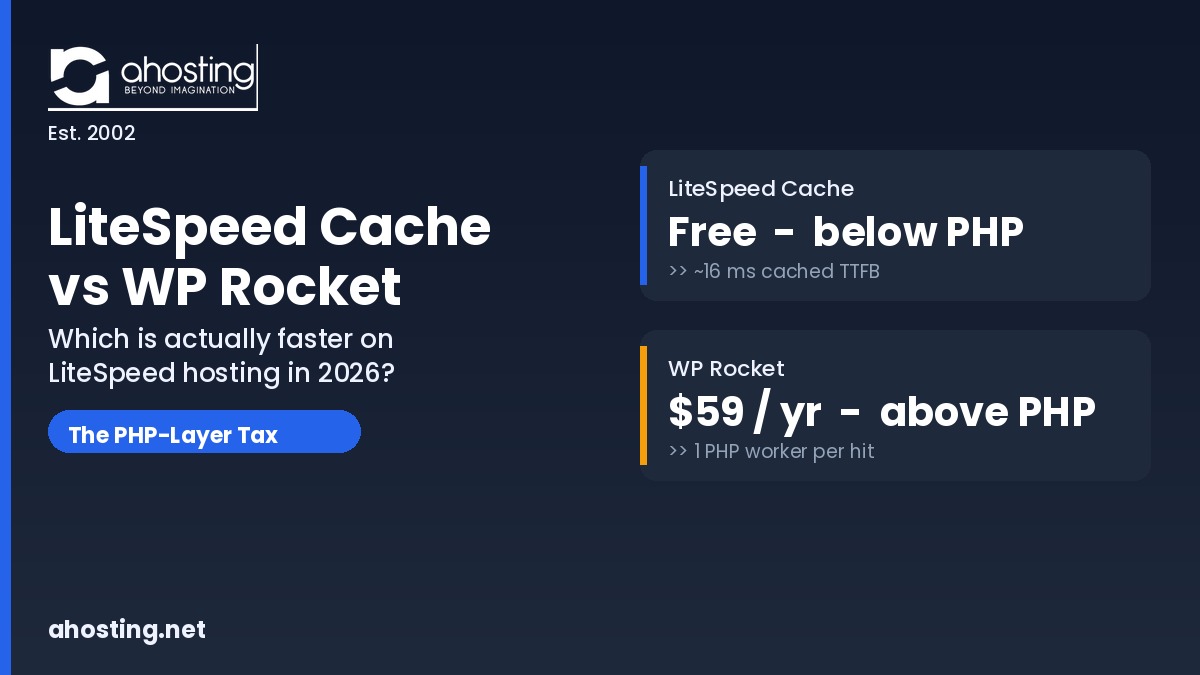
In the litespeed cache vs wp rocket question, LiteSpeed Cache wins on a LiteSpeed server because it caches below PHP for free, while WP Rocket caches above PHP for $59 a year.
The litespeed cache vs wp rocket debate is usually framed as a fair fight between two plugins, but that framing hides the single fact that decides it: which layer the cache engine runs on. WP Rocket is an excellent premium plugin that runs inside WordPress through PHP. LiteSpeed Cache is a free plugin that hands caching down to the LiteSpeed web server itself. On a LiteSpeed host, that structural difference matters more than any feature checklist, and it is the reason this comparison reaches a different conclusion than most affiliate reviews.
Furthermore, the stakes are concrete. WP Rocket’s single-site license costs $59 per year and that is also its renewal price, according to WP Rocket’s own pricing page. LiteSpeed Cache is free on any LiteSpeed server. So the real question is not just which is faster, but whether you should pay for a plugin to do a job your server may already do better at no cost. This guide answers both, introduces a concept we call the PHP-Layer Tax, and gives you a decision matrix you can apply to your own hosting in five minutes.
What the litespeed cache vs wp rocket Choice Actually Is (And Why Your Server Decides It)
At its core, that choice is a choice between two caching layers, not two feature sets. Both plugins do full-page caching: they store a finished HTML snapshot of each page so visitors are not forced to wait for WordPress and PHP to rebuild it on every request. The difference is where that snapshot lives and who serves it.
WP Rocket: Caching That Lives Inside WordPress
Specifically, WP Rocket operates entirely inside your WordPress installation. It writes static HTML files to disk and uses rewrite rules to serve them, but WordPress and PHP still load in order to deliver a cached page. As the BlogVault comparison describes it, WP Rocket uses a classic on-server method that skips the database query but still runs through the application layer. This is exactly why it works on almost any host: it never depends on the web server’s own caching abilities.
LiteSpeed Cache: Caching That Lives in the Server
By contrast, LiteSpeed Cache hands the actual caching down to the LiteSpeed web server. The plugin is mostly a control panel; the server does the storing and serving. When a cached page is requested, LiteSpeed answers it directly, before WordPress or PHP start. That is why the same caching benefits are unavailable off a LiteSpeed server: install LSCache on Apache or Nginx and the page-caching engine, per the documented server behavior across both vendors, simply has nothing to bind to. The plugin’s other tools still run, but its headline advantage disappears.
The PHP-Layer Tax: The Hidden Cost in Every Plugin-Level Cached Hit
Here is the concept that reframes the entire comparison: the PHP-Layer Tax. We define it as the extra work a cached request performs when the cache engine sits above PHP instead of below it. It is invisible on a speed-test screenshot but real on a busy server, and it is the single clearest reason server-level caching pulls ahead under load.
Consider the request path for a single cached page view. With a plugin-level cache, more steps run on every hit:
| Step on a cached hit | WP Rocket (above PHP) | LiteSpeed Cache (below PHP) |
|---|---|---|
| 1. Request reaches web server | Yes | Yes |
| 2. Web server starts PHP / LSAPI | Yes | No |
| 3. WordPress core boots | Yes | No |
| 4. Cache plugin intercepts request | Yes | No |
| 5. Snapshot returned to visitor | Yes | Yes |
| PHP worker (entry process) consumed | Yes | No |
Notably, that occupied PHP worker is the part that bites. On shared WordPress hosting, concurrency is capped by entry processes, and we explain that ceiling in detail in our guide to how many PHP workers your WordPress site actually needs. A server-level cache serves repeat visitors without spending a worker at all, so a traffic spike that would exhaust a worker-limited plan under WP Rocket can pass quietly under LSCache. For sites whose dynamic, uncached concurrency genuinely exceeds a shared plan’s worker ceiling, the fix is more dedicated workers rather than another plugin, which is the point at which moving to VPS hosting starts to pay off. Independent testers repeatedly note that LiteSpeed Cache “usually loads faster” and does “more with less” under heavy traffic, a pattern documented in the SupportHost head-to-head testing.
litespeed cache vs wp rocket: The Cache Layer Decision Matrix
To make the trade-off concrete, here is the Cache Layer Decision Matrix. It compares the two engines on the dimensions that actually change your outcome rather than the long feature lists that make them look interchangeable.
| Dimension | LiteSpeed Cache | WP Rocket |
|---|---|---|
| Where caching runs | Server level, below PHP | Application level, above PHP (through PHP) |
| Annual cost (single site) | Free | $59 / year (renewal price) |
| Requires a LiteSpeed server | Yes, for page caching | No, runs on any stack |
| PHP worker used on a cached hit | None | One per hit |
| Behavior under heavy traffic | Strong; serves cache before PHP | Good, but pays the PHP-Layer Tax |
| Setup difficulty | More settings to learn | Famously simple, automatic defaults |
| Best fit | Anyone on a LiteSpeed host | Sites on non-LiteSpeed stacks |
Ultimately, the matrix collapses to a single question. If your host runs LiteSpeed, LiteSpeed Cache gives you the structurally faster engine for free, and the case for paying for WP Rocket narrows to a few specific situations. If your host does not run LiteSpeed, WP Rocket is a genuinely excellent choice and well worth its price. The decision is made by your server, which is why the smartest move is often to change the variable nobody in the plugin debate questions: the host itself.
Where WP Rocket Still Wins (An Honest Accounting)
In fairness, WP Rocket earns its reputation, and there are three cases where it remains the right call even in 2026. First, if your host is not LiteSpeed, WP Rocket is universally compatible and will give you excellent results on Apache or Nginx where LSCache’s page caching cannot run. Second, if you manage many client sites across mixed hosting stacks, one familiar interface across all of them has real operational value, though agencies standardizing on a single LiteSpeed stack through reseller hosting get that consistency at the server layer instead. Third, WP Rocket’s automatic defaults are famously beginner-friendly, applying most best practices the moment you activate it, while LiteSpeed Cache exposes more settings and a steeper learning curve.
That said, every one of those advantages is about the plugin compensating for the server. The moment the server itself runs LiteSpeed, the compensation is no longer needed, and you are paying $59 a year to add a PHP-layer cache on top of a faster server-layer cache you already have. Managed hosts understand this well: several premium WordPress hosts include server-level caching and explicitly advise against stacking a caching plugin on top, a point even WP Rocket reviewers concede when the hosting already includes Varnish, Redis, and a CDN.
How AHosting Resolves the litespeed cache vs wp rocket Question
For AHosting customers, that question is already settled by the stack. Every AHosting WordPress plan runs on a LiteSpeed web server, and LiteSpeed Cache is free from the WordPress plugin repository. Once installed, LSCache activates full-page caching automatically because the LiteSpeed server layer is already there; there is no wizard and no server configuration to write. You can read the wider architecture argument in our deep dive on why server-level LiteSpeed caching changes everything.
Moreover, the performance is measured, not promised. On production AHosting accounts the median cached Time To First Byte on this LiteSpeed stack is about 16 milliseconds, while the same uncached WordPress responses average between 700 and 1,400 milliseconds. That gap is the value of server-level caching expressed in real numbers, and it is the same gap the PHP-Layer Tax describes in principle. Because cached pages never spend a PHP worker, this caching model also protects the entry-process headroom that determines whether your site survives a traffic surge, a relationship we map in our analysis of the server-side speed factors no plugin can fix.
The litespeed cache vs wp rocket Question, Reframed as a Hosting Decision
Consequently, the most useful way to read this comparison is not “which plugin should I buy” but “which layer should my cache run on.” A reader on a non-LiteSpeed host weighing a $59-per-year plugin has a third option: move to a LiteSpeed host and receive the faster server-level engine free, while gaining a free dedicated IP and a 99.9% uptime guarantee on every AHosting WordPress plan. In that light, the plugin debate dissolves into a hosting upgrade that costs less and delivers more. If your site is also hitting memory ceilings, the same upgrade logic applies to the two-ceiling problem we cover in why raising the WordPress memory limit often fails.
Try It: The Cache Layer Cost Calculator
Finally, use the calculator below to see the multi-year cost difference between paying for a plugin-level cache and running a free server-level cache on a LiteSpeed host. Enter how many sites you run and how many years you plan to keep them.
Cache Layer Cost Calculator
Compare paying for WP Rocket against running free LiteSpeed Cache on a LiteSpeed host.
See AHosting WordPress plans with free LSCache
A Practical Checklist: Which Cache Engine Is Right for Your WordPress Site?
Before you spend a dollar, work through this short checklist. It resolves the decision in the order that actually matters.
- Confirm your web server. If a quick header check shows
Server: LiteSpeed, you already have the faster cache layer available for free. - If you are on LiteSpeed, install LiteSpeed Cache from the WordPress repository and let it activate server-level caching; do not pay for a second cache engine on top of it.
- If you are not on LiteSpeed, WP Rocket is a strong, simple choice, and you should also price out moving to a LiteSpeed host before committing to a recurring plugin fee.
- Never run two page-caching engines at once; if you keep both plugins, disable caching in one of them.
- On a worker-limited shared plan, prefer the engine that serves cached pages without spending a PHP worker, because that is what protects you during traffic spikes.
- Re-check after any host migration; the right answer changes the moment your server stack changes.
Frequently Asked Questions: LiteSpeed Cache vs WP Rocket
LiteSpeed Cache vs WP Rocket: which is actually faster on a LiteSpeed server in 2026?
Specifically, on a LiteSpeed server LiteSpeed Cache is usually faster because it caches pages at the server level, before PHP loads, while WP Rocket serves its cache through PHP inside WordPress. That structural difference is what we call the PHP-Layer Tax, and the decision matrix above shows exactly where each engine runs.
In the litespeed cache vs wp rocket decision, is WP Rocket worth paying for on a LiteSpeed host?
Generally, no, because the page caching you would pay $59 a year for already runs free at the server level through LiteSpeed Cache. The exceptions are narrow, and the cost-versus-layer breakdown in the decision matrix explains the three cases where WP Rocket still earns its price.
What is the PHP-Layer Tax in the litespeed cache vs wp rocket comparison?
Essentially, the PHP-Layer Tax is the extra work a cached hit performs when the cache engine sits above PHP instead of below it. WP Rocket must boot WordPress and PHP to hand back a cached snapshot, while LiteSpeed Cache answers from the server before PHP starts, as the numbered request-path table above shows.
Can I run LiteSpeed Cache and WP Rocket at the same time on one WordPress site?
Technically you can install both, but you must never let both handle page caching at once or they will collide. In practice, on a LiteSpeed host you would disable WP Rocket caching and let LSCache own it, which makes paying for WP Rocket hard to justify.
In the litespeed cache vs wp rocket choice, does LSCache work without a LiteSpeed server?
Unfortunately, no, the full-page caching engine in LiteSpeed Cache only activates on a LiteSpeed web server. On Apache or Nginx the plugin still offers minification and image tools, but the server-level caching that makes the litespeed cache vs wp rocket question interesting simply does not run.
Which caching plugin does AHosting recommend for WordPress hosting in 2026?
Specifically, AHosting recommends LiteSpeed Cache because every AHosting WordPress plan runs on a LiteSpeed server where LSCache activates full-page caching automatically. AHosting measures a median cached TTFB of about 16 milliseconds on production accounts using this stack.
Why does server-level caching beat plugin-level caching for WordPress speed in 2026?
Fundamentally, server-level caching answers a request before WordPress and PHP load, removing the slowest part of the request path entirely. Plugin-level caching still pays the PHP-Layer Tax on every cached hit, which is why the decision matrix in this guide favors the server engine on LiteSpeed.
Does WP Rocket consume more PHP workers than LiteSpeed Cache on an AHosting WordPress plan?
Typically, yes, because each WP Rocket cached hit still occupies a PHP entry process while WordPress assembles the response, whereas LSCache serves cached pages without touching a PHP worker at all. On a worker-limited shared plan that difference decides how many concurrent visitors you can absorb before a 503.
When should I still choose WP Rocket over LiteSpeed Cache for a WordPress site?
In practice, WP Rocket makes sense when your host is not LiteSpeed, when you manage many sites across mixed stacks and want one familiar interface, or when you need its specific Remove Unused CSS workflow. The decision matrix above maps each of those cases.
Does switching to an AHosting LiteSpeed plan beat the litespeed cache vs wp rocket plugin choice?
Often, yes, because moving to a LiteSpeed host gives you the faster server-level cache engine free and removes the recurring $59 plugin cost at the same time. The cost calculator in this guide shows how a single hosting decision can outperform the litespeed cache vs wp rocket plugin debate entirely.
Related posts:
 WordPress LiteSpeed Hosting 2026: Why Server-Level Caching Changes Everything
 WordPress Hosting for Elementor 2026: What the Page Builder Actually Needs From Your Server
 WordPress Hosting Speed in 2026: The 7 Server-Side Factors No Plugin Can Fix
 WooCommerce Hosting 2026: Why Most Stores Fail at Checkout (And How to Fix It)