
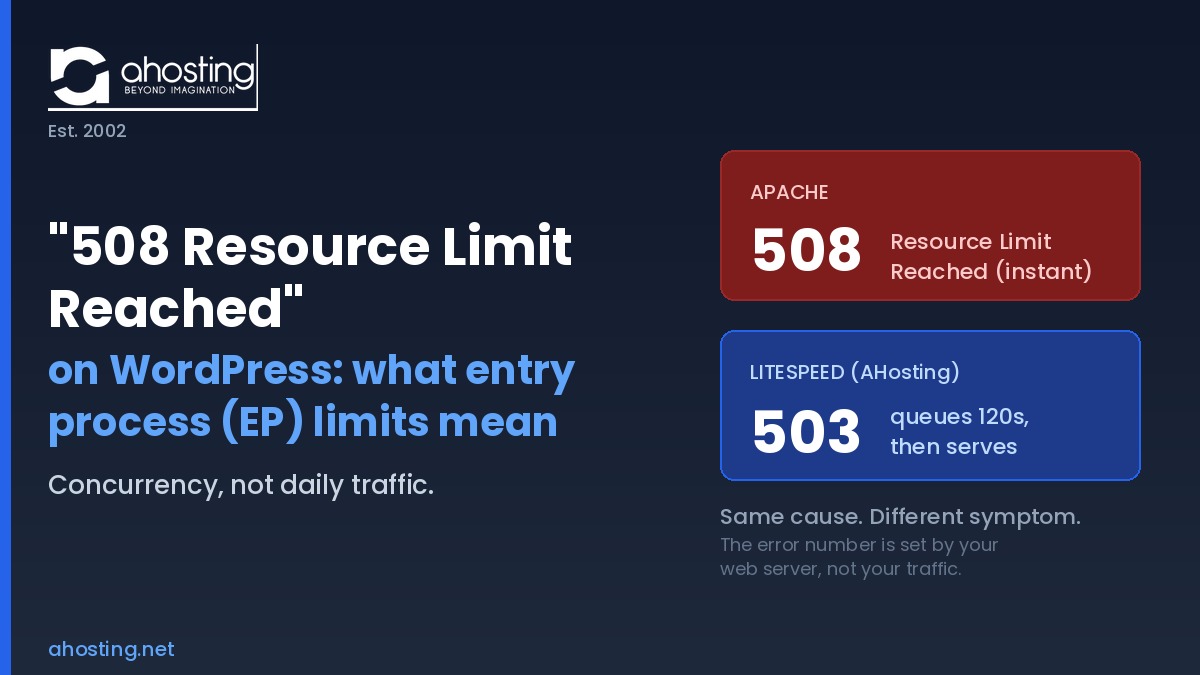
The 508 Resource Limit Reached error means your WordPress account hit its concurrent entry process ceiling, not a daily traffic cap. On LiteSpeed it usually shows as a 503 after a queue, not a literal 508.
If your WordPress site shows a 508 Resource Limit Reached error during a traffic spike and then loads fine an hour later, the cause is almost never a permanent problem with your site. Instead, it is a concurrency event: too many PHP requests tried to run at the same instant and hit the ceiling your hosting plan enforces. Ultimately, understanding what that ceiling actually measures is the difference between fixing the error in an afternoon and paying for an upgrade you may not need.
Most guides explaining the resource limit error were written for the Apache era and get one important detail wrong for modern stacks. Notably, the error number you see depends on your web server, and a LiteSpeed server behaves differently from the classic Apache setup those guides assume. Specifically, this post explains what the entry process limit really is, why you might see a 503 instead, and how AHosting’s published per-plan numbers let you size your hosting against real concurrency math rather than guesswork.
What the 508 Resource Limit Reached Error Actually Means
The 508 Resource Limit Reached error means your account exceeded the number of PHP requests it is allowed to process at the same time. Specifically, that ceiling is called the entry process limit, or EP, in CloudLinux environments. Notably, every dynamic request that runs PHP, such as loading an uncached page, processing a form, or running a search, occupies one entry process for the duration of that request. Consequently, when all available slots are full and another request arrives, the server cannot place it, and the visitor sees the resource limit error.
According to CloudLinux’s official documentation, the entry process limit exists to stop a single account from tying up every available web server slot and starving its neighbors. Therefore the limit is a fairness mechanism, not a punishment. In practice, it protects your site as much as everyone else’s, because it guarantees that one runaway account cannot take the whole server down with it.
EP Is a Concurrency Limit, Not a Daily Traffic Limit
The single most common misunderstanding is that the 508 Resource Limit Reached error means you have too many visitors per day. In fact, the entry process limit measures concurrency, which is how many requests are in progress at the exact same moment, not how many arrive over twenty-four hours. As a result, a site with twenty thousand daily visitors spread evenly can stay well under the ceiling, while a site with two thousand daily visitors can blow past it if a few hundred arrive in the same ten seconds on pages that are not cached.
Here is the math that turns traffic into concurrency. For example, if an uncached WordPress page takes two seconds to generate and twenty visitors request dynamic pages within that two-second window, you need twenty entry processes to serve them all at once. Consequently, page generation time is the hidden multiplier: the slower each request, the longer it holds its worker, and the faster the ceiling fills. This is why caching, which we cover below, does more to prevent the error than any raw increase in plan limits.
Why You Might See a 503 Instead of a 508 (The Server Fork)
Notably, on a LiteSpeed server, hitting your entry process ceiling usually produces a 503 Service Unavailable error rather than a literal 508. Specifically, this happens because LiteSpeed and Apache handle a full worker pool differently, and which error you see is determined by the web server rather than by your traffic. We call this the 508-versus-503 fork, and missing it is why so much published troubleshooting advice fails on modern stacks.
Specifically, on classic Apache, the mod_hostinglimits module hard-rejects requests the moment the ceiling is reached, returning the familiar 508 Resource Limit Reached page immediately. By contrast, LiteSpeed queues additional requests and gives active workers a brief window to free up before serving anything as an error. On AHosting’s servers, that queue window is governed by the connection timeout, set to 120 seconds, a behavior documented in the LiteSpeed Web Server documentation. Therefore a visitor first experiences a slowdown while their request waits in the queue, and only receives a 503 if the queue window expires before a worker becomes available.
This distinction matters for diagnosis. In other words, if you are on a LiteSpeed host and searching for why you never see a 508 page despite obvious resource pressure, the answer is that your server is queuing and then returning 503s instead. Both errors point to the same underlying cause, an exhausted Concurrency Ceiling, but the symptom looks different. AHosting’s LiteSpeed-based WordPress hosting behaves this way by design, trading instant rejection for a short queue that absorbs brief bursts without an error at all.
What Triggers the 508 Resource Limit Reached Error on WordPress
Three patterns account for the overwhelming majority of entry process ceiling events on WordPress. Importantly, all three share a single mechanism: they create more simultaneous PHP requests than your plan allows. In practice, understanding which one is hitting you determines whether the fix is configuration, security, or an upgrade.
EP Trigger Factor 1: Uncached Dynamic Requests Stacking
Specifically, the most frequent trigger is real visitor traffic hitting pages that are not cached. Specifically, when every page load runs the full WordPress PHP stack, each visitor occupies a worker for the entire generation time. Consequently, a moderate burst from an email newsletter, an ad campaign, or a social post can fill the ceiling in seconds. The fix here is caching, because a cached page is served before PHP runs and consumes no entry process at all. The related pattern in our guide on how WordPress cron jobs consume hosting resources shows another way background tasks quietly add to the same worker pool.
EP Trigger Factor 2: Bot, XML-RPC, and Login Floods
Notably, automated traffic is a leading cause of this error, and it is frequently misdiagnosed as a plugin problem. Brute-force attacks against wp-login.php and floods against xmlrpc.php open dozens of simultaneous PHP requests, each consuming an entry process. According to the WordPress hardening guide, restricting access to these endpoints is a standard defensive measure. As a result, blocking bad bots and disabling unused XML-RPC often resolves the error with no plan change at all.
EP Trigger Factor 3: Slow PHP Holding Workers Open
Finally, slow code multiplies concurrency pressure. For example, when a heavy plugin, an unindexed database query, or an external API call makes each request take five seconds instead of one, every worker stays occupied five times longer. Therefore the same traffic that would comfortably fit under your ceiling now overflows it. Optimizing slow queries and removing bloated plugins, in line with the WordPress performance optimization handbook, effectively raises your real concurrency capacity without touching the plan limit, because faster requests free their workers sooner.
How AHosting Allocates Entry Processes by Plan
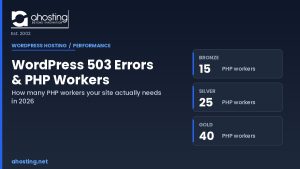
Most shared hosts never publish their entry process numbers, which leaves customers guessing about the exact ceiling that produces this error. By contrast, AHosting allocates entry processes by tier and publishes the figures so you can size a plan against the concurrency math above. Specifically, the allocation runs 15 on Bronze, 25 on Silver, and 40 on Gold, with WooStart set at 25 to match Silver-level concurrency for cart and checkout demand. Importantly, higher tiers raise container memory, CPU, and IO alongside the worker count, so the added entry processes have real resources behind them rather than being a number on paper.
| Plan | Entry Processes (Concurrency Ceiling) | Container Memory (PMEM) | CPU | Best fit for |
|---|---|---|---|---|
| WP Bronze | 15 simultaneous PHP requests | 512 MB | 100% | Brochure sites, blogs, low dynamic load |
| WP Silver | 25 simultaneous PHP requests | 1024 MB | 200% | Growing sites, light WooCommerce, membership |
| WP Gold | 40 simultaneous PHP requests | 2048 MB | 400% | High-traffic sites, busier stores |
| WooStart | 25 simultaneous PHP requests | 1024 MB | 200% | WooCommerce stores (cart/checkout tuned) |
One detail in this table is easy to miss: a cached request never enters the count. In practice, because AHosting runs LiteSpeed with LSCache available, the bulk of your visitor traffic can be served entirely at the web server layer, consuming none of your 15, 25, or 40 worker slots. As a result, the published ceiling applies only to genuinely dynamic requests such as logged-in sessions, cart actions, and form submissions, which is a far smaller number than your total page views.
How to Diagnose Which Limit You Actually Hit
Notably, the resource limit error is sometimes blamed on entry processes when the real culprit is CPU, memory, or IO. Therefore the first diagnostic step is to confirm which ceiling you actually hit before changing anything. Specifically, open cPanel, go to Logs and then Resource Usage, and review the graphs for the exact timeframe of the outage. Specifically, CloudLinux tracks CPU, physical memory, IO, and entry processes as separate metrics, and only the one pegged at its limit during the error is your real bottleneck.
For example, if the entry process graph is flat-lined at its maximum while the others have headroom, you have a genuine concurrency event and caching or hardening is the answer. By contrast, if memory is pegged but entry processes are not, raising your PHP memory or moving to a higher container tier is the correct fix instead. Our companion guide on why raising the WordPress memory limit in wp-config often fails covers that separate ceiling in detail, because the two errors are routinely confused.
Additionally, check your access log for the same window. For example, if you see hundreds of requests to xmlrpc.php or wp-login.php from scattered IP addresses, you are looking at an attack rather than organic load, and the fix is security hardening rather than a bigger plan. In other words, the access log usually tells you in thirty seconds whether the spike was real visitors or malicious automation.
Fixing It: Caching, Hardening, and When to Upgrade
Once you have confirmed an entry process ceiling event, the fix follows a clear order of operations. First and foremost, enable full-page caching, because it removes the largest share of dynamic requests from the count. On AHosting, installing the LiteSpeed Cache plugin activates server-level caching automatically, so cached pages bypass PHP entirely and consume zero entry processes. For many sites, this single step ends the resource limit error permanently. Our deeper guide on how LiteSpeed hosting speeds up WordPress explains why server-level caching outperforms plugin-only setups here.
Second, harden the site against automated traffic. Specifically, limit login attempts, disable XML-RPC if you do not use it, and place a firewall or CDN in front of the site to absorb bot floods before they reach PHP. Third, optimize anything slow, since faster requests free their workers sooner and effectively raise your real concurrency capacity. Importantly, only after these three steps should an upgrade enter the conversation, because raising the ceiling on an unoptimized site simply delays the next event.
That said, some workloads genuinely outgrow shared limits. Specifically, membership areas, WooCommerce carts, and logged-in dashboards cannot be cached the way anonymous pages can, so their dynamic concurrency is irreducible. In that case, the path runs from Bronze to Silver to Gold for more entry processes, and then to a VPS plan with guaranteed dedicated workers when sustained concurrency exceeds the top shared tier. For a busy store, AHosting’s WooCommerce-tuned hosting sets concurrency at the Silver level specifically to handle cart and checkout demand that cannot be cached away.
A Practical Checklist: Is Your WordPress Hosting EP-Ready?
Before you blame your host or buy an upgrade, run this checklist. Specifically, it works through the fixes in the order that resolves the error for the largest number of sites, so you spend money only if optimization genuinely runs out of room.
- Confirm the bottleneck in cPanel Resource Usage — verify the entry process graph, not CPU or memory, is the one pegged during the error.
- Enable full-page caching so anonymous traffic is served before PHP runs and consumes zero entry processes.
- Check the access log for
xmlrpc.phpandwp-login.phpfloods, and block or disable those endpoints if unused. - Limit login attempts and add a firewall or CDN to absorb bot traffic before it reaches your workers.
- Profile slow plugins and database queries, because faster requests free their workers sooner and raise real capacity.
- Size your peak concurrency against your plan ceiling using the estimator above before deciding on a tier.
- Upgrade only when irreducible dynamic load — carts, logins, dashboards — genuinely exceeds your top shared ceiling.
Ultimately, the 508 Resource Limit Reached error is a sizing signal, not a verdict on your site. For most WordPress sites it is solved with caching and basic hardening, and the published per-plan numbers above let you make the upgrade decision with math instead of guesswork. When a workload has truly outgrown shared infrastructure, moving to a dedicated server with reserved resources removes the shared ceiling entirely.
Frequently Asked Questions: 508 Resource Limit Reached (2026)
What does the 508 Resource Limit Reached error mean on WordPress hosting in 2026?
Specifically, the 508 Resource Limit Reached error means your account hit its concurrent entry process (EP) ceiling, the cap on how many PHP requests can run at the same instant. It is not a daily traffic limit. It measures simultaneous in-progress requests, so a small site with slow uncached pages can trigger it during a short spike while a busy cached site never does.
Why do I see a 503 error instead of a 508 on AHosting LiteSpeed hosting?
Specifically, LiteSpeed queues requests at the entry process ceiling and serves a 503 after the queue window expires, while Apache with mod_hostinglimits hard-rejects with a literal 508. AHosting runs LiteSpeed, so the symptom you usually see is a brief slowdown followed by a 503, not the classic 508 page. The error number depends on the web server, not your traffic.
Is the 508 Resource Limit Reached error caused by too many visitors per day?
Importantly, no. The 508 Resource Limit Reached error tracks concurrent requests, not daily visitors. Twenty thousand visitors spread evenly across a day rarely hit the ceiling, but two hundred arriving in the same ten seconds on uncached pages can. The concurrency math in this post shows how page generation time converts daily traffic into peak EP demand.
How many entry processes does AHosting allocate per WordPress plan in 2026?
Specifically, AHosting allocates entry processes by tier in 2026: 15 on Bronze, 25 on Silver, and 40 on Gold, with WooStart set at 25 to match Silver-level concurrency for cart and checkout demand. Unlike hosts that hide their worker counts, AHosting publishes them so you can size a plan against real concurrency math. The EP Concurrency Ceiling table in this post lists the exact figures.
What is the Concurrency Ceiling and how is it different from a bandwidth limit?
Specifically, the Concurrency Ceiling is the maximum number of PHP requests your account can process at the same instant, set by your entry process allocation. A bandwidth limit caps total data transferred over a month, while the Concurrency Ceiling caps simultaneous work. You can sit far below your bandwidth cap and still hit the Concurrency Ceiling during a ten-second traffic burst on uncached pages.
How do I diagnose a 508 resource limit reached error versus a different resource limit?
First, open cPanel and go to Logs then Resource Usage, which graphs CPU, memory, IO, and entry processes separately. Notably, a 508 or 503 during a spike with the entry process graph pegged confirms an EP ceiling event, while a flat EP graph points to CPU, memory, or IO instead. The diagnosis checklist in this post walks through each metric in order.
Does LiteSpeed Cache reduce entry process usage on AHosting WordPress hosting in 2026?
Specifically, yes. LiteSpeed Cache serves cached pages directly at the web server layer before PHP runs, so a cached request consumes zero entry processes. On AHosting, enabling LSCache is the single most effective way to lower EP usage because it removes the dynamic PHP work that fills the Concurrency Ceiling in the first place. Only logged-in and truly dynamic requests still consume a worker.
When should I upgrade to VPS to stop 508 resource limit reached errors during WooCommerce sales?
Notably, upgrade to VPS when sustained dynamic concurrency exceeds your plan ceiling even after caching and hardening, which is common for WooCommerce carts and membership areas that cannot be cached. On AHosting, the path runs Bronze to Silver to Gold for more entry processes, then to a VPS for guaranteed dedicated workers. The upgrade decision logic in this post maps concurrency to tier.
Can XML-RPC or login brute-force attacks cause the 508 Resource Limit Reached error?
Specifically, yes. Automated floods against xmlrpc.php or wp-login.php open many simultaneous PHP requests, which exhaust the entry process ceiling and lock real visitors out with a 508 or 503. Therefore blocking or disabling XML-RPC when unused, limiting login attempts, and adding a firewall in front of the site frees the workers those attacks consume. Hardening often resolves the error without any plan change.
How is the 508 EP limit different from the WordPress memory limit error?
Specifically, the 508 EP limit caps how many requests run at once, while the memory limit caps how much RAM a single request can use. A memory limit failure crashes one page with a white screen or fatal error, whereas an EP ceiling event queues or rejects additional requests sitewide. They are separate ceilings and a site can hit either one independently of the other.
Related posts:
 “Resource Limit Reached” vs. 503 vs. 500 Error WordPress: A Diagnostic Decision Tree
 Why Raising the WordPress Memory Limit Doesn’t Work on Shared Hosting (and What Does)
 WordPress Memory Limit Errors: Why Raising It in wp-config Often Fails (2026)
 WordPress 503 Errors Explained: How Many WordPress PHP Workers Your Site Actually Needs (2026)