
- What a WordPress 503 Error Actually Means (It Is Almost Never "Down")
- What WordPress PHP Workers Are and Why They Decide Your Site's Ceiling
- How Many WordPress PHP Workers Does Your WordPress Site Actually Need?
- WordPress PHP Workers Allocation Factor by Factor: How AHosting Assigns Entry Processes
- When to Upgrade from Shared to VPS for WordPress PHP Workers Headroom
- Shared Pool vs Per-Account Isolation: Why CageFS Changes the Math
- A Practical Checklist: Are Your Hosting WordPress PHP Workers Ready for Traffic Spikes?
- Frequently Asked Questions: WordPress PHP Workers and 503 Errors
- What is the difference between a 503 error and a server crash in WordPress in 2026?
- How many PHP workers does a WordPress site need in 2026?
- When does a WordPress site on AHosting's 15-worker Bronze plan start returning 503 errors?
- How do I calculate how many PHP workers my WordPress site requires?
- Shared PHP worker pools vs CloudLinux LVE isolation: which prevents 503 errors?
- What are entry processes and how does AHosting allocate them per WordPress plan?
- Why does my WooCommerce checkout throw a 503 during a flash sale with 500 concurrent visitors?
- Does AHosting WordPress hosting increase PHP workers by plan tier in 2026?
- Do cached WordPress pages use PHP workers or trigger 503 errors?
- When should I upgrade from shared to VPS hosting for more PHP worker headroom?
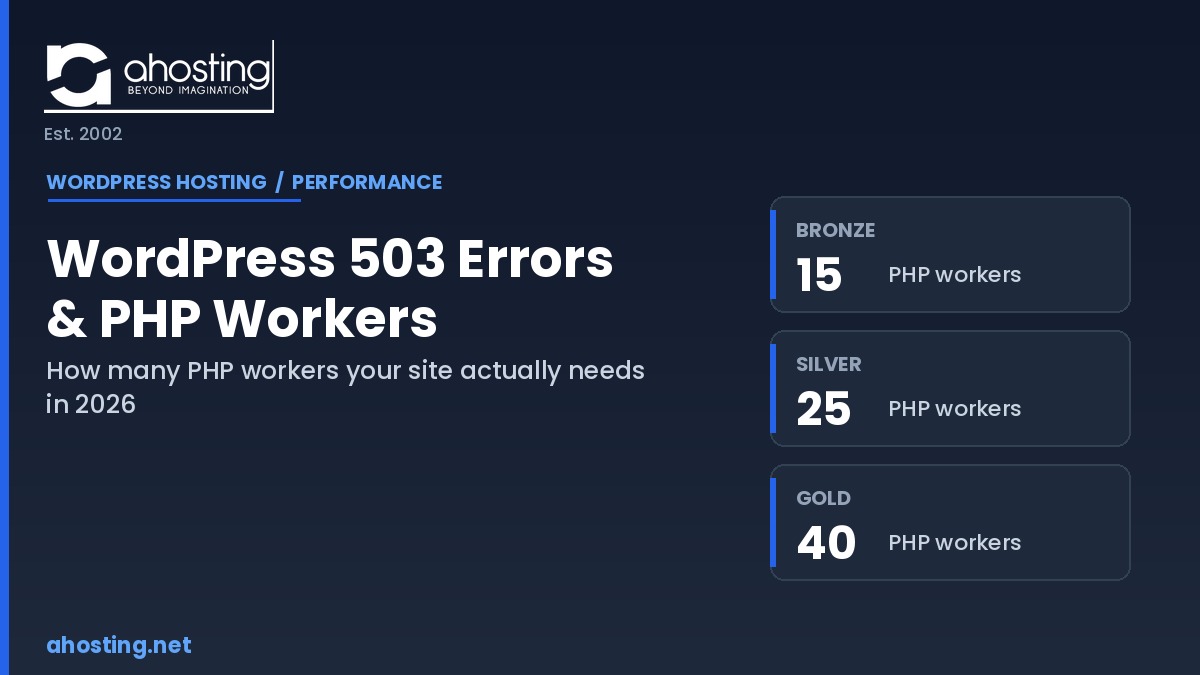
WordPress PHP workers set a hard ceiling on simultaneous dynamic requests, and a 503 error means that ceiling was hit. AHosting publishes its real counts: 15, 25, and 40 across Bronze, Silver, and Gold.
If your WordPress site occasionally shows a “503 Service Unavailable” message, the cause is almost always WordPress PHP workers running out, not a crashed server. Specifically, a PHP worker is a single process that handles one dynamic request at a time, and when every worker is busy, new requests wait in a queue and eventually time out. Most published guides tell you to deactivate plugins or “ask your host” for more resources, yet none of them publish the one number that actually decides your ceiling: how many workers you have. This guide fixes that. Below you will find the real concurrency math, a capacity table with AHosting’s published worker counts, and an interactive calculator that estimates your own limit.
What a WordPress 503 Error Actually Means (It Is Almost Never “Down”)
Fundamentally, a 503 error means the web server received your visitor’s request but had no available PHP worker to process it in time. The server itself is healthy. As a result, the request sat in a short queue waiting for a worker to free up, and when none did within the timeout window, the server returned 503 rather than make the visitor wait indefinitely. Importantly, this distinction matters because the fix for “down” (restart, restore, debug) is completely different from the fix for “out of workers” (cache more, reduce execution time, or add capacity).
Notably, the official HTTP 503 status definition describes a server that is temporarily unable to handle the request, often due to overload. In WordPress specifically, that overload is rarely CPU or RAM at the machine level. Instead, it is the per-account concurrency limit your hosting plan enforces. Therefore, understanding that limit is the entire game.
What WordPress PHP Workers Are and Why They Decide Your Site’s Ceiling
Specifically, a PHP worker is one process that can execute one WordPress request from start to finish. WordPress is built in PHP, and the official WordPress server requirements assume a PHP runtime that builds each page on demand. Specifically, when a request arrives, a worker loads WordPress, runs your theme and plugins, queries the database, assembles the HTML, and returns it. Then that worker is free for the next request. The number of workers you have is therefore the number of these jobs your site can run at the exact same instant.
How a Single Request Consumes a Worker
In practice, a worker is occupied for as long as the page takes to build. If an uncached WordPress page takes half a second of PHP execution, one worker can complete two such pages per second. Consequently, the math is direct: with 15 workers each clearing a request every half second, the site sustains roughly 30 dynamic requests per second. Anything beyond that queues. Notably, this is why two sites on identical hardware can behave completely differently. The one with slow, plugin-heavy pages holds each worker longer and hits its ceiling sooner.
Why Cached Pages Do Not Touch WordPress PHP Workers (and Which Pages Always Do)
Importantly, a fully cached page never wakes a PHP worker at all. On AHosting’s LiteSpeed stack, the LiteSpeed Cache plugin serves cached responses directly at the web server layer, before PHP runs. As such, a well-cached blog can serve tens of thousands of visits while barely touching its worker pool. However, certain pages can never be cached because they are personalized: logged-in dashboards, WooCommerce cart and checkout, login and registration, and any page built from live, per-user data. Those requests always consume a worker, which is exactly why membership sites and stores exhaust workers far faster than brochure sites at the same traffic level.
How Many WordPress PHP Workers Does Your WordPress Site Actually Need?
Directly, the number of PHP workers you need equals your peak concurrent dynamic requests per second multiplied by your average PHP execution time in seconds. For example, a store expecting 20 simultaneous uncached requests per second, each taking 0.5 seconds, needs about 10 workers of genuine headroom. Furthermore, you should size for peak, not average, because 503 errors happen in the worst sixty seconds of your busiest day, not on a quiet afternoon. Therefore, the table below shows AHosting’s published allocation against realistic concurrency, so you can match a plan to your real load rather than guess.
| WordPress Plan | WordPress PHP Workers (Entry Processes) | Container Memory | Approx. Dynamic Requests/sec* | Best Fit |
|---|---|---|---|---|
| Bronze | 15 | 512 MB | ~30 | Blogs, brochure sites, low logged-in traffic |
| Silver | 25 | 1 GB | ~50 | Busy blogs, small membership areas |
| Gold | 40 | 2 GB | ~80 | High-traffic and heavily dynamic sites |
| WooStart (WooCommerce) | 25 | 1 GB | ~50 | Stores with concurrent cart and checkout load |
Above all, notice that the worker count is tiered: Bronze provides 15, Silver 25, and Gold 40, while WooStart matches Silver at 25 to handle concurrent store sessions. Higher tiers also raise container memory and CPU, so each added worker has the resources to do real work rather than just inflate a headline figure. If you run a store, the WooCommerce-optimized plan is sized specifically for the uncacheable checkout load that breaks underpowered shared hosting.
WordPress PHP Workers Allocation Factor by Factor: How AHosting Assigns Entry Processes
Concretely, AHosting uses CloudLinux to enforce per-account limits, and the relevant unit is the entry process. Each entry process is one concurrent PHP request slot, which is functionally a WordPress PHP worker. Because the LiteSpeed server-level cache bypasses PHP entirely for cached content, only uncached requests draw down this pool. Specifically, use the calculator below to estimate the worker headroom your real traffic requires, then compare it against the capacity table above.
PHP Worker Concurrency Calculator
Estimate the worker headroom your dynamic (uncached) traffic needs.
Moreover, because AHosting publishes these numbers, you can verify the math yourself instead of trusting a vague “unlimited” claim. Hosts that advertise unmetered everything still cap concurrency somewhere, and that hidden cap is where 503 errors are born. For sites that have outgrown shared concurrency entirely, the dedicated-resource VPS option removes the shared ceiling completely.
When to Upgrade from Shared to VPS for WordPress PHP Workers Headroom
Generally, you should upgrade when your uncached concurrent load routinely exceeds your plan’s worker ceiling even after caching is fully active. Typically, caching is the first lever because it is free and removes the most load. However, some workloads are structurally uncacheable: large membership communities, busy stores, and applications where most traffic is logged in. In those cases, adding workers is the only real fix, and a VPS gives you dedicated workers that no neighbor can consume. Sites that have clearly outgrown shared infrastructure benefit from bare-metal isolation for sustained, predictable concurrency.
Shared Pool vs Per-Account Isolation: Why CageFS Changes the Math
Critically, where your workers come from matters as much as how many you have. On an oversold shared pool, your effective worker count is whatever is left after every other site on the server takes its share. By contrast, AHosting runs CloudLinux CageFS and LVE, which reserve each account its own isolated worker allocation. Therefore, a neighbor’s flash sale cannot steal the capacity your checkout needs. Consequently, the comparison below shows why isolation produces predictable behavior while shared pools produce intermittent, hard-to-diagnose 503 errors.
| Factor | Shared WordPress Workers Pool | Per-Account Isolation (AHosting CageFS + LVE) |
|---|---|---|
| Worker availability | Whatever neighbors leave unused | Reserved per account, guaranteed |
| Bad-neighbor effect | A spike next door can cause your 503s | Neighbors cannot consume your workers |
| 503 predictability | Intermittent, hard to reproduce | Only at your own published limit |
| Capacity transparency | Usually undisclosed | Published per plan (15 / 25 / 40) |
In other words, isolation turns concurrency from a guessing game into arithmetic. When your worker pool is genuinely yours, the only way to hit 503 is to exceed your own documented limit, which the calculator above helps you avoid. For a deeper look at how this same isolation protects uptime during traffic events, see our guide on what a 99.9% WordPress uptime SLA actually delivers.
A Practical Checklist: Are Your Hosting WordPress PHP Workers Ready for Traffic Spikes?
Before your next campaign or launch, work through this checklist. Together, these steps close the gap between “we think we are fine” and a worker pool sized to your real peak.
- Confirm your plan’s published WordPress PHP workers (entry process) count, not a vague “unlimited” claim.
- Measure your average uncached PHP execution time using a tool like Query Monitor.
- Estimate peak concurrent dynamic requests for your busiest realistic minute.
- Run the concurrency calculator above and compare the result to your plan.
- Verify full-page caching is active so cached traffic never touches a worker.
- Identify your uncacheable pages: checkout, login, account, and personalized content.
- Stagger campaign emails so 10,000 recipients do not arrive in the same sixty seconds.
- Confirm your host isolates workers per account rather than sharing a server-wide pool.
- If uncached peak still exceeds your ceiling, plan a VPS upgrade before the event, not during it.
For sites that publish frequently or run scheduled jobs, also review how background tasks consume workers in our guide to WordPress cron jobs and hosting, since runaway cron events are a common hidden source of worker pressure.
Frequently Asked Questions: WordPress PHP Workers and 503 Errors
What is the difference between a 503 error and a server crash in WordPress in 2026?
Specifically, a 503 Service Unavailable error means your server is healthy but had no free PHP worker to handle the request before it timed out. In contrast, a crash means the server process itself failed. Most WordPress 503 errors in 2026 are temporary capacity events, not crashes, and they clear the moment a worker frees up. The capacity table earlier in this guide shows exactly where that limit sits on each plan.
How many WordPress PHP workers does a WordPress site need in 2026?
Typically, a small WordPress blog runs comfortably on 10 to 15 PHP workers because most pages serve from cache. However, sites with heavy logged-in traffic, WooCommerce checkout, or membership areas need 25 to 40 workers, since those requests cannot be cached and must run live. The exact count depends on your average PHP execution time and peak concurrent dynamic requests, which the calculator above estimates for you.
When does a WordPress site on AHosting’s 15-worker Bronze plan start returning 503 errors?
In practice, an AHosting Bronze plan returns 503 errors only when more than 15 uncached PHP requests arrive at the same time and the brief LVE queue window expires before a worker frees up. Because LiteSpeed Cache serves cached pages without consuming a worker, a well-cached Bronze site can absorb large visitor spikes without hitting this limit at all. The readiness checklist above lists the steps that keep most traffic off the worker pool.
How do I calculate how many PHP workers my WordPress site requires?
First, measure your average PHP execution time for an uncached page, then estimate your peak concurrent dynamic requests per second. The formula is peak requests per second multiplied by average execution seconds. For example, 20 concurrent dynamic requests at 0.5 seconds each require about 10 workers of true headroom. The interactive calculator in this guide runs that exact formula and maps the result to a recommended plan.
Shared PHP worker pools vs CloudLinux LVE isolation: which prevents 503 errors?
Notably, per-account isolation prevents the unpredictable 503 errors that shared worker pools cause. On an oversold shared pool, a neighbor’s traffic spike can consume the workers your site needs. AHosting runs CloudLinux LVE so each account receives its own reserved worker allocation that no other tenant can borrow. The comparison table above contrasts both models side by side.
What are entry processes and how does AHosting allocate them per WordPress plan?
Technically, an entry process is CloudLinux’s term for a concurrent PHP request slot, which functions as a PHP worker. AHosting allocates 15 entry processes on Bronze, 25 on Silver, and 40 on Gold, with WooCommerce plans set at 25. Unlike hosts that hide these numbers, AHosting publishes them so you can size your plan against real concurrency math rather than marketing claims.
Why does my WooCommerce checkout throw a 503 during a flash sale with 500 concurrent visitors?
Fundamentally, checkout and cart pages cannot be served from cache, so every one of those 500 visitors consumes a live PHP worker simultaneously. When concurrent checkouts exceed your worker count, the excess requests queue and then time out as 503 errors. Staggering campaign emails and pre-warming cache reduces the simultaneous load on your worker pool, and a WooCommerce-sized plan gives the checkout path more concurrent slots.
Does AHosting WordPress hosting increase PHP workers by plan tier in 2026?
Yes, AHosting tiers PHP worker allocation by plan in 2026: Bronze provides 15 workers, Silver 25, and Gold 40. Higher tiers also raise container memory and CPU, so the additional workers have the resources to run real concurrent load rather than just a higher headline number. The capacity table above pairs each worker count with its memory allocation.
Do cached WordPress pages use PHP workers or trigger 503 errors?
No, fully cached pages do not consume a PHP worker and cannot trigger a worker-exhaustion 503. LiteSpeed serves cached responses directly at the web server layer before PHP runs. This is why aggressive full-page caching is the cheapest defense against 503 errors for content sites, and why a cached blog can outlast a store at the same traffic level.
When should I upgrade from shared to VPS hosting for more PHP worker headroom?
Ultimately, you should upgrade to VPS hosting when your uncached concurrent requests routinely exceed your shared plan’s worker ceiling even with caching fully active. A VPS gives you dedicated workers no neighbor can touch and lets you tune the pool size to your real traffic. The readiness checklist earlier in this guide shows the exact signals that indicate you have outgrown shared concurrency.
Related posts:
 WordPress Memory Limit Errors: Why Raising It in wp-config Often Fails (2026)
 How to Disable the WordPress Heartbeat (Before It Eats Your PHP Workers)
 WordPress Staging Site: What Your Hosting Plan Needs to Make It Work (2026 Guide)
 WordPress Membership Site Hosting: The 500-User Threshold You Need to Know