
- Why Elementor Punishes Underpowered Hosting (And Most Hosts Do Not Warn You)
- PHP Memory Limits: WordPress Hosting for Elementor's Non-Negotiable Hosting Requirement
- LiteSpeed and LSCache: Server-Level Caching That Understands Page Builders.
- PHP 8.4 and Execution Model: The Engine Running Every Elementor Widget
- CloudLinux LVE: How Resource Isolation Protects Your WordPress Hosting for Elementor From Shared Hosting's Biggest Risk
- The 5-Factor WordPress Hosting for Elementor Checklist: How to Evaluate Any Host
- Frequently Asked Questions: WordPress Hosting for Elementor
- WordPress Hosting for Elementor vs Generic Shared Hosting in 2026: What Infrastructure Differences Actually Matter?
- How Much PHP Memory Does WordPress Hosting for Elementor Need in 2026 When Running Elementor Pro With WooCommerce?
- What Are the Minimum Server Requirements to Run Elementor on WordPress?
- When Should an AHosting WordPress Hosting for Elementor Customer Upgrade From PHP 8.4 to PHP 8.3 to Access 512MB Memory Limits?
- How Does AHosting's LiteSpeed LSAPI Execution Model Reduce Elementor AJAX Save Latency Compared to Standard PHP-FPM?
- LiteSpeed Cache vs W3 Total Cache for WordPress Hosting for Elementor Sites: Which Performs Better on AHosting's LiteSpeed Stack?
- What Is the WordPress Hosting for Elementor AJAX Wall Problem and Why Does CloudLinux LVE Prevent It From Cascading Across Accounts?
- Does Elementor Work on WordPress cPanel Hosting With CloudLinux CageFS?
- What PHP Version Does Elementor Require for WordPress Hosting Elementor Sites in 2026?
- What Happens When Elementor Exceeds the PHP memory_limit on a Shared WordPress Hosting Plan and How Do You Fix It Without a Support Ticket?
WordPress hosting for Elementor requires PHP 8.2 or higher, at least 256 MB of memory (512 MB recommended for Pro builds), a persistent PHP execution model like LSAPI, and server-level caching — infrastructure gaps that oversold shared hosts routinely miss.
WordPress hosting for Elementor is not the same decision as WordPress hosting for a simple blog or brochure site. Elementor — now active on over 21 million websites worldwide — generates significantly more server-side work per page load than a lightweight WordPress theme, and that gap widens every time someone opens the page builder editor. Most hosts never disclose what their infrastructure does (or fails to do) when Elementor fires its AJAX calls, loads its widget scripts, or imports a 500-element template. This guide explains what the page builder actually requires at the server layer, why those requirements matter, and how AHosting’s stack maps to each one.
Why Elementor Punishes Underpowered Hosting (And Most Hosts Do Not Warn You)
Specifically, WordPress hosting for Elementor behaves differently from static WordPress themes because it is not a theme — it is a front-end application running inside WordPress. Every time a designer drags a widget, updates a section’s settings, or switches a responsive breakpoint, Elementor fires one or more AJAX requests to the server. Those requests hit the PHP layer directly, bypassing any full-page cache that might otherwise protect the server from load. A busy editorial session — building a new landing page from a template, for example — can generate dozens of PHP requests within a few minutes.
Furthermore, the Elementor editor itself carries a heavier bootstrap cost than a standard WordPress page load. Loading the editor requires initializing Elementor’s React-based UI, registering every active widget, and pulling in the current page’s JSON schema. On an underpowered server, this initialization can take 4 to 8 seconds — long enough for a designer to assume the editor has crashed. On a well-provisioned server running a persistent PHP execution model, the same initialization completes in under 1.5 seconds.
In practice, the failure modes on underpowered hosting are predictable: the editor freezes mid-save, returns a 500 error on template import, or silently fails to apply changes that appeared to save correctly. Many designers blame Elementor for these behaviors. However, the root cause is almost always the hosting layer — specifically, insufficient PHP memory, a PHP execution model that restarts worker processes on every request, or a shared-resource pool that another account is currently exhausting. AHosting’s WordPress hosting plans address each of these failure points through LiteSpeed’s LSAPI persistent worker model and CloudLinux’s per-account resource isolation, both of which are covered in detail below.
PHP Memory Limits: WordPress Hosting for Elementor’s Non-Negotiable Hosting Requirement
According to Elementor’s official system requirements, the WordPress memory limit must be set to at least 256 MB for Elementor and Elementor Pro. Elementor recommends 512 MB as the practical standard for most sites, and 768 MB for best performance on installations that combine Elementor with WooCommerce or translation plugins such as WPML. These are not conservative safety margins — they reflect the actual RAM footprint of Elementor’s widget registry, the parsed JSON for a complex page, and the additional overhead introduced by popular add-on plugin sets.
The memory limit matters most in two specific scenarios. First, during editor sessions: every drag-and-drop action that modifies a page’s JSON schema requires PHP to rebuild and validate the full page structure in memory before saving. Second, during template imports: pulling in a multi-section template from Elementor’s library instantiates dozens of widgets simultaneously, each requiring its own memory allocation. When the PHP memory_limit is set below 256 MB, template imports fail silently or return a white screen. When the limit is set at exactly 256 MB and Elementor runs alongside a heavy WooCommerce catalog, memory exhaustion errors become a recurring problem during checkout-page edits.
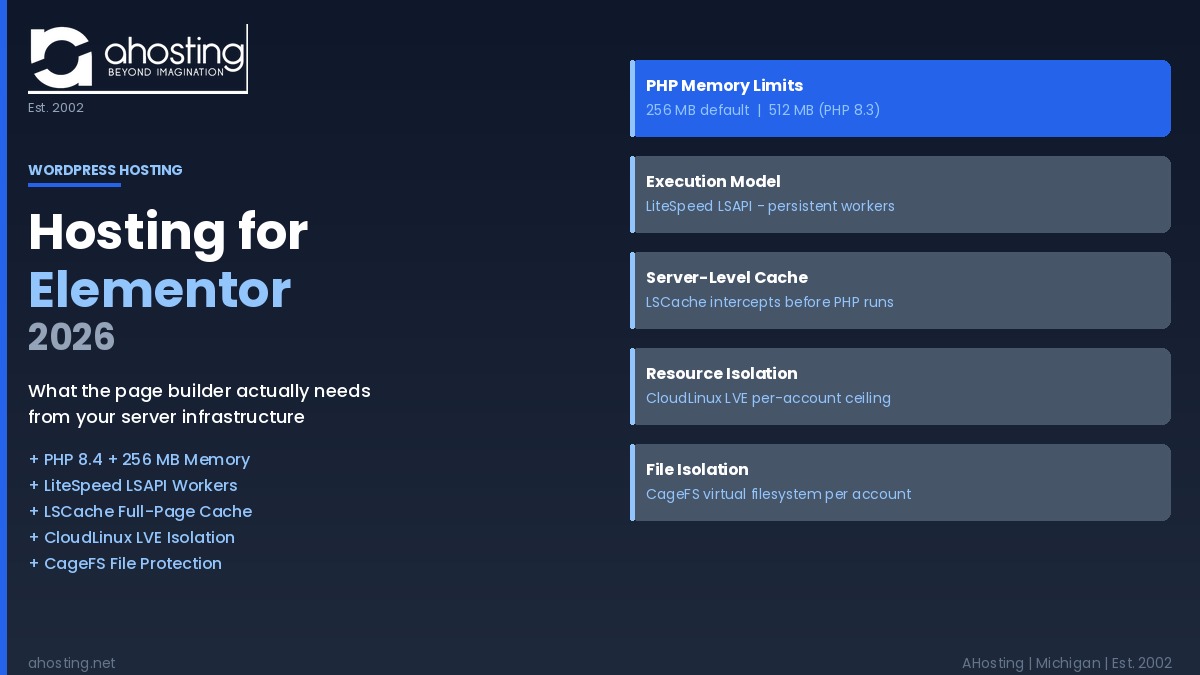
Moreover, for those running WooCommerce alongside Elementor, the combined memory footprint typically pushes requirements past the 512 MB threshold. On AHosting, PHP 8.4 (the default) provides 256 MB — meeting Elementor’s documented minimum. Switching to PHP 8.3 raises that allocation to 512 MB, meeting the recommended level. Customers who need 768 MB or higher can raise the limit directly in cPanel’s PHP INI Editor without opening a support ticket, because AHosting’s hosting environment has the MultiPHP INI Editor enabled at the package level.
The Memory Tiers That Map to Your Elementor Build
The following table maps Elementor’s documented requirements against AHosting’s available PHP versions and their default memory allocations.
| Requirement | Elementor’s Specification | AHosting PHP 8.4 (Default) | AHosting PHP 8.3 |
|---|---|---|---|
| PHP version | 7.4 min; 8.2+ recommended | PHP 8.4 ✅ | PHP 8.3 ✅ |
| PHP memory limit | 256 MB min; 512 MB recommended; 768 MB best | 256 MB ✅ | 512 MB ✅ |
| PHP execution model | Persistent workers preferred | LiteSpeed LSAPI ✅ | LiteSpeed LSAPI ✅ |
| Server-level caching | Required for acceptable TTFB | LSCache available ✅ | LSCache available ✅ |
| Per-account CPU and RAM isolation | Critical on shared hosting | CloudLinux LVE ✅ | CloudLinux LVE ✅ |
| File system isolation | Recommended | CloudLinux CageFS ✅ | CloudLinux CageFS ✅ |
| REST API | Required (Elementor editor) | Enabled ✅ | Enabled ✅ |
LiteSpeed and LSCache: Server-Level Caching That Understands Page Builders.
Notably, the distinction between server-level caching and plugin-level caching is not academic — it determines whether Elementor pages load fast for visitors or not. A plugin-level caching solution, such as W3 Total Cache, operates inside the PHP stack. When a visitor requests a cached page, the server still has to start or resume a PHP process, load WordPress, bootstrap the cache plugin, check the cache store, and then return the cached HTML. That entire sequence adds latency before any cached content reaches the visitor.
In contrast, LiteSpeed Cache (LSCache) operates at the web server layer, inside LiteSpeed itself. When a visitor requests a page that LSCache has cached, LiteSpeed returns the static HTML directly — without invoking PHP at all. The difference in TTFB for cached pages is significant: plugin-level caches typically deliver cached responses in 80 to 150ms; server-level caches like LSCache regularly return cached responses in 10 to 30ms. According to LiteSpeed benchmarks, LSCache delivers cached WordPress pages up to 6x faster than Apache with plugin-level caching under concurrent load.
Additionally, LSCache includes native Elementor integration. The plugin automatically identifies Elementor’s editor preview URLs and excludes them from the page cache — so designers always see live, uncached previews during builds while visitors receive the fast cached version. This distinction matters: a caching plugin without Elementor awareness can serve a cached version of an in-progress design to a real visitor, breaking the live site.
Furthermore, LSCache handles the LSAPI layer simultaneously. LSAPI (LiteSpeed Server Application Programming Interface) is a direct communication channel between LiteSpeed and PHP that does not require the overhead of FastCGI or Unix socket handshakes. The result is that Elementor’s editor AJAX calls — which bypass the page cache because they are dynamic — are handled by the fastest available PHP execution path, not a slower fallback. The infographic below illustrates all five infrastructure layers that interact with each Elementor request on AHosting’s stack.
PHP 8.4 and Execution Model: The Engine Running Every Elementor Widget
For wordpress hosting elementor sites in 2026, PHP version choice carries both a performance and a security dimension. According to PHP’s official supported-versions page, PHP 7.4 reached end-of-life in November 2022, PHP 8.0 in November 2023, and PHP 8.1 on December 31, 2025. Sites still running any of those versions receive no security patches for vulnerabilities discovered after those dates. Elementor’s own documentation reflects this reality: the recommended PHP version is 8.2 or higher, not because earlier versions cannot run Elementor, but because running it on an unsupported PHP version means running on a permanently unpatched security surface.
AHosting WordPress hosting runs PHP 8.4 by default. PHP 8.4 delivers security patch support through December 2028 — the longest runway of any currently-supported PHP version — and benchmarks from the Make WordPress Core team show a 6.6% speed gain over PHP 7.4 for standard WordPress workloads and a 21% gain for WooCommerce stores. PHP 8.3 and PHP 8.5 are also available via cPanel’s MultiPHP Manager on every plan tier — no support ticket, no plan upgrade, and no migration required.
However, version number alone does not determine how fast PHP serves Elementor’s AJAX calls. The execution model matters equally. Hosts running Apache with standard PHP-FPM communicate via Unix or TCP sockets, creating a measurable inter-process handshake overhead on every PHP request. LiteSpeed with LSAPI communicates via a shared-memory channel instead, eliminating that socket round-trip. For Elementor, where an active editing session fires repeated AJAX calls in short bursts, this difference compounds across dozens of requests per session.
CloudLinux LVE: How Resource Isolation Protects Your WordPress Hosting for Elementor From Shared Hosting’s Biggest Risk
The most underappreciated threat to Elementor performance on shared hosting is not the server’s total capacity — it is how that capacity is divided. On traditional shared hosting without resource isolation, all accounts on a physical server draw from the same PHP worker pool and the same block of server RAM. When one account — a WooCommerce store running a flash sale, for example — exhausts the shared PHP worker pool, every other site on that server slows down or stops responding. Elementor editor sessions are particularly vulnerable to this, because the editor requires fast, successive PHP responses to function correctly.
CloudLinux LVE (Lightweight Virtual Environment) solves this by assigning a guaranteed CPU and memory ceiling to each individual account. When one account hits its LVE ceiling, only that account is throttled — the surrounding accounts continue to operate at their full allocation. AHosting’s entire shared WordPress hosting infrastructure runs on CloudLinux, which means every Elementor session benefits from this isolation even on the most affordable plan. For a deeper look at how this isolation layer prevents a specific class of downtime, see our guide to WordPress hosting uptime in 2026 and what your 99.9% SLA actually covers.
Additionally, CageFS provides a complementary layer of file system isolation. Each account’s WordPress files — including Elementor’s template library, widget settings, and theme builder files — exist inside a private virtual filesystem that other accounts on the same server cannot read or modify. Moreover, CageFS prevents a compromised account from traversing the server’s file system to reach other accounts’ Elementor installations. For agencies managing Elementor sites for multiple clients on a single AHosting account, this isolation architecture means client sites cannot interfere with each other at the file system level. For a detailed look at how this applies to client-site management, our guide to WordPress membership site hosting covers the same CageFS principles in the context of multi-user environments.
The 5-Factor WordPress Hosting for Elementor Checklist: How to Evaluate Any Host
When evaluating any host for wordpress hosting elementor compatibility, five infrastructure factors determine real-world performance — not marketing claims. First, PHP version: the host must offer PHP 8.2 or higher with an active security support window. Second, PHP memory: the default allocation must be at least 256 MB, with self-service means to raise it to 512 MB or higher without a support ticket. Third, PHP execution model: LSAPI on LiteSpeed or a comparable persistent worker model delivers meaningfully faster editor AJAX responses than standard PHP-FPM. Fourth, server-level caching: full-page cache at the web server layer (not the plugin layer) reduces visitor TTFB independent of the page builder. Fifth, per-account resource isolation: without CloudLinux LVE or equivalent, any neighboring account can drain the shared PHP worker pool and stall Elementor mid-session.
AHosting’s WordPress hosting for Elementor plans meet all five criteria on every plan tier, starting at $2.79 per month. Sites that have grown beyond shared hosting — particularly Elementor-built WooCommerce stores handling concurrent transactions — can move to AHosting VPS hosting to gain dedicated CPU cores and RAM that are not shared with any other account. Use the checker below to assess your current hosting environment against Elementor’s documented requirements, or check out AHosting WooCommerce hosting plans if you are running a store on Elementor Pro’s WooCommerce builder.
Elementor Hosting Compatibility Checker
Enter your current hosting specifications to check against Elementor’s documented requirements.
Frequently Asked Questions: WordPress Hosting for Elementor
WordPress Hosting for Elementor vs Generic Shared Hosting in 2026: What Infrastructure Differences Actually Matter?
Specifically, three infrastructure gaps define wordpress hosting for Elementor versus generic shared hosting in 2026: PHP execution model, per-account memory isolation, and server-level full-page caching. Generic shared hosting uses Apache with mod_php, allocates memory from a shared pool, and relies on plugin-level caching — three limitations that fail Elementor under real editorial load. The gap becomes visible when the editor hangs on saves or TTFB climbs above 800ms on uncached pages. See the comparison table in this post for a side-by-side infrastructure breakdown.
How Much PHP Memory Does WordPress Hosting for Elementor Need in 2026 When Running Elementor Pro With WooCommerce?
Fortunately, Elementor’s own documentation specifies the answer: 256 MB is the minimum, 512 MB is recommended, and 768 MB delivers best performance when WooCommerce or WPML are also active. For wordpress hosting for Elementor in 2026, AHosting’s PHP 8.4 provides 256 MB by default and PHP 8.3 provides 512 MB. Customers can raise the limit further via cPanel’s PHP INI Editor — no support ticket required.
What Are the Minimum Server Requirements to Run Elementor on WordPress?
According to Elementor’s official system requirements, the minimums are PHP 7.4 or higher, a WordPress memory limit of 256 MB, MySQL 5.6 or MariaDB 10.5, and WordPress 6.0 or later. In practice, Elementor recommends PHP 8.2 or higher and 512 MB of memory for most Pro sites. These requirements are published and verifiable at elementor.com/help/requirements. Sites on PHP 7.4, 8.0, or 8.1 are running end-of-life versions with no security patches.
When Should an AHosting WordPress Hosting for Elementor Customer Upgrade From PHP 8.4 to PHP 8.3 to Access 512MB Memory Limits?
Specifically, an AHosting wordpress hosting elementor customer should switch to PHP 8.3 when their site combines Elementor Pro with WooCommerce, WPML, or three or more third-party add-ons — any configuration where page builds regularly consume more than 200 MB. PHP 8.3 on AHosting carries a 512 MB limit versus the 256 MB default on PHP 8.4. Alternatively, customers can stay on PHP 8.4 and raise memory_limit directly via the PHP INI Editor in cPanel — no version change required, and no support ticket needed.
How Does AHosting’s LiteSpeed LSAPI Execution Model Reduce Elementor AJAX Save Latency Compared to Standard PHP-FPM?
Interestingly, the difference is process persistence: LSAPI keeps PHP workers alive between requests. Each Elementor AJAX call — saving a widget, updating a section, refreshing a preview — arrives at an already-running PHP process. Standard PHP-FPM communicates via Unix or TCP sockets, adding inter-process overhead on every handshake. LSAPI uses a direct shared-memory interface to LiteSpeed, skipping that socket layer entirely. The practical result on AHosting is consistently lower AJAX response times during heavy Elementor editor sessions, particularly when multiple calls fire in rapid succession during drag-and-drop builds.
LiteSpeed Cache vs W3 Total Cache for WordPress Hosting for Elementor Sites: Which Performs Better on AHosting’s LiteSpeed Stack?
Notably, LiteSpeed Cache is the correct choice for wordpress hosting elementor sites on AHosting — W3 Total Cache is not recommended on a LiteSpeed host. LSCache operates at the web server layer, serving cached pages before any PHP process runs. W3 Total Cache is a PHP-layer plugin, which means PHP must execute before it can return a cached response. LSCache also includes native Elementor integration that automatically excludes editor preview URLs from the page cache, so builds remain accurate while visitors receive fast cached responses.
What Is the WordPress Hosting for Elementor AJAX Wall Problem and Why Does CloudLinux LVE Prevent It From Cascading Across Accounts?
Specifically, the Elementor AJAX wall problem occurs when a builder session fires more simultaneous PHP AJAX requests than a shared hosting plan can serve, freezing the editor until workers free up. On hosts without per-account isolation, one account’s spike drains the shared PHP worker pool and affects every site on the server. CloudLinux LVE on AHosting assigns guaranteed CPU and memory to each account individually, so one account hitting its LVE ceiling cannot consume resources allocated to other accounts. Elementor editor sessions on other accounts remain completely unaffected.
Does Elementor Work on WordPress cPanel Hosting With CloudLinux CageFS?
Yes, Elementor works fully on WordPress cPanel hosting with CloudLinux CageFS, and CageFS provides a security benefit most Elementor users overlook. CageFS jails each hosting account into its own virtual filesystem, so Elementor’s file operations — template imports, widget settings, theme builder files — cannot be seen or affected by other accounts on the same server. A security breach on one account cannot traverse the filesystem to reach Elementor’s template library on another. The Elementor editor, REST API, and all plugin operations run within CageFS without any configuration changes required.
What PHP Version Does Elementor Require for WordPress Hosting Elementor Sites in 2026?
Officially, Elementor’s minimum PHP version is 7.4, but for wordpress hosting elementor sites in 2026 the practical minimum is PHP 8.2 or higher. PHP 7.4, 8.0, and 8.1 have all reached end-of-life and receive no security patches. Elementor’s own documentation recommends PHP 8.2 or higher to avoid security exposure. AHosting WordPress hosting runs PHP 8.4 by default — with security patches through December 2028 — and PHP 8.3, 8.4, and 8.5 are all available via cPanel’s MultiPHP Manager without a support ticket.
What Happens When Elementor Exceeds the PHP memory_limit on a Shared WordPress Hosting Plan and How Do You Fix It Without a Support Ticket?
Typically, exceeding the PHP memory_limit during an Elementor session produces a fatal “Allowed Memory Size Exhausted” error that crashes the editor, fails widget saves, or returns a white screen during template import. On AHosting wordpress hosting plans, fixing this requires no support ticket: open cPanel, navigate to MultiPHP INI Editor, select your PHP version, and raise the memory_limit value — changes take effect immediately. Alternatively, switching from PHP 8.4 (256 MB default) to PHP 8.3 (512 MB default) via cPanel’s MultiPHP Manager doubles the allocation in under a minute.
Related posts:
 WordPress LiteSpeed Hosting 2026: Why Server-Level Caching Changes Everything
 WordPress Multisite Hosting: What Your Server Actually Needs in 2026
 WordPress Hosting Speed in 2026: The 7 Server-Side Factors No Plugin Can Fix
 WordPress Hosting Security in 2026: The Server-Level Protection Plugins Can’t Add