
- Shared vs Cloud vs Dedicated Hosting: The Analogy and Its Limits
- Resource Isolation Is the Real Dividing Line in Shared vs Cloud vs Dedicated Hosting
- Cloud Is a Deployment Model, Not a Performance Tier
- The AHosting Isolation Ladder: Shared vs Cloud vs Dedicated Hosting Across Six Axes
- Failure Blast Radius: What Breaks, and Who Notices
- What Support Tickets Reveal About Shared Hosting Isolation
- How Billing Differs Across Shared vs Cloud vs Dedicated Hosting
- Choosing Between Shared vs Cloud vs Dedicated Hosting: The Isolation Matcher
- A Practical Checklist: Which Tier Does Your Site Need in 2026?
- Frequently Asked Questions About Shared vs Cloud vs Dedicated Hosting
- What are the pros and cons of shared vs cloud vs dedicated hosting?
- Which of shared vs cloud vs dedicated hosting is right for a small business in 2026?
- Is cloud hosting faster than shared hosting, or is that a marketing claim?
- What does CloudLinux CageFS isolate on AHosting shared hosting that a hypervisor does not?
- When should a WooCommerce store with 500 daily orders move from shared hosting to a VPS?
- How does AHosting price shared vs cloud vs dedicated hosting tiers in 2026?
- What is the failure blast radius in shared vs cloud vs dedicated hosting?
- If my site gets a traffic spike of 200 concurrent visitors, does cloud hosting handle it better than shared?
- Can I move from shared to dedicated hosting on AHosting without downtime or a migration fee?
- What changed about shared vs cloud vs dedicated hosting decisions in 2026?
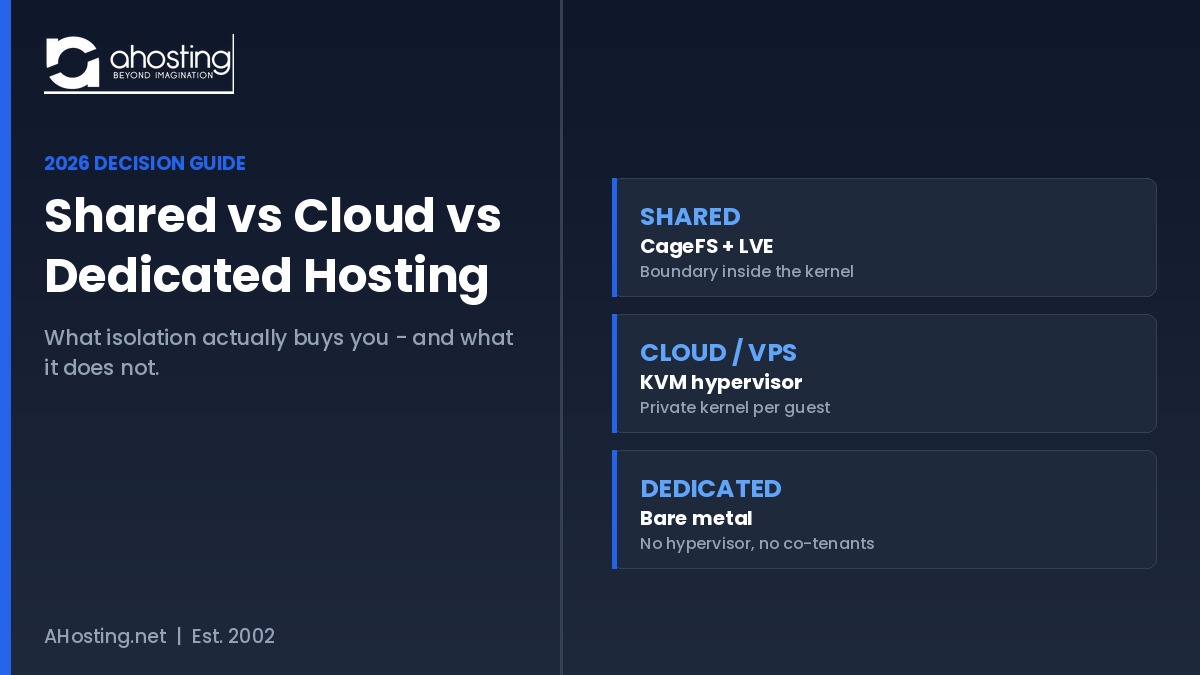
Choosing between shared vs cloud vs dedicated hosting is a resource isolation decision, not a speed decision. Each tier draws its boundary in a different place, and that boundary decides what a bad neighbor can do to you.
Comparing shared vs cloud vs dedicated hosting usually turns into a speed contest, and that framing is wrong. All three tiers can serve a page in under 100 milliseconds on modern hardware. What actually separates them is where the isolation boundary sits and what that boundary prevents when the account next door misbehaves.
This guide starts with the analogy everyone reaches for, then immediately goes past it into the mechanisms — kernel namespaces, control groups, hypervisors, and bare metal — because the analogy is where most published comparisons of shared vs cloud vs dedicated hosting stop.
Shared vs Cloud vs Dedicated Hosting: The Analogy and Its Limits
The Apartment, the Serviced Building, and the Detached House
Shared hosting is an apartment. You have your own locked unit, but the plumbing, the electrical supply, and the elevator are common property, and a neighbor running a workshop in their living room affects the whole floor. Cloud and VPS hosting is a serviced building where each unit has its own metered supply and its own boiler, so a neighbor can be as demanding as they like without touching your water pressure. Dedicated hosting is a detached house on its own lot: nothing arrives or leaves except through infrastructure you control.
Where the Analogy Breaks Down
However, the property metaphor misleads in two specific ways. First, it implies the detached house is automatically faster, which is false — an empty house with old wiring performs worse than a well-run apartment. Second, it hides the maintenance transfer. Moving up a tier does not only buy separation; it moves responsibility for patching, monitoring, and recovery onto you. That trade is the part buyers underestimate, and it is why the twelve-point checklist for choosing a hosting provider treats support model and isolation as separate criteria.
Resource Isolation Is the Real Dividing Line in Shared vs Cloud vs Dedicated Hosting
Isolation is a promise about containment: it defines what one tenant can observe, consume, and damage. Consequently, comparing tiers means comparing three different enforcement mechanisms rather than three price points.
What Isolation Actually Prevents
Isolation prevents four distinct failures, and it is worth naming them separately because no single tier addresses all four equally:
- Visibility — one tenant reading another tenant’s files, environment variables, or process list.
- Consumption — one tenant exhausting CPU, memory, or I/O that others need.
- Escalation — a compromised account becoming a compromised server.
- Contagion — one tenant’s crash or reboot interrupting everyone else.
Shared Hosting: CageFS and LVE Draw the Line Inside the Kernel
On AHosting shared plans, isolation is enforced by CloudLinux rather than by a hypervisor. CageFS gives each account a virtualized file system in which the account cannot see other users, cannot read server configuration files, and gets a restricted view of /proc that hides other processes. That closes the visibility and escalation problems. Consumption is handled separately by Lightweight Virtual Environments, which apply per-account ceilings on CPU, memory, and entry processes.
Underneath both sits ordinary Linux plumbing. Control groups meter and cap what a group of processes may consume, and the cgroup v2 memory controller is what turns an over-limit account into a contained error rather than a server-wide outage. Notably, this is why a runaway script on a neighbor account produces a 503 for that neighbor and nothing at all for you. The same mechanism is what our cPanel web hosting plans rely on.
Cloud and VPS: The Hypervisor Boundary
Virtualized hosting moves the boundary down a layer. KVM turns the Linux kernel into a hypervisor, giving every guest private virtualized hardware and an unmodified operating system of its own. Contagion drops sharply as a result: a neighbor can panic their kernel without touching yours. Additionally, you gain root, which means you can install what you like — and must now patch what you installed. Our KVM-based VPS plans sit at this boundary, and the signs a site has outgrown shared hosting guide covers the triggers in detail.
Dedicated: Physical Separation
Dedicated hardware removes the hypervisor entirely. There is no scheduling contention with other guests, no shared page cache, and no noisy-neighbor variance, which makes tail latency far more predictable than any multi-tenant tier. In exchange, the machine is a single failure domain that belongs entirely to you. Our dedicated server configurations and the Detroit peering breakdown show what that predictability is worth when network geometry matters.
Cloud Is a Deployment Model, Not a Performance Tier
The word “cloud” describes how capacity is provisioned and billed, not how fast it runs. NIST Special Publication 800-145 defines cloud computing through five essential characteristics — on-demand self-service, broad network access, resource pooling, rapid elasticity, and measured service — plus three service models and four deployment models. Read that list again: not one entry is a performance guarantee.
Therefore a cloud instance is exactly as fast as the stack someone configured on it. An entry instance running unturned Apache with a plugin cache will lose to a LiteSpeed shared account with server-level caching, and that outcome surprises people only because the marketing implies otherwise. Our server-versus-plugins TTFB diagnostic works through the measurements behind that comparison. In short, treat “cloud” as a billing and provisioning shape, then evaluate the stack separately.
The AHosting Isolation Ladder: Shared vs Cloud vs Dedicated Hosting Across Six Axes
Below is the comparison the tier decision actually turns on. Each axis is scored from AHosting’s own published plan specifications rather than from generic industry claims.
| Axis | Shared (CageFS + LVE) | Cloud / VPS (KVM) | Dedicated (bare metal) |
|---|---|---|---|
| Entry cost per month | $2.79 | $8.79 | $96.75 |
| Isolation mechanism | Kernel namespaces + cgroup limits | Hypervisor, private kernel per guest | Physical machine, no co-tenants |
| Burst capacity | Capped at the plan entry process ceiling | Guaranteed vCPU and RAM, burst within the guest | Entire machine available at all times |
| Scaling speed | Instant plan upgrade, no migration | Resize the instance, brief reboot | Hardware provisioning lead time |
| Administration burden | None — fully managed stack | Root access; you patch and monitor | Root access plus hardware lifecycle |
| Failure blast radius | Your account only | Your guest only | Every site on the machine |
Above all, notice that cost and isolation move together while speed does not appear as an axis at all. That omission is deliberate, because on a correctly configured stack the tier is not what determines first-byte time.
Failure Blast Radius: What Breaks, and Who Notices
Blast radius is the axis buyers most often skip when weighing shared vs cloud vs dedicated hosting, and it is the one that decides how a bad day feels. The table below traces four failures through each tier.
| Failure | On shared | On cloud / VPS | On dedicated |
|---|---|---|---|
| Runaway PHP script | Hits your own LVE ceiling; errors served to your visitors only | Consumes your guest’s vCPU; neighbors unaffected | Consumes the whole machine |
| Neighbor account compromised | CageFS blocks file and process visibility | Separate kernel; no crossover | No neighbors exist |
| Kernel panic | Affects every account on the node | Affects that guest only | Affects everything you host |
| Disk or component failure | Handled by the provider, transparently | Handled by the provider, guest migrated | Your machine is down until replaced |
In other words, moving up a tier narrows the radius of other people’s failures while widening the radius of your own. That symmetry is the honest reason to choose dedicated hardware, and it is the axis that reframes shared vs cloud vs dedicated hosting as a risk question rather than a performance one.
What Support Tickets Reveal About Shared Hosting Isolation
Here is a figure from our own queue rather than from a vendor datasheet. Across AHosting shared plans, “my site is slow” tickets resolve roughly fifty-fifty: about half trace to the account hitting its own entry process or memory ceiling, and about half trace to genuine contention on the node.
That split matters for the tier decision in a way averages usually hide. Half of the people who assume a noisy neighbor is punishing them are actually running into their own plan ceiling, which a tier change would fix only incidentally and expensively — a plan upgrade within shared hosting, or a caching fix, addresses it for a fraction of the cost. Meanwhile the other half have a real isolation problem that no amount of tuning inside the account will solve. Measuring which half you are in, using the method in our concurrent user capacity guide, is worth more than any generic tier recommendation.
How Billing Differs Across Shared vs Cloud vs Dedicated Hosting
Measured service is one of the five characteristics in the NIST definition, and it has a direct budgeting consequence: true cloud billing is metered, so your invoice tracks consumption rather than a fixed line item. That is genuinely useful for workloads that idle most of the month and spike hard, and genuinely dangerous for workloads that get unexpectedly popular.
By contrast, fixed-tier hosting trades elasticity for predictability. You buy a ceiling, you pay the same figure every month, and exceeding the ceiling produces an error rather than an invoice. Neither model is superior in the abstract. Agencies carrying client sites usually prefer the predictable shape, which is why our reseller hosting tier is priced that way, while a seasonal campaign site may genuinely benefit from metering. Decide which failure you would rather explain: a slow page, or a surprising bill.
Choosing Between Shared vs Cloud vs Dedicated Hosting: The Isolation Matcher
Answer five questions about containment rather than about traffic. The matcher weighs your answers against the six axes in the Isolation Ladder above.
Hosting Tier Isolation Matcher
Five containment questions. No traffic estimates required.
A Practical Checklist: Which Tier Does Your Site Need in 2026?
Finally, work through these six statements before settling shared vs cloud vs dedicated hosting for your own site. Each one maps to an axis in the Isolation Ladder, so a gap here tells you precisely which boundary you are missing.
- My cached-to-uncached request ratio is measured rather than assumed.
- The plan's entry process ceiling is known, and so is how often I reach it.
- Someone specific patches the operating system next month, and I can name them.
- Any contract or regulation requiring single tenancy has already been checked.
- Tail latency has a target expressed as a number rather than an adjective.
- When this site fails, I know exactly which other sites go down with it.
Six yes answers means the tier decision is already made for you by the evidence. Any no answer is cheaper to resolve with measurement than with an upgrade, since a managed WordPress plan and a bare-metal machine solve genuinely different problems.
Frequently Asked Questions About Shared vs Cloud vs Dedicated Hosting
What are the pros and cons of shared vs cloud vs dedicated hosting?
Specifically, shared hosting wins on cost and zero administration but shares a kernel, so your ceiling is a per-account limit rather than a private machine. Cloud and VPS hosting buy a private kernel and burst headroom at roughly three times the price, with root access you now have to maintain. Dedicated hosting removes the hypervisor entirely and gives predictable single-tenant performance, but you own every failure. The Isolation Ladder table in this guide scores all three across six axes.
Which of shared vs cloud vs dedicated hosting is right for a small business in 2026?
Typically, a brochure site, portfolio, or blog under a few thousand monthly visitors belongs on shared hosting, because the workload never approaches the per-account ceiling. A store taking regular orders, or any site with logged-in traffic that bypasses the page cache, is the point where a VPS starts earning its price. Dedicated hardware makes sense when compliance, sustained concurrency, or a hard latency target drives the decision rather than raw traffic volume.
Is cloud hosting faster than shared hosting, or is that a marketing claim?
In fact, neither label predicts speed. The NIST definition of cloud computing lists five essential characteristics, and not one of them is a performance guarantee, so a cloud instance is only as fast as the stack running on it. A well-tuned LiteSpeed shared account with server-level caching routinely returns pages faster than an untuned cloud instance running Apache. Judge the stack, not the deployment model.
What does CloudLinux CageFS isolate on AHosting shared hosting that a hypervisor does not?
Notably, CageFS and a hypervisor solve overlapping problems at different layers. CageFS gives every AHosting account a private view of the filesystem and of /proc, so one account cannot read another account's files, enumerate usernames, or inspect other processes, while LVE caps what that account can consume. A hypervisor instead hands each guest a private kernel. The practical difference is that CageFS isolation is enforced without the memory and scheduling overhead a full guest operating system costs you.
When should a WooCommerce store with 500 daily orders move from shared hosting to a VPS?
In practice, order volume matters less than how much of that traffic bypasses the cache. Checkout, cart, and account pages are uncacheable by definition, so 500 daily orders concentrated into a two-hour promotional window behaves very differently from the same 500 spread evenly. Move when uncached concurrent requests regularly exceed your plan's entry process allocation, not when a round order number is reached.
How does AHosting price shared vs cloud vs dedicated hosting tiers in 2026?
Specifically, AHosting web hosting starts at $2.79 per month, VPS hosting at $8.79 per month, and dedicated servers at $96.75 per month. Furthermore, the gaps between those tiers are not linear, because each step buys a different isolation boundary rather than simply more of the same resource. Verify current figures on the product pages before budgeting, since promotional and renewal rates differ.
What is the failure blast radius in shared vs cloud vs dedicated hosting?
Ultimately, blast radius answers a single question: when something breaks, how many of your sites go with it. On shared hosting a runaway script hits your own account ceiling and returns errors to your visitors only, because LVE contains it. A kernel panic inside a VPS takes down that one guest and nothing else. Dedicated hardware behaves differently again, since a failed component takes down everything you put on that machine, which is why single-tenant performance and single-tenant risk arrive together.
If my site gets a traffic spike of 200 concurrent visitors, does cloud hosting handle it better than shared?
Interestingly, that depends entirely on whether those visitors hit cached pages. Two hundred concurrent readers of a cached article barely register on a shared plan, because cached responses never reach PHP. Two hundred concurrent logged-in users are a different workload and will exhaust a shared plan's worker allocation regardless of price. Measure your cached-to-uncached ratio before assuming the tier is the problem.
Can I move from shared to dedicated hosting on AHosting without downtime or a migration fee?
Fortunately, yes. AHosting handles cPanel-to-cPanel migrations free of charge with zero downtime, and most transfers complete in under 20 minutes. Because the control panel and the LiteSpeed stack are the same on every tier, moving up does not force you to relearn your environment or rebuild your configuration from scratch.
What changed about shared vs cloud vs dedicated hosting decisions in 2026?
Overall, the meaningful change is that the performance argument has largely collapsed. Server-level caching, kernel-enforced resource limits, and modern PHP have narrowed the gap between a tuned shared account and an entry cloud instance to the point where isolation, not speed, is the honest reason to move up a tier. Consequently, the right question in 2026 is what you need contained, not what you need to be faster.
Related posts:
 Detroit Dedicated Server Hosting: Inside the DET-iX Advantage (2026)
 How Many Concurrent Users Can WordPress Shared Hosting Handle? The PHP Worker Math (2026)
 Why Raising the WordPress Memory Limit Doesn’t Work on Shared Hosting (and What Does)
 7 Signs Your WordPress Site Has Outgrown Shared Hosting (Is It Time for WordPress VPS Hosting?)