- What "Beginner-Friendly" Should Actually Mean in 2026
- The Five Decisions Behind a First Website
- Best Hosting for Beginners Factor 1: Reversibility Beats Feature Count
- Best Hosting for Beginners Factor 2: The Domain Decision Locks Hardest
- Best Hosting for Beginners Factor 3: Nameservers Are Cheap to Change, Costly to Forget
- Best Hosting for Beginners Factor 4: Your Billing Cycle Is the Real Commitment
- Best Hosting for Beginners Factor 5: Control Panel Portability Is an Exit Cost
- The AHosting Beginner Lock-In Ladder
- The Overbuy and Underbuy Traps
- Check Your Own Lock-In Exposure
- Launch Day and the First 90 Days
- Frequently Asked Questions About the Best Hosting for Beginners
- What does best hosting for beginners actually mean in 2026 beyond price?
- Shared hosting vs VPS hosting: which is the best hosting for beginners?
- cPanel vs a proprietary control panel: which is safer for a first website?
- Is the best hosting for beginners free hosting, or does free cost more later?
- How long is a new domain locked after registration with a host in 2026?
- If I register my domain elsewhere, will my free certificate still renew automatically?
- Does AHosting bundle a free domain with its best hosting for beginners plans?
- When should a first-time site owner on a 15 entry-process plan upgrade?
- What makes AHosting best hosting for beginners accounts portable in 2026?
- Which first-website decisions can AHosting reverse without a support ticket?
The best hosting for beginners is not the plan with the longest feature list. It is the plan whose decisions you can undo. Five choices lock you in, and only two are reversible for free.
Every guide to the best hosting for beginners compares the same things: price, storage, uptime badges, a support promise. Those columns are nearly identical across the entry market, which is why they settle nothing. The question that actually separates a good first purchase from a bad one never appears in the table.
That question is how much each decision costs to reverse. A first-time buyer is, by definition, deciding with the least information they will ever have. Consequently the right plan is not the one that guesses correctly on your behalf; it is the one that lets you be wrong cheaply. This guide scores all five first-site decisions on exactly that axis.
What “Beginner-Friendly” Should Actually Mean in 2026
Beginner-friendly is usually sold as an interface promise: a guided wizard, a one-click installer, a tidy dashboard. Those things genuinely help on day one and matter very little by day ninety. In practice, the beginner-specific risk is not that setup is hard. It is that a decision made in ignorance during week one becomes expensive to unwind in month six.
Therefore a technical definition serves a first-time buyer better than a marketing one. Beginner-friendly means one-click installation so nothing is assembled by hand, staging included rather than sold as an upgrade, certificates that renew without anyone remembering, and an account format another provider can actually accept. Notably, only the last of those four is about leaving, and it is the one no comparison table lists.
The Five Decisions Behind a First Website
Launching a first site involves exactly five purchasing decisions. Everything else marketed alongside them is either bundled into one of the five or is genuinely optional at this stage.
Firstly, where the domain is registered. Secondly, which hosting type to buy. Thirdly, which control panel that hosting runs. Fourthly, where email is routed. Finally, how backups are produced and where they are kept. Each of the five is covered in depth elsewhere on this blog; this guide is about a property they share rather than about the decisions themselves.
That shared property is asymmetry. Some of these five are trivially reversible, and some bind you for a fixed period no support ticket can shorten. Above all, a beginner has no way to tell which is which from a pricing page, because reversal cost is never advertised.

Best Hosting for Beginners Factor 1: Reversibility Beats Feature Count
Fundamentally, feature counts converge at the entry tier while exit costs diverge sharply. Two plans advertising identical inclusions can differ by weeks of waiting and a weekend of manual work the moment you want to leave, and nothing on either page signals that gap.
Reversibility is measurable along three axes: what triggers the lock, how long it lasts, and what it costs to break. Accordingly, a decision that binds you for sixty days at no cash cost is not obviously better or worse than one that costs a rebuild but can happen today. Ranking them requires scoring both dimensions, which is what the ladder later in this guide does.
For a broader evaluation framework that goes beyond reversibility, our 12-point checklist for choosing a web hosting provider covers the criteria a business with revenue at stake should weigh. This guide deliberately assumes no revenue is at risk yet, which changes which trade-offs are acceptable.
Best Hosting for Beginners Factor 2: The Domain Decision Locks Hardest
Of the five, the domain binds you longest, and almost every first-time buyer makes it first and fastest. ICANN Transfer Policy prevents a registrar-to-registrar transfer for 60 days following registration, and imposes a further 60-day lock after any change to the registrant contact details.
Interestingly, that policy is now in transition. Following a full review, the Transfer Policy Review recommendations went to the ICANN Board after public comment closed in June 2025, and the approved package shortens the registration lock and removes the registrant-change lock entirely. However, implementation drafting is still underway and no effective date has been published, so the 60-day rule is what binds a domain registered this week.
One further detail decides who you are actually dealing with. The IANA Root Zone Database records which organization operates each top-level domain, and that registry, not your host, sets the rules your name lives under. Ultimately a domain is the one asset in this list that outlives every other decision, which argues for buying it where the renewal price is published rather than where the first year is free. AHosting sells domains at a flat published rate and supports moving an existing name in once any lock expires.
Best Hosting for Beginners Factor 3: Nameservers Are Cheap to Change, Costly to Forget
By contrast, the nameserver decision is the cheapest to reverse and the most damaging to leave wrong. Changing where a domain points costs nothing and takes minutes; the only delay is cache expiry, governed by the record time-to-live defined in RFC 2181 section 8.
Moreover, a time-to-live is a ceiling rather than a schedule. DNS terminology guidance notes that a resolver operator may shorten the value it honors, so propagation in practice often completes faster than the published figure suggests. Consequently the real cost of a nameserver change is measured in hours, not the days folklore assigns it.
The damage comes from never making the change at all. A domain registered at one company and hosted at another keeps answering from the registrar, and automated certificate renewal then fails silently against a zone that never receives its validation record. Our guide to what free SSL and domain management actually includes documents that failure chain in full, including what our own account data shows about its single recurring cause.
Best Hosting for Beginners Factor 4: Your Billing Cycle Is the Real Commitment
Similarly, the headline price on any entry plan is a term commitment wearing a monthly costume. The advertised figure is available because you have paid ahead, so the discount and the lock are the same object viewed from two sides.
For a first site this matters more than it does for an established one, because a first site has the highest chance of being abandoned or rebuilt. Specifically, prepaying three years to save on a project you may not want in six months converts a discount into a loss. In contrast, an established site with known traffic is exactly the case where prepayment pays. Our breakdown of what website hosting costs per month runs that arithmetic across every cycle.
The practical reading for a beginner is to buy the shortest term you can tolerate on the first purchase and lengthen it at the first renewal, once the site has proven it will exist. Fortunately the cycle can generally be extended at any renewal rather than only at signup, which makes the cautious choice a cheap one rather than a permanent penalty.
Best Hosting for Beginners Factor 5: Control Panel Portability Is an Exit Cost
Finally, the control panel looks like a usability decision on day one and reveals itself as a portability decision on the day you leave. All of them install WordPress in a click; they differ in what they hand you on the way out.
A cPanel account produces a standard full-account archive containing files, databases, email accounts, DNS records and cron jobs as a single unit, which another cPanel host can import directly. A proprietary panel produces an export in its own format, and the receiving provider has no native way to consume it. As a result the migration becomes a manual rebuild: files moved by hand, databases exported separately, mailboxes recreated, schedules rewritten from memory.
That gap is not billed to you, which is precisely why it never appears in a comparison. It is paid in a weekend, and it is paid at the worst possible moment. Every AHosting WordPress plan runs cPanel for this reason, including the entry tier.
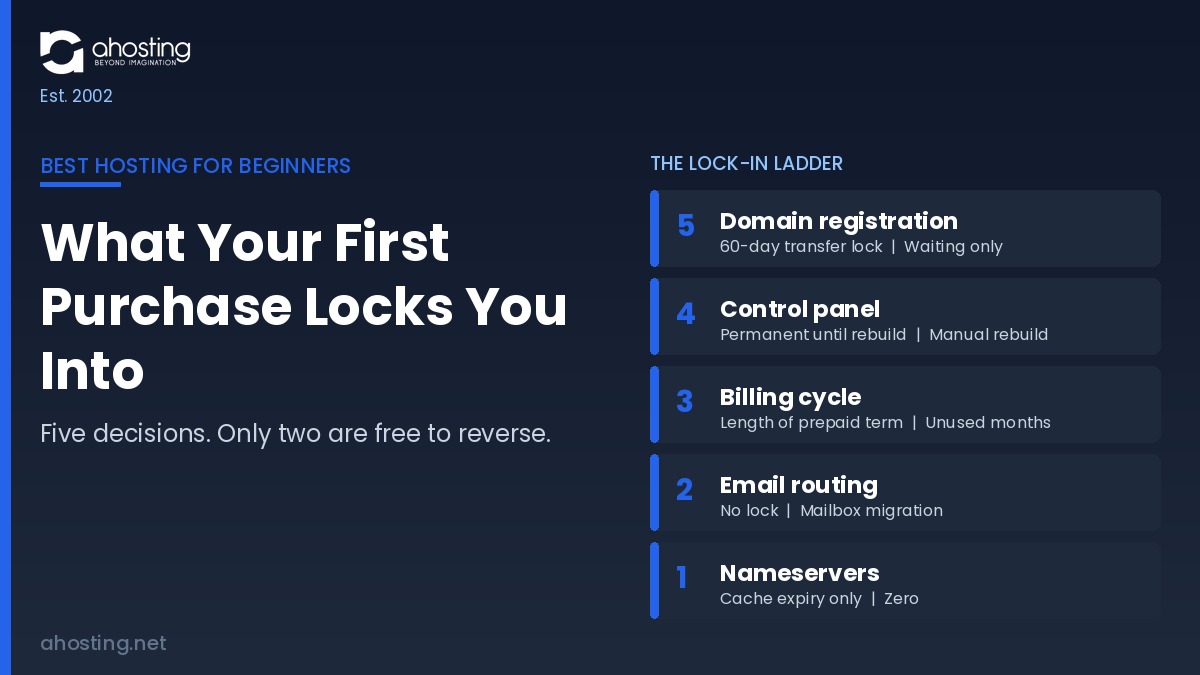
The AHosting Beginner Lock-In Ladder
Below, the five decisions are scored on what triggers the lock, how long it holds, and what breaking it costs. Lock score runs 1 to 5, where 5 is hardest to reverse.
| Decision | Lock trigger | Lock window | Cost to reverse | Lock score |
|---|---|---|---|---|
| Domain registration | Registration, transfer, or registrant-detail change | 60 days, restarting on each trigger | No cash cost; waiting only | 5 |
| Control panel | Account created in a proprietary format | Permanent until you rebuild | Manual rebuild of files, databases, mail, cron | 4 |
| Billing cycle | Prepaying a committed term | Length of the term purchased | Unused prepaid months | 3 |
| Email routing | Mailboxes created at the host | None; migration is the constraint | Mailbox export and re-delivery setup | 2 |
| Nameservers | None; change is always permitted | Cache expiry only | Zero | 1 |
Two readings follow immediately. Notably, the decision most first-time buyers make first and most casually, the domain, sits at the top of the ladder, while the one they agonize over, the plan tier, does not appear at all because it is reversible on request. Additionally, the two hardest locks are the two nobody markets to beginners.
The Overbuy and Underbuy Traps
Two opposite mistakes account for most regretted first purchases, and both come from sizing a plan against a guess rather than against a measurement.
| Trap | What it looks like | What it actually costs | Better first move |
|---|---|---|---|
| Overbuy | Buying a VPS for a site with no traffic history | Paying for idle capacity plus taking on server administration | Start shared; move when queueing persists with caching on |
| Overbuy | Prepaying three years on a first project | Unused committed months if the site is abandoned | Short term first, extend at renewal |
| Underbuy | Cheapest possible plan for a store | Checkout queueing during the traffic you were hoping for | Size against concurrent uncached requests, not visits |
| Underbuy | Free hosting to avoid a small monthly fee | No account export, no owned domain, no exit | Pay the entry rate and keep portability |
The tier question itself is genuinely reversible, which is why it belongs in a table rather than on the ladder. Our comparison of shared hosting versus VPS hosting for growing sites sets out the real upgrade signals, and the wider view across shared, cloud and dedicated isolation boundaries explains what each tier is actually selling. When a site does outgrow shared resources, a VPS with guaranteed resources is the standard next step.
Check Your Own Lock-In Exposure
Rather than reading the ladder against a hypothetical launch, answer four questions about the purchase you are about to make. The result returns your total exposure and names the single decision worth changing first.
Beginner Lock-In Exposure Checker
Four questions about the purchase you are about to make. Nothing is sent anywhere.
1. Will you register the domain and buy hosting at two different companies?
2. Does the plan use a proprietary control panel rather than cPanel?
3. Are you prepaying more than twelve months on this first purchase?
4. Is the domain bundled free for the first year with the plan?
Launch Day and the First 90 Days
A first launch has a short list of things that must be true on day one, and a shorter list of habits that decide whether month three is calm.
The launch-day checklist
- Nameservers point at the hosting account, not the registrar, before anything else is tested.
- The certificate is issued and the site loads over HTTPS on both the bare domain and the www form.
- A full account backup has been generated once manually, so you have seen the process work.
- Email routing is confirmed by sending a message to an outside address and receiving a reply.
- Staging exists and has been opened once, before you need it in an emergency.
The first ninety days
Afterwards, the maintenance list is genuinely short. Specifically, apply core and plugin updates on staging rather than live, confirm monthly that a backup exists and can be downloaded, and record the renewal date and renewal price of both the hosting plan and the domain somewhere you will actually look.
One habit matters more than the rest. Ultimately, checking that certificate renewal has happened at least once, roughly sixty days after launch, catches the single most common silent failure before a visitor meets a browser warning.
Frequently Asked Questions About the Best Hosting for Beginners
What does best hosting for beginners actually mean in 2026 beyond price?
Specifically, the best hosting for beginners in 2026 is the plan that leaves your first decisions reversible: a control panel whose account format another host can import, a domain you can move, and a billing term you are not trapped inside. Feature checklists look identical across providers at this price point. Exit costs do not, and the Lock-In Ladder in this guide scores all five.
Shared hosting vs VPS hosting: which is the best hosting for beginners?
In practice, shared hosting is the correct first purchase for essentially every first website, and a VPS is the classic overbuy. A first site has no traffic history to size against, so buying guaranteed resources means paying for capacity you cannot yet justify and accepting server administration you did not sign up for. Our shared hosting versus VPS comparison sets out the actual thresholds that signal a real move.
cPanel vs a proprietary control panel: which is safer for a first website?
Notably, the difference only shows up on the day you leave. A cPanel account produces a standard full-account archive that another cPanel host can import directly, so your files, databases, email accounts and cron jobs move as one unit. A proprietary panel produces an export in its own format, which usually means rebuilding the account by hand somewhere else.
Is the best hosting for beginners free hosting, or does free cost more later?
Typically, free hosting is the most expensive option available to a first-time site owner, because it is paid for in portability rather than money. Free tiers generally withhold the standard account export, place your site on a subdomain you do not own, and offer no path to move the result anywhere. The best hosting for beginners is cheap to leave, not free to enter.
How long is a new domain locked after registration with a host in 2026?
Indeed, this is the hardest lock in the whole first purchase. ICANN Transfer Policy blocks a registrar-to-registrar transfer for 60 days after a domain is registered or transferred, and imposes a further 60-day lock after a change to the registrant contact details. Approved reforms will shorten the registration lock and drop the registrant-change lock, though no implementation date has been published yet.
If I register my domain elsewhere, will my free certificate still renew automatically?
Typically it will not, and this is the single most common way a first website quietly breaks. Automated certificate renewal writes a validation record into the DNS zone held on the hosting account, so a domain whose authoritative nameservers still point at the registrar sends the certificate authority to a zone that never receives it. Our guide to free SSL and domain management traces all five links in that chain.
Does AHosting bundle a free domain with its best hosting for beginners plans?
In fact, no, and the omission is deliberate. A bundled domain is free for twelve months and then renews at the registrar standard rate, which is where the real cost appears. AHosting instead sells domains at a published flat rate where registration and renewal are the same figure, so the second-year number is visible before you buy rather than after.
When should a first-time site owner on a 15 entry-process plan upgrade?
Ultimately, the trigger is sustained uncached concurrency rather than a visitor count. A Bronze plan allocates 15 entry processes, meaning 15 simultaneous requests that reach PHP, while cached pages consume none at all. Therefore the first move is almost always server-level caching, and only a site still queueing with caching active has genuinely earned a larger plan.
What makes AHosting best hosting for beginners accounts portable in 2026?
Above all, the account format. AHosting runs cPanel on every plan, so the account exports as a standard archive rather than a proprietary bundle, and domains carry no bundled-renewal trap. Additionally, the DNS zone editor sits on the account itself, which means nameserver and record changes never wait on a support ticket.
Which first-website decisions can AHosting reverse without a support ticket?
Fortunately, most of them. DNS records and nameservers change in the zone editor, PHP versions change in MultiPHP Manager, and staging exists on every plan including the entry tier, so changes get tested before they reach visitors. The decisions that still involve waiting are the two nobody controls: the registrar transfer lock and your committed billing term.