
- What “An Active PHP Session Was Detected” Actually Means
- What Actually Breaks: Your Own Cookie Comes Back at You
- Why This Test Is Wrong About an Active PHP Session in Both Directions
- What an Active PHP Session Costs on Shared Hosting
- Where PHP Session Files Actually Live
- Work Out What an Active PHP Session Costs Your Account
- How to Fix an Active PHP Session Without Breaking What Needed It
- A Practical Checklist for an Active PHP Session Warning
- Frequently Asked Questions About an Active PHP Session
- How do I clear a session variable in PHP?
- Is an active PHP session a real problem in 2026, or just a warning?
- What actually starts an active PHP session on a WordPress site?
- How do I find what opens an active PHP session on AHosting shared hosting?
- session_write_close vs session_destroy: which one should I actually call?
- File sessions vs Redis sessions: does moving the store fix an active PHP session?
- Does an active PHP session use up AHosting entry processes in 2026?
- Why does the loopback request test fail whenever a session is open?
- Can I safely ignore an active PHP session warning on AHosting hosting?
- Will clearing an active PHP session speed up a WordPress site in 2026?
WordPress core never opens a PHP session, so an active PHP session on your site was opened by a plugin, a theme or a server directive. The cost is not the warning: PHP locks the session file for the whole request, so every other request from that visitor queues behind it, and the session cookie stops the page being cached at all. The fix is to close the session as soon as the last write is done — not to delete the code that needed it, and not to hide the test.
WordPress core does not open one, which is the first useful thing to know. When Site Health reports an active PHP session, it has found that something in your installation called the function that opens a session, and that the session was still open when the screen rendered. Core keeps its own state in cookies, the options table and transients precisely so it never needs one, so a stock install with no third-party code cannot produce this entry. Something you installed did. The warning itself is mild, the wording is vague, and the actual cost is concurrency: while that session is open, PHP holds an exclusive lock on one file, and everything else that visitor asks for stands in line. This guide covers what the test really checks, why it is wrong in both directions, what the lock costs on a shared plan, and how to close it without breaking the feature that needed it.
What “An Active PHP Session Was Detected” Actually Means
The test behind it is about ten lines long. Core asks PHP one question — is a session open right now — and if the answer is yes it changes a label, raises the status to critical, and prints a sentence telling you to close the session before making any HTTP requests. There is no plugin name in it, no file path, no line number, and no indication of how long the session has been open or what opened it. That is the whole test. You can read it yourself as the get_test_php_sessions method in the WP_Site_Health class, which core has shipped since version 5.5. Everything else people believe about an active PHP session — that it means a plugin is broken, that it slows the dashboard, that it is a security problem — is inference, and most of it is wrong. What it does mean is worth the rest of this page, because the sentence core prints describes the symptom and never the mechanism.
Why WordPress Core Never Opens an Active PHP Session Itself
Core made this choice deliberately and has stuck to it for over a decade. Logged-in state travels in authentication cookies, short-lived data goes in transients, and anything durable goes in the options or usermeta tables, none of which needs a file locked on disk for the length of a request. The practical consequence is that an active PHP session has a very short suspect list. If you see an active PHP session on a site, the code that opened it is a plugin, a theme, a must-use plugin, or a server-level directive that opens one automatically for every request before your code runs at all. That last case is the one people miss, because nothing in the site’s own files mentions sessions and the search that would have found the culprit comes back empty.
Why the Badge Says Performance and the Status Says Critical
Site Health entries carry two independent pieces of metadata, and this one pairs them oddly. The badge is the blue Performance label, which is what core chose to file the test under. The status, when a session is found, is critical — the same severity the screen uses for a site that cannot reach the update servers. Readers reasonably conclude that core is either overreacting or mislabelling, and then ignore it. Both halves are defensible once you know what an active PHP session does: the damage genuinely is a performance problem, and it genuinely is severe, because it removes the site’s ability to serve one visitor’s requests in parallel. The badge tells you the category and the status tells you the size. Neither tells you the cause.
What Actually Breaks: Your Own Cookie Comes Back at You
Core’s own wording says the session interferes with REST API and loopback requests, and stops there. The reason it interferes is specific, mechanical and absent from every page that ranks for this error. A loopback request is WordPress asking its own server for a page, which is how it verifies that scheduled tasks and the editor’s safety checks can work at all. We covered what that test does and how it fails on its own in the guide to the loopback request warning. What that guide does not cover, because it belongs here, is what happens when a session is open at the moment the loopback fires.
The Loopback Request Carries Your Session Cookie
Core builds that request with the line $cookies = wp_unslash( $_COOKIE ); and passes the result straight through. Every cookie the browser sent with the current admin request is forwarded to the inner request, and that includes the session cookie PHP set when the session opened. So the inner request does not arrive anonymous. It arrives holding the identifier of the session the outer request is currently sitting on. If the plugin that opened the session runs on that inner request too — and a plugin that opens one unconditionally will — PHP tries to take the same exclusive lock on the same file. The outer request has it, and will not give it up until it finishes.
Ten Seconds, Then the Test Reports a Failure
At this point the site is waiting for itself, and it will wait for exactly as long as core allows. The loopback timeout is hard-coded at ten seconds. The outer request cannot complete until the loopback answers; the loopback cannot answer until the outer request releases the lock. Ten seconds later the timeout expires, the loopback test records a failure, and you are looking at two red entries that are really one problem. That is why the loopback entry and the session entry so often appear together, and why fixing the loopback in isolation never works. The same pattern explains some cases of the secure connection failure, where the outbound call is made while a session is still open.
Why This Test Is Wrong About an Active PHP Session in Both Directions
Here is the part that changes how you should read the screen. The session test is registered as a direct test, meaning it executes inside the PHP process that is building the Site Health page, at the moment you load it. It is not a background job and it does not sample anything. It asks one question about one request — the one it is inside. Everything that follows from that is a limitation nobody documents, and it cuts both ways. A site can show a clean screen while paying the full cost on every visitor, and a site can show a red critical for something that costs it almost nothing.
It Only Sees the Request It Runs In
Consider a plugin that opens a session on the front end and not in the dashboard, which is by far the most common shape for form handlers, cart add-ons and tracking code. When you open Site Health, that code does not run, no session is open in the admin request, and the test reports that no PHP sessions were detected. The screen is clean. Every visitor to the site is still queueing behind a lock on every page. Nothing on the Site Health screen will ever tell you so, and no amount of re-running it will change the answer, because the request it inspects is not the request with the problem.
A Red Critical Can Be the Cheap Case
Now invert it. A plugin that opens a session only inside wp-admin trips the test reliably, because the session is open in exactly the request the test runs in. That is the version everyone sees and the version every forum thread is about. It is also, in cost terms, the mild one: dashboard pages are uncacheable anyway, the audience is you and your editors, and the concurrency lost is concurrency nobody was using. The visible warning and the expensive problem are, in other words, close to uncorrelated. Read the code, not the badge.
What an Active PHP Session Costs on Shared Hosting
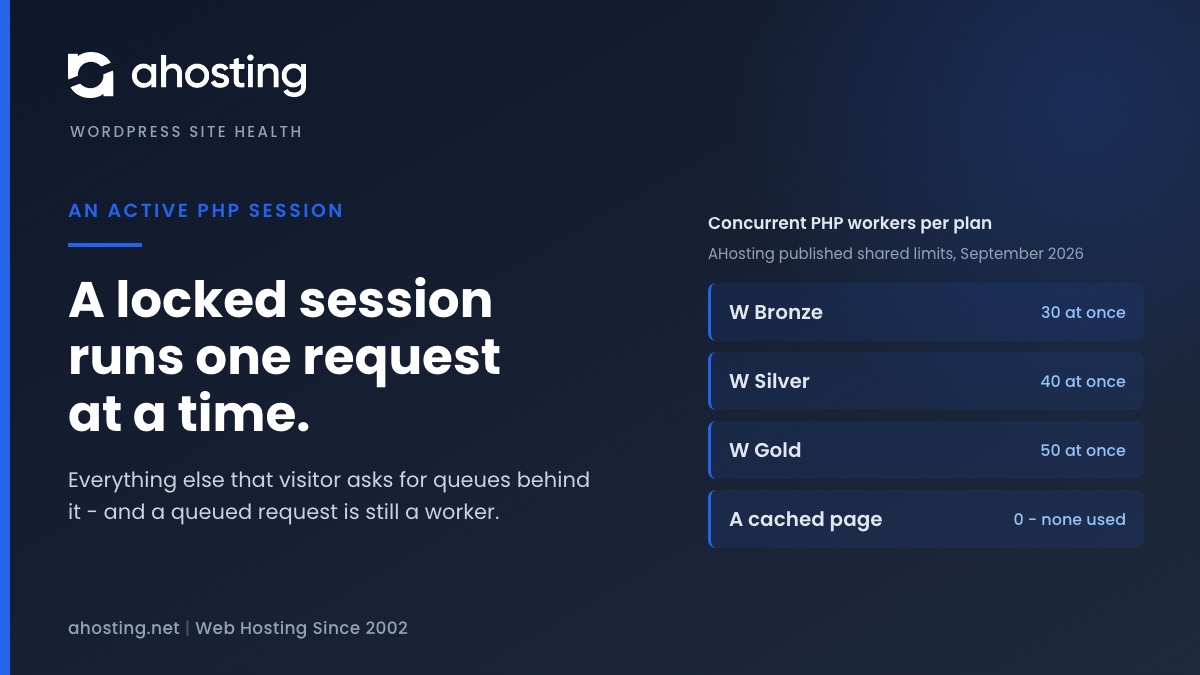
Three separate costs stack up behind an active PHP session, and only the first is about PHP at all. The lock serializes a visitor’s requests, the queued requests occupy concurrency the account is metered on, and the session cookie removes the page from the cache that was protecting both. Each is modest alone. Together they turn a page that cost nothing into a page that costs a worker and holds it.
One Lock, One Request at a Time
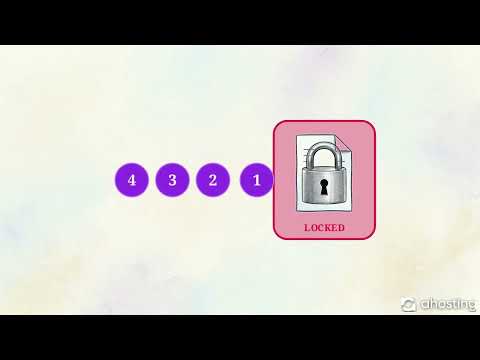
PHP’s default session store is files on disk, and the manual is blunt about what that means: session data is locked to prevent concurrent writes, so only one script may operate on a session at any time. Underneath, that is an exclusive advisory lock on the session file, and the flock system call documents the consequence precisely — only one process may hold an exclusive lock on a file at a time, and a call may block if an incompatible lock is already held. Blocking is the whole story. The second request does not fail and does not fall back; it waits, holding a PHP worker while it does nothing.
Entry Processes: Where Queueing Becomes a Ceiling
This is where a shared plan stops being an abstraction. Entry processes are the account’s ceiling on simultaneous PHP execution, and our shared plan pages publish the number for each tier along with the sentence that matters most here: it is a limit, not a reservation, and cached pages are served without consuming one. A request waiting on a session lock is not cached and is not idle from the ceiling’s point of view. It is a worker, occupied, achieving nothing. Push enough of them into the queue at once and the account stops accepting new work, which is the same wall described in the guide to the 508 resource limit error.
| Shared plan | Entry processes published | Requests that can run at once, account-wide | Requests that can run at once for one visitor holding a session lock |
|---|---|---|---|
| W Bronze / WP Bronze | 30 | 30 | 1 |
| W Silver / WP Silver / WooStart | 40 | 40 | 1 |
| W Gold / WP Gold | 50 | 50 | 1 |
| Any plan, page served from cache | not counted | not counted | not applicable |
An Active PHP Session Makes the Page Uncacheable
Opening a session sets a cookie, and a cookie changes how every cache in the path treats the response. Caches do not agree on the rule, which is itself the problem: Apache Traffic Server documents cookied-content caching as a configurable policy with several possible settings, and a full-page cache in front of WordPress typically takes the conservative option and declines to serve a cached copy. On our stack, a cached page consumes zero entry processes; a page carrying a session cookie does not get to be that page. The cost is therefore not one slow request. It is the loss of the mechanism that was keeping most requests off PHP entirely, which is also what makes the writes described in our guide to disk I/O throttling climb.
Where PHP Session Files Actually Live
People ask this second, right after asking what opened the active PHP session, and the honest answer starts with a setting rather than a path. PHP writes sessions wherever session.save_path points, and the session configuration reference lists that directive with an empty default, which means the build decides. On a cPanel account the path is set for you and is usually a per-version directory outside your home folder, so you will not find the files by browsing the File Manager. The same reference records three other defaults worth knowing: the cookie is named PHPSESSID, the handler is files, and data is treated as garbage after 1440 seconds.
Reading Your Own Save Path Rather Than Guessing It
Guessing is what costs people the afternoon, because the answer differs by control panel, by PHP version and sometimes by account. The reliable way is to ask the PHP that is actually running your site, which every AHosting plan lets you do two ways: a one-line info page, or the command line through the jailed shell that ships with every shared plan. Read the value of the save path directive there and you have the real answer for the version currently selected. Switch PHP version and check again, because each installed version keeps its own configuration and can be pointed somewhere else entirely.
Why the Files Pile Up: One Per Cent Garbage Collection
Session files are not deleted when a visitor leaves. PHP clears them opportunistically, and the default odds are published in the same reference: a garbage collection probability of one against a divisor of one hundred, which is a one per cent chance of a cleanup pass on any given request. Busy sites therefore accumulate small files steadily, and each one is a real file consuming a real inode. On a plan with a published inode allowance that matters, and it is the same accounting described in our guide to the WordPress inode limit. Many managed stacks replace the probabilistic sweep with a scheduled job for exactly this reason.
Work Out What an Active PHP Session Costs Your Account
The numbers above are ceilings and defaults. What you want is the cost on your account, with your plan, for the way your site opens its session. Set the three controls and the calculator gives you what an active PHP session costs in wall-clock time, the share of your concurrency it occupies, whether Site Health can see the problem at all, and the first thing to change.
Session Lock Concurrency Calculator
Say where the session is opened, how long the request that holds it runs, and which plan the account is on. It works out what the lock costs in wall-clock time, how many entry processes are tied up while that happens, whether Site Health can even see the problem, and what to do first.
What the lock costs:
What it does to the cache:
Whether Site Health can see it:
Do this first:
The arithmetic assumes four overlapping requests from one visitor, which is ordinary for a page with a cart fragment, an autosave and a tracking call. It models PHP file-based sessions, where an exclusive lock is held for the whole request. It cannot see your code, so confirm against the plugin before changing anything.
How to Fix an Active PHP Session Without Breaking What Needed It
Almost every ranking page for an active PHP session says the same thing: find the plugin and delete the line that opens the session. That advice breaks working features, because the code opened a session for a reason and something later in the request reads it. The supported fix is smaller and safer. Keep the session, and close it the moment the last write is done, which releases the lock while leaving the data intact for the next request.
Close It After the Last Write, Not at the End of the Request
Closing the session explicitly writes the data back and releases the lock, and PHP is clear that this is what the call is for. Placement is the part that decides whether it helps. A close call on the last line of a plugin file releases the lock a millisecond before the request would have released it anyway, which is worth nothing. The call belongs immediately after the final write to the session — before the template renders, before any outbound HTTP call, and before anything that might take time. Frameworks treat this as ordinary practice: Symfony documents that the native handlers lock while its Redis and Memcached handlers do not, and tells you to pick deliberately.
Read-Only Pages Never Need the Lock at All
Many pages read from the session and never write to it: a header that greets the visitor by name, a template that checks whether a wizard was completed, a widget showing a saved preference. For those, PHP offers a mode that opens the session, reads it and closes it in one step, taking no lasting lock. It is the read_and_close option, and the manual describes it as avoiding unnecessary locking when the session data will not change. Applied to the read-only two-thirds of a typical plugin’s pages, it removes the contention without touching a single feature.
What Not to Do About an Active PHP Session Warning
- Do not delete the session code blind. Something reads it, and the failure will surface somewhere unrelated, days later.
- Do not reach for a plugin that hides the Site Health entry. The lock does not care whether you can see the warning.
- Do not destroy the session where you meant to close it. Destroying throws away a cart or a part-completed form; closing keeps the data and releases the lock.
- Do not turn on the directive that starts a session automatically for every request. It guarantees the cost on every page including the ones that never needed it.
- Do not assume a network-backed store is a free upgrade. Valkey and the Redis-protocol stores remove the file lock, but a handler that does not lock lets two requests overwrite each other, which is a different bug and a quieter one.
- Do not benchmark the fix on a quiet staging copy. Laravel allows concurrent same-session requests by default for the same reason the problem is invisible there: with one tester, nothing overlaps.
A Practical Checklist for an Active PHP Session Warning
- Read whether the session is opened on the front end or only in wp-admin. That single fact decides whether this is costing you visitors or costing you nothing.
- Bisect the plugins with Site Health open, and check the theme as well. Theme frameworks that predate the REST API are a common source.
- Search the codebase for the call that opens a session before bisecting, if you have shell access. It is usually faster than halving the plugin list.
- Rule out a server-level automatic start before blaming your code, because that setting leaves no trace in the files you are searching.
- Add the close call immediately after the last write, then re-run Site Health and the loopback test together. Both should clear at once.
- Switch the read-only paths to open-read-and-close, which is where most of the remaining contention lives.
- Confirm the page is cacheable again afterwards. If the cookie is still being set on every request, the concurrency fix landed and the cache fix did not.
Where an Active PHP Session Stops Being Your Problem
None of that needs a support ticket on an AHosting account, and that is deliberate. Our WordPress plans include selectable PHP versions, WP-CLI and a jailed shell so that the person reading a warning can act on it in the same sitting. The part we take off your hands is the layer underneath: LiteSpeed and LSCache keeping the pages you fixed out of PHP altogether, and CloudLinux holding the account’s concurrency steady while you work. Where a store is the thing queueing, the WooCommerce plans start at the larger allocation for exactly that reason, and where a single account can no longer be made to fit, a VPS is the honest next step rather than a bigger shared plan. The lock is yours to release; the headroom around it is ours.
Which Fix Fits Which Page
| What your code does with the session | The call that fits | What it costs you | What it does not fix |
|---|---|---|---|
| Reads a value, never writes | Open with read and close in one step | Nothing. The read still works | The Site Health entry, if another page still holds a session open |
| Writes once, early in the request | Close immediately after that write | One line, placed deliberately | A second plugin opening its own session later in the same request |
| Writes throughout the request | Close after the last write, then re-open only if a later write is unavoidable | A short audit of where the writes are | The cookie, which keeps the page out of the cache either way |
| Opens a session it never uses | Remove the call, after confirming nothing reads it | A bisect to prove nothing reads it | Nothing. This is the one case where deletion is correct |
Frequently Asked Questions About an Active PHP Session
How do I clear a session variable in PHP?
Typically people arrive at that question from the wrong end of this problem, so it is worth separating the two things it can mean. Removing one value is a single unset call against the session superglobal, and removing all of them is a session destroy call, but neither of those releases the lock that Site Health is complaining about. The lock is held from the moment the session opens until the request ends or the session is explicitly closed, so clearing values inside it changes nothing about concurrency. If what you actually want is for other requests to stop queueing, the call you need closes the session rather than emptying it.
Is an active PHP session a real problem in 2026, or just a warning?
Specifically it is a real problem, and the reason the wording feels overblown is that core files it under a Performance badge while marking it critical. The cost is concurrency: a request holding the session file holds it exclusively, so every other request from that same visitor waits its turn rather than running alongside. On a laptop with one tester that is invisible. On a shared plan with a checkout, a cart fragment and two dashboard polls firing together, it is the difference between one round trip and four stacked end to end.
What actually starts an active PHP session on a WordPress site?
In practice a plugin or a theme does, because WordPress core never calls the function that opens one. Core keeps its own state in cookies, the options table and transients precisely so it does not need PHP sessions, which is why a stock install with no third-party code cannot produce this warning. The usual sources are older form and booking plugins, membership and quiz add-ons, some analytics and affiliate trackers, and theme frameworks that predate the REST API. A server-level directive that opens a session automatically for every request can do it too, and that one is invisible in your code.
How do I find what opens an active PHP session on AHosting shared hosting?
Fortunately this is one of the few WordPress problems with a genuinely reliable bisect, and every AHosting plan ships the two tools it needs. Deactivate plugins in halves from the dashboard, re-running Site Health after each pass, and the warning appears and disappears with the responsible one. The faster route is a search of the code itself, because the function that opens a session is short and distinctive, and a jailed shell plus WP-CLI is included on every shared and WordPress plan. A theme is worth checking last and worth checking anyway, since theme frameworks are a common source.
session_write_close vs session_destroy: which one should I actually call?
By contrast with each other these two do almost opposite things, and only one of them is the answer here. Closing the session writes what is in memory back to the file, releases the lock and leaves the data intact for the next request, which is what you want after the last write on a page. Destroying it deletes the stored data entirely and is what you want at logout, not at the end of a page render. Reaching for destroy to clear a warning throws away a shopping cart or a multi-step form part way through, and the warning comes back on the next page anyway.
File sessions vs Redis sessions: does moving the store fix an active PHP session?
Notably it fixes the file lock and not the warning, which is a distinction worth understanding before anyone spends money on it. Site Health tests whether a session is open at all, not where the data lives, so the entry stays exactly as it is. What changes is the concurrency cost, because a network-backed handler usually does not lock, so parallel requests stop queueing. That is also the trade: without locking, two requests writing to the same session can overwrite each other, which is why some handlers ship locking off by default and treat it as a choice rather than a bug.
Does an active PHP session use up AHosting entry processes in 2026?
Indeed it does, twice over, and that is the part the warning never mentions. A request waiting on a session lock is not idle from the account’s point of view: it is a live PHP worker doing nothing, and it counts against the entry process ceiling exactly as a working request does. The second cost is worse, because a session cookie makes a page ineligible for full-page caching, and a cached page is served without consuming an entry process at all. So starting a session converts free cached hits into counted workers and then makes those workers queue.
Why does the loopback request test fail whenever a session is open?
Consequently the two entries fail together often enough that people treat them as one problem, and mechanically they are. The loopback test asks your own server for a page and forwards the current request cookies with it, session cookie included, so the inner request lands on the same session as the outer one. If the code that opened the session runs again on that inner request, it waits for a lock the outer request is still holding and cannot release until it finishes. Core gives that inner request ten seconds, and ten seconds later the test reports a failure that is really a self-inflicted wait.
Can I safely ignore an active PHP session warning on AHosting hosting?
Ultimately that depends on one thing, and it is not the badge color. If the session is opened only in the admin area by a plugin that genuinely needs it, the cost is confined to your own dashboard and ignoring it is defensible. If the same code runs on the front end, the site is paying for it on every visitor, every request, whether or not anyone ever opens Site Health. The screen cannot tell you which of those you have, because it only sees the request it ran in, so the answer comes from reading the code rather than reading the warning.
Will clearing an active PHP session speed up a WordPress site in 2026?
Interestingly it rarely improves a single page load and often transforms the site under load, which is why benchmarks on a quiet staging copy mislead people here. One request on an idle server is no faster for having released a lock nobody was waiting on. The gain arrives when several requests overlap: a cart update alongside a fragment refresh, an editor saving while an autosave fires, a crawler and a visitor hitting the same account together. Closing the session early lets those run side by side instead of end to end, and letting pages cache again removes them from the count entirely.
Related posts:
 One or More Recommended Modules Are Missing: How to Read the WordPress Site Health Warning and Fix It on Shared Hosting
 Autoloaded Options Could Affect Performance: How to Read the Site Health Warning and Clear It on Shared Hosting
 Your Site Could Not Complete a Loopback Request: How to Read the Error and Fix It on Shared Hosting
 7 Signs Your WordPress Site Has Outgrown Shared Hosting (Is It Time for WordPress VPS Hosting?)