
- Request Header or Cookie Too Large: What the 400 Error Means
- Request Header or Cookie Too Large Limits We Measured
- Why WordPress Cannot Fix a Request Header or Cookie Too Large Error
- Check Your Request Header or Cookie Too Large Risk
- Fix Request Header or Cookie Too Large as a Visitor
- Fix Request Header or Cookie Too Large as a Site Owner
- Why Request Header or Cookie Too Large Hits Some Pages Only
- Stop Request Header or Cookie Too Large From Coming Back
- What to Send Support When Request Header or Cookie Too Large Persists
- Frequently Asked Questions: Request Header or Cookie Too Large
- How do I fix 400 Bad Request: Request Header or Cookie Too Large in 2026?
- What size triggers request header or cookie too large on nginx and Apache by default?
- Is request header or cookie too large a browser problem or a server problem in 2026?
- Why does request header or cookie too large hit WordPress admin but not cached pages?
- 400 vs 431 vs 414: which status code means request header or cookie too large?
- Cloudflare vs origin server: which one returns request header or cookie too large on my site?
- Does AHosting shared hosting let me change the request header or cookie too large limit?
- Can I raise the header limit myself on an AHosting VPS in 2026?
- What should I send AHosting support when request header or cookie too large keeps coming back?
- Does clearing cookies for one site log me out of my other websites?
Request header or cookie too large means one header line, usually Cookie, passed the server limit of about 8 KB. Test in a private window, clear that site cookies, then raise the limit only if you run the server.
Request Header or Cookie Too Large: What the 400 Error Means
The 400 Bad Request page that says request header or cookie too large means the web server refused to read your request. It never reached WordPress, PHP or your theme. One header line, almost always the Cookie line, was longer than the server allows, so the server stopped at the door.
Search results for this error are mostly generic fix lists. We run the servers, so we measured it instead. This guide gives you the exact byte limits we found, shows why WordPress itself is rarely the cause, and tells you who can actually change the limit on your plan. The numbers come from a lab we built for this post and from probing our own site on November 5, 2026.
Why one oversized cookie breaks every page
Your browser attaches every cookie that matches the site to every request, including requests for images and scripts. When the combined Cookie line grows past the limit, each request fails the same way, so the whole site seems down for you while it works for everyone else.
That is why a coworker on another computer sees nothing wrong. The problem lives in one browser profile, not in the site. It also explains why the error can appear overnight: a cookie that grew a little with each visit finally crossed the line.
A related loop is the redirect error, where a bad cookie or setting sends the browser round in circles. We cover that separately in ERR_TOO_MANY_REDIRECTS in WordPress. The error here is different, because the server says no before any redirect logic runs.

Request Header or Cookie Too Large Limits We Measured
Every web server caps the size of a single header line. The caps are close to each other, and they are the reason the same cookie breaks on one site and not on another. Here is what our tests returned.
| Where we tested | Refused with | Passed | Refused |
|---|---|---|---|
| nginx 1.31.6 default, oversized cookie | 400 Request Header Or Cookie Too Large | 8,180-byte cookie value | 8,181-byte cookie value |
| nginx 1.31.6 default, oversized URL | 414 | 8,170-byte query string | 8,180-byte query string |
| nginx with large_client_header_buffers 4 16k | 400 | 16,300-byte cookie value | 20,000-byte cookie value |
| ahosting.net origin, uncached URL, through Cloudflare | 431 Request Header Fields Too Large | 8,180-byte cookie value | 8,181-byte cookie value |
| ahosting.net, cached page, through Cloudflare | Nothing refused | 64,000-byte cookie value, the largest we tried | Not reached |
Request header or cookie too large on nginx
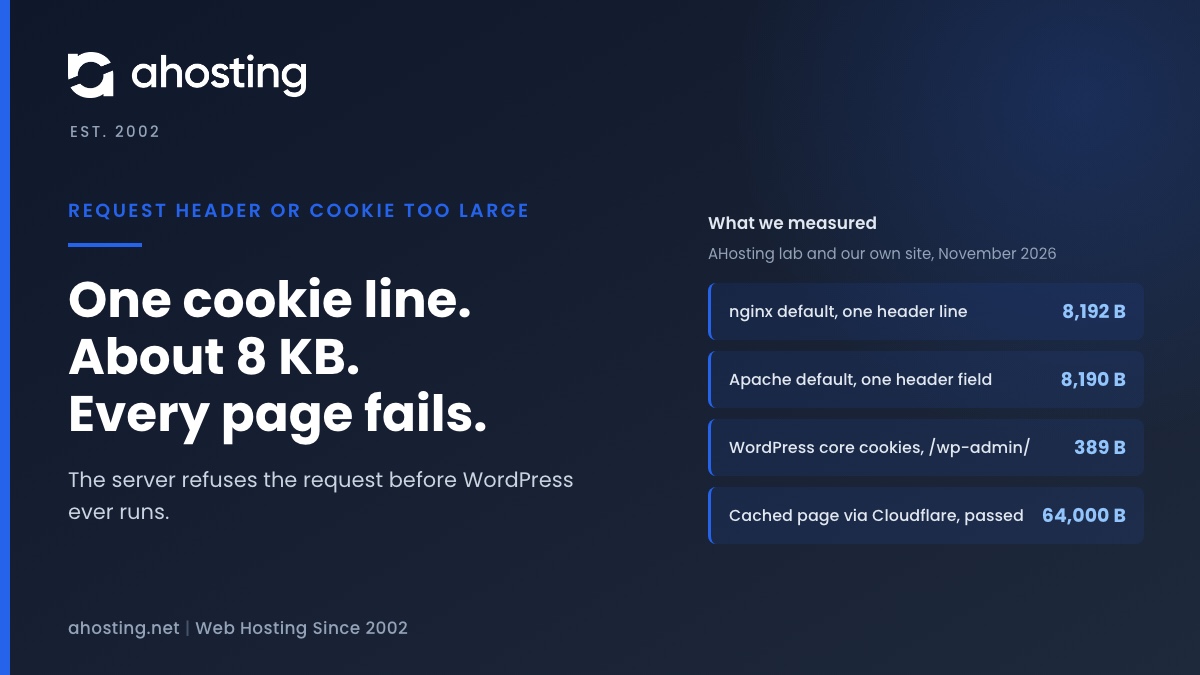
The nginx documentation sets large_client_header_buffers to 4 buffers of 8k by default, and says a request header field cannot exceed the size of one buffer or the server returns 400. We confirmed it. A Cookie line of exactly 8,192 bytes including its line ending passed, and one more byte failed.
The count of cookies did not matter. Three hundred small cookies totaling 8,098 bytes passed, and four hundred totaling 10,798 failed. A header other than Cookie hit the same wall, so the message names cookies even when another header is at fault.
The same error on Apache and behind Cloudflare
The Apache documentation lists LimitRequestFieldSize with a default of 8190 bytes. Our own origin refused a Cookie line of 8,191 bytes and accepted 8,190, which matches that default. Cloudflare hides the origin server name, so we say consistent with, not configured as.
Apache documents that some authentication headers can reach 12,392 bytes. If you use that kind of login, the default can be too low even with few cookies.
One detail is worth knowing. For a Cookie line, nginx and Apache land on the same cutoff: 8,190 characters before the line ending, or 8,192 bytes with it. That is why a cookie that fits one server usually fits the other, and why a site moved between them rarely changes behavior.
How we ran the request header or cookie too large test
We installed stock WordPress 7.1.4 with a SQLite database on a workstation, put nginx 1.31.6 in front of it, and sent requests with curl while we changed one thing at a time. We padded a single cookie named x until the answer changed, then narrowed the cutoff to the exact byte. The workstation is not an AHosting server, so the nginx numbers describe nginx defaults, not our shared plans.
The live probe was simpler. We sent the same padded cookie to our own blog on November 5, 2026, once to a cached page and once to an uncached login URL, and recorded the status codes. We repeated the cutoff search until the first failing size was stable.
Why WordPress Cannot Fix a Request Header or Cookie Too Large Error
Plugins are the usual suggestion, and they cannot help here. In our lab, a logged-in administrator on WordPress 7.1.4 sent only 389 bytes of core cookies on a /wp-admin/ request. The limit is about 21 times that, so WordPress alone is nowhere near it.
We then added a stray cookie until the header line reached 8,407 bytes. The admin screen, the home page and a static image all failed with 400 at the same moment, because nginx refused each request before it routed anything. A cache plugin, a security plugin or a PHP setting runs after that point, so none of them can change the result.
Where the extra bytes come from
WordPress core sets its login cookies on separate paths. In the 7.1.4 files, default-constants.php lines 303 to 325 define the cookie paths, and option.php lines 1740 and 1741 set the two wp-settings cookies for a year. These are short strings.
The growth comes from everything else stored for the same host: analytics, consent banners, A/B tests, checkout sessions and cookies left by other apps on the same domain. We did not measure those on a customer site, so check your own with the tool below.
Check Your Request Header or Cookie Too Large Risk
Use this checker before you change any server setting. It adds up the Cookie line the way the server counts it, so you can see how close you are and which cookies are largest.
Check Your Cookie Header Against the Limit
Open the affected site in a working browser, open the developer console, run document.cookie and paste the result here. The check runs in your browser and sends nothing anywhere.
The console cannot see HttpOnly cookies, which include the WordPress login cookies. Add that allowance in the second box. A result close to the limit means the next cookie that grows will trigger the error.
Fix Request Header or Cookie Too Large as a Visitor
Start with the quick test that tells you whether the cause is on your side. These steps take about two minutes and do not need any access to the server.
- Open the exact URL in a private or incognito window. If it loads, the cause is your stored cookies.
- Delete the cookies for that one site only, not your whole history. In Safari on a Mac, Apple describes Manage Website Data under Privacy settings. On an iPhone, the Safari clearing steps are in Apple support.
- In Microsoft Edge, Microsoft explains how to delete cookies from a specific site. Chrome and Firefox have the same idea in their site data screens.
- Reload the page and sign in again. Save any draft first, because deleting a site cookies signs you out.
If the private window fails too, the problem is not your stored cookies. Another browser extension, a very long URL or a proxy that adds headers can be adding bytes. Try a different network and a different browser to narrow it down.
Fix Request Header or Cookie Too Large as a Site Owner
Remove the cookie that grew before you raise any limit. A higher limit hides the cause and also lets larger abusive requests reach your server. Find the biggest cookies with the checker above, then ask which plugin or service sets each one.
Raise the limit on nginx or Apache
On nginx, set large_client_header_buffers to 4 16k in the http or server block and reload. In our lab a 16,300-byte cookie then passed, while a 20,000-byte cookie still failed, so you cannot raise it without bound. On Apache, set LimitRequestFieldSize in server or virtual host configuration, then reload.
Retest with the same oversized request after each change. Both numbers are per header line, so one fat cookie still needs headroom on its own.
Who can change the limit on your plan
| Where your site runs | Who controls the limit | What you can do |
|---|---|---|
| Shared hosting | The host. The Apache directive is valid in server config and virtual host only, not .htaccess | Remove cookies, then open a ticket with the URL and time |
| VPS or dedicated server | You | Raise the directive, reload, retest, then trim the cookie |
| Behind Cloudflare | Cloudflare for the edge, your server for the origin | Test an uncached URL, because cached pages skip the origin |
| Visitor on any plan | Neither | Private window test, then delete that site cookies |
On shared hosting the web server belongs to the host, so the cleanup is yours and the limit is not. Our shared servers run LiteSpeed, and we did not measure its header limit for this guide. If you manage your own server, our VPS plans give you that control, and the checker above links them.
Why Request Header or Cookie Too Large Hits Some Pages Only
The error often appears in WordPress admin first, and visitors see nothing. Logged-in sessions carry extra cookies, and they bypass page caches. Our probe showed the effect on a live site. A cached blog page answered 200 with a 64,000-byte cookie, because Cloudflare served it without asking the origin.
The login page on the same site refused a cookie of 8,181 bytes with a 431. So an owner can test the homepage, see it load, and conclude the server is fine. Always test an uncached URL, such as the login screen or a search result, when you reproduce this.
Related limits show up in similar ways. A large upload fails differently, with a 413, and we explain that in WordPress 413 Request Entity Too Large. A missing login header is a separate problem covered in The Authorization Header Is Missing. If caching confuses your tests, read LiteSpeed Cache and Cloudflare.
Read the error page to find the layer
The wording of the page points at the server. Our nginx lab printed 400 Bad Request, then Request Header Or Cookie Too Large, then the nginx version. Our own origin printed 431 Request Header Fields Too Large and said the server refused the request because the header fields were too large. The 431 code is defined in RFC 6585 for exactly this case, and it may be used when the total or a single field is at fault.
A branded error page from Cloudflare or a security plugin tells a different story, because then the edge or the application answered. Note which page you see before you test further, since the fix differs for each layer.
Stop Request Header or Cookie Too Large From Coming Back
Treat the cookie budget like disk space: check it before it is full. Run the checker on a logged-in session and on a visitor session once a quarter, and write down the largest cookie each time. A cookie that doubles between checks is the one to investigate.
Set sensible lifetimes for anything you control, and avoid storing lists, carts or preferences in cookies when a server session or local storage would do. Keep the number of tracking and consent scripts small. Each one adds its own cookies to every request, including requests for images.
Finally, keep a note of the limit your server really enforces. When a plugin update adds a cookie, you can compare the new header size to that number instead of waiting for visitors to report the error.
What to Send Support When Request Header or Cookie Too Large Persists
If cleaning cookies does not help, give your host the facts that locate the layer. Send the full URL, the exact error wording, the time with your time zone, and whether a private window loads the page. Never paste cookie values, since they can include login tokens.
Managed plans move the server side of this off your list. If you would rather not tune a web server, our WordPress hosting plans keep that configuration with the host, and web hosting covers general sites. For this error, the fix you control is always the same: fewer and smaller cookies.
Frequently Asked Questions: Request Header or Cookie Too Large
How do I fix 400 Bad Request: Request Header or Cookie Too Large in 2026?
Specifically, test in a private window first. If the page loads there, the cause is the cookies your browser stores for that site, so delete the cookies for that one site and reload. If it still fails in a private window, the cause is not your stored cookies, and the site owner must raise the server limit or shrink the request.
What size triggers request header or cookie too large on nginx and Apache by default?
In practice, nginx reads one header line in an 8,192-byte buffer and Apache allows 8,190 bytes for one header field. In our lab a cookie value of 8,180 bytes passed nginx and 8,181 bytes failed. Both limits count one header line, not the number of cookies.
Is request header or cookie too large a browser problem or a server problem in 2026?
Typically, it is both. The browser sends an oversized Cookie line, and the server refuses to read it. Clearing the site cookies fixes it for one visitor, but a server that cannot hold a normal login plus tracking cookies still needs a higher limit or fewer cookies.
Why does request header or cookie too large hit WordPress admin but not cached pages?
In fact, a cached page can be answered by the edge without touching your origin, while an uncached page must be read by the origin web server. On our own site a 64,000-byte cookie still loaded a cached page, and an 8,181-byte cookie got a 431 from an uncached one.
400 vs 431 vs 414: which status code means request header or cookie too large?
However, the code depends on the server and on what was too big. nginx returned 400 for an oversized header field and 414 for an oversized URL, and our own origin returned 431 for an oversized cookie. All three mean the request was refused before WordPress ran.
Cloudflare vs origin server: which one returns request header or cookie too large on my site?
In other words, check which server wrote the error page. In our test Cloudflare accepted a 64,000-byte cookie on a cached page, while the origin refused 8,181 bytes on an uncached one, so the origin held the lower limit. Your own results may differ, so test an uncached URL.
Does AHosting shared hosting let me change the request header or cookie too large limit?
Typically, no. On shared hosting the web server is configured by the host, and the Apache directive LimitRequestFieldSize is valid only in server or virtual host configuration, not in .htaccess. We did not measure the LiteSpeed limit on our shared servers, so open a ticket with the URL and the time.
Can I raise the header limit myself on an AHosting VPS in 2026?
Indeed, yes. On a VPS you control the web server, so you can raise large_client_header_buffers on nginx or LimitRequestFieldSize on Apache. Treat a higher limit as a stopgap and still remove the cookie that grew, because a larger limit also lets larger abusive requests through.
What should I send AHosting support when request header or cookie too large keeps coming back?
Specifically, send the full URL, the exact wording of the error, the time in your time zone, and whether a private window loads the page. Do not paste cookie values into the ticket, because they can include login tokens.
Does clearing cookies for one site log me out of my other websites?
Typically, it signs you out of that one site only. Cookies are stored per site, so other websites keep their sessions. The real risk is unsaved work in an open editor tab, so save your draft before you clear the cookies.
Related posts:
 413 Request Entity Too Large in WordPress: Find the Layer That Said No
 Your Site Could Not Complete a Loopback Request: How to Read the Error and Fix It on Shared Hosting
 The Authorization Header Is Missing? What Site Health Tested, and the Fix
 The REST API Encountered an Error? WordPress Never Reached It