
- What “The Authorization Header Is Missing” Actually Tests
- Missing or Invalid: Two Labels, Two Different Faults
- Does the Authorization Header Warning Matter on Your Site?
- Why the Authorization Header Is Missing on CGI and FastCGI Servers
- Why “Flush Permalinks” Sometimes Leaves the Authorization Header Missing
- How to Add the Authorization Rule by Hand
- Prove the Header Reaches WordPress With an Application Password
- When the Authorization Header Is Missing Because of the Server
- A Practical Checklist When the Authorization Header Is Missing
- Frequently Asked Questions: The Authorization Header Is Missing
- What does the authorization header is missing mean in WordPress Site Health?
- What request does Site Health send to test the Authorization header in 2026?
- The authorization header is missing vs invalid: what is the difference in Site Health?
- Flushing permalinks vs editing .htaccess by hand: which fixes the Authorization header warning?
- Why does the authorization header is missing come back after I flush permalinks?
- Is it safe to ignore the authorization header is missing if no app connects to my site?
- How do I check that the Authorization header reaches WordPress 7.1 in 2026?
- Does AHosting LiteSpeed hosting pass the Authorization header to WordPress in 2026?
- Can AHosting support help when Site Health says the authorization header is missing?
- Do I need an AHosting VPS to use WordPress application passwords in 2026?
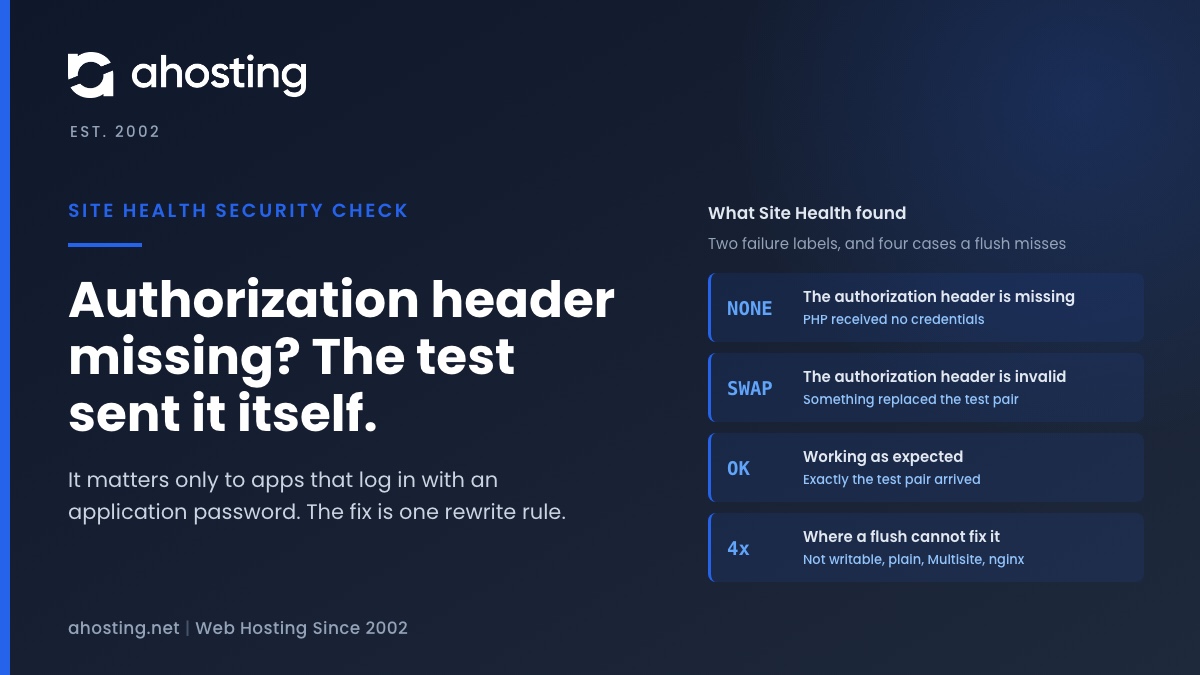
The authorization header is missing means Site Health sent its own test login in an Authorization header and PHP never received it, so the web server or the PHP handler dropped it. No plugin sent it and no visitor is affected; it matters only to apps that log in with an application password. WordPress fixes it with one rewrite rule that “Flush permalinks” writes, except in four cases where the flush cannot write anything. Then prove it worked with a real application password, not with the warning.
What “The Authorization Header Is Missing” Actually Tests
The authorization header is missing is a Site Health result most site owners meet without ever having connected an app to WordPress, which is why it is confusing. The text under it talks about “third-party applications you have approved”, and the common advice is to disable plugins until it goes away. Read against the code that produces it, that advice misses: during the test, the third-party application is Site Health itself, and no plugin is involved. The result tells you one thing, that a header did not reach PHP, and whether that matters depends entirely on what logs in to your site.
Site Health Sends Its Own Test Login
An Authorization header is how a program proves who it is on each request, without a login form or a cookie. The Basic form is a username and password joined by a colon and encoded, which is exactly how Postman sets Basic auth on a request and how curl sends it with -u. The Site Health test, documented in the code reference and introduced in WordPress 5.6, sends that header from your browser to a REST route on your own site, carrying the deliberately fake pair user and pwd. Once it arrives, the route checks two PHP variables:
$_SERVER['PHP_AUTH_USER']must equaluser.$_SERVER['PHP_AUTH_PW']must equalpwd.- If both are absent, the label reads The authorization header is missing.
- If they hold anything else, it reads The authorization header is invalid.

Where It Sits on the Site Health Screen
Both failure labels carry the blue Security badge and the status recommended, not critical. They sit under the async tests, so the result appears a moment after the screen loads. The test is also skipped entirely when the site itself sits behind an HTTP password, because the outer password would replace the test pair. A password-protected staging copy never shows this result, while the same site on its live domain can.
Missing or Invalid: Two Labels, Two Different Faults
The two failure labels look like the same complaint, but they come from different branches of the check and point at different layers. Knowing which one you have rules out half the causes before you open a file.
| Label | What PHP received | Status | What usually causes it | What can fix it |
|---|---|---|---|---|
| The authorization header is missing | No Basic credentials at all | Recommended | A CGI or FastCGI handler that does not pass the header, with no rule to carry it | The rewrite rule, written by a flush or by hand |
| The authorization header is invalid | Credentials, but not user and pwd | Recommended | A folder password, a proxy or a security layer that sets its own header | Removing or excluding the layer that replaced it |
| The Authorization header is working as expected | Exactly user and pwd | Good | Nothing | Nothing to fix |
Why “Invalid” Points Somewhere Else
An invalid result means the header did get through, so the rewrite rule is not the problem. Something swapped the credentials on the way. On a cPanel account the usual source is Directory Privacy, which puts a real password on the folder: the browser then sends those credentials instead of the test pair. A proxy that adds its own Authorization header does the same. Flushing permalinks cannot touch either one.
Does the Authorization Header Warning Matter on Your Site?
Here is the question none of the usual guides ask. The header only matters to programs that log in with HTTP Basic credentials, and in WordPress core that means application passwords. Your visitors, the block editor and your own admin login all use cookies, so when the authorization header is missing none of them notice anything.
What Actually Breaks When the Header Is Lost
Application passwords are separate credentials WordPress issues for programs, and the core integration guide notes that by default they are available only on sites served over SSL. They work on REST API and XML-RPC requests only. When the header is lost, every one of these fails with a login error even though the password is correct:
- Automation tools. n8n’s WordPress credential, for example, asks for a username and an application password.
- Remote publishing apps and scripts that post through the REST API.
- WooCommerce’s own REST API keys, which its documentation sends as HTTP Basic auth, and which fail with “Consumer key is missing” on servers that do not parse the header.
When the Authorization Header Is Missing and It Is Safe to Leave
If nothing connects to the site that way, leaving the warning alone has no effect on how the site runs, and some owners switch application passwords off on purpose because they authenticate without passing through the login form. That is a security choice, and a reasonable one. What is not reasonable is guessing: a plugin you install next month may depend on the header. Our knowledge base article on securing the REST API and XML-RPC covers how to keep application passwords tidy if you do use them.
Why the Authorization Header Is Missing on CGI and FastCGI Servers
The code itself names the cause. The WordPress function that repairs the header carries the comment that some servers running in CGI or FastCGI mode do not pass the Authorization header on to WordPress. When PHP runs as a separate process from the web server, which is how most shared hosting runs it, the server decides which request headers become PHP variables, and some servers do not pass this one on.
The Two Halves of the WordPress Fix
WordPress works around it in two steps. First, the rewrite block it writes to .htaccess contains RewriteRule .* - [E=HTTP_AUTHORIZATION:%{HTTP:Authorization}], which copies the incoming header into a server variable called HTTP_AUTHORIZATION. The E= flag, as the Apache rewrite flags manual explains, sets an environment variable, and after an internal rewrite the server renames it with a REDIRECT_ prefix. Second, early in every page load, WordPress reads HTTP_AUTHORIZATION or REDIRECT_HTTP_AUTHORIZATION, decodes the Basic pair and fills PHP_AUTH_USER and PHP_AUTH_PW itself.
What That Means on LiteSpeed
Our shared servers run LiteSpeed with PHP as a separate process under each site’s own user. WordPress counts LiteSpeed as Apache: its server check is true for either name, so Site Health shows the Flush permalinks action and WordPress writes the rule into .htaccess exactly as it would on Apache. Whether the header then arrives on your site is not something to assume either way. The application password test further down answers it in about a minute.
Why “Flush Permalinks” Sometimes Leaves the Authorization Header Missing
Every guide on the first page of results says to flush permalinks, and often that works: saving Settings, Permalinks rewrites the WordPress block, and that block has carried the Authorization rule since 5.6. But the flush fails silently in four situations, and in each one the authorization header is missing after the flush exactly as before.
| Situation | What the flush does | Why | What to do instead |
|---|---|---|---|
| .htaccess not writable | Nothing, and no message | WordPress writes only when the file, or its folder if the file is absent, is writable by PHP | Fix ownership, then flush again, or edit by hand |
| Plain permalinks (?p=123) | Writes an empty block | With no pretty permalinks WordPress generates no rewrite rules at all | Choose a pretty structure, or add the line by hand |
| Multisite network | Nothing at all | Saving permalinks never writes .htaccess on Multisite | Add the line by hand to the network file |
| nginx | No flush action is offered | nginx does not read .htaccess, so there is nothing to write | Change the server configuration |
A File PHP Cannot Write
The first case is the most common on accounts that were moved or restored by hand. If .htaccess belongs to a different user than the one PHP runs as, WordPress cannot rewrite it and simply skips the step. The same ownership fault is what makes WordPress ask for FTP details, and our guide to WordPress asking for FTP credentials shows how to spot it.
Multisite Networks Built Before 5.6
A network’s .htaccess comes from the block the Network Setup screen tells you to paste, and the current block includes the Authorization rule. A network set up before WordPress 5.6 was given a block without it, and nothing has updated the file since. Our page on WordPress Multisite hosting covers what else differs on a network.
How to Add the Authorization Rule by Hand
When the flush cannot write, add the line yourself. It takes two minutes in the cPanel File Manager, and it is the same line WordPress would have written.
- Open the File Manager, turn on hidden files, and open
.htaccessin the WordPress folder. - Find the block that starts
# BEGIN WordPressand the lineRewriteEngine Oninside it. - Directly below
RewriteEngine On, addRewriteRule .* - [E=HTTP_AUTHORIZATION:%{HTTP:Authorization}]on its own line, unless it is already there. - Save, reload Site Health, and wait a moment for the async tests to run again.
Is It Safe to Edit Inside the WordPress Markers?
Normally anything between # BEGIN WordPress and # END WordPress is overwritten on the next flush. Here that is harmless, because the line you added is the line WordPress writes itself: a later successful flush puts it back in the same place. On Multisite the markers are yours, and the line goes directly after RewriteEngine On in the block the Network Setup screen shows.
Prove the Header Reaches WordPress With an Application Password
The warning is a proxy for the thing you actually care about, which is whether a real program can log in. Test that directly. Under Users, Profile, create an application password named header test, then run one request from your own computer:
curl -u yourname:"xxxx xxxx xxxx xxxx xxxx xxxx" https://example.com/wp-json/wp/v2/users/me- Replace the name, the password WordPress showed you, and the domain.
- Read the status and the
codefield in the reply, then revoke the test password.
| What came back | What it means | First fix |
|---|---|---|
| 200 with your user details | The header arrived and the password worked | Nothing; the warning should clear after the rule is in place |
| 401 rest_not_logged_in | WordPress saw no credentials: the header was dropped, or application passwords are switched off | Confirm the rule is in .htaccess, then check whether a security plugin disables application passwords |
| 401 incorrect_password | The header arrived; the password did not match | Copy the password again, spaces and all |
| 401 invalid_username | The header arrived; the username did not match | Use the login name, not the display name |
| 401 application_passwords_disabled_for_user | The header arrived; the feature is off for that user | Check any plugin or setting that limits application passwords by role |
| 403 or an HTML page | Something in front of WordPress refused the request | Read the security plugin and firewall logs for the time of the test |
Authorization Header Decoder
Four questions about your site and what Site Health printed. The answer names the most likely reason the header is lost and the next thing to do.
Most likely:
Do this next:
Read from the WordPress 7.1.2 source. It cannot see your server, so treat the answer as where to start, not as a diagnosis.
Why the Authorization Header Is Missing Can Hide a REST Failure
The Site Health test is itself a REST request, so if the REST API is blocked the header check cannot pass either. When the REST test on the same screen is also red, start with our guide to the REST API encountered an error. If you restricted the REST API on purpose, stopping REST API user enumeration shows how to close the risky parts without breaking authenticated requests.
When the Authorization Header Is Missing Because of the Server
Most cases end at the manual rule. On our WordPress hosting plans and standard web hosting plans WordPress treats the server as Apache, so the flush action is offered and the rule goes into .htaccess like on any Apache host. What remains is the case you cannot settle from inside the account: the line is in place, the application password test still returns rest_not_logged_in, and no plugin disables the feature. If the header still does not arrive after the rule is in place, open a ticket with the line Site Health printed and we will look at it with you.
Some setups need a change to the web server itself, such as a reverse proxy that strips the header or a handler setting, and no file inside a shared account can reach that. A VPS with full root access puts that configuration in your hands. One recommended item in Site Health is not a reason to move; an integration you depend on that cannot authenticate might be. If both the loopback and REST tests are failing as well, our guide to the failed loopback request is the place to start.
A Practical Checklist When the Authorization Header Is Missing
- Note whether the label says missing or invalid before changing anything.
- Decide whether anything logs in with an application password or REST API keys.
- If the label is invalid, check cPanel Directory Privacy and any proxy in front of the site.
- Open .htaccess and search for the HTTP_AUTHORIZATION line.
- If it is absent, save Settings, Permalinks once and look again.
- If it is still absent, check ownership, the permalink setting and whether it is Multisite.
- Add the line by hand, directly after RewriteEngine On.
- Run the application password test and read the code in the reply.
- Revoke the test password when you are done.
- Open a ticket only when the line is present and the test still returns rest_not_logged_in.
Frequently Asked Questions: The Authorization Header Is Missing
What does the authorization header is missing mean in WordPress Site Health?
In other words, PHP never received the login details Site Health sent to test it. The check sends its own made-up username and password in an Authorization header to a REST endpoint on your site, then looks for them in the PHP variables WordPress reads. When they are absent, the web server or the PHP handler dropped the header on the way. It matters only for apps that log in with an application password, and the fix is one rewrite rule.
What request does Site Health send to test the Authorization header in 2026?
Specifically, a REST request from your browser to the authorization-header test route under wp-json, carrying the header Authorization: Basic with the encoded pair user and pwd. In WordPress 7.1.2 the route then checks whether PHP_AUTH_USER equals user and PHP_AUTH_PW equals pwd. The test is skipped entirely when the site itself sits behind an HTTP password, because those credentials would replace the test pair.
The authorization header is missing vs invalid: what is the difference in Site Health?
In practice the first means nothing arrived and the second means the wrong thing arrived. Missing is shown when PHP has no Basic credentials at all, so the header was dropped between the server and WordPress. Invalid is shown when credentials did arrive but they were not user and pwd, so something in the path replaced them, such as a password on the folder or a proxy that sets its own header.
Flushing permalinks vs editing .htaccess by hand: which fixes the Authorization header warning?
Typically flushing is enough, because it rewrites the WordPress block of .htaccess and that block has carried the Authorization rule since WordPress 5.6. Editing by hand is needed when the flush cannot write: the file is not writable, the site uses plain permalinks, or it is a Multisite network, where the flush writes nothing at all. In those cases add the single rewrite line yourself, directly after RewriteEngine On.
Why does the authorization header is missing come back after I flush permalinks?
Typically because the flush did not write anything. WordPress saves the rules only when .htaccess or its folder is writable, writes an empty block on plain permalinks, and skips the file entirely on Multisite. Open .htaccess and look for the line containing HTTP_AUTHORIZATION. If it is absent, the flush failed silently. If it is present and the warning stays, the server is dropping the header before the rule can run.
Is it safe to ignore the authorization header is missing if no app connects to my site?
Indeed it is, as long as nothing logs in to the site with HTTP Basic credentials. Visitors, the block editor and your own admin login use cookies, not this header, so they are unaffected. What breaks is anything that uses an application password, such as an automation tool, a remote publishing app or a script, along with integrations like the WooCommerce REST API that send keys the same way.
How do I check that the Authorization header reaches WordPress 7.1 in 2026?
First and foremost, test the real feature rather than the warning. Create an application password under your user profile, send one request with curl using your username and that password to the users me endpoint under wp-json, then revoke the password. A 200 with your user means the header arrived. A 401 with rest_not_logged_in means it was dropped, while incorrect_password or invalid_username mean it arrived and the credentials were wrong.
Does AHosting LiteSpeed hosting pass the Authorization header to WordPress in 2026?
Notably, WordPress treats LiteSpeed the same way it treats Apache, so on AHosting shared and WordPress plans Site Health offers the Flush permalinks action and writes the Authorization rule into .htaccess when permalinks are pretty and the file is writable. Whether your own site receives the header is a one-minute check with the application password test in this guide. If the rule is present and the test still fails, contact support.
Can AHosting support help when Site Health says the authorization header is missing?
Above all, try the two steps in this guide first, because together they settle most cases: confirm the rewrite line is in .htaccess, then run the application password test. If the line is in place and the test still returns rest_not_logged_in, the header is being lost before WordPress runs, which you cannot change from inside the account. In that case open a ticket with the line Site Health printed and we will look at it with you.
Do I need an AHosting VPS to use WordPress application passwords in 2026?
Fortunately not for the header alone. Application passwords need HTTPS and a server that passes the Authorization header through, and on shared hosting the rewrite rule in this guide is the usual way to get it. A VPS makes sense when you need to change the web server configuration itself, for example a proxy or a handler setting, which no account-level file can reach.
Related posts:
 One or More Recommended Modules Are Missing: How to Read the WordPress Site Health Warning and Fix It on Shared Hosting
 Page Cache Is Not Detected: What WordPress Site Health Actually Checks
 You Should Use a Persistent Object Cache: What WordPress Site Health Actually Measures
 An Active PHP Session Was Detected: What WordPress Site Health Is Really Telling You, and How to Fix It on Shared Hosting