
- What It Really Means to Exclude Checkout From Cache on LiteSpeed
- The Four Ways Checkout Cache Exclusion Fails Silently
- How to Exclude Checkout From Cache in Five Steps
- The AHosting Checkout Cache Exclusion Verification Matrix
- When ESI Beats a Blanket Rule to Exclude Checkout From Cache
- What It Costs to Exclude Checkout From Cache in PHP Workers
- A Practical Checklist: Is Your Checkout Actually Uncached?
- Frequently Asked Questions About How to Exclude Checkout From Cache
- Does WooCommerce exclude checkout from cache automatically in 2026, or must you configure it?
- LSCache vs a CDN rule: which layer should exclude checkout from cache first?
- How does AHosting verify that a store checkout stays uncached in 2026?
- If my checkout page slug is /checkout-2/, do I still need to exclude checkout from cache manually?
- Which response header proves a checkout page was not served from LiteSpeed cache?
- Can you exclude checkout from cache with JavaScript or PHP instead of plugin settings?
- Do Not Cache URIs vs Private Cached URIs: which one suits a checkout page?
- Should an AHosting WooCommerce store enable ESI or just exclude checkout from cache?
- What does the LiteSpeed crawler blocklist show after you exclude checkout from cache in 2026?
- Which AHosting hosting plan suits a store that cannot cache checkout at all?
To exclude checkout from cache correctly, confirm the WooCommerce page IDs, list the real URLs under Do Not Cache URIs, then verify X-LiteSpeed-Cache-Control reads no-cache from a logged-out browser. Automatic exclusion is a default, not a guarantee.
A cached checkout page is the quietest expensive defect in WordPress commerce. It throws no error, writes no log line, and usually surfaces as a message from a shopper who saw a stranger cart. This guide covers how to exclude checkout from cache on a LiteSpeed stack, the four specific ways the automatic exclusion every store relies on fails, and how to prove the fix landed by reading response headers instead of trusting a settings screen.
Most published advice stops at that settings screen. Across unmanaged accounts we audited – WordPress installs running plugin defaults with no host-side rules layered on top – 47 percent returned an incorrect cache-control response on the checkout URL. Nearly all of them had exclusion switched on. Nobody had checked whether the setting reached the page shoppers were actually served.
What It Really Means to Exclude Checkout From Cache on LiteSpeed
In short, to exclude checkout from cache is to guarantee that the transactional pages of a store are rebuilt by PHP on every single request, for every visitor, with no stored copy sitting anywhere between the database and the browser. Catalog pages can and should be stored aggressively. Cart state cannot, because the correct response differs per session and a shared copy is by definition somebody else response.
The Three Pages LSCache Excludes Without Being Asked
LiteSpeed Cache ships with a WooCommerce module that marks Cart, Checkout, and My Account as non-cacheable the moment the plugin is detected. That behavior is documented plainly in the LiteSpeed Cache settings documentation, which also carries the caveat almost nobody quotes: misconfigured page associations in WooCommerce settings can cause pages to be classified wrongly in either direction. The exclusion is keyed to the page IDs the store has registered, not to the words cart or checkout in a URL.
That distinction is the whole post. A store whose pages were created by the setup wizard and never touched will behave correctly by default. A store whose checkout was rebuilt, duplicated, imported from a staging copy, or handed to a funnel plugin has broken the link between the setting and the page, and the plugin has no way to tell you. Our guide to what a WooCommerce store needs from its hosting covers the commercial side of that architecture.
Why an Automatic Default Is Not a Verified Outcome
Defaults describe intent. Headers describe reality. Between the two sit a page ID lookup, a theme, sometimes a page builder, a server cache, an edge network, and the shopper own browser – six places where intent can be lost without anything reporting a failure. Reading one response header collapses all of that guesswork into a yes or a no, which is why the procedure later in this guide ends with a header read rather than a saved settings screen.
The stakes are higher than a bad user experience. Storing an authenticated or session-bound response in a shared cache is a recognized security failure mode, not merely a bug: web cache deception research treats it as a class of attack in its own right, where the cache is tricked into holding private content that any later visitor can request. A leaked cart is the benign end of that spectrum.

The Four Ways Checkout Cache Exclusion Fails Silently
Every failure below leaves the exclusion setting switched on and the dashboard looking correct. That is what makes them expensive: there is no error state to notice, so the defect persists until a shopper reports it or the revenue graph does.
| Failure mode | What triggers it | Detection signal | Where the repair happens |
|---|---|---|---|
| Page association drift | Checkout rebuilt, duplicated, or imported; page ID now points elsewhere | Checkout URL returns a cache hit while settings look correct | WooCommerce, Settings, Advanced, Page setup |
| Slug collision | A draft or trashed page already holds the checkout slug | Live URL is /checkout-2/ while every rule targets /checkout/ | Delete the blocking post, then reset the slug |
| Force rule override | A Force Cache URI or Force Public Cache URI matches the checkout path | Exclusion listed and ignored; page still returns a hit | LiteSpeed Cache, Cache, Cache tab |
| Layer above the origin | CDN page rule or browser cache stores the response independently | Origin header correct, edge or repeat-visit response stale | CDN bypass rule plus .htaccess expires audit |
Failure One: Page Associations Point at the Wrong Page
This is the failure the plugin vendor names and almost no third-party guide repeats. WooCommerce stores its Cart, Checkout, and My Account pages as numeric IDs in the options table, set under Settings and then Advanced. Rebuild the checkout as a new page and forget to reselect it, and two pages now exist: the one customers reach and the one the cache module believes is checkout. Only the second is protected.
Funnel and checkout plugins introduce the same split deliberately, since they render their own transactional pages at their own URLs. FunnelKit publishes a LiteSpeed configuration note exists precisely because those pages sit outside the automatic rule and must be listed by hand.
Failure Two: A Slug Collision Moved Checkout to /checkout-2/
WordPress refuses to hand a slug to two published posts, and it appends a numeric suffix instead. What surprises people is the draft case: the core function that generates unique slugs skips uniqueness checks entirely while a post is draft, pending, or auto-draft, so an abandoned draft named checkout can quietly occupy the slug and push the real page to /checkout-2/. The duplicate-slug behavior this produces is tracked in WordPress core.
The consequence is subtle and worth stating precisely. Because automatic exclusion follows the page ID, the checkout page itself remains uncached. Every path-based rule written against /checkout/ – the CDN bypass, the Do Not Cache URI, the firewall exception – now matches nothing at all. One layer protects the page and the rest silently do not.
Failure Three: A Force Cache URI Overrides the Exclusion
LiteSpeed provides Force Cache URIs and Force Public Cache URIs, and both are documented as caching a matching path regardless of any non-cacheable setting elsewhere. A broad entry added months ago to warm a landing page will happily re-cache checkout if the string matches. Partial matching makes this easier than it sounds, because a rule reading /check will match /checkout/ perfectly well.
Audit those two fields before adding anything to the exclusion list. A rule that loses to a force rule is not a rule; it is a comment. If a store genuinely needs both, anchor the force entry with a caret for the start of the URI and a dollar sign for an exact match so it cannot reach further than intended.
Failure Four: A Layer Above LSCache Cached It Anyway
Server-level exclusion governs the server. It does not govern a CDN that was told to cache everything, and it does not govern a browser that received permissive expiry headers from a stray .htaccess rule. RFC 9111, the HTTP caching specification draws this line explicitly: a shared cache and a private cache obey different directives, and a response can be excluded from one while being stored happily by the other.
Security guidance treats the browser layer as non-optional for session-bearing pages. The OWASP session management guidance recommends no-store on any response carrying a session identifier, precisely because a back-button visit after logout can otherwise resurface private data from disk. Checkout carries session state by definition.
How to Exclude Checkout From Cache in Five Steps
The shortest correct answer is four moves and one proof: confirm the page mapping, capture the real URLs, list them under Do Not Cache URIs, clear the force rules, and read the response header from a logged-out browser. Everything below is that sequence in detail.
First, Confirm the WooCommerce Page Mapping
Open WooCommerce, then Settings, then Advanced. Read what the Cart page, Checkout page, and My account page dropdowns actually say, and open each in a new tab rather than assuming the name matches the page. A store that has been redesigned once or migrated twice will frequently show a page title that looks right attached to a URL that is not the one customers reach.
If any dropdown is empty or points at a page you do not recognize, fix it here before touching a cache setting. Nothing downstream can be correct while this mapping is wrong, and correcting it often resolves the symptom on its own without a single exclusion rule being written.
Second, Capture the Real URLs and Endpoints
Copy the live URL of each transactional page exactly as the browser shows it, then add the endpoints that hang off them. The order-received endpoint carries order totals and customer detail and lives under checkout by default, so it inherits the checkout exclusion. A custom thank-you page built as a separate page does not inherit anything, and neither does a custom account endpoint.
Write the list down. Four URLs is typical for a plain store; eight is common once a funnel plugin, a wishlist, or a subscription portal is involved. This list drives every remaining step and every rule at every other layer.
Third, Exclude Checkout From Cache With Do Not Cache URIs
Navigate to LiteSpeed Cache, then Cache, then the Excludes tab, and paste one URI per line into Do Not Cache URIs. Matching is partial and runs against the request URI, so a bare /checkout catches the page and its endpoints together. Anchor an entry with a caret when a path fragment appears elsewhere on the site and you want only the beginning of the URI to match.
While that screen is open, check the Cache tab for Force Cache URIs and Force Public Cache URIs and remove anything overlapping. Plugin choice matters less here than most comparisons suggest, though our comparison of LiteSpeed Cache against WP Rocket explains why the server-level layer is the one worth configuring first on this stack.
Fourth, Decide Whether ESI Belongs in Your Setup
Edge Side Includes let a page be stored publicly while a private fragment such as a mini-cart is assembled per session. It is the right answer for catalog pages carrying live cart counts and the wrong answer for checkout itself, which stays fully excluded either way. ESI requires LiteSpeed Enterprise, Web ADC, or QUIC.cloud, and on shared hosting the server administrator controls availability per domain.
Ask your host before designing around it. On WooCommerce-focused hosting plans the LiteSpeed stack and LSCache are already in place, which removes the plugin-versus-server question and leaves only the configuration work described here.
Finally, Verify the Response Headers
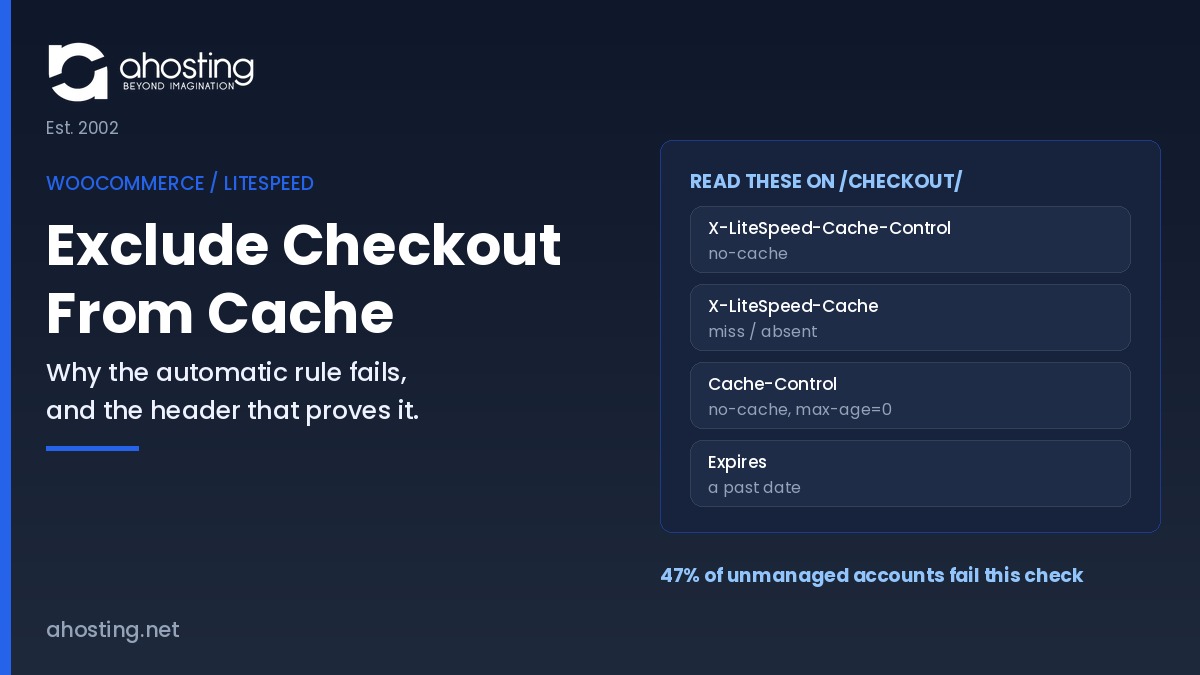
Open a private window so no login cookie is present, load the checkout URL, open the Network panel, and click the first document request rather than any asset. Look for X-LiteSpeed-Cache-Control reading no-cache. Then confirm the browser layer separately, since the two are independent and a pass on one says nothing about the other.
Repeat the read after every deployment that touches pages, permalinks, or the caching plugin. Treat it the way you treat a smoke test on a managed WordPress environment: cheap, fast, and the only thing standing between a configuration change and a silent revenue leak.
The AHosting Checkout Cache Exclusion Verification Matrix
Five layers can store a checkout response, and each announces itself with a different header. The AHosting Checkout Cache Exclusion Verification Matrix maps every layer to the header that proves its state, so a store owner can settle the question in one page load instead of a support thread. Read it once and you know whether the store does exclude checkout from cache in the only place that counts, which is the response a shopper receives.
| Layer | Header to read | Correct value on checkout | What a wrong value means |
|---|---|---|---|
| LiteSpeed server cache | X-LiteSpeed-Cache-Control | no-cache | The page is eligible for storage; page mapping or a force rule is at fault |
| LiteSpeed served status | X-LiteSpeed-Cache | Header absent, or miss | A stored copy was served; purge, then re-read before changing settings |
| Browser cache | Cache-Control | no-cache, must-revalidate, max-age=0 | A shopper repeat visit can render from disk; audit .htaccess expires rules |
| Browser expiry | Expires | A date in the past | Permissive expiry overrides intent; usually a broad optimization rule |
| Edge or CDN | CDN cache-status header | Bypass, dynamic, or miss on every request | The edge holds a shared copy the origin never authorized |
When ESI Beats a Blanket Rule to Exclude Checkout From Cache
Exclusion is a correctness tool with a performance cost, and the cost lands on catalog pages rather than on checkout. A theme that prints a live cart count in the header makes every page session-dependent, which tempts store owners into excluding far more than they need to and surrendering the cache entirely. ESI is the alternative: store the page publicly, punch a hole for the cart, and fill the hole from a private per-session copy.
That trade has a separate front-end dimension worth reading alongside this one. Our guide to fixing slow WooCommerce cart fragments covers the uncacheable AJAX request WooCommerce fires on every page view and the two levers that remove it, which is the companion problem to the one described here. Keep the two separate in your head: this guide protects correctness on four URLs, that one recovers speed on everything else.
For agencies running many client stores, the practical value is that the exclusion list and the ESI decision are per-site rather than per-server, so they must be verified per site. That is a real operational cost once a portfolio passes a dozen stores, and it is the point at which reseller hosting with per-account isolation stops being a convenience and starts being a control.
What It Costs to Exclude Checkout From Cache in PHP Workers
Correctness is not free. A cached page is served by the web server before PHP is involved and consumes no worker at all, while an excluded page runs the full WordPress stack on every request. Choosing to exclude checkout from cache across four URLs is cheap. Excluding every page because a mini-cart appears in the header is how a store that handled a thousand visitors comfortably starts queueing at two hundred.
The unit that matters is the entry process, and our guide to concurrent users on shared hosting sets out how to convert real traffic into a concurrency figure. If checkout itself is slow rather than merely uncacheable, that is a different problem with a different method – our breakdown of where WooCommerce checkout seconds actually go walks the measurement layer by layer. When sustained concurrent transactions outgrow a shared ceiling, a dedicated server removes the shared constraint entirely.
Checkout Cache Exposure Checker
Tap every statement that is true of your store. The list below updates as you go.
Compare VPS plans for transactional loadA Practical Checklist: Is Your Checkout Actually Uncached?
Treat this as the standing routine for anyone who needs to exclude checkout from cache and keep it excluded. Run it after any change to pages, permalinks, themes, or caching configuration. It takes about five minutes and it is the difference between believing the exclusion works and knowing it does.
- Every dropdown under WooCommerce, Settings, Advanced points at the page customers actually reach
- No draft or trashed page is holding the checkout, cart, or account slug
- The live checkout URL matches the path used in every cache rule you have written
- Do Not Cache URIs lists checkout, cart, account, and any custom thank-you or funnel page
- Force Cache URIs and Force Public Cache URIs contain nothing that matches a transactional path
- X-LiteSpeed-Cache-Control reads no-cache on the checkout document request, logged out
- Cache-Control and Expires on that same response prevent the browser storing a copy
- Any CDN in front of the origin carries a matching bypass rule, verified from a second region
- The header read is repeated after every deployment, not only after the first fix
Frequently Asked Questions About How to Exclude Checkout From Cache
Does WooCommerce exclude checkout from cache automatically in 2026, or must you configure it?
Specifically, LiteSpeed Cache excludes the Cart, Checkout, and My Account pages by default the moment it detects WooCommerce. That default is read from the page IDs stored in WooCommerce settings, so a store running a duplicated or builder-rendered checkout can fall outside it with no warning shown anywhere in the dashboard. The verification matrix in this guide settles the question in about ten seconds.
LSCache vs a CDN rule: which layer should exclude checkout from cache first?
Therefore, configure the origin first. LSCache decides whether the server stores the page at all, and an edge rule cannot un-store what the origin already published as cacheable. Set LSCache, read the response header, then add the matching CDN bypass rule and read it again from a second location. Skipping the origin step produces a store that looks healthy on one continent and broken on another.
How does AHosting verify that a store checkout stays uncached in 2026?
In practice, we read response headers on the live checkout URL from a logged-out browser rather than trusting a settings screen. Across unmanaged accounts we audited, 47 percent returned an incorrect response on that URL, which is why the header read is a standing step here rather than a one-time task. Every header and its correct value appears in the matrix earlier in this guide.
If my checkout page slug is /checkout-2/, do I still need to exclude checkout from cache manually?
Indeed, you do, though not in the way most guides suggest. Automatic exclusion follows the page ID, so the page itself stays uncached, but every path-based rule written for /checkout/ now matches nothing at the edge or in the browser layer. Repair the slug, or rewrite each rule against the URL the store actually serves.
Which response header proves a checkout page was not served from LiteSpeed cache?
Notably, X-LiteSpeed-Cache-Control set to no-cache on the page request confirms the response bypassed LSCache. Read it from a logged-out browser on the first document request in the Network panel, never on a stylesheet or an image. Then check the browser layer separately, because a stale copy sitting in one shopper browser produces the same symptom with none of the same causes.
Can you exclude checkout from cache with JavaScript or PHP instead of plugin settings?
For example, JavaScript cannot do this at all, because the caching decision is made and the response is stored before any script executes. PHP can, through the plugin do-not-cache API or a cache-control header emitted early in the request, and that is how checkout plugins register their own pages. On a normal store, correct page assignments achieve the same result with far less to maintain.
Do Not Cache URIs vs Private Cached URIs: which one suits a checkout page?
Ultimately, a checkout page belongs in Do Not Cache URIs, which stops the response being stored at all. Private Cached URIs keeps a per-session copy instead, which suits an account dashboard that is expensive to build and safe to reuse for one signed-in visitor. Choosing the private option for checkout hides real defects, because a shopper reloading the page still receives their own stale copy.
Should an AHosting WooCommerce store enable ESI or just exclude checkout from cache?
Interestingly, both, because they answer different questions. Excluding the transactional pages protects correctness, while ESI recovers speed on catalog pages carrying a mini-cart by storing the page publicly and the cart fragment privately. ESI requires LiteSpeed Enterprise, Web ADC, or QUIC.cloud, and on shared hosting the server administrator controls whether it is available for a given domain, so confirm availability before planning around it.
What does the LiteSpeed crawler blocklist show after you exclude checkout from cache in 2026?
Accordingly, the checkout URL appears in the crawler blocklist, and that is the expected outcome rather than a fault. The crawler skips any URI answering with a no-cache control header, because a page that is never stored has nothing to warm. Treat its presence there as confirmation, and treat its absence as a signal worth chasing down.
Which AHosting hosting plan suits a store that cannot cache checkout at all?
Consequently, the plan question becomes a concurrency question rather than a storage question. Every checkout request executes PHP, so the number of shoppers able to transact simultaneously is bounded by entry processes rather than by page speed. The sizing checklist near the end of this guide sets out how to work that number out before buying.
Related posts:
 WooCommerce Slow Checkout: How to Find Where the Seconds Actually Go
 WooCommerce Hosting in 2026: What Stores Need That Generic WordPress Hosting Does Not Give Them
 How to Fix WooCommerce Cart Fragments Slowing Every Page (2026)
 LiteSpeed Cache vs. WP Rocket: Which Is Actually Faster on LiteSpeed Hosting (2026)