- What Double Caching Actually Means on a LiteSpeed Server
- Why Cloudflare Alone Does Not Double-Cache Your WordPress Site
- LiteSpeed Cache and Cloudflare Ownership Factor 1: Who Holds the HTML
- LiteSpeed Cache and Cloudflare Ownership Factor 2: Splitting the Optimization Features
- LiteSpeed Cache and Cloudflare Ownership Factor 3: Making Purges Propagate
- Reading the Two Headers That Expose Double Caching
- Why the Cache Warming Crawler Starts Blacklisting Pages
- What the LiteSpeed Conflict Warning Is Actually Telling You
- First-Hand: What LiteSpeed Cache and Cloudflare Look Like in Production
- Diagnose Your Own LiteSpeed Cache and Cloudflare Configuration
- A Practical Checklist for LiteSpeed Cache and Cloudflare
- Frequently Asked Questions About LiteSpeed Cache and Cloudflare
- Do LiteSpeed Cache and Cloudflare conflict with each other in 2026?
- Does Cloudflare do caching by default, or must you enable it yourself?
- Cloudflare APO vs LiteSpeed Cache: which page cache should own HTML in 2026?
- Cloudflare edge cache vs LiteSpeed server cache: which header shows what served the page?
- How does AHosting run LiteSpeed Cache and Cloudflare together without double caching?
- What is the downside of Cloudflare caching on an AHosting LiteSpeed Cache setup?
- Should I disable the Cloudflare plugin when LiteSpeed Cache and Cloudflare are both active?
- Why does the LSCache crawler blacklist pages once Cloudflare edge caching is enabled?
- Does AHosting WordPress hosting support LiteSpeed Cache and Cloudflare on shared plans?
- WooCommerce checkout with LiteSpeed Cache and Cloudflare: what must bypass both caches in 2026?
LiteSpeed Cache and Cloudflare only double-cache when you enable edge HTML caching. Keep one page cache, leave Cloudflare on static assets, and verify with two headers.
Running LiteSpeed Cache and Cloudflare together is the default shape of a fast WordPress stack, and it is also the configuration that generates more contradictory advice than any other. Site owners see a plugin warning about a conflict, read a forum thread telling them to pick one, and end up disabling something that was working. The truth is narrower and more useful: these two layers coexist safely until a specific set of options is switched on, and the damage they cause afterwards is silent. Nothing errors. Pages simply go stale, edits fail to appear, and the cache warming tool starts marking healthy URLs as uncacheable.
What Double Caching Actually Means on a LiteSpeed Server
Double caching means two independent systems have each stored a complete copy of the same HTML page and neither one knows when the other should discard it. That is the entire problem in one sentence. A CDN storing your images alongside a server storing your pages is not double caching, because the two layers hold different objects and never disagree.
Notably, the disagreement only becomes possible once both layers hold HTML. WordPress can instruct the origin cache to drop a page the instant you press Update, because the plugin runs inside WordPress. It has no comparable authority over a copy sitting in a data center several hundred miles away. Consequently the edge copy survives on its own timer, and your visitors read whichever version their nearest location happens to hold.
Furthermore, the staleness window is not a bug in either product. In the HTTP caching specification, a stored response stays usable until its freshness lifetime expires, and every cache in a chain calculates that independently. Both layers are behaving correctly. They are simply answering different questions, which is why the symptom presents as intermittent rather than broken.
Why Cloudflare Alone Does Not Double-Cache Your WordPress Site
Here is the fact that resolves most of the confusion: Cloudflare does not cache HTML by default. According to Cloudflare’s documented default cache behavior, static content such as images, CSS and JavaScript is cacheable the moment your domain is proxied, while dynamic content including HTML pages is excluded unless you add a Cache Rule. Cloudflare additionally refuses to store any response that carries a Set-Cookie header, a private or no-store directive, or a non-GET method.
In practice this means a freshly proxied WordPress site behind LiteSpeed is already in the recommended configuration. The origin owns HTML, the edge accelerates assets, and no page exists in two places. Nobody has to choose between the two products, because out of the box they are not competing for the same object.
The Three Opt-Ins That Create the Conflict
Specifically, three deliberate changes move HTML to the edge and introduce the second copy. Automatic Platform Optimization comes first, and it exists precisely to cache WordPress HTML at the edge, as set out in Cloudflare’s own launch write-up for the feature. A Cache Rule carrying an Edge TTL applied to page URLs is the second. Third comes the legacy Cache Everything page rule, which still lingers in older configurations. Each is a reasonable choice on a stack with no server-level page cache. On LiteSpeed, each creates the duplicate.

LiteSpeed Cache and Cloudflare Ownership Factor 1: Who Holds the HTML
Therefore the first decision is the only one that genuinely matters, and it is binary. One layer owns HTML. On a LiteSpeed server the origin is the stronger candidate for a reason that has nothing to do with brand preference: LSCache is built into the web server rather than bolted on above it, so a cached page is returned before PHP is ever invoked. That is the same mechanism behind how LiteSpeed hosting serves WordPress pages before PHP runs, and it is why a cached request consumes no PHP worker at all.
Moreover, the origin cache is the only one WordPress can address directly. Publishing a post, editing a page or updating a plugin fires an invalidation the plugin understands. An edge cache receives no such signal unless you build one. Ownership at the origin therefore buys correctness, and correctness is worth more than the handful of milliseconds an edge copy would save on a stack already returning cached pages in roughly sixteen milliseconds.
That said, the reverse choice is legitimate on hosting without a server-level page cache. If your platform runs Apache with no native cache layer, moving HTML to the edge is a genuine upgrade. The error is running both, not preferring either. For sites that have outgrown shared infrastructure entirely, a dedicated server changes the arithmetic again by removing contention from the equation.
LiteSpeed Cache and Cloudflare Ownership Factor 2: Splitting the Optimization Features
Beyond page caching, both products ship overlapping optimization features, and this is where configurations quietly rot. Minification, image conversion, and HTML rewriting all exist on both sides. Enabling the same function twice does not double the benefit; it produces assets processed by one layer and re-processed by another, which is how a site ends up serving a stylesheet that no longer matches its markup.
Additionally, one setting is frequently misread. Cloudflare is a distributed proxy rather than a reverse-proxy CDN, so the plugin’s Enable CDN mapping option is not meant for it, per LiteSpeed’s explanation of that distinction. Turning it on rewrites asset URLs that Cloudflare already serves transparently. The table below assigns every overlapping function to exactly one owner and names the signal that confirms it.
Where LiteSpeed Cache and Cloudflare Overlap Function by Function
| Function | Owning layer | Turn off on the other layer | Verification signal |
|---|---|---|---|
| Full-page HTML cache | LiteSpeed Cache | APO, Cache Rules and Cache Everything all OFF | x-litespeed-cache: hit |
| Static asset delivery | Cloudflare | No action needed — default behavior | cf-cache-status: HIT on assets |
| CSS and JS minify | LiteSpeed Cache | Cloudflare Auto Minify OFF | Minified filename at origin |
| WebP image conversion | LiteSpeed Cache | Cloudflare Polish OFF | content-type: image/webp |
| Guest Mode / first-visit optimization | LiteSpeed Cache | Requires edge HTML caching OFF | Guest Mode test passes in plugin |
| Brotli and HTTP/3 transport | Cloudflare | Nothing to disable at origin | content-encoding: br |
| Object cache (database layer) | Origin only | Never an edge function | Site Health reports persistent cache |
| Cache warming crawler | LiteSpeed Cache | Needs an origin-reaching request path | Crawler blacklist stays empty |
| Purge on content update | LiteSpeed Cache, propagating outward | Manual edge purges become unnecessary | cf-cache-status: MISS after update |
Accordingly, the matrix is worth applying line by line rather than skimming. Most broken configurations fail on only one or two rows, and the failure is invisible in a browser because both layers return a valid page. Sites running checkout flows should treat the object-cache row as mandatory, which is why WooCommerce-tuned hosting plans ship with the database layer already provisioned.
LiteSpeed Cache and Cloudflare Ownership Factor 3: Making Purges Propagate
Once ownership is settled, the remaining risk is propagation. An origin purge does not reach the edge unless something tells it to, and this is the gap that produces the classic complaint of an edit that refuses to appear. Two mechanisms close it, and they are mutually exclusive in practice.
First and foremost, the plugin can drive Cloudflare directly. Per the plugin’s CDN screen documentation, entering a scoped API token generated from the WordPress template lets a LiteSpeed Purge All also purge Cloudflare automatically, keeping the edge current without a second dashboard. Alternatively, if you have kept HTML at the origin as recommended, there is very little at the edge to purge, and the question largely dissolves.
Ultimately the sequence is what people get wrong. Purging the edge before the origin simply refills the edge from a stale origin copy. Origin first, edge second, then verify — in that order, every time. On accounts where sustained dynamic traffic makes purge frequency itself a load concern, VPS hosting with dedicated resources removes the shared ceiling that turns a purge storm into a queue.
Reading the Two Headers That Expose Double Caching
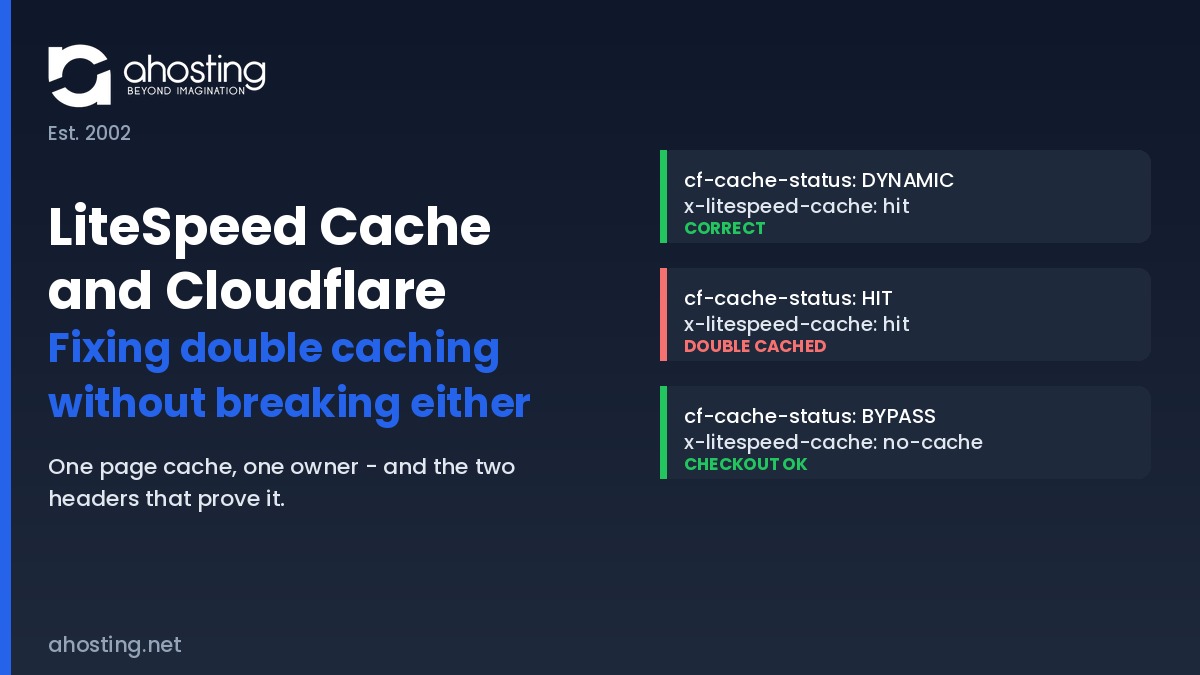
Diagnosing LiteSpeed Cache and Cloudflare takes one command and two headers. The cf-cache-status header reports what Cloudflare did, and x-litespeed-cache reports what the origin did. Reading either alone is exactly why double caching survives so long undetected — each header, on its own, looks perfectly healthy.
Interestingly, the standards world has already formalized this problem. RFC 9211 Cache-Status field defines a single header in which every cache in a chain appends its own entry, ordered from the cache closest to the origin outward to the one closest to the user, specifically so an entire chain can be debugged at once. Neither product emits it yet, so the two-header read below remains the practical method.
The LiteSpeed Cache and Cloudflare Verdict Table
cf-cache-status | x-litespeed-cache | Verdict | What to do |
|---|---|---|---|
DYNAMIC | hit | Correct — recommended shape | None. This is the target state. |
DYNAMIC | miss | Correct, cache cold | Warm it with the crawler, then re-test. |
HIT | hit | Double cached | Two stored copies. Disable edge HTML caching. |
HIT | (header absent) | Double cached, origin masked | Edge is answering; origin health is unknown. |
BYPASS | no-cache | Correct for cart and checkout | None. Confirm it stays this way. |
MISS | hit | Edge caching HTML, cold | Duplicate forming. Review your Cache Rules. |
DYNAMIC | (header absent) | Nothing is caching | LSCache inactive or excluded. Check the plugin. |
Similarly, one detail trips people up during testing. A logged-in administrator is excluded from caching on both layers by design, so a browser check while signed in reports the uncached path and tells you nothing. Test in a private window, or against the command line, and always bypass your own edge with a cache-busting query string when you want to confirm what the origin is really doing — the same technique described in whether a CDN fixes high TTFB or merely hides it.
Why the Cache Warming Crawler Starts Blacklisting Pages
One symptom deserves its own section because it is so widely misdiagnosed. After edge HTML caching is enabled, the LiteSpeed crawler begins marking large numbers of URLs as uncacheable, and site owners reasonably conclude the crawler is broken. It is not.
By contrast, the crawler is doing exactly what it was built to do — against the wrong layer. Under the documented crawler blacklist conditions, a URI is blacklisted when the response carries a no-cache directive in the x-litespeed-cache-control header, or when the status is not a 200 or 201. When the edge answers first, the crawler never reaches the origin, so it records a verdict about a response the origin never sent. Operators who bypass the edge in development mode watch the identical crawler run cleanly, which is the tell.
In fact this matters more than a cosmetic list. A crawler that cannot warm the origin cache leaves real visitors generating uncached page builds, and those consume PHP workers — the mechanism behind how cached pages raise your concurrency ceiling. A configuration error at the edge becomes a capacity problem at the origin.
What the LiteSpeed Conflict Warning Is Actually Telling You
The warning that starts most of these investigations reads as a recommendation to disable the Cloudflare plugin, and taken literally it is too broad. Running LiteSpeed Cache and Cloudflare side by side is not the problem, and the plugin itself is harmless. What the message is guarding against is the page-cache duplication that the plugin makes available, since the official plugin is the supported route to Automatic Platform Optimization outside enterprise plans.
For example, LiteSpeed states the underlying rule plainly in its LiteSpeed Cache general settings documentation: when using the plugin alongside other optimization solutions you must not duplicate functions, and because Automatic Platform Optimization is itself a page cache, it has to be off for the LiteSpeed page cache to work correctly. Read that way, the notice is not a verdict on Cloudflare at all. It is a warning about owning HTML twice.
As such, the correct response depends on which layer you chose. Keeping HTML at the origin means the plugin is simply unnecessary and the notice can be dismissed. Choosing the edge instead means keeping the plugin and disabling the overlapping origin features, including Guest Mode. Either path is coherent. Running both page caches is the only genuine error, and it is also the configuration people arrive at by accident. Where hostile traffic is the real driver for edge features, filtering hostile traffic at the edge is a better reason to sit behind Cloudflare than caching ever was.
First-Hand: What LiteSpeed Cache and Cloudflare Look Like in Production
Across AHosting accounts pairing LiteSpeed Cache and Cloudflare, one pattern recurs. An internal review of a production WordPress server found LSCache installed on fourteen of roughly one hundred and twenty WordPress accounts — and not one of those fourteen carried a custom plugin configuration file. That detail is more interesting than it first appears.
Consequently it confirms something the documentation implies but rarely states: on a LiteSpeed server the plugin begins full-page caching on activation, with no wizard and no configuration step. Site owners are therefore running a page cache they never consciously configured. When one of them later enables edge HTML caching, believing they are adding caching to a site that has none, they are in fact adding a second one. That is the mechanism behind almost every double-caching report, and it explains why the affected site owner is genuinely surprised.
Overall, the operational lesson is to establish which layer holds HTML before changing anything, rather than after. This applies equally to standard web hosting accounts and to larger deployments, because the failure is architectural rather than a function of plan size. If you are weighing a plugin-level cache instead, how LSCache compares with plugin-level page caches covers that trade-off.
Diagnose Your Own LiteSpeed Cache and Cloudflare Configuration
Below, describe what your own LiteSpeed Cache and Cloudflare headers report and the tool returns the verdict from the table above, together with the next action. Run the check in a private window against a public page rather than while signed in.
Double-Cache Diagnostic
Read both headers on a public URL, then match them here.
Correct – recommended shape
Nothing to change. The origin owns HTML and the edge is accelerating assets only.
A Practical Checklist for LiteSpeed Cache and Cloudflare
Work through these in order to bring LiteSpeed Cache and Cloudflare into a single-owner configuration. Each step is verifiable, and the sequence matters because a later check is meaningless if an earlier one has not been settled.
- Decide which single layer owns HTML, and write the decision down before changing any setting.
- Confirm Automatic Platform Optimization is off if the origin owns HTML, and that no Cache Rule targets page URLs.
- Search your Cloudflare configuration for any surviving Cache Everything rule from an older setup.
- Disable Auto Minify and Polish at the edge if the plugin is already handling minification and WebP conversion.
- Leave the plugin CDN mapping option off, since Cloudflare is a distributed proxy rather than a reverse-proxy CDN.
- Enter a scoped Cloudflare API token in the plugin CDN screen so an origin purge propagates outward automatically.
- Verify cart, checkout, account and login URLs return a bypass verdict on both layers.
- Run the crawler and confirm the blacklist stays empty rather than filling with ordinary pages.
- Re-test both headers in a private window, and repeat the check after the next content update.
Finally, treat the header check as a recurring task rather than a one-time fix. Edge configurations drift as features are trialled and forgotten, and a stale page is the kind of defect nobody reports because it never looks like an error.
Frequently Asked Questions About LiteSpeed Cache and Cloudflare
Do LiteSpeed Cache and Cloudflare conflict with each other in 2026?
Typically they do not. In a default configuration Cloudflare caches only static assets and leaves HTML to your origin, so LiteSpeed Cache keeps sole ownership of the page cache and nothing is stored twice. The conflict appears only after you opt into HTML caching at the edge, through Automatic Platform Optimization, a Cache Rule, or the retired Cache Everything page rule. The plugin warning many site owners see is a precaution about that opt-in, not evidence that the two products are incompatible. Which specific settings collide is set out in the AHosting Cache Layer Ownership Matrix earlier in this guide.
Does Cloudflare do caching by default, or must you enable it yourself?
Specifically, Cloudflare caches static content automatically and dynamic content only on request. Images, CSS and JavaScript are cacheable the moment your domain is proxied, while HTML pages are excluded until you add a Cache Rule or enable Automatic Platform Optimization. Cloudflare also declines to cache any response carrying a Set-Cookie header, a private or no-store directive, or a request method other than GET. That default is the reason a freshly proxied WordPress site behind LiteSpeed rarely shows double caching until somebody changes it deliberately.
Cloudflare APO vs LiteSpeed Cache: which page cache should own HTML in 2026?
Ultimately only one of them can, and LiteSpeed’s own documentation is unambiguous that Automatic Platform Optimization must be switched off when the LiteSpeed Cache page cache is in use, because both are page caches and their functions must not be duplicated. On a LiteSpeed server the practical answer is to keep HTML at the origin: LiteSpeed Cache already serves cached pages before PHP executes, and it understands WordPress publish events, so it invalidates precisely. Automatic Platform Optimization makes more sense on stacks with no server-level page cache to begin with.
Cloudflare edge cache vs LiteSpeed server cache: which header shows what served the page?
In practice you read two headers together. The cf-cache-status header reports what Cloudflare did, where HIT means the edge answered and DYNAMIC means the URL was never eligible for edge caching at all. The x-litespeed-cache header reports what the origin did, where hit means LiteSpeed served a stored page. Reading either one alone is what makes double caching so easy to miss. The full combination table, including the two states that indicate genuine trouble, appears in the verdict table above.
How does AHosting run LiteSpeed Cache and Cloudflare together without double caching?
Notably the rule is one page cache, one owner. AHosting runs LiteSpeed Web Server with LSCache holding the HTML layer and leaves Cloudflare on its default behavior, where the edge accelerates static assets and passes HTML through. Because LSCache integrates at the server level, cached pages are returned before PHP starts and consume no entry processes at all. Purge order matters just as much as configuration: the origin cache is flushed first, then the edge, and the result is verified before the change is considered done.
What is the downside of Cloudflare caching on an AHosting LiteSpeed Cache setup?
Fortunately the downside is narrow and entirely avoidable. Edge HTML caching adds a second layer that WordPress cannot invalidate on its own, so a published edit can clear the origin cache and still be served stale from the edge until its own timer expires. It also hides origin behavior from you, because a page answered at the edge never reveals whether the server cache underneath is healthy. On a stack that already returns cached pages in roughly sixteen milliseconds, the latency won is small next to the staleness risk introduced.
Should I disable the Cloudflare plugin when LiteSpeed Cache and Cloudflare are both active?
That said, the warning that prompts this question is broader than the actual conflict. The official Cloudflare plugin is required if you intend to run Automatic Platform Optimization, so removing it is wrong for that setup and right for almost every other one. If you are keeping HTML at the origin, you do not need the plugin at all, and you can instead enter a scoped Cloudflare API token in the LiteSpeed Cache CDN screen so that an origin purge propagates outward automatically.
Why does the LSCache crawler blacklist pages once Cloudflare edge caching is enabled?
Consequently the crawler is measuring the wrong layer. LiteSpeed blacklists a URI when the response is not cacheable by design, meaning it carries a no-cache directive in the x-litespeed-cache-control header, or when the response status is not a 200 or 201. When Cloudflare answers from its own edge cache, the crawler never reaches the origin, so it records a response that says nothing about the server cache it was sent to warm. Site owners who bypass the edge in development mode see the same crawler run cleanly.
Does AHosting WordPress hosting support LiteSpeed Cache and Cloudflare on shared plans?
Indeed both work on every AHosting WordPress plan, and neither requires a support ticket to set up. LSCache installs from the WordPress plugin repository and begins caching immediately because the LiteSpeed server layer is already present, which is why an internal review of one production server found no custom configuration file on any account running it. Cloudflare sits in front independently. The one decision that matters is which of the two owns your HTML, and the matrix above resolves it line by line.
WooCommerce checkout with LiteSpeed Cache and Cloudflare: what must bypass both caches in 2026?
Above all, cart, checkout, account and any logged-in session must bypass every caching layer, not merely the one you configured most recently. LiteSpeed Cache excludes these paths natively once WooCommerce is detected, and Cloudflare declines them by default because the responses carry a Set-Cookie header. Introducing an edge HTML rule can override that protection if the rule is written too broadly, which is the single most expensive mistake in this entire configuration. Confirm the exclusion with a header check rather than assuming it.