
- What Error Establishing a Database Connection Means
- Why Visitors and Admins See Different Error Establishing a Database Connection Pages
- The AHosting Database Error Decoder: Five Failures, One Page
- How to Read the Real Cause
- Fix Error Establishing a Database Connection on Shared Hosting, Cause by Cause
- Database Tables Unavailable: The WordPress Repair Page
- Why Plugins Rarely Cause It
- When Error Establishing a Database Connection Means a Bigger Plan
- Frequently Asked Questions: Error Establishing a Database Connection
- How do I fix the error establishing a database connection in WordPress in 2026?
- Cannot select database vs error establishing a database connection: which one does my AHosting WordPress site have?
- What does error establishing a database connection mean in WordPress 7.1 in 2026?
- Why does my site show error establishing a database connection after I changed the cPanel database user password?
- Database connection error vs white screen of death: how do I tell which one my WordPress site has?
- Which debug.log line explains why WordPress shows an error establishing a database connection?
- What is the AHosting Database Error Decoder and how do I use it?
- Can the WordPress repair page fix an error establishing a database connection on an InnoDB table?
- What should I send AHosting support when my site shows an error establishing a database connection?
- Is it safe to leave WP_DEBUG_LOG on while I fix an error establishing a database connection in 2026?
Error establishing a database connection is one page for many different failures. In our WordPress 7.1.5 lab a closed port, an unresolvable host name, a wrong password, a full connection pool and even a wrong database name all gave visitors the same one-line page with HTTP status 500. The real cause is in wp-config.php, in wp-admin or in debug.log. Read the cause first, fix only that, and remove the debug and repair switches afterward.
What Error Establishing a Database Connection Means
Error establishing a database connection is the message WordPress prints when it cannot get a working connection to its database. WordPress stops at that point, before it loads a single plugin or theme, so the page is a one-line dead end. The message does not say why. We pointed WordPress 7.1.5 at five different broken databases to find out what each one looks like, and all five gave visitors the same page.
The cause is still findable. It sits in wp-config.php, in the wp-admin version of the page, or in the debug log. This guide shows where to look, in what order, and which fix belongs to which clue.
Why Visitors and Admins See Different Error Establishing a Database Connection Pages
WordPress shows two versions of the message. The core function dead_db() says so in a code comment: if installing or in the admin, provide the verbose message, otherwise be terse. In our lab a visitor got only the heading Error establishing a database connection, with the page title Database Error and HTTP status 500.
Open /wp-admin/ and the same failure prints a longer text. It says the username and password in wp-config.php may be wrong, or that contact with the database server at your DB_HOST could not be established, and it names that host. It then asks three questions: is the username and password correct, is the hostname correct, and is the database server running.
Two other things change what you see. A file named db-error.php in wp-content replaces both pages, so a custom-looking error means someone installed that drop-in. And the front-end page carries no-cache headers in our lab, so a refresh really asks the server again.

The AHosting Database Error Decoder: Five Failures, One Page
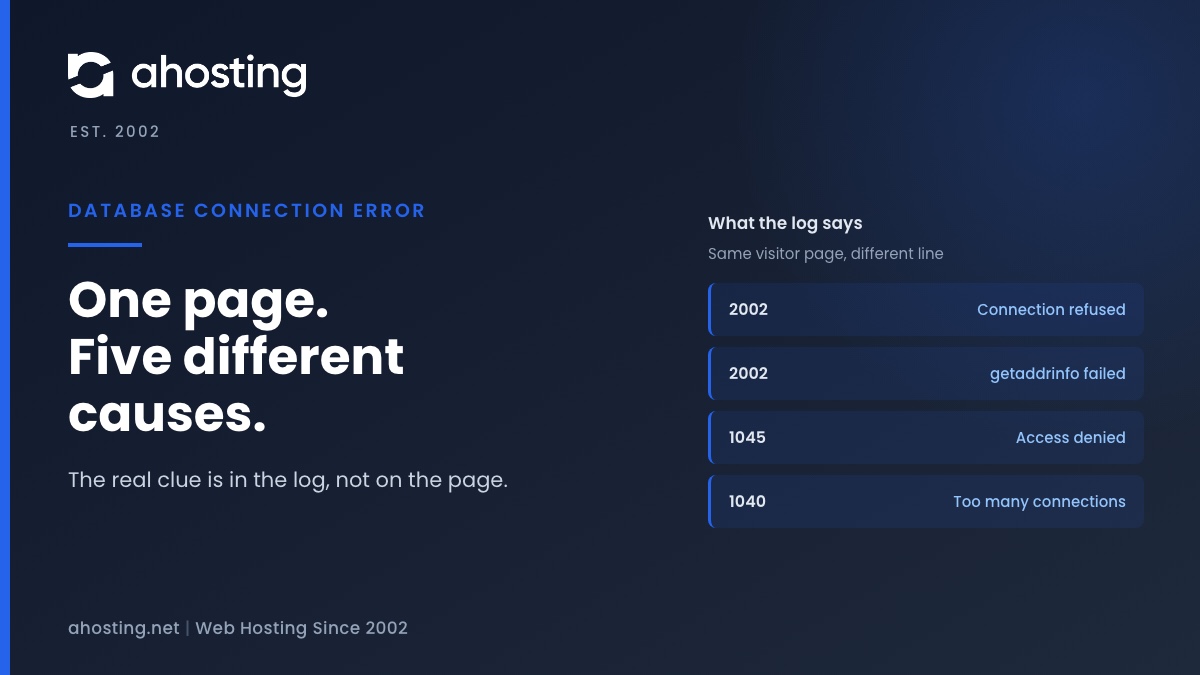
Each failure leaves a different trace. The table below is our AHosting Database Error Decoder. It was built from five runs on one machine, and it lists what the visitor saw, what wp-admin showed, and the line WordPress wrote to debug.log with logging on.
| What failed | Visitor sees | wp-admin shows | debug.log line | Who usually fixes it |
|---|---|---|---|---|
| Server not answering | Error establishing a database connection | Heading plus the three questions, naming DB_HOST | (HY000/2002): Connection refused | Your host |
| Host name does not resolve | Same one line | Same text, naming the bad host | getaddrinfo for the host failed, with (HY000/2002) on a second line | You, in wp-config.php |
| Wrong username or password | Same one line | Same text | (HY000/1045): Access denied for user | You, in wp-config.php or cPanel |
| Server out of connections | Same one line | Same text | (08004/1040): Too many connections | Your host, or time |
| Wrong database name or no privilege | Same one line | Cannot select database, with a list of checks | Nothing written | You, in DB_NAME or privileges |
The honest limit of this table is the stand-in. Its error numbers match the MySQL error reference: 1040 Too many connections, 1045 Access denied and 1049 Unknown database. What we tested was how WordPress reacts, and that part ran on real WordPress code.
Look hardest at the wrong-database row. Because the login worked, the connection did succeed. Visitors still saw Error establishing a database connection, though, and the log stayed empty.
How to Read the Real Cause
With debug logging off, WordPress writes nothing about a failed connection. Turn it on for one reload and read the result. This takes about two minutes in cPanel File Manager.
- Open
wp-config.phpand adddefine( 'WP_DEBUG', true );, thendefine( 'WP_DEBUG_LOG', true );, thendefine( 'WP_DEBUG_DISPLAY', false );above the line that says to stop editing. - Reload the broken page once, then open
wp-content/debug.log. - Find the line that names
mysqli_real_connect. The number after HY000 or 08004 is the MySQL error number. - Set
WP_DEBUGback to false and deletedebug.log. The log is a plain file, and our guide on a potentially public log file explains why it should not stay.
WordPress calls mysqli_real_connect without suppressing warnings only when WP_DEBUG is true, which is why the log stays empty otherwise. That is the code at line 1989 of class-wpdb.php in 7.1.5. A wrong database name never reaches this step, so for that case read the wp-admin page instead.
Database Error Reader
See what a shared hosting plan includesFix Error Establishing a Database Connection on Shared Hosting, Cause by Cause
Match your clue to one row of the next table, then fix only that. Changing three things at once hides which one worked.
| Cause | Check | Change |
|---|---|---|
| Wrong user or password (1045) | cPanel MySQL Databases: the user added to the database. In wp-config.php: DB_USER and DB_PASSWORD. | Reset the user password in cPanel and paste the identical value into DB_PASSWORD. |
| Host does not resolve (2002 getaddrinfo) | DB_HOST in wp-config.php. | Use the value your host documents. After a move, an old server name often stays behind. |
| Nothing listening (2002 Connection refused) | Whether phpMyAdmin opens, and whether other sites on the account fail the same way. | If the whole account fails, open a ticket with the log line. If DB_HOST has a port, confirm it. |
| Out of connections (1040) | Whether the error comes and goes. | Wait, then ask your host. Look for bot floods meanwhile. |
| Wrong database name | DB_NAME against the exact name in cPanel, including the account prefix. | Correct the name, and confirm the user is added to that database. |
Fix Error Establishing a Database Connection After a Password Change
A password changed in cPanel does not update WordPress. WordPress keeps sending the old value, and the server answers 1045. Copy the new password into DB_PASSWORD without spaces, save, and reload.
Fix Error Establishing a Database Connection From a Wrong Host or Port
MySQL documents that error 2002 usually means no server is running or the socket or port is wrong. In our lab a closed port and an unresolvable name both produced it. The log text differs, so read the words after the number: Connection refused for the first, getaddrinfo for the second.
Fix Error Establishing a Database Connection When Connections Run Out
The MySQL manual describes error 1040 as every available connection being in use by other clients. On shared hosting that pool is not yours alone, so you cannot raise it from wp-config.php. If it keeps returning, our resource limit diagnostic tree shows how to tell a traffic spike from a runaway process.
Fix Cannot Select Database
WordPress itself lists the three checks: does the database exist, does the user have permission to use it, and is the name prefixed with the account name, such as username_name. On cPanel the prefix is the usual culprit after a manual import.
Database Tables Unavailable: The WordPress Repair Page
A fifth message appears only in wp-admin. If core tables are missing, is_blog_installed() prints that one or more database tables are unavailable and that the database may need to be repaired, with a link to maint/repair.php. We read this in the source and did not reproduce it in the lab.
| Step | What WordPress runs | Where in 7.1.5 |
|---|---|---|
| Switch on | Requires define( 'WP_ALLOW_REPAIR', true ); in wp-config.php. No login is needed. | repair.php line 28 |
| Check | CHECK TABLE on each WordPress table | line 111 |
| Repair | REPAIR TABLE, only for a table the check reports as not okay | line 121 |
| Optional | ANALYZE TABLE, then OPTIMIZE TABLE, when you choose repair and optimize | lines 136 and 143 |
| Switch off | The page tells you to remove the line so unauthorized users cannot use it | line 170 |
Remove the line when you finish, because anyone can open that page while it is set. There is one more catch. MySQL documents that REPAIR TABLE works for MyISAM, ARCHIVE and CSV tables. On InnoDB the server answers with the message from MySQL bug 42563, that the storage engine does not support repair. A request to map it to a rebuild was closed without doing so. Expect to restore a backup instead.
Why Plugins Rarely Cause It
The usual advice is to rename the plugins folder. For a connection failure it changes nothing. In 7.1.5, wp-settings.php loads the database class at line 136, but must-use plugins load at line 506 and regular plugins at line 582. A failed connection ends the request before either runs.
A plugin can still cause the load that exhausts connections, so 1040 is the one case where a plugin is a suspect. The other database message that stops WordPress this early is a missing PHP driver, covered in our guide to the missing MySQL extension error. If you see an empty page rather than a heading, see the white screen of death guide, and a 502 is a different layer again, covered in our 502 Bad Gateway guide.
When Error Establishing a Database Connection Means a Bigger Plan
Fix the clue first. Only the 1040 case ever points at capacity, and only when it returns after you have removed bots and stuck jobs. If it keeps coming back on an account with real traffic, a plan with more room is the fix. Our WordPress hosting plans are the next step up for a busy site, and a VPS gives you a database server of your own.
If the clue is a credential, a host name or a database name, no plan change helps. Those are one line in wp-config.php.
Frequently Asked Questions: Error Establishing a Database Connection
How do I fix the error establishing a database connection in WordPress in 2026?
Specifically, read the cause before you change anything. Turn on WP_DEBUG_LOG for one reload, read the mysqli line in wp-content/debug.log, and match its number against the decoder table above. A 2002 line points at the host name or the server, 1045 points at the username or password, and 1040 means the server is out of connections.
Cannot select database vs error establishing a database connection: which one does my AHosting WordPress site have?
In contrast to the connection error, Cannot select database means WordPress reached the server and the login worked. It only shows in wp-admin, because visitors still see the one-line error establishing a database connection page. Check DB_NAME and the account prefix in cPanel next.
What does error establishing a database connection mean in WordPress 7.1 in 2026?
In other words, WordPress could not open a working connection to its database, or could not select the database it was told to use. Core stops at that point before any plugin or theme loads, and in our lab it answered with HTTP status 500.
Why does my site show error establishing a database connection after I changed the cPanel database user password?
Typically, the new password was never copied into DB_PASSWORD in wp-config.php. WordPress keeps using the old value, the server answers 1045 Access denied, and the visitor sees the same one-line page as for any other cause. Paste the new value exactly, with no spaces.
Database connection error vs white screen of death: how do I tell which one my WordPress site has?
First and foremost, look at the text. The database error prints a heading, while a white screen prints nothing or a critical error notice. A connection failure also stops before plugins load, so renaming the plugins folder changes nothing for it, which is the quickest way to tell them apart.
Which debug.log line explains why WordPress shows an error establishing a database connection?
Specifically, look for the line that begins with PHP Warning and names mysqli_real_connect. The number in brackets after HY000 or 08004 is the MySQL error number, and the words after it are the reason. If the log stays empty while wp-admin says Cannot select database, the database name is wrong.
What is the AHosting Database Error Decoder and how do I use it?
Specifically, it is the table in this guide that maps five failures to what visitors see, what wp-admin shows and what debug.log records. Find your log line in the fourth column, then read across to see who usually fixes it. It was built from a lab run on WordPress 7.1.5, not from a customer server.
Can the WordPress repair page fix an error establishing a database connection on an InnoDB table?
However, the repair page only helps when WordPress can already connect. MySQL documents REPAIR TABLE for MyISAM, ARCHIVE and CSV tables, so on InnoDB expect it to report a table as not okay and then fail to repair it. Restore a backup or ask your host instead.
What should I send AHosting support when my site shows an error establishing a database connection?
In practice, send the exact debug.log line, the time you saw it, and whether wp-admin shows the longer message or Cannot select database. Add whether phpMyAdmin opens in cPanel. Those four facts let support tell a server problem from a wp-config.php problem without guessing.
Is it safe to leave WP_DEBUG_LOG on while I fix an error establishing a database connection in 2026?
Overall, no. The log is a plain file inside wp-content and can be requested by URL on many setups. Turn WP_DEBUG back to false and delete debug.log as soon as you have read the line, because it can contain paths and user names.
Related posts:
 WordPress Could Not Establish a Secure Connection to WordPress.org: How to Read the Error and Fix It on Shared Hosting
 Plugin Could Not Be Activated Because It Triggered a Fatal Error: Find the Real Cause (2026)
 Your Site Could Not Complete a Loopback Request: How to Read the Error and Fix It on Shared Hosting
 Your Connection Is Not Private on WordPress: Whose Problem It Is and How to Fix It (2026)