
- PHP Security Update: 8.5.12, 8.4.27, 8.3.36 and 8.2.35 Fix Two Critical Flaws
- Does the PHP Security Update Affect Your WordPress Site?
- How to Check the PHP Security Update Reached Your Site
- How to Install the PHP Security Update in cPanel MultiPHP Manager
- Where AHosting Servers Stand on the PHP Security Update
- PHP 8.1 and Older: No PHP Security Update Is Coming From PHP
- If You Cannot Install the PHP Security Update Today
- What to Check After the PHP Security Update
- Frequently Asked Questions About the PHP Security Update
- Do I need to install the php security update on my WordPress site in 2026?
- Which PHP versions fix the php security update released on 21 October 2026?
- Why does WordPress Site Health stay green before and after the php security update?
- PHP 8.4.27 vs PHP 8.3.36: which branch should a WordPress site run after the php security update?
- Shared hosting vs VPS: which one leaves the php security update in your hands?
- What should I do if my WordPress site runs PHP 8.1 and no php security update exists for it?
- Can memory_limit or post_max_size changes replace the php security update on shared hosting in 2026?
- How do I find which PHP version my AHosting WordPress site runs after the php security update?
- Does AHosting list PHP 8.5 in cPanel MultiPHP Manager for WordPress hosting in 2026?
- Are AHosting servers on the fixed php security update release yet, and what should I do meanwhile?
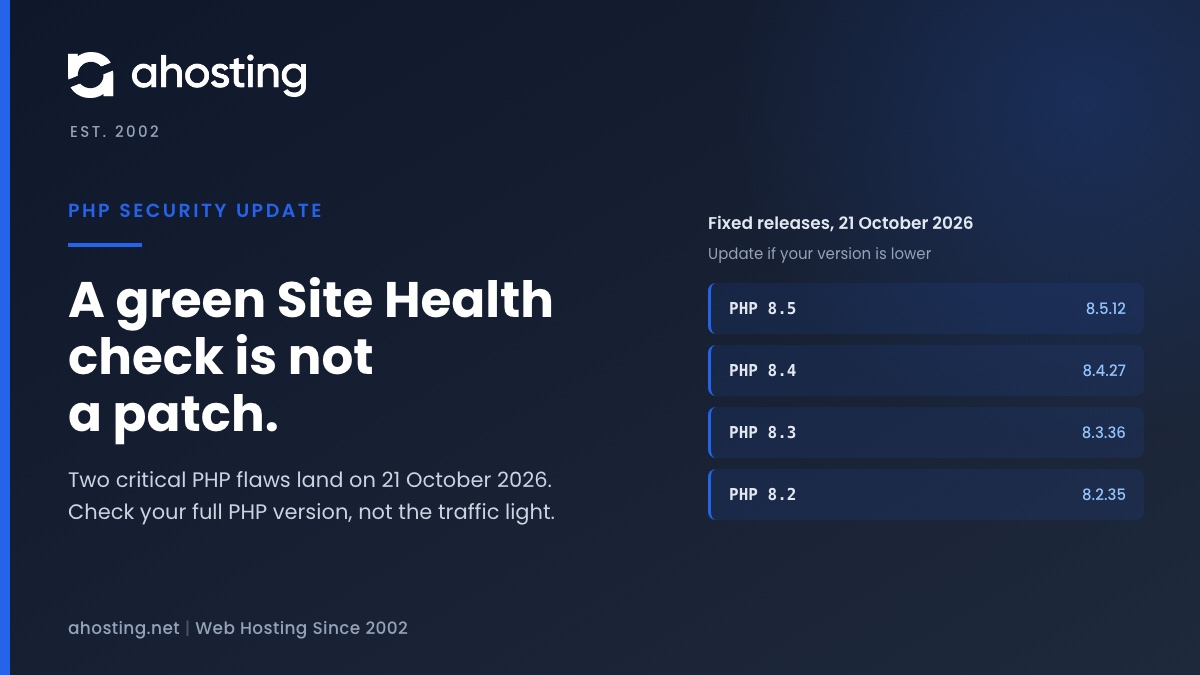
PHP 8.5.12, 8.4.27, 8.3.36 and 8.2.35 are the php security update for two critical remote code execution flaws, released on 21 October 2026. Read your full PHP version now, and update if it is lower than the fixed release for your branch. A green WordPress Site Health check does not prove you are patched, and PHP 8.1 and older get no fix from PHP.
PHP Security Update: 8.5.12, 8.4.27, 8.3.36 and 8.2.35 Fix Two Critical Flaws
The php security update shipped on Wednesday, 21 October 2026, and every WordPress site runs on the PHP it patches. PHP 8.5.12, 8.4.27, 8.3.36 and 8.2.35 fix two critical remote code execution flaws. Specifically, php.net says the risk is highest for mod_php, where it describes a demonstrated exploit that needs no login. Therefore, the job is short: read your full PHP version, compare it with the fixed release for your branch, and update if you are behind.
Yesterday we published what was known before the release, in our pre-release guide to the PHP critical security release. The details are public now, so this guide replaces the waiting with steps. It also shows why WordPress cannot run the check for you.
PHP Security Update Facts Confirmed on php.net
Every fact in the table below comes from the PHP security advisory of 21 October 2026 and the PHP supported versions page. We read both directly on 22 October 2026. The last releases before this one came out on 24 September 2026, so any of those versions is behind.
| PHP branch | Fixed release | Release before the fix | PHP support on 22 October 2026 |
|---|---|---|---|
| PHP 8.5 | 8.5.12 | 8.5.11 | Active support until 31 December 2027; security until 31 December 2029 |
| PHP 8.4 | 8.4.27 | 8.4.26 | Active support until 31 December 2026; security until 31 December 2028 |
| PHP 8.3 | 8.3.36 | 8.3.35 | Security fixes only, until 31 December 2027 |
| PHP 8.2 | 8.2.35 | 8.2.34 | Security fixes only, ending 31 December 2026 |
| PHP 8.1 and older | None from PHP | Not applicable | No updates from the PHP project; source backports exist for 7.4, 8.0 and 8.1 |
What the Two Critical PHP Flaws Do
PHP names the first flaw CVE-2026-109618, “RCE via OOM corruption”. In plain terms, out-of-memory handling can interrupt PHP while internal request data is only partly set up. Request cleanup may then treat that invalid data as valid. The CVE record went public on the day of the release.
The second flaw is CVE-2026-109619, “RCE via stale global state”. Request-owned internal state can survive after its memory is freed. A later request handled by the same worker may then use that stale state before normal initialization resets it. Both flaws are rated CVSS v4.0 9.2, and the CVSS v4.0 specification puts every score from 9.0 to 10.0 in the Critical band.
Does the PHP Security Update Affect Your WordPress Site?
Yes, if your site runs one of the affected branches at a release older than the fixed one. WordPress is a PHP application, so each page request runs through the PHP interpreter on your server. A flaw in PHP therefore sits underneath your site whatever theme or plugins you use.
Which Server Setups the PHP Security Update Covers
PHP says the risk applies to all installations that serve web requests. Its list includes PHP-FPM, Apache with mod_php, php-cgi, FrankenPHP and LiteSpeed. In other words, no common setup is outside the notice. Our shared WordPress servers serve PHP through LiteSpeed, so a site that is not on mod_php is still inside the scope of the advisory.
PHP also says Linux distributions and LTS vendors received the patches in advance. That matters for any server you manage yourself, because your package source may already carry the fix.
Why a WordPress Update Does Not Replace the PHP Security Update
A flaw in the PHP engine is fixed in PHP, not in WordPress. Updating plugins and themes remains good practice, but it will not close this gap. For the wider picture of what a host adds at server level, see our guide to server-level WordPress hosting security.
Who installs the fixed release depends on how your site is hosted. On shared hosting the provider installs packages and you choose among them. On a managed server or a VPS hosting plan you or your administrator install the packages yourself, so nobody does it for you.

How to Check the PHP Security Update Reached Your Site
You need the full version, such as 8.4.26, not just 8.4. The branch tells you the family. The last number tells you whether you have the fix.
Read Your Full PHP Version in WordPress
- Log in to the WordPress admin area.
- Open Tools, then Site Health, then the Info tab.
- Expand the Server section and read the PHP version line.
- Write the full number down, including the last segment.
A second source is useful. In cPanel, MultiPHP Manager lists the PHP version each domain uses. If the two views disagree, a per-domain setting or a file in your document root is overriding one of them.
Why Site Health Stays Green Without the PHP Security Update
WordPress shows a PHP check in Site Health, and green looks like proof of a patch. It is not. We read the source of WordPress 7.1.2: the test is get_test_php_version in wp-admin/includes/class-wp-site-health.php, lines 736 to 860. It asks the WordPress.org Serve Happy service for a recommended version and three flags, then compares your PHP_VERSION with that one number.
At line 786 the test returns good when your version is equal to or higher than the recommended version. WordPress also caches the answer for a week. Nothing in the function holds a list of fixed releases, so it cannot tell a patched release from an unpatched one on the same branch.
What WordPress.org Returned for Affected and Fixed Releases
We tested that on 22 October 2026, about a day after the release. We asked the same WordPress.org endpoint that WordPress calls about nine version strings. The table shows what came back, and what the code at lines 786, 798, 813 and 829 does with it.
| PHP version string | Where it stands | is_supported | is_secure | Site Health result |
|---|---|---|---|---|
| 8.5.11 | Affected, before the fix | true | true | Good (green) |
| 8.5.12 | Fixed | true | true | Good (green) |
| 8.4.26 | Affected, before the fix | true | true | Good (green) |
| 8.4.27 | Fixed | true | true | Good (green) |
| 8.3.35 | Affected, before the fix | true | true | Good (green) |
| 8.3.36 | Fixed | true | true | Good (green) |
| 8.2.34 | Affected, before the fix | false | true | Recommended (warning) |
| 8.2.35 | Fixed | false | true | Recommended (warning) |
| 8.1.31 | No fix from PHP | false | true | Recommended (warning) |
The result runs backwards. A vulnerable 8.4.26 shows green, while a fixed 8.2.35 shows a warning. Even 8.1.31, which PHP no longer updates, still returns is_secure as true. A code comment in WordPress explains why: the key only means the branch receives security updates, not that your version is safe. The service may change its answers, so treat the table as a dated snapshot.
Site Health is still good for one thing. Its label prints your full version string. Use it to read the number, and ignore the color for patch status.
PHP Security Update Version Checker
The checker below compares the version you type with the fixed release for its branch. It uses only the four fixed releases PHP published. It runs in your browser and sends nothing anywhere.
PHP Security Update Version Checker
How to Install the PHP Security Update in cPanel MultiPHP Manager
Here is what you can and cannot do, depending on your hosting. The cPanel MultiPHP Manager documentation says each domain can use any installed PHP version, and that only the system administrator can set the system PHP version. As a result, the interface lets you choose among installed versions. It does not install a newer release for you.
Shared Hosting: What You Can Change Yourself
If your branch is 8.2, 8.3, 8.4 or 8.5, the fixed release is installed by your provider. Your part is to confirm the version afterward. If your site is on PHP 8.1 or older, the fix is a real upgrade, and that is a change you can make yourself in MultiPHP Manager, once the site passes a test.
Back Up and Test Before the PHP Security Update
- Take a full backup of files and database, and confirm you can restore it.
- Record your current PHP version from Site Health and from cPanel, so you can switch back.
- Test the site on a staging copy running the newer version. Our guide to pushing WordPress staging to live covers doing that safely.
- Switch the live domain only after the staging copy passes: forms, login, checkout and cron jobs.
For the choice between branches, our guide to the best PHP version for WordPress in cPanel compares 8.3, 8.4 and 8.5. If WordPress shows a version warning after the switch, our post on the PHP version error WordPress shows walks through the usual causes.
Confirm the PHP Security Update Afterward
Reload Site Health and cPanel and confirm the full version string changed or already matched the fixed release. A branch name alone is not proof. On a provider you do not control, ask for the exact version in writing, then read the same number yourself. Our cPanel MultiPHP Manager lists PHP 8.5 among the selectable versions, but a listed branch shows a family and not a point release.
Where AHosting Servers Stand on the PHP Security Update
We checked our own servers on 22 October 2026. Across eleven of them, all four branches still run the release before the fix: 8.2.34, 8.3.35, 8.4.26 and 8.5.11. A second reading at 14:58 UTC the same day, on three of them, showed the same versions and no pending update. We are not telling you our servers are patched, because they are not yet.
The cause is not a missed update. Our servers already carry the newest PHP 8.4 build in the vendor repository they use, which was 8.4.26 when we looked. A package for 8.4.27 had not been published there yet, so there was nothing to install. That is no advantage: any host that takes its PHP packages from that repository is in the same position. We cannot give you a date, because publishing the package is the vendor step and not ours.
How We Install the PHP Security Update When It Arrives
On the servers we manage, we install PHP security releases ourselves, through the update path built into cPanel. On the server we examined in detail, that security check runs every hour. On a customer-owned server we install it too, with the customer approval.
Your settings stay as they are. The package is replaced under the PHP branch your domain already selects, so you remain on the same version choice, and PHP workers recycle. The full version string in Site Health then moves, for example from 8.4.26 to 8.4.27. Until it matches the fixed release for your branch, the table above is still true: a shared hosting customer cannot set most of those measures, so the useful step is to read your version and ask us to confirm it.
Why a Build Date of 21 October Is Not the Fix
Here is a trap worth knowing. Running php -v prints a line such as PHP 8.4.26 (cli) (built: Oct 21 2026). That build date is the day PHP published the advisory, so it reads like the fix. It is not. Version 8.4.26 is the release before 8.4.27. Compare the version number with the fixed release for your branch, and never compare the build date.
PHP 8.1 and Older: No PHP Security Update Is Coming From PHP
PHP states that PHP 8.1 and older no longer receive updates from the PHP project. Some distributions and LTS vendors provide backported fixes, so a vendor may still protect an old version. Otherwise, the way out is to upgrade to a supported branch.
The fix ships for 8.2 to 8.5 only. A site on PHP 8.1, 8.0, 7.4 or 5.6 will not receive it through a normal update, because PHP published no release for those branches. Our MultiPHP Manager still lists some of those older branches, so check which one your domain selects.
Why a Version Number Can Mislead on Old Branches
The version number alone cannot tell you whether a vendor backport is present. Only the vendor can say. For that reason the checker above tells you to ask, not to assume. PHP also gave the security team source backports for 7.4, 8.0 and 8.1, which helps people who build PHP from source.
Which Branch to Move To
The PHP supported versions page lists 8.3 with security support until 31 December 2027, 8.4 until 31 December 2028 and 8.5 until 31 December 2029. PHP 8.2 reaches end of life on 31 December 2026, so moving there only buys ten weeks. Test on staging, then move to 8.3, 8.4 or 8.5.
If You Cannot Install the PHP Security Update Today
PHP says only an update is a complete solution. It lists measures that reduce exposure to specific attack paths but, in its words, do not make an installation safe. The table shows each measure and where the advisory says to set it.
| Flaw | Measure PHP lists | Where the advisory says to set it | What it does not do |
|---|---|---|---|
| CVE-2026-109618 | Set memory_limit to -1 | Preferably where applications cannot override it, such as php_admin_value in the FPM pool or Apache configuration | An underlying allocation failure can still reach the vulnerable path |
| CVE-2026-109618 | Set a low post_max_size: 8M without uploads, 32M with uploads | PHP configuration, plus limits at the web server or proxy | Does not remove the flaw |
| CVE-2026-109619 | Set session.upload_progress.enabled to 0 and restart every worker | php.ini, an FPM pool or server configuration; not ini_set() or .user.ini | Blocks the confirmed session paths, not other variants |
| CVE-2026-109619 | On PHP 8.5, set fatal_error_backtraces to 0 and restart every worker | Server-level configuration | Blocks only the confirmed fatal backtrace path |
Why Shared Hosting Customers Can Rarely Apply These Measures
Most measures belong in server or pool configuration. For the stale-state flaw, PHP says not to rely on ini_set() or .user.ini. A shared hosting customer normally edits neither the pool nor the server configuration. As a result, the practical step is to ask the host for the fixed release, not to tune settings yourself.
What a Low post_max_size Costs a WordPress Site
A low post_max_size also limits what WordPress accepts in one request. An 8M cap means a media upload above 8 MB fails. On a store or a membership site, that shows up as a broken upload, which is why this stopgap should be temporary and removed once the fixed release is installed.
What to Check After the PHP Security Update
Start with the pages that earn money. Submit a contact form, log in as a customer and run a test order. A PHP change touches payment and checkout plugins first, so a store needs this step more than a blog does. If you run a shop, our WooCommerce hosting page describes the plans built for that load.
Signs Worth Checking After a Critical PHP Flaw
The PHP notice we read does not report exploitation in the wild. The advisory does call the flaws critical and unauthenticated, though, so a short review is cheap. Check for administrator accounts you did not create, files changed since 21 October that you did not touch, and scheduled tasks you do not recognize. Finally, keep your backups from before and after the update.
Keep the Version Check on a Calendar
PHP 8.4 leaves active support on 31 December 2026, and PHP 8.2 reaches end of life the same day. Therefore, put one recurring reminder in your calendar to read the full PHP version after each PHP release. It takes two minutes, and it matches how the advisory defines the fix.
If the number does not match the fixed release for your branch and you cannot change it yourself, open a ticket with the PHP version shown under Tools, Site Health, Info, Server, and we will look at it with you.
Frequently Asked Questions About the PHP Security Update
Do I need to install the php security update on my WordPress site in 2026?
Specifically, yes: PHP 8.5.12, 8.4.27, 8.3.36 and 8.2.35 fix two critical flaws that can allow unauthenticated remote code execution. Every WordPress site runs on PHP, so every site on an older release of those branches needs the fixed release. Check your full version string first.
Which PHP versions fix the php security update released on 21 October 2026?
Specifically, the fixed releases are PHP 8.5.12, 8.4.27, 8.3.36 and 8.2.35. Anything older on those four branches is affected. PHP 8.1 and older get no update from the PHP project, so those sites need a vendor backport or an upgrade.
Why does WordPress Site Health stay green before and after the php security update?
In fact, Site Health compares your version with one number from WordPress.org, so a vulnerable 8.4.26 and a fixed 8.4.27 both pass. Therefore, read the full version string in the Info tab and compare it with the fixed release yourself.
PHP 8.4.27 vs PHP 8.3.36: which branch should a WordPress site run after the php security update?
Specifically, both branches carry the fix at their fixed releases. According to php.net, PHP 8.4 has security support until 31 December 2028 and PHP 8.3 until 31 December 2027. Therefore, choose 8.4 if your plugins support it, and test on a staging copy first.
Shared hosting vs VPS: which one leaves the php security update in your hands?
Typically, a shared host installs the patched PHP packages, and you can only choose among the versions it has installed. On a VPS, by contrast, you or your administrator update the packages. In practice, ask your provider which case applies and for the exact version it now runs.
What should I do if my WordPress site runs PHP 8.1 and no php security update exists for it?
Specifically, move to a supported branch, because the PHP project no longer updates PHP 8.1 and older. Some distributions and LTS vendors ship backported fixes, so ask yours. Otherwise, test on staging and upgrade to PHP 8.3, 8.4 or 8.5.
Can memory_limit or post_max_size changes replace the php security update on shared hosting in 2026?
In fact, they cannot. PHP states that only an update is a complete solution and that its listed measures do not make an installation safe. Moreover, several of them belong in server or pool configuration, which shared hosting customers usually cannot change.
How do I find which PHP version my AHosting WordPress site runs after the php security update?
Specifically, open WordPress Site Health, choose the Info tab and expand the Server section to read the full PHP version. Additionally, cPanel MultiPHP Manager shows the branch for each domain. Together, the two views should agree; if they do not, a per-domain setting is overriding one of them. Compare the version number, never the build date, because a build dated 21 October 2026 can still be 8.4.26.
Does AHosting list PHP 8.5 in cPanel MultiPHP Manager for WordPress hosting in 2026?
Specifically, our cPanel MultiPHP Manager lists PHP 8.5 among the versions you can select. However, a listed branch is not proof of a fixed release, because the list shows branches and not point releases. Therefore, always confirm the full version string in Site Health after any change.
Are AHosting servers on the fixed php security update release yet, and what should I do meanwhile?
Specifically, not yet as of 22 October 2026: our servers run the release before the fix, because the newest PHP 8.4 build in the vendor repository was still 8.4.26. However, we install the package ourselves once the vendor publishes it, and on a customer-owned server we do it with your approval. Meanwhile, read your full version in Site Health and open a ticket if you want it confirmed.
Related posts:
 PHP Critical Security Release: What WordPress Site Owners Should Do Now
 Why It’s Now More Important Than Ever To See To Security On Your WordPress Blog
 WordPress Hosting Security in 2026: The Server-Level Protection Plugins Can’t Add
 Available Disk Space Is Critically Low? What WordPress Is Really Measuring