
- PHP Critical Security Release: What Was Announced and What Is Still Unknown
- Does the PHP Critical Security Release Affect Your WordPress Site?
- Why a Green Site Health Check Does Not Mean the PHP Critical Security Release Reached You
- How to Find Your PHP Version Before the PHP Critical Security Release
- PHP Critical Security Release Readiness: Check Your Next Steps
- Which PHP Branches Still Receive Security Fixes After the Release
- What to Do if the PHP Critical Security Release Skips Your End-of-Life PHP Version
- Who Applies the PHP Critical Security Release: Shared Hosting, VPS or You?
- Frequently Asked Questions: PHP Critical Security Release
- Does the PHP critical security release put my WordPress site at risk in 2026?
- When is the PHP critical security release and could it arrive earlier than planned?
- Does a green PHP check in WordPress Site Health prove the PHP critical security release reached my site?
- PHP 8.4 vs PHP 8.5: which branch should a WordPress site be on for security support in 2026?
- Who applies the PHP critical security release on shared hosting vs a VPS?
- My WordPress site runs PHP 8.2 in 2026, so should I wait for the PHP critical security release patch or upgrade now?
- What should I do if my WordPress site runs PHP 8.0 or an older end-of-life branch?
- How do I check which PHP version my AHosting WordPress site uses in cPanel?
- Does AHosting CageFS limit the damage if a PHP flaw is exploited on one site?
- How can AHosting help me confirm my PHP version after the PHP critical security release?
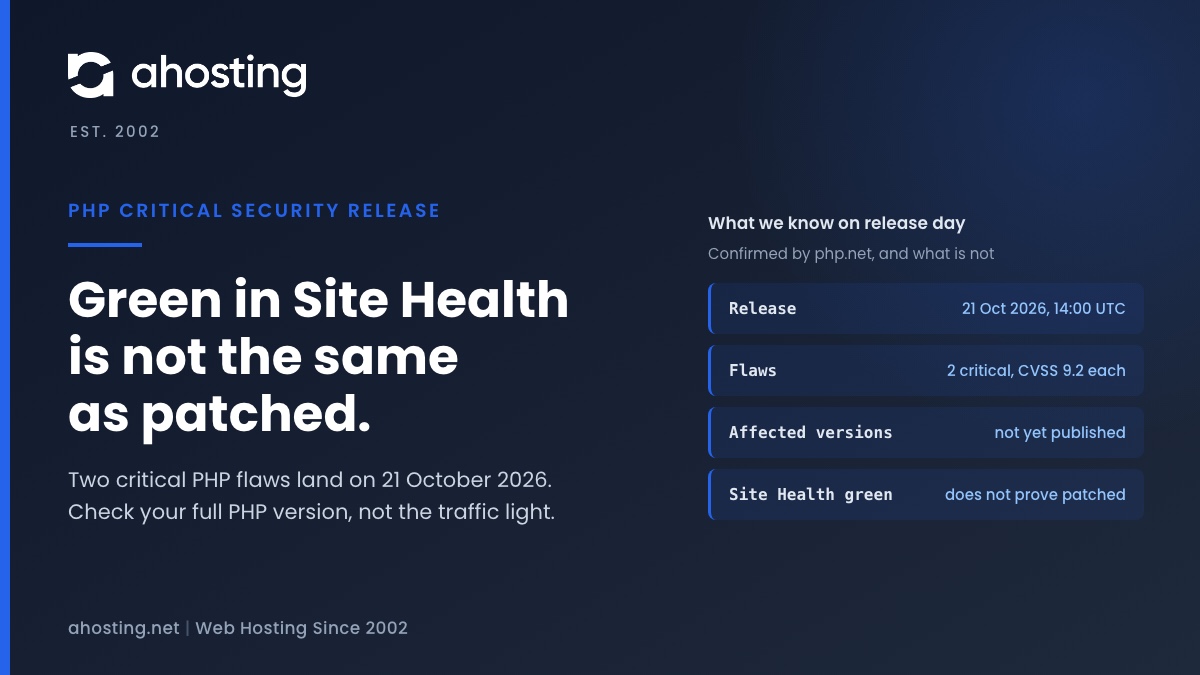
The PHP critical security release is due on 21 October 2026 at 14:00 UTC and fixes two flaws rated CVSS 9.2. PHP has not named the affected versions yet, so treat every WordPress site as exposed until it does. Check your full PHP version now, back up, and update as soon as the fixed version for your branch is published. A green Site Health PHP check does not prove you are patched.
The PHP critical security release is scheduled for Wednesday, 21 October 2026 at 14:00 UTC, and every WordPress site runs on the software it patches. Specifically, the PHP security team announced two vulnerabilities, both rated CVSS v4.0 9.2, and asked all users to prepare now. However, the notice does not yet say which PHP versions are affected or which versions fix them. Therefore, this guide sticks to what is confirmed, shows how to check your site in two minutes, and explains why WordPress itself cannot tell you whether you are patched.
PHP Critical Security Release: What Was Announced and What Is Still Unknown
In its news entry of 20 October 2026, PHP confirmed the date, the count and the severity. Notably, the same text went to the developer list, where the PHP security team posted it for php.internals. Consequently, there is one primary source for every confirmed fact below.
PHP Critical Security Release Facts You Can Rely On
The table separates what PHP confirmed from what press coverage claims. In particular, two CVE identifiers are circulating, but Qualys reports that PHP has not confirmed them.
| Item | Status as of 21 October 2026 | Source |
|---|---|---|
| Release date and time | Confirmed: Wednesday 21 October 2026, 14:00 UTC | php.net news entry |
| Number of vulnerabilities | Confirmed: two | php.net news entry |
| Severity | Confirmed: CVSS v4.0 9.2 for each (critical) | php.net news entry |
| Earlier release | Possible if details become public or exploitation appears | php.net news entry |
| CVE identifiers | Unconfirmed: public reports link CVE-2026-109618 and CVE-2026-109619 | Qualys blog |
| Affected PHP versions | Not published yet | php.net, Qualys |
| Fixed PHP versions | Not published yet | php.net, Qualys |
| Type of flaw | Not stated in the notice | php.net news entry |
| Exploitation in the wild | None reported in the coverage we read | Help Net Security |
| WordPress-specific impact | Not stated by PHP | php.net news entry |
Why PHP Critical Security Release Timing Is a Plan, Not a Promise
PHP reserved the right to ship earlier. As a result, the 14:00 UTC time is the latest you should expect, not the earliest. Indeed, preparing before the release costs you ten minutes, while preparing after it costs you a rushed afternoon.
Does the PHP Critical Security Release Affect Your WordPress Site?
WordPress is a PHP application, so every page request runs through the PHP interpreter on your server. Therefore, a flaw in PHP sits underneath your site whatever theme or plugins you use. However, whether a given flaw is reachable from a WordPress page depends on details nobody has published yet.
What the Announcement Says About WordPress
In fact, it says nothing. PHP does not mention WordPress, and the Help Net Security report only tells WordPress owners where to find their PHP version. Likewise, Qualys advises organizations to prepare for expedited patching and to inventory every PHP system. In other words, the safe reading is that every PHP installation could be affected until the advisory says otherwise.
Why a WordPress Update Will Not Fix a PHP Flaw
Typically, a flaw in the PHP engine is fixed in PHP, not in WordPress. As such, updating plugins and themes remains good practice but will not close this gap. For the wider picture of what a host can add at server level, see our guide to server-level WordPress hosting security.

Why a Green Site Health Check Does Not Mean the PHP Critical Security Release Reached You
WordPress ships a PHP check in Site Health, and it is tempting to treat green as patched. Specifically, we read its source in WordPress 7.1.2: the test is get_test_php_version in wp-admin/includes/class-wp-site-health.php, lines 736 to 860. In short, it measures branch support, not patch level.
What the PHP Version Test Actually Compares
First, the test asks the WordPress.org Serve Happy service for a recommended version and three flags. Next, it compares your PHP_VERSION with the recommended version. If yours is equal or higher, the result is good and the label reads that you run a recommended version of PHP. Only below that line does it look at whether the branch is still supported.
Consequently, a site on any point release of a current branch shows green, including one that has not received a fix. Nothing in that function checks your exact release against a list of fixed releases. That is a design choice, not a bug, but it matters on the day a critical fix ships.
What Site Health Is Still Good For
That said, the label prints your full version, for example the text Your site is running PHP followed by the exact number. In addition, WordPress marks a branch with no security updates as critical. Therefore, use Site Health to read the version string and the end-of-life warning, and ignore the color for patch status.
How to Find Your PHP Version Before the PHP Critical Security Release
You need the full version, such as 8.4.26, not just 8.4. Specifically, there are three places to read it, and the first two take under two minutes.
Read the PHP Version Inside WordPress
- Log in to the WordPress admin area.
- Open Tools, then Site Health, then the Info tab.
- Expand the Server section and read the PHP version line.
- Write the full number down, including the last segment.
Read the PHP Version in cPanel MultiPHP Manager
Alternatively, cPanel lists the version for each domain. According to the cPanel MultiPHP Manager documentation, each domain can use any installed PHP version, and an Inherited label means it follows the system version. Notably, only the system administrator can change that system default, and a provider can switch the interface off.
In practice, the two views should agree. If they do not, a per-domain setting or a file in your document root is overriding one of them. For that case, our post on the PHP version error WordPress shows walks through the usual causes.
Read the PHP Version on a VPS
On a server you manage, run php -v over SSH. However, the command line can use a different PHP than the web server, so confirm the web version in Site Health as well.
PHP Critical Security Release Readiness: Check Your Next Steps
The checker below turns your branch and server type into next steps. It uses only facts confirmed on php.net, and it will not guess a fixed version.
PHP Critical Security Release Readiness Checker
Before the PHP Critical Security Release: Four Steps
- Take a full backup of files and database, and confirm you can restore it.
- Record your exact PHP version from Site Health or cPanel.
- Test your site on a staging copy running a newer branch. Our guide to pushing WordPress staging to live covers doing that safely.
- Check your host for any notice about the maintenance window.
After the PHP Critical Security Release: Four Steps
- Read the advisory and find the fixed version for your branch.
- Update, or confirm your host has updated, to that version or later.
- Reload Site Health and cPanel and confirm the full version string changed.
- Test the pages that earn money, such as forms and checkout.
For stores, the last step matters most. For example, a WooCommerce store should place a test order, because a PHP change touches payment plugins first.
Which PHP Branches Still Receive Security Fixes After the Release
Importantly, a fix only reaches branches that PHP still supports. The table below is taken from the PHP supported versions page, read on 21 October 2026.
| PHP branch | Active support until | Security support until | Status on 21 October 2026 |
|---|---|---|---|
| 8.2 | 31 December 2024 | 31 December 2026 | Security fixes only, ending in about ten weeks |
| 8.3 | 31 December 2025 | 31 December 2027 | Security fixes only |
| 8.4 | 31 December 2026 | 31 December 2028 | Active support, ending in about ten weeks |
| 8.5 | 31 December 2027 | 31 December 2029 | Active support |
| 8.1 and older | Not listed | Not listed | Not supported by PHP |
| 8.6 | Not listed | Not listed | Release candidate, not for production |
Therefore, a branch outside the first four rows will not get a patch from PHP. Overall, the choice between current branches is covered in our PHP version guide for WordPress in cPanel.
What to Do if the PHP Critical Security Release Skips Your End-of-Life PHP Version
PHP has not said which branches the fixes cover. Even so, a branch missing from the supported list gets nothing from this release or the next one. In fact, WordPress already treats that case as critical and labels the version as one that does not receive security updates.
End-of-Life PHP Is Still Selectable on Many Hosts
Notably, being able to choose an old branch does not make it safe. On our customer servers, the cPanel list of installed PHP versions runs from old branches up to PHP 8.5, so an old branch is one click away. As a result, check what you selected, not what is on offer.
A Safe Move Off an Old PHP Branch
First, back up. Second, change the version for one domain in MultiPHP Manager or on staging. Third, load the site, the admin area and every form. Finally, switch back at once if a plugin fails, then update or replace that plugin before trying again.
Who Applies the PHP Critical Security Release: Shared Hosting, VPS or You?
The answer depends on where the PHP packages live. Typically, on shared hosting the provider installs them and you pick the branch. On a VPS or dedicated server, by contrast, you own that job.
Shared Hosting: The Host Patches, You Verify
In practice, a shared host updates the PHP packages for all accounts, and your task is to confirm the result. First-hand, the AHosting customer server we inspected runs CloudLinux 9 with CageFS and LVE. Its LiteSpeed PHP processes run as each site’s own cPanel user, and 38 of them were observed that way on 30 September 2026.
As a result, an exploited site is confined to what its own account can reach, which is how that isolation is designed to work. However, nobody has published the flaws, so we cannot say whether an exploit would respect that boundary.
VPS and Dedicated Servers: You Patch
By contrast, a WordPress VPS leaves package updates to you. Therefore, schedule the update for the hour after the fixed version appears, and keep a snapshot ready.
Agencies: Many Sites, One Version Check
For agencies, the work is a list, not a single check. Specifically, record the PHP version of every client site today. Agencies hosting many client sites on a reseller hosting account can then update them in one pass instead of site by site.
Finally, once you have confirmed the full version, open a ticket with the PHP version shown under Tools, Site Health, Info, Server and we will look at it with you.
Frequently Asked Questions: PHP Critical Security Release
Does the PHP critical security release put my WordPress site at risk in 2026?
Specifically, any WordPress site runs on PHP, so a critical PHP flaw can reach it whatever plugins it uses. However, PHP has not published the affected versions yet. Therefore, treat every site as exposed until the advisory names fixed versions.
When is the PHP critical security release and could it arrive earlier than planned?
Specifically, PHP scheduled the release for Wednesday 21 October 2026 at 14:00 UTC. However, the security team reserved the right to ship earlier if details become public or exploitation appears. As a result, prepare before the stated time, not at it.
Does a green PHP check in WordPress Site Health prove the PHP critical security release reached my site?
In fact, it does not. The check compares your PHP version with a recommended version from WordPress.org and shows green at or above it. Therefore, a site on an unpatched point release of a current branch still shows green. Read the full version string instead.
PHP 8.4 vs PHP 8.5: which branch should a WordPress site be on for security support in 2026?
Specifically, php.net lists security support for 8.4 until 31 December 2028 and for 8.5 until 31 December 2029. Both receive fixes today. However, WordPress plugin compatibility is the practical limit, so test on staging before moving a live site.
Who applies the PHP critical security release on shared hosting vs a VPS?
Typically, a shared host installs the patched PHP packages and you choose the branch your site uses. On a VPS, by contrast, you or your administrator must update the packages yourself. In practice, ask your provider which of the two applies to your plan.
My WordPress site runs PHP 8.2 in 2026, so should I wait for the PHP critical security release patch or upgrade now?
Notably, php.net lists 8.2 with security support only until 31 December 2026. A fix for 8.2 is not confirmed for this release. Therefore, back up, test on staging, and plan the move to 8.3 or later instead of waiting.
What should I do if my WordPress site runs PHP 8.0 or an older end-of-life branch?
First and foremost, move to a supported branch, because php.net no longer lists the older ones. WordPress Site Health already flags such versions as critical because they receive no security updates. Consequently, a patch is unlikely to reach them.
How do I check which PHP version my AHosting WordPress site uses in cPanel?
Specifically, open MultiPHP Manager in cPanel and read the PHP version listed beside each domain. Alternatively, open Tools, Site Health, Info, Server inside WordPress. In other words, the two views should agree, and a mismatch points to a per-domain override.
Does AHosting CageFS limit the damage if a PHP flaw is exploited on one site?
Specifically, AHosting customer servers run CloudLinux with CageFS and LVE, and each PHP process runs as the cPanel user that owns the site. As a result, an exploited site is confined to what that account can reach. However, nobody has published the flaws yet, so this is design intent, not a guarantee.
How can AHosting help me confirm my PHP version after the PHP critical security release?
In practice, open a ticket with the PHP version shown under Tools, Site Health, Info, Server and we will look at it with you. Additionally, mention your domain so we can compare it with the version cPanel lists for that site.
Related posts:
 Why It’s Now More Important Than Ever To See To Security On Your WordPress Blog
 WordPress Hosting Security in 2026: The Server-Level Protection Plugins Can’t Add
 Log Errors to a Potentially Public File? What Site Health Checks
 One or More Recommended Modules Are Missing: How to Read the WordPress Site Health Warning and Fix It on Shared Hosting