- Headers Already Sent in WordPress: What PHP Is Refusing to Do
- How to Read Output Started At When Headers Already Sent Appears
- Headers Already Sent After a BOM or a Stray Space
- Headers Already Sent Because of Text After the Closing Tag
- Headers Already Sent Because Something Printed a Notice
- Paste Your Headers Already Sent Warning Into the Decoder
- Why Headers Already Sent Works on One Host and Fails on Another
- What Headers Already Sent Breaks: Login, Redirects and the REST API
- Find the Stray Byte That Causes Headers Already Sent Across a Site
- What the Headers Already Sent Lab Did Not Cover
- Frequently Asked Questions About Headers Already Sent in WordPress
- What does the headers already sent warning mean in WordPress in 2026?
- Why does headers already sent appear in wp-admin and login but not on the front page?
- Headers already sent: BOM vs closing tag whitespace, which one does the line number reveal?
- Output buffering vs fixing the file: which is the right fix for headers already sent in 2026?
- How do I find which plugin causes headers already sent when the path names a core file?
- Why can't I edit the header in WordPress when the headers already sent warning shows?
- Which AHosting plans list SSH access or WP-CLI for headers already sent troubleshooting?
- What should I send AHosting support about a headers already sent warning in 2026?
- Can I hide the headers already sent warning with a .user.ini file on AHosting shared hosting?
- Is headers already sent a security problem or only a coding mistake in 2026?
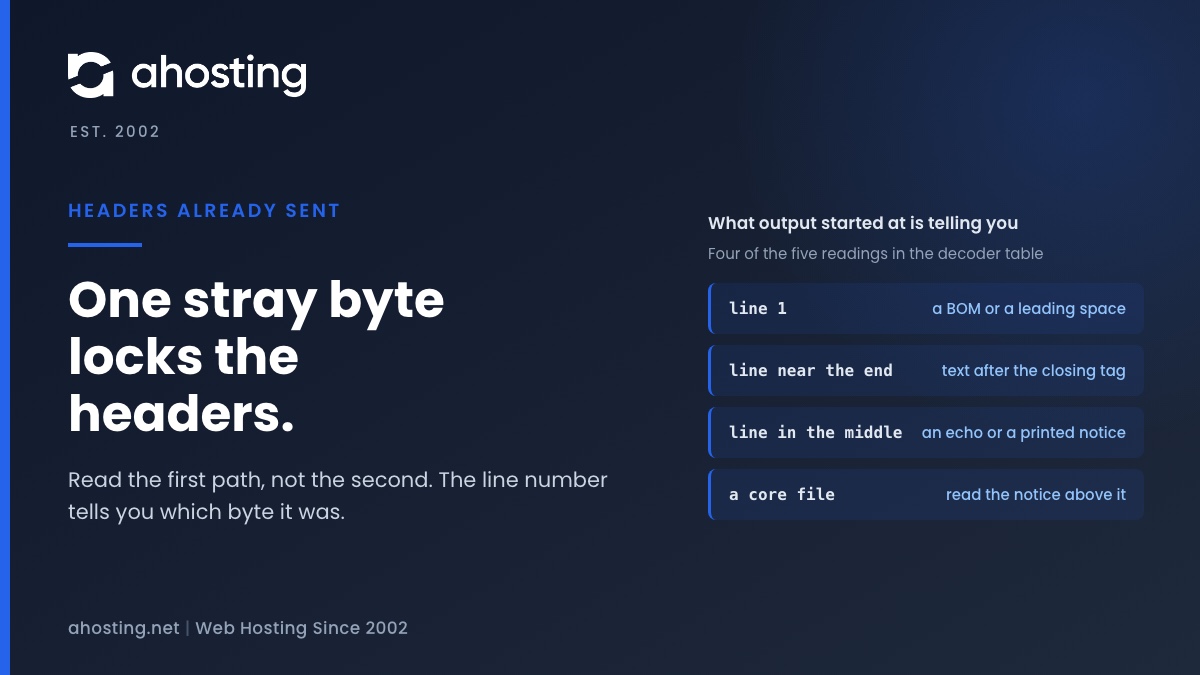
The headers already sent warning means PHP had already sent a byte of page output when WordPress tried to send a header or a cookie. Read the path after "output started at" first, because it names the file and line where that byte left. A line number of 1 points to a BOM, a line near the end points to text after a closing tag, and a core file points to a notice printed above it. In our lab a 3 byte BOM produced six warnings and no login.
Headers Already Sent in WordPress: What PHP Is Refusing to Do
The headers already sent warning is PHP refusing to change an HTTP header after the page has started. A web response has two parts, the headers first and the body second. Once a single byte of body leaves PHP, the headers are locked, and a later call to header() or setcookie() fails. The PHP manual for header() says why: output can come from “blank lines in a file”, not only from HTML.
Here is the full message, with a made-up path:
Warning: Cannot modify header information - headers already sent by (output started at /home/user/public_html/wp-config.php:1) in /home/user/public_html/wp-login.php on line 525Headers Already Sent: The Second Path Names the Victim
The message has two halves, and only one of them helps. The first half, output started at, names the file and line where the first byte left PHP. That is the cause. The second half, in ... on line, names the code that tried to send a header and was too late. Core files appear there constantly, and editing them is the wrong move.
To check this, I installed WordPress 7.1.3 on a local PHP 8.5.10 server and caused each problem on purpose. Every row of the tables below comes from one of those runs. The setup is a single workstation, not an AHosting server, and the last section lists what it did not cover.
How to Read Output Started At When Headers Already Sent Appears
Start with the file and the line number. Together they sort the problem into one of five cases, and each case has a different fix.
| What output started at names | Most likely cause | What to check | Reproduced in the lab |
|---|---|---|---|
A plugin, theme or wp-config.php file, line 1 | A BOM, or a space or line break before the PHP opening tag | The first three bytes of that file | Yes. A BOM in wp-config.php gave six warnings and no login cookie |
| A plugin or theme file, a line near the end | Text after the closing tag: a second newline or a space | The last lines of that file | Yes. A closing tag plus two newlines was reported at line 5 |
| A plugin or theme file, a line in the middle | The code printed something: an echo, or a notice PHP displayed | The named line, then any message printed above the warning | Yes. A notice raised on line 2 was reported at line 2 |
A core file such as wp-includes/functions.php | A Notice or Deprecated message printed by core for another plugin | The first message above the first warning; it names the real file | Yes. A deprecated call was reported at functions.php line 6260 |
| Nothing is shown at all | display_errors is off, so the warning is hidden but the problem remains | The PHP error log, and the login page error text | Yes. Login returned 200 with no cookie and an unexpected output error |
Headers Already Sent After a BOM or a Stray Space
A byte order mark, or BOM, is the character U+FEFF placed at the start of a file. In UTF-8 it is the three bytes EF BB BF, and the W3C article on the byte-order mark warns that a BOM at the start of a PHP file begins output before a header call runs. Some editors add it on save, and none shows it. PHP treats any bytes before the opening tag as output. The PSR-1 standard therefore requires PHP code to use UTF-8 without BOM.
In the lab I put those three bytes before the opening tag of wp-config.php and submitted the login form with the right password. WordPress answered 200 and set no login cookie. It printed six warnings, all saying output started at wp-config.php:1. One invisible mark produced six messages, because each header and cookie call in the login request failed on its own.
Check the First Three Bytes for Headers Already Sent
A line number of 1 is the tell, but check before you edit. In a shell, head -c 3 wp-config.php | od -An -tx1 prints ef bb bf when the BOM is there. I ran that on macOS only. A space or tab before the opening tag shows up as 20 or 09 in the same output.
To fix it, save the file again as UTF-8 without BOM. In VS Code, the encoding button in the status bar lets you save the file with a different encoding. Then request the page again and confirm that the first byte is the opening tag.

Headers Already Sent Because of Text After the Closing Tag
The closing tag is the second classic source. PHP swallows one newline that comes right after the closing tag, and anything beyond that newline is output. The lab shows the edge exactly: a must-use plugin ending in a closing tag plus one newline worked, and the same file with two newlines broke login.
In that run the report said output started at the plugin file, line 5, although the file had four lines. Notably, the second newline sits on a fifth line that looks empty in an editor, which is why this one is hard to see.
Remove the Closing Tag to Stop Headers Already Sent
Because the closing tag at the end of a file is optional, leaving it off removes this whole class of error. The WordPress PHP coding standards say that omitting the closing tag at the end of a file is preferred. For a file you own, such as a custom plugin or a functions.php, delete the final closing tag and any lines below it.
Do not edit a core file or a vendor plugin this way. Replace it with a clean copy from its author instead, because your change disappears at the next update anyway.
Headers Already Sent Because Something Printed a Notice
Whitespace is only one kind of output. A PHP notice, warning or deprecation message is output as well, and WordPress shows them in the page when debugging is on. The WordPress debugging handbook says the WP_DEBUG_DISPLAY default is true, which “shows errors and warnings as they are generated”. A site that shows one notice then shows a headers already sent warning right behind it.
In the lab, a must-use plugin raised a notice on init with debugging on. Login returned 200 with no cookie, and the warning said output started at that plugin, line 2, the very line that raised the notice. So far the file named is the culprit.
When the Named File Is a Core File
The next run is the one that misleads people. A plugin called a deprecated function on init. WordPress printed the Deprecated message itself, so the warning said output started at wp-includes/functions.php:6260. Core is named, and core is innocent. The real file is in the message printed above the first warning.
Read that first message, then rename the plugin folder it names and test again. To stop the display while you fix the cause, set WP_DEBUG_DISPLAY to false and WP_DEBUG_LOG to true. If a debug log stays on, read what a public debug log exposes so that you do not trade one problem for another.
Paste Your Headers Already Sent Warning Into the Decoder
The decoder below applies the table to your own warning. It reads the line number and the path, then names the likely cause and the section to read next. It reports what the table says and nothing more, so a plugin with unusual output still needs a person to read the file.
Warning Line Decoder
Paste the whole warning. The text stays in your browser and is not sent anywhere.
Why Headers Already Sent Works on One Host and Fails on Another
The same files can pass on one server and fail on another. The reason is output_buffering. The PHP output control settings list its default as “0” and give 4096 as an example value. With a buffer, PHP holds early output in memory, so headers can still go out first.
I ran the same broken files with and without a 4096 byte buffer. The result is Table 2.
| Stray output | output_buffering | Login result |
|---|---|---|
3 byte BOM in wp-config.php | 0 | 200, no login cookie, six warnings |
3 byte BOM in wp-config.php | 4096 | 302 redirect, login cookie set, no warning |
| 20 byte echo from a plugin | 4096 | 302 redirect, login cookie set |
| 5000 byte echo from a plugin | 4096 | 200, no login cookie, warning at the echo line |
| 3 byte BOM, display_errors off | 0 | 200, no login cookie, no warning shown |
Headers Already Sent After You Move Hosts
Because the setting belongs to the server, a migration can start this warning without anyone touching a file. A BOM that a lenient buffer hid for years surfaces the day the new server has none. If the warning appears right after a move, the migration walkthrough covers the checks around it, and the stray byte is still the thing to find.
Raising the buffer would hide the symptom in the lab, and I would not ship it. The 5000 byte row shows the hiding stops working as soon as the output grows. I did not read this setting on any AHosting server, so this post makes no claim about its value there. Ask your host, or look at it in phpinfo().
What Headers Already Sent Breaks: Login, Redirects and the REST API
The warning is the visible part. The damage is what failed to send. In login, wp_set_auth_cookie() makes three setcookie() calls at pluggable.php:1193 to 1195, and all three failed in the lab. Redirects use header( "Location: ..." ) at pluggable.php:1542, and the admin sends a Referrer-Policy header at functions.php:7310. None of these has a guard.
The Cookies Are Blocked Due to Unexpected Output Error
Hiding the warning does not hide the failure. With display_errors off, the lab login page came back with “Cookies are blocked due to unexpected output.” These lines of wp-login.php print it when the login cookie is missing and headers_sent() is true. The error is the same problem seen from the login form.
Headers Already Sent in the REST API Response
REST responses need clean JSON. With a BOM in a must-use plugin, a REST request returned a body that began with the bytes ef bb bf, then warning markup, and a JSON parser rejected it. The editor shows that as a bad response, so the not a valid JSON response guide is the next place to look.
Why the Front Page Looks Fine
The front end is quieter. WordPress tests headers_sent() before it sends most front-end headers, at class-wp.php:573 to 581, and nocache_headers() returns early the same way. In the lab, the front page returned 200 and printed no warning, yet the stray byte still sat ahead of the doctype. A clean front page therefore does not clear a file.
Redirect and login problems from cookies deserve their own check, and the too many redirects guide covers the cookie and redirect side separately.
Find the Stray Byte That Causes Headers Already Sent Across a Site
Usually the warning names the file, and you are done. Sometimes you migrate a site or inherit one, and you want every file checked at once. On a shared web hosting plan that lists SSH access, a short PHP script can do it. I wrote one and tested it on seven sample files.
A Scanner for BOMs and Text After the Closing Tag
It reads every .php file under a folder and prints two kinds of finding. A first token made only of a BOM or whitespace is reported with its bytes, and so is whitespace after a final closing tag. It left alone a closing tag followed by one newline, a file with no closing tag, and a template with real markup.
<?php
// Usage: php find-stray-output.php /path/to/wp-content
$it = new RecursiveIteratorIterator(new RecursiveDirectoryIterator($argv[1], FilesystemIterator::SKIP_DOTS));
foreach ($it as $f) {
    if (substr($f, -4) !== '.php') { continue; }
    $t = token_get_all(file_get_contents($f));
    $first = $t[0];
    if (is_array($first) && $first[0] === T_INLINE_HTML && trim($first[1], "\xEF\xBB\xBF \t\r\n") === '') {
        echo $f . ':1 starts with ' . bin2hex(substr($first[1], 0, 6)) . "\n";
    }
    $last = end($t);
    $prev = prev($t);
    if (is_array($last) && $last[0] === T_INLINE_HTML && is_array($prev) && $prev[0] === T_CLOSE_TAG && trim($last[1]) === '') {
        echo $f . ' ends with ' . bin2hex(substr($last[1], 0, 6)) . " after the closing tag\n";
    }
}
The script is read-only. It cannot find an echo or a notice, so the decoder above still comes first. If you run many client sites, run it once per account, because a reseller hosting account keeps a separate cPanel account for each client.
A Fix Order for Headers Already Sent
- Read the first warning, and ignore the repeats. They share one cause.
- On line 1, check the first three bytes and save the file as UTF-8 without BOM.
- Near the end of a file, delete the closing tag and any lines under it.
- With a core file, read the message printed above the first warning and fix the file it names.
- Test login in a private window, because a cached admin session hides the cookie failure.
What the Headers Already Sent Lab Did Not Cover
The lab used WordPress 7.1.3 with SQLite instead of MySQL, PHP 8.5.10 and the built-in web server, on one workstation. I did not test LiteSpeed, LSAPI or php-fpm, multisite, a cPanel editor, or any browser. The scanner ran on seven sample files, not on a real site, and the shell commands ran on macOS only. Every number in this guide comes from that setup, so treat the line numbers as WordPress 7.1.3 line numbers.
Finally, if your warning fits none of the five rows, the file is not the problem and the next step is a person. If your site runs on our WordPress hosting plans, open a ticket with the full warning line, from the word Warning to the last line number, and we will look at it with you.
Frequently Asked Questions About Headers Already Sent in WordPress
What does the headers already sent warning mean in WordPress in 2026?
Specifically, PHP had already sent page output when WordPress tried to send a header or a cookie, so PHP refused. The path after output started at names the file and line where the first byte left, and that is the place to look. The second path in the message only names the code that was too late.
Why does headers already sent appear in wp-admin and login but not on the front page?
In practice, WordPress core tests headers_sent before it sends most front-end headers, so the front end stays quiet. Login, admin screens and redirects call setcookie or header without that test, so they print the warning. The stray output can still be on the front page, ahead of the doctype.
Headers already sent: BOM vs closing tag whitespace, which one does the line number reveal?
Specifically, a line number of 1 points to a BOM or to text before the PHP opening tag. A line number near the end of a file points to text after the closing tag. In our lab a closing tag followed by two newlines was reported at line 5 of a file with four lines.
Output buffering vs fixing the file: which is the right fix for headers already sent in 2026?
Specifically, fixing the file is the right fix. Output buffering only holds early output in memory, and it stops helping once the output outgrows the buffer. In our lab a 20 byte echo passed with a 4096 byte buffer, and a 5000 byte echo failed with the same setting.
How do I find which plugin causes headers already sent when the path names a core file?
Specifically, scroll up to the first message printed above the first warning, because a Notice or Deprecated line names the real file. In our lab a deprecated call from a must-use plugin was reported at wp-includes functions.php line 6260, while the message above it named the plugin. Then rename that plugin folder and test again.
Why can’t I edit the header in WordPress when the headers already sent warning shows?
Indeed, this warning is about HTTP headers, the lines a server sends before the page, and not the header area you edit in the Customizer or the Site Editor. No theme setting changes it. The fix is in a PHP file that printed something too early, so use the path after output started at.
Which AHosting plans list SSH access or WP-CLI for headers already sent troubleshooting?
Specifically, the AHosting WordPress Hosting page lists WP-CLI access and SSH access (jailed shell), and the Web Hosting page lists SSH access (jailed shell), as read on October 20, 2026. Neither page says which tools exist inside the shell, so check that PHP runs there before you rely on a scanner.
What should I send AHosting support about a headers already sent warning in 2026?
Specifically, send the full warning line, from the word Warning to the last line number, including both paths. The line holds file paths for your account and nothing secret. If a notice printed above it, add that line too, and say which file you already checked.
Can I hide the headers already sent warning with a .user.ini file on AHosting shared hosting?
However, hiding the message does not fix the cause. Our servers read .user.ini files, so display_errors can be set there, but in our lab login still failed with display_errors off and WordPress printed that cookies are blocked due to unexpected output. Fix the file that printed the byte.
Is headers already sent a security problem or only a coding mistake in 2026?
Typically it is an editor or coding mistake, and a BOM does not prove a hack. That said, if the output at the named line is text you did not write, treat the file as suspect and compare it with a clean copy from the plugin or theme author.