
- Why the Best PHP Version for WordPress in 2026 Is Not Automatically the Newest
- The 2026 WordPress PHP Version Matrix
- What Changes Behind the Dropdown When You Switch PHP Versions
- The Best PHP Version for WordPress on cPanel: The AHosting Directive Ladder
- Three cPanel Tools, One PHP Version: Which Screen Does What
- How to Change Your PHP Version in cPanel MultiPHP Manager
- Choosing the Best PHP Version for WordPress Across Client Sites
- AHosting PHP Version Defaults: What Every WordPress Plan Runs
- A Practical Checklist: Is Your WordPress PHP Version the Right One?
- Frequently Asked Questions About the Best PHP Version for WordPress
- What is the best PHP version for WordPress in 2026, and does newest always mean fastest?
- PHP 8.3 vs PHP 8.4: which is the best PHP version for WordPress on cPanel hosting?
- Why does my WordPress memory limit survive a PHP version change but my timeout does not?
- Does AHosting enable OPcache on WordPress hosting accounts, and on which PHP version?
- When should a WooCommerce store on AHosting switch from PHP 8.4 to PHP 8.3 for the 512MB memory limit in 2026?
- How do I change the PHP version for one domain in cPanel MultiPHP Manager without affecting other sites?
- Is PHP 7.4 still the best PHP version for WordPress if it remains the official 7.0 minimum?
- What is the best PHP version for WordPress multisite or a reseller account with mixed client builds?
- Which PHP version does AHosting use by default on WordPress hosting plans in 2026?
- How can I verify the best PHP version for WordPress actually took effect after switching?
The best PHP version for WordPress in 2026 is PHP 8.3 for compatibility or PHP 8.5 for speed. On AHosting, each version also sets a different memory limit and timeout.
Choosing the best PHP version for WordPress looks like a one-click decision in cPanel, and that is exactly why it goes wrong so often. The MultiPHP Manager dropdown presents a tidy list of version numbers with no indication that picking a different one also rewrites how much memory your site gets, how long a script may run before it is killed, and whether compiled bytecode is cached at all. Consequently, site owners switch versions to chase a performance headline and inherit three configuration changes they never asked for.
This guide covers what actually changes behind that dropdown on AHosting shared hosting, why WordPress and PHP disagree about which version to recommend, and how to make the switch without discovering the consequences during a failed import.
Why the Best PHP Version for WordPress in 2026 Is Not Automatically the Newest
The newest PHP release is rarely the version WordPress officially recommends, and in 2026 the gap between those two answers is two full releases wide. Specifically, WordPress core is fully compatible with PHP 8.0 through 8.3 and beta compatible with PHP 8.4 and 8.5. Meanwhile, PHP’s own release schedule tells a different story: 8.3 left active support at the end of 2025 and now receives security fixes only.
Therefore, the version WordPress recommends most strongly is already past its active-support window, while the versions with the longest runway carry a compatibility caveat from the WordPress project. Neither answer is wrong. However, both are incomplete without knowing what your host does with each version, which is where most guides stop and this one starts.
The 2026 WordPress PHP Version Matrix
Ultimately, four PHP branches still receive security patches in 2026, and each occupies a different position on the compatibility-versus-longevity trade-off. The table below pairs the official PHP support timeline with WordPress core’s compatibility tier for each branch.
| PHP branch | WordPress core status | Active support ended | Security support ends | Verdict for WordPress |
|---|---|---|---|---|
| PHP 7.4 | Minimum supported | Nov 2021 | Nov 2022 (EOL) | Floor only — unpatched runtime |
| PHP 8.2 | Fully compatible | Dec 31 2024 | Dec 31 2026 | Migrate off within months |
| PHP 8.3 | Fully compatible (recommended) | Dec 31 2025 | Dec 31 2027 | Safest compatibility choice |
| PHP 8.4 | Beta compatible | Dec 31 2026 | Dec 31 2028 | Longest practical runway |
| PHP 8.5 | Beta compatible | Dec 31 2027 | Dec 31 2029 | Fastest — OPcache built in |
Fully Compatible vs Beta Compatible in WordPress Core
Notably, beta compatible does not mean broken. WordPress uses the term to signal that core passes its automated test suite on a PHP branch, but that the wider plugin and theme ecosystem has not yet had time to catch every edge case. In practice, core itself runs cleanly; the risk sits in third-party code that has not been updated for the newer branch. Accordingly, the WordPress Core Handbook compatibility reference is the authoritative place to check any specific pairing before you commit.
Where WordPress 7.0’s PHP 7.4 Floor Actually Sits
WordPress 7.0 raised the minimum supported PHP version to 7.4.0, dropping 7.2 and 7.3 entirely. However, the minimum recommended version stayed at 8.3, and the two numbers serve completely different purposes. Specifically, the minimum is the point below which core will not load; the recommendation is where the project believes your site belongs. Furthermore, the core Trac discussion behind the change makes the reasoning explicit — the floor moved because usage fell below the project’s 5% retirement threshold, not because 7.4 became a good idea again. Our full breakdown of the WordPress 7.0 hosting requirements covers the database and memory side of the same release.
What Changes Behind the Dropdown When You Switch PHP Versions
Switching PHP versions changes more than the version number, and the additional changes are invisible in the cPanel interface. Specifically, every PHP version on a cPanel server carries its own configuration file with its own default values for memory limit, script timeout, upload size, and input variables. Consequently, when you move a domain from one version to another, you inherit the target version’s defaults for every directive you have not personally customized.
In practice, this produces a failure mode that is genuinely difficult to diagnose. A store owner switches to a newer PHP branch for the performance gain, and a week later a scheduled product import starts timing out. Nothing in WordPress changed. Nothing in the plugin changed. However, the script timeout was halved by the version switch, and no interface announced it.
Why Your Memory Limit Survives and Your Timeout Does Not
Notably, the behavior is asymmetric, and the reason is where cPanel stores your customizations. When you change a directive through the MultiPHP INI Editor, cPanel writes that single directive into a configuration file in your account’s home directory — a file that carries no version number in its path. Therefore, it applies to whichever PHP version is active, and it survives every switch you make.
Directives you never touched are absent from that file entirely. Accordingly, they resolve to the active version’s own defaults, which differ between versions. The practical rule is short: what you customized follows you, and what you left alone changes underneath you. Our guide to why raising the WordPress memory limit does not always work on shared hosting explains the layers involved in more depth.
The Best PHP Version for WordPress on cPanel: The AHosting Directive Ladder
Ultimately, the trade-off is only visible once the version numbers sit beside the directive values they carry. The table below is the configuration AHosting sets on its shared WordPress hosting platform, not PHP’s stock defaults.
| Directive | PHP 8.3 | PHP 8.4 (default) | PHP 8.5 |
|---|---|---|---|
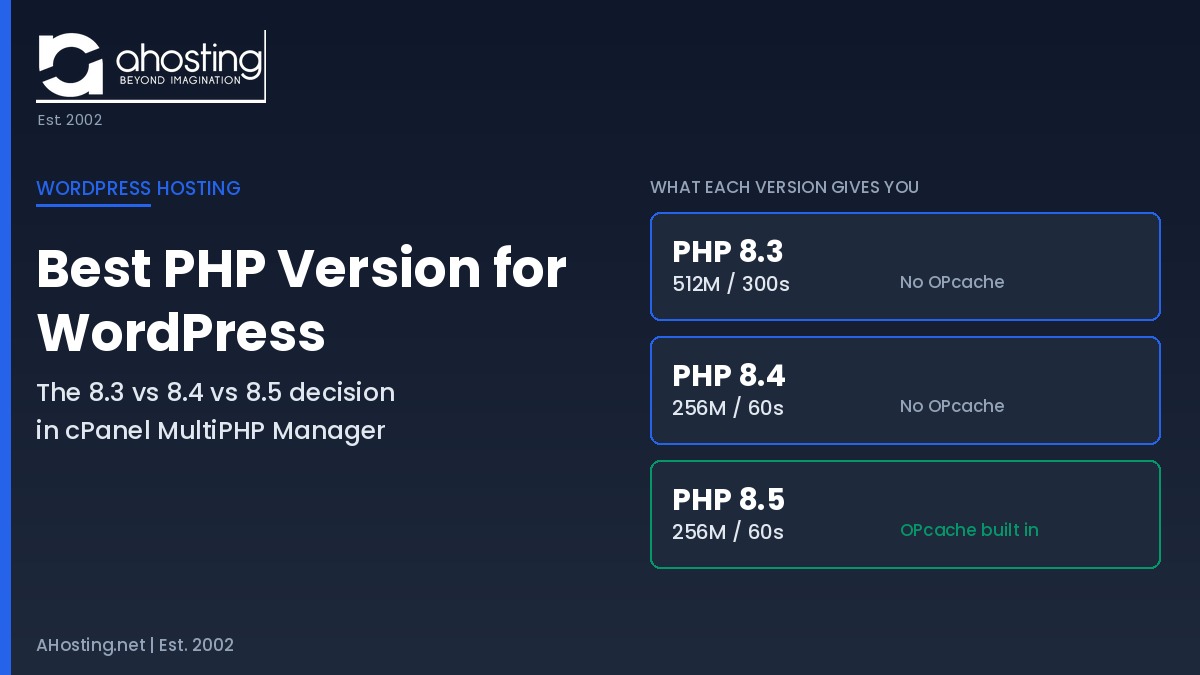
| memory_limit | 512M | 256M | 256M |
| max_execution_time | 300s | 60s | 60s |
| post_max_size | 128M | 128M | 128M |
| max_input_vars | 1000 | 1000 | 1000 |
| OPcache | Not available | Not available | Built into core |
| WordPress core status | Fully compatible | Beta compatible | Beta compatible |
The Case for PHP 8.3 as the Best PHP Version for WordPress
Specifically, PHP 8.3 is the only branch that combines full WordPress core compatibility with the most generous resource allocation on the platform: a 512MB memory limit and a 300-second script timeout. Therefore, it is the correct choice for plugin-heavy builds, large page-builder sites, and any workflow involving bulk imports or exports. The trade-off is runway — security support ends December 31 2027.
The Case for PHP 8.4 as the Best PHP Version for WordPress
Notably, PHP 8.4 is the AHosting default because it balances a long support window against broad ecosystem readiness. It receives security patches through December 31 2028, and by 2026 the major plugin vendors have had eighteen months to test against it. However, the 256MB memory limit and 60-second timeout are half and one-fifth of what 8.3 provides respectively, which matters more than the version number for heavy sites.
The Case for PHP 8.5 as the Best PHP Version for WordPress
In contrast, PHP 8.5 offers something no earlier branch on the platform does: OPcache. As of PHP 8.5, OPcache is compiled directly into the PHP core binary rather than distributed as a separate loadable extension, so it is present and active by default. Consequently, selecting PHP 8.5 in MultiPHP Manager is the single action that enables bytecode caching on an AHosting account. Additionally, 8.5 carries security support to December 31 2029, the longest of any current branch.
Three cPanel Tools, One PHP Version: Which Screen Does What
Confusingly, a cPanel account exposes three separate screens that all appear to control PHP, and they do different jobs. Specifically, MultiPHP Manager sets which version a domain runs. MultiPHP INI Editor sets individual directive values such as the memory limit. Select PHP Version, where present, is a separate CloudLinux tool with its own version list and extension checklist.
Importantly, MultiPHP Manager and Select PHP Version are alternative paths rather than complementary ones. A domain configured through one is not accurately reported by the other, which is why an account can appear to run an old version in one screen while actually serving a newer one. Therefore, pick one tool and stay with it. For AHosting WordPress accounts, that tool is MultiPHP Manager.
OPcache and LSCache: Two Cache Layers, Two Different Jobs
Notably, these two caches are often confused, and they operate at completely different points in a request. OPcache stores compiled PHP bytecode in memory so the server does not recompile your code on every request; it reduces how long PHP takes to run. In contrast, LiteSpeed Cache stores the finished HTML output so that PHP does not run at all for a cached visitor.
Consequently, they stack rather than compete: LSCache handles repeat visitors, and OPcache accelerates everything LSCache cannot serve from cache — logged-in sessions, cart pages, and admin requests. Furthermore, neither is a plugin feature at the layer that matters; both are properties of the server configuration your host provides. Our guide to server-level caching on LiteSpeed hosting covers the page-cache half in detail.
How to Change Your PHP Version in cPanel MultiPHP Manager
Specifically, changing the PHP version for a single domain takes about thirty seconds in cPanel and requires no support ticket on any AHosting WordPress plan. The five steps below include the two verification points most walkthroughs omit.
First Step: Record What You Are Running Now
Before changing anything, open WordPress admin, go to Tools, then Site Health, then Info, and expand the Server panel. Write down three values: the PHP version, the memory limit, and the maximum execution time. Consequently, you will be able to tell afterwards which of them changed, rather than guessing.
Second Step: Switch on Staging Before Production
Notably, every AHosting WordPress plan includes staging, and a PHP version change is exactly the kind of change staging exists for. Clone the site, switch the staging copy first, then load the front end and the admin dashboard, and watch for deprecation notices from older plugins. Additionally, exercise the specific workflows that matter to you — checkout, form submission, imports — because those are where an incompatible plugin surfaces.
Third Step: Select the Version and Apply
In cPanel, go to the Software section and open MultiPHP Manager. Furthermore, tick the checkbox beside only the domain you intend to change, choose your version from the PHP Version menu at the top right, and click Apply. The change takes effect immediately for that virtual host and leaves every other domain on the account untouched.
Fourth Step: Re-Check the Directives That Just Changed
This is the step almost every guide skips, and it is the one that prevents the silent failure described earlier. Specifically, return to Site Health and compare the memory limit and maximum execution time against the values you recorded in the first step. If either dropped, open MultiPHP INI Editor and set it explicitly — once set, it will survive future version changes.
Fifth Step: Verify the Switch Took Effect
Finally, confirm that the version reported by WordPress matches what you selected. Site Health reads what the server is actually serving, whereas the cPanel dropdown reports what you asked for, and those two can disagree when a caching layer or a second PHP tool is involved. Therefore, trust Site Health. If it still shows the old version after a few minutes, WordPress’s own update-PHP guidance covers the remaining checks before you open a ticket.
Choosing the Best PHP Version for WordPress Across Client Sites
Notably, agencies face a version problem that single-site owners do not: one legacy client build can hold an entire portfolio back. However, because MultiPHP Manager sets the version per domain rather than per account, a reseller hosting account can run PHP 8.3 for a fragile legacy site and PHP 8.5 for everything else, on the same server, at the same time.
WordPress multisite is the exception worth knowing. Specifically, every site in a multisite network shares a single virtual host, so they share a single PHP version — the network moves together or not at all. Consequently, multisite networks need the compatibility of PHP 8.3 more often than standalone sites do.
AHosting PHP Version Defaults: What Every WordPress Plan Runs
Specifically, every AHosting WordPress hosting account defaults to PHP 8.4 on a LiteSpeed and CloudLinux stack, with PHP 8.3 and 8.5 selectable per domain at no additional cost. Additionally, the PHP INI Editor is enabled on every plan, so raising a memory limit is a self-service change rather than a support request. For WooCommerce stores, that combination matters more than it does for a brochure site, because cart and checkout requests cannot be served from page cache and therefore run PHP on every hit.
Furthermore, sites that have outgrown shared resource ceilings entirely can move to VPS hosting for dedicated workers and full control over PHP configuration. Our guide to hosting requirements for Elementor builds works through the memory side of the same decision.
PHP Version Decision Checker
Answer three questions to see which PHP version fits your WordPress site on AHosting.
1. What kind of site is it? 2. Do you run bulk imports, exports, or long scheduled jobs? 3. How current are your plugins and theme?A Practical Checklist: Is Your WordPress PHP Version the Right One?
Finally, run these five checks before you decide you are finished. First, confirm your active version in Site Health rather than in the cPanel dropdown. Second, check that the branch you are on still receives security patches — anything at 8.1 or below does not. Third, compare your memory limit and script timeout against what your heaviest workflow actually needs.
Fourth, if you have ever customized a directive, verify it is still applied after any version change. Fifth, test on staging before production, every time, without exception. Ultimately, the best PHP version for WordPress is the newest branch your plugins tolerate, with the directive values your workload requires — and those two conditions are what the dropdown alone will never tell you.
Frequently Asked Questions About the Best PHP Version for WordPress
What is the best PHP version for WordPress in 2026, and does newest always mean fastest?
Specifically, the best PHP version for WordPress in 2026 is PHP 8.3 for maximum compatibility or PHP 8.5 for maximum performance, not simply the newest release available. WordPress core is fully compatible with PHP 8.0 through 8.3 and only beta compatible with 8.4 and 8.5, so the newest branch carries a small compatibility caveat that the recommended branch does not. Furthermore, on AHosting the version you pick also changes your memory limit and script timeout, which is covered in the directive ladder table in this guide.
PHP 8.3 vs PHP 8.4: which is the best PHP version for WordPress on cPanel hosting?
Notably, PHP 8.3 gives WordPress full core compatibility and, on AHosting, a 512MB memory limit with a 300-second script timeout. In contrast, PHP 8.4 carries security support two years longer, until December 31 2028, but ships with a 256MB memory limit and a 60-second timeout. Therefore, plugin-heavy builds and long imports favor 8.3, while sites prioritizing a longer support runway favor 8.4.
Why does my WordPress memory limit survive a PHP version change but my timeout does not?
Specifically, cPanel writes any directive you customize into a version-agnostic file in your home directory, so it applies to every PHP version you switch to. However, directives you never customized are not in that file at all, so they fall through to the defaults of whichever PHP version is now active. Consequently, a custom memory limit follows you across a switch while an untouched script timeout silently adopts the new version's value.
Does AHosting enable OPcache on WordPress hosting accounts, and on which PHP version?
Specifically, OPcache is active on AHosting accounts running PHP 8.5 and is not available on PHP 8.4 or earlier. Since PHP 8.5, OPcache is compiled into the PHP core binary rather than shipped as a separate loadable extension, so selecting PHP 8.5 in cPanel MultiPHP Manager is what turns bytecode caching on. Moreover, no plugin can enable OPcache on any version, because it operates below the application layer entirely.
When should a WooCommerce store on AHosting switch from PHP 8.4 to PHP 8.3 for the 512MB memory limit in 2026?
Notably, switch when product imports, bulk order exports, or plugin updates fail partway through with a white screen or a memory exhaustion notice. PHP 8.3 on AHosting provides a 512MB memory limit and a 300-second timeout, compared with 256MB and 60 seconds on PHP 8.4. Additionally, stores running large catalogs with heavy extension stacks are the most common case where the extra headroom resolves the failure outright.
How do I change the PHP version for one domain in cPanel MultiPHP Manager without affecting other sites?
Specifically, open cPanel, go to Software, then MultiPHP Manager, tick the checkbox beside only the domain you want to change, choose a version from the PHP Version menu, and click Apply. Furthermore, the change applies to that virtual host alone, so other domains on the same cPanel account keep their existing version. Note that any domain left on the inherit setting follows the server default instead.
Is PHP 7.4 still the best PHP version for WordPress if it remains the official 7.0 minimum?
However, no. WordPress 7.0 raised the minimum supported version to PHP 7.4.0, but minimum supported and recommended are different standards. PHP 7.4 reached end of life in November 2022 and receives no security patches, so running it means an unpatched runtime beneath a patched application. Therefore, treat 7.4 as the floor that keeps core loading, never as a target.
What is the best PHP version for WordPress multisite or a reseller account with mixed client builds?
Notably, cPanel MultiPHP Manager sets the PHP version per domain, so a reseller can run different versions for different client sites on the same server. Consequently, a legacy client build can stay on an older version while newer sites move ahead, without forcing a single version across the whole account. However, WordPress multisite is the exception: all sites in a network share one PHP version because they share one virtual host.
Which PHP version does AHosting use by default on WordPress hosting plans in 2026?
Specifically, AHosting WordPress hosting accounts default to PHP 8.4, with a 256MB memory limit and a 60-second script timeout. Additionally, PHP 8.3 and PHP 8.5 are selectable per domain through cPanel MultiPHP Manager without a support ticket or a plan change. Every version's exact directive values appear in the AHosting PHP Directive Ladder table in this guide.
How can I verify the best PHP version for WordPress actually took effect after switching?
Specifically, open WordPress admin, go to Tools, then Site Health, then Info, and expand the Server panel to read the active PHP version, memory limit, and maximum execution time. Furthermore, this reads the values your site is actually served with, which is the point: the cPanel dropdown reports what you selected, while Site Health reports what is running. In practice, check both the version and the two directive values, because one of them may have changed without you asking.
Related posts:
 “Resource Limit Reached” vs. 503 vs. 500 Error WordPress: A Diagnostic Decision Tree
 Why Raising the WordPress Memory Limit Doesn’t Work on Shared Hosting (and What Does)
 WordPress White Screen of Death: A Host’s Step-by-Step Recovery Guide
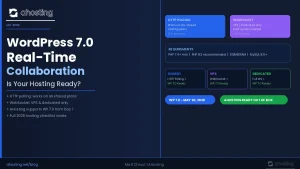 WordPress 7.0 Real-Time Collaboration: Is Your Hosting Ready?