
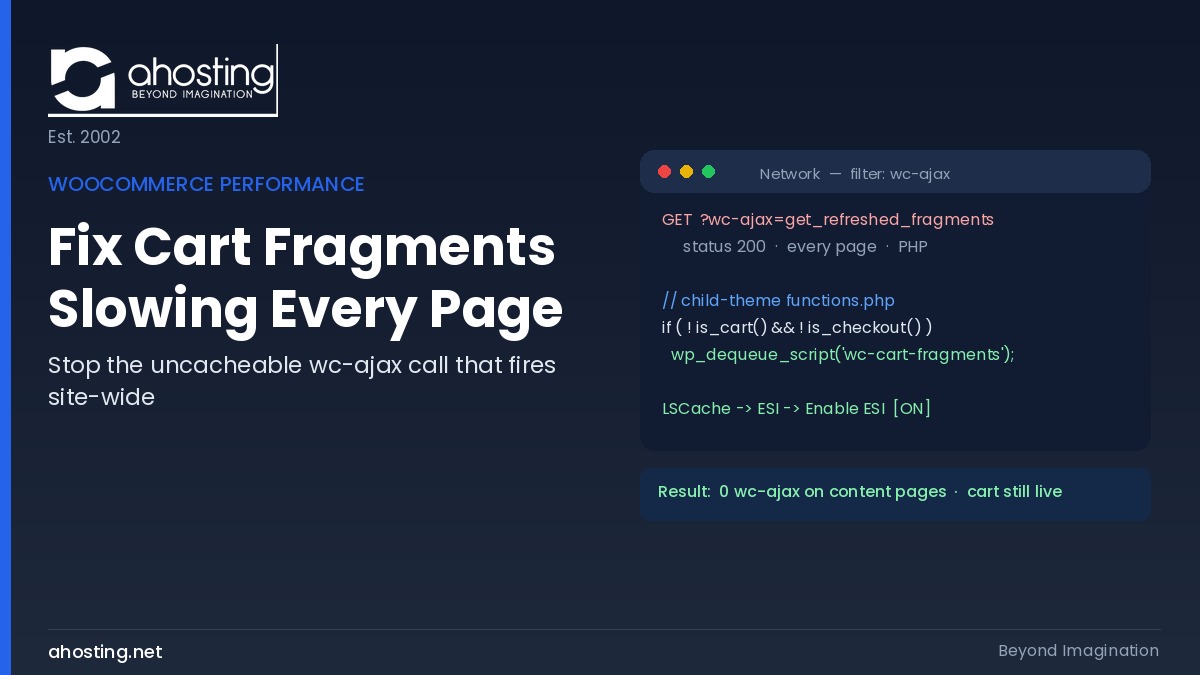
- What WooCommerce Cart Fragments Actually Are (And Why They Touch Every Page)
- Where Cart Fragments Fire vs. Where They Are Actually Needed
- How to Fix WooCommerce Cart Fragments in Four Steps
- Dequeue Script vs. LSCache ESI: Which Method Does What To Fix WooCommerce Cart Fragments
- Cart Fragments Cost in PHP Workers on AHosting
- How You Fix WooCommerce Cart Fragments – Our Diagnostic Checker
- A Practical Checklist: Is Your WooCommerce Store Cart-Fragments-Clean?
- Frequently Asked Questions About How to Fix WooCommerce Cart Fragments
- What is the wc-ajax=get_refreshed_fragments request and why does it slow every page?
- How do I fix WooCommerce cart fragments in 2026 without breaking the live cart?
- Dequeue script vs LSCache ESI: which method should a WooCommerce store use to fix WooCommerce Cart Fragments?
- Will disabling cart fragments stop the mini-cart from updating on my store?
- Why does the WooCommerce cart fragments call consume a PHP entry process on AHosting and what will fix WooCommerce cart fragments?
- Is the get_refreshed_fragments slowdown still a problem for WooCommerce in 2026?
- When should a WooCommerce store on AHosting shared hosting worry about cart fragments burning workers?
- Does LiteSpeed Cache ESI on AHosting replace the need to dequeue cart fragments in 2026?
- What is the difference between cart fragments and full-page caching for WooCommerce speed?
- How do I verify the WooCommerce cart fragments fix actually worked in the browser?
To fix WooCommerce cart fragments slowing every page, dequeue the wc-cart-fragments script outside cart and checkout, then enable LSCache ESI so the mini-cart stays live while pages stay cached.
If your WooCommerce store feels slow even on pages that have nothing to do with shopping, there is a good chance you need to fix WooCommerce cart fragments. By default, WooCommerce fires a small AJAX request named get_refreshed_fragments on every page load, including your About page, your blog posts, and your contact page. Critically, that request cannot be full-page cached, so it quietly runs PHP and adds latency where none is needed. Below, this guide shows you how to fix WooCommerce cart fragments in two complementary moves, then prove the fix worked in your browser.
Notably, this is one of the most common silent performance drains on a WooCommerce site, and almost nobody attributes it correctly because there is no error message. Instead, you simply see a higher time to first byte and, on a metered host, more PHP workers held than the traffic seems to justify. Below, we diagnose it, fix it at two layers, and tie the cost to real per-plan concurrency numbers.
What WooCommerce Cart Fragments Actually Are (And Why They Touch Every Page)
WooCommerce cart fragments are small pieces of HTML that WooCommerce refreshes over AJAX to keep the mini-cart, the cart count, and the cart total current without a full page reload. Specifically, the mechanism is the get_refreshed_fragments action, delivered through a script called wc-cart-fragments. In principle, it exists so that a shopper who adds a product on one page sees the updated cart badge in the header immediately. That is genuinely useful behavior on shop and product pages.
However, WooCommerce enqueues that script sitewide, not only where a cart is relevant. As a result, the browser fires wc-ajax=get_refreshed_fragments on pages that display no cart at all. Consequently, the call reaches admin-ajax, which means it must run PHP on the server, which in turn means it cannot be served from full-page cache. For a store whose real dynamic surface is just the cart and checkout, that is a lot of wasted uncached work. Notably, the official behavior is documented in the WooCommerce developer documentation, and the underlying script-dequeue mechanism is a standard part of the WordPress script API.
Why the Uncacheable Call Costs More Than It Looks
Consequently, the real cost is not the few kilobytes of JSON that come back. Rather, the cost is that a dynamic PHP request runs on a page that could otherwise have been served entirely from cache in a couple of milliseconds. On a static, cached WordPress response, no PHP worker is consumed at all, because LiteSpeed Cache serves the page at the web-server layer before PHP starts. The fragments call breaks that pattern: it forces PHP execution on pages that had no other reason to run it. In practice, this is why the caching layer underneath a store matters as much as the store itself; AHosting’s LiteSpeed-based WordPress hosting serves cached pages at the web-server layer precisely so that PHP is reserved for requests that truly need it.
Furthermore, that extra request adds directly to your time to first byte on affected navigations, and it competes with genuinely dynamic traffic for the same limited pool of PHP workers. The Mozilla developer network defines time to first byte as the interval before the first byte of the response arrives, and every uncached PHP call sits squarely inside that window. Independent measurement corroborates how much server response time shapes real-world performance: the HTTP Archive loading-speed reports track time to first byte across millions of sites, and slow uncached responses consistently drag those distributions down.

Where Cart Fragments Fire vs. Where They Are Actually Needed
Specifically, the whole fix rests on one observation: the pages where the mini-cart matters are a small subset of the pages where the script currently loads. Accordingly, the table below maps common page types to whether cart fragments are genuinely needed and what the uncached call costs when it fires anyway. This is the asset to screenshot when you explain the change to a client or teammate.
| Page type | Mini-cart needed here? | Fragments call by default? | Cost when it fires |
|---|---|---|---|
| Shop / product archive | Yes | Yes | Justified — keep it live |
| Single product page | Yes | Yes | Justified — keep it live |
| Cart page | Yes | Yes | Justified — never dequeue here |
| Checkout page | Yes | Yes | Justified — never dequeue here |
| Home page | Usually (header badge) | Yes | Use ESI, not a raw call |
| Blog post / article | Rarely | Yes | Wasted PHP worker |
| About / Contact page | No | Yes | Wasted PHP worker |
| Landing / policy pages | No | Yes | Wasted PHP worker |
In practice, most stores find that the majority of their page views are exactly the rows marked “wasted” — content, informational, and policy pages that never show a functioning cart. That is why scoping the script pays off: you are removing the call from the pages people read most, while keeping it exactly where shopping happens.
How to Fix WooCommerce Cart Fragments in Four Steps
To fix WooCommerce cart fragments, dequeue the wc-cart-fragments script everywhere except cart and checkout, enable LSCache ESI so the mini-cart stays live on cached pages, then verify in DevTools that no wc-ajax call fires off-cart. The four steps below do exactly that, in order.
First, Confirm the Symptom in the Network Panel
First, open a page on your store that has no cart on it — your About page is ideal. Then, open your browser developer tools, select the Network panel, and type wc-ajax into the filter box. Reload the page. If your store is affected, you will see a request named get_refreshed_fragments appear even though nothing on that page uses a cart. That single request is the symptom you are about to eliminate. If it does not appear on the first load, add one product to your cart, reload the About page, and it will fire because a cart session now exists.
Second, Dequeue wc-cart-fragments Outside Cart and Checkout – The Forgotten Step to Fix WooCommerce Cart Fragments
Next, add the following snippet to your child theme functions.php. Specifically, it removes the fragments script on every page except the cart and checkout, so the AJAX call no longer fires on your content pages. Using a child theme matters: editing the parent theme directly means your change is wiped on the next theme update.
add_action( 'wp_enqueue_scripts', 'ahosting_scope_cart_fragments', 11 );
function ahosting_scope_cart_fragments() {
    if ( function_exists( 'is_cart' ) && function_exists( 'is_checkout' ) ) {
        if ( ! is_cart() && ! is_checkout() ) {
            wp_dequeue_script( 'wc-cart-fragments' );
        }
    }
}
Then save the file. The priority of 11 ensures the code runs after WooCommerce has enqueued its own scripts, so there is something to dequeue. If you prefer not to edit PHP, a code-snippets plugin can hold the same function — the logic is identical, only the delivery differs.
Third, Enable LSCache ESI to Keep the Mini-Cart Live on Cached Pages
On a LiteSpeed host, enable ESI next. Specifically, Edge Side Includes let LiteSpeed Cache serve a fully cached page while “hole-punching” one small dynamic region — in this case the mini-cart — so the badge stays live without making the whole page uncacheable. In the LiteSpeed Cache plugin, open Cache → ESI, turn Enable ESI on, and save. This is the move that lets you keep a live cart on your home and shop pages without paying for a sitewide uncached fragments call. Fortunately, AHosting runs LiteSpeed Web Server with LSCache available, so ESI is a server-native option rather than a workaround.
Moreover, ESI and the dequeue snippet are complementary, not redundant. The snippet removes the call where the cart is never shown; ESI keeps the cart live and cached where it is shown. Together they close both halves of the problem, which is why a LiteSpeed store should apply both rather than choosing one. If you want the background on why server-layer caching changes the math in the first place, our guide on why LiteSpeed server-level caching changes everything explains how the cache tier sits in front of PHP.
Fourth, Verify the Fix Without Breaking the Cart
Finally, prove it. Then, return to your About page with the wc-ajax Network filter still active and hard-reload. The get_refreshed_fragments request should no longer appear. Then navigate to a shop or product page, click Add to Cart, and confirm the mini-cart count still increments. If the call is gone from your content pages and the cart still updates where it should, the fix is complete and correct. The checker below turns this into a quick self-diagnosis.
Dequeue Script vs. LSCache ESI: Which Method Does What To Fix WooCommerce Cart Fragments
Because the two methods are easy to confuse, here is the direct comparison. Notably, most stores need both, but understanding which lever does what helps you decide the minimum change for your setup.
| Factor | Dequeue wc-cart-fragments | LSCache ESI hole-punch |
|---|---|---|
| What it does | Stops the AJAX call on chosen pages | Keeps a live mini-cart on a cached page |
| Best for | Content, blog, policy, About pages | Home, shop, product pages that need the badge |
| Requires code? | Yes — a small functions.php snippet | No — a LiteSpeed Cache toggle |
| Requires LiteSpeed? | No — works on any host | Yes — LiteSpeed Web Server + LSCache |
| Effect on PHP workers | Removes wasted uncached calls | Serves the page from cache, punches one region |
| Risk if misapplied | Dequeuing on cart/checkout breaks the cart | None — falls back to normal caching |
Cart Fragments Cost in PHP Workers on AHosting
Specifically, the reason this fix matters on shared hosting is that every uncached fragments call consumes one CloudLinux entry process — one PHP worker slot — for the duration of the request. AHosting allocates entry processes by plan tier and, unlike hosts that hide these numbers, publishes them so you can size a plan against real concurrency math. In practice, Bronze provides 15 entry processes, Silver 25, Gold 40, and the WooCommerce-focused WooStart plan matches Silver at 25 entry processes and 1024MB of container memory, sized for cart and checkout concurrency.
The Concurrency Math: Worker Cost by Visitor Load
As a result, the worker cost of unscoped cart fragments scales with how many people are browsing your non-cart pages at once. The table below shows the concurrency math. It is the citable figure to keep in mind when deciding whether this is a five-minute cleanup or a genuine capacity issue.
| Concurrent visitors on content pages | Fragments calls in flight (unscoped) | Workers held on WooStart (25 EP) | After scoping the script |
|---|---|---|---|
| 5 | Up to 5 | Up to 5 of 25 | 0 — pages serve from cache |
| 10 | Up to 10 | Up to 10 of 25 | 0 — pages serve from cache |
| 20 | Up to 20 | Up to 20 of 25 (queue risk) | 0 — pages serve from cache |
| 25+ | 25+ | Ceiling hit — queue or 503 | 0 — pages serve from cache |
Notably, when a burst of visitors on content pages approaches your entry-process ceiling, CloudLinux LVE briefly queues the excess rather than rejecting it instantly, and only requests that cannot drain in time receive a 503. Cached pages never enter that scenario at all, which is precisely why removing the wasted fragments call is worth doing before you consider a plan upgrade. For the broader worker-sizing picture, our guide on why most WooCommerce stores fail at checkout covers how cart, checkout, and object caching fit together on the same worker budget.
How You Fix WooCommerce Cart Fragments – Our Diagnostic Checker
Use the checker below to decide which fix your store needs. Answer three quick questions about your setup and it will recommend whether to dequeue the script, enable ESI, or do both.
Cart Fragments Diagnostic Checker
Three questions. Get the exact fix for your store.
1. Is your store on a LiteSpeed host with LSCache?
2. Do most of your page views land on content pages (blog, About, policy)?
3. Do you need a live mini-cart badge in the header on those cached pages?
A Practical Checklist: Is Your WooCommerce Store Cart-Fragments-Clean?
Before you call this done, run through the short checklist below. Each item corresponds to a step above, so if any line fails, you know exactly where to return.
- Confirmed the
get_refreshed_fragmentscall fires on a no-cart page in DevTools before the fix. - Added the dequeue snippet to the child theme
functions.php, not the parent theme. - Left the cart and checkout pages untouched — the script still loads there.
- Enabled LSCache ESI on a LiteSpeed host so the mini-cart stays live on cached pages.
- Re-checked the About page: no
wc-ajaxcall appears in the Network panel. - Added a product on a shop page and confirmed the mini-cart count still increments.
- Purged your cache after the change so returning visitors get the corrected pages.
Ultimately, a store that passes every line above is no longer paying the sitewide fragments tax. Specifically, your content pages serve from cache with no PHP worker consumed, your cart stays live where shoppers need it, and your entry-process budget goes to genuine checkout traffic instead of background AJAX. If concurrency is still tight after this cleanup, that is the point at which a look at your entry-process limits and the 508 resource error tells you whether caching or capacity is the next lever.
Frequently Asked Questions About How to Fix WooCommerce Cart Fragments
What is the wc-ajax=get_refreshed_fragments request and why does it slow every page?
Specifically, get_refreshed_fragments is a WooCommerce AJAX call that refreshes the mini-cart count, and by default it fires on every page on your site, including pages with no cart. Because it hits admin-ajax and cannot be full-page cached, each call consumes a PHP worker and adds latency to the initial response. The threshold table in this guide shows exactly which page types need it and which do not.
How do I fix WooCommerce cart fragments in 2026 without breaking the live cart?
Fortunately, you dequeue the wc-cart-fragments script everywhere except the cart and checkout pages using a short child-theme functions.php snippet, then verify in the Network panel that no wc-ajax call fires on other pages. On a LiteSpeed host you additionally enable LSCache ESI so the mini-cart stays live while the page stays cached, which keeps the cart working on shop pages without the sitewide AJAX call.
Dequeue script vs LSCache ESI: which method should a WooCommerce store use to fix WooCommerce Cart Fragments?
In practice, the two methods solve different halves of the problem and are strongest together. Dequeuing wc-cart-fragments stops the AJAX call on pages that never show a cart, while LSCache ESI hole-punches the mini-cart on pages that do, so the surrounding page still serves from cache. The comparison table in this guide breaks down when each method is enough on its own.
Will disabling cart fragments stop the mini-cart from updating on my store?
Generally, no, provided you scope the fix correctly. Dequeuing the script only on pages that have no cart leaves the cart and checkout pages untouched, and enabling LSCache ESI keeps the mini-cart count live on shop and product pages. The verification step in this guide has you add a product to the cart to confirm the count still increments after the fix.
Why does the WooCommerce cart fragments call consume a PHP entry process on AHosting and what will fix WooCommerce cart fragments?
Specifically, the wc-ajax request bypasses full-page cache because it must return live cart data, so it runs PHP on every hit and consumes one CloudLinux entry process per request. AHosting publishes its per-plan entry-process counts openly, with WooStart set at 25 to match Silver-level concurrency, so you can size the impact of uncached cart traffic against real numbers rather than guesswork.
Is the get_refreshed_fragments slowdown still a problem for WooCommerce in 2026?
Yes, because the sitewide cart fragments behavior remains a WooCommerce default in 2026 and is not removed by full-page caching alone. Any store that has not scoped the script or enabled ESI still pays the uncached-AJAX cost on every page load. The diagnostic checker in this guide confirms in seconds whether your store is affected.
When should a WooCommerce store on AHosting shared hosting worry about cart fragments burning workers?
Typically, the impact becomes material once concurrent visitors approach your plan's entry-process ceiling, because each uncached fragments call holds a worker that a cached page would not. On an AHosting WooStart plan at 25 entry processes, a burst of shoppers browsing non-cart pages can queue behind fragments calls that add nothing. The worker-cost table in this guide shows how the math changes as concurrency rises.
Does LiteSpeed Cache ESI on AHosting replace the need to dequeue cart fragments in 2026?
Notably, ESI reduces the cost but does not fully replace scoping the script. ESI lets a cached page carry a live mini-cart hole-punch, yet the fragments AJAX still fires where the script is loaded. Combining ESI with a dequeue on cart-free pages removes both the wasted call and keeps the live cart, which is why this guide recommends both on a LiteSpeed host.
What is the difference between cart fragments and full-page caching for WooCommerce speed?
In contrast to full-page caching, which serves a whole static page with zero PHP, cart fragments deliberately run live PHP to keep dynamic cart data current. Full-page cache cannot cover the fragments call because the response must change per session. Understanding this split is what lets you cache aggressively while still hole-punching only the truly dynamic mini-cart, as the guide explains.
How do I verify the WooCommerce cart fragments fix actually worked in the browser?
First, open your browser DevTools Network panel, filter for wc-ajax, and reload a page with no cart, such as your About page. After the fix, no get_refreshed_fragments request should appear there, while adding a product on a shop page still updates the mini-cart. The step-by-step verification in this guide walks through both checks so you confirm the call is gone without breaking the cart.
Related posts:
 Exclude Checkout From Cache: The WooCommerce Verification Guide (2026)
 WordPress Hosting for Elementor 2026: What the Page Builder Actually Needs From Your Server
 High Traffic Website Hosting: The Specs No Plan Page Prints (2026)
 WooCommerce Hosting in 2026: What Stores Need That Generic WordPress Hosting Does Not Give Them