
- What “Opcode Cache Is Not Enabled” Actually Checks
- Three Causes of Opcode Cache Is Not Enabled, and Only Two Mean It Is Off
- “Disabled by Configuration”: Reading the Info Tab
- Why .user.ini Cannot Fix Opcode Cache Is Not Enabled
- Check Opcode Cache Is Not Enabled Yourself in Two Minutes
- How to Fix Opcode Cache Is Not Enabled, in Order
- Opcode Cache Is Not Enabled on AHosting Servers
- A Practical Checklist for Opcode Cache Is Not Enabled
- Frequently Asked Questions: Opcode Cache Is Not Enabled
- How do I fix WordPress OPcache not enabled in PHP?
- What does opcode cache is not enabled mean in WordPress Site Health in 2026?
- Opcode cache is not enabled vs Disabled by configuration: what is the difference?
- Why does Site Health say opcode cache is not enabled when phpinfo shows OPcache running?
- Can I fix opcode cache is not enabled with .user.ini on shared hosting?
- Is it safe to hide the opcode cache is not enabled test in Site Health?
- PHP 8.4 vs PHP 8.5: does PHP 8.5 turn on OPcache automatically in 2026?
- How do I check opcode cache is not enabled on AHosting shared hosting in 2026?
- Can AHosting support check why my site says opcode cache is not enabled?
- Do I need an AHosting VPS to control OPcache settings in 2026?
Opcode cache is not enabled means one PHP function, opcache_get_status, did not confirm that OPcache is on. That happens when the cache really is off, and also when it is running but your host restricts the function. Open Site Health, Info, Server first. Disabled by configuration usually means the cache works and there is nothing to fix. Disabled means it is off, and only a PHP version change or your host can turn it on, because PHP refuses to switch it on from .user.ini.
What “Opcode Cache Is Not Enabled” Actually Checks
Opcode cache is not enabled is the Site Health warning many site owners first met after updating to WordPress 7.0, on a server nobody had touched. It reads as if the host had switched off a performance feature. Read against the WordPress 7.1.3 code that writes it, the message is narrower than that: one PHP function did not confirm that the cache is on, and the reason is not always that it is off.
What an Opcode Cache Does
PHP does not run your theme and plugin files as written. It first compiles each file into opcodes, the small instructions its virtual machine executes; Nikita Popov’s walkthrough of the PHP 7 virtual machine shows what they look like. OPcache keeps those compiled opcodes in shared memory, so a file is compiled once and reused on later requests instead of being compiled again on every page load. A WordPress page touches hundreds of PHP files, which is why PHP’s own developers describe running a production site without OPcache as a mistake.
One Function Call Behind Opcode Cache Is Not Enabled
The test, listed in Site Health as Opcode cache, arrived in WordPress 7.0 and runs each time the Site Health screen loads. It calls opcache_get_status() and passes only when that function returns a report whose opcache_enabled value is true. Any other answer gives opcode cache is not enabled, graded recommended under the Performance badge. Nothing on the site breaks. When the cache really is off, PHP files are simply compiled again on every request.
Three Causes of Opcode Cache Is Not Enabled, and Only Two Mean It Is Off
The status function can fail to confirm the cache in three different ways, and WordPress treats all three the same. Two of them mean the cache is genuinely off. The third is the one shared-hosting customers keep reporting, and in that case the cache is working normally.
- Extension not loaded. On PHP 8.4 and older, OPcache is an optional extension. If the PHP version your site runs does not load it, the status function does not exist at all.
- Switched off. OPcache is loaded, but
opcache.enableis off, either for the whole server or for your site. Here the function does answer, and its answer says the cache is off. - API restricted. Your host sets
opcache.restrict_apito a folder outside your account, so that one customer cannot read or reset the shared cache. PHP then refuses the call with a warning and returns false, while the cache keeps serving every page.
The Shared Hosting False Alarm
The third case is WordPress Trac ticket #65395, titled as a false report of opcode cache is not enabled on shared hosting. Reporters on two different hosts posted phpinfo output showing OPcache up and running beside the warning. A patch proposes falling back to the opcache.enable setting when the status function is blocked. It is still awaiting review, and in WordPress 7.1.3 the check is unchanged. WordPress already knows about the restriction elsewhere: its own routine for clearing the cache after an update checks it before calling the API. The new Site Health test does not.
“Disabled by Configuration”: Reading the Info Tab
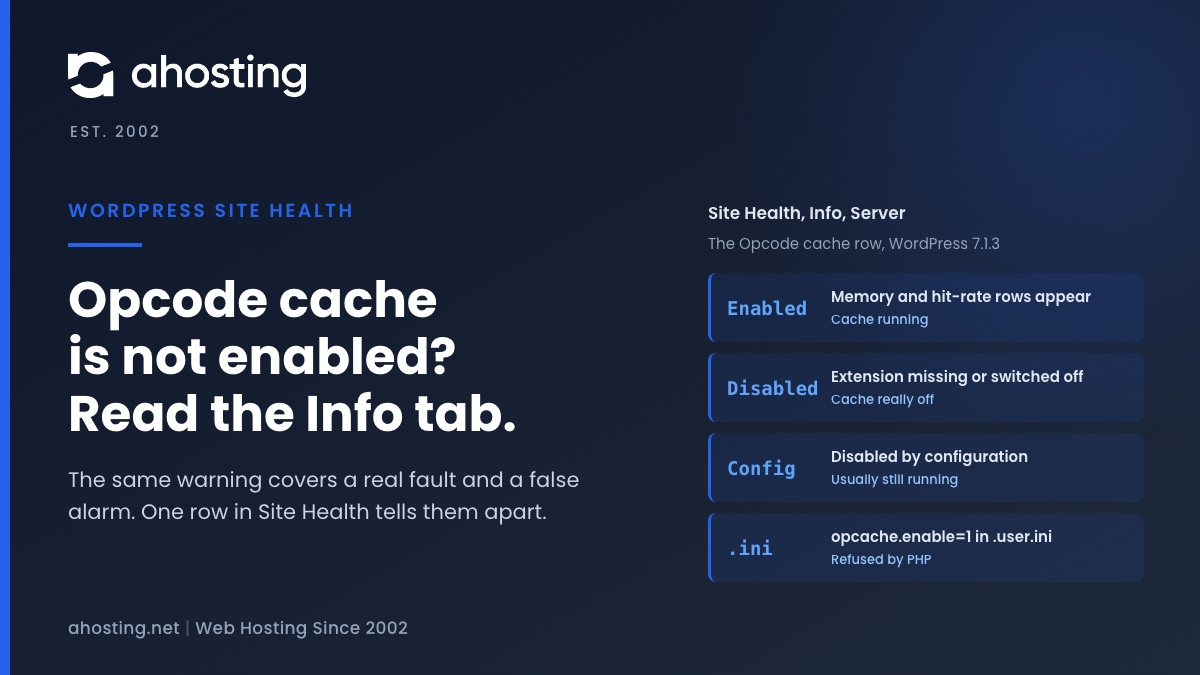
The Status tab shows the same label for every cause. The Info tab does not. Open Tools, Site Health, Info, expand Server, and find the Opcode cache row. WordPress fills it from the same function, but it reports how the function failed, which is what separates the false alarm from a real fault.
| Opcode cache row in Info | What the status function returned | Is OPcache caching your site? | Who can change it |
|---|---|---|---|
| Enabled, with memory and hit-rate rows below it | A report saying the cache is on | Yes | Nothing to change |
| Disabled | Nothing: the function does not exist because the extension is not loaded | No | A PHP version change, or the host |
| Disabled | A report saying the cache is off | No | Your .user.ini if it switches it off, otherwise the host |
| Disabled by configuration | False, because the host restricts the API | Yes | The host only; a WordPress fix is pending |
| Disabled by configuration | False, because OPcache failed to start | No | The host only |
Why the Memory and Hit-Rate Rows Disappear
When the cache reports itself enabled, WordPress adds rows for memory usage, interned strings usage, hit rate and whether the cache is full. When the status function is restricted, those numbers are exactly what the host chose to keep private, so the rows vanish and only Disabled by configuration remains. A missing hit-rate row is therefore not evidence that the cache is idle. It means WordPress was not allowed to ask.

Why .user.ini Cannot Fix Opcode Cache Is Not Enabled
The most common advice for this warning is a block of OPcache settings pasted into .user.ini or the cPanel MultiPHP INI Editor, starting with opcache.enable=1. PHP itself refuses most of it. The OPcache runtime configuration page says the switch can only be disabled at runtime, never enabled, and PHP’s source is blunter still: a true value is accepted only while PHP starts. A per-folder file is read later than that, so the line fails with a warning that OPcache cannot be temporarily enabled.
| OPcache setting | Where PHP accepts it | From .user.ini on shared hosting | On a VPS |
|---|---|---|---|
| opcache.enable | Anywhere, but only to switch off after startup | Off only, never on | Yes, in the PHP-wide ini |
| opcache.restrict_api | System level only | Ignored | Yes |
| opcache.enable_cli | System level only | Ignored | Yes |
| opcache.memory_consumption | System level only | Ignored | Yes |
| opcache.interned_strings_buffer | System level only | Ignored | Yes |
| opcache.max_accelerated_files | System level only | Ignored | Yes |
| opcache.validate_timestamps | Anywhere | Yes | Yes |
| opcache.revalidate_freq | Anywhere | Yes | Yes |
The Line That Can Switch Opcode Cache Off
The same rule cuts the other way. A .user.ini line setting opcache.enable to 0 is accepted, and it switches the cache off for every request in that folder, so check for it before assuming the server is at fault. Our post on why a WordPress memory limit change does not take covers which PHP settings files are actually read, and the same files are the place to look here.
Check Opcode Cache Is Not Enabled Yourself in Two Minutes
The Info tab narrows it down. A three-value test file settles it, because it reads the switch directly instead of asking the status function. Create a file with a random name, such as oc-check-7f3a.php, in the folder your domain serves, containing one line: <?php var_dump(extension_loaded('Zend OPcache'), ini_get('opcache.enable'), ini_get('opcache.restrict_api'));. Load it in a browser, note the three values, and delete it straight away.
What the Three Values Mean
- true, 1, then a path: OPcache is loaded and on, and the path is the restriction. This is the false alarm. The cache is working.
- true, 1, then an empty string: loaded, on and unrestricted, yet Site Health still warns. The cache most likely failed to start, which only the host can see.
- true, then 0 or an empty string: loaded but switched off. Look for a line that switches it off before asking anyone.
- false, false, false: the extension is not loaded for this PHP version.
Why SSH and WP-CLI Say Opcode Cache Is Not Enabled
Do not run this check over SSH. PHP on the command line has its own setting, opcache.enable_cli, which is off by default, and without it OPcache does not start in the command-line PHP at all. A check run there reports the cache as off whatever the website is doing. Tideways’ guide to tuning OPcache makes the same point: every kind of PHP process has its own shared memory, so the console cannot see the web server’s cache. Load the test file through the domain.
Decode Your Opcode Cache Is Not Enabled Result
The same logic as a tool: enter the Info row and the test-file values, and it tells you whether the cache is really off and the one step to take next.
Opcode Cache Warning Decoder
Enter what Site Health and the test file show. The answer is whether OPcache is really off, why WordPress says so, and the one thing to do next.
Is OPcache caching your site?
Why WordPress warns:
Do this next:
Read from the WordPress 7.1.3 and PHP source. It cannot see your server, so the test file is what settles it.
How to Fix Opcode Cache Is Not Enabled, in Order
Work through these in sequence and stop at the first one that applies. Most shared-hosting sites stop at the first step.
- If the Info row says Disabled by configuration and the test file shows 1 and a path, the cache is running. Leave it. Nothing you change in WordPress will alter the result, and the warning costs nothing.
- If you want the warning gone anyway, remove only this test with the
site_status_testsfilter, unsetting theopcode_cacheentry from thedirectlist in a small must-use plugin. Remove it again when WordPress fixes the check. - If the test file shows the switch off, search
.user.iniin your site folder and the cPanel MultiPHP INI Editor foropcache.enableset to 0, remove it, wait five minutes for PHP to reread the file, and check again. - If the extension is not loaded, open cPanel MultiPHP Manager, try another PHP version on a staging copy first, then run the test file again. PHP 8.5 always loads OPcache.
- If none of that changes the Info row, the setting lives at server level. Ask your host, and send the Info row and the three test values with the question.
Opcode Cache Is Not Enabled Is Not the Other Cache Warnings
Site Health has two more Performance warnings about caching, and fixing this one does not touch them. OPcache keeps compiled code. A page cache keeps finished pages, covered in our guide to the page cache is not detected warning, and a persistent object cache keeps database results between requests, covered in you should use a persistent object cache. Each is a separate setting with its own warning.
Opcode Cache Is Not Enabled on AHosting Servers
On our shared servers, PHP runs as your own cPanel user through LiteSpeed, one of the server interfaces OPcache supports, and the Zend OPcache extension is present on all three of our shared servers; the test file shows whether the PHP version you picked loads it. That has two practical consequences for this warning. The test file, loaded through your domain, sees exactly the PHP your site uses, so its three values are the answer for your account. And .user.ini in your site folder is read, so a stray line switching the cache off would take effect here and is worth checking for.
Where OPcache Sits Next to LiteSpeed Cache
OPcache speeds up the PHP that runs. A page served from LiteSpeed’s page cache runs no PHP at all, so the two stack rather than compete: the page cache handles repeat visitors, and OPcache handles everything it cannot serve, such as logged-in sessions, carts and the admin area. Our comparison of server-side and plugin fixes for TTFB shows where each layer sits in a request.
When to Open a Ticket
Everything in this guide works the same way on our WordPress hosting plans and standard web hosting plans. If the Info tab says Disabled and switching PHP versions does not change it, open a ticket with that row and the PHP version you run, and we will look at it with you. If you want to choose the cache size or the restriction yourself, a VPS with full root access puts the PHP-wide settings in your hands. The warning alone is not a reason to move.
A Practical Checklist for Opcode Cache Is Not Enabled
- Read the Opcode cache row under Site Health, Info, Server before changing anything.
- Treat Disabled by configuration as a likely false alarm until a test says otherwise.
- Load the three-value test file through the domain, never over SSH.
- Delete the test file as soon as you have the three values.
- Look for
opcache.enableset to 0 in.user.iniand remove it. - Never paste OPcache memory settings into
.user.ini; PHP ignores them there. - Try another PHP version on a staging copy before switching the live site.
- Hide the test only after confirming the cache runs, and only in a must-use plugin.
- Fix page caching and object caching separately; this warning covers neither.
- Send the Info row and the three test values with any question to your host.
Frequently Asked Questions: Opcode Cache Is Not Enabled
How do I fix WordPress OPcache not enabled in PHP?
First and foremost, find out whether OPcache is really off. Open Tools, Site Health, Info, Server and read the Opcode cache row. Disabled by configuration usually means OPcache is running and your host restricts its status function, so there is nothing to fix. Disabled means it is off: try another PHP version in cPanel MultiPHP Manager, remove any line that switches it off, or ask your host.
What does opcode cache is not enabled mean in WordPress Site Health in 2026?
In other words, one PHP function did not confirm that the cache is on. WordPress 7.0 added the test, and in 7.1 it passes only when opcache_get_status returns a report saying OPcache is enabled. Any other answer, including no answer at all, gives the warning. It is graded recommended under the Performance badge, so your site keeps working either way.
Opcode cache is not enabled vs Disabled by configuration: what is the difference?
Specifically, the first is the Status label and the second is one of the values Site Health shows for the Opcode cache row on its Info tab. The Status label appears for every cause. The Info value narrows it down: Disabled means the cache is off, while Disabled by configuration means the status function refused to answer, which on shared hosting usually means the cache is running.
Why does Site Health say opcode cache is not enabled when phpinfo shows OPcache running?
Typically because your host restricts which scripts may call the OPcache status function. PHP then returns false with a warning, and WordPress reads false as off. The cache keeps working for every page. WordPress Trac ticket 65395 reports exactly this on shared hosting, and a proposed patch would fall back to the opcache.enable setting, but it is not part of WordPress 7.1.3.
Can I fix opcode cache is not enabled with .user.ini on shared hosting?
In fact, no. PHP accepts opcache.enable set to 1 only when PHP starts, so the same line in .user.ini is refused with a warning. The memory and file-count settings often suggested alongside it are system-level and ignored there too. What .user.ini can do is switch OPcache off for your site, so check that yours does not contain opcache.enable set to 0.
Is it safe to hide the opcode cache is not enabled test in Site Health?
Indeed it is, once you have confirmed that OPcache is running. Removing the test with the site_status_tests filter changes only what Site Health reports, not how PHP behaves. Do it in a small must-use plugin rather than a theme, and remove it again when WordPress ships a fix, because a hidden test cannot warn you if the cache is ever switched off for real.
PHP 8.4 vs PHP 8.5: does PHP 8.5 turn on OPcache automatically in 2026?
In practice, only partly. On PHP 8.4 and older, OPcache is an extension a host may or may not load. On PHP 8.5 it is built into PHP and always loaded, but the opcache.enable switch is still honored, so a host can still switch it off, and a restricted status function still gives the same false warning. Check the Info tab after switching versions.
How do I check opcode cache is not enabled on AHosting shared hosting in 2026?
Above all, check through the website, not over SSH. Read the Opcode cache row in Site Health Info, then load the three-value test file from this guide in a browser and delete it afterward. On our servers PHP runs as your own cPanel user through LiteSpeed, which OPcache supports, so the test file sees exactly what your site sees.
Can AHosting support check why my site says opcode cache is not enabled?
Notably, a Disabled by configuration result with opcache.enable on needs no ticket, because the cache is working. If the Info tab says Disabled and switching PHP versions in MultiPHP Manager does not change it, open a ticket with that row and the PHP version you run, and we will look at it with you.
Do I need an AHosting VPS to control OPcache settings in 2026?
Fortunately not to clear this warning. On a shared plan the cache size, the status-function restriction and the master switch are set for the whole server. A VPS makes sense when you want to choose those yourself, for example to give a large WooCommerce store more OPcache memory or to watch hit rates in Site Health.
Related posts:
 Page Cache Is Not Detected: What WordPress Site Health Actually Checks
 Log Errors to a Potentially Public File? What Site Health Checks
 You Should Use a Persistent Object Cache: What WordPress Site Health Actually Measures
 LiteSpeed Cache and Cloudflare: Fixing Double Caching Without Breaking Either (2026)