
- What it means when the active theme is broken
- What visitors see while the active theme is broken
- Why the active theme is broken notice waits for the Themes screen
- Five ways a theme folder breaks on shared hosting
- How to fix the active theme is broken without reinstalling WordPress
- Match your message: the active theme is broken diagnosis tool
- How we tested the active theme is broken behavior
- Keeping the active theme is broken notice from coming back
- Frequently Asked Questions: the active theme is broken
- How do I restore my WordPress theme to default when the active theme is broken?
- Why does WordPress say the active theme is broken in 2026 after I rename a theme folder?
- Will my customizer settings survive when the active theme is broken and WordPress reverts?
- Why is my site blank for visitors while the active theme is broken and wp-admin still works?
- Stylesheet is missing vs Template is missing: which broken theme message do I have?
- Why does WordPress say the active theme is broken after I deleted the parent of my child theme?
- Does it mean my AHosting server is at fault when WordPress says the active theme is broken?
- Can I fix it on AHosting shared hosting without SSH when the active theme is broken?
- Where does AHosting File Manager keep a deleted theme folder in 2026?
- File Manager vs FTP in 2026: which is safer for replacing a theme folder when the active theme is broken?
The active theme is broken means WordPress already switched your site to a default theme. Restore the missing folder or file first, then reactivate your theme.
What it means when the active theme is broken
When the active theme is broken, WordPress is not warning you about a problem it might fix later. The message reads “The active theme is broken. Reverting to the default theme.” and the word reverting is literal: by the time you read it, the site has already been switched to another theme. We read the WordPress 7.1.4 source and rebuilt each failure in a test install, so every claim below comes from a line of code or a measured result.
Most people meet the message after changing files by hand. A theme folder was deleted in File Manager, a zip was extracted into the wrong place, or a parent theme was removed during a cleanup. The result looks like a plugin or hosting fault, but it is a plain file check, and it behaves the same on any host. This guide shows what that check does, what visitors see meanwhile, and how to restore your theme.
The check WordPress runs before it says the active theme is broken
The check is one function, validate_current_theme(), in wp-includes/theme.php. It runs three tests on the theme named in the database. First, does the theme have index.php or templates/index.html? Second, does it have a style.css? Third, if it is a child theme, does the child folder have its own style.css? Fail any one and WordPress calls switch_theme().
The replacement is the constant WP_DEFAULT_THEME, which is twentytwentyfive in 7.1.4. If that theme is not installed, WordPress picks the newest core default theme that is. If none is installed, nothing can be switched and the check returns without changing anything.
What the reversion changes in your database
The switch rewrites two options, template and stylesheet, which hold folder names. It also saves a snapshot of your widget placement before it moves on. It does not delete your old theme’s settings. In our lab we stored a custom logo setting for a test theme, forced the reversion, and the setting was still in the database afterward. Your theme’s settings wait under its own name until you activate it again.

What visitors see while the active theme is broken
A broken theme does not look the same to everyone. We made six kinds of breakage in a WordPress 7.1.4 test install and requested the home page twice: once without cookies, as a visitor, and once logged in as an administrator. The table records the results.
| What broke | Visitor, home page | Administrator, home page | Appearance, then Themes |
|---|---|---|---|
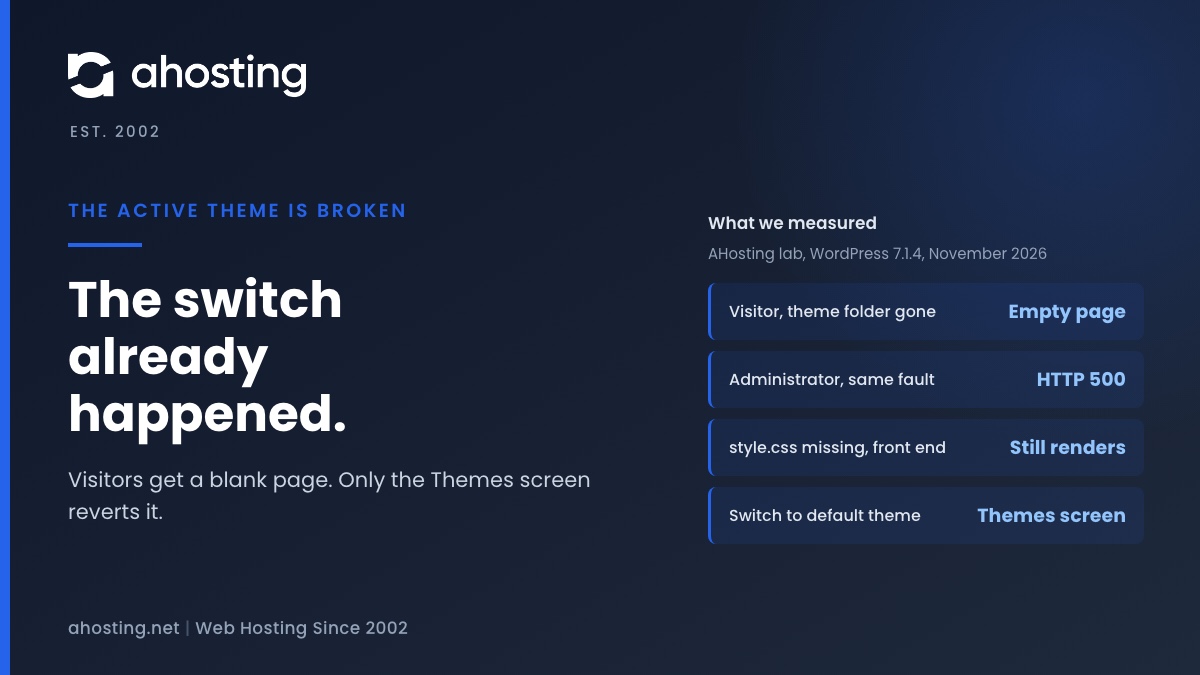
| Active theme folder deleted, renamed or moved | HTTP 200, 0-byte page | HTTP 500: The theme directory does not exist | Reverting notice only |
| style.css missing from the active theme | Page renders normally | Page renders normally | Reverting notice, then Broken Themes: Stylesheet is missing. |
| index.php missing from a classic theme | HTTP 200, 0-byte page | HTTP 500: Template is missing. | Reverting notice, then Broken Themes: Template is missing. |
| Child theme active, parent folder deleted | HTTP 200, 0-byte page | HTTP 500: The parent theme is missing. | Reverting notice, then Broken Themes: The parent theme is missing. |
| Child theme style.css missing | Page renders normally | Page renders normally | Reverting notice, then Broken Themes: Stylesheet is missing. |
| Inactive theme missing style.css | No change | No change | Broken Themes list only, no notice |
Two rows deserve attention. A missing style.css breaks nothing on the front end, so the site keeps working until somebody opens the Themes screen. A deleted folder or missing index file is the opposite: visitors get an empty page and no clue why.
Why an administrator sees an error and visitors see nothing
The template loader prints the theme error only when the current user has the switch_themes capability. For anyone else it returns quietly with no template, and PHP sends an empty page with a success status. That is why the owner sees a clear message and the customer sees a blank screen. If your page is empty and no error appears even when logged in, the cause is probably a different one, and our white screen of death guide covers it.
If a cache sits in front of the site, visitors may keep getting the last good page for a while. We did not test caching in the lab, so treat that as an expectation, not a measurement.
Why the active theme is broken notice waits for the Themes screen
The reversion does not happen when the folder disappears. It happens when someone opens Appearance, then Themes. In the 7.1.4 source, the only call to validate_current_theme() inside wp-admin and wp-includes is on line 264 of wp-admin/themes.php. Our lab agreed. With the active theme deleted, we loaded the dashboard, the Plugins screen, General Settings, the login page and the theme installer. The stored theme name stayed the same after every one. The first visit to the Themes screen changed it.
Two practical results follow. A site can run on a broken theme for days with the real cause hidden behind an empty page. And the person who triggers the switch is rarely the person who broke the folder, so the notice often arrives with no history attached. A plugin or a custom script could call the function elsewhere, which the core source cannot rule out.
Five ways a theme folder breaks on shared hosting
Every case behind the active theme is broken ends in one of the four messages in the table, but the routes there differ. These are the five routes we found, with what we measured for each.
A folder deleted, renamed or moved in File Manager
Renaming labtheme to labtheme-1 in the lab produced the same result as deleting it: the database still named the old folder, the folder did not exist, and the next Themes visit reverted the site. If you deleted instead of renamed, the cPanel documentation says File Manager moves deleted items to a Trash folder and that View Trash then Restore puts them back, so the original folder may still be recoverable.
A zip extracted one folder too deep
Extracting a theme zip inside wp-content/themes can leave the theme one folder lower than it should be. We moved the test theme from themes/labtheme to themes/labnest/labtheme and WordPress did not hide it. It listed the theme under the name labnest/labtheme, while the database still asked for labtheme, so the site reverted. The WordPress source explains it: when a folder has no style.css, WordPress scans exactly one level of sub-folders for themes.
Theme marketplaces add to the confusion. One marketplace support article says the download includes a full package and a separate installable file and only the installable file should be uploaded. Extracting that full package into the themes folder, instead of uploading the installable file, puts the wrong layout where WordPress looks for a theme.
A parent theme removed while the child stays
Cleanup habits cause this one. A site owner deletes the unused themes, the parent of the active child theme goes with them, and the child survives with nothing to inherit from. WordPress records the state as theme_no_parent and prints a message that names the missing folder: The parent theme is missing. Please install the folder-name parent theme. The WordPress developer handbook is explicit that the Template value must match the parent folder name exactly, so a renamed parent breaks the child the same way a deleted one does.
A half-finished upload leaves a file missing
An interrupted upload can leave a theme folder with some files and not others. Missing style.css gives Stylesheet is missing., and a missing index.php gives Template is missing. The theme header lives in style.css and the handbook lists Theme Name as the one required header, so a stylesheet with no header is also unusable. We simulated this by deleting the files, not by interrupting a real transfer.
A second theme directory after a move or restore
This cause is rare and applies only to sites that register a second theme directory. In that case WordPress stores two extra options, template_root and stylesheet_root, next to the theme names. A deployment that moves the theme without updating them produces the same notice. One forum thread on a Bedrock deployment ended with the poster setting that option by command line after each deploy. A normal shared account has a single theme directory, so you can ignore this unless you changed it.
How to fix the active theme is broken without reinstalling WordPress
The order matters, because opening the Themes screen is the step that performs the switch. Restore the files first when you can. The steps below use only wp-admin and the cPanel File Manager.
- Read the line. Log in as an administrator and load the home page. The error text names the missing folder, file or parent theme. A visitor never sees it.
- Open File Manager and go to
wp-content/themesfor the affected site. Look for the theme folder, a renamed copy, or a folder one level deeper. - Missing folder: open View Trash and restore it, or rename the copy back to the original name. Folder one level deeper: move it up so
style.cssis directly inside the theme folder. - Missing file: upload the theme again from its installable zip. A marketplace zip named after the theme is usually the right one, not the full package.
- Missing parent: install the parent under the exact folder name the child expects, then check the child’s
Templateline. - Now open Appearance, then Themes, and activate your theme. If the site was already switched, this step puts it back.
- Clear any page cache or CDN cache, then load the site as a visitor to confirm the real page is back.
Do not use the Delete button on a row in the Broken Themes list unless you mean to remove that folder. The button is attached to every broken entry, including a theme you only need to repair.
If you already opened the Themes screen
Nothing is lost, but the site is now running a default theme. Restore the missing files, reload the Themes screen and activate your own theme. Check menus and widgets afterward. We confirmed the stored theme settings survive, but we did not test that every menu location and widget returns after reactivation.
Child themes need the parent installed first
A child theme whose parent is missing is listed under Broken Themes until the parent returns. Its row includes an Install Parent Theme button only when the parent exists in the WordPress.org directory. A commercial or custom parent will not get the button, so upload it yourself. Compare your zip names with the package could not be installed guide if the upload is refused.
Match your message: the active theme is broken diagnosis tool
Pick the line you see on the site or on the Themes screen. The tool names the likely cause and the first fix, using the same four messages WordPress prints.
Which broken-theme message do you see?
Pick the line WordPress shows. The tool names the file it checked and the first fix.
How we tested the active theme is broken behavior
We downloaded WordPress 7.1.4 from wordpress.org, ran it on PHP 8.5.10 with the SQLite database plugin and the built-in PHP server, and installed a small classic theme and a child theme. We then broke them nine ways and recorded the HTTP status, the page body and the stored theme name for each request, with and without a logged-in administrator. The lab ran on one workstation. It was not an AHosting server.
Not tested: multisite, a real interrupted FTP or File Manager transfer, page caching, a block theme with its own template folders, and a case-only rename on a case-sensitive file system. Those statements in this guide come from the source code, not from the lab, and are worded that way.
Keeping the active theme is broken notice from coming back
Four habits prevent most repeats. Rename a folder instead of deleting it until the site has been checked. Remove a parent theme only after confirming no child theme names it. Upload themes through Appearance, then Themes, using the installable zip, because that path runs WordPress's own package checks. After any manual change in wp-content/themes, load the front page while logged in as an administrator, since that is where the real error text appears without triggering a switch.
Where AHosting fits when the active theme is broken
If you want theme work done on a plan built for it, compare our WordPress hosting plans with the general web hosting plans. If a site needs root access for deployments with a second theme directory, our VPS hosting is the step up. The fix in this guide needs only cPanel File Manager, so none of that is required to recover. Related errors you may meet while repairing the theme are covered in our guides to plugins that could not be activated and a destination folder that already exists.
Frequently Asked Questions: the active theme is broken
How do I restore my WordPress theme to default when the active theme is broken?
In practice, WordPress has already done it for you: the notice means the options named template and stylesheet were switched to twentytwentyfive, or to the newest default theme installed. Your own theme is not gone. Restore its folder in wp-content/themes, then activate it again on the Themes screen.
Why does WordPress say the active theme is broken in 2026 after I rename a theme folder?
Specifically, the database stores the folder name, not the theme name. Rename labtheme to labtheme-1 and the stored name no longer points at a folder, so the next visit to Appearance then Themes triggers the switch. Rename the folder back before anyone opens that screen.
Will my customizer settings survive when the active theme is broken and WordPress reverts?
Fortunately, mostly yes. In our WordPress 7.1.4 lab a saved custom logo setting was still in the database after the reversion, because theme settings are stored per theme name. We did not test every menu and widget placement, so check those after you reactivate.
Why is my site blank for visitors while the active theme is broken and wp-admin still works?
Typically that is how the failure splits. WordPress prints the real error only for users who can switch themes, so a visitor gets an empty page with no message while the admin screens keep loading. Load the front page while logged in as an administrator to read the message.
Stylesheet is missing vs Template is missing: which broken theme message do I have?
In other words, they name different files. Stylesheet is missing means the theme folder has no style.css, so WordPress cannot read a theme header. Template is missing means style.css is fine but a standalone theme has no index.php or templates/index.html. Check the folder for the named file.
Why does WordPress say the active theme is broken after I deleted the parent of my child theme?
Indeed, a child theme cannot load without its parent. The Template line in the child style.css must match the parent folder name exactly, and when that folder is gone WordPress reports that the parent theme is missing. Reinstall the parent under the same folder name and the child works again.
Does it mean my AHosting server is at fault when WordPress says the active theme is broken?
Overall, no. The check is WordPress code that looks at your theme folder and runs the same on any host. Our lab was a workstation, not an AHosting server. A missing or misplaced theme file is almost always the cause, and the fix takes place in your own wp-content/themes folder.
Can I fix it on AHosting shared hosting without SSH when the active theme is broken?
Fortunately, yes. Every fix in this guide uses wp-admin and the cPanel File Manager: restore from Trash, extract a zip, rename a folder, then activate the theme. Our hosting accounts run cPanel, so File Manager is there. Only a second theme directory, covered above, needs a configuration change.
Where does AHosting File Manager keep a deleted theme folder in 2026?
Specifically, in the Trash. The cPanel documentation says File Manager moves deleted items to a Trash folder instead of erasing them, and View Trash then Restore puts the folder back. Empty Trash permanently deletes it, so restore before you empty anything.
File Manager vs FTP in 2026: which is safer for replacing a theme folder when the active theme is broken?
Specifically, File Manager is the safer default, because the cPanel documentation says it moves deleted items to Trash where they can be restored. We did not test an FTP client, so confirm that yours keeps no recycle copy before you delete anything, and rename a folder instead of deleting it.
Related posts:
 What Your WordPress Theme Says About Your Blog
 Installation Failed: Destination Folder Already Exists in WordPress: What It Means and How to Fix It
 PHP Default Timezone Is Invalid? What WordPress Is Really Checking
 An Active PHP Session Was Detected: What WordPress Site Health Is Really Telling You, and How to Fix It on Shared Hosting