- PHP Default Timezone Is Invalid: What the Site Health Check Tests
- Why Server Settings Cannot Cause or Clear PHP Default Timezone Is Invalid
- Why Changing the WordPress Timezone Does Not Clear PHP Default Timezone Is Invalid
- How to Find What Triggers PHP Default Timezone Is Invalid
- How to Fix PHP Default Timezone Is Invalid Without Shifting Dates
- Where Hosting Matters for PHP Default Timezone Is Invalid
- Frequently Asked Questions: PHP Default Timezone Is Invalid
- How do I set the default timezone in PHP for WordPress in 2026?
- Does the PHP default timezone is invalid warning mean my WordPress site is broken in 2026?
- Can AHosting change a server setting to clear PHP default timezone is invalid?
- Why does PHP default timezone is invalid appear after I install a booking or events plugin?
- WordPress timezone setting vs PHP date.timezone: which one controls my post dates in 2026?
- Editing the plugin file vs asking the developer to fix PHP default timezone is invalid: which is safer?
- How can I find which plugin triggers PHP default timezone is invalid without SSH access?
- Can I use AHosting cPanel to download plugin files and test PHP versions while tracking this down in 2026?
- Will a staging copy help me test fixes for PHP default timezone is invalid safely?
- Why does AHosting recommend wp_date() instead of changing the PHP default timezone?
PHP default timezone is invalid means a plugin, theme or custom file changed PHP timezone after WordPress set it to UTC. Your server settings did not cause it and cannot clear it. Search wp-content for date_default_timezone_set(), update or remove whatever calls it, and use wp_date() when you need local times.
PHP Default Timezone Is Invalid: What the Site Health Check Tests
If Tools > Site Health lists a critical issue called PHP default timezone is invalid, your hosting did not break anything. Something running inside WordPress changed the PHP timezone after WordPress had already set it. That is all the check detects. It is also why the usual advice to edit php.ini does nothing. This guide shows what the test compares, how to find the code that trips it, and how to fix it without shifting your dates.
First, the exact wording. The critical label reads PHP default timezone is invalid. Its description says PHP default timezone was changed after WordPress loading by a date_default_timezone_set() function call. It adds that this interferes with correct calculations of dates and times.
The one-line test behind the critical label
In the WordPress 7.1.3 source, the test is get_test_php_default_timezone(), and it is short enough to read in one sitting. Its logic is a single comparison. If date_default_timezone_get() returns anything other than UTC, the status becomes critical. Specifically, the comparison sits at line 1168 of class-wp-site-health.php.
There is no warning tier and no list of acceptable zones. Moreover, the message never names the plugin responsible. Europe/Malta, America/Chicago and a typo all fail in exactly the same way, because the test only asks whether the answer is UTC.
What goes wrong when PHP default timezone is invalid
Core code assumes PHP is running on UTC and applies the site’s own offset when it formats a date. When a plugin moves PHP to another zone, code that calls PHP’s plain date() and code that calls wp_date() start giving different answers for the same timestamp. The mismatch equals the gap between the two zones.
The vendor of one popular booking plugin documents this exact error. They note that most plugins should not modify the PHP timezone, and that when one does, dates and times shift even when the correct timezone is configured in the plugin. In practice, a booking page that shows 9:00 for a visitor while the confirmation email says another hour is the usual symptom.
Therefore the label is a symptom, and the damage is whatever the changed zone does to your dates. A site with no date-sensitive plugins may never notice. A site with bookings, events, scheduled posts or order cutoffs will.
Why Server Settings Cannot Cause or Clear PHP Default Timezone Is Invalid
WordPress overwrites the server timezone at load
Here is the part most guides skip. Early in wp-settings.php, WordPress runs date_default_timezone_set( 'UTC' ), on line 73 of the 7.1.3 tag. The comment above it reads that WordPress calculates offsets from UTC. Whatever PHP was told before that line is discarded for the rest of the request.
That includes the date.timezone value in php.ini, a .user.ini file, and any timezone field in a cPanel PHP editor. The PHP manual describes the INI setting as the alternative to calling date_default_timezone_set() in a script, and the function simply wins because it runs later.
We checked the behavior with a three-line script on PHP 8.5.10 on a workstation, not a server. With date.timezone set to America/Chicago, the default read back as America/Chicago. After one call with UTC it read UTC. After a second call with Europe/Malta it read Europe/Malta. In short, the last call always wins, and WordPress makes the first call, so only code that runs after it can leave the zone changed.
What our shared servers do with php.ini and .user.ini
On our shared WordPress servers, PHP runs as each site’s own cPanel user under CloudLinux. A php.ini file inside the document root is never read, while a .user.ini file is read and refreshed on a cache of about five minutes. As a result, you can set date.timezone per site, and it will still be overwritten the moment WordPress loads.
The order in wp-settings.php matters too. After line 73, core loads must-use plugins at line 506 and regular plugins at line 582. Every one of those files runs after the reset, so any of them can change the zone, and the active theme does the same later still.
The Timezone Layer Table
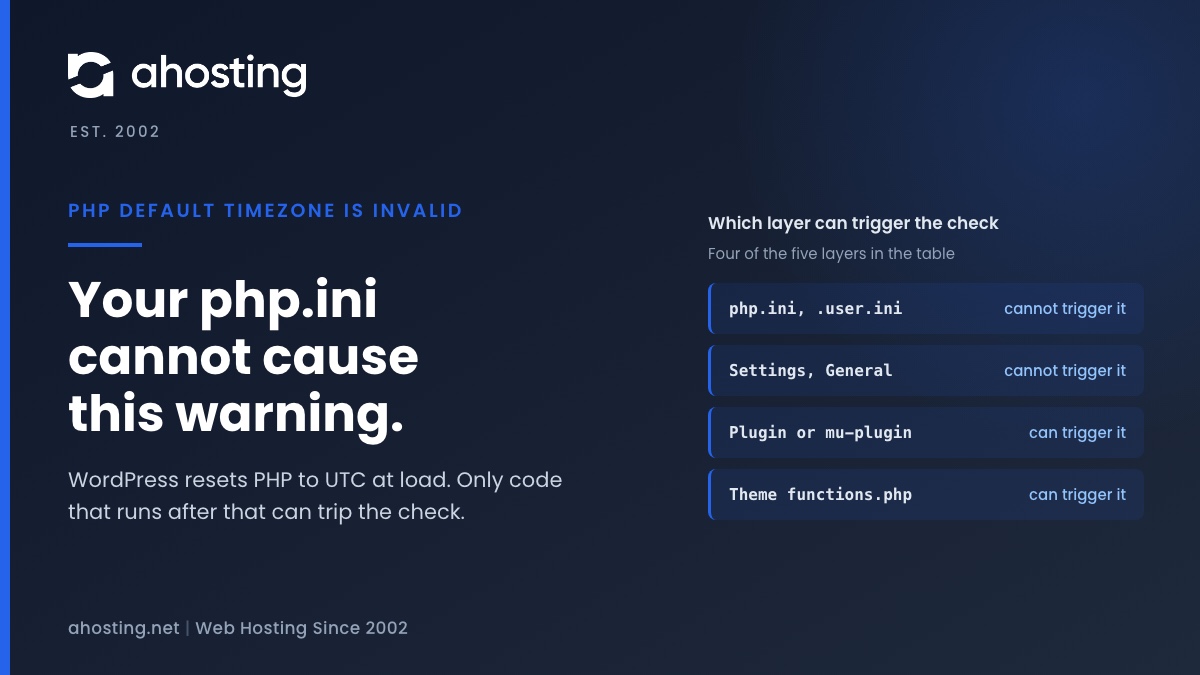
Use this table to rule layers in or out before you touch anything. It is the same logic the infographic below draws as a request timeline.
| Layer | Where it lives | Who sets it | Can it trigger the Site Health check? |
|---|---|---|---|
| Server default | php.ini or a cPanel PHP setting, date.timezone | You or your host | No. WordPress overwrites it with UTC at wp-settings.php line 73 |
| Per-site file | .user.ini in the document root | You | No. The same overwrite applies |
| Site timezone | Settings, General, Timezone (options timezone_string and gmt_offset) | You | No. It is read for display by wp_timezone() and never sets PHP |
| Must-use plugin | wp-content/mu-plugins, loaded at line 506 | A developer | Yes, if it calls date_default_timezone_set() and leaves the zone changed |
| Plugin or theme | wp-content/plugins and wp-content/themes, loaded after line 582 | A developer | Yes, with the same condition |
Why Changing the WordPress Timezone Does Not Clear PHP Default Timezone Is Invalid
Settings > General has its own timezone field, and many site owners change it hoping the critical label will clear. It will not. That setting is stored in the timezone_string and gmt_offset options, and wp_timezone() builds a date object from them whenever WordPress needs the site’s local time.
Specifically, wp_timezone_string() returns the saved zone name if there is one. Otherwise it builds a fixed offset such as +08:45 from gmt_offset. Neither path calls date_default_timezone_set(), so the PHP default stays on UTC unless other code moves it.
Region names beat fixed offsets
For the site setting, choose a named zone such as Europe/Malta over a manual offset. Named zones come from the tz database, which records that governments change daylight saving rules sometimes with little notice. A fixed offset cannot follow those changes, so the clock drifts twice a year.
Store UTC, convert only for display
The same idea appears in W3C guidance. An instant in time can be converted for display in any timezone, as the W3C working note on time and timezones explains. In other words, keep timestamps neutral and convert at the last step. That is exactly the job wp_date() does, and it is why changing PHP’s own zone is the wrong tool.
How to Find What Triggers PHP Default Timezone Is Invalid
The label gives you no file name, so the search is yours. Work from cheapest to most disruptive, and do all of it on a staging copy if you have one. Furthermore, take a backup before deactivating anything on a live site.
First Step: Search the files for date_default_timezone_set
With SSH or a terminal on your plan, run grep -rn date_default_timezone_set wp-content from the WordPress root. Without a terminal, use the cPanel File Manager to compress wp-content, download the archive, and run Find in Files in any code editor. The File Manager search box only matches file names, so it cannot find a function call. Check the plugins, themes and mu-plugins folders in the results.
Read each match before blaming it. A function that sets the zone, does its work, and then restores the previous zone is harmless, because the test only sees the final state. Similarly, a match inside a comment or a bundled date library that never runs on your site is noise. Only a call that leaves the zone changed matters.
Second Step: Ask WordPress what PHP is using
With WP-CLI, run wp eval 'echo date_default_timezone_get();'. It loads WordPress fully, so the answer includes whatever plugins and the theme did. UTC means the cause is not loading on that path. Anything else confirms the zone really is being changed.
Next, repeat the command with --skip-plugins, then with --skip-themes. If the answer flips back to UTC when plugins are skipped, the cause is a plugin. If it flips when the theme is skipped, look at functions.php and the theme’s included files.
Third Step: Bisect by deactivating plugins in batches
Without WP-CLI, deactivate half of your plugins and reload Tools > Site Health. Wait for the tests to finish. If the label clears, the culprit is in that half, so reactivate it in smaller groups. If it stays, the culprit is in the other half.
In practice, six to eight rounds find a single plugin among a hundred, and far fewer on a normal site. Avoid deactivating anything that handles payments or order processing on a live store during business hours, and test those on staging instead.
Fourth Step: Check the theme and must-use plugins
Plugins are the usual suspect, but a theme can do the same thing. Open the active theme’s functions.php and any child theme files. Moreover, look in wp-content/mu-plugins, because must-use plugins cannot be deactivated from the Plugins screen and are easy to forget.
Snippets pasted from old tutorials are a common source. A line added years ago to make a date display in a local zone often survives theme changes inside a code-snippets plugin. Search that plugin’s stored snippets too.
How to Fix PHP Default Timezone Is Invalid Without Shifting Dates
Update or replace the plugin that changes the zone
Start with an update, because vendors fix this once reported. If the current version still calls the function, send the developer the file name, the line number and one sentence: the PHP default timezone is invalid check fails because the plugin changes PHP’s zone after WordPress sets UTC. Developers respond to that, as the SSA guide above shows, because the fix is usually a small change to wp_date().
If the plugin is abandoned, replace it. Nothing about this warning justifies keeping code that changes global PHP state for every other plugin on the request.
Replace the call in your own code with wp_date()
If the call is your own snippet, delete the date_default_timezone_set() line. Then format times with wp_date( 'Y-m-d H:i', $timestamp ), which uses the site timezone automatically. For date objects, wp_timezone() or current_datetime() gives you the site zone without touching PHP.
Core’s own wp_date() accepts a true Unix timestamp and an optional timezone argument. As a result, one function covers both display in the site zone and display in any other named zone, with no global state involved.
Why forcing UTC back is the wrong fix
It is tempting to reset the zone from a later hook so the label turns green. However, that hides the symptom while the plugin keeps working from a different assumption, so its dates can stay wrong. Fix the code that changes the zone rather than the check that reports it.
Confirm that PHP default timezone is valid again
Reload Tools > Site Health after each change and wait for the tests to complete. The critical item moves to the passed list with the label PHP default timezone is valid once the zone reads UTC at test time. Then spot-check a scheduled post, a booking page and any date shown in an email.
PHP Default Timezone Is Invalid Layer Checker
Your result appears here.
Still hunting through plugin folders? See AHosting WordPress hosting with cPanel
Where Hosting Matters for PHP Default Timezone Is Invalid
Hosting cannot clear this label, but it decides how easily you can run the search above. On a cPanel web hosting plan, File Manager and the PHP version selector cover every step in this guide that does not need a terminal. Our walkthrough of choosing a PHP version in cPanel covers the second one.
When you want to run grep and WP-CLI against many sites at once, a VPS with root access is the easier place to do it. For a single WordPress site, our WordPress hosting plans run on cPanel with File Manager and PHP version selection, which is all this hunt needs.
If you have followed every step and still cannot find the cause, open a ticket with the exact Site Health line and the list of plugins and must-use plugins in your account, and we will look at it with you.

Related Site Health checks worth reading next
Timezone problems rarely travel alone. If the same screen also shows a failed cron event, read what a failed scheduled event really means, because scheduled jobs depend on correct timestamps. For another PHP-side warning, see an active PHP session was detected. Finally, the auto-updates check matters here, because the plugin you need to update may be blocked from updating itself.
Frequently Asked Questions: PHP Default Timezone Is Invalid
How do I set the default timezone in PHP for WordPress in 2026?
In practice, you do not set it at all. WordPress forces PHP to UTC every time it loads, so the correct place for your local zone is Settings, General, Timezone. Use date.timezone in php.ini only for scripts that run outside WordPress.
Does the PHP default timezone is invalid warning mean my WordPress site is broken in 2026?
Specifically, no. The label only says some code changed PHP timezone after WordPress set it to UTC. Pages still load, but dates, schedules and booking times produced by that code can be off by the gap between the two zones.
Can AHosting change a server setting to clear PHP default timezone is invalid?
However, no server setting can clear it, because WordPress overwrites the server timezone with UTC at load. The check only fails when a plugin, theme or must-use file calls date_default_timezone_set() later, so the fix lives in that code.
Why does PHP default timezone is invalid appear after I install a booking or events plugin?
Typically, the plugin calls date_default_timezone_set() so its own date functions match the zone it expects. That works inside the plugin but leaves PHP changed for the rest of the request, which is exactly what the Site Health test compares against UTC.
WordPress timezone setting vs PHP date.timezone: which one controls my post dates in 2026?
In fact, the WordPress setting controls what visitors see, because wp_date() reads it through wp_timezone(). PHP date.timezone is replaced with UTC at load, so changing it never moves a post date on a WordPress site.
Editing the plugin file vs asking the developer to fix PHP default timezone is invalid: which is safer?
Therefore, ask the developer first. A hand edit disappears at the next plugin update and can change how that plugin formats dates. If you must edit, do it on a staging copy and send the vendor the file and line number.
How can I find which plugin triggers PHP default timezone is invalid without SSH access?
For example, deactivate plugins in small batches and reload Site Health after each one. The batch whose removal turns the label green contains the culprit. You can also download wp-content and search it on your computer for date_default_timezone_set.
Can I use AHosting cPanel to download plugin files and test PHP versions while tracking this down in 2026?
Overall, yes. AHosting WordPress hosting runs on cPanel, so File Manager can compress and download wp-content, and the PHP version selector lets you test another version. The file search itself happens on your computer.
Will a staging copy help me test fixes for PHP default timezone is invalid safely?
Indeed, a staging copy is the safest place to deactivate plugins in batches. The Site Health result is the same on staging, and you can watch dates and schedules for a day before touching the live site.
Why does AHosting recommend wp_date() instead of changing the PHP default timezone?
As a result of how core works, wp_date() formats any timestamp in the site timezone without touching PHP global state. Changing the PHP default affects every other plugin on the request, while wp_date() affects only the string you ask for.