
- Open Registration With Privileged Default Role: What It Means in Site Health
- How Open Registration With Privileged Default Role Gets Set Without the Settings Screen
- How to Fix Open Registration With Privileged Default Role in Two Minutes
- Check Whether Anyone Used Your Open Registration
- Which Default Roles Trigger the Open Registration With Privileged Default Role Warning
- Why Author and Contributor Pass the Open Registration With Privileged Default Role Check
- What Site Health Cannot Tell You About Open Registration
- When Open Registration Is Intentional: Choosing a Safe Default
- Check Your Settings for Open Registration With Privileged Default Role
- Keep Registration Closed Without Another Plugin
- Frequently Asked Questions About Open Registration With Privileged Default Role
- What does open registration with privileged default role mean in WordPress 2026?
- Is open registration with privileged default role a real risk when Anyone can register is checked?
- How do I fix open registration with privileged default role in 2026 if Settings will not save?
- What are the default user roles in WordPress for new registrations?
- Editor vs Administrator as the default role: which one triggers open registration with privileged default role?
- Subscriber vs Contributor in 2026: which default role is safer after open registration with privileged default role is fixed?
- Who can change the options behind open registration with privileged default role on an AHosting account?
- Can I open a ticket with AHosting about open registration with privileged default role on my site?
- Do AHosting accounts see the same open registration with privileged default role check as any other host?
- Why does Site Health 7.1.3 pass an Author default role under open registration with privileged default role?
Open registration with privileged default role means anyone can sign up and become an Editor or Administrator. Set New User Default Role to Subscriber in Settings, General, then check Users for accounts you did not create.
Open Registration With Privileged Default Role: What It Means in Site Health
Open registration with privileged default role is a critical Security item that WordPress 7.0 added to Tools, Site Health. It appears when two options in your database agree on something dangerous: anyone may register, and every new account lands as an Editor or an Administrator. We read the check in WordPress 7.1.3 to see exactly what it compares, and what we found changes what you should do first.
The short version is a two-minute fix followed by a check you should not skip. This guide covers both, plus a gap in the test itself: it flags two roles and quietly passes three that can still hurt you.
Here is the mechanism. The option users_can_register controls the Anyone can register box, and default_role controls New User Default Role. The registration form never asks a visitor which role they want. It calls wp_create_user() with a name, a password and an email, and wp_insert_user() then fills in the role from default_role. Combine a public form with a powerful default, and a stranger gets a privileged account in one submission.
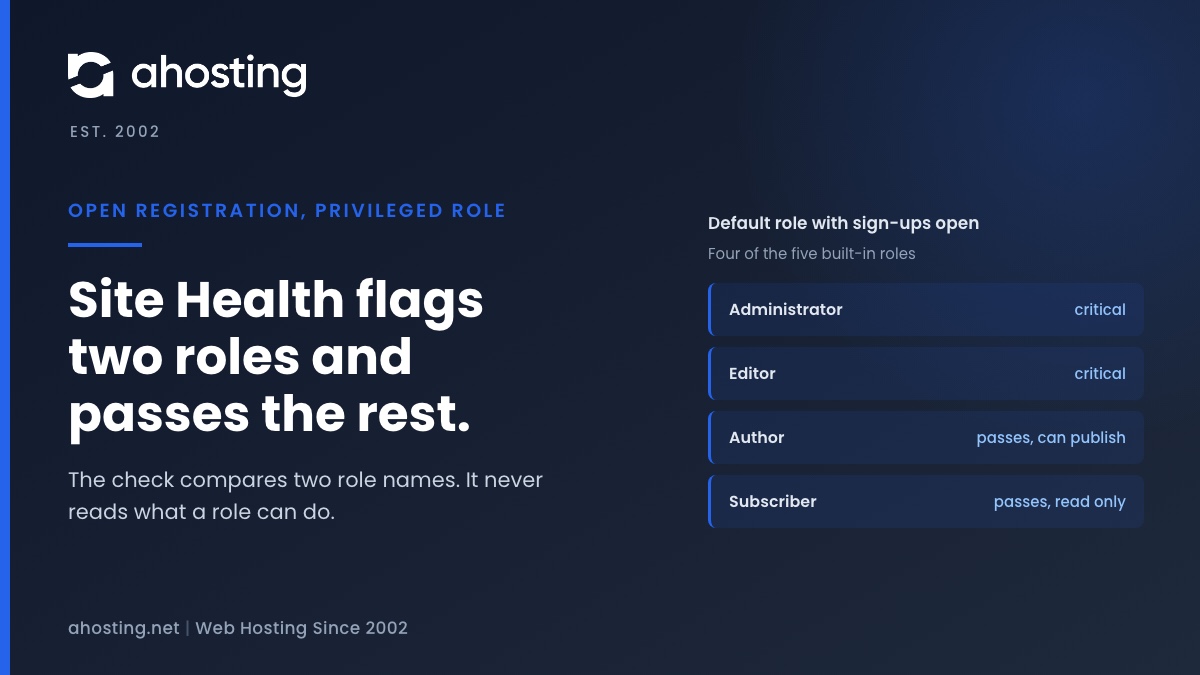
Site Health runs the check as a direct test when the screen loads. It reads both options with get_option(), and the item turns critical only when users_can_register is truthy and default_role is exactly editor or administrator, per the check in WordPress 7.1.3. The description it prints reads: Registration is open to anyone, and the default role is set to a privileged role.
How Open Registration With Privileged Default Role Gets Set Without the Settings Screen
Because the Settings screen no longer lets you choose a privileged default, a site that shows this item had its options written some other way. WordPress 7.0 added a filter named default_role_dropdown_excluded_roles and set it to exclude administrator and editor from the dropdown, according to the General Settings source. The one exception is a role that is already saved: it stays in the list so you can see it and change it.
That leaves a short list of ways the combination appears:
- The site chose Editor before the exclusion arrived in WordPress 7.0, and nobody has revisited the value since.
- A plugin, theme or code snippet wrote the option with
update_option(), or a migration or staging copy carried an old value over. - Someone with Administrator or database access edited the row directly.
- A snippet emptied the exclusion filter, so the dropdown offers Editor again and an Administrator picked it.
The check cannot tell you which of these happened. It reads two values and has no history. Treat it as a configuration error until the Users screen says otherwise, and read the account check below before you close the item.

How to Fix Open Registration With Privileged Default Role in Two Minutes
Change the two options in Settings, General
- Log in as an Administrator and open Settings, then General.
- Find the Membership row. If you do not need public sign-ups, untick Anyone can register.
- If you do need sign-ups, set New User Default Role to Subscriber.
- Click Save Changes, then reload Tools, Site Health and open the Status tab to run the check again.
On a Multisite network the Membership row does not appear on the single-site General screen, because the source only renders it when is_multisite() is false. The test still reads the site-level options on a network, and its Change these settings link points to that same screen, so network owners will need the database method below.
Read the open registration options directly in the database
If the Settings screen will not load or will not save, read the values where they live. In phpMyAdmin or any database tool your plan gives you, open the options table and run SELECT option_name, option_value FROM wp_options WHERE option_name IN ('users_can_register', 'default_role');. Your table prefix may differ from wp_, but the two option names are the same on every site.
A value of 1 in users_can_register means the form is open, and subscriber is the safe default. If a value flips back after you change it, something writes it on every request. A plugin or must-use plugin is the usual suspect, so deactivate plugins one at a time until the value stays put.
Check Whether Anyone Used Your Open Registration
Fixing the settings closes the door. It does not tell you who already walked through, so check the accounts before you move on. Open Users, then All Users, and use the Administrator and Editor links above the list. Open every account you do not recognize and read its role on the profile screen.
The database gives a faster view of the newest accounts. Run SELECT ID, user_login, user_registered FROM wp_users ORDER BY user_registered DESC LIMIT 20; to list the twenty most recent sign-ups with their registration time. The user_registered column exists in the core schema, so the query works on every install.
What to do about an account you did not create
If an unknown Administrator or Editor exists, treat the site as exposed and work through these steps in order:
- Write down the unknown account’s username and registration time before you touch anything.
- Change the password of every real Administrator, and use Log Out Everywhere Else on each profile.
- Reassign any content the unknown account owns, then delete the account.
- Open Plugins and Appearance, Themes and look for anything you did not install, because an Administrator can add both.
- Restore from a clean backup if you have one that predates the account.
Then fix the two options so the same thing cannot happen again. CWE-269, Improper Privilege Management, is the name security teams give to handing an account more access than it needs, and this check is a small, specific guard against it.
Which Default Roles Trigger the Open Registration With Privileged Default Role Warning
The role you pick decides what a stranger can do in the first minute. The table below turns the capability grants in WordPress 7.1.3 into plain terms and shows which rows the check flags. It is our reading of the core role definitions for a single-site install.
| Default role | Site Health result | What a stranger can do on day one | Capabilities granted by core |
|---|---|---|---|
| Administrator | Critical | Take over the site: activate and edit plugins, edit themes, change settings, edit other users | activate_plugins, edit_plugins, edit_themes, edit_users, manage_options |
| Editor | Critical | Publish and edit any post, upload files, save raw HTML | edit_others_posts, publish_posts, upload_files, unfiltered_html |
| Author | Good (not flagged) | Publish and edit their own posts and upload files | publish_posts, edit_published_posts, upload_files |
| Contributor | Good (not flagged) | Write posts and submit them, but not publish | edit_posts |
| Subscriber | Good (not flagged) | Read only, and manage their own profile | read |
Read the table from the bottom up. Each step adds a power, and the check draws its line above Author. The line is reasonable for a quick warning, but it is not the line a careful site owner would draw. The role definitions are also documented in the WordPress roles and capabilities guide, which lists the full capability set for every role.
Why Author and Contributor Pass the Open Registration With Privileged Default Role Check
The test is a strict comparison against two role names. In code terms it asks whether default_role is in the list editor, administrator, and nothing else. That has two consequences you should know about.
First, Author passes. A site with Anyone can register on and Author as the default shows a green item, yet every stranger who signs up can publish posts and upload files. Green here does not mean safe.
Second, custom roles pass. Membership and course plugins create their own role slugs, and the test compares the slug, not the capabilities behind it. A role named member that carries every Editor capability looks identical to a harmless one. Open the plugin that created the role and read what it grants.
The principle behind both cases is least privilege: give an account only what its job needs. The OWASP Authorization Cheat Sheet puts it as a design rule, and for open sign-ups it reduces to one line. Choose Subscriber unless you have a written reason for anything else.
What Site Health Cannot Tell You About Open Registration
The item is a two-value comparison, so it misses several things a careful owner would want to know. It does not look at your existing accounts, so a site that was already abused still shows green once the options are fixed. It does not check whether new sign-ups must confirm an email address or pass any approval step.
The test also reads only the site-level users_can_register option. On a Multisite network, new-site registration is controlled by a separate network setting that the source reads with get_site_option() in a different file, and this test never looks at it. Treat the item as a prompt to review your sign-up setup, not as a verdict on it.
Finally, a passed check says nothing about plugins that run their own registration forms. A form from a plugin can create accounts with any role the plugin chooses, whatever your General settings say. If you use such a plugin, read its role setting in the plugin itself.
When Open Registration Is Intentional: Choosing a Safe Default
Some sites need public sign-ups: communities, course sites, member areas and shops. The check is not telling you to close registration. It is telling you not to hand out Editor or Administrator while registration is open. For an intentional sign-up form, the safe pattern is short.
- Leave New User Default Role on Subscriber, so a new account can do nothing but read.
- Grant any higher role by hand or through a plugin rule you have read, never through the default.
- Review the newest accounts on a schedule, using the database query above or the Users screen.
- Read the capabilities of any custom role before you accept it as a default, because the test will not.
If a membership plugin insists on its own default role, that is a decision about what a stranger should be allowed to do in the first minute. Make it deliberately, with the role table above beside you.
Check Your Settings for Open Registration With Privileged Default Role
Pick your two settings below. The checker applies the same logic as the WordPress 7.1.3 test, then adds the verdict the test leaves out for Author, Contributor and custom roles.
Keep Registration Closed Without Another Plugin
A fresh WordPress install is safe on both options. The core install defaults set users_can_register to 0 and default_role to subscriber, so every dangerous combination is something that was changed afterward. That is why this item deserves attention even though it takes two minutes to fix.
If you do run public sign-ups, keep Subscriber as the default and promote people by hand. Our guide to keeping a WordPress site spam-free covers registration controls and server-level blocking.
Account isolation limits the damage if one site is compromised, as we explain in WordPress hosting security beyond plugins. Two other Site Health items have their own guides: the potentially public log file warning and the auto-update problem check.
If the Site Health line or the account list still does not make sense, open a ticket with the exact line Site Health printed and the usernames and roles of your Administrator and Editor accounts, with no passwords or email addresses, and we will look at it with you. The WordPress default of Subscriber applies on every plan, from web hosting to a shop on WooCommerce hosting.
Frequently Asked Questions About Open Registration With Privileged Default Role
What does open registration with privileged default role mean in WordPress 2026?
Specifically, it means Anyone can register is switched on while New User Default Role is Editor or Administrator, so every new sign-up becomes a privileged user. WordPress added the check in version 7.0, and the role table above shows exactly which values trip it.
Is open registration with privileged default role a real risk when Anyone can register is checked?
Indeed, it is a real risk. The registration form never asks which role a visitor wants, so anyone who can submit it receives the saved default role, unless a plugin adds an approval step of its own. Fixing the default role closes the door, and checking the Users screen shows whether anyone already walked through.
How do I fix open registration with privileged default role in 2026 if Settings will not save?
Typically, something rewrites the option on every request, such as a plugin or a must-use plugin. Set default_role to subscriber in the options table, reload Site Health, and if the value flips back, deactivate plugins one at a time until it stays. The code that writes the option is the real problem to remove.
What are the default user roles in WordPress for new registrations?
Specifically, a fresh WordPress install leaves Anyone can register off and sets New User Default Role to Subscriber, as the install defaults in core 7.1.3 show. The five built-in roles are Administrator, Editor, Author, Contributor and Subscriber, and only Subscriber is read-only.
Editor vs Administrator as the default role: which one triggers open registration with privileged default role?
In fact, both do. The test compares default_role to the two strings editor and administrator and turns critical on either match. Administrator is worse, because that role can edit plugins and themes, while Editor can publish any post and save raw HTML.
Subscriber vs Contributor in 2026: which default role is safer after open registration with privileged default role is fixed?
Overall, Subscriber is safer. It holds only the read capability, while Contributor adds edit_posts, which lets every stranger create draft posts inside your admin. Choose Contributor only when you want public submissions and will review each one.
Who can change the options behind open registration with privileged default role on an AHosting account?
Notably, only your site’s Administrators, code running inside your site, and anyone with access to your account’s database. The two options live in your own WordPress database, so the warning is a question about your site’s configuration and access, not about the server.
Can I open a ticket with AHosting about open registration with privileged default role on my site?
Specifically, yes: send the exact line Site Health printed plus the usernames and roles of your Administrator and Editor accounts, with no passwords or email addresses. We will look at it with you. Fix the two options first if you can, because that takes about two minutes.
Do AHosting accounts see the same open registration with privileged default role check as any other host?
Indeed, because the check lives in WordPress core, not in the server. It behaves the same on any host running WordPress 7.0 or later, and the options it reads are stored in your site’s own database wherever it is hosted.
Why does Site Health 7.1.3 pass an Author default role under open registration with privileged default role?
In fact, the test only lists editor and administrator, so Author, Contributor and every custom role slug pass. An Author can publish posts and upload files, which makes Author a poor default for open sign-ups even though the item stays green.
Related posts:
 An Active PHP Session Was Detected: What WordPress Site Health Is Really Telling You, and How to Fix It on Shared Hosting
 You Should Use a Persistent Object Cache: What WordPress Site Health Actually Measures
 Log Errors to a Potentially Public File? What Site Health Checks
 The Authorization Header Is Missing? What Site Health Tested, and the Fix