
- 502 Bad Gateway WordPress Errors: A Proxy Reporting That Something Behind It Failed
- First Step: Work Out Who Sent the 502 Bad Gateway WordPress Page
- Second Step: Match the Log to the Cause of the 502 Bad Gateway WordPress Error
- Why a PHP Fatal Error Gives a 500, Not a 502 Bad Gateway WordPress Page
- Why a Slow Request Is a 504, and What a Queue Looks Like Next to a 502 Bad Gateway WordPress Error
- Find Your 502 Bad Gateway WordPress Cause in Two Clicks
- What You Can Fix Yourself When WordPress Shows a 502 Bad Gateway
- What a Host Has to Fix, and What to Send Support for a 502 Bad Gateway
- How Long Does a 502 Bad Gateway WordPress Error Last?
- Frequently Asked Questions: 502 Bad Gateway WordPress
- How do you fix a 502 bad gateway WordPress error in 2026?
- What does a 502 bad gateway WordPress error mean when the server runs nginx?
- 502 vs 504: how do you tell a 502 bad gateway WordPress page from a timeout in 2026?
- How long does a 502 bad gateway WordPress error last on shared hosting?
- Why does a 502 bad gateway WordPress error appear only on wp-admin or checkout pages?
- Does a PHP fatal error cause a 502 bad gateway WordPress page or a 500 error?
- Cloudflare 502 vs origin 502: which one is your 502 bad gateway WordPress page in 2026?
- Does AHosting show a 502 or a 508 when a WordPress site reaches its plan limits?
- What should I send AHosting support when my site shows a 502 bad gateway?
- Can a security plugin or a large cookie cause a 502 on AHosting WordPress hosting in 2026?
A 502 bad gateway WordPress error is a proxy reporting that the process behind it died, vanished or sent a broken answer. Find out who sent it, then read the log line: a PHP fatal error is a 500, and a slow request is a 504.
502 Bad Gateway WordPress Errors: A Proxy Reporting That Something Behind It Failed
A 502 bad gateway WordPress error is not a WordPress error. WordPress never prints it, because WordPress is not running when it happens. A server sitting in front of PHP asked for your page, got no valid answer, and reported that with status 502.
That one fact reorders the whole troubleshooting job. Most guides start by disabling plugins. A plugin can be the reason a worker died, but the 502 itself only tells you that some hop lost contact with the hop on its right. The first job is to find which hop spoke, and the second is to read the line it wrote down.
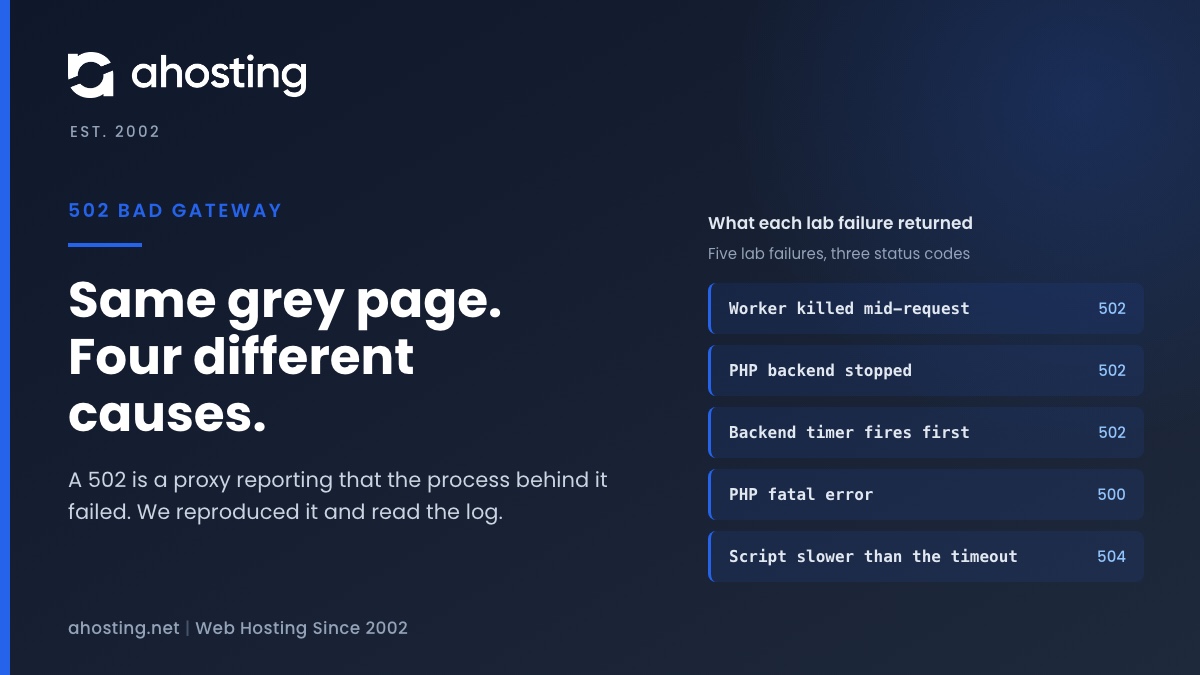
We reproduced the common causes on a small nginx and php-fpm lab and recorded the status code and the log line each one produced. The lab is one workstation with plain PHP scripts, with no WordPress install, and it is not LiteSpeed. Our shared servers run LiteSpeed, so read the log wording below as nginx wording and the mechanism as the part that carries over.
| Status | Who prints it | What happened | What produced it in the lab |
|---|---|---|---|
| 500 | The PHP side | PHP ran and failed | An undefined function, and an exhausted memory_limit |
| 502 | The proxy or web server | No valid answer from the backend | A killed worker, a stopped backend, an oversized response header, a backend timer that fired first |
| 503 | The proxy or web server | The backend is unavailable | Not tested in the lab |
| 504 | The proxy or web server | It waited and gave up | A script slower than the read timeout, and a request queued behind busy workers |
First Step: Work Out Who Sent the 502 Bad Gateway WordPress Page
If your site sits behind Cloudflare, two different machines can print a 502, and they need opposite fixes. Cloudflare’s documentation separates them by how the page looks.
A Cloudflare-branded page means your origin said it
Cloudflare returns a branded 502 or 504 when your origin web server itself answered with a 502 or 504. Cloudflare only relayed it. Nothing in the Cloudflare dashboard will fix this one, so the next stop is the origin web server error log for the same minute.
A blank page means Cloudflare said it
A blank page with no branding is a 502 or 504 that Cloudflare produced. The documentation names two causes you can act on: an origin that serves gzip content but sends a wrong content-length header, and broken gzip output. It also names a third you cannot: a data center shifting traffic, which can cause a few seconds of 502 errors. Check the Cloudflare status page before you change anything at the origin.
A plain page from your own web server
A grey page reading 502 Bad Gateway with the server name underneath came from the web server in front of PHP. That is the case the rest of this guide is about. If you are unsure how Cloudflare and a LiteSpeed cache interact on your site, our LiteSpeed Cache and Cloudflare guide explains which layer serves what.
Second Step: Match the Log to the Cause of the 502 Bad Gateway WordPress Error
Every 502 we produced printed an identical grey page, so the page cannot tell the causes apart. The web server error log can. This table is the AHosting 502 Cause Map from the lab: one row per cause, the status it returned, and the log line that names it.
| Cause | Status | Error log line (nginx) | Other evidence |
|---|---|---|---|
| Worker killed mid-request (SIGKILL) | 502 in about 1 ms | Connection reset by peer while reading response header from upstream | php-fpm log: child exited on signal 9 (SIGKILL) |
| PHP backend stopped | 502 in about 1 ms | connect() failed (Connection refused) while connecting to upstream | No php-fpm process is listening |
| Response header larger than the buffer | 502 | upstream sent too big header while reading response header from upstream | Worked at 3,000 and 3,900 bytes, failed at 9,000 bytes with a 4k buffer |
| Backend timer fires before the proxy timer | 502 at 2.3 s | Connection reset by peer while reading response header from upstream | php-fpm request_terminate_timeout of 2 s against a 3 s proxy timeout |
Two rows print the same log line, and that is a real limit of the method. A killed worker and a backend timer that fired first both end in a reset connection. To separate them, read the php-fpm log: it names the signal when a worker dies, and the timer shows up as the request reaching a fixed duration.
Cause one: the worker was killed
A PHP worker can die for reasons PHP never gets to report, because a process that receives SIGKILL cannot catch it. The usual source is the kernel running out of memory and choosing a victim, a mechanism LWN describes as the out-of-memory killer. In the lab we sent the signal ourselves, and the visitor saw a 502 within a few milliseconds while php-fpm logged the signal and started a replacement worker.
Cause two: nothing is listening
When php-fpm was stopped, every request returned a 502 at once and the nginx log said connect() failed with connection refused. This is the cause where every page fails together. On a shared account you cannot restart the service yourself, so this is a ticket, and the log line is what makes the ticket short.
Cause three: the response header was too big
This one hides inside a working backend. The web server reads the first part of the reply into a buffer, and nginx documents that a header larger than the buffer makes the response invalid. In the lab a 3,900-byte Set-Cookie header passed against a 4k buffer, and a 9,000-byte one returned a 502 with the log line upstream sent too big header.
A plugin that stuffs state into cookies can reach that size. The request-side version of the same problem is covered in our 400 Bad Request header and cookie guide. We did not test LiteSpeed, so we make no claim about its limit.
Cause four: the backend gave up before the proxy did
php-fpm has its own per-request kill timer, request_terminate_timeout, which is off by default. With it set to 2 seconds and the proxy timeout at 3 seconds, an 8-second script returned a 502 after 2.3 seconds. The backend killed its own worker first, so the proxy saw a reset connection instead of a slow one.
Why a PHP Fatal Error Gives a 500, Not a 502 Bad Gateway WordPress Page
Many guides blame PHP errors for a 502. The lab says otherwise. An undefined function returned a 500 with an empty body, and a script that exhausted memory_limit also returned a 500. In both cases the PHP worker survived, finished the request and told the web server it had failed. The web server then passed that status along.
That separation is useful. A 500 means PHP ran, so the PHP error log holds the reason and WordPress can usually be debugged from inside. A 502 means PHP never completed the request, so the answer sits in the web server log and the process list. The two logs answer different questions, and reading the wrong one is how a 502 hunt wastes an afternoon.
Resource limits follow the same pattern on our servers. A CloudLinux limit normally appears as a 508 page, not a 502, and our 508 Resource Limit Reached guide explains what the entry-process numbers mean.
Why a Slow Request Is a 504, and What a Queue Looks Like Next to a 502 Bad Gateway WordPress Error
A slow script produced the other status. The proxy waited, reached its read timeout and returned a 504 at 3.00 seconds. The nginx documentation defines that timer as the gap between two successive reads from the backend, with a default of 60 seconds, so a script that sends nothing for that long loses the request.
A queue produced the same status. We ran a pool of two workers and sent three requests that each took 2 seconds. Two finished normally and the third waited for a free worker, then timed out as a 504 at 3.0 seconds. No process died, so no 502 appeared. The visitor sees a gateway error, but the cause is capacity.
The remedy differs too. A 502 asks you to find what died. A 504 asks you to find what was slow, and our maximum execution time guide covers the PHP side of that question. If both statuses alternate on the same URL, the request is slow enough to be killed by a timer on some attempts and to time out on others.
Find Your 502 Bad Gateway WordPress Cause in Two Clicks
The checker below turns the first two steps into one answer. It tells you which log to open first. It does not diagnose your site, because only the log line can do that.
Find Your 502 Cause
Pick what you see, and the checker names the first thing to read.
What You Can Fix Yourself When WordPress Shows a 502 Bad Gateway
Work in this order, and stop at the first step that changes the result.
- Reload once, then open the same URL in a private window. A single killed worker is replaced in moments, so a reload that works means the cause was one request.
- Check the Cloudflare status page if the error page is blank. Nothing at your origin needs to change when Cloudflare produced the page.
- Rename the plugins folder in the cPanel File Manager to switch every plugin off. If the 502 goes away, put the folder back and rename plugins one at a time to find the one that triggers it.
- Look at the cookies the site sets. A plugin that stores a long list in a cookie can push the response header over the web server buffer.
- Retry the failing action in smaller pieces. A large import, a bulk image regeneration or an export is a request that can outlive a timer, so run it in batches.
A plugin that keeps killing its own worker is a code problem, and renaming it is the correct end of the self-service route. If the 502 persists with every plugin off, the cause sits below WordPress, and no setting inside WordPress can reach it.
If the failures follow the account running out of room, the numbers matter. Our web hosting plans publish their CloudLinux limits so you can compare them with what the site actually uses, and a VPS gives you the logs and the service restarts that a shared account cannot.
What a Host Has to Fix, and What to Send Support for a 502 Bad Gateway
Three of the four causes live where a shared account cannot reach: a stopped PHP service, a worker killed by the kernel, and a server buffer or timer. Only the host can read those logs for your account, restart the service or change the limit. Your part is to make the ticket searchable.
Send four items: the exact failing URL, the time of the error with your time zone, the status code, and whether the page carried Cloudflare branding. With a Cloudflare site, Cloudflare support also asks for the output of your domain’s /cdn-cgi/trace page, so open it and copy the result before you write.
Add one sentence about what changed last: a plugin update, an import, a new cookie banner, a traffic campaign. The log line says what happened, and that sentence says why it started today.
How Long Does a 502 Bad Gateway WordPress Error Last?
It lasts exactly as long as its cause. A killed worker was replaced almost instantly in the lab, so the next request worked. A stopped backend failed every request until it was started again, and a request that trips a timer fails every time you repeat it. Reload twice before you decide which of the three you have.
That pattern is the cheapest test in this guide. One failure that clears is a worker. Every page failing at once is a stopped backend. One URL failing every time is the request itself, and it needs its own fix, not a restart.
Frequently Asked Questions: 502 Bad Gateway WordPress
How do you fix a 502 bad gateway WordPress error in 2026?
Specifically, find out who sent the page first, then match the web server log line to its cause. A Cloudflare-branded 502 means your origin sent it, a blank unbranded page means Cloudflare did, and the log lines in the cause map above separate a dead worker from a stopped backend from an oversized header.
What does a 502 bad gateway WordPress error mean when the server runs nginx?
In practice, it means the web server in front of PHP got no valid answer from PHP. On nginx the error log names the reason: connect() failed, Connection reset by peer, or upstream sent too big header. WordPress never prints the page itself, because it is not running when the 502 happens.
502 vs 504: how do you tell a 502 bad gateway WordPress page from a timeout in 2026?
In contrast to a 502, a 504 means the proxy waited and gave up, while a 502 means it got a broken answer or none at all. In the lab a script slower than the read timeout returned 504 at 3.00 seconds, and a killed worker returned 502 within a few milliseconds.
How long does a 502 bad gateway WordPress error last on shared hosting?
Overall, it lasts as long as its cause does. A single killed worker is replaced in moments and a reload works, while a stopped backend keeps returning 502 until someone restarts it. If the same URL fails on every reload, the request itself is the cause.
Why does a 502 bad gateway WordPress error appear only on wp-admin or checkout pages?
Specifically, those pages run the heaviest PHP and cannot be cached, so they reach a timer or a memory ceiling first. In the lab a php-fpm timer set below the proxy timer turned an 8-second script into a 502 after 2.3 seconds.
Does a PHP fatal error cause a 502 bad gateway WordPress page or a 500 error?
In fact, a PHP fatal error returns a 500, not a 502. In the lab an undefined function and an exhausted memory_limit both returned 500 with an empty body, and the 502 appeared only when the worker process itself died or could not be reached.
Cloudflare 502 vs origin 502: which one is your 502 bad gateway WordPress page in 2026?
However, the status code alone cannot tell you, because both are 502. Cloudflare documents that a Cloudflare-branded page means your origin returned the 502 or 504, and that an unbranded blank page means Cloudflare produced it, so the look of the page is the first clue.
Does AHosting show a 502 or a 508 when a WordPress site reaches its plan limits?
Fortunately, a plan limit normally shows as a 508 Resource Limit Is Reached page, which our 508 guide explains. A 502 therefore points at a crashed process, an unreachable backend or an oversized response header instead of a plan limit.
What should I send AHosting support when my site shows a 502 bad gateway?
Specifically, send the exact URL, the time of the error with your time zone, the status code, and whether the page carried Cloudflare branding. With those four items the matching log line can be found instead of guessed.
Can a security plugin or a large cookie cause a 502 on AHosting WordPress hosting in 2026?
Typically only when a response header grows larger than the web server buffer. In the lab a 9000-byte Set-Cookie header against a 4k buffer returned 502 while 3900 bytes passed, but we did not test LiteSpeed, so treat those numbers as nginx numbers.
Related posts:
 Request Header or Cookie Too Large: What the 400 Error Means (2026)
 Plugin Could Not Be Activated Because It Triggered a Fatal Error: Find the Real Cause (2026)
 The REST API Encountered an Error? WordPress Never Reached It
 Unable to Create Directory wp-content/uploads: What the Error Really Means (2026)