
- What a 403 Forbidden Error Means on a WordPress Site
- Who Printed the Error Page: Server, WordPress or a Firewall
- How We Tested Forbidden Errors: Ten Setups on Apache 2.4.66
- 403 Forbidden Error Log Lines and What Each One Means
- Which Forbidden Error Cause Fits Your Log Line
- How to Fix a Forbidden Error in WordPress, Cause by Cause
- Forbidden Errors on Shared Hosting: What Changes on an AHosting Account
- When a Forbidden Error Is Not a Server File Problem
- Frequently Asked Questions: 403 Forbidden in WordPress
- How do you fix a 403 Forbidden error in WordPress in 2026?
- What is the difference between a 403 Forbidden and a 404 Not Found error?
- Why does my WordPress site show a 403 Forbidden error after a migration to AHosting in 2026?
- What should I send AHosting support when my site shows a 403 Forbidden error?
- Is chmod 777 the right fix for a 403 Forbidden error on AHosting shared hosting?
- Why does only wp-admin show a 403 Forbidden error while the rest of the site loads?
- ModSecurity vs .htaccess: which one caused my 403 Forbidden error?
- What does Server unable to read htaccess file, denying access to be safe mean in a 403 Forbidden page?
- Can a security plugin cause a 403 Forbidden error in WordPress in 2026?
- 403 Forbidden vs Sorry you are not allowed to access this page: are they the same error?
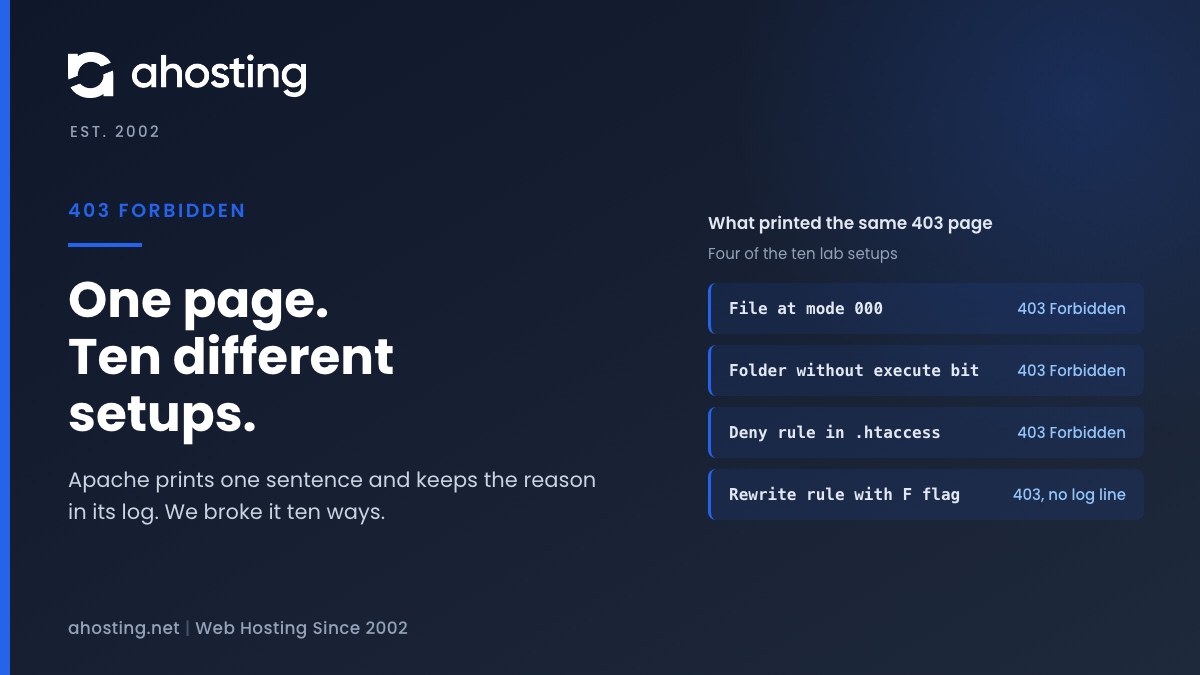
A 403 Forbidden error means the web server understood the request and refused it. In my Apache lab, ten different setups printed the same page and left eight different outcomes in the error log, so the page alone cannot name the cause. Read the log line for the blocked request: a permission line points to file modes, a deny line points to .htaccess, a missing index line points to the folder, and no line at all points to a rewrite rule or a firewall.
What a 403 Forbidden Error Means on a WordPress Site
A 403 Forbidden error means the web server received your request, understood it and refused to serve it. On Apache the page reads Forbidden: You don’t have permission to access this resource, and it reads the same whether the cause is a file mode, a rule in .htaccess or a folder with no index file. In a lab on Apache 2.4.66, ten different setups printed that page and left eight different outcomes in the error log. This guide reads that log line and attaches a fix to each one.
The message is accurate and almost useless. “Permission” suggests a login, but nothing in these tests involved a login. The server had a rule, a file mode or a missing file that said no, and the page does not say which. The error log does, and most guides never ask you to open it.
403 Forbidden vs Other Errors That Look Similar
A 404 means the server found nothing at that address. A 403 Forbidden means it found the request and declined it, so the file can exist and be perfectly healthy. In the lab, a file at mode 000 returned 403 while its neighbor at mode 644 returned 200. A 500 means the server could not run the rules at all: a Require ip line with the host-matching module missing returned 500, not 403, in the same lab.
Who Printed the Error Page: Server, WordPress or a Firewall
Several layers can answer with a 403, and each one has its own fix. Work out which layer answered before you change a single file. The table lists what each layer prints and where its evidence lives.
| Layer that answered | What the page looks like | Where the evidence is |
|---|---|---|
| Web server (Apache) | A bare Forbidden heading and the sentence You don’t have permission to access this resource (lab, Apache 2.4.66) | The web server error log |
| WordPress | A page titled WordPress › Error with the message inside a wp-die-message block | WordPress core, wp-includes/functions.php lines 4413 and 3920 in 7.1.4 |
| A firewall such as ModSecurity | Varies by host. The log reads Access denied with code 403 and names a rule id | The error log or the firewall audit log |
| A CDN or proxy in front | Varies. The response headers name who answered | The server response header |
| The host’s own custom page | The host’s design. Our ahosting.net returns a page titled 403 Forbidden – AHosting | The same server log as the first row |
The WordPress row matters because the wording is close. WordPress prints Sorry, you are not allowed to access this page after it has loaded and checked your user role, and that is a different problem with a different fix, covered in our guide to that message. The core source lives on GitHub in the 7.1.4 tag, and a wp_die page defaults to a 500 response unless the caller passes 403.

How We Tested Forbidden Errors: Ten Setups on Apache 2.4.66
I ran the stock Apache 2.4.66 that ships with macOS on one workstation, with a WordPress-shaped folder tree: wp-admin, wp-content/uploads and an xmlrpc file. The files were static, because a 403 happens before PHP runs. I broke the tree ten ways and recorded the status, the page and the error log line for each request.
Two limits belong up front. This is not an AHosting server, and it is not LiteSpeed or CloudLinux. Log wording can differ on other servers, so treat the codes as Apache’s and the logic as general.
Eight of the ten setups returned the identical page, 239 bytes with the same checksum. The two that failed because Apache could not read an .htaccess file added one sentence to the page: Server unable to read htaccess file, denying access to be safe. That sentence is the only cause the page itself ever named.
403 Forbidden Error Log Lines and What Each One Means
The error log is where the eight outcomes separate. Find the line for your blocked request by its time and URL, then match its code in the table. The code is the part to search for; the path in it is yours.
| Lab setup | Error log outcome | Cause class |
|---|---|---|
| File at mode 000 | AH00132 file permissions deny server access | Permissions |
| Folder at 644 (read, no execute) | AH00035 search permissions are missing on a component of the path | Permissions |
| Folder at mode 000, .htaccess checking on | AH00529 unable to check htaccess file, ensure it is readable and that the folder is executable | Permissions |
| .htaccess at mode 000 | AH00529, same line, and the page gains the htaccess sentence | Permissions |
| Folder with no index file, Options -Indexes | AH01276 Cannot serve directory: No matching DirectoryIndex found | Index |
| Require all denied for .php in uploads | AH01630 client denied by server configuration | Rule |
| Require ip allowlist on wp-admin | AH01630, same line | Rule |
| Old Order and Deny from all syntax | AH01797 client denied by server configuration (a different module) | Rule |
| Symlink with -FollowSymLinks | AH00037 Symbolic link not allowed or link target not accessible | Link |
| RewriteRule with the F flag | No error log line at all; only the access log shows the 403 | Rule |
Why the Path in a 403 Forbidden Log Line Can Mislead
The permission line names a path, and it is not always the broken one. With the folder nox at mode 644, the log named the child path nox/sub as the one it could not search, while the missing execute bit was on nox itself. The Debian Reference describes the execute permission on a directory as what lets the server reach the files inside it. Read it as “something at or above this path lacks the bit”, then check each folder on the way down.
In Python, the same refusal is called EACCES, Permission denied. The (13) in front of the Apache line is that number, which tells you the operating system refused the server, not an Apache rule.
Which Forbidden Error Cause Fits Your Log Line
Pick the log line you found and what fails, and the checker returns the likely cause and the first thing to look at. It uses only the lab results above.
Match Your 403 Forbidden Log Line to a Cause
Jump to the fix stepsHow to Fix a Forbidden Error in WordPress, Cause by Cause
Fix only the cause the log named. Changing five things at once hides which one mattered, and some of the popular fixes make things worse.
403 Forbidden From Permissions: Set 755 and 644, Not 777
For the three permission lines, set folders to 755 and files to 644, starting at the folder the log named and walking up. In the lab a folder at 755 and a file at 644 served normally, and neither the fix nor the test needed 777. On our shared WordPress servers PHP runs as the account’s own cPanel user, measured across 38 processes on 2026-09-30, so a wider mode only exposes files to other users.
403 Forbidden From .htaccess or a Rewrite Rule
For a deny line, open the .htaccess in the blocked folder and in each parent, and look for Require all denied, Require ip, Deny from all or a RewriteRule ending in [F]. The Apache rewrite flag table defines F as Forbidden, return 403. A rewrite block leaves no error log line, so when the log is empty for a 403, search the rules for that flag before you suspect the files.
403 Errors From a Folder With No Index File
A folder with no index file and listing switched off returns 403 by design, and that is usually what you want for wp-content/uploads. Do not add Options +Indexes to make the message go away: it publishes a list of every file in the folder.
403 Forbidden From Ownership, Symlinks or a Firewall
LiteSpeed’s own 403 troubleshooting page lists a wrong file owner and a Force Strict Ownership setting that returns 403 when a file’s owner differs from the site’s owner. That is the usual result of a migration or a manual upload. A symlink block logs the AH00037 line above. A firewall block logs a ModSecurity line with a rule id, and only the host can read or change that rule.
Forbidden Errors on Shared Hosting: What Changes on an AHosting Account
On shared hosting you may not be able to read the server error log yourself. cPanel’s documentation says its Errors page shows up to 300 recent web server error entries, and that a host can enable or disable the page. If yours is switched off, the exact URL, the time and your IP are what let someone else find the line.
Two things from our own records change the order of suspects. First, on our shared WordPress servers, only two files across all 530 docroots were not owned by their account user when measured on 2026-10-01, and both were one-off hand uploads. So an ownership block is rare unless the files came from a migration or an upload made as another user. Second, on one of our own Apache servers cPanel created a subdomain folder at mode 0750, which the web server could not traverse, and every request returned 403 until the folder was set to 0755.
That second case is the folder-execute lesson from the lab, seen on a real account. If you manage a plan with room to grow, our shared web hosting plans run each account under its own user with CageFS isolation, which keeps one account’s files out of another’s reach.
When a Forbidden Error Is Not a Server File Problem
If the log shows a firewall line, or there is no log line at all and no rewrite rule, the block happened elsewhere. The ModSecurity project describes ModSecurity as an open-source web application firewall module, so a rule inside it can refuse a request that a perfectly healthy WordPress would have served. Admin screens that fail with a vague message often meet this block first; the same pattern explains many invalid JSON response errors.
A host with a firewall can tell you which rule fired. Ask for the rule id, the time and whether it is a false positive, because rules differ from host to host and only the host can change one.
Permission fixes also tie into updates. The same ownership fault that causes a 403 shows up as a prompt for credentials during updates, described in WordPress asking for FTP credentials. If you read your own logs, a VPS hosting plan gives you root access to the Apache or LiteSpeed logs, and our LiteSpeed hosting guide explains the server in front of most of our WordPress sites.
If you are stuck, open a ticket with our WordPress hosting team and include the exact URL that fails, the time, your IP and whether one file, one folder or the whole site is affected. With those four items the matching log line can be found instead of guessed.
Frequently Asked Questions: 403 Forbidden in WordPress
How do you fix a 403 Forbidden error in WordPress in 2026?
Specifically, read the web server error log line for the blocked request, because the same 403 Forbidden page comes from at least eight different causes. A permission line means set folders to 755 and files to 644, a deny line means find the rule in .htaccess, and a missing index line means add an index file or accept the block.
What is the difference between a 403 Forbidden and a 404 Not Found error?
In contrast to a 404, a 403 Forbidden means the server found the request and refused it, so the file may well exist. In the lab a file with mode 000 returned 403 while its sibling at mode 644 returned 200, and no file was missing in either case.
Why does my WordPress site show a 403 Forbidden error after a migration to AHosting in 2026?
Typically the migrated files kept the wrong owner or the wrong mode, so the web server cannot read them. LiteSpeed documents a 403 for files owned by the wrong user, so compare the owner of the new files with the account user, then reset folders to 755 and files to 644.
What should I send AHosting support when my site shows a 403 Forbidden error?
Specifically, send the exact URL that fails, the time of the request in your time zone, your own IP address and a note of whether one file, one folder or the whole site is affected. With those four items the matching line in the server error log can be found instead of guessed.
Is chmod 777 the right fix for a 403 Forbidden error on AHosting shared hosting?
In fact, no. On our shared WordPress servers PHP runs as the account own cPanel user, so a folder at 755 and a file at 644 are enough, and in the lab neither needed a wider mode. As a result 777 adds risk and does not remove the cause.
Why does only wp-admin show a 403 Forbidden error while the rest of the site loads?
Typically a rule is scoped to that folder: an IP allowlist, a security plugin rule or a firewall rule. In the lab a Require ip line in the wp-admin folder returned 403 for every address outside the list, and the public pages stayed at 200.
ModSecurity vs .htaccess: which one caused my 403 Forbidden error?
In practice the error log separates them. An .htaccess deny logs a client denied by server configuration line, while a ModSecurity block logs an Access denied with code 403 line that names a rule id, so only the log tells the two apart.
What does Server unable to read htaccess file, denying access to be safe mean in a 403 Forbidden page?
In other words, Apache could not open an .htaccess file in that folder or its path, so it refused every request there. In the lab this happened with an .htaccess at mode 000 and with a folder that lacked the execute bit, and a permission reset fixed both.
Can a security plugin cause a 403 Forbidden error in WordPress in 2026?
In practice, yes, indirectly. Plugins that write rules into .htaccess can add the same deny and rewrite rules the lab tested, so rename the plugin folder, test the page again and read the rules the plugin wrote before you remove anything.
403 Forbidden vs Sorry you are not allowed to access this page: are they the same error?
By contrast they come from different layers. The web server prints a bare Forbidden heading before WordPress loads, while WordPress prints Sorry you are not allowed to access this page after it loads and checks your user role.
Related posts:
 Sorry, You Are Not Allowed to Access This Page in WordPress: Find the Cause
 “Resource Limit Reached” vs. 503 vs. 500 Error WordPress: A Diagnostic Decision Tree
 “508 Resource Limit Reached” on WordPress: What Entry Process (EP) Limits Really Mean
 Installation Failed: Destination Folder Already Exists in WordPress: What It Means and How to Fix It