
- What Could Not Instantiate Mail Function Means in WordPress
- What a Lab Found Behind Could Not Instantiate Mail Function
- Why Could Not Instantiate Mail Function Appears on Shared Hosting
- Log the Real Reason Behind Could Not Instantiate Mail Function
- Fix Could Not Instantiate Mail Function by Moving to SMTP
- Frequently Asked Questions: Could Not Instantiate Mail Function
- Why is my WordPress email not working with the could not instantiate mail function error in 2026?
- Does the could not instantiate mail function error mean my host blocks email in 2026?
- Does AHosting include a dedicated IP on WordPress plans, and does it fix could not instantiate mail function?
- SMTP vs PHP mail(): which fixes could not instantiate mail function more reliably on WordPress?
- Sendmail exit code 127 vs 67: what does each tell you about could not instantiate mail function?
- What should I send AHosting support when WordPress shows could not instantiate mail function in 2026?
- Can AHosting WooCommerce hosting stop order emails failing with could not instantiate mail function?
- Does PHP 8.5 change what WordPress shows for could not instantiate mail function in 2026?
- Why does wp_mail return true, but the email never reaches the inbox?
- Will a missing attachment or a bad address trigger could not instantiate mail function in WordPress?
Could not instantiate mail function means the mail() call in PHP returned false. WordPress prints the same sentence whether sendmail refused the message, was missing or exited with an error. In our lab a small mu-plugin recovered the exit code on PHP 8.5, and moving to SMTP turned the sentence into the server’s own reason.
What Could Not Instantiate Mail Function Means in WordPress
The WordPress error could not instantiate mail function means the mail() call in PHP returned false. WordPress hands the message to PHPMailer, PHPMailer calls mail() once, and when that call fails PHPMailer throws this sentence. It names no cause, no recipient and no server. WordPress 7.1.5 ships PHPMailer 7.1.1, and that is all it tells you, whatever actually went wrong.
The path is short. wp_mail() in pluggable.php selects the mail transport at line 505. PHPMailer then runs @mail() at PHPMailer.php:894. When that returns false, line 2150 throws the exception, and pluggable.php:665 fires the wp_mail_failed action and returns false. The @ in front of mail() matters later in this guide.
What a Lab Found Behind Could Not Instantiate Mail Function
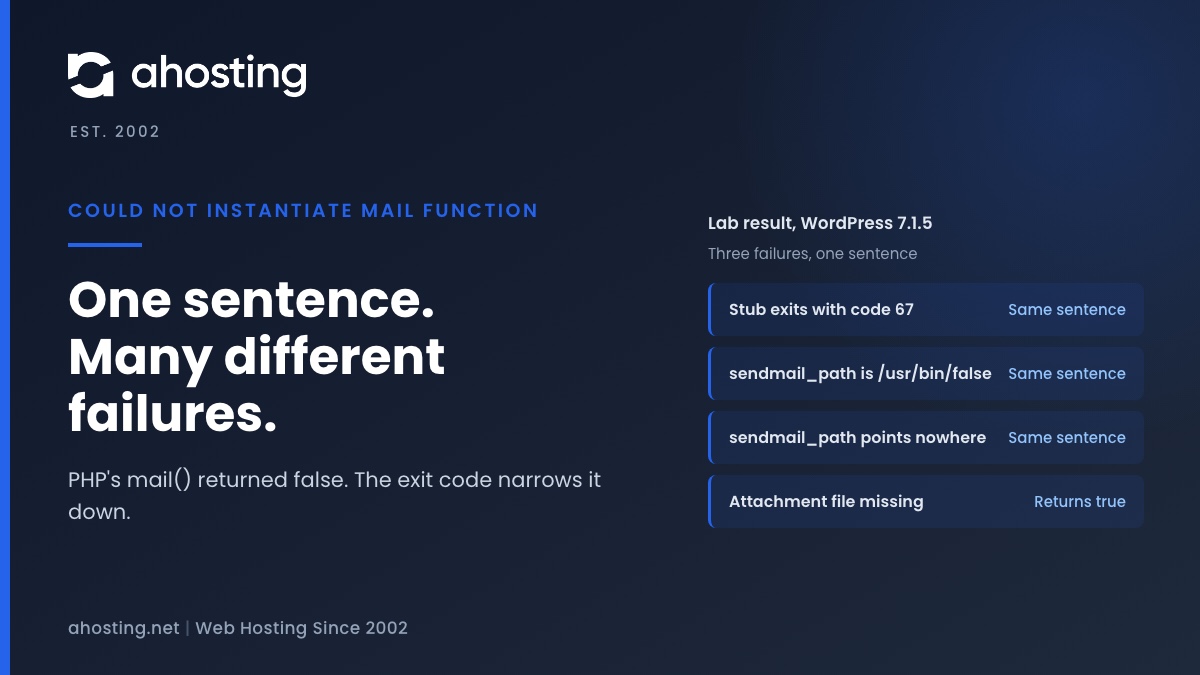
I ran WordPress 7.1.5 on PHP 8.5.10 on one Mac, put a stub where the server’s sendmail command would be, and broke it eight ways. This was not an AHosting server, and it says nothing about Exim, cPanel or CloudLinux. It shows what WordPress and PHPMailer do with each failure.
| Lab setup | wp_mail() returns | What WordPress shows |
|---|---|---|
| Stub accepts the message | true | Nothing |
| Stub exits 67 after printing a 550 line | false | Could not instantiate mail function. |
| sendmail_path is /usr/bin/false | false | Could not instantiate mail function. |
| sendmail_path points at a missing file | false | Could not instantiate mail function. |
| mail() is listed in disable_functions | Fatal error | There has been a critical error on this website. |
| From header is not an address | false | Invalid address: (From): not an address |
| Recipient is not-an-email | false | You must provide at least one recipient email address. |
| Attachment file does not exist | true | Nothing, and the attachment is dropped |
Three failures, one sentence
Rows two, three and four fail for three different reasons and print the same sentence. The PHP manual says mail() returns true only when the message was accepted for delivery, and nothing the sendmail command prints on stderr comes back to WordPress. In row two the stub printed a 550 line, and that line appears nowhere in WordPress.
Row five is the exception. With mail() disabled, PHP 8.5.10 removes the function, so PHPMailer dies with an uncaught error and you see the critical-error page, never the mail sentence. If that is your screen, the white screen of death guide is the better place to start.
Two failures WordPress hides
Rows seven and eight fail quietly. WordPress skips a bad recipient at pluggable.php:498 and a missing attachment at line 565, each inside a try block that simply continues. A missing attachment still returns true, and a bad address surfaces as the recipient sentence rather than naming the address.
Why Could Not Instantiate Mail Function Appears on Shared Hosting
The sentence reports one event: the sendmail-compatible command that PHP starts exited with an error. PHP’s default for that command is /usr/sbin/sendmail -t -i, where -t takes recipients from the headers and -i stops a lone dot from ending the message.
When mail() returns false
Anything that makes that command exit non-zero lands here: a wrong sendmail_path, a mail server that refused the message, or a command that cannot start. WordPress cannot tell which. The reason sits in the mail log on the host, which a customer cannot read from inside WordPress.
One cause worth checking is the sender. wp_mail() builds a default From header from your site host, yet in the lab PHPMailer passed no -f flag, only -t -i. The Exim documentation says that without -f the sender of a local message becomes the caller’s login name at the default domain. A mail server that compares the two can reject the mismatch. I have not measured that on an AHosting server, so treat it as the first thing to ask about, not a finding.
When mail() returns true and nothing arrives
True means accepted, not delivered. In the lab, the mail.log setting wrote an identical line for the accepted send and the rejected one, so it proves PHP called mail() and nothing more. If the message left the server and then reached a spam folder, that is a reputation problem, and our guide to WordPress email going to spam covers it.
Log the Real Reason Behind Could Not Instantiate Mail Function
A small mu-plugin records both halves of the story. The first hook logs the WordPress message and the recipient through the wp_mail_failed action. The second catches the warning that PHP 8.5 raises when sendmail exits with an error. PHPMailer silences that warning with the @ operator, so an ordinary error log never shows it, yet a handler still receives it.
<?php
/**
 * Plugin Name: Mail failure log
 */
add_action( 'wp_mail_failed', function ( $error ) {
	$data = $error->get_error_data();
	$to   = isset( $data['to'] ) ? implode( ', ', (array) $data['to'] ) : 'unknown';
	error_log( 'wp_mail_failed: ' . $error->get_error_message() . ' (to: ' . $to . ')' );
} );

set_error_handler( function ( $errno, $message ) {
	if ( 0 === strpos( $message, 'mail():' ) ) {
		error_log( 'PHP warning from mail(): ' . $message );
	}
	return false;
}, E_WARNING );
In the lab, a failed send wrote two lines: the PHP warning with the exit code, then the wp_mail_failed line with the sentence and the recipient. A successful send wrote nothing. With the plugin removed, the error log stayed empty. The PHP manual lists that warning as new in 8.5.0, so on older PHP only the second line appears.
Read the code like this. 127 is the shell’s code for command not found, so sendmail_path points at nothing. 1 is a generic failure. A code from 64 to 78 is a sysexits code, and 67 means the user specified did not exist, so the command reported a problem with the recipient. Send your host the time, the exit code and the recipient domain, and they can find the matching log line.
AHosting Mail Error Decoder
See WordPress plans with a dedicated IPFix Could Not Instantiate Mail Function by Moving to SMTP
Authenticated SMTP replaces the sendmail hand-off with a conversation, and the other server’s answer comes back as text. I tested that with a raw SMTP stub behind the phpmailer_init action.
| Stub behavior | wp_mail() returns | What WordPress shows |
|---|---|---|
| Nothing listens on the port | false | SMTP Error: Could not connect to SMTP host. Failed to connect to server |
| Server answers AUTH with 535 | false | SMTP Error: Could not authenticate. |
| Server answers MAIL FROM with 550 | false | The following From address failed: (the sender address) : MAIL FROM command failed,Sender address rejected: not owned by user |
| Server accepts everything | true | Nothing |
The third row is the useful one, because the message carries the server’s own reason. RFC 5321 defines 550 as mailbox unavailable, including a command rejected for policy reasons. Set the From address to a mailbox on the domain you authenticate against, then retest.
- Add the mu-plugin above and trigger one send, then note the exit code.
- Create a mailbox for the sending address in cPanel. AHosting’s web hosting plans list cPanel with IMAP, SMTP and Webmail.
- Point an SMTP plugin at that mailbox with its host, port and password, and use the same mailbox as the From address.
- Send a test and read the message against the table above.
No plan change clears a sendmail refusal by itself, and the steps above work on any host. If you also want the sending address on an IP that is not shared with unrelated accounts, every AHosting WordPress plan includes one, and the dedicated IP guide explains what it does and does not change. A shop that sends order receipts through wp_mail() follows the same steps on WooCommerce hosting.
Frequently Asked Questions: Could Not Instantiate Mail Function
Why is my WordPress email not working with the could not instantiate mail function error in 2026?
Specifically, the message means the mail() function in PHP returned false, so the sendmail command on the server refused the message or never started. WordPress 7.1.5 prints the same sentence for each of those cases. Log the exit code with the mu-plugin above to see which one happened.
Does the could not instantiate mail function error mean my host blocks email in 2026?
In practice, a host that blocks mail() is only one cause. A wrong sendmail_path, a refused sender or a command that cannot start produce the identical sentence. Only the exit code and the mail log on the host separate them, so ask for both before blaming the plan.
Does AHosting include a dedicated IP on WordPress plans, and does it fix could not instantiate mail function?
In other words, yes to the first part and no to the second. Every AHosting WordPress plan page lists a dedicated IP. That IP affects reputation after a message leaves, while this error appears before it leaves, so the log and the sender still need checking.
SMTP vs PHP mail(): which fixes could not instantiate mail function more reliably on WordPress?
Therefore SMTP is the better first move, because the other server answers in words. In our lab the SMTP path returned could not authenticate, could not connect, or the sender rejection text. The mail() path returned one sentence for every failure.
Sendmail exit code 127 vs 67: what does each tell you about could not instantiate mail function?
Specifically, 127 is the shell code for command not found, so sendmail_path points at nothing. A code of 67 is the sysexits code for a user that does not exist, so the command reported a problem with the recipient. Both give the same WordPress sentence.
What should I send AHosting support when WordPress shows could not instantiate mail function in 2026?
Specifically, send the time of the failed send, the exit code from the log, the recipient domain and the From address. Those four items let support find the matching mail log line. Add the exact sentence WordPress showed, copied as text.
Can AHosting WooCommerce hosting stop order emails failing with could not instantiate mail function?
In practice, no plan change clears this error by itself. WooCommerce sends order emails through the same wp_mail() call, so the same log and the same checks apply. Fix the sender or the transport first, then retest with a real order.
Does PHP 8.5 change what WordPress shows for could not instantiate mail function in 2026?
Notably, PHP 8.5 raises a warning that carries the sendmail exit code, but PHPMailer silences it with an at sign, so WordPress still shows the same sentence. A small error handler restores the code. On older PHP versions that warning does not exist.
Why does wp_mail return true, but the email never reaches the inbox?
However, true only means the server accepted the message for delivery. The PHP manual says that does not mean it reaches the destination. Check the spam folder, then ask the host for the mail log entry at that time.
Will a missing attachment or a bad address trigger could not instantiate mail function in WordPress?
In contrast, neither does. WordPress skips a missing attachment and still returns true. It skips an unparseable recipient and reports that you must provide at least one recipient email address. Both are separate from this error.
Related posts:
 Plugin Could Not Be Activated Because It Triggered a Fatal Error: Find the Real Cause (2026)
 Unable to Create Directory wp-content/uploads: What the Error Really Means (2026)
 Error Establishing a Database Connection in WordPress: Read the Real Cause (2026)
 502 Bad Gateway WordPress Error: Who Sent It and What Died (2026)