
- What Missing a Temporary Folder Actually Means
- Why WP_TEMP_DIR Does Not Fix Missing a Temporary Folder
- Error 6 or Error 7: Could Not Create vs Could Not Write
- How to Tell Which Upload Error You Have
- What You Can Fix Yourself
- What Only Your Host Can Fix for Missing a Temporary Folder
- When WP_TEMP_DIR Is the Right Answer
- Frequently Asked Questions About Missing a Temporary Folder
- How do I fix the Missing a temporary folder error in WordPress?
- Why does WP_TEMP_DIR not fix Missing a temporary folder in 2026?
- Can I change the PHP upload temporary directory on AHosting shared hosting?
- Missing a temporary folder vs Failed to write file to disk: what is the difference?
- WP_TEMP_DIR vs upload_tmp_dir: which one controls WordPress uploads?
- Why does Missing a temporary folder appear when my disk is not full?
- Is Missing a temporary folder a WordPress bug in 2026?
- Does Missing a temporary folder also affect plugin and theme uploads?
- What AHosting file limit can cause Missing a temporary folder in 2026?
- When should I move to an AHosting VPS over Missing a temporary folder?
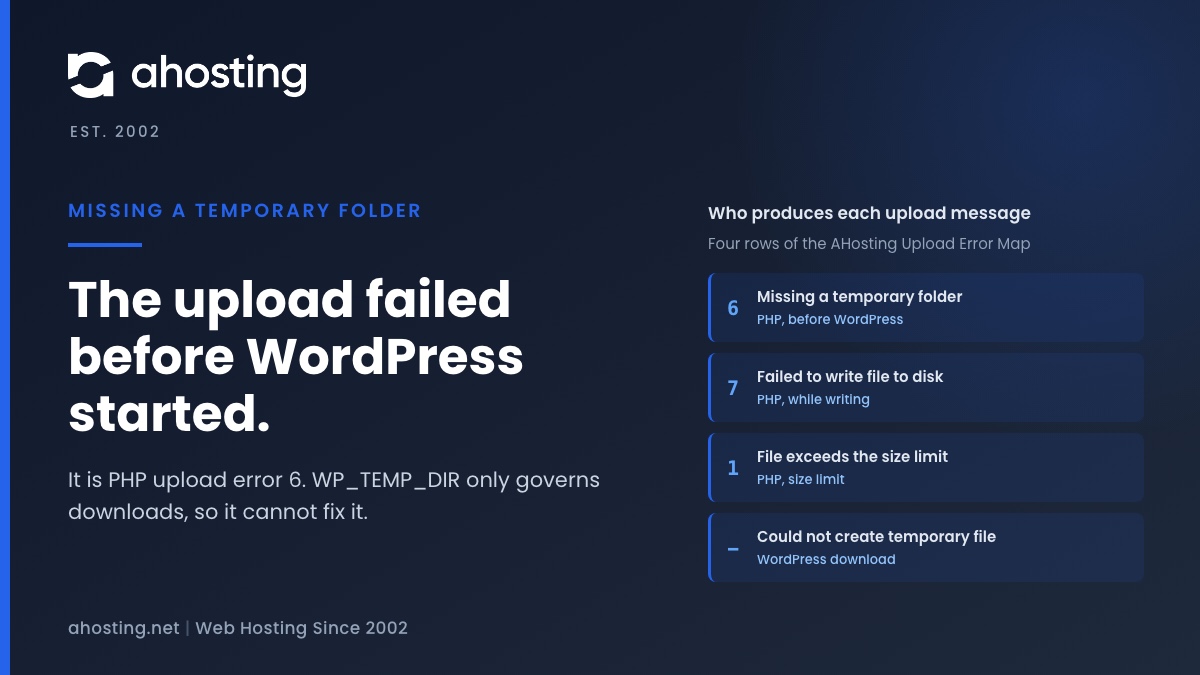
Missing a temporary folder is PHP upload error 6, set before WordPress loads, when PHP cannot create the temporary file an upload is written into. WordPress only prints the text. That is why the popular WP_TEMP_DIR fix cannot touch it: that constant governs downloads, not uploads. Check whether the account is out of files or space, then read the PHP error log. PHP lets only the server configuration set the upload directory, so on shared hosting what remains is your host’s to fix.
What Missing a Temporary Folder Actually Means
When WordPress answers an upload with Missing a temporary folder, it is reporting a failure it did not have. The message looks like a WordPress fault, and nearly every guide treats it as one. It is PHP’s. Before WordPress runs a single line, PHP receives the file from your browser and tries to create a temporary file to hold it. If that create fails, PHP records an error code and hands the request on. WordPress reads the code, looks up the matching sentence and prints it. That order decides which fixes can work, and it rules out the one most people try first.
Where the Message Comes From
In WordPress 7.1.2, the current release on 30 September 2026, the sentence exists in exactly one file. It sits in a list inside wp-admin/includes/file.php that the source comments credit to php.net: one entry for each error code PHP can return with an upload. The upload handler checks whether PHP reported an error and, if it did, prints the entry for that code. There is no test of its own behind it. Media uploads, the plugin zip uploader and the theme zip uploader all go through the same handler, so all three can show it.

The Error Code Behind Missing a Temporary Folder
The code is 6, and the PHP manual lists it as UPLOAD_ERR_NO_TMP_DIR, with the same words WordPress prints. In the PHP 8.4 source, main/rfc1867.c sets it at one point only: when the call that opens a new temporary file returns failure. At that moment PHP also emits a warning, File upload error – unable to create a temporary file. The numbering has a gap at 5, which an old Stack Overflow thread traces to a code PHP retired, and WordPress keeps an empty entry in that position to match.
| Code | Message WordPress prints | Set by | When it happens |
|---|---|---|---|
| 1 | The uploaded file exceeds the upload_max_filesize directive in php.ini. | PHP | The file is larger than the size limit |
| 3 | The uploaded file was only partially uploaded. | PHP | The connection ended before the file did |
| 6 | Missing a temporary folder. | PHP | The temporary file could not be created |
| 7 | Failed to write file to disk. | PHP | The file was created but could not be filled |
| 8 | File upload stopped by extension. | PHP | A PHP extension stopped the upload |
| — | Could not create temporary file. | WordPress | A plugin or theme download had nowhere to go |
Why WP_TEMP_DIR Does Not Fix Missing a Temporary Folder
Search for the message and almost every result gives the same fix: add a line defining WP_TEMP_DIR to wp-config.php, create a temp folder inside wp-content, and set its permissions. It is repeated so often that it reads as settled. Read the source and it cannot work for this message, for a reason that has nothing to do with the path you choose or where you put the line.
What WP_TEMP_DIR Really Controls
The constant is read by one function, get_temp_dir, which returns the folder WordPress uses for its own temporary files. Its order is fixed: the constant if it is defined, then the system temporary directory, then PHP’s upload directory, then wp-content itself, then /tmp. WordPress calls it when it downloads something, such as a plugin, theme or update package from WordPress.org. An upload from your browser never asks it. By the time WordPress loads wp-config.php, PHP has already tried to store the file and has already failed. Nothing defined there can go back and change that.
| What is being written | Folder chosen by | Can WP_TEMP_DIR change it |
|---|---|---|
| A file you upload through the media library | PHP, from upload_tmp_dir or the system temporary directory | No |
| A plugin or theme zip you upload from your computer | PHP, the same way | No |
| A plugin, theme or update downloaded from WordPress.org | WordPress, through get_temp_dir | Yes |
| A theme exported from the site editor | WordPress, through get_temp_dir | Yes |
Why the Popular Fix Seems to Work Sometimes
Two things can make it look as if it did. The first is timing: someone adds the constant, deletes old backups or caches in the same sitting, and the upload works because the account now has room. The second is a different message. Could not create temporary file appears when a plugin install from the directory fails, and for that one the constant is exactly right. A WordPress Stack Exchange question shows the pattern clearly: the constant set several ways, the folder open to everyone, and the upload still failing. The answer that explains it points out that the failure happens before any script runs.
Error 6 or Error 7: Could Not Create vs Could Not Write
PHP separates two moments that most guides blur. Creating the temporary file is one operation; filling it with your upload is another. If the create fails, you get 6 and Missing a temporary folder. If the create works and the write fails partway, you get 7 and Failed to write file to disk. Knowing which one you have halves the list of possible causes before you open anything.
Four Reasons PHP Cannot Create the File
PHP creates the file with a standard system call, and the manual page for open lists why that call refuses. For an upload, four of those reasons matter:
- The directory does not exist, usually because a custom
php.inipointsupload_tmp_dirat a path that was later removed or never created. - The directory exists but the account cannot write to it.
- The account has used its quota of disk blocks or files, so there is no room for one more file.
- An
open_basedirrestriction keeps PHP out of the directory it would fall back to.
Why a Full Account Can Print Missing a Temporary Folder
The third reason is the one that surprises people, because the disk rarely looks full. Every file uses a slot as well as space, and a site with years of cache files, backups and email can use up its slots long before its gigabytes. We explain that ceiling in detail in our guide to the WordPress inode limit on shared hosting. On our shared servers it links directly to uploads. They run CloudLinux with CageFS, and the CloudLinux documentation states that each account has its own /tmp, stored inside the account and counted against its quota. An account at its ceiling cannot create the file an upload needs.
How to Tell Which Upload Error You Have
You do not need server access for this. Two checks, both inside your hosting control panel, separate the causes, and a third settles whether the problem is yours to fix or your host’s. Do them in this order, because the first is the most common cause and the quickest to rule out.
Check File Usage and Disk Usage Together
The cPanel home screen shows File Usage and Disk Usage side by side, each as a count against a ceiling. Read them as a pair. File Usage at or near its ceiling points straight at the create failure; Disk Usage at its ceiling can produce either error. These are the published ceilings on AHosting shared hosting:
| Plan | File ceiling | Storage | Where to read it |
|---|---|---|---|
| Bronze | 250,000 files | 10 GB SSD | File Usage and Disk Usage, cPanel home screen |
| Silver | 400,000 files | 20 GB SSD | File Usage and Disk Usage, cPanel home screen |
| Gold | 600,000 files | 50 GB SSD | File Usage and Disk Usage, cPanel home screen |
Read the PHP Error Log
When the create fails, PHP writes a warning containing unable to create a temporary file. It often reads as coming from Unknown on line 0, because no script was running yet, which is itself proof that WordPress was not involved. On many cPanel servers PHP’s log is a file named error_log in the folder of the script that handled the request, so for the media library look inside wp-admin. If the warning is there and the account has room, the directory itself is at fault.
Upload Error Decoder
Pick the exact message WordPress showed you. This tells you which layer produced it, whether WP_TEMP_DIR can affect it, and what to check first.
Produced by:
Can WP_TEMP_DIR change it:
Check first:
Read from WordPress 7.1.2 and PHP 8.4 source. It cannot see your server, so treat the first check as where to start, not as a diagnosis.
What You Can Fix Yourself
Most of the causes above are within reach from your own account. Work through them before contacting anyone, because the most common one, a full account, is also the one your host will ask you to resolve.
Free Up Files and Space
Start with the folders that grow without anyone deciding they should: old backups kept inside the account, page cache directories, abandoned staging copies and mailboxes that were never emptied. The Disk Usage tool in cPanel shows where the space went. If you have SSH access, counting files folder by folder finds where the slots went, and a Unix Stack Exchange thread on counting files recursively collects several ways to do it. Once File Usage is comfortably below its ceiling, try the upload again.
Remove a Stale upload_tmp_dir Line
If you or a previous developer added a custom php.ini to the account, open it and look for upload_tmp_dir. A line pointing at a folder that no longer exists is the classic cause of the missing directory case. Delete the line rather than editing it, so PHP falls back to the directory the server provides. Leave open_basedir alone unless you set it yourself; on managed servers it is the host’s setting.
Rule Out the Upload That Is Simply Too Big
A file that is larger than the limit produces error 1, not error 6, but it is worth ruling out while you are here. Unlike the temporary directory, the size limit can be raised per directory. Our guide to the server cannot process the image error covers the failures that happen after an upload succeeds, when WordPress tries to resize it.
What Only Your Host Can Fix for Missing a Temporary Folder
If the account has room, no custom php.ini points anywhere odd and the warning is in the log, the remaining cause is the temporary directory itself. That is where your part of the fix ends, and the reason is written into PHP.
Why a User ini File Cannot Change It
PHP marks every setting with where it may be changed. The php.ini directives list gives upload_tmp_dir and sys_temp_dir the mode INI_SYSTEM: they can be set in the main configuration and nowhere else. A .user.ini file, an .htaccess line and a call from a plugin are all ignored for these two. It is also why this differs from the memory limit, which you can raise yourself; we covered where that one stops working in our guide to raising the WordPress memory limit on shared hosting.
What We Do on Our Shared Servers
This is the part we take off your hands. On AHosting WordPress hosting and our shared plans, each account’s temporary directory is provided by CageFS and is private to that account. You should never have to create one, and you cannot break it from wp-config. If Missing a temporary folder appears while your File Usage and Disk Usage have room, open a ticket with the time of the failed upload. That is a server fault, and fixing it is our job.
When WP_TEMP_DIR Is the Right Answer
None of this makes the constant useless. It fixes a different pair of messages, and they are easy to confuse with this one because they also mention a temporary file. The test is what you were doing when the message appeared: sending a file from your computer, or asking WordPress to fetch one.
The Two Messages It Does Fix
Could not create temporary file and Destination directory for file streaming does not exist or is not writable both come from WordPress while it downloads a package, and both use the folder the constant controls. If one appears when you install or update from the directory, pointing the constant at a writable folder is correct. A download that fails for a network reason instead is a separate problem, covered in our guide to the secure connection to WordPress.org error.
When You Want the Directory in Your Own Hands
Some sites need to set PHP configuration that shared hosting keeps at server level: a dedicated temporary volume, a custom upload path, or their own PHP build. An AHosting VPS gives you full root access, so upload_tmp_dir is yours to set. Move for control you will use repeatedly, not to clear one message a ticket would solve.
A Short Checklist
- Read Missing a temporary folder as PHP error 6. WordPress did not produce it.
- Check File Usage and Disk Usage together on the cPanel home screen.
- Look in the PHP error log for the warning about creating a temporary file.
- Remove any stale
upload_tmp_dirline from a customphp.ini. - Leave
WP_TEMP_DIRfor the download errors it was written for. - If the account has room and the warning persists, open a ticket with your host.
Frequently Asked Questions About Missing a Temporary Folder
How do I fix the Missing a temporary folder error in WordPress?
In practice you fix it on the server, not in WordPress. The message means PHP could not create the temporary file it writes every upload into, and that happens before any WordPress code runs. Check first whether your account is at its file or storage ceiling, then look in the PHP error log for the warning PHP writes when the create fails. If the account has room and the warning is there, the temporary directory itself is the problem, and on shared hosting that is a ticket for your host.
Why does WP_TEMP_DIR not fix Missing a temporary folder in 2026?
Specifically because the constant is read by the wrong code for this error. WP_TEMP_DIR only changes the folder that the WordPress function get_temp_dir returns, and WordPress uses that folder for downloads such as installing a plugin from the directory. An upload from your browser is received by PHP first, which stores it in its own temporary directory before WordPress loads. By the time wp-config.php is read, the upload has already failed. That is as true in WordPress 7.1.2 as it was in older releases.
Can I change the PHP upload temporary directory on AHosting shared hosting?
That said, not from inside your account, and that comes from PHP rather than from a rule we chose. PHP allows the upload temporary directory to be set only in the main server configuration, never in a user ini file or an htaccess file. On AHosting shared and WordPress plans each account already has its own private temporary directory through CageFS. If that directory stops accepting uploads while your account has room, it is a support ticket for us rather than an edit to wp-config.php.
Missing a temporary folder vs Failed to write file to disk: what is the difference?
In other words, one failed at the start and one failed partway through. Missing a temporary folder is PHP error 6 and means PHP could not create the temporary file at all, because the directory is missing, is not writable, or the account has no room for another file. Failed to write file to disk is error 7 and means the file was created and then could not be filled, which usually means storage ran out during the upload. Each one points at a different check.
WP_TEMP_DIR vs upload_tmp_dir: which one controls WordPress uploads?
Typically upload_tmp_dir, for anything you upload through the browser. It is a PHP setting, and PHP uses it, or the system temporary directory when it is empty, to hold each uploaded file before WordPress runs. WP_TEMP_DIR is a WordPress constant and controls only where WordPress itself writes temporary files, such as plugin and theme packages it downloads. Uploading a plugin zip from your computer goes through the first path, and installing from the plugin directory goes through the second.
Why does Missing a temporary folder appear when my disk is not full?
Notably because a new file needs a free file slot as well as free space. Every file on an account counts against a file ceiling, and a site with years of cache files, backups or email can reach that ceiling while storage still looks comfortable. When no new file can be created, PHP cannot create its upload file either, and it reports the missing folder. On CloudLinux servers with CageFS, each account has its own temporary directory inside its own quota, so the two limits are directly linked.
Is Missing a temporary folder a WordPress bug in 2026?
In fact it is not, because WordPress only translates it. WordPress keeps a short list of messages for the error codes PHP returns with an upload, and Missing a temporary folder is the text for code 6. There is exactly one place in WordPress 7.1.2 where the message appears, and it prints only when PHP has already set that code. Updating WordPress, switching themes or disabling plugins will not change it, unless a plugin is what has been filling the account.
Does Missing a temporary folder also affect plugin and theme uploads?
Indeed it does, when you upload the zip file from your computer. That path sends the file through the same PHP upload handling as a media upload, so the same temporary directory failure produces the same message. Installing a plugin by searching the directory is different, because WordPress downloads the package itself and uses its own temporary folder. If uploading a zip fails while installing from the directory works, the PHP upload directory is the likely cause.
What AHosting file limit can cause Missing a temporary folder in 2026?
Overall the published ceilings on AHosting shared plans are 250,000 files on Bronze, 400,000 on Silver and 600,000 on Gold, against 10 GB, 20 GB and 50 GB of storage. The cPanel home screen shows File Usage and Disk Usage side by side in plain numbers. If File Usage is at or near its ceiling, clearing old files or moving up a tier restores room for new ones, including the temporary files PHP creates for every upload.
When should I move to an AHosting VPS over Missing a temporary folder?
Ultimately only when you need to set PHP configuration that shared hosting keeps at server level. On a VPS you have root access, so upload_tmp_dir, file ownership and the temporary directory itself are yours to configure. Most sites that see Missing a temporary folder do not need that; they need room on the account or a fix from the host. Move for control you will use again and again, not to clear one error that a ticket would solve.
Related posts:
 One or More Recommended Modules Are Missing: How to Read the WordPress Site Health Warning and Fix It on Shared Hosting
 Your Site Could Not Complete a Loopback Request: How to Read the Error and Fix It on Shared Hosting
 WordPress Could Not Establish a Secure Connection to WordPress.org: How to Read the Error and Fix It on Shared Hosting
 “Resource Limit Reached” vs. 503 vs. 500 Error WordPress: A Diagnostic Decision Tree