
- What "WordPress Concurrent Users" Actually Means on WordPress Shared Hosting
- The WordPress Concurrent Users Formula: Little's Law Applied to PHP Workers
- The AHosting Concurrency Ladder: WordPress Concurrent Users by Plan and Workload
- Why Your Site Slows Down Before It Shows an Error
- How to Measure Your Real WordPress Concurrent Users
- WordPress Concurrent Users Capacity Calculator
- Caching Versus Upgrading: Which Lever Applies to You
- When the Math Genuinely Says VPS
- A Practical Checklist: Sizing WordPress Concurrent Users on Shared Hosting
- Frequently Asked Questions: WordPress Concurrent Users on Shared Hosting
- How many concurrent users can WordPress shared hosting handle in 2026?
- What is the formula for calculating WordPress concurrent users on shared hosting?
- AHosting shared hosting vs VPS in 2026: what changes for WordPress concurrent users?
- Why does my WordPress site slow down before it shows a 503 error?
- How many PHP workers does a WooCommerce store need for 100 concurrent shoppers?
- What cache-bypass rate should I assume for a WordPress membership site in 2026?
- How do AHosting Bronze, Silver, and Gold plans differ in concurrent user capacity?
- Is it better to add caching or upgrade my AHosting plan for more concurrent users?
- What is the AHosting Concurrency Ladder and how do I use it?
- When should I upgrade from shared hosting to VPS based on concurrency numbers?
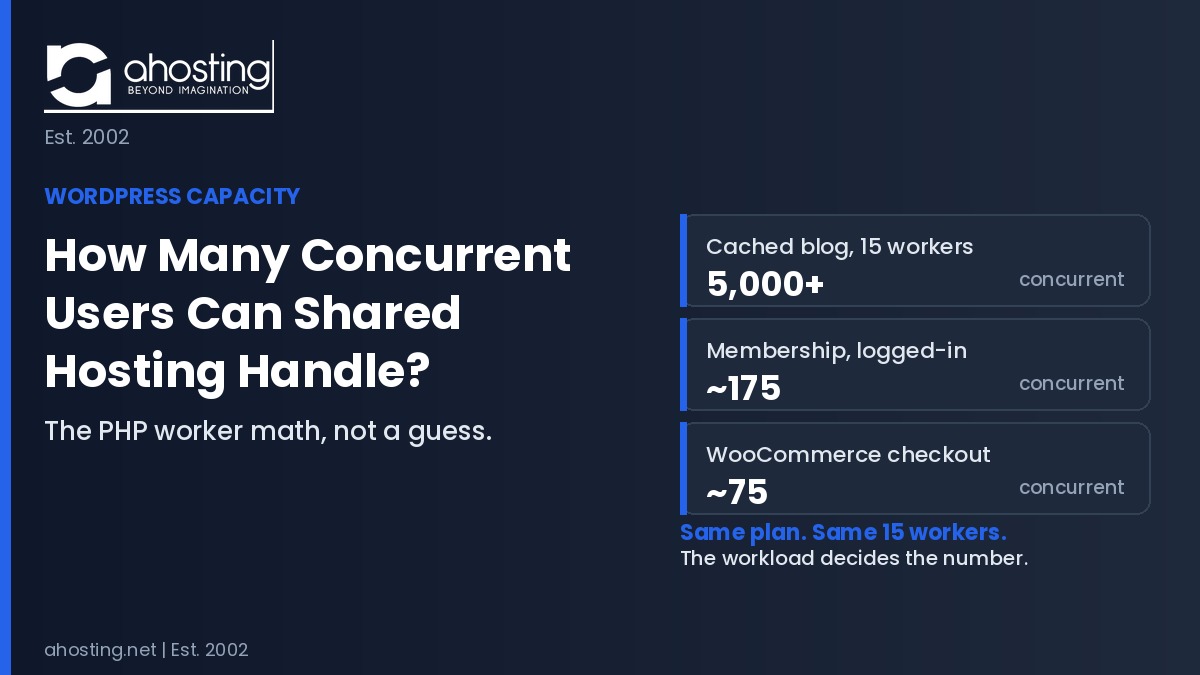
The number of WordPress concurrent users shared hosting supports is not one figure. It is your PHP worker count divided by execution time, then divided by your cache-bypass rate. A cached blog handles thousands. An uncached membership site handles about 175.
Ask how many WordPress concurrent users shared hosting can handle and you will get answers ranging from “about 50” to “up to 100,000 visitors a month” — figures that are not merely different but measuring entirely different things. The reason is that almost nobody publishes the arithmetic. They publish a number, detached from the two variables that actually determine it: how many PHP workers your plan allocates, and what fraction of your traffic reaches those workers at all.
Furthermore, the honest answer is that a single shared hosting plan can simultaneously be wildly overpowered for one site and dangerously undersized for another with identical monthly traffic. A 50,000-visit blog and a 50,000-visit membership site place demands on a server that differ by more than an order of magnitude. Consequently, “how much traffic can shared hosting handle” is the wrong question. The right one is “how many of my requests hit PHP at the same moment, and how many slots do I have.”
This guide publishes the formula, the measured inputs from AHosting’s own shared infrastructure, and a named reference table — the AHosting Concurrency Ladder — that converts worker counts into concurrent visitor capacity for six distinct WordPress workloads. Additionally, it explains why your site slows down before it errors, and which of the two available levers, caching or plan tier, actually applies to your situation.
What “WordPress Concurrent Users” Actually Means on WordPress Shared Hosting
WordPress concurrent users, in server terms, means the number of requests being processed at the same instant — not the number of people with your site open. Specifically, that distinction is the single largest source of confusion in every shared hosting capacity discussion, and getting it wrong by a factor of twenty is routine.
Sessions Versus In-Flight Requests: A 20x Difference
Consider 200 people reading your membership site. Each one loads a page, then reads it for roughly twenty seconds before clicking again. In that twenty-second window, their browser is idle and your server is doing nothing for them. Therefore, at any given instant, only a small fraction of those 200 sessions are actually executing PHP.
Specifically, if a page takes one second to generate and the reader spends twenty seconds reading it, each session occupies a worker for one second out of every twenty-one — about 4.8% of the time. Two hundred such sessions therefore produce roughly nine or ten simultaneous PHP requests on average, not two hundred. In other words, the ratio between “people on your site” and “requests in flight” is governed by think time, and it is typically between 10:1 and 30:1.
Consequently, any capacity claim that does not state which of these two things it is counting is unusable. A host advertising “supports 50 concurrent users” may mean 50 simultaneous PHP requests, which is a substantial allocation, or 50 people browsing, which is almost nothing. Both statements are technically defensible, which is precisely the problem.
What a PHP Worker Is, and Why the Count Is a Hard Ceiling
A PHP worker is a single process slot that handles exactly one uncached request from start to finish. Notably, it cannot be shared, subdivided, or timesliced — while a worker is generating a page, it is unavailable to everyone else. On CloudLinux shared hosting these slots are called entry processes, and the CloudLinux LVE documentation defines the entry process limit as the number of concurrent requests an account can handle at a given moment.
Additionally, this ceiling behaves differently from bandwidth or storage limits, which degrade gracefully. Worker exhaustion is binary: either a slot is free and your visitor is served immediately, or every slot is busy and your visitor waits. The same architecture governs traditional web servers, where the Apache MaxRequestWorkers directive sets the limit on simultaneous requests and queues connection attempts beyond it rather than rejecting them outright.
In practice, this is why plugin optimization eventually stops helping. Trimming a plugin reduces how long each worker is occupied, which genuinely increases throughput. However, it cannot create a sixteenth worker on a fifteen-worker plan. Once execution time is as low as it will go, the worker count is the ceiling, and only a plan change moves it.

The WordPress Concurrent Users Formula: Little’s Law Applied to PHP Workers
The arithmetic that converts a worker count into a visitor count is not new, and it is not specific to hosting. Specifically, it is Little’s Law, a result from queueing theory proved by MIT’s John Little in 1961, which states that the average number of items in a stable system equals the arrival rate multiplied by the average time each item spends in the system.
Concurrent Users Formula Factor 1: Requests Per Second
Written as L = λW, Little’s Law relates queue length, arrival rate, and service time. Notably, the original Little and Graves chapter emphasizes that the relationship holds regardless of how many servers exist, how arrivals are distributed, or what order items are served in — which is exactly what makes it safe to apply to a PHP worker pool.
Rearranged for our purposes, where L is your worker count and W is average PHP execution time, the sustainable arrival rate becomes workers divided by execution time. Therefore a 15-worker plan generating pages in one second sustains roughly 15 uncached requests per second. The same plan generating pages in two seconds sustains only 7.5. In other words, halving your execution time doubles your capacity without changing plan.
Concurrent Users Formula Factor 2: The Cache-Bypass Multiplier
Requests per second is not yet a visitor count, because most requests never reach PHP at all. Specifically, a cached page is served by the web server directly from memory or disk, consuming zero PHP workers. The fraction of your requests that miss cache and reach PHP is your cache-bypass rate, and it is the variable that separates a comfortable site from a struggling one.
Furthermore, bypass rate is a property of your workload, not your configuration alone. A brochure site serving identical HTML to every visitor can cache almost everything. A membership site cannot: logged-in users see personalized content, so full-page cache is bypassed on every request unless edge side includes are configured. The LiteSpeed Cache ESI documentation describes how a page can be cached publicly while private fragments are punched out and assembled separately — the one technique that recovers cacheability for logged-in traffic.
Consequently, the same 15 workers produce radically different visitor ceilings. At a 5% bypass rate, 15 requests per second of PHP capacity serves 300 page views per second of visitor demand. At a 100% bypass rate, it serves 15. That twentyfold spread, driven entirely by workload type, is why generic “shared hosting handles X visitors” claims cannot be correct for everyone.
Concurrent Users Formula Factor 3: Think Time and Burst Headroom
The final step converts page views per second into people. Multiplying by average think time — the seconds a visitor spends on a page before requesting another — turns a request rate into a session count. Typically this is 8 seconds for a checkout flow, 15 to 20 for browsing, and 30 or more for article reading.
However, sizing to the exact average is a mistake, because arrivals are bursty rather than evenly spaced. Requests cluster, and a pool running at 90% average utilization will overflow regularly. Modeling arrivals as a Poisson process shows that keeping the probability of a queue event below 1% requires holding average utilization to roughly 54% on a 15-worker pool, 62% on 25 workers, and 69% on 40 workers. Notably, larger pools tolerate higher utilization because burst variance averages out — a genuine and underappreciated advantage of the higher tiers.
Accordingly, every figure in the ladder table below is calculated at that sub-1% queue-risk threshold, not at theoretical maximum. These are numbers a site can actually sit at, not numbers it touches immediately before failing.
The AHosting Concurrency Ladder: WordPress Concurrent Users by Plan and Workload
The table below applies the formula to AHosting’s three shared WordPress tiers using verified worker allocations and measured response times from the production shared platform. Specifically, AHosting allocates 15 entry processes on Bronze, 25 on Silver, and 40 on Gold, with container memory of 512MB, 1024MB, and 2048MB respectively — worker counts most hosts decline to publish at all.
| WordPress workload | Cache bypass | Bronze 15 workers | Silver 25 workers | Gold 40 workers |
|---|---|---|---|---|
| Cached blog or brochure site | 5% | 5,000+ | 9,500+ | 17,000+ |
| Content site with search and comments | 15% | 1,000+ | 2,000+ | 4,000+ |
| WooCommerce catalog browsing | 40% | ~325 | ~625 | 1,000+ |
| LMS or course portal | 60% | ~275 | ~550 | ~975 |
| Membership site, logged-in | 100% | ~175 | ~325 | ~575 |
| WooCommerce checkout | 100% | ~75 | ~150 | ~250 |
Read the table by workload row first, then plan column. Notably, the spread within a single column is the point: Bronze supports over 5,000 concurrent readers of a cached blog and about 75 simultaneous checkouts. Both figures come from the same 15 workers. Only the bypass rate differs.
Furthermore, these figures explain a pattern support teams see constantly. A store owner whose catalog pages are fast cannot understand why checkout stalls during a promotion. The catalog is cached and the checkout is not, so a traffic surge that the browsing tier absorbs easily lands entirely on the workers. Consequently the failure appears at the exact moment revenue depends on it.
For context on scale, WordPress remains the dominant platform in this space — the 2025 Web Almanac CMS chapter reports it powering more than 60% of CMS-driven sites, with self-hosted installations showing far wider performance variance than managed platforms. That variance is largely the gap between sites that have done this arithmetic and sites that have not. Consequently, reading your own workload row against your current tier is the fastest way to know which group you are in.
Why Your Site Slows Down Before It Shows an Error
Exceeding your worker count does not produce an immediate error page. Specifically, CloudLinux queues excess requests rather than rejecting them, holding each one until a worker frees up. That queue is why performance degrades gradually rather than failing cleanly, and why the problem is so often misdiagnosed as a plugin issue.
On AHosting’s shared platform the queue drain window is 120 seconds, set by the LiteSpeed connection timeout. Therefore a request arriving when all workers are busy waits — potentially for a long time — and that wait is added directly to the visitor’s page load. Only if no worker frees within that window does the server return a 503 Service Unavailable response, which signals that the server is temporarily unable to handle the request.
Consequently there are three distinct states, and recognizing which one you are in determines the fix. Below the worker limit, pages are instant. At the limit with the queue draining, pages are slow but nothing errors — this is the state most sites live in without realizing it. Beyond the drain window, visitors receive 503s. Additionally, cached pages never enter this sequence at all, because they are served before PHP is ever invoked.
In practice, the diagnostic value here is considerable. Intermittent slowness that correlates with traffic peaks, affects logged-in pages more than public ones, and disappears at quiet hours is not a plugin problem. It is worker queueing, and no amount of image optimization will touch it. Our guide to WordPress PHP workers and 503 errors covers the error-state diagnosis in depth, while the 508 resource limit guide addresses what happens when the entry process ceiling is hit directly.
How to Measure Your Real WordPress Concurrent Users
Reading the ladder table requires knowing your actual peak concurrency, which is not a number most site owners have. Fortunately, it can be derived from data you already collect, using the same law in reverse.
First Step: Derive Peak Concurrency From Analytics
Open your analytics and find page views in your single busiest hour, not your daily average. Specifically, divide that figure by 3,600 to get average page views per second, then multiply by three to approximate the within-hour peak, since traffic inside any hour is uneven. That result is your peak page views per second.
Multiply by your average think time to convert into concurrent sessions. As a worked example, a site with 9,000 views in its peak hour averages 2.5 views per second, peaks near 7.5, and at 20 seconds of think time carries roughly 150 concurrent sessions. That is the number to compare against the ladder.
Second Step: Find Your Actual Cache-Bypass Rate
Bypass rate is measurable rather than estimated. Load a public page in a logged-out browser and inspect the response headers for the LiteSpeed cache status — a hit means that request consumed no PHP worker. Then repeat while logged in. Notably, most WordPress sites show a hit for anonymous visitors and a miss for authenticated ones, which confirms the pattern the ladder assumes.
Additionally, calculate the proportion of your traffic that is authenticated, cart-bearing, or search-driven, since those requests are your true bypass population. A blog where 2% of sessions log in has a bypass rate near 5%. A membership site where 80% of sessions are authenticated is closer to 85%. Consequently, that percentage, not your total traffic, is what determines your tier.
Third Step: Reduce Execution Time to Buy Capacity
Because execution time sits in the denominator, halving it doubles capacity at no cost. Specifically, the highest-yield target is repeated database work: WordPress issues dozens of queries per uncached page load, and the same expensive queries frequently run on every request.
The WordPress Transients API provides the native mechanism for storing the result of an expensive query with an expiration, so it runs once rather than continuously. Furthermore, a persistent object cache extends that principle across requests entirely — Redis data structures hold query results in memory so repeated lookups never reach the database. Together these two changes routinely cut execution time by a third or more on plugin-heavy sites.
WordPress Concurrent Users Capacity Calculator
Enter your workload type and peak traffic below to see the plan tier your concurrency actually requires. The calculator applies the same formula and the same sub-1% queue-risk threshold used to build the ladder table.
WordPress Concurrent Users Capacity Calculator
Three inputs. Returns the plan tier your peak concurrency actually needs.
Caching Versus Upgrading: Which Lever Applies to You
Two levers raise concurrency: lowering your cache-bypass rate, or raising your worker count. Specifically, they are not interchangeable, and applying the wrong one is the most common and most expensive capacity mistake.
For cacheable traffic, caching wins decisively on cost. Moving a blog from no full-page cache to server-level caching drops its bypass rate from 100% to roughly 5%, multiplying effective capacity about twentyfold — a gain no single plan upgrade can match, since Bronze to Gold is a 2.7x change in workers. Therefore a content site struggling under load should exhaust caching before considering a tier change.
However, caching cannot touch traffic that is inherently uncacheable. Checkout pages carry live cart state, payment tokens, and inventory writes. Logged-in member pages carry personalized content. Consequently no cache configuration reduces their bypass rate below 100%, and for those workloads the worker count is the only variable left. Additionally, this is why a store can be simultaneously over-provisioned for browsing and under-provisioned for checkout. AHosting’s WooCommerce hosting plans are allocated at Silver-level concurrency for exactly this reason.
In practice the sequence is: cache everything cacheable, reduce execution time with object caching, then size the tier against whatever uncacheable peak remains. Notably, most sites that believe they need a VPS discover after the first two steps that they need Silver.
When the Math Genuinely Says VPS
The ladder has a top rung, and some sites sit above it. Specifically, when your uncacheable peak exceeds the Gold figure for your workload, no configuration change on shared hosting will close the gap, because the worker allocation is fixed by plan and cannot be raised in isolation.
Three situations put a site there. A membership platform sustaining more than roughly 575 concurrent logged-in sessions has exhausted Gold. A store regularly exceeding about 250 simultaneous checkouts has done the same. Additionally, any site needing direct control over worker counts, object cache configuration, or per-site PHP tuning has hit an architectural limit rather than a numerical one. On a VPS you set pm.max_children yourself against your own RAM, so capacity becomes a resource question rather than a plan question — VPS hosting exists precisely for that transition.
Furthermore, sites whose uncacheable concurrency runs into the thousands eventually exceed a single VPS as well, at which point single-tenant hardware becomes the right answer. Our guide to the seven signs a WordPress site has outgrown shared hosting covers the qualitative symptoms that accompany these numbers, and a dedicated server removes resource contention entirely for workloads at that scale.
Consequently the decision is arithmetic rather than instinct. Measure your peak concurrency, identify your bypass rate, compare against the ladder, and the correct rung is unambiguous. Sites that skip this step routinely upgrade two tiers past what they need, or stay one tier below it while blaming their plugins.
A Practical Checklist: Sizing WordPress Concurrent Users on Shared Hosting
Work through these in order. Notably, the sequence matters — steps one through four are free and frequently remove the need for step six entirely.
- Pull page views from your single busiest hour, not your daily or monthly average
- Divide by 3,600 and multiply by three to estimate peak page views per second
- Multiply by average think time to convert that rate into concurrent visitors
- Check cache headers logged out and logged in to establish your real bypass rate
- Locate your workload row in the AHosting Concurrency Ladder and read across to your tier
- If you are above your tier’s figure, enable full-page caching before changing plans
- Add a persistent object cache to cut execution time on whatever remains uncacheable
- Re-measure after both changes, since capacity often doubles without a plan change
- Only if the remaining uncacheable peak still exceeds Gold does the arithmetic point to VPS
Additionally, re-run this whenever your traffic pattern changes materially — adding a membership tier, launching a store, or gating content all raise your bypass rate sharply even when total traffic is flat. In practice, that shift, not traffic growth, is what pushes most sites past their ceiling. Server-level caching behavior is covered further in our guide to LiteSpeed server-level caching.
Frequently Asked Questions: WordPress Concurrent Users on Shared Hosting
How many concurrent users can WordPress shared hosting handle in 2026?
Specifically, a cached WordPress blog on a 15-worker shared plan handles roughly 5,000 concurrent visitors, while an uncached membership site on the same plan handles about 175. The number is not one figure. It depends on how many of your requests bypass cache and reach PHP, which is why two sites with identical traffic can need completely different plans. The AHosting Concurrency Ladder table above gives the figure for six workload types across all three tiers.
What is the formula for calculating WordPress concurrent users on shared hosting?
Specifically, the formula is concurrent visitors = (PHP workers divided by average PHP execution time) divided by your cache-bypass rate, then multiplied by average think time. This applies Little’s Law from queueing theory to PHP worker pools. Furthermore, sizing to the raw result is unsafe because arrivals are bursty, so every figure in the ladder table is calculated at a utilization level that keeps queue events below one percent.
AHosting shared hosting vs VPS in 2026: what changes for WordPress concurrent users?
Fundamentally, shared hosting gives you a fixed worker allocation set by your plan, while VPS lets you configure the worker count yourself against your own RAM and CPU. On AHosting shared plans the ceiling is 15, 25, or 40 entry processes depending on tier. On VPS you set pm.max_children directly. Consequently the practical difference is that shared hosting has a hard ceiling you cannot raise without upgrading, and VPS has a ceiling you control.
Why does my WordPress site slow down before it shows a 503 error?
Notably, CloudLinux queues excess requests rather than rejecting them instantly. When every PHP worker is busy, new requests wait for a free slot, and that wait time is added directly to your page load, so visitors experience slowness first. Only when a request cannot be served inside the 120-second connection window does the server return a 503. That queue window is the reason slowness always precedes errors, and it is why traffic-correlated slowness is a capacity signal rather than a plugin problem.
How many PHP workers does a WooCommerce store need for 100 concurrent shoppers?
Typically, 100 concurrent WooCommerce shoppers browsing a cached catalog need roughly 7 to 10 workers, but 100 concurrent shoppers at checkout need far more because checkout cannot be cached at all. In practice the distinction matters more than the visitor count: browsing traffic mostly hits cache, while checkout traffic hits PHP on every single request. The ladder table separates these two workloads deliberately, and the gap between the two rows is where most store outages originate.
What cache-bypass rate should I assume for a WordPress membership site in 2026?
Generally, assume a 100 percent cache-bypass rate for logged-in membership traffic unless you have configured edge side includes. Logged-in users receive personalized content, so full-page cache cannot serve them. Consequently a membership site with 500 registered members can need more server capacity than a blog with 50,000 monthly readers, because registered members are a marketing number while concurrent logged-in sessions are a server specification.
How do AHosting Bronze, Silver, and Gold plans differ in concurrent user capacity?
Specifically, AHosting allocates 15 entry processes on Bronze, 25 on Silver, and 40 on Gold, with container memory rising from 512MB to 1024MB to 2048MB alongside. Because higher tiers raise memory and CPU together with worker count, the added workers have real resources behind them rather than being a headline number. Additionally, larger pools absorb traffic bursts more efficiently, so Gold handles roughly 2.7 times the simultaneous PHP load of Bronze.
Is it better to add caching or upgrade my AHosting plan for more concurrent users?
Indeed, caching almost always delivers more capacity per dollar than a plan upgrade for content sites. Moving a blog from no cache to full-page caching can cut its bypass rate from 100 percent to about 5 percent, which multiplies effective concurrency roughly twentyfold, while Bronze to Gold is only a 2.7 times change. However, caching cannot help traffic that is inherently uncacheable, such as checkout and logged-in sessions, so for those workloads the plan tier is the only lever available.
What is the AHosting Concurrency Ladder and how do I use it?
Specifically, the AHosting Concurrency Ladder is a published table mapping six WordPress workload types to the concurrent visitor capacity of each plan tier, calculated from measured worker counts and response times rather than marketing estimates. To use it, identify your workload row, read across to your current tier, and compare that figure to your real peak concurrency from analytics. Notably, most hosts decline to publish worker counts at all, which makes this arithmetic impossible to perform anywhere else.
When should I upgrade from shared hosting to VPS based on concurrency numbers?
Generally, upgrade to VPS when your measured peak concurrency exceeds the Gold tier figure for your workload type, or when you need to configure worker counts and object caching directly. Before that point, moving up the Bronze to Silver to Gold ladder is cheaper and requires no migration. Furthermore, the calculator above identifies which of those two situations you are in, and sites that run it frequently discover that caching changes remove the need for any upgrade at all.
Related posts:
 Why Raising the WordPress Memory Limit Doesn’t Work on Shared Hosting (and What Does)
 7 Signs Your WordPress Site Has Outgrown Shared Hosting (Is It Time for WordPress VPS Hosting?)
 What’s The Difference Between Reseller And Shared Hosting?
 WordPress 503 Errors Explained: How Many WordPress PHP Workers Your Site Actually Needs (2026)