- What REST API User Enumeration Exposes on a WordPress Site in 2026
- Why Your Scanner Reports a 2017 CVE on a Patched WordPress 7.0 Site
- The Four Doors That Leak Author Slugs Before You Stop REST API User Enumeration
- How to Stop REST API User Enumeration Without Breaking the Block Editor
- Blast Radius: What Each Way to Stop REST API User Enumeration Breaks
- WordPress 7.0 Changed the Cost of Blocking REST Traffic Site-Wide
- Check Your Own Exposure Before You Stop REST API User Enumeration
- Where Hosting Sits: Server-Level Context on AHosting WordPress Hosting
- A Checklist to Stop REST API User Enumeration and Keep It Closed
- Frequently Asked Questions: Stop REST API User Enumeration
- How do I turn off the REST API in WordPress without breaking Gutenberg in 2026?
- rest_endpoints vs rest_authentication_errors: which filter should I use to stop REST API user enumeration?
- Does WordPress 7.0 expose more user data through the wp-abilities/v1 namespace in 2026?
- Should I stop REST API user enumeration on an AHosting reseller account hosting 30 client sites?
- Why does my security scanner still report CVE-2017-5487 on a fully patched WordPress 7.0 site?
- Author archive redirect vs REST endpoint restriction: which closes more username exposure?
- Can an mu-plugin stop REST API user enumeration on AHosting WordPress hosting in 2026?
- What happens if I stop REST API user enumeration on a headless WordPress site using the users endpoint?
- What is the AHosting Username Exposure Matrix and which four vectors does it cover?
- Does a dedicated IP address help stop REST API user enumeration attempts before they reach WordPress?
To stop REST API user enumeration, gate the users routes by capability in an mu-plugin, then close the author redirect, the users sitemap, and the oEmbed author fields. Verify all four while logged out.
You can stop REST API user enumeration on a WordPress site in about ten minutes. The complication is that most of the code circulating for this job either breaks the block editor or, since WordPress 7.0, quietly disables a surface you may not know you are running.
This guide separates the four routes that publish author information, gives one mu-plugin that closes all of them, and shows what each competing method to stop REST API user enumeration actually costs you. Notably, it also explains why a clean vulnerability scan is not what you are aiming for here.
What REST API User Enumeration Exposes on a WordPress Site in 2026
Before you can stop REST API user enumeration you need to know what it discloses, and the honest answer is narrower than most guides claim. Enumeration is reconnaissance, not intrusion. A request to the users collection returns every account that has authored a published post in a post type that opts into REST, and the response carries an ID, a display name, an author slug, an avatar URL, and a link to the author archive.
Precision matters here, because most write-ups overstate it. The public response exposes the author slug, stored as user_nicename, and not the login name. Per the REST API users reference, the login name appears only in the authenticated edit context. However, WordPress seeds the slug from the login name when an account is created, so unless someone deliberately changed it afterwards the two match. On the majority of installations, therefore, the slug is the login name in practice.
That distinction decides how seriously to treat the finding. Half of a login pair is not a breach, but it is a permanent advantage handed to whoever asks. The OWASP Web Security Testing Guide entry on account enumeration classifies this as an identity-management weakness precisely because it converts blind guessing into targeted guessing. Furthermore, the NIST guidance on memorized secrets in SP 800-63B assumes the password carries the authentication weight, which is exactly the assumption that weakens when the other half is published.

Why Your Scanner Reports a 2017 CVE on a Patched WordPress 7.0 Site
If a vulnerability scan flagged this and sent you here, read this section before you change anything. The finding is usually a misattribution rather than an unpatched core.
CVE-2017-5487 describes a flaw in WordPress 4.7 that was fixed in 4.7.1 in January 2017. In 4.7.0 the users endpoint returned authors of any public post type. The 4.7.1 release narrowed that to post types which explicitly declare they should appear in REST, which is the behavior every modern release ships.
Consequently, what a scanner detects on WordPress 7.0 today is the remaining intended behavior, not the old defect. Several scanner templates map any reachable users route to that 2017 identifier, and at least one open-source template project has removed the CVE tag for this reason. In practice you should treat the alert as a configuration decision with a real security rationale, and never as evidence that core is out of date. The difference matters when you are reporting to a client, because promising to patch a CVE that was fixed nine years ago is a promise you cannot keep.
The Four Doors That Leak Author Slugs Before You Stop REST API User Enumeration
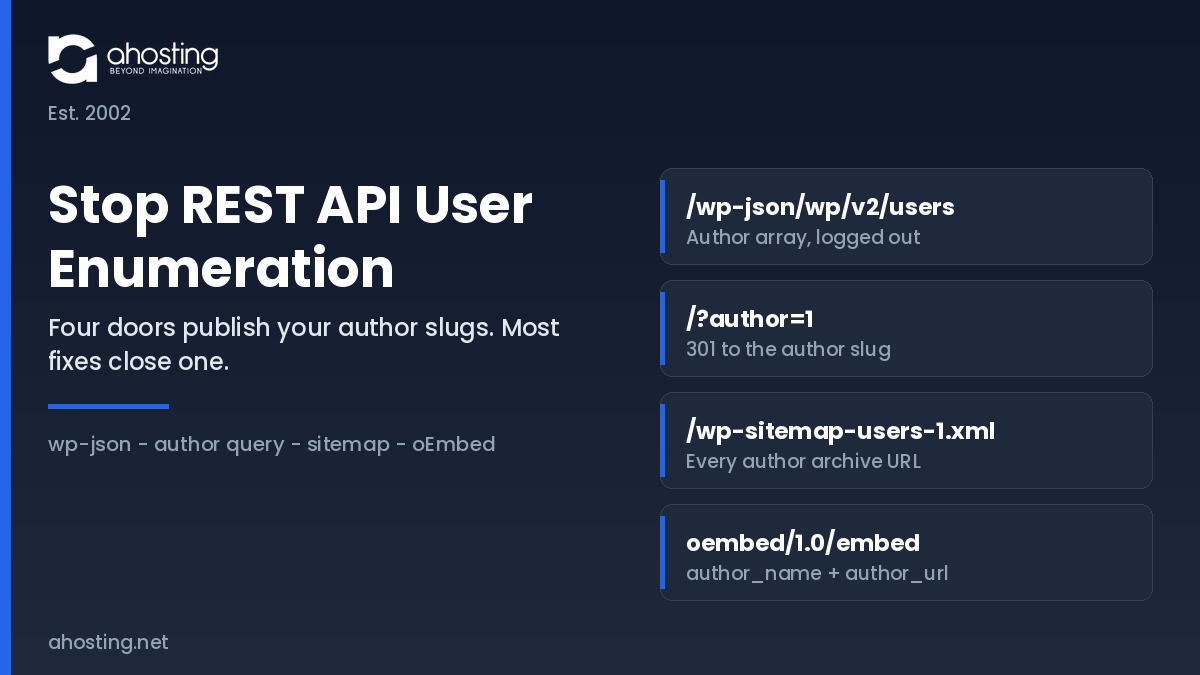
The REST route is the one scanners probe first, which is why it collects the attention. It is not the only one. Three further core features publish the same author slugs by different means, and closing the REST route alone simply moves the collection to whichever door is still open.
| Door | Anonymous request | What it returns | Closed by | Open after a REST-only fix |
|---|---|---|---|---|
| 1. REST users routes | /wp-json/wp/v2/users | ID, display name, author slug, avatar, archive link | Capability gate via rest_endpoints | No |
| 2. Author query redirect | /?author=1 | A 301 to /author/slug/, printing the slug in the URL | template_redirect guard or a rewrite rule | Yes |
| 3. Core users sitemap | /wp-sitemap-users-1.xml | Every author archive URL on the site | wp_sitemaps_add_provider filter | Yes |
| 4. oEmbed endpoint | /wp-json/oembed/1.0/embed?url= | author_name and author_url for any public post | oembed_response_data filter | Yes |
The users sitemap is the one that surprises people, because it arrived quietly with automatic sitemaps in WordPress 5.5 and is enabled by default. Agencies feel the combined effect hardest. An account running many client installations publishes a separate author list per domain, so reseller hosting environments need the same four fixes deployed uniformly rather than site by site.
How to Stop REST API User Enumeration Without Breaking the Block Editor
To stop REST API user enumeration without breaking anything, restrict the two users routes behind a capability check rather than removing them, and close the other three doors in the same file.
Deliver all four fixes as a single must-use plugin. Create wp-content/mu-plugins if it does not exist, then upload one PHP file. Files there load automatically, cannot be deactivated from the dashboard, and survive theme switches and core updates, which is where the usual functions.php advice fails.
First, Gate the Users Routes by Capability
The rest_endpoints filter edits the route table before dispatch. Rather than unsetting the routes, replace the permission callback so the routes still exist but answer only to a request that can list users.
<?php
/* Plugin Name: AHosting Author Slug Hardening */

add_filter( 'rest_endpoints', function ( $endpoints ) {
    $routes = array( '/wp/v2/users', '/wp/v2/users/(?P<id>[\d]+)' );
    foreach ( $routes as $route ) {
        if ( ! isset( $endpoints[ $route ] ) ) {
            continue;
        }
        foreach ( $endpoints[ $route ] as $i => $handler ) {
            if ( ! isset( $handler['methods'] ) ) {
                continue;
            }
            if ( false === strpos( $handler['methods'], 'GET' ) ) {
                continue;
            }
            $endpoints[ $route ][ $i ]['permission_callback'] = function () {
                return current_user_can( 'list_users' );
            };
        }
    }
    return $endpoints;
} );
An anonymous request now receives a 401 while an editor session continues to populate the author dropdown. By contrast, the widely copied unset approach deletes the route for everyone, including administrators.
Next, Close the Author Archive Redirect
The numeric author query is the oldest vector and predates REST entirely. Catch it early and send the visitor to the homepage.
add_action( 'template_redirect', function () {
    if ( is_admin() ) {
        return;
    }
    if ( ! isset( $_GET['author'] ) ) {
        return;
    }
    wp_safe_redirect( home_url( '/' ), 301 );
    exit;
} );
Sites that genuinely publish author archives for readers should skip this one and accept the exposure knowingly. That is a legitimate editorial trade-off rather than an oversight.
Then, Drop the Users Sitemap Provider
Core registers a users provider inside its automatic sitemap index. Returning false for that provider removes the file and its index entry together.
add_filter( 'wp_sitemaps_add_provider', function ( $provider, $name ) {
    if ( 'users' === $name ) {
        return false;
    }
    return $provider;
}, 10, 2 );
Verify afterwards that the sitemap index no longer references the users file, because a cached index will keep advertising a path that now returns a 404.
Finally, Strip Author Fields From oEmbed
The embed endpoint answers for any public post URL and includes the author name and archive link in its response.
add_filter( 'oembed_response_data', function ( $data ) {
    unset( $data['author_name'] );
    unset( $data['author_url'] );
    return $data;
} );
Embedding your posts elsewhere continues to work; the embed card simply loses its byline. Additionally, if you never want other sites discovering embeds at all, remove the discovery links from the document head as a separate decision.
Blast Radius: What Each Way to Stop REST API User Enumeration Breaks
Three methods circulate for this problem and they are not interchangeable. The table below scores each against the surfaces a live site actually depends on, which is the comparison the published snippets leave out.
| Surface | Unset the routes | Block all anonymous REST | Capability gate (recommended) |
|---|---|---|---|
| Anonymous users route | Blocked (404) | Blocked (401) | Blocked (401) |
| Block editor author dropdown | Broken | Works | Works |
| WooCommerce admin REST calls | Works | Works | Works |
| wp-abilities/v1 discovery (7.0) | Works | Broken | Works |
| Headless front end author data | Broken | Broken | Broken unless exempted |
| Other three enumeration doors | Still open | Still open | Still open |
| Site Health REST loopback | Works | Fails | Works |
Two rows deserve emphasis, and both explain why teams that stop REST API user enumeration once still report breakage weeks later. Unsetting the routes removes them for authenticated administrators too, which is why sites that apply it report a broken author dropdown days later without connecting the two events. A site-wide anonymous block, applied through the rest_authentication_errors filter, is heavier still. Stores feel that second one first, since WooCommerce hosting environments run several integrations that assume REST answers predictably.
The final row is the point of the whole exercise. Every method closes exactly one of the four doors, so no row in this table represents a finished job on its own.
WordPress 7.0 Changed the Cost of Blocking REST Traffic Site-Wide
The blunt fix got more expensive in 2026, and the reason is a namespace most site owners have never opened.
The Abilities API arrived in WordPress 6.9 as a registry that lets plugins, themes, and core declare named capabilities with input and output schemas and permission rules. WordPress 7.0, released in May 2026, shipped its JavaScript client counterpart along with REST endpoints under the wp-abilities/v1 namespace, and core itself registers a small initial set covering site, environment, and current-user information. WordPress 7.1 extends how those abilities are discovered and filtered through the same REST collection.
Those routes run their own permission callbacks, so they are not an anonymous disclosure problem. The consequence is the opposite one. A filter that returns an error for every unauthenticated REST request now takes down agent and AI-client discovery as a side effect, on a site whose owner was only trying to hide four usernames. Sites already reviewing what the 7.0 release turned on will find the same reasoning in our guide to disabling the WordPress AI features introduced in 7.0.
Scoping the fix to the users routes avoids the trade entirely, which is why the capability gate is the recommendation here rather than a compromise.
Check Your Own Exposure Before You Stop REST API User Enumeration
Run the four checks below in a private browsing window, logged out, before and after you deploy the file. The checker records which doors are open and interprets the combination.
Username Exposure Checker
Answer for the site you are auditing. Each answer describes what an anonymous visitor gets today, not what you intend to configure.
Test while logged out without exception. An administrator session passes the capability check, so a logged-in test returns author data on a correctly hardened site and reads as a failure.
Where Hosting Sits: Server-Level Context on AHosting WordPress Hosting
Enumeration is an application-layer disclosure, so no hosting plan closes it for you. The server layer still governs what the probing costs while it happens.
These routes are never served from cache. A cached page consumes no PHP worker at all, but a REST request and an author redirect both reach PHP, and each concurrent request occupies one entry process. AHosting allocates entry processes by tier, at 15 on Bronze, 25 on Silver, and 40 on Gold. A scripted sweep across a numeric ID range is therefore a small, sustained draw on the same pool your visitors use. When that pool saturates, CloudLinux queues requests rather than rejecting them instantly, and the LiteSpeed connection timeout of 120 seconds is the window before a queued request is answered with a 503. Our guide to the entry-process ceiling behind resource-limit errors covers that mechanism in full.
What It Costs to Leave REST API User Enumeration Open
Reconnaissance is also the first half of a longer sequence. A collected username list feeds the login and endpoint floods described in our guide to stopping an XML-RPC bot flood, and the server-side controls in our overview of WordPress hosting security below the plugin layer are what absorb the second half. Sites where sustained bot traffic competes with real visitors for the same worker pool are the usual candidates for moving to a VPS with a worker pool you size yourself, or for dedicated hardware once shared infrastructure is genuinely outgrown.
One deployment note specific to shared accounts. Upload the file rather than pasting into a theme editor, and if a syntax error takes the site down, the recovery path is in our guide to the WordPress white screen of death. Every AHosting WordPress plan also ships a free dedicated IP and CloudLinux CageFS isolation, which govern reputation and containment rather than disclosure.
A Checklist to Stop REST API User Enumeration and Keep It Closed
Work through this once at deployment, then re-run the verification half after any migration, restore, or theme change. The steps that stop REST API user enumeration are code; the steps that keep it stopped are habit.
- Create wp-content/mu-plugins and upload a single hardening file rather than editing a theme.
- Gate the two users routes by capability instead of unsetting them.
- Redirect the numeric author query, unless author archives are deliberately public.
- Remove the users provider from the automatic sitemap and confirm the index no longer lists it.
- Strip author_name and author_url from the oEmbed response.
- Verify all four routes from a logged-out private window, never from an admin session.
- Confirm the block editor author dropdown still populates after deployment.
- Change the author slug on any account where it still equals the login name.
- Re-test after every restore, because three of these fixes live in a file a rollback can remove.
- Record the scan finding as a reviewed configuration decision rather than an open vulnerability.
Above all, treat the slug change as the step that outlasts the rest. Fixing the routes hides the mapping, whereas breaking the link between slug and login name removes the value of the mapping even if a future change reopens a door.
Frequently Asked Questions: Stop REST API User Enumeration
How do I turn off the REST API in WordPress without breaking Gutenberg in 2026?
Specifically, do not turn the whole REST API off. Gate only the two users routes behind a capability check with the rest_endpoints filter, which leaves every other route reachable. Gutenberg, WooCommerce admin screens, and the WordPress 7.0 ability endpoints all keep working because their requests carry an authenticated session. A site-wide authentication block is the version of this fix that breaks the editor, and the blast-radius table earlier in this guide shows exactly which six surfaces it takes down.
rest_endpoints vs rest_authentication_errors: which filter should I use to stop REST API user enumeration?
Therefore the answer depends on scope. The rest_endpoints filter edits the route table itself, so it can target the users collection and single-user routes and leave everything else alone. The rest_authentication_errors filter sits in front of every route at once, which makes it a blunt instrument for this job. Use rest_endpoints with a permission callback for enumeration, and reserve rest_authentication_errors for genuinely private installations where no route should answer an anonymous request.
Does WordPress 7.0 expose more user data through the wp-abilities/v1 namespace in 2026?
Notably, it adds a second REST namespace rather than more public user data. WordPress 6.9 introduced the Abilities API and WordPress 7.0 shipped its JavaScript client, registering a small core set covering site, environment, and current-user information under wp-abilities/v1. Those abilities run permission callbacks of their own, so they are not an anonymous disclosure route. The practical consequence is different: a blanket authentication block now silently disables agent and AI-client discovery as well.
Should I stop REST API user enumeration on an AHosting reseller account hosting 30 client sites?
Ultimately yes, and the reseller case is the strongest one. Every client site under a reseller account publishes its own author list, so a single scripted pass across 30 domains returns 30 username sets from one afternoon of work. Deploy the same mu-plugin file to each account rather than editing 30 themes, because a theme switch on any one site silently reopens the door. The exposure matrix in this guide lists the four vectors each deployment has to close.
Why does my security scanner still report CVE-2017-5487 on a fully patched WordPress 7.0 site?
In fact, that finding is almost always a misattribution. CVE-2017-5487 was fixed in WordPress 4.7.1 in January 2017, which narrowed the users endpoint to authors of post types that opt into REST. What your scanner detects today is the remaining intended behavior, not the unpatched flaw, and several scanner templates simply map any reachable users route to the old identifier. Treat it as a configuration finding to decide on, never as evidence of an unpatched core.
Author archive redirect vs REST endpoint restriction: which closes more username exposure?
By contrast with the common assumption, neither one closes the exposure alone. The REST restriction shuts the route most scanners probe first, while the author redirect shuts the oldest vector, the numeric author query that resolves to a slug in the URL. Two further doors stay open behind both of them, namely the core users sitemap and the oEmbed response. Closing any single door moves the attacker to the next one rather than stopping the collection.
Can an mu-plugin stop REST API user enumeration on AHosting WordPress hosting in 2026?
Fortunately yes, and an mu-plugin is the right delivery method on any cPanel account. Files placed in wp-content/mu-plugins load automatically, cannot be deactivated from the dashboard, and survive both theme changes and core updates, which is where functions.php edits usually fail. Create the directory through the cPanel File Manager if it does not exist yet, then upload a single PHP file containing all four fixes. No support ticket and no server-level change is required.
What happens if I stop REST API user enumeration on a headless WordPress site using the users endpoint?
Consequently, a headless front end that renders author bylines from the users route will start receiving empty responses. Handle it by exempting a specific application password or by embedding author data in the posts response with the _embed parameter instead of a separate users call. Test the front end against a staging copy before deploying, because the failure is a missing byline rather than a visible error, and that is easy to ship without noticing.
What is the AHosting Username Exposure Matrix and which four vectors does it cover?
Similarly to a pre-flight checklist, it is a four-row reference that maps every core route that publishes an author slug against the fix that closes it. The four vectors are the REST users routes, the numeric author query redirect, the core users sitemap added in WordPress 5.5, and the oEmbed embed endpoint. Each row also records what remains reachable if you close only the REST route, which is the mistake most published guides encourage.
Does a dedicated IP address help stop REST API user enumeration attempts before they reach WordPress?
Interestingly, a dedicated IP changes reputation rather than reachability. Enumeration probes target your domain, so they arrive whichever address answers, and the request still reaches PHP because these routes are never served from cache. What a dedicated IP does change is that your address carries no other tenant's history, so firewall reputation decisions about your traffic reflect only your own site. Isolation and the application-layer fix solve different halves of the problem.