- What ERR_TOO_MANY_REDIRECTS Means in WordPress
- Read the ERR_TOO_MANY_REDIRECTS Chain With curl Before You Change Anything
- Cause 1: A Force-HTTPS Rule Behind a Proxy Causes ERR_TOO_MANY_REDIRECTS
- Cause 2: FORCE_SSL_ADMIN Produces an ERR_TOO_MANY_REDIRECTS Loop on wp-admin Only
- Cause 3: A www and Non-www Fight Creates an ERR_TOO_MANY_REDIRECTS Loop
- Cause 4: Two HTTPS Rules Cause the Last ERR_TOO_MANY_REDIRECTS Pattern
- What Our ERR_TOO_MANY_REDIRECTS Lab Measured
- A Five-Step ERR_TOO_MANY_REDIRECTS Fix Order That Avoids Guessing
- What to Record Before You Ask for Help With ERR_TOO_MANY_REDIRECTS
- When ERR_TOO_MANY_REDIRECTS Points at Something You Cannot Edit
- Frequently Asked Questions: ERR_TOO_MANY_REDIRECTS in WordPress
- How do I fix ERR_TOO_MANY_REDIRECTS on a WordPress site?
- Why does ERR_TOO_MANY_REDIRECTS appear only on wp-admin and the login page in 2026?
- Does a 301 vs 302 status matter when debugging an ERR_TOO_MANY_REDIRECTS loop?
- Should an .htaccess rule vs the WordPress address setting force HTTPS in 2026 without an ERR_TOO_MANY_REDIRECTS loop?
- Will moving to AHosting stop an ERR_TOO_MANY_REDIRECTS loop that started on my old host?
- What should I send AHosting support for an ERR_TOO_MANY_REDIRECTS loop in 2026?
- Can page caching on AHosting hide or cause an ERR_TOO_MANY_REDIRECTS loop in wp-admin?
- How many redirects does a browser follow before showing ERR_TOO_MANY_REDIRECTS?
- Why does ERR_TOO_MANY_REDIRECTS appear after I set www as the preferred domain?
- Can HSTS keep an ERR_TOO_MANY_REDIRECTS loop alive after I fix the server in 2026?
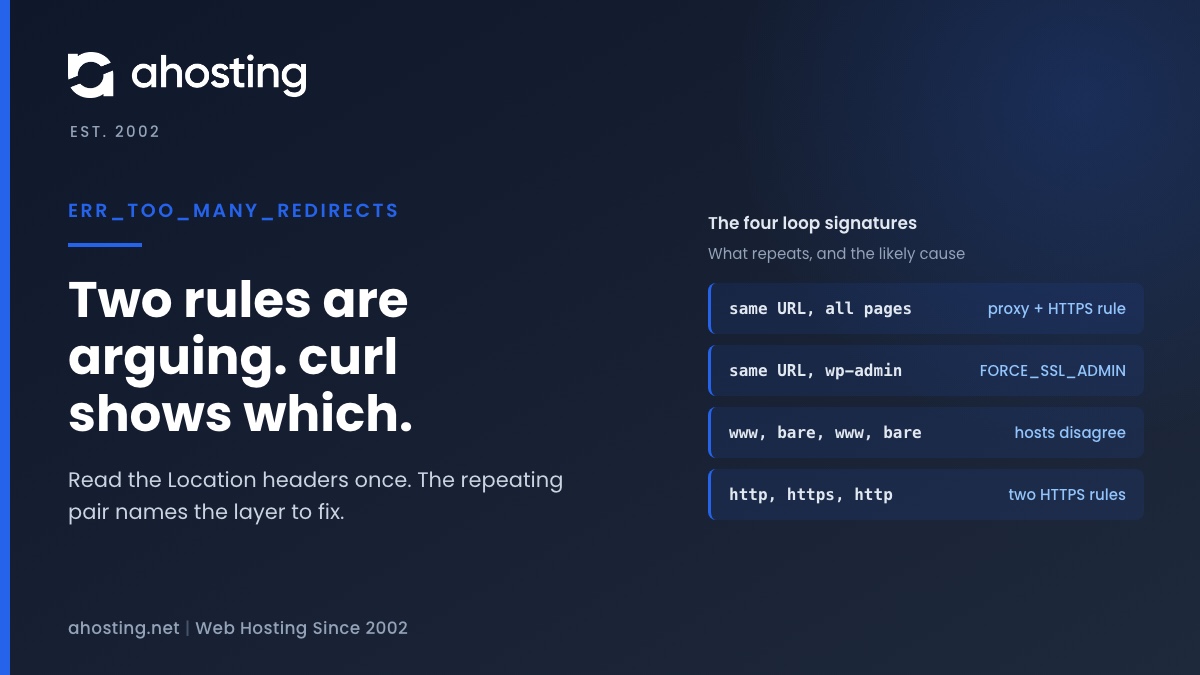
ERR_TOO_MANY_REDIRECTS means two layers keep sending the browser to each other. Run curl -sIL once, read the Location headers, and the repeating pair names the layer to fix.
What ERR_TOO_MANY_REDIRECTS Means in WordPress
ERR_TOO_MANY_REDIRECTS is the browser telling you that a request was redirected, and the redirect was redirected, and so on until it gave up. The message is not a WordPress error. WordPress is one of the two parties in the argument, and finding the other party is the whole job.
The give-up point is a published number. The Fetch standard says that when a request’s redirect count reaches 20 the browser returns a network error (Fetch standard, HTTP-redirect fetch), and Chromium sets its own limit to 20 (Chromium url_request.h).
Why the ERR_TOO_MANY_REDIRECTS Loop Is Rarely a WordPress Bug
A loop needs two rules that each think they are right. One says the canonical address is HTTPS, the other cannot tell that the visitor already arrived over HTTPS. Or one says www, and another says non-www. WordPress ships with parts of both rules, which is why the loop looks like a WordPress problem, but the second rule is almost always something you or a layer in front of the site added.

Read the ERR_TOO_MANY_REDIRECTS Chain With curl Before You Change Anything
Do not start by disabling plugins. Start by looking at the chain, because the chain tells you which of four causes you have. In a terminal, run curl -sIL --max-redirs 5 https://example.com/wp-admin/, replacing the address with the failing one. The -I flag asks for headers only, -L follows redirects, and --max-redirs 5 stops the output after five hops so you can read it.
curl keeps no cache, so it shows what the server sends today, not what your browser remembers from an hour ago. Read only the Location lines. A loop is any URL that shows up twice.
The Redirect Loop Signature Table for ERR_TOO_MANY_REDIRECTS
We reproduced the first three loops below in a lab and recorded the Location pattern each one prints. The fourth row is the pattern expected when two rules point opposite ways, and we did not reproduce it. Match your curl output to a row, then jump to the section named in the last column.
| What repeats in the Location lines | Where the loop appears | Likely cause | Section |
|---|---|---|---|
The same https:// URL, forever | Every page | A force-HTTPS rule that cannot see HTTPS behind a proxy | Cause 1 |
The same https:// URL for /wp-admin/ only | Login and dashboard | FORCE_SSL_ADMIN with is_ssl() false | Cause 2 |
https://www. then https:// then https://www. | Front-end pages | Home URL host and a second rule disagree about www | Cause 3 |
http:// to https:// to http:// | Every page | Two HTTPS rules in different layers pointing opposite ways | Cause 4 |
Cause 1: A Force-HTTPS Rule Behind a Proxy Causes ERR_TOO_MANY_REDIRECTS
This is the loop to rule out first whenever a CDN or reverse proxy sits in front of the site, and it is the one the diagram below shows. A CDN or reverse proxy accepts the visitor over HTTPS, then talks to your server over plain HTTP. A force-HTTPS rule at the origin sees an HTTP request, answers with a 301 to the HTTPS address, and the visitor comes straight back to the proxy. The origin never learns the visitor was already secure.
How WordPress Decides a Request Is HTTPS
WordPress reads two server variables. The function is_ssl() returns true when $_SERVER['HTTPS'] is on or 1, or when no HTTPS variable exists and the port is 443 (WordPress 7.1.3, load.php lines 1659 to 1673). It does not read the X-Forwarded-Proto header a proxy adds. Behind a proxy that ends TLS, both variables describe the plain HTTP leg, so is_ssl() is false on every request.
The wp-config.php Fix for This ERR_TOO_MANY_REDIRECTS Loop
The WordPress developer documentation describes exactly this case: a site behind a reverse proxy that provides SSL, itself hosted without SSL, sends requests into an infinite redirect loop, and the remedy is to configure WordPress to recognize HTTP_X_FORWARDED_PROTO (Administration Over SSL). In practice that means a few lines in wp-config.php, above the require_once for wp-settings.php: if ( isset( $_SERVER['HTTP_X_FORWARDED_PROTO'] ) && 'https' === $_SERVER['HTTP_X_FORWARDED_PROTO'] ) { $_SERVER['HTTPS'] = 'on'; }. Our lab used the same logic and it turned 51 requests into one (results below). Only use it when every request really arrives through your proxy, because a client that reaches the origin directly could send that header itself. Some proxies send a comma-separated list such as http,https, which the same page warns about, so test the value you actually receive.
The Second Way Out of This ERR_TOO_MANY_REDIRECTS Loop
The header trick is one fix, and changing the connection is the other. If the proxy connects to your server over HTTPS instead of plain HTTP, the web server itself reports a secure request, so is_ssl() is true with no code change at all. Which of the two you choose depends on whether the origin has a valid certificate for the proxy to connect to, and on who controls the proxy settings. Either way the goal is identical: the layer that decides to redirect must be told what the visitor actually used.
On Cloudflare this choice has a name: the SSL/TLS encryption mode. Flexible is the mode that produces this loop, because Cloudflare serves the visitor over HTTPS and then fetches from your origin over plain HTTP, which is exactly the arrangement the diagram above shows. In the Cloudflare dashboard, select the site, open SSL/TLS, then Overview, and change the mode from Flexible to Full (strict). Full (strict) requires a valid certificate on the origin, while Full accepts a self-signed one and still encrypts the leg to your server. Change the mode first and retest with curl before you edit wp-config.php, because the header fix ends the loop while leaving the connection to your server unencrypted.
Cause 2: FORCE_SSL_ADMIN Produces an ERR_TOO_MANY_REDIRECTS Loop on wp-admin Only
If the public pages load and only /wp-admin/ or wp-login.php loops, suspect this cause first. Two places in core redirect to HTTPS when FORCE_SSL_ADMIN is on and is_ssl() is false. The login file does it at line 15 of wp-login.php, and auth_redirect() does it for dashboard URLs at lines 1281 and 1293 of pluggable.php (WordPress 7.1.3).
The front end is untouched because neither code path runs there. That asymmetry is the clue, and it is why people lose an afternoon editing public-page rules that were never involved. The fix is the same as Cause 1, since both come from is_ssl() being false behind a TLS-terminating layer: make the HTTPS variable reflect the real request before wp-settings.php loads.
Cause 3: A www and Non-www Fight Creates an ERR_TOO_MANY_REDIRECTS Loop
WordPress sends the browser to the host in its Home URL setting. The canonical redirect takes its target host from home_url() (canonical.php lines 602 to 605), and it only acts when the difference is no-www versus yes-www (lines 731 to 738). If your Home URL says www and another layer sends www traffic to the bare domain, the two bounce between hosts.
The second rule can be a redirect in a DNS or proxy panel that was set up before the WordPress address changed, or the reverse. The signature is easy to spot in curl: the Location lines alternate between two hostnames. Pick one host, then set that host in the Home URL setting and in every rule that mentions it.
Why the Scheme Alone Rarely Triggers This One
The canonical comparison arrays hold host, path, port and query, and no scheme (canonical.php lines 740 to 750). So a scheme mismatch by itself does not make redirect_canonical() loop. It also runs only on the front end, because the function returns early when is_admin() is true (line 63), which matches the pattern that a www loop breaks public pages while the dashboard keeps working.
Cause 4: Two HTTPS Rules Cause the Last ERR_TOO_MANY_REDIRECTS Pattern
A site can end up with a force-HTTPS rule in .htaccess, another from a security or SSL plugin, and a third in the proxy panel. When they all agree, nobody notices. When one of them uses a different host or a different port, the browser alternates between two targets.
Apache’s own documentation says a redirect in a dedicated HTTP virtual host is the cleanest approach to forcing HTTPS, with a mod_rewrite alternative for .htaccess use (Apache mod_rewrite: when not to use it). The practical rule that follows is simple: one force-HTTPS rule, in one place. Where you cannot edit the virtual host, the single rule lives in .htaccess or in the plugin, never both. Our guide to free SSL and domain management covers where certificates and domain redirects normally sit.
What Our ERR_TOO_MANY_REDIRECTS Lab Measured
We reproduced three of the loops on 19 October 2026 so the numbers in this guide are first-hand. The setup was a PHP 8.5.10 origin that uses WordPress 7.1.3’s own is_ssl() and the redirect branches quoted above, a small TLS edge that ends HTTPS and forwards plain HTTP with X-Forwarded-Proto: https, and curl following redirects. It is a lab on one machine, not a customer site, and it is labeled that way so nobody reads it as production data.
| Lab case | Redirects followed | Requests the origin logged | Outcome |
|---|---|---|---|
| Force-HTTPS rule behind the edge | 50 | 51 | curl stopped: Maximum (50) redirects followed |
| FORCE_SSL_ADMIN branch on /wp-admin/ | 50 | 51 | Same stop, only on the dashboard path |
| www to non-www edge rule vs canonical host | 50 | 51 (26 non-www, 25 www) | Hosts alternated on every hop |
| Same rule with X-Forwarded-Proto trusted first | 0 | 1 | HTTP 200 on the first request |
Two things stand out. Each loop costs the origin one request per hop, so a browser that stops at 20 redirects will have cost the origin about 21 requests, which is a quiet source of server load on a busy site. And the fix for the proxy case changed the result from 51 requests to one.
A Five-Step ERR_TOO_MANY_REDIRECTS Fix Order That Avoids Guessing
- Run
curl -sIL --max-redirs 5on the failing URL and write down the repeating Location values. - Match them to the signature table, then change one rule only.
- Retest with curl, then in a private window, so a remembered redirect or an HSTS upgrade does not hide your fix (how HSTS works).
- If the loop only appears after a move, compare the redirect rules on the old and new site, starting with our WordPress migration steps.
- Only now disable plugins one at a time, because a plugin that adds a redirect will show up as a rule in the chain.
If you run a CDN in front of the site, our guide to LiteSpeed Cache and a CDN together lists the settings that tend to collide with an HTTPS redirect.
ERR_TOO_MANY_REDIRECTS Loop Diagnoser
What to Record Before You Ask for Help With ERR_TOO_MANY_REDIRECTS
A loop report is only as useful as the evidence attached to it. Collect four things first, because each one rules out a cause in seconds. The exact URL that loops, copied from the address bar. The full output of curl -sIL --max-redirs 5 for that URL. Whether a CDN, proxy or DNS-level redirect service sits in front of the site. And the last change made before it started, whether that was a migration, a new SSL plugin, or an edit to the WordPress Address or Site Address fields.
That last item matters more than it looks. A loop that begins right after a change was almost certainly caused by that change, and reversing it is faster than any diagnosis. The signature table then tells you what you reversed, which is how you avoid repeating it.
When ERR_TOO_MANY_REDIRECTS Points at Something You Cannot Edit
Some loops live in a layer you do not control: a proxy panel, a reseller’s DNS service or a managed-hosting rule. When the curl output names a hostname that your account does not manage, you are done diagnosing and the next step is a ticket with that output attached. If your hosting and TLS arrangement is the open question, our SSL certificate options page and the shared hosting plans list what each plan includes.
For the hosting side of a WordPress setup, see our WordPress hosting plans. If the loop is already live and the curl output is in front of you, open a ticket with that output, with any Set-Cookie lines removed, and we will look at it with you.
Frequently Asked Questions: ERR_TOO_MANY_REDIRECTS in WordPress
How do I fix ERR_TOO_MANY_REDIRECTS on a WordPress site?
Specifically, run curl -sIL on the failing URL and read the Location headers. The two URLs that repeat name the two layers fighting, and the fix is to make one layer stop redirecting.
Why does ERR_TOO_MANY_REDIRECTS appear only on wp-admin and the login page in 2026?
Typically because FORCE_SSL_ADMIN is on while WordPress cannot see that the request arrived over HTTPS. The login code redirects to HTTPS, the proxy forwards plain HTTP again, and the loop never ends. The signature table above shows the curl output to expect.
Does a 301 vs 302 status matter when debugging an ERR_TOO_MANY_REDIRECTS loop?
In practice, it matters for the browser, not for the cause. A browser may remember a permanent redirect, so test with curl or a private window, because curl keeps no cache and shows every hop as the server sends it.
Should an .htaccess rule vs the WordPress address setting force HTTPS in 2026 without an ERR_TOO_MANY_REDIRECTS loop?
Ultimately, use one place only. Apache documents a redirect in a dedicated HTTP virtual host as the cleanest approach, with mod_rewrite as the .htaccess alternative, and a second HTTPS rule in a plugin or proxy is how the loops start.
Will moving to AHosting stop an ERR_TOO_MANY_REDIRECTS loop that started on my old host?
In fact, not by itself, because the loop comes from redirect rules that travel with the site files and database. Instead, compare the curl chain before and after the move, and check the migration steps in our migration guide before changing any rule.
What should I send AHosting support for an ERR_TOO_MANY_REDIRECTS loop in 2026?
In particular, send the output of curl -sIL –max-redirs 5 on the failing URL with any Set-Cookie lines removed, plus whether a CDN or proxy sits in front of the site. That output shows which hostnames and schemes repeat, so nobody has to guess the cause.
Can page caching on AHosting hide or cause an ERR_TOO_MANY_REDIRECTS loop in wp-admin?
In contrast to public pages, a logged-in admin session is uncacheable, so every wp-admin request reaches PHP and the redirect code runs each time. Caching therefore neither causes nor cures that loop, and the fix lives in the redirect rules.
How many redirects does a browser follow before showing ERR_TOO_MANY_REDIRECTS?
Specifically, the Fetch standard stops at 20 redirects and Chromium sets its limit to 20. Command-line curl follows up to 50 by default when you ask it to follow redirects, which is why a loop shows a count of 50 there.
Why does ERR_TOO_MANY_REDIRECTS appear after I set www as the preferred domain?
Notably, WordPress sends non-www requests to the host in its Home URL setting, so a second rule that sends www back to non-www at the DNS panel, proxy or .htaccess makes the two bounce forever. Keep one preferred host in both places.
Can HSTS keep an ERR_TOO_MANY_REDIRECTS loop alive after I fix the server in 2026?
Indeed, a site that sent an HSTS header makes the browser upgrade http:// URLs for that domain to HTTPS on its own, so an HTTP-based test can behave differently in the browser than in curl. Retest with curl and a fresh private window before changing rules again.