
- WordPress 7.1.3 Security Release: What Changed and Who Can Reach It
- Does the WordPress 7.1.3 Security Release Apply to Your Site?
- Did the WordPress 7.1.3 Security Release Reach Your Site Automatically?
- Lab Results: WordPress 7.1.2 Against 7.1.3
- The Comment Disclosure Fix in the WordPress 7.1.3 Security Release
- The Sticky Post Fix and Who Holds Author Roles
- The make_absolute_url() Loop That Never Ended
- The Image Upload Bug in the WordPress 7.1.3 Security Release
- Imgur Embeds After the WordPress 7.1.3 Security Release
- What I Could Not Tie to Code
- Who Applies the WordPress 7.1.3 Security Release: Shared Hosting, VPS or You?
- Frequently Asked Questions: WordPress 7.1.3 Security Release
- Do I need the WordPress 7.1.3 security release on my site in 2026?
- When was the WordPress 7.1.3 security release published and which fixes does it carry?
- Does the WordPress 7.1.3 security release install itself on every WordPress site in 2026?
- What changed between WordPress 7.1.2 vs 7.1.3 in the WordPress 7.1.3 security release?
- How can I confirm the WordPress 7.1.3 security release reached my AHosting WordPress site?
- Shared hosting vs VPS: who installs the WordPress 7.1.3 security release for me?
- Is WordPress 7.1.2 vulnerable until the WordPress 7.1.3 security release is installed in 2026?
- Which Imgur embeds need attention after the update, and does clearing the cache matter?
- Does AHosting CageFS protect a site from a WordPress core flaw like the comment disclosure?
- How can AHosting help me when the WordPress 7.1.3 security release does not appear under Updates?
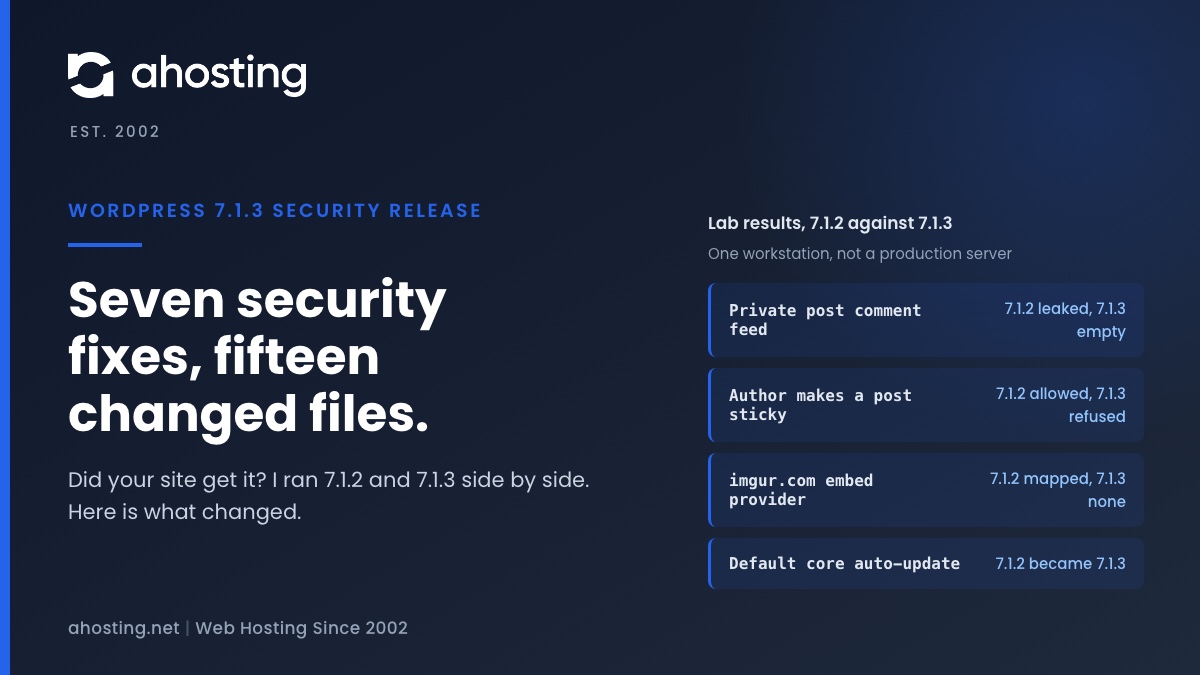
The WordPress 7.1.3 security release shipped on 6 October 2026 with seven security fixes and four bug fixes. Read your version under Tools, Site Health, Info, WordPress; 7.1.2 or any earlier 7.1 release needs the update. Minor releases install themselves by default, but a handful of switches stop that. In my lab, 7.1.2 handed an anonymous visitor the comments on a private post and a draft post and let an Author account make posts sticky; 7.1.3 refused both. WordPress published no CVE IDs, and none of the coverage I opened reports exploitation.
WordPress 7.1.3 Security Release: What Changed and Who Can Reach It
The WordPress 7.1.3 security release shipped on 6 October 2026 with seven security fixes and four bug fixes. WordPress.org recommends updating immediately. This guide reads the release the way a host does. It checks whether the update reached your site, and it compares the real code of 7.1.2 and 7.1.3 file by file. Every fact below is dated 23 October 2026.
Seven fixes sounds like a lot of change, but the change is small. I downloaded both official archives and compared them: 15 files differ, and 9 of those are PHP. The rest are one admin script with its minified copy, four admin bar style sheets and the version number.
WordPress 7.1.3 Security Release Facts From WordPress.org and Patchstack
- WordPress.org lists the seven fixes and credits each reporter in its version 7.1.3 notes.
- The same notes say older branches get the fixes as a courtesy, and only the newest version is actively supported.
- Patchstack, which wrote the most detailed analysis of the seven fixes, says only two of them can start from a visitor with no login.
- WordPress assigned no CVE IDs and published no severity scores for these fixes, and SecurityOnline reports no confirmed exploitation and no public proof of concept.
| Fix as WordPress lists it | Who can reach it (Patchstack) | Changed file in 7.1.3 | What the diff shows |
|---|---|---|---|
| Stored XSS on the Comments admin screen | A visitor posts a pending comment; a moderator must click its link | Not found in the diff | I could not tie it to a changed line |
| Denial of service in WP_Http::make_absolute_url() | Contributor or higher | class-wp-http.php | A loop now stops when a pass removes nothing |
| Second-order SQL injection in the WXR export | An administrator running an export, plus a bad stored thumbnail value | export.php | IDs are cast to integers with absint() in three places |
| Author role can make posts sticky | Author or higher | class-wp-rest-posts-controller.php | An AND in the permission check became an OR |
| Comments on private and unpublished posts disclosed | Anyone, no login | class-wp-query.php | The comment feed query moves below the post status check |
| Imgur embeds vulnerable to XSS | Contributor or higher, plus a viewer | class-wp-oembed.php | Imgur is dropped from the trusted provider list |
| Hook name collision in the status and type hooks | Needs a plugin that passes raw values | post.php | The hooks fire only for registered statuses and types |
Does the WordPress 7.1.3 Security Release Apply to Your Site?
If your site reports 7.1.2 or any earlier 7.1 version, it needs 7.1.3. Patchstack says the Comments screen XSS affects 7.1.0 through 7.1.2, and SecurityOnline says every version before 7.1.3 is affected. The comment disclosure fix exists only from 7.1.3 on, as the lab results below show.
Older branches depend on backports. WordPress.org said they were still in progress when it published, and Patchstack reported fixes available through at least 6.6 on 6 October, with branches 4.7 through 6.5 not yet patched at that point. Check Dashboard, then Updates, for a patch release on your own branch.
Read your version in one of three places. Tools, then Site Health, then Info, then WordPress shows it. In cPanel File Manager, open wp-includes/version.php and read the wp_version line. With WP-CLI, the command wp core version prints it. The checker below turns that number into a next step.
WordPress 7.1.3 Security Release Update Check
Did the WordPress 7.1.3 Security Release Reach Your Site Automatically?
Possibly, because WordPress installs minor releases by default. The WordPress upgrade documentation says existing installations receive minor core updates, such as maintenance and security releases, unless you change that.
I tested it. On 23 October 2026 I built a fresh WordPress 7.1.2 site on my workstation with default settings. Within a few minutes it had replaced its own core files and reported 7.1.3. That was one machine with outbound network access, not an AHosting server, so treat it as proof that the mechanism works, not as a promise about any particular site.
A second 7.1.2 site, built with automatic core updates switched off, stayed on 7.1.2 for the whole test. That is the state of any site where something blocks the updater, and it is the state in which this release never arrives.
What Blocks Automatic Updates in WordPress Core
I read the updater in the WordPress 7.1.3 source. The blockers are specific, and most of them are choices someone made once and forgot.
| Blocker | Where WordPress checks it | How a site ends up with it |
|---|---|---|
| WP_AUTO_UPDATE_CORE set to false in wp-config.php | Documented core setting | Someone froze core after a bad update |
| AUTOMATIC_UPDATER_DISABLED set to true | class-wp-automatic-updater.php, is_disabled() | A hardening guide or a staging copy |
| The automatic_updater_disabled filter returns true | The same function, one line later | A plugin or a must-use plugin |
| DISALLOW_FILE_MODS set to true | wp_is_file_mod_allowed() in load.php | A locked-down production setup |
| A .git, .svn, .hg or .bzr folder in the site folder or above it | class-wp-automatic-updater.php, is_vcs_checkout() | A site deployed from a repository |
| WP-Cron never runs | wp-includes/update.php starts the update only during a cron run | DISABLE_WP_CRON with no system cron behind it |
Plugin and theme updates follow their own switches, which our post on auto-updating plugins and themes walks through. If any row above matches your site, press Update Now under Dashboard, then Updates, and do not wait for the updater.
Lab Results: WordPress 7.1.2 Against 7.1.3
Reading a diff tells you what changed. Running both versions tells you what it meant. I installed WordPress 7.1.2 and 7.1.3 side by side with the SQLite integration plugin from WordPress.org, then repeated the same requests against each.
Setup: one workstation, PHP 8.5.10, one private post, one draft post and one public post, each with an approved comment, plus an Author account. This is not an AHosting server, and I did not test the SQL injection, the Comments screen XSS or the hook collision.
| Request | WordPress 7.1.2 | WordPress 7.1.3 |
|---|---|---|
| Anonymous request for the comment feed of the private post | Returned the comment | Empty feed |
| Anonymous request for the comment feed of the draft post | Returned the comment | Empty feed |
| Anonymous request for the site-wide comment feed | Public post comment only | Public post comment only |
| Author creates a published post with sticky set to true through the REST API | 201 Created, post made sticky | 403 rest_cannot_assign_sticky |
| Author marks an existing post of their own sticky | 200 OK, post made sticky | 403 rest_cannot_assign_sticky |
| make_absolute_url() with a crafted relative path | Ran until PHP time limit hit at 3 seconds | Returned at once |
| oEmbed provider lookup for an imgur.com link | Mapped to the Imgur endpoint | No provider found |
The Comment Disclosure Fix in the WordPress 7.1.3 Security Release
This is the fix that needs no login. In 7.1.2, an anonymous request for the comment feed of a single post returned the comments of a private post and of a draft post. WordPress had already built the comment list before it decided the visitor was not allowed to see the post.
The cause is an ordering problem in class-wp-query.php. In 7.1.2 the comment feed query runs first, and the post status check that empties the post list runs afterward, which is too late for the comments already loaded. The 7.1.3 diff moves the whole comment block below the status check, so a hidden post now produces an empty feed.
Two limits keep this in proportion. The comment must already be approved, which happens, for example, when it was approved before the post went private or when a logged-in editor replied. The visitor also needs the post ID, and those are sequential numbers. Neither limit makes the bug harmless on a site that keeps member-only or unreleased content.
The Sticky Post Fix and Who Holds Author Roles
The sticky bug is a one-operator logic error, and my lab reproduced it exactly. The REST posts controller refused the request only if the user lacked both the edit-others and the publish capability. An Author has the publish capability, so the check passed. 7.1.3 changed the AND to an OR.
The impact is modest: an Author could pin their own post to the top of the blog index. The lesson is wider. Patchstack warns that several of the seven fixes concern what Contributor and Author roles can reach, and recommends auditing who holds them. Our guide to open registration and the default role shows where a site quietly hands those roles out.
The update path changed too. 7.1.3 checks the sticky permission only when a request would change the sticky state, so an Author editing a post that is already sticky is not blocked.
The make_absolute_url() Loop That Never Ended
WordPress resolves relative redirect addresses with WP_Http::make_absolute_url(). It strips every segment-then-dot-dot pair with a regular expression, in a loop that runs while the path still contains the dot-dot sequence. In 7.1.2, if the expression matches nothing, the sequence never leaves and the loop never ends.
I tested a path of that shape against the real 7.1.2 function. It ran until PHP stopped it at my 3 second limit. The 7.1.3 version counts the replacements in each pass and exits the loop when the count is zero, and it answered at once. I am not printing the exact input.
The caller matters. In class-wp-http.php, redirect handling reads the Location header of a response and passes it to this function, so a site fetching a remote address that redirects can reach it. Patchstack says the attack needs a Contributor account or higher. A request stuck in that loop holds one PHP process until the time limit ends it, which is why the fix belongs in the update, not in a server setting.
The Image Upload Bug in the WordPress 7.1.3 Security Release
Four bug fixes ship beside the seven security fixes, and Search Engine Journal calls one of them critical, citing the WordPress ticket rating. Image uploads could fail with a fatal error on a server whose PHP lacks the DOM extension. It is not a security fix, but it breaks the Media Library.
The code explains it. The image helper wp_get_image_alttext() builds a DOMDocument to read the alternative text stored in a photo. In 7.1.2 it never checked that the class exists. The 7.1.3 diff adds that check at the top and returns an empty string instead. The function reaches the DOM code only when the file contains XMP metadata.
I did not reproduce the crash. The PHP on my machine has the extension built in, and the switch I tried to hide the class had no effect. Site Health lists the dom extension under PHP extensions as optional, so your own Info, Server tab shows whether your server has it. For the PHP side of the same server, see our guide to the best PHP version for WordPress in cPanel.
Imgur Embeds After the WordPress 7.1.3 Security Release
The Imgur fix removes the provider rather than patching it. In 7.1.2, WordPress mapped imgur.com links to the Imgur endpoint. In 7.1.3 my lookup found no provider for an imgur.com link. The class-wp-oembed.php docblock now lists Imgur, and two Someecards domains, among the providers no longer supported as of 7.1.3.
The oEmbed format works by asking a provider endpoint for HTML to place in your page, as the oEmbed specification describes. Patchstack explains that Imgur sat on the trusted list, so its output skipped the sandboxing filter.
Existing embeds are the catch. WordPress stores a fetched embed in post meta under keys that begin with _oembed_, and Patchstack warns the fix does not remove cached content already stored. Clear your page and object caches after updating, and search your posts for imgur.com links written by Contributor accounts.
What I Could Not Tie to Code
A guide that claims to have verified everything is lying. Here is what I could not verify. The stored XSS on the Comments admin screen, reported by Trail of Bits, has no changed line in the comments list table that I could find. The only admin script that changed is the help tab handler in common.js, and I will not call that the fix.
WordPress.org also lists two Customizer files among the revised files in its 7.1.3 notes. In the two archives I downloaded, both files are byte-identical. I cannot explain that difference, and I would rather say so than guess.
What I can say comes from Patchstack: the attack starts with a pending comment and needs a moderator to click a link in it. Until you update, moderators should not click links inside pending comments. The export SQL injection needs an administrator to run an export and a bad thumbnail value already stored, and the hook collision needs a plugin that passes raw values into post creation.
Who Applies the WordPress 7.1.3 Security Release: Shared Hosting, VPS or You?
WordPress core is your application, so the answer is mostly you on every kind of hosting. The host updates the server and the PHP packages. WordPress updates itself from inside your account, unless one of the blockers above stops it. Our PHP security update guide covers the server half of that split.
Shared Hosting: The Host Patches Packages, You Verify WordPress
On shared web hosting, your provider keeps the server software current, and you read the WordPress version. First-hand, the AHosting customer server we inspected runs CloudLinux 9 with CageFS and LVE, and its LiteSpeed PHP processes run as each site’s own cPanel user, 38 of them on 30 September 2026. That isolation keeps one account away from another. It does not stop a flaw inside a site from leaking that site’s own comments, which is why the update matters even with isolation in place.
VPS and WooCommerce: You Verify Both Layers
A WordPress VPS leaves package updates and WordPress updates to you, so check both versions. Stores deserve one extra step: update on staging, then run a test checkout on your WooCommerce hosting account before the live site. Agencies can read the version of every client site in one pass and update them together.
If the update does not appear, open a ticket with the WordPress version from Site Health and the PHP version from its Server tab, and we will look at it with you. Anyone on shared web hosting can open wp-includes/version.php in cPanel File Manager, the file this guide uses to read the version.
Frequently Asked Questions: WordPress 7.1.3 Security Release
Do I need the WordPress 7.1.3 security release on my site in 2026?
Specifically, yes if your site reports 7.1.2 or any earlier 7.1 version. WordPress.org recommends updating immediately because it is a security release. Patchstack says the update is not a drop-everything emergency, so schedule it today, not next month.
When was the WordPress 7.1.3 security release published and which fixes does it carry?
Specifically, WordPress.org published it on 6 October 2026 with seven security fixes and four bug fixes. The fixes cover a Comments screen XSS, a denial of service, an export SQL injection, sticky posts for Authors, comment disclosure, Imgur embeds and a hook name collision.
Does the WordPress 7.1.3 security release install itself on every WordPress site in 2026?
However, not on every site. WordPress installs minor releases by default, and a fresh 7.1.2 lab site replaced itself with 7.1.3 within minutes. A constant in wp-config.php, a plugin filter, a locked file system, a Git folder or a stalled WP-Cron can stop it.
What changed between WordPress 7.1.2 vs 7.1.3 in the WordPress 7.1.3 security release?
In practice, 15 files differ between the two official archives, and 9 of them are PHP. The changes sit in the HTTP class, the query class, the REST posts controller, the oEmbed class, the export tool, the post status code and the image helper.
How can I confirm the WordPress 7.1.3 security release reached my AHosting WordPress site?
Specifically, open Tools, then Site Health, then Info, then WordPress, and read the version. You can also open wp-includes/version.php in cPanel File Manager and read the wp_version line. Anything below 7.1.3 means the update did not arrive.
Shared hosting vs VPS: who installs the WordPress 7.1.3 security release for me?
Typically, WordPress core lives inside your own site and updates itself on both. On shared hosting your provider handles the server packages. On a VPS you handle the packages and the application, so you must also verify the core version yourself.
Is WordPress 7.1.2 vulnerable until the WordPress 7.1.3 security release is installed in 2026?
Specifically, yes, because 7.1.2 lacks the seven security fixes, and my lab showed it leaking private post comments and letting an Author make posts sticky. However, WordPress published no CVE IDs and the coverage I opened reports no confirmed exploitation, so update promptly without panic.
Which Imgur embeds need attention after the update, and does clearing the cache matter?
Notably, the fix removes Imgur from the trusted embed list but does not remove embeds already stored. Patchstack advises clearing your cache after updating. Review posts that contain Imgur links, especially ones written by Contributor accounts.
Does AHosting CageFS protect a site from a WordPress core flaw like the comment disclosure?
In practice, no, not from a flaw inside the site itself. CageFS keeps one account from reading another account, but a leaked comment feed is the content of the site itself, served by its own WordPress. Updating WordPress is what closes that kind of flaw.
How can AHosting help me when the WordPress 7.1.3 security release does not appear under Updates?
Specifically, open a ticket and include the WordPress version from Site Health and the PHP version shown under the Server tab. We will look at it with you. Meanwhile, check wp-config.php for a WP_AUTO_UPDATE_CORE or AUTOMATIC_UPDATER_DISABLED line.
Related posts:
 PHP Critical Security Release: What WordPress Site Owners Should Do Now
 PHP Security Update: 8.5.12, 8.4.27, 8.3.36 and 8.2.35 for WordPress
 Why It’s Now More Important Than Ever To See To Security On Your WordPress Blog
 WordPress Hosting Security in 2026: The Server-Level Protection Plugins Can’t Add