
- What Does the Maximum Execution Time Exceeded Error Mean in WordPress?
- Why the Number in the Message Matters
- What a Lab Run Shows About the Time Clock
- How to Find What Was Running When the Maximum Execution Time Ran Out
- Which Layer Set Your Maximum Execution Time? A Quick Checker
- How to Raise the Execution Time on Shared Hosting
- When Raising the Maximum Execution Time Is the Wrong Fix
- A Checklist for the Maximum Execution Time Error
- Frequently Asked Questions About the Maximum Execution Time Error
- How do I fix the maximum execution time of 30 seconds exceeded error in WordPress in 2026?
- What does the maximum execution time exceeded message mean when the number is 300 instead of 30?
- Does AHosting let me raise the maximum execution time on shared hosting without a support ticket?
- Maximum execution time vs memory limit in WordPress: which one did my site run out of?
- Should I set max_execution_time to 0 in WordPress to stop the error for good?
- WP-CLI vs wp-admin: why does the same import finish from the command line without a maximum execution time error?
- Will AHosting support look at a maximum execution time error if I send the exact log line in 2026?
- Does a slow remote API call count toward the maximum execution time on Linux hosting?
- What does the terminated version of the maximum execution time message mean in 2026?
- Can AHosting shared hosting plans handle long WordPress imports without hitting the maximum execution time?
Maximum execution time errors mean PHP stopped a script at its time limit. The number in the message tells you who set that limit: 30 is usually PHP or your host, while 300 or 600 means WordPress raised it.
What Does the Maximum Execution Time Exceeded Error Mean in WordPress?
The maximum execution time error means PHP stopped one script because it ran longer than the limit set for it. The full message reads “Maximum execution time of 30 seconds exceeded in”, followed by a file path and a line number, and the 30 is whatever limit was in force when the clock ran out. In most cases WordPress did not choose that number, and WordPress is not broken. One request, update or background task simply used up its allowance.
That matters because the advice on most search results is a single line: raise the limit to 300 and move on. Sometimes that works. Often the limit that fired is not the one you changed, or the script was never going to finish, and the error comes back with a bigger number in it. This guide reads the number first, then finds what was running, and only then touches a setting.
Is the Maximum Execution Time Error a Memory Problem or a Timeout?
It is a timeout. Memory exhaustion has its own message, “Allowed memory size exhausted”, and its own limit, which our guide to the WordPress memory limit not working on shared hosting covers. One heavy task can hit both in turn, but they are separate counters, so raising one does nothing for the other. A site that meets both errors usually has a single job doing too much work in one request.
Where Does the Maximum Execution Time Error Appear?
On an admin screen it can show as plain text in the middle of an update, as the WordPress critical error page, or as a blank white screen when error display is off. Our white screen of death guide explains how to read the log when nothing is printed. When error logging is on, the full message goes to the PHP log, which on most cPanel accounts is a file named error_log in the folder of the script that failed, or wp-content/debug.log when WP_DEBUG_LOG is enabled.

Why the Number in the Message Matters
PHP prints the limit that was active when the timer fired, not the value in php.ini. The PHP manual documents a default of 30 seconds for max_execution_time, and it lists the setting as changeable in php.ini, in per-directory files and from inside a script. A script that calls set_time_limit() replaces the limit and, according to the set_time_limit manual page, restarts the count from zero. WordPress makes that call in several places, so the number in your message often names the layer that set it.
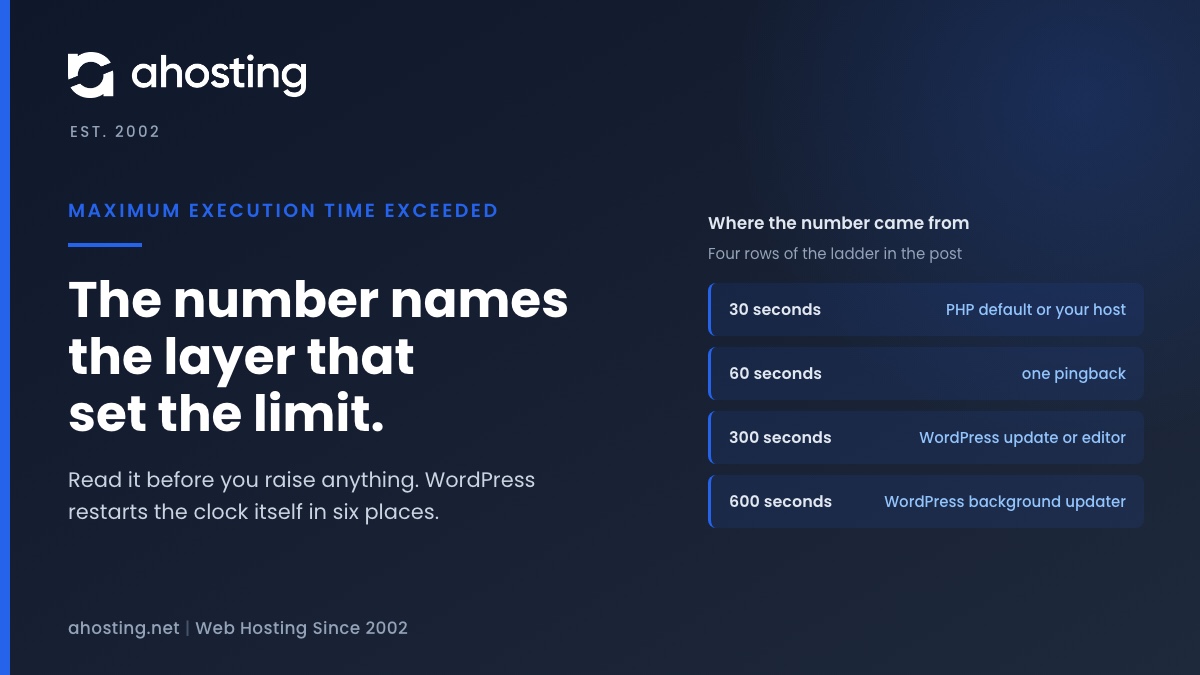
Six set_time_limit calls in WordPress 7.1.4 can produce this error. The table gives each with its file and line.
| Number in the message | Who set it | Where in WordPress 7.1.4 | What can change it |
|---|---|---|---|
| 30 | PHP default, or your host | Not set by WordPress | php.ini, .user.ini or the MultiPHP INI Editor |
| 60 | WordPress, once per pingback it sends | wp-includes/comment.php line 3585 | Fewer outbound links, or pingbacks turned off |
| 300 | WordPress, at the install step of a plugin or theme update | wp-admin/includes/class-wp-upgrader.php line 564 | Nothing in php.ini; fix disk space or package size |
| 300 | WordPress, during a core update | wp-admin/includes/update-core.php line 1360 | Nothing in php.ini; retry or update by hand |
| 300 | WordPress, in the file editor and the revision comparison screen | wp-admin/includes/file.php line 550 and ajax-actions.php line 3611 | Nothing in php.ini; trim revisions or slow plugins |
| 600 | WordPress, in the background updater | wp-admin/includes/class-wp-automatic-updater.php line 553 | Nothing in php.ini; check the update log |
| Any other number | A plugin, theme, script or host panel | Search wp-content for set_time_limit and ini_set | The code or setting that set it |
How to Read the Maximum Execution Time Ladder
Read the table from the top. A 30 means nothing has overridden the default for that request, so the value is PHP’s or your host’s. A 300 during an update is WordPress’s own allowance, and a php.ini edit will not change it, because the call runs after php.ini has been read. Any other number means something on your site set it on purpose.
Which WordPress Actions Restart the Maximum Execution Time Clock?
Core updates and plugin or theme installs restart it to 300 seconds. WordPress’s own comment explains why: the upgrade gets an additional 300 seconds because downloading and unpacking in WP_Upgrader::run() may already have used up the normal allowance. The background updater gets ten minutes, and the file editor and the revision comparison screen get five.
The pingback sender restarts the clock at 60 seconds for each link it contacts, so a post with many outbound links can run well past 60 seconds in total without any single pingback timing out. Every one of these calls is wrapped in function_exists(), and PHP reports a disabled function as missing. We confirmed that locally with set_time_limit in disable_functions. A host that disables it therefore removes all of these extensions at once, and the plain default applies.
What a Lab Run Shows About the Time Clock
We tested the clock on PHP 8.5.10 on one Apple silicon workstation, not on an AHosting server. Each script had a limit of 2 seconds, so a result arrives in seconds instead of minutes. Busy loops kept wall time and CPU time equal.
The diagram is scenario B in the table below. The script worked for 1.5 seconds, called set_time_limit(2), and the clock restarted. It then worked another 1.5 seconds, so it had been alive for 3.0 seconds against a limit of 2. The kill came at 3.50 seconds, which is two seconds after the restart.
| Scenario | Limit | What happened | Wall time |
|---|---|---|---|
| A: busy loop | 2 s | Fatal error, Maximum execution time of 2 seconds exceeded | 1.99 s |
| B: 1.5 s of work, then set_time_limit(2), then 3.0 s more work | 2 s | Survived to 3.0 s, killed in the third burst | 3.50 s |
| C: sleep(6) and nothing else | 2 s | Killed during the sleep (Apple silicon timer) | 2.00 s |
| D: an HTTP request to a server that sleeps 6 s | 2 s | Fatal error in the 2+2 seconds (terminated) form | Not timed |
Does Waiting Count Toward the Maximum Execution Time?
It depends on the operating system, and the lab shows the trap. On the Apple silicon workstation a script that only called sleep(6) was killed at 2.00 seconds, so waiting counted. A Linux server behaves differently. The PHP manual says time spent outside the script itself, in system calls, stream operations and database queries, is not counted, except on Windows.
The reason is in the PHP source. In zend_execute_API.c on the PHP-8.5 branch, the timer is created with setitimer using ITIMER_PROF, which counts CPU time. A code comment notes that ITIMER_PROF is broken on Apple silicon with macOS 14 and later, so there the code uses ITIMER_REAL, a wall clock. The Linux kernel’s itimer.c maps ITIMER_PROF to a CPU clock, and the Linux manual page describes it as the user plus system CPU time of the process.
We did not run this on Linux. Linux builds with thread safety can use a different timer, which we did not read, so confirm the behavior on your own account with a small test script. The practical point holds either way: a script stuck waiting on a slow remote service may never reach this limit, and then it ends at the web server or proxy timeout, which produces a different error page. Our guide to the server cannot process the image describes the same two clocks.
How to Find What Was Running When the Maximum Execution Time Ran Out
The message ends with a file path and a line number. That is the line PHP was executing when the timer fired, which is not always the code that is slow. Treat it as a pointer to the layer, then confirm by repeating the action.
What the File Path in the Message Tells You
A path under wp-content/plugins names a plugin whose code was running at that instant. A path under wp-includes or wp-admin names WordPress itself, and the cause is usually a plugin or a large data set feeding it. In the lab on PHP 8.5.10 the fatal error also printed a stack trace listing the calls above that line. That trace is the most useful part when it appears, but do not count on it from older PHP versions.
Match the path against the ladder. A path inside class-wp-upgrader.php during an update means the install step, so look at disk space and package size before you suspect a plugin. If the path is unhelpful, repeat the action once with WP_DEBUG and WP_DEBUG_LOG on, read wp-content/debug.log, and turn both off again afterward.
What the Terminated Version of the Maximum Execution Time Message Means
A second form reads “Maximum execution time of 30+2 seconds exceeded (terminated)”, and the path in it may be Unknown on line 0. The PHP manual documents a directive called hard_timeout, default 2 seconds, that starts when the normal limit is reached. PHP first tries to tear the script down cleanly. If the script is stuck, for example waiting on a network read, the hard timeout ends the process abruptly.
In the lab, a script blocked reading from a socket produced the 2+2 form. Because hard_timeout is a system-level setting, you cannot change it from .user.ini, and raising it would not help anyway. The useful question is what the script was blocked on.
Which Layer Set Your Maximum Execution Time? A Quick Checker
Pick the number from your message and what you were doing when it appeared. The checker applies the ladder above. It does not read your server, so confirm any answer in the log and in Site Health.
Which Layer Set Your Time Limit?
Jump to the fix stepsHow to Raise the Execution Time on Shared Hosting
Raise the limit only when the job is finite and legitimate: an import, a backup, a one-time migration step. For those, set a value a little above the time the job needs, not zero. WordPress’s own common errors page suggests a php.ini line or a php_value line in .htaccess. We have not tested php_value on our servers, so the steps below use the two methods we can stand behind.
Check the Current Maximum Execution Time in Site Health
Open Tools, then Site Health, then the Info tab, and expand Server. The row labeled PHP time limit is read with ini_get(‘max_execution_time’) for that request. Write the value down before you change anything, and read it again afterward. A value that did not move means the change never reached PHP, and no amount of retrying the job will help.
Set a New Limit With .user.ini or the MultiPHP INI Editor
The PHP manual says .user.ini files recognize settings in the INI_ALL, INI_PERDIR and INI_USER classes, and it lists max_execution_time as INI_ALL. Add one line to the .user.ini file in your site folder, for example max_execution_time = 120, or set the same directive in the MultiPHP INI Editor in cPanel. Choose the number from the job, not from habit.
We have confirmed that a site-level .user.ini works for memory_limit on our servers. We have not separately confirmed max_execution_time, so the Site Health check above is the proof. PHP re-reads .user.ini files on a timer, user_ini.cache_ttl, which defaults to 300 seconds, so a change can take up to five minutes to appear. Remove the line when the job is finished.
When Raising the Maximum Execution Time Is the Wrong Fix
A higher limit hides a slow script; it does not speed it up. Three signs say stop: the error appears on ordinary page views, the number is one WordPress set itself (300 or 600) so your change cannot reach it, or the failure repeats at a larger number. In each case the work needs to shrink or move, not wait longer.
Run Long Jobs From the Command Line
A comment in WordPress core says max_execution_time defaults to 0 when PHP runs from the command line, and the code treats 0 as no limit. A job started with WP-CLI therefore has no PHP time limit unless a custom php.ini sets one. Check yours with php -r "echo ini_get('max_execution_time');". If your plan gives you command-line access, run the import or the cron event there. Our measured look at WP-Cron covers events that run long.
What a Longer Limit Costs on a Shared Plan
Every request that runs long holds an entry process for the whole time. The AHosting Silver shared plan lists 40 entry processes, so if 40 visitors each started a 300-second job, no slot would be free for anyone else. That is arithmetic, not a measurement. The practical rule is to raise the limit for a job you start yourself at a quiet hour, and to leave the default alone for the public site. Our guide to WordPress concurrent users on shared hosting shows how execution time divides into capacity.
A Checklist for the Maximum Execution Time Error
- Copy the full message from the log, including the number, the file path and the line.
- Match the number to the ladder table, and use the checker if the source is unclear.
- Open Site Health and note the PHP time limit before changing anything.
- If WordPress set the number (300 or 600), check disk space, package size and slow plugins instead of php.ini.
- With a 30 and a finite job, set max_execution_time in .user.ini and confirm it in Site Health.
- For an open-ended job, split it into batches or run it from the command line.
- Remove the temporary setting when the job is done.
If the same line keeps coming back after those steps, send us a ticket with the exact message, the number and the plugin path. That is enough for us to look at it with you. The plan pages list the entry processes you work within: WordPress hosting plans, shared web hosting, and VPS hosting for work that needs a server of its own.
Frequently Asked Questions About the Maximum Execution Time Error
How do I fix the maximum execution time of 30 seconds exceeded error in WordPress in 2026?
Specifically, read the number, find what was running, and only then change a setting. A 30 means the PHP default or your host value applied, so for a finite job such as an import you can set max_execution_time in .user.ini or the MultiPHP INI Editor and confirm the new value under Tools, Site Health, Info, Server. If the job is open-ended, batch it or run it from the command line instead of raising the limit.
What does the maximum execution time exceeded message mean when the number is 300 instead of 30?
In practice, a 300 usually means WordPress raised the limit itself. In WordPress 7.1.4 the core updater, the plugin and theme install step, the file editor and the revision comparison screen each call set_time_limit with 300 seconds, and the background updater uses 600. A php.ini edit cannot change a value set that way, so look at disk space, package size and slow plugins instead.
Does AHosting let me raise the maximum execution time on shared hosting without a support ticket?
Typically yes, with one caveat we have not tested. We have confirmed that a site-level .user.ini file works for memory_limit on our servers, and the PHP manual lists max_execution_time in the same changeable class, so try that file or the MultiPHP INI Editor first. Then read PHP time limit in Site Health. If the value does not change, send a ticket with the number you tried.
Maximum execution time vs memory limit in WordPress: which one did my site run out of?
Specifically, read the first words of the error. Maximum execution time of N seconds exceeded is the clock, and Allowed memory size of N bytes exhausted is memory. They are separate counters, so raising one does nothing for the other, although one heavy task such as a large import can hit both in turn.
Should I set max_execution_time to 0 in WordPress to stop the error for good?
In other words, zero removes the limit, and that is rarely wise on a public site. A script that loops forever or waits forever then holds an entry process until the server or a proxy ends it. Use a finite number for a job you start yourself, and remove it when the job is done.
WP-CLI vs wp-admin: why does the same import finish from the command line without a maximum execution time error?
Notably, PHP run from the command line has no time limit by default. A comment in WordPress core states that max_execution_time defaults to 0 under the CLI, while a browser request uses the web limit. Check your command-line value with php -r followed by echo ini_get of max_execution_time, because a custom php.ini can still set one.
Will AHosting support look at a maximum execution time error if I send the exact log line in 2026?
Indeed, send a ticket with the full message, the number, the file path and what you were doing when it appeared. That is enough for us to look at it with you. A screenshot of the visual error alone is not enough, because the path and line number identify the code that was running.
Does a slow remote API call count toward the maximum execution time on Linux hosting?
Typically not. The PHP manual says time spent in system calls, stream operations and database queries is not counted outside Windows, and the PHP source uses a CPU time timer on most Linux builds. We did not measure this on Linux, and our Apple silicon lab did count waiting. A stuck API call then ends at the web server or proxy timeout instead.
What does the terminated version of the maximum execution time message mean in 2026?
Specifically, the 30+2 form means the normal limit was reached and PHP then waited a further hard_timeout, 2 seconds by default, for the script to stop cleanly before ending the process. It usually points to a script blocked on something such as a network read. The hard timeout is a system-level setting, so you cannot change it from .user.ini.
Can AHosting shared hosting plans handle long WordPress imports without hitting the maximum execution time?
That said, a long import is safer in batches than in one request. The Silver plan lists 40 entry processes, and every request that runs for minutes occupies one of them. Set a finite limit for the import, run it at a quiet hour, and use the command line if your plan gives you access. If it still fails, send us the log line.
Related posts:
 WooCommerce Slow Checkout: How to Find Where the Seconds Actually Go
 WordPress 503 Errors Explained: How Many WordPress PHP Workers Your Site Actually Needs (2026)
 WordPress Memory Limit Errors: Why Raising It in wp-config Often Fails (2026)
 How Many Concurrent Users Can WordPress Shared Hosting Handle? The PHP Worker Math (2026)