
- Undefined Array Key Warning in WordPress: PHP Reporting Someone Else's Missing Data
- The Undefined Array Key Wording Map: Ten PHP 8 Messages That Look Alike
- Step 1: Read the File Path in the Undefined Array Key Warning
- Step 2: Is the Undefined Array Key Warning Harmless or a Real Break?
- Step 3: Stop the Undefined Array Key Warning Showing on Your Site
- When an Undefined Array Key Warning Corrupts a REST Response
- Step 4: Fix the Undefined Array Key Warning at the Source
- What a Host Should Handle for an Undefined Array Key Warning
- Frequently Asked Questions: Undefined Array Key Warning in WordPress
- What causes the undefined array key warning in WordPress, and how do you fix it in 2026?
- Is the undefined array key warning dangerous, or can you safely ignore it on a live site?
- Why did the undefined array key warning appear right after moving a site to PHP 8 in 2026?
- Does setting WP_DEBUG to false hide an undefined array key warning in WordPress?
- Undefined array key vs undefined index: what changed between PHP 7 and PHP 8?
- Undefined array key warning vs fatal error: how do you tell which one is breaking your site?
- Can AHosting customers choose a different PHP version per domain to stop an undefined array key warning in 2026?
- Where does AHosting store the debug log for a WordPress site when WP_DEBUG_LOG is turned on?
- What should you send AHosting support when an undefined array key warning keeps coming back?
- Can a warning printed on the page break the WordPress REST API or the block editor save?
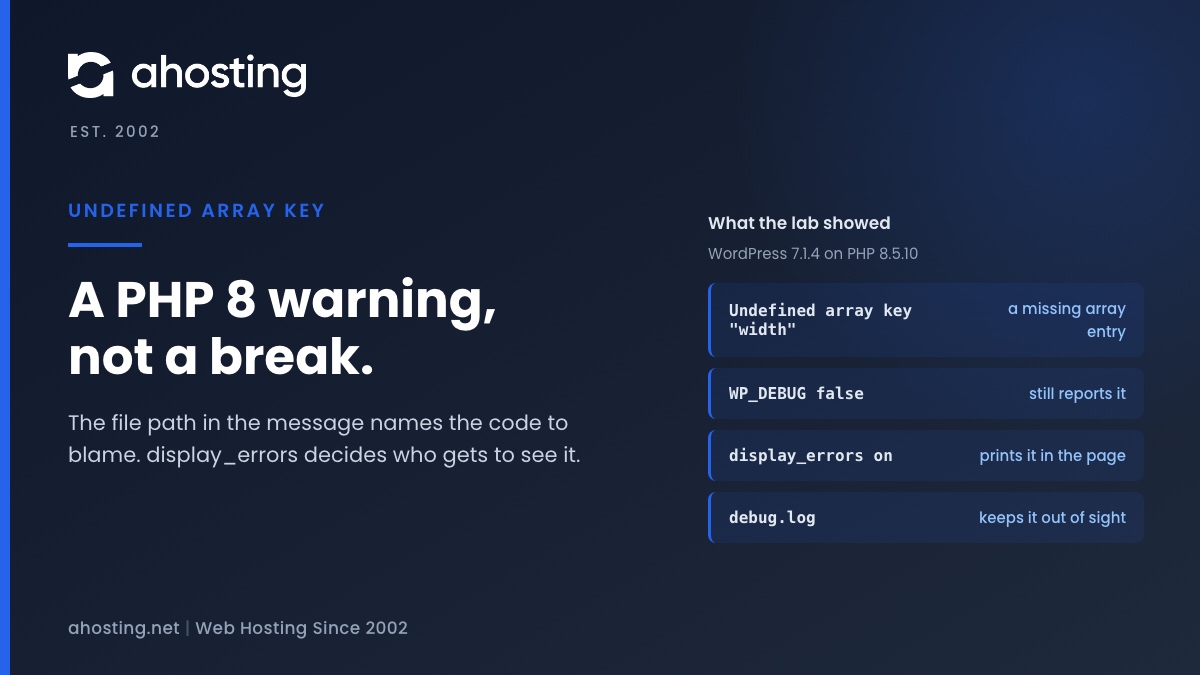
An undefined array key warning means a plugin or theme asked PHP for data that is not there. PHP 8 reports it loudly and keeps running, so the site usually still works. The file path in the message names the code to blame. Turning WP_DEBUG off does not hide it; display_errors decides whether visitors see it.
Undefined Array Key Warning in WordPress: PHP Reporting Someone Else’s Missing Data
The undefined array key warning in WordPress means a piece of PHP code asked an array for an entry that is not in it. PHP 8 reports that as a warning, prints the file and line number, and carries on with an empty value where the missing entry should have been. Your site usually still works. It is just talking loudly about a gap in a plugin or theme.
That message tends to appear the week a site moves to a newer PHP version, and that is not a coincidence. According to the PHP manual, reading an undefined array key is one of the notices PHP 8.0 converted into warnings, and the same manual page for error handling settings says the default error_reporting level was E_ALL minus notices, strict standards and deprecations before 8.0. Nothing in the plugin changed; the reporting did.
We reproduced the behavior on PHP 8.5.10 with a fresh WordPress 7.1.4 install and a small test plugin that reads a key that does not exist. The lab ran on one workstation, so it is not an AHosting server and it is not LiteSpeed. Everything below that comes from it is marked as lab output. What the lab cannot show is what our servers print by default, so the post never claims that.

The Undefined Array Key Wording Map: Ten PHP 8 Messages That Look Alike
Several PHP 8 messages share the same shape and the same cause, so a search for one finds advice about all of them. We triggered each of the ten below on PHP 8.5.10 and copied the wording and the level exactly.
| Code that ran | Level | Message printed by PHP 8.5.10 | What PHP did next |
|---|---|---|---|
| Read a missing string key | E_WARNING | Undefined array key "width" | Used NULL, kept running |
| Read a missing number key | E_WARNING | Undefined array key 9 | Used NULL, kept running |
| Read a variable never set | E_WARNING | Undefined variable $undefined | Used NULL, kept running |
| Read a property of null | E_WARNING | Attempt to read property "name" on null | Used NULL, kept running |
| Read a property of an array | E_WARNING | Attempt to read property "name" on array | Used NULL, kept running |
| Index into null | E_WARNING | Trying to access array offset on null | Used NULL, kept running |
| Index into a number | E_WARNING | Trying to access array offset on int | Used NULL, kept running |
| Read a property the object lacks | E_WARNING | Undefined property: C::$missing | Used NULL, kept running |
| Set a new property on the fly | E_DEPRECATED | Creation of dynamic property C::$dyn is deprecated | Created it, kept running |
| Read past the end of a string | E_WARNING | Uninitialized string offset 10 | Kept running |
Nine of the ten are warnings and none of them stops the script. The tenth, the dynamic property message, is a deprecation: it is advance notice about a future PHP version. After the warning, the line that caused it kept running and the value was NULL. The short PHP 8 summary on stitcher.io lists the undefined array index change in the same terms.
Guards that print nothing
Guards stay silent, and that matters for the fix. Reading the key with the null coalescing operator, checking isset() or calling array_key_exists() printed nothing in the lab. If you want to see how your own snippet words the message on other versions, 3v4l.org runs code on more than 500 PHP versions at once.
Step 1: Read the File Path in the Undefined Array Key Warning
Every message ends with a path and a line number, and the path is the answer to whose code to blame. Read the folder just after wp-content, not the file name at the end.
wp-content/plugins/NAME/is the plugin called NAME. The folder name is the plugin slug, which is usually close to its name on the Plugins screen.wp-content/themes/NAME/is a theme. If you run a child theme, check whether the file belongs to the child or to its parent.wp-content/mu-plugins/holds must-use plugins. These load without being activated, and your host or an agency may have put them there.wp-includes/orwp-admin/is WordPress core. Core is rarely the author of the bug, because a plugin or theme often hands it the missing data.
The widget below does the same reading for you. Paste a line and it names the folder, the file and the line number, and gives the first thing to try. It runs in your browser and sends nothing anywhere.
Decode Your Warning Line
Paste one warning line from your debug log or from the page. Nothing leaves your browser.
Step 2: Is the Undefined Array Key Warning Harmless or a Real Break?
In the lab, the page returned status 200 in all seven setting combinations we tried, and the page content was intact every time. The line that raised the warning carried on with NULL. That is the whole reason the message is usually safe to read slowly.
Harmless does not mean meaningless. A plugin that reads a missing key is often a plugin that lost a setting, received an empty reply from an API, or ran after a half-finished update. Look at what the affected feature does. A missing logo width is cosmetic. A checkout total built from a missing key is not.
Warning or fatal error: which one is stopping the page?
Only the word at the start of the message matters. A line beginning with Warning means the script went on. A line beginning with Fatal error means it stopped, and the symptom is a critical error screen, a blank page or a 500 status. If both appear, solve the fatal error first, because the warning is only noise beside it.
Can a printed warning break a login?
We tested it. We raised a warning before any output on wp-login.php with display on. The warning printed at the top of the page, but the form worked and a login returned the redirect and its cookie. That was the PHP built-in server, so do not assume a real server behaves the same: output sent before headers is the cause behind the error in our post on headers already sent, and it depends on how the server buffers output.
Step 3: Stop the Undefined Array Key Warning Showing on Your Site
Hiding the message from visitors is a settings job, and it is worth doing today even if the plugin author takes weeks. A printed warning gives every visitor the absolute path of your files. The flow below shows where the decision is made.
What WP_DEBUG false does and does not do
WordPress sets PHP's error_reporting level at startup. With WP_DEBUG true it uses E_ALL. With WP_DEBUG false it uses a shorter list that still includes E_WARNING (wp-includes/load.php, line 635 in WordPress 7.1.4). So switching WP_DEBUG off does not silence this warning. Only notices and deprecations drop out.
Whether a warning that gets through is printed is then up to display_errors. WP_DEBUG_DISPLAY can change display_errors, but only inside the WP_DEBUG branch. The matrix shows all seven combinations we ran.
| Row | WP_DEBUG | WP_DEBUG_DISPLAY | WP_DEBUG_LOG | PHP display_errors | Printed on the page | Where it was logged |
|---|---|---|---|---|---|---|
| A | not set | not set | not set | off | No | PHP error log |
| B | not set | not set | not set | on | Yes | PHP error log |
| C | false | not set | not set | on | Yes | PHP error log |
| D | true | not set | not set | off | Yes | Nowhere |
| E | true | false | true | on | No | wp-content/debug.log |
| F | true | not set | true | off | Yes | wp-content/debug.log |
| G | false | true | not set | off | No | PHP error log |
In row C, WP_DEBUG was false and the warning still printed, because PHP's own display_errors was on. Row D is the other surprise: WP_DEBUG true switched display on even though PHP had it off, and with PHP's log_errors also off the warning went nowhere. The other rows had log_errors on. In row G, the lab shows that WP_DEBUG_DISPLAY does nothing while WP_DEBUG is false.
Two safe recipes
The first recipe keeps WordPress in debug mode and sends everything to a file. Add these constants to wp-config.php above the line that says to stop editing, following the WordPress debugging documentation:
define( 'WP_DEBUG', true );define( 'WP_DEBUG_LOG', true );define( 'WP_DEBUG_DISPLAY', false );@ini_set( 'display_errors', 0 );
WP_DEBUG_LOG true writes wp-content/debug.log, which is reachable over the web, so our post on a potentially public log file shows how to point it outside the public folder. The second recipe leaves WP_DEBUG false and turns display_errors off for the account. On the AHosting shared server we checked, a php.ini in the site folder is never read, but .user.ini is, and a change can take a few minutes to apply. Where your plan includes it, cPanel's MultiPHP INI Editor can write the file for you.
When an Undefined Array Key Warning Corrupts a REST Response
WordPress switches display off for AJAX, XML-RPC and REST requests, because a warning in the middle of a JSON reply makes the reply unreadable. It does that early in startup, in a function that cannot yet know every kind of request. In WordPress 7.1.4 the check includes wp_is_json_request(), which is true when the request's Accept or Content-Type header names JSON (wp-includes/load.php, lines 642 to 646 and 1917 to 1927).
We tested what that means. With display on and a plugin raising a warning when the REST API starts, a request to a REST route with no JSON Accept header got status 200, a JSON content type and a body that began with the warning, so it did not parse. Sending Accept: application/json made the body parse. The block editor's fetch helper sends Accept: application/json, */*;q=0.1 (wp-includes/js/dist/api-fetch.js, line 480), so editor saves are protected from the display. A plain browser visit to the route, or a script that sends no JSON header, is not.
That is one way to end up with a response that is not a valid JSON response. It is not the only cause, and we did not test a live block editor save. The fix for this one is the same as Step 3: keep the warning out of the page.
Step 4: Fix the Undefined Array Key Warning at the Source
- Update the plugin or theme named in the path. An update is the first thing to try, because the fix belongs in the author's code.
- If it is current, send the author the exact message, the file, the line number and your PHP version. A report with a line number is one a developer can act on in minutes.
- If the warning started after an update, roll that plugin back on a staging copy and see whether it stops. Then report the version that introduced it.
- As a stop-gap only, choose an older PHP version for the domain. It hides the warning, it does not fix the code, and old versions stop receiving security fixes. Our guide to the best PHP version for WordPress on cPanel covers what each version costs you.
Do not edit the plugin's files by hand. The next update overwrites your change and the warning returns. If you write the code yourself, the fix is a guard: the null coalescing operator, an isset() check, or making sure the key always exists. The Psalm documentation for PossiblyUndefinedArrayOffset shows both fixes on a short example.
What a Host Should Handle for an Undefined Array Key Warning
A host cannot rewrite a plugin author's code, and any host that says otherwise is guessing. What a host can do is make the three things around the fix easy: choosing the PHP version for each domain, reading the log, and trying a change on a copy first.
On AHosting WordPress hosting, staging and daily backups are included, so a plugin update or a PHP version change can be tried on a copy and undone. The cPanel plans on web hosting set the PHP version per domain in MultiPHP Manager, and a VPS gives you the server's own PHP configuration to edit. For this warning specifically, that is all you need: a version to test, a log to read and a copy to break.
If the warning keeps coming back after the plugin is updated, contact support with four things: the full message line, the time it appeared, the PHP version set for the domain, and whether it prints on the page or only in the log. Our post on the PHP version warning in Site Health explains how to read the version WordPress sees.
Frequently Asked Questions: Undefined Array Key Warning in WordPress
What causes the undefined array key warning in WordPress, and how do you fix it in 2026?
Specifically, a plugin or theme asked PHP for an array entry that does not exist, and PHP 8 reports that as a warning. Read the file path in the message to find the plugin or theme, update it, and send its author the file, line and message if the warning stays. The page usually keeps working.
Is the undefined array key warning dangerous, or can you safely ignore it on a live site?
In practice it is not dangerous by itself, because PHP carries on with an empty value and the page still loads. However, a printed warning shows your server path to every visitor, and it can be the first sign that a plugin lost a setting. Hide it from the page, keep it in the log, and read the log.
Why did the undefined array key warning appear right after moving a site to PHP 8 in 2026?
Notably, the code did not change, the reporting did. PHP 8 turned undefined array key notices into warnings, and its default error_reporting level now includes them. Code that quietly read missing keys on an older version now prints a line each time. Fix the plugin, or hide the display while you wait for its update.
Does setting WP_DEBUG to false hide an undefined array key warning in WordPress?
In fact, WordPress still reports warnings when WP_DEBUG is false, so the answer is no. In our WordPress 7.1.4 lab the warning printed with WP_DEBUG false whenever PHP display_errors was on. As a result, the switch that decides whether visitors see the message is display_errors, which WP_DEBUG_DISPLAY can only change while WP_DEBUG is true.
Undefined array key vs undefined index: what changed between PHP 7 and PHP 8?
Specifically, the level and the default visibility changed. The PHP manual lists reading an undefined array key among the notices converted into warnings in PHP 8.0, and the default error_reporting stopped hiding notices. Consequently, a line that stayed silent on an older version can print a warning on a current one.
Undefined array key warning vs fatal error: how do you tell which one is breaking your site?
In contrast, a warning prints a line and the script continues, so the page still renders. A fatal error stops the script, and you see a critical error screen, a blank page or a 500 status. Check which word starts the message. If both appear, fix the fatal error first, because the warning is only noise beside it.
Can AHosting customers choose a different PHP version per domain to stop an undefined array key warning in 2026?
Indeed, cPanel MultiPHP Manager sets the PHP version for each domain, and the AHosting shared server we checked lists versions from 5.6 through 8.5. Stepping down hides the warning without fixing it, and old versions stop getting security fixes. Treat it as a short loan, and test it on a staging copy first.
Where does AHosting store the debug log for a WordPress site when WP_DEBUG_LOG is turned on?
Typically, WordPress writes wp-content/debug.log inside the site folder, and that path is reachable over the web. For example, you can set WP_DEBUG_LOG to a full path outside the public folder instead. Delete the log when you are done, because it records server paths and plugin names for every warning.
What should you send AHosting support when an undefined array key warning keeps coming back?
First and foremost, send the full message line, because the path and line number name the file. Add the time it appeared, the PHP version for the domain, and whether it prints on the page or only in the log. Together those four items let a person find the plugin without guessing.
Can a warning printed on the page break the WordPress REST API or the block editor save?
In practice, yes, for requests that do not ask for JSON. In our lab a REST route with no JSON Accept header returned a status 200 body that began with a warning and failed to parse. Fortunately the block editor sends a JSON Accept header, so WordPress turns display off for it, but plain fetches and browser visits are not protected.
Related posts:
 One or More Recommended Modules Are Missing: How to Read the WordPress Site Health Warning and Fix It on Shared Hosting
 Your PHP Installation Appears to Be Missing the MySQL Extension: What It Means and How to Fix It (2026)
 Unable to Create Directory wp-content/uploads: What the Error Really Means (2026)
 Autoloaded Options Could Affect Performance: How to Read the Site Health Warning and Clear It on Shared Hosting