
- What Fork: Retry: Resource Temporarily Unavailable Means
- Why Resource Temporarily Unavailable Never Reaches the Site Error Log
- What Fills the Slots: Processes, Threads and Your Own Shell
- AHosting Process Ceilings: 200, 300 and 400 Slots
- Count Your Slots Before You Guess
- How to Find What Holds Your Process Slots
- Usual Suspects When Resource Temporarily Unavailable Appears on WordPress
- Resource Temporarily Unavailable or Something Else: A Decoder
- When Resource Temporarily Unavailable Means You Need a Bigger Plan
- Frequently Asked Questions About Resource Temporarily Unavailable
- What does fork: retry: resource temporarily unavailable mean on shared hosting in 2026?
- Is resource temporarily unavailable a memory error or a process limit error?
- How do I fix bash: fork: retry: resource temporarily unavailable in cPanel Terminal?
- Does the nproc command vs ulimit -u show my real process limit in 2026?
- Why does resource temporarily unavailable appear over SSH but not in my WordPress error log?
- NPROC vs entry processes: which limit does resource temporarily unavailable point to?
- How many total processes does an AHosting shared plan allow in 2026?
- Will AHosting WordPress hosting stop resource temporarily unavailable errors after an upgrade?
- Can a VPS from AHosting avoid the resource temporarily unavailable process ceiling?
- Should I raise ulimit or find what is filling process slots first in 2026?
Fork: retry: resource temporarily unavailable means the operating system refused to start another process for your account. The cap counts threads as well as processes, and the message appears in SSH, cPanel Terminal and cron mail, not in the site error log. On AHosting shared plans the ceiling is 200, 300 or 400 total processes. Count what you own, stop the leftovers, and upgrade only when the count is high without them.
What Fork: Retry: Resource Temporarily Unavailable Means
Fork: retry: resource temporarily unavailable is the message a shell prints when the operating system refuses to start one more process for your account. It shows up in SSH, in the cPanel Terminal and in cron output, and it means the account has used every process slot it is allowed. The words come from the kernel error EAGAIN, which the Linux fork manual page lists as the answer when a process limit has been reached.
In practice the limit that usually answers is the per-user process cap. The getrlimit manual page says it counts threads as well as processes for one user ID, and that it is not enforced for root. On a CloudLinux shared host the same idea is called NPROC, and the CloudLinux limits documentation describes it as the total number of processes and threads inside your account’s container.
It is not a memory error and it is not a disk error. A full disk says no space left on device, and a memory kill ends a process that already exists. This message is the refusal of a process that has not started yet.
Why Resource Temporarily Unavailable Never Reaches the Site Error Log
The shell prints this message to your terminal, so no website log records it. A cron job sends it to the account’s cron mail instead. WordPress never sees it, which is why people search for it after a command fails rather than after a page does.
Visitors meet the same shortage differently. CloudLinux says Apache may answer with a 500 or 503 page when the container has no free process slot, and it increments an NPROC counter each time the limit is hit. Our own resource-limit diagnostic tree maps those pages to the limit behind them.
A PHP script that tries to start a process may log its own failure text. We did not reproduce that wording, so we do not quote it here.
Why the Word Retry Appears
The word retry means bash tried the fork again instead of giving up at once. We reproduced the refusal on a Mac by lowering ulimit -u to 25 slots above the user’s running process count and asking for 60 background jobs. About 45 were running when the shell was refused, and it printed fork: Resource temporarily unavailable. The bash that ships with macOS is version 3.2 and printed the short form, so your server may show retry lines first. This lab was one Mac, not a CloudLinux server.

What Fills the Slots: Processes, Threads and Your Own Shell
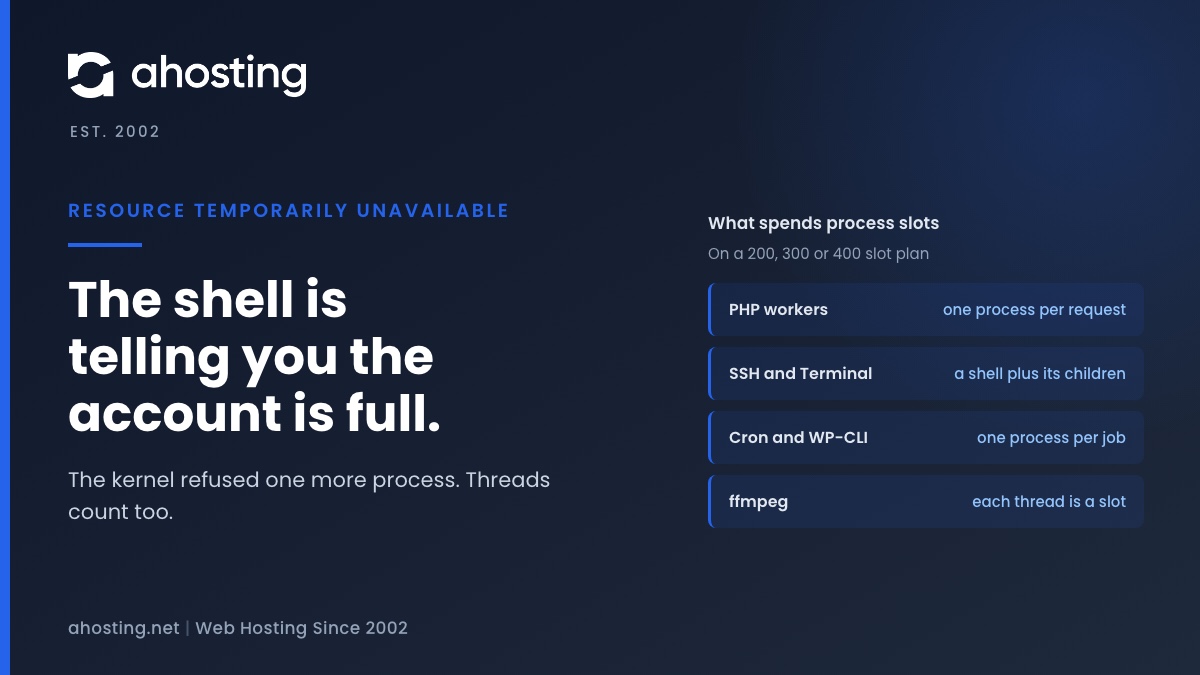
A slot is any process or thread owned by your account. Everything in the table below spends slots from the same pool, including the shell you are typing in.
| What takes slots | How it counts | Typical cause of a pile-up |
|---|---|---|
| PHP workers | One process for each PHP request running now | Slow uncached requests stacking up |
| Web server workers | Processes and threads inside your container, per CloudLinux | A burst of uncached traffic or bots |
| SSH and Terminal sessions | The shell plus every command it started | Old sessions left open |
| Cron and WP-CLI jobs | One process per job, often with children | A job that starts again before the last one ends |
| Multi-threaded tools | Each thread is a slot on Linux | ffmpeg started with default threads |
Threads matter because Linux counts them against the same cap. Our guide to slow ffmpeg encoding on shared hosting explains why ffmpeg starts a thread for every core it can see, which spends slots quickly.
AHosting Process Ceilings: 200, 300 and 400 Slots
Total processes is a different number from entry processes. Entry processes cap how many PHP requests run at once, and total processes cap everything else as well. Cached pages never reach PHP, so a cached visit takes no entry process.
| Plan | Total processes | Entry processes | Slots beyond the entry cap |
|---|---|---|---|
| Bronze | 200 | 30 | 170 |
| Silver | 300 | 40 | 260 |
| Gold | 400 | 50 | 350 |
Every limit applies to the whole account and is shared by every website on it, so five sites on one plan spend one pool. CloudLinux also advises setting NPROC above the entry process limit plus 15, because web server processes and SSH sessions live in the same container. Each plan clears that by a wide margin, so a refusal usually means something is holding slots, not that the ceiling is too low.
Count Your Slots Before You Guess
The next section shows how to read your own counts. Type them in below to see how close a typical hour comes to the ceiling.
How to Find What Holds Your Process Slots
Red Hat's support article on this error says there are several causes and that you should confirm the process and thread counts are expected before raising any limit. We follow that order. Count first, then group, then stop.
First Step: Count What You Own
Open the cPanel Terminal and run ulimit -u to see the cap your shell inherited. Then count your threads and processes with ps -u "$USER" -L | wc -l. Red Hat's article uses the same -L switch with ps -eLf to count threads. Subtract one for the header line. We ran the macOS form of the count in our lab and have not timed these exact commands on a customer server, so compare the result with the plan table above.
Second Step: Group by Command
Run ps -u "$USER" -o comm= | sort | uniq -c | sort -rn | head. The command that appears dozens of times is the one holding your slots. Ten php lines mean busy requests. Fifty wp or ffmpeg lines mean a job started again and again.
Third Step: Stop the Leftovers
Stop one stuck job with kill and its process ID, then count again. Leave PHP workers alone while the site is serving visitors, because stopping one cuts a live request. Close old SSH sessions as well, since each one holds a shell. If a slot count stays high with nothing obvious to stop, ask support to read the account fault counters.
Usual Suspects When Resource Temporarily Unavailable Appears on WordPress
Four causes are common on WordPress accounts. Each one fills slots in a different way.
- Overlapping cron. A job that takes longer than its interval starts a second copy while the first still runs. WordPress cron jobs on hosting covers how to space them.
- WP-Cron firing on every visit. Each trigger can start a process, and disabling WP-Cron, measured shows the effect of moving it to a real schedule.
- Bot floods. Uncached requests from crawlers spend PHP workers and web server slots together, which the 508 resource limit guide explains from the entry process side.
- Media tools. ffmpeg and image jobs spawn threads that each take a slot.
Before blaming the plan, rule these out. A job that keeps restarting will fill a larger ceiling just as it fills a smaller one.
Resource Temporarily Unavailable or Something Else: A Decoder
The same words can come from other limits, and the man page lists several. Use the table to pick the right layer before you change anything.
| What you see | Likely layer | Who can change it |
|---|---|---|
| Fork refused, process count near the plan figure | Account process cap (NPROC) | You, by stopping jobs; the host, by plan |
| Fork refused, count is low | A different limit, such as a host-set shell cap | The host |
| 508 or 503 page, shell works | Entry processes (PHP workers) | You, by caching; the host, by plan |
| Allowed memory size exhausted in a log | PHP memory_limit | You, in PHP settings |
| No space left on device | Disk or inodes | You, by cleaning files |
| Same text on a VPS | Operating system cap, PID limit or cgroup limit | You, as root |
Some hosts also set a shell-level cap of their own. cPanel's support documentation describes a Shell Fork Bomb Protection setting that is on by default in WHM and can make a command fail with a similar message. That is the host's setting, so ask which layer answered. On a VPS the kernel itself can refuse, through the PID ceiling or a container limit, as the Red Hat article notes, and its companion on the nproc setting shows where Red Hat raises the user cap.
When Resource Temporarily Unavailable Means You Need a Bigger Plan
If the count is high with nothing stuck, the account has outgrown its ceiling. A busy store, several sites sharing one plan or regular media jobs all need more slots than they used to. AHosting web hosting steps from 200 to 400 total processes, and WordPress hosting lists the same three figures.
A VPS is the next step when you want to set the cap yourself. It has guaranteed vCPU and RAM and full root access, and a runaway job can still fill the limit you choose. The tuning above is what we would do first on any plan.
Frequently Asked Questions About Resource Temporarily Unavailable
What does fork: retry: resource temporarily unavailable mean on shared hosting in 2026?
Specifically, it means the kernel refused to start one more process for your account because a limit was reached, and the shell printed the refusal. The limit is usually the per-user process cap, which counts threads as well as processes, so it is neither a memory error nor a disk error.
Is resource temporarily unavailable a memory error or a process limit error?
Typically, in shared hosting it is a process limit error, because the message is the refusal of a process that has not started yet. A memory limit usually ends a process that already exists, and a full disk reports no space left on device instead. That said, the same wording can come from other limits, so count your processes before you decide.
How do I fix bash: fork: retry: resource temporarily unavailable in cPanel Terminal?
In practice, wait a minute and close extra Terminal or SSH sessions, because each one holds slots. Then list your processes, stop the leftovers such as a stuck WP-CLI or ffmpeg job, and run the command again. If the count is normal and the message returns, ask your host to read the account fault counters.
Does the nproc command vs ulimit -u show my real process limit in 2026?
In contrast to what the name suggests, the nproc command prints the number of processing units available, which is a CPU count and not a process limit. The ulimit -u command reports the per-user process cap that your shell inherited, which is the closer number. On a CloudLinux host the container limit can still differ, so treat the published plan figure as the ceiling.
Why does resource temporarily unavailable appear over SSH but not in my WordPress error log?
Indeed, the message is printed by the shell to your terminal or to cron mail, and WordPress never sees it. Visitors meet the same shortage as a 500 or 503 page instead, which CloudLinux documents for this limit. A PHP script that tries to start a process may log its own failure text.
NPROC vs entry processes: which limit does resource temporarily unavailable point to?
By contrast with a 508 page, this message points to NPROC, the total process and thread count. Entry processes cap simultaneous PHP execution, and a site can hit that limit while the total count stays low. The two are separate numbers on every plan, so read both.
How many total processes does an AHosting shared plan allow in 2026?
Specifically, as of November 2026 the AHosting web hosting plan page lists 200 total processes on Bronze, 300 on Silver and 400 on Gold. Entry processes are listed separately at 30, 40 and 50. Both figures apply to the whole account and are shared by every website on it.
Will AHosting WordPress hosting stop resource temporarily unavailable errors after an upgrade?
However, an upgrade only helps when the account is genuinely busy. The WordPress hosting plans list the same 200, 300 and 400 total processes, so a higher tier gives more headroom but does not remove a runaway job. Clear stuck processes first, and upgrade when the count is high without them.
Can a VPS from AHosting avoid the resource temporarily unavailable process ceiling?
Overall, a VPS removes the shared account ceiling but not the limit itself. You get a KVM machine with guaranteed vCPU and RAM and full root access, so the process cap is the operating system's own and you control it. A runaway job can still fill that cap.
Should I raise ulimit or find what is filling process slots first in 2026?
First and foremost, find what is filling the slots. Red Hat advises confirming that the process and thread counts are expected before raising any limit, because a higher cap on top of a leak only delays the failure. On shared hosting you cannot raise the account ceiling yourself anyway.
Related posts:
 “508 Resource Limit Reached” on WordPress: What Entry Process (EP) Limits Really Mean
 “Resource Limit Reached” vs. 503 vs. 500 Error WordPress: A Diagnostic Decision Tree
 Why Raising the WordPress Memory Limit Doesn’t Work on Shared Hosting (and What Does)
 Briefly Unavailable for Scheduled Maintenance? WordPress Gives Up After 10 Minutes