
- What WordPress Database Update Required Means
- Why the Message Appears
- AHosting Update Screen Decoder: What Each Page Tells You
- Fixing The Message Loop
- Run Database Update Required From WP-CLI
- When It Means a You Need A Bigger Plan
- Frequently Asked Questions: Database Update Required
- Is the WordPress database update required message safe to click through in 2026?
- What does the database update required screen actually change in WordPress?
- Why does the database update required screen keep coming back after I click Update?
- Does an AHosting account need a manual database update required step after a core update?
- How do I fix database update required in WordPress with WP-CLI instead of a browser in 2026?
- Database update required vs No Update Required: which page means the update worked?
- Is a stale object cache vs a failed database write the cause of a database update required loop?
- Can visitors who are not logged in see the database update required page on my AHosting site?
- How long does the database update required step take, and can it break a large site in 2026?
- Should my AHosting plan change because of a database update required loop?
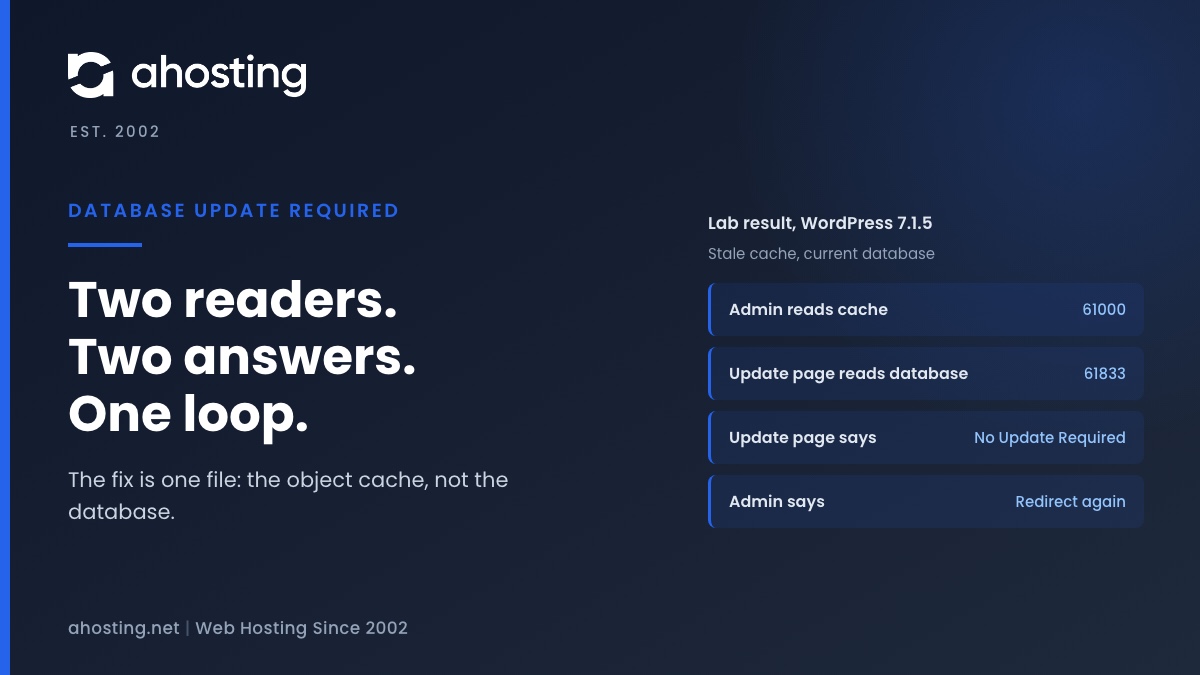
WordPress shows the Database Update Required screen when the db_version stored in the database differs from the one in the files. One click normally fixes it. If the screen returns, the cause in our WordPress 7.1.5 lab was a persistent object cache holding the old version: the admin read the cache, the update page read the database, and they never agreed. Renaming the object-cache.php file ended the loop. This was a lab result, not a customer server.
What WordPress Database Update Required Means
Database update required is a screen WordPress shows when the version number saved in your database is not the version your files expect. It reads Database Update Required, explains that WordPress has been updated, and offers one button, Update WordPress Database. Most of the time one click ends it. Sometimes it comes back, and that loop is what people search for.
We looked at the core code and ran WordPress 7.1.5 in a small lab to see which pages appear, who can reach them, and why a loop happens. The lab was not an AHosting server and it used a SQLite stand-in for MySQL, so we report what the code does, not how fast our databases are.
Why the Message Appears
Every WordPress release carries a number called $wp_db_version, 61833 in 7.1.5. Your database stores its own copy as the db_version option. At the top of every admin page, wp-admin/admin.php compares the two. If they differ, the request is not an AJAX call and carries no POST data, a single-site install is redirected to wp-admin/upgrade.php, with the page you wanted saved in the address.
We set db_version to 61000 in the lab and tried a series of addresses. Every admin page redirected, including the dashboard and the new post screen. The front page, wp-login.php, the REST API and wp-cron.php did not, and neither did a POST sent to an admin page. A heartbeat request returned an error rather than a redirect.
Why Database Update Required Shows Before Login
The redirect fires before the login check. In the lab a logged-out visitor who opened /wp-admin/ landed on the update screen, not the login form. The file upgrade.php contains no capability check, and a logged-out request to its step 1 address ran the update and moved the stored version to 61833. That is why the message sometimes appears to people who are not logged in. The exposure ends once the update has run.
The version test is not a less-than test. It is a not-equal test. When we set the stored version to 99999, newer than the files, the same screen appeared. Step 1 then wrote 61833 back over it. A database restored from a newer copy of the site, under older files, shows the screen for that reason.

AHosting Update Screen Decoder: What Each Page Tells You
Three different pages come from upgrade.php, and each one says something about your site. The table is our AHosting Update Screen Decoder, built from four runs of the lab.
| Page you see | What the code just did | What it means | Next step |
|---|---|---|---|
| Database Update Required | Read the stored version, found it different from the files | A real update is pending, or a cache is stale | Back up, click once |
| Update Complete | Ran the upgrade and wrote the new version | The update succeeded | Load wp-admin and confirm it opens |
| No Update Required | Read the database, found the versions equal | The database is current. If wp-admin still sends you here, the admin is reading a stale cache | Flush or disable the object cache |
| Redirect straight back to the update page | The admin read an old value | The loop | See the next section |
The upgrade itself is ordered so that a half-finished run does not claim success. In wp_upgrade() the version is written by the last two statements, db_version and then a db_upgraded flag. The first admin load afterward sees the flag, flushes rewrite rules and clears it, which is why you see the dashboard normally the second time.
Fixing The Message Loop
The loop we reproduced needs a persistent object cache, a cache that survives between page loads. The admin reads db_version through it. The update page does not, because it defines WP_INSTALLING as true, and get_option() in 7.1.5 uses the cache only when WordPress is not installing. That branch is at line 163 of option.php.
So the update page reads the database, finds 61833, and says No Update Required. The admin reads the cache, finds 61000, and redirects again. In our lab a click on the button changed nothing. The loop continued for as many reloads as we tried, while the front page stayed fine.
How to Fix a Database Update Required Loop Step by Step
- Look in
wp-contentfor a file namedobject-cache.php. If it is there, a persistent cache is active. - Rename it to
object-cache.php.bak. The Object Cache Pro debugging guide describes deleting that drop-in by hand as the way to bypass the cache. - Reload
/wp-admin/. In our lab the dashboard opened at once. - Rename the file back, then flush the cache from your cache plugin or with
wp cache flush. The same guide warns that data changed while the cache was off will not invalidate it, so the flush matters.
Why did the cache not clear itself? wp_upgrade() calls wp_cache_flush() before and after the upgrade, at lines 675 and 682. The wp_cache_flush reference lists wp_upgrade() among its callers. Our lab cache was a deliberately faulty file we wrote, whose flush did nothing. A real cache whose flush never reaches the store WordPress reads would behave the same way, and that part is inference, not something we measured. Per the Object Cache Pro flushing documentation, a default flush there runs FLUSHDB, and Redis shared between sites is a separate hazard.
Update Screen Reader
See what a shared hosting plan includesSome guides suggest editing $wp_db_version in wp-includes/version.php to match the database. We would not. The file is overwritten at the next update, and it tells WordPress something untrue about your database. Fix the cache instead.
Run Database Update Required From WP-CLI
You can skip the browser entirely. The WP-CLI documentation for wp core update-db describes the command as running the WordPress database update procedure, with a --dry-run flag that compares versions without making changes and a --network flag for multisite.
Run the dry run first, then the real command, then open wp-admin. We did not have WP-CLI in the lab, so we have no run of our own to show. If a stale cache is the cause, the command is no shortcut, because the admin screen still reads the cache afterward. On multisite, core runs this itself: admin.php requests step 1 of the update page for you, a behavior in the same file as the redirect.
When It Means a You Need A Bigger Plan
A version mismatch is not a capacity problem, so no plan change will clear it. Fix the cache or the stored version first. If an interrupted core update left the site in maintenance mode too, our guide to the briefly unavailable message covers that lock, and our notes on a persistent object cache explain what a drop-in does. A redirect that never ends in the browser is a different problem, covered in the redirect loop guide.
Large updates on a busy site are the one place a plan matters. Our WordPress hosting plans give a WordPress site its own allocation, and a VPS suits a site whose tables are large enough that a release update strains a shared limit. For most sites the screen is a minute of work.
After a release such as the one in our WordPress 7.1.3 security release notes, expect to see the screen once on the first admin visit.
Frequently Asked Questions: Database Update Required
Is the WordPress database update required message safe to click through in 2026?
Typically yes. The screen appears because the version number stored in your database differs from the one in the WordPress files, and the button runs the same upgrade routine that core runs after every release. Take a backup first if the site holds orders or members. If the page returns after you click, stop clicking and read the loop section above.
What does the database update required screen actually change in WordPress?
Specifically, it runs wp_upgrade, which checks the MySQL version, flushes the object cache, rebuilds the table structure, runs every upgrade step newer than your stored version, and only then writes the new db_version and a db_upgraded flag. Your posts and pages are not rewritten. The steps touch options, tables and settings that a release changed.
Why does the database update required screen keep coming back after I click Update?
In practice the usual cause is a persistent object cache that still holds the old db_version. The admin reads the version through the cache, while the update page reads the database directly, so the two disagree forever. In our lab, renaming wp-content/object-cache.php ended the loop on the next reload.
Does an AHosting account need a manual database update required step after a core update?
Overall, no extra step is specific to hosting. This screen is core WordPress behavior, so the same rules apply on an AHosting account as anywhere else. When a release changes the database, the first admin visit shows the screen, one click runs it, and the next admin load clears the db_upgraded flag.
How do I fix database update required in WordPress with WP-CLI instead of a browser in 2026?
Typically you run wp core update-db from the site folder. The WP-CLI documentation lists a –dry-run flag that compares database versions without changing anything, and a –network flag for multisite. Run the dry run first, then the real command, then load wp-admin to confirm the screen is gone.
Database update required vs No Update Required: which page means the update worked?
Notably, neither page proves it alone. Update Complete is the page that follows a successful click. No Update Required means the update page read the database and found the versions equal, so if wp-admin still redirects to it, the admin is reading a stale cached value, not the database.
Is a stale object cache vs a failed database write the cause of a database update required loop?
In practice a stale cache is far more common, and it is the one we reproduced. A failed write would also keep the old version, because update_option for db_version is the last statement of the upgrade. We did not test a database user without write privileges, so treat that second cause as source reading, not measurement.
Can visitors who are not logged in see the database update required page on my AHosting site?
Indeed, in our lab a logged-out request to wp-admin was redirected to the update screen, and a logged-out request to the step 1 address ran the update. The file has no login check. Visitors reading your pages, and requests to wp-login.php, wp-json and wp-cron.php, were not redirected. The exposure is brief and fixed by running the update once.
How long does the database update required step take, and can it break a large site in 2026?
However long it takes depends on what the release changes and how large your tables are, and we have no timing for an AHosting database to quote. The page itself says the process may take a little while. Take a backup, click once, and wait for Update Complete before you reload.
Should my AHosting plan change because of a database update required loop?
Overall, no. A loop is a version mismatch, not a capacity problem, so a bigger plan will not clear it. Fix the cache or the stored version first. Only if a large update repeatedly times out on a busy site is a plan with more room worth considering.
Related posts:
 Error Establishing a Database Connection in WordPress: Read the Real Cause (2026)
 PHP Security Update: 8.5.12, 8.4.27, 8.3.36 and 8.2.35 for WordPress
 WordPress Hosting for Online Courses: LMS Requirements & Setup Guide 2026
 Maximum Execution Time of 30 Seconds Exceeded in WordPress: What the Number Tells You (2026)