- What Refused to Display in a Frame Means in WordPress
- Refused to Display in a Frame: Which Side Is Saying No?
- What WordPress Sends, and on Which Pages
- How Chrome 158 Decided in Our Refused to Display in a Frame Lab
- Why www, a Subdomain or http Still Counts as Another Site
- How to Allow One Named Site to Frame WordPress Pages
- When the Header Does Not Come From WordPress
- Refused to Display in a Frame: Fix Checklist
- Frequently Asked Questions: Refused to Display in a Frame
- What does refused to display in a frame mean, and what are the X-Frame-Options values in 2026?
- Refused to display in a frame: X-Frame-Options vs frame-ancestors, which one wins in Chrome?
- Why does refused to display in a frame appear on my WordPress login page in 2026?
- Why is refused to display in a frame still showing after I removed X-Frame-Options from WordPress?
- Does SAMEORIGIN treat www vs the bare domain as the same site in 2026?
- Which WordPress hooks send the headers behind refused to display in a frame, and at what priority?
- Does AHosting send X-Frame-Options on its own pages, and what did we measure in 2026?
- How do I allow one partner site past refused to display in a frame on an AHosting WordPress plan?
- How can I check which headers my AHosting site returns before embedding it in 2026?
- Is the X-Frame-Options header deprecated, and do browsers still support ALLOW-FROM?
Refused to display in a frame means a browser would not draw a page inside an iframe because that page’s response said no. The message prints in the console of the embedding page, and the blocked site logs nothing. WordPress core sends X-Frame-Options SAMEORIGIN plus a frame-ancestors policy on wp-login.php and wp-admin only. In our Chrome 158 lab, removing just the old header left the login page blocked, while a frame-ancestors header naming one site loaded it.
What Refused to Display in a Frame Means in WordPress
Refused to display in a frame means a browser fetched a page for an iframe and then declined to draw it, because the response carried a header forbidding that embedding. The full Chrome line reads Refused to display ‘URL’ in a frame because it set ‘X-Frame-Options’ to ‘sameorigin’. Nothing is broken on the server. The page loaded, and the browser obeyed the page’s own instruction.
Two headers can carry that instruction. X-Frame-Options is the older one and takes DENY or SAMEORIGIN. The Content-Security-Policy frame-ancestors directive is the newer one and can name the sites allowed to embed the page. MDN’s X-Frame-Options reference calls the ALLOW-FROM value obsolete and points to frame-ancestors instead. Both exist to stop clickjacking, where an attacker frames your login page invisibly under their own page.
Where the Message Prints
The line appears in the DevTools console of the embedding page, not on the site that said no. If you own site A and embed site B, you see the error on A while B logs nothing. That is why a search of your server logs finds nothing: the request ended in a 200. The fix belongs to whoever controls the headers of B, which is you only when you run both.

Refused to Display in a Frame: Which Side Is Saying No?
Read the headers of the framed page, not the embedding page. From a terminal, swap in the framed URL:
curl -sI https://example.com/page/ | grep -i -E "x-frame-options|content-security-policy"Read them from a 200 response. Our own curl of a wp-login.php URL answered 403 on 2026-11-24, so we did not treat its headers as the login page’s. Reading the log behind a 403 explains why an error page cannot vouch for the real one. If you would rather not use a terminal, securityheaders.com analyzes the response headers of a public URL.
Then check for frame-ancestors first. When the response contains that policy, the browser ignores X-Frame-Options. The Chromium source for the check, ancestor_throttle.cc, returns early in that case (lines 263 to 267).
A similar error comes from the other direction. A frame-src directive on the embedding page limits which sites that page may load into frames, while frame-ancestors on the framed page limits who may embed it. It is also not CORS. Fonts and fetch calls fail on Access-Control-Allow-Origin, covered in Blocked by CORS Policy in WordPress, and a frame has its own pair of headers. A store that embeds a booking or support page from another site meets the same rule, and the framed page’s owner decides, even when the store sits on a WooCommerce hosting plan.
What WordPress Sends, and on Which Pages
Core has one function for this. send_frame_options_header() in wp-includes/functions.php sends X-Frame-Options: SAMEORIGIN and Content-Security-Policy: frame-ancestors ‘self’ together, at lines 7282 to 7287 in WordPress 7.1.5, and only if headers have not been sent yet. Core hooks it to admin_init (wp-admin/includes/admin-filters.php, line 47) and login_init (wp-includes/default-filters.php, line 398), both at priority 10. The Customizer adds its own filter for the preview in class-wp-customize-manager.php (lines 1970 to 1980) that sets the same pair.
We probed a real WordPress 7.1.5 install on PHP 8.5.10 with curl and a logged-in cookie.
| URL | X-Frame-Options | frame-ancestors policy | Who WordPress lets frame it |
|---|---|---|---|
| Home page and single post | none | none | Not restricted by WordPress |
| REST root and embed URL | none | none | Not restricted by WordPress |
| admin-ajax.php | none | none | Not restricted by WordPress |
| wp-login.php | SAMEORIGIN | ‘self’ | Same origin only |
| wp-admin (logged in) | SAMEORIGIN | ‘self’ | Same origin only |
So the front end is not WordPress’s doing. When a public page refuses to be framed, the header comes from the server, a security plugin or a CDN. A curl on 2026-11-24 showed www.ahosting.net answering its home page and its blog with X-Frame-Options SAMEORIGIN and a policy ending in frame-ancestors ‘self’, although core sends nothing on those pages.
How Chrome 158 Decided in Our Refused to Display in a Frame Lab
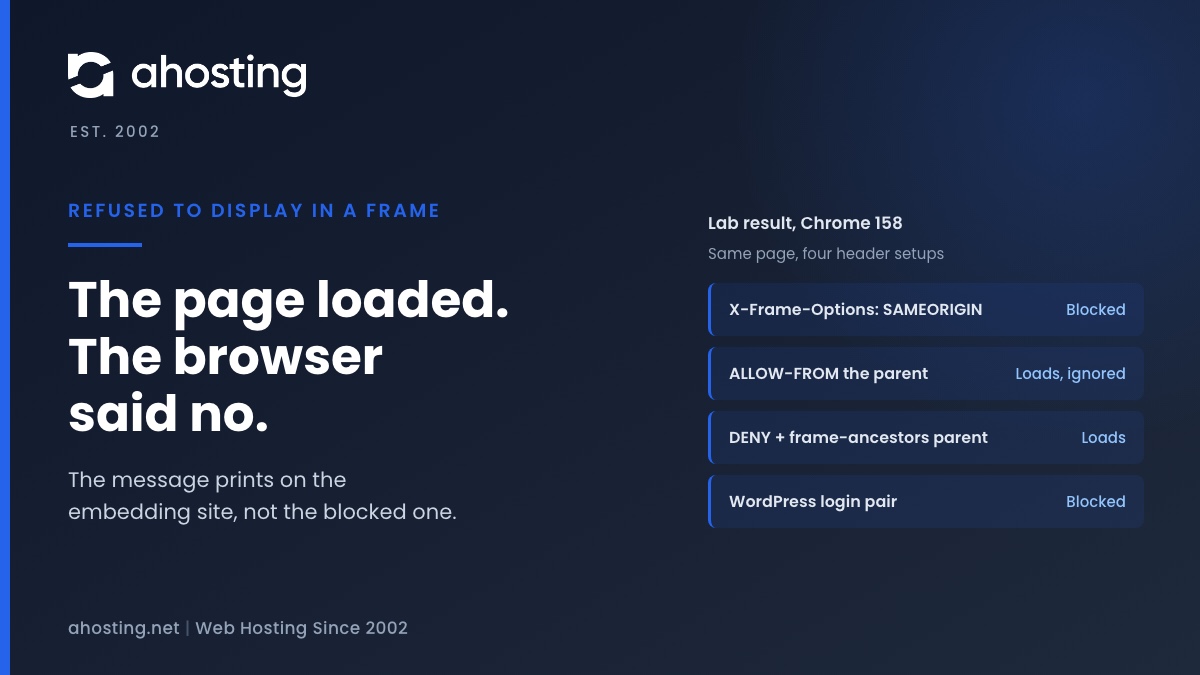
We framed one page from a different origin eleven ways in headless Chrome 158 (nginx 1.31.6, one machine). Five setups loaded and six were blocked.
| Headers on the framed page | Result | Console line in the embedding page |
|---|---|---|
| No frame headers | Loads | none |
| X-Frame-Options: DENY | Blocked | Refused to display … ‘deny’ |
| X-Frame-Options: SAMEORIGIN | Blocked | Refused to display … ‘sameorigin’ |
| X-Frame-Options: ALLOW-FROM the parent | Loads | Invalid header … not a recognized directive. The header will be ignored |
| X-Frame-Options: ALLOWALL | Loads | none |
| frame-ancestors ‘self’ | Blocked | Framing … violates the following Content Security Policy directive |
| frame-ancestors naming the parent | Loads | none |
| DENY plus frame-ancestors naming the parent | Loads | none |
| WordPress pair: SAMEORIGIN plus frame-ancestors self | Blocked | Framing … violates … frame-ancestors (CSP wording only) |
| Two X-Frame-Options headers: SAMEORIGIN and ALLOWALL | Blocked | … multiple ‘X-Frame-Options’ headers with conflicting values … Falling back to ‘deny’ |
| WordPress pair plus a second policy naming the parent | Blocked | Framing … violates … frame-ancestors (policies intersect) |
- frame-ancestors beats X-Frame-Options. A page sending DENY and naming the parent in frame-ancestors loaded.
- ALLOW-FROM does nothing. The page loaded and the console said the directive is not recognized, which matches MDN.
- Duplicate headers fall back to deny. The conflict message is in the Chromium source at lines 202 to 204.
- Two policies intersect. A self-only policy plus one naming the parent still blocked.
- The WordPress pair prints the policy wording. On a stock login page Chrome 158 printed the Framing line, not the Refused to display line, so search for both.
Why www, a Subdomain or http Still Counts as Another Site
SAMEORIGIN and a self-only policy compare origins: scheme, host and port. In our lab the parent sat on sub.parent.localhost and the framed page on parent.localhost. All three header setups we tried were blocked, including a policy that named the parent host only. By the same rule www.example.com framing example.com is refused, and so is http framing https. The Chromium source checks frame-ancestors against every parent (line 368), so in nested frames one disallowed ancestor stops the load.
It also explains the Customizer. By the header’s own rule the preview works only when wp-admin and the front end share one origin, because core sets the same SAMEORIGIN pair for it.
How to Allow One Named Site to Frame WordPress Pages
Allow the one site you trust and nothing else. X-Frame-Options can no longer name a site, so the allowlist lives in frame-ancestors, and the old header has to go so the two never disagree.
Removing only X-Frame-Options does not work. In our lab, with that header gone and core’s policy still in place, Chrome kept blocking the login page. Removing core’s hooks needs care too. The login hook is registered before init, but the admin hook is registered later, so a remove_action at init cleared wp-login.php and left wp-admin with both headers. The reliable pattern replaces the headers after core has sent them, at priority 11:
<?php
/* wp-content/mu-plugins/allow-one-frame-parent.php */
$allow_one_parent = function () {
    header_remove( 'X-Frame-Options' );
    header( "Content-Security-Policy: frame-ancestors 'self' https://partner.example" );
};
add_action( 'login_init', $allow_one_parent, 11 );
add_action( 'admin_init', $allow_one_parent, 11 );
In the lab, Chrome loaded the login page inside a parent on a different origin named in the policy, and wp-admin carried the same single header. Replace https://partner.example with the exact scheme and host of the embedding site, never a wildcard. A login form that any page may frame is a clickjacking target. If only wp-login.php must be framed, register the closure on login_init alone and keep the dashboard locked. The header() call only works before output starts, so if it fails see Headers Already Sent in WordPress.
Use the decoder to turn the console line you see into the next step.
AHosting Frame Error Decoder
See WordPress hosting plansWhen the Header Does Not Come From WordPress
If a front-end page refuses to be framed, core is not the sender. Check the server configuration or .htaccess, a security plugin’s header setting and any CDN rule, and change the header where it is set. A PHP snippet cannot remove a header a CDN adds after PHP has finished. MDN shows the Apache and nginx lines for X-Frame-Options. We did not test Apache or LiteSpeed here, so confirm with curl after any change. For the wider picture of what the server layer does, read WordPress Hosting Security 2026.
Two things never work. A meta http-equiv tag for X-Frame-Options has no effect, and frame-ancestors is not supported in a meta element either, both per MDN. A static page or another app on the same account follows the same rule, so a site on a web hosting plan needs the header set in its own server configuration.
Refused to Display in a Frame: Fix Checklist
- Copy the exact console line from the embedding page.
- Run curl -sI on the framed URL and read X-Frame-Options and Content-Security-Policy from a 200 response.
- If a frame-ancestors policy is present, ignore X-Frame-Options and read the list.
- Compare origins exactly: scheme, host and port.
- Change the header where it is set. For the WordPress login and admin, replace both headers at priority 11.
- Reload the embedding page and run the curl again to confirm.
Frequently Asked Questions: Refused to Display in a Frame
What does refused to display in a frame mean, and what are the X-Frame-Options values in 2026?
Specifically, it means the browser loaded a page for an iframe and then declined to draw it because that page sent a header forbidding the embedding. X-Frame-Options accepts DENY, which blocks every parent, and SAMEORIGIN, which allows only the same origin. ALLOW-FROM is obsolete and modern browsers ignore it. The message prints in the console of the embedding page, and the blocked site logs nothing, as the decision table above shows.
Refused to display in a frame: X-Frame-Options vs frame-ancestors, which one wins in Chrome?
In practice, frame-ancestors wins. In our Chrome 158 lab a page that sent X-Frame-Options DENY together with a frame-ancestors list naming the parent loaded normally, because the browser ignores the older header once a frame-ancestors policy is present. The Chromium source returns early for that case. Send one header, not both.
Why does refused to display in a frame appear on my WordPress login page in 2026?
Typically because WordPress core sends X-Frame-Options SAMEORIGIN and a frame-ancestors policy limited to the site itself on wp-login.php and on wp-admin. In WordPress 7.1.5 both come from one function that runs on the login and admin hooks. Any page on another origin that frames the login form is refused, which is the clickjacking protection working as designed.
Why is refused to display in a frame still showing after I removed X-Frame-Options from WordPress?
Indeed, removing only that header changes nothing in Chrome. WordPress sends a frame-ancestors policy from the same function, and in our lab the login page stayed blocked with only that policy left. Replace both headers, or remove the core hooks at the right moment, as the section on allowing one named site shows.
Does SAMEORIGIN treat www vs the bare domain as the same site in 2026?
Specifically, no. Origin means scheme, host and port, so www.example.com, example.com and a subdomain are three different origins. In our lab a page on a subdomain was refused when it framed its parent, under both SAMEORIGIN and a self-only frame-ancestors policy. The same applies to http against https.
Which WordPress hooks send the headers behind refused to display in a frame, and at what priority?
Specifically, core runs send_frame_options_header on admin_init and on login_init, both at priority 10 in WordPress 7.1.5. The Customizer adds its own filter that sets the same pair for the preview. Core sends nothing on front-end pages, so a public page that refuses to be framed is getting its header from the server, a plugin or a CDN.
Does AHosting send X-Frame-Options on its own pages, and what did we measure in 2026?
Overall, yes. A curl check on 2026-11-24 showed the AHosting home page and the blog home both answering with X-Frame-Options SAMEORIGIN and a content security policy ending in a frame-ancestors rule for the site itself. WordPress core sends nothing on those pages, so the headers are set outside core. Other sites cannot frame those pages.
How do I allow one partner site past refused to display in a frame on an AHosting WordPress plan?
In practice, replace both headers on the login and admin hooks with one frame-ancestors policy that names the partner origin, using a small must-use plugin. That changes only what WordPress sends. A header added by the server or the CDN is a separate layer and has to be changed where it is set. Test with curl after the change.
How can I check which headers my AHosting site returns before embedding it in 2026?
Fortunately, one curl command shows them. Run curl with the head option against the exact URL you plan to frame, then look at X-Frame-Options and Content-Security-Policy on a 200 response, not on an error page. The browser console of the embedding page then confirms which rule fired.
Is the X-Frame-Options header deprecated, and do browsers still support ALLOW-FROM?
In fact, DENY and SAMEORIGIN still work, but frame-ancestors is the replacement and ALLOW-FROM is obsolete. In our Chrome 158 lab a page sending ALLOW-FROM with the parent origin loaded, and the console said the value is not a recognized directive and the header would be ignored. To allow one named site, use frame-ancestors.