- Failed to Open Stream in WordPress: Read the Message Before You Touch a File
- What a Failed to Open Stream Message Contains
- Include or Require: Why the Same Failed to Open Stream Can Stop Your Site
- Failed to Open Stream: No Such File or Directory
- Failed to Open Stream: Permission Denied
- Failed to Open Stream: HTTP Request Failed
- When open_basedir Turns a Failed to Open Stream into a Fatal Error
- Why a Failed to Open Stream Message Can Be Invisible
- What a Failed to Open Stream Looks Like Under Each Debug Setting
- The Failed to Open Stream Decoder Table
- Try the Failed to Open Stream Finder
- What AHosting Can Do About a Failed to Open Stream Error
- Frequently Asked Questions: Failed to Open Stream
- What does the failed to open stream error mean in WordPress in 2026?
- Why is my WordPress site not opening after a failed to open stream message?
- How do I fix failed to open stream: no such file or directory in WordPress 2026?
- How do I fix failed to open stream: permission denied on AHosting shared hosting?
- Is a failed to open stream warning vs a Failed opening required fatal error a different problem?
- Does failed to open stream: HTTP request failed mean my WordPress site is hacked in 2026?
- Can WP_DEBUG_LOG vs display errors show me a failed to open stream message safely?
- Will AHosting support look at a failed to open stream error on my WordPress site?
- Why does a failed to open stream error appear after I move my WordPress site to AHosting in 2026?
- Should I set a folder to 777 to stop a failed to open stream permission denied error?
A failed to open stream message in WordPress is PHP reporting that it could not open a file or a web address. The words after the colon name the cause: no such file or directory, permission denied, HTTP request failed, or an open_basedir block. Read those words and the path before them, then fix that one thing. In a WordPress 7.1.3 lab, a missing include was only a warning, a missing required file was a fatal error, and with display switched off a visitor saw either nothing or a blank page.
Failed to Open Stream in WordPress: Read the Message Before You Touch a File
A failed to open stream warning looks like a wall of server paths, and most guides answer it with the same checklist: reinstall WordPress, reset permissions, disable every plugin. That order wastes time, because the message already says what failed. It names the file PHP wanted, gives a reason in plain words, and points at the plugin or theme file that asked for it.
We checked this on 2026-10-27 in a WordPress 7.1.3 lab running PHP 8.5.10, with a small test plugin that included, required and fetched things that were missing, locked or blocked. Every cause printed a different reason after the colon, and every reason had a different fix. A missing include was a warning and the page kept loading. A missing required file was a fatal error. With display switched off the same fault produced a blank page, or nothing at all.
This guide shows how to read the message, what each reason means, and why you sometimes never see it. It ends with a decoder table and a short finder. If your message ends differently from the ones covered here, the structure still applies, so start with the reason.

What a Failed to Open Stream Message Contains
A stream is PHP’s word for anything it can read from or write to: a file on disk, or a web address opened with a function such as file_get_contents. When the open call fails, PHP raises a warning with the same sentence every time. Our lab printed Failed to open stream with a capital F, while search results show both spellings, so search for either.
The message has four parts, and only the third names the cause. The function and the target come first, for example include( followed by a path. Next is the fixed phrase. Third is the reason, which comes from the operating system or from the URL handler. Last is the file and line that made the call, which tells you which plugin or theme to blame. Figure 1 splits one message into those parts.
One more line often follows. For an include, PHP adds a second warning, Failed opening followed by the path and the words “for inclusion”. It carries no new information, so you can ignore it. What changes the outcome is the function in part one, which the next section covers.
Include or Require: Why the Same Failed to Open Stream Can Stop Your Site
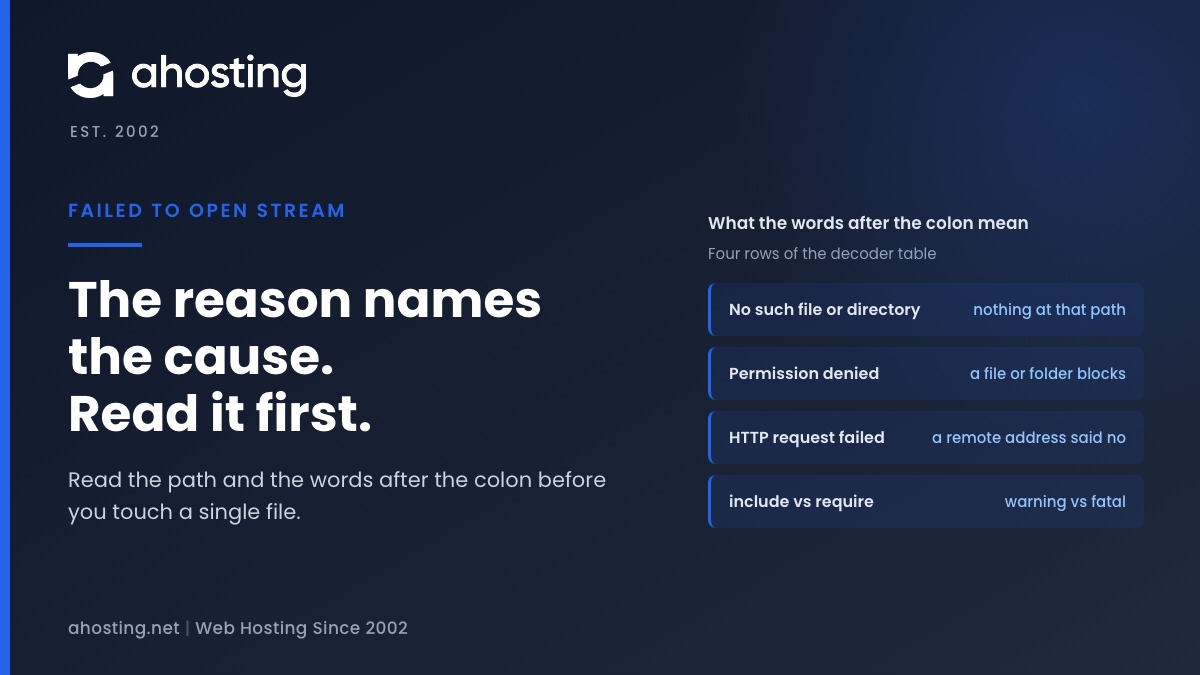
The PHP manual page for include explains that include raises a warning when it cannot find a file and carries on, while require treats the same fault as fatal. We saw exactly that. With the file nope.php missing, an include returned HTTP 200 with two warnings above the page content. A require on the same missing file returned HTTP 500 with the warning, an uncaught fatal error reading Failed opening required, and WordPress’s own critical error notice.
That difference explains most “my site is down” reports. A theme that includes an optional template part fails softly, and the owner sees a stray line of text. A plugin that requires its main class file fails hard, and the whole request ends. The word at the start of the message tells you which one you have before you open a single file.
Core files are the harshest case. We removed wp-includes/class-wp-hook.php from the lab install and switched display off. The result was an HTTP 500 with an empty body, zero bytes, and a fatal error in the log pointing at wp-includes/plugin.php line 25. A visitor sees a blank screen. Our guide to the WordPress white screen of death covers the wider list of causes behind that screen.
Failed to Open Stream: No Such File or Directory
This reason is the most common, and it is a literal statement: nothing exists at that path. The open system call documentation defines the error as a component of the path that must exist but does not. PHP prints the operating system’s own words.
Four situations produce it. A plugin or theme folder was deleted or only partly uploaded, so a file it includes is gone. Or a core update was interrupted, so a file under wp-includes is missing. After a move, a plugin may have stored an absolute path that names the old account, such as a home folder that no longer exists. Finally, a path may have the wrong case, which matters on Linux servers even though a laptop may forgive it.
One result in the lab surprised us. We listed a plugin as active in the database and deleted its folder. WordPress threw no error at all and left the database entry in place on a front-end load. The reason is in wp-includes/load.php at line 1031: it adds a plugin to the load list only when file_exists() is true for the main file. So a missing main plugin file is skipped silently, and the message you see comes from a file the plugin includes later, not from the plugin itself.
The fix follows the path. Confirm in File Manager or by SFTP that the exact path exists. Reinstall the plugin or theme if its folder is incomplete. Upload a fresh copy of the same WordPress version if a core file is missing. If an old absolute path is the cause, search the files for the old account name and replace it. Our guide to migrating WordPress to a new host covers moves that go wrong.
Failed to Open Stream: Permission Denied
Here the file exists, but the account PHP runs as may not open it. The NetBSD documentation for open lists two triggers: the permissions on the file itself deny the requested access, or search permission is denied on a folder in the path. The second one is easy to miss, because the file can look perfect while a folder above it blocks the way.
We reproduced both in the lab. An included file set to mode 000 printed Failed to open stream: Permission denied. A path inside a folder set to mode 000 printed the same words, before PHP could even tell whether the file was there. So when you check permissions, check every folder from the site root down to the file, not only the file.
On our shared servers PHP runs as your own cPanel account, so a correctly owned install is readable by the code that needs it. On sh193 we counted 530 document roots on 2026-10-01 and found exactly two files not owned by their account, both uploaded by hand as root. That count is one server and one day, but it points the right way: the usual cause is an odd owner or a stripped mode on one file or folder, not a general fault.
Look at the owner and the mode of the named file and of each folder above it. If a file belongs to another user, ownership has to change, and that is a ticket rather than a setting. Do not widen permissions for everyone to make the message go away. If the same warning appears while WordPress is installing something, our guide to the could not create directory error covers the write side, and WordPress asking for FTP credentials covers ownership mismatches.
Failed to Open Stream: HTTP Request Failed
When the target in part one starts with https, no file on your disk is involved. A plugin asked a remote address for data, and the open call failed. The reason is then not an operating system message but the remote answer. In the lab, a request to a page that does not exist printed HTTP request failed! HTTP/1.1 404 Not Found. The status code after HTTP/1.1 is the remote server’s reply, so a 403 means it refused, and a 404 means the address is wrong.
Two other reasons belong here. If the server disables URL access, PHP prints a line saying the https wrapper is disabled by allow_url_fopen=0, followed by Failed to open stream: no suitable wrapper could be found. If the host name cannot be resolved, the reason is a php_network_getaddresses failure. We reproduced all three.
None of these is fixed by touching your own files. A 403 or 404 means the plugin is calling a broken or blocked address, so update the plugin or contact its author. If the wrapper is disabled, the plugin needs a setting that its host controls. A resolution failure points at DNS or at a network block on the server. Plugins that call remote services print this message whenever the service is down or has moved.
When open_basedir Turns a Failed to Open Stream into a Fatal Error
The open_basedir directive limits the folders PHP may open files from. When a path falls outside the list, PHP prints a line beginning open_basedir restriction in effect, then Failed to open stream: Operation not permitted. The first line names the path and lists the allowed folders, so the message gives you everything you need.
We tested two cases. Opening /etc/hosts from the test plugin with the limit set to the WordPress folder printed both lines and returned an ordinary warning. Then we set the limit to a plugin subfolder only, which excludes the site root. The request failed before WordPress loaded, with a fatal error reading Failed opening required for index.php, and the location printed as Unknown on line 0. In our test, that is what a base directory that excludes the site root looked like.
We did not measure what the limit is on an AHosting account, so we state nothing about our setting here. If your message contains the restriction line, the fix is to bring the path inside the allowed folders or to remove the code that reaches outside them. Where the directive is set depends on your host, so ask support for the value before changing anything.
Why a Failed to Open Stream Message Can Be Invisible
Many site owners never see the message at all, which is why the symptom is often just a blank page or a notice. The display depends on settings. In our lab, with debugging on and display on, the warnings were printed above the page. With WP_DEBUG off and PHP display off, the same include produced no visible output, and the warnings existed only in the PHP error log.
For a require, the visitor saw WordPress’s generic notice instead of the message. The fatal error handler in wp-includes/class-wp-fatal-error-handler.php chooses its wording at lines 188 to 200: “There has been a critical error on this website” in the plainest case, with longer wording that mentions the admin email on protected screens such as wp-admin. The path itself stays in the log.
To read it safely, follow the WordPress debugging guide: set WP_DEBUG and WP_DEBUG_LOG to true and WP_DEBUG_DISPLAY to false in wp-config.php. WordPress then writes the message to wp-content/debug.log and shows visitors nothing. We confirmed the log path in load.php at line 623. Reload the failing page, open the log and copy the newest failed to open stream line. Remove the constants when you are done, because the log can grow and expose paths.
What a Failed to Open Stream Looks Like Under Each Debug Setting
The table compares the same fault under two settings. If your problem is a different PHP complaint about output, our guide to headers already sent decodes that one in the same way.
| Setting | Missing include | Missing require | Missing core file |
|---|---|---|---|
| Debug and display on | HTTP 200, two warnings printed above the page | HTTP 500, warning and fatal error printed, then the critical error notice | Not tested |
| Debug off, display off, log on | HTTP 200, nothing visible, warnings in the log | HTTP 500, generic critical error notice, fatal error in the log | HTTP 500, empty page of 0 bytes, fatal error in the log |
The Failed to Open Stream Decoder Table
Use this table with the message in front of you. Match the words after the colon, then run the first check. The last column records what we actually saw in the lab, so you can compare your own output.
| Reason after the colon | What it means | First check | Lab result |
|---|---|---|---|
| No such file or directory | Nothing exists at that path | Does the exact path exist? Was the folder deleted or the site moved? | Include: warning, page loads. Require: fatal error |
| Permission denied | The file or a folder above it blocks this account | Owner and mode of the file and of every folder above it | Mode 000 on the file, and on a folder in the path, both printed it |
| HTTP request failed! HTTP/1.1 404 | A remote address answered with an error | Which address, and which plugin calls it? | Warning only, page loads |
| no suitable wrapper could be found | The server disables URL access (allow_url_fopen) | Which plugin needs remote access? | Printed after a line about the disabled https wrapper |
| php_network_getaddresses failed | The host name did not resolve | Spelling of the address, DNS from the server | Warning only, page loads |
| Operation not permitted | The path is outside open_basedir | The allowed folder list in the preceding line | Warning, or fatal error at “Unknown on line 0” if the site root is excluded |
Try the Failed to Open Stream Finder
Pick the words from your message and what the page does. The tool names the likely cause and jumps to the section that fixes it.
Find Your Failed to Open Stream Cause in Two Questions
What AHosting Can Do About a Failed to Open Stream Error
Once you have the reason, the fix is usually one file or one folder. The part you cannot see from a dashboard is who owns the file and which path the code actually tried to open. If the message names a file you did not create, or a permission fault you cannot clear, open a ticket with the full message, the time it appeared and the page that triggered it, and we will look at it with you.
The shared plans on our web hosting page include a cPanel File Manager where you can check owners and modes yourself. The WordPress hosting plans are the page to compare if you want the debugging and file work handled on a WordPress-focused account. If you manage several client sites and meet this after every migration, see the reseller hosting plans.
Frequently Asked Questions: Failed to Open Stream
What does the failed to open stream error mean in WordPress in 2026?
Specifically, it means PHP tried to open a file or a web address and the attempt failed. The words after the colon give the cause, such as no such file or directory, permission denied or HTTP request failed. WordPress only passes along what PHP reports.
Why is my WordPress site not opening after a failed to open stream message?
In practice, it depends on the function named at the start of the message. A failed include is a warning and the page keeps loading. A failed require is a fatal error, so the page stops and WordPress shows its critical error notice or, with display switched off, nothing at all.
How do I fix failed to open stream: no such file or directory in WordPress 2026?
In practice, read the path in the message and check whether that exact file exists on the server. If a plugin or theme folder was deleted, reinstall it. If a core file under wp-includes is missing, upload a fresh copy of the same WordPress version. A hardcoded path from an old host needs editing.
How do I fix failed to open stream: permission denied on AHosting shared hosting?
Typically, the file or one of its parent folders is owned by another user or has its permissions stripped. On our shared servers PHP runs as your own cPanel account, so check the owner and the mode of the file and of every folder above it in File Manager. If the owner is not your account, open a ticket.
Is a failed to open stream warning vs a Failed opening required fatal error a different problem?
Similarly, both begin with the same failed to open stream line, so the cause is the same kind of fault. The difference is the function. Include continues after the warning, while require stops the request with a fatal error. Fix the missing or unreadable file and both disappear.
Does failed to open stream: HTTP request failed mean my WordPress site is hacked in 2026?
In fact, that message does not by itself mean a hack. It means a plugin asked a remote address for data and the remote server answered with an error such as 403 or 404, or the connection never completed. It points at the remote address, not at your files. Check the status code after HTTP/1.1 in the message.
Can WP_DEBUG_LOG vs display errors show me a failed to open stream message safely?
Overall, logging is the safer choice. With WP_DEBUG_LOG on and WP_DEBUG_DISPLAY off, WordPress writes the message to wp-content/debug.log and shows nothing to visitors. Display on a live site prints server paths on the page, so use it only briefly and switch it off again.
Will AHosting support look at a failed to open stream error on my WordPress site?
Specifically, open a ticket and paste the complete message, including the path and the words after the colon, together with the time it appeared. Those words tell us whether the cause is a missing file, an ownership fault or a blocked address, so the first reply can be specific.
Why does a failed to open stream error appear after I move my WordPress site to AHosting in 2026?
Typically, a plugin or theme stored an absolute server path from the old host, such as a home folder with the old account name. The path no longer exists, so PHP reports no such file or directory. Search the files for the old path and replace it with the new one.
Should I set a folder to 777 to stop a failed to open stream permission denied error?
Ultimately, opening a folder to every user hides the symptom and leaves the real fault, which is usually ownership, in place. Find which file or folder the message names, confirm your own account owns it, and restore ordinary permissions rather than granting access to everyone.